

Whether you spend your time editing photos, grinding ranked matches, or just want a display that makes everything look sharper, ASUS has a monitor line for you. The challenge is that their catalog spans budget-friendly 1080p panels all the way up to flagship 4K OLED screens, which makes narrowing down your choice genuinely tricky.
We evaluated seven ASUS monitors across the gaming, professional, and everyday categories to help you cut through the noise. If you want a deeper look at high-refresh displays specifically, our roundup of the best 1440p 240Hz monitors covers that ground in detail. Here is what stands out in 2026.
Quick Comparison
| Model | Link | Rating | Screen Size | Resolution | Refresh Rate |
|---|---|---|---|---|---|
| 1 ASUS TUF Gaming VG27AQ3A 27" 1440p 180Hz IPS Monitor with... | Check price | 4.6 of 51,333 ratings | 27 inches | QHD Wide 1440p | 180 hertz |
| 2 ASUS ProArt PA278QV 27 Inch 1440p Professional Monitor,...Highest ratedMost reviewed | Check price | 4.6 of 53,078 ratings | 27 inches | QHD Wide 1440p | 75 hertz |
| 3 ASUS ROG XG27AQDMGR 27" 1440p 240Hz OLED Gaming Monitor... | Check price | 4.6 of 5146 ratings | 27 inches | QHD Wide 1440p | 240 hertz |
| 4 ASUS TUF Gaming VG249QE5A 23.8-Inch 1080p IPS Gaming... | Check price | 4.4 of 5131 ratings | 24 inches | FHD 1080p | 146 hertz |
| 5 ASUS ROG XG27ACS 27" 1440p 180Hz USB-C Gaming Monitor... | Check price | 4.4 of 51,089 ratings | 27 inches | QHD Ultra Wide 1440p | 180 hertz |
| 6 ASUS TUF Gaming VG27AQM5A 27" 1440p 300Hz IPS Gaming...Fastest refresh | Check price | 4.4 of 5285 ratings | 27 inches | QHD Wide 1440p | 300 hertz |
| 7 ASUS ROG PG27UCDM 27" 4K 240Hz QD-OLED Gaming Monitor... | Check price | 4.4 of 5216 ratings | 26.5 inches | 4K UHD 2160p | 240 hertz |
Ratings reflect the most recent data pull. Check each listing for current price and availability.
Quick answer
This guide compares 7 picks, with ASUS TUF Gaming VG27AQ3A 27" 1440p 180Hz IPS Monitor ranked first. ASUS ProArt PA278QV 27 Inch 1440p Professional Monitor holds the highest customer rating among them. ASUS TUF Gaming VG27AQM5A 27" 1440p 300Hz IPS Gaming leads this list on refresh rate.
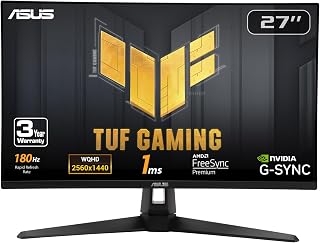
For gamers wanting a reliable everyday competitive setup, this pick pairs a 180Hz refresh rate with Fast IPS technology, giving smooth motion clarity without the color shift issues older panels suffer from. The matte finish cuts glare in bright rooms, and 1440p strikes a practical balance between sharpness and frame rates that most mid range GPUs can actually sustain at high settings.
Pros
- 180Hz QHD Fast IPS panel
- G-SYNC, FreeSync Premium, and ELMB Sync
- 130% sRGB coverage with HDR support
- Matte frameless design with GamePlus tools
Cons
- 2W speakers lack immersive sound
- Brightness may require manual adjustment
Among ASUS options, the TUF Gaming VG27AQ3A makes the clearest case for buyers whose priority is a responsive 1440p gaming screen rather than OLED-level contrast. Its 27-inch Fast IPS panel pairs QHD resolution with a 180Hz refresh rate and 1ms response time, a combination aimed at rapid shooters and racing games. G-SYNC compatibility, FreeSync Premium, and ELMB Sync provide several routes to reduce tearing and blur, so it can suit different GPU ecosystems. This is also a practical choice for a desk used beyond games. The panel covers 130% of sRGB and supports HDR, while its matte finish helps limit reflections. A 178-degree viewing angle, slim frameless styling, and GamePlus tools such as a frame-rate counter and crosshair overlay add useful flexibility. ASUS includes DisplayPort and HDMI cables, and the coverage includes a three-year warranty with accidental-damage protection. The built-in 2W speakers are not intended for immersive sound, and the brightness may need manual adjustment. Still, for an all-round ASUS gaming monitor focused on speed and QHD clarity, its specification set is well balanced.
Display: 27-inch Fast IPS, 2560 x 1440 (QHD), 16:9 aspect ratio, 178-degree viewing angles
Refresh Rate: 180Hz native. Supports G-SYNC compatible, FreeSync Premium, and AdaptiveSync with variable refresh rate
Response Time: 1ms (moving picture response time)
Color: 130% sRGB gamut, HDR-10 support, 856.5 lm brightness, 1000:1 contrast ratio
Connectivity: 2x HDMI 2.0, 1x DisplayPort 1.4, 3.5mm audio jack
Physical: 24.2" depth, 8.4" width, 17.9" height, 4.6 kg weight. VESA 100x100 mount compatible. Flat panel with matte screen finish
Features: Blue light filter, flicker-free technology, integrated 2W stereo speakers, frameless design, built-in GamePlus menu with FPS counter and crosshair overlay
Warranty: 3-year warranty with accidental damage replacement
Choose the VG27AQ3A if you want an ASUS monitor for 1440p PC gaming with a 180Hz refresh rate, adaptive-sync support, and a matte Fast IPS screen. It is especially sensible for players of shooters or racing games, as well as users who want strong sRGB coverage for creative tasks alongside games. Skip it if perfect OLED blacks and extremely high contrast are priorities or if you need convincing onboard audio. Buyers who prefer 4K resolution or 240Hz output should also look at ASUS's more specialized options.
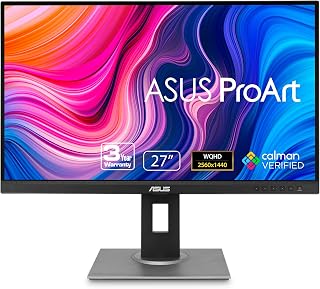
Creative professionals needing color accuracy over raw speed will find this monitor's 100,000,000:1 contrast ratio and QHD resolution well suited to detailed editing work. Its 75Hz refresh rate reflects a design built for precision rather than gaming, and the matte finish helps maintain consistent color judgment during long hours of design or photo work.
Pros
- Calman-verified Delta E < 2 color accuracy
- 100% sRGB and Rec. 709 coverage
- Fully ergonomic stand with portrait pivot
- Wide selection of video ports and USB hub
Cons
- 75Hz refresh rate limits gaming appeal
- Long-term color accuracy requires external calibration
The ASUS ProArt PA278QV earns its place in a best ASUS monitor roundup as the focused choice for color-sensitive creative work. Rather than chasing extreme refresh rates, it centers on a 27-inch 1440p IPS panel with factory-calibrated, Calman-verified Delta E < 2 accuracy and full sRGB and Rec. 709 coverage. That combination suits photo, video, design, and motion-graphics projects where dependable color presentation is the priority. Its matte screen helps limit glare, while the 178-degree viewing angle supports collaboration or checking work from different positions. The ergonomic stand provides height, tilt, swivel, and pivot adjustments, which is useful for long editing sessions and portrait-oriented tasks. ASUS Eye Care features, including flicker-free backlighting and a blue light filter, further support extended desktop use. Connectivity is unusually flexible, with DisplayPort, HDMI, Mini-DP, DVI-D, and a USB 3.2 hub. A 75Hz refresh rate is perfectly serviceable for creative applications but makes this a less natural fit for fast gaming. For a workstation that needs accurate 1440p color and adaptable ergonomics, though, it is one of ASUS's most purpose-built options.
Display Specifications: 27-inch IPS panel with 2560 x 1440 (QHD) resolution, 16:9 aspect ratio, 100,000,000:1 contrast ratio, 350 nits brightness, 178-degree viewing angles, and matte anti-glare finish.
Color Accuracy: Factory-calibrated with Delta E < 2, 100% sRGB gamut, 100% Rec. 709 gamut, Calman verified, includes color pre-calibration report.
Connectivity: DisplayPort, HDMI, Mini-DisplayPort, DVI-D, plus 4x USB 3.2 Gen 1 Type-A ports integrated hub for peripheral connections.
Design: Fully adjustable ergonomic stand supports height, tilt, pivot, and swivel adjustments. Dimensions 24.21 x 15.04 x 8.9 inches, weighs 17 pounds. VESA wall mount compatible.
Additional Features: Flicker-free technology, blue light filter, built-in speakers, FreeSync adaptive sync support. Power consumption 12.5 watts. 3-year standard warranty, extendable to 5 years with online registration.
Buy the ProArt PA278QV if your ASUS monitor needs to support photography, video editing, digital art, motion graphics, or other work where calibrated color matters more than gaming speed. It also suits users who value a matte 27-inch QHD screen, broad connectivity, and extensive stand adjustment. Skip it if competitive gaming is a major priority, since its 75Hz refresh rate is modest beside ASUS gaming displays. It is also less appropriate for buyers who do not need its color-focused feature set.

Anyone chasing best in class visuals for fast paced titles should look at this OLED option, where a 240Hz refresh rate meets a 1,500,000:1 contrast ratio for genuinely deep blacks and vivid highlights. The glossy finish enhances color punch and saturation, making it a strong match for players who prioritize picture quality alongside high speed responsiveness.
Pros
- 240Hz OLED panel with 0.03ms response time
- True blacks and 1,500,000:1 contrast ratio
- 99% DCI-P3 and DisplayHDR 400 True Black
- OLED Care Pro proximity sensor
Cons
- Glossy screen can show fingerprints
- Initial settings adjustment may be needed
Competitive play benefits most when a monitor can combine rapid updates with the deep contrast that brings darker game scenes into focus. That is the role the ROG XG27AQDMGR fills in an ASUS lineup. This 27-inch 1440p OLED uses a 240Hz refresh rate and a 0.03ms response time, targeting esports-style speed while retaining the image qualities that make cinematic games compelling. OLED is the central reason to choose it: the 1,500,000:1 contrast ratio supports true blacks, while 99% DCI-P3 coverage and VESA DisplayHDR 400 True Black compliance address color-rich HDR content. Its glossy surface is designed for a vivid, punchy look, though it needs more careful handling because fingerprints can show. Thin bezels and an aluminum stand give it a compact, sturdy presentation, and ASUS supplies standard cables and a microfiber cloth. The OLED Care Pro system includes a proximity sensor that shifts the display when you step away to help reduce burn-in risk. It also includes a three-year warranty with burn-in coverage. For an ASUS buyer seeking fast 1440p OLED gaming, this is the specialist pick.
Display and Resolution: 27-inch 1440p QHD (2560 x 1440) TrueBlack Glossy OLED with 16:9 aspect ratio, 240Hz refresh rate, and 0.23mm pixel pitch.
Performance Metrics: 0.03ms gray-to-gray response time, 1,500,000:1 contrast ratio, 1300 nits peak brightness, 178-degree viewing angles.
Color and HDR: 99% DCI-P3 color gamut, true 10-bit color depth, Delta E less than 2, VESA DisplayHDR 400 True Black compliance.
Connectivity: 1x DisplayPort, 1x HDMI, 2x USB ports, 1x audio output. Includes DisplayPort cable and HDMI cable.
Physical Specifications: 23.8 inches wide, 7.4 inches deep, 19.7 inches high, 14.6 pounds. Wall-mount compatible.
Power and Protection: 26.8 watts typical power consumption, ASUS OLED Care Pro with proximity sensor, flicker-free technology, TÜV Low Blue Light certification, 3-year warranty with burn-in coverage.
Buy the XG27AQDMGR if your ASUS monitor should prioritize 240Hz 1440p gameplay, a 0.03ms response time, and OLED contrast for both competitive and story-led games. It also suits creators who need 99% DCI-P3 color coverage and can make use of the included Adobe Creative Cloud subscription. Skip it if you want a matte screen, routinely prefer minimal screen maintenance, or need 4K resolution. Its glossy surface demands care to avoid fingerprints, so it does not suit buyers who want a less fussy finish.

Pros
- High refresh rate and low response time provide smooth, responsive gaming performance.
- IPS panel delivers strong color quality and wide viewing angles.
- ELMB Sync and adaptive sync features help minimize tearing and motion blur.
- Works well with gaming PCs and consoles, including setups using HDMI or DisplayPort.
- Sturdy base, simple setup, and a three-year warranty add practical value.
Cons
- Full HD resolution is less detailed than 1440p or 4K alternatives, especially on larger screens.
- The stand offers limited adjustability, and one reviewer noted some remaining wobble.
- Some users may find certain menu or volume controls difficult to adjust with specific devices.
The ASUS TUF Gaming VG249QE5A is a 23.8-inch Full HD monitor designed for PC and console gamers who prioritize speed and smooth motion. Its compact size, HDMI and DisplayPort connectivity, and built-in speakers also make it practical for everyday entertainment and work.
Its IPS panel combines a 146Hz overclocked refresh rate with a 1ms response time for responsive gameplay and clearer fast-moving scenes. ELMB Sync works alongside variable refresh rate technology to help reduce ghosting and tearing, while Shadow Boost improves visibility in darker areas.
Color performance is a strong point, with a 125% sRGB gamut and 178-degree viewing angles that help images remain vibrant from different positions. DisplayWidget Center simplifies setting adjustments, and flicker-free operation plus a blue light filter can make extended viewing more comfortable.
The flat matte design helps limit distracting reflections, and the included stand is sturdy and easy to set up. However, the stand has limited adjustment options, and a reviewer reported minor wobble, while some device combinations may make menu or volume controls less intuitive.
Overall, the VG249QE5A is a capable value-focused gaming monitor for players who want fast 1080p performance, vivid IPS color, and useful motion-enhancement features. It is best suited to buyers who prefer high refresh rate gaming over the added detail of a 1440p or 4K screen.

For setups built around laptops or docking stations, this monitor's USB-C connectivity simplifies cabling while still delivering 180Hz refresh and G-SYNC support for tear free gameplay. It suits readers who value a streamlined single cable workflow alongside HDR support, even though its 400:1 contrast ratio means it leans more toward convenience than deep blacks.
Pros
- 180Hz refresh rate with 1ms response time
- ELMB Sync and G-SYNC support
- Fast IPS panel with 133% color gamut
- Fully adjustable stand and USB-C hub
Cons
- USB-C lacks power for most laptop charging
- Matte coating can look slightly fuzzy on bright content
The ASUS ROG XG27ACS is the versatile gaming pick in this ASUS monitor lineup, pairing a sharp 27-inch 1440p screen with a fast 180Hz refresh rate. It targets the middle ground many players want: more visual detail than lower-resolution competitive displays, with substantially smoother motion than a conventional productivity monitor. Its 1ms response time, Fast IPS technology, and G-SYNC support reinforce that all-around gaming focus. ASUS ELMB Sync is a notable inclusion because it combines motion-blur reduction with variable refresh rate support, helping keep action clear while reducing tearing. A 400-nit brightness rating and 133% color gamut add to its appeal for games, everyday media, and creative tasks. The matte finish helps with reflections, although it can produce slight fuzziness on bright content. It is also practical beyond gameplay. The stand supports tilt, swivel, pivot, and height adjustment, while the USB-C hub simplifies desk connectivity. Buyers should note that the USB-C connection does not provide enough power to charge most laptops or devices. For someone who wants one ASUS display for fast 1440p gaming and general desktop work, this is the balanced choice.
Buy the ROG XG27ACS if you want one ASUS monitor for 1440p gaming, routine work, and occasional photo or video editing. Its 180Hz refresh rate, 1ms response time, Fast IPS panel, and adjustable stand make sense for players who want smooth performance without moving to a specialized 300Hz display. Skip it if you need USB-C to charge a laptop, dislike any softness on bright content from matte coatings, or want a display dedicated solely to color-critical professional work.
Display: 27-inch IPS LCD, 2560 x 1440 (1440p), 16:9 aspect ratio, 178-degree viewing angles
Refresh Rate & Response: 180Hz, 1ms response time (GTG), variable refresh rate support
Color & Brightness: 133% color gamut, 400 nits brightness, 400:1 contrast ratio, HDR support
Connectivity: 2x HDMI 2.0, 1x DisplayPort 1.4, 1x USB Type-C (with DisplayPort alt mode), 3x USB downstream ports, 3.5mm audio out
Physical: Dimensions 25.3"W x 15.5"H x 8.6"D, 14.6 lbs, fully adjustable stand (tilt, swivel, pivot, height), VESA 100x100 wall mount compatible
Features: ASUS Fast IPS, ELMB SYNC, G-SYNC compatible, blue light filter, flicker-free, eye care mode, DisplayWidget Center OSD control
Warranty: 3-year limited warranty with Advanced Replacement Service

Competitive players chasing the fastest possible response should consider this model, where a 300Hz refresh rate gives a real edge in fast reflex genres like shooters. The matte panel and 1440p resolution keep visuals clear without overtaxing a GPU, making it a fit for readers prioritizing raw speed over maximum contrast or color depth.
Pros
- 300Hz refresh rate and 0.3ms response time
- 1440p Fast IPS display
- ELMB Sync supports blur reduction and variable refresh
- Rigid stand and DisplayWidget Center controls
Cons
- Maximum refresh can need game-specific tuning
- Power button may take time to learn
The ASUS TUF Gaming VG27AQM5A is the speed-first selection for this ASUS monitor roundup. Its 27-inch 1440p panel reaches 300Hz and a 0.3ms response time, giving competitive players an option that preserves QHD image detail while prioritizing exceptionally rapid on-screen motion. That makes it particularly relevant for users who want a serious esports-oriented display without stepping down from 1440p. Fast IPS technology, G-SYNC support, and ELMB Sync form the core of its gaming feature set. ELMB Sync allows motion-blur reduction and variable refresh rate support to operate together, helping reduce both ghosting and tearing. Shadow Boost can brighten dark areas without crushing blacks or overexposing highlights, while the 95% DCI-P3 gamut gives the display a broader visual role for photo and video editing. The matte finish also helps control glare. ASUS backs those performance specifications with a rigid stand intended to limit desk vibration and DisplayWidget Center software for mouse-based menu adjustments. Some games may require tuning at the maximum refresh rate because flickering or artifacts can occur. Still, for competitive QHD gaming, this is the most specialized high-refresh ASUS option here.
Display: 27-inch Fast IPS panel, 2560x1440 (1440p QHD), 16:9 aspect ratio, 300Hz refresh rate, 0.3ms GTG response time (minimum)
Color: 95% DCI-P3 gamut, 1027.8 lm brightness, 1300:1 contrast ratio, 178-degree viewing angle, Blue Light Filter and Flicker-Free technology
Connectivity: DisplayPort, HDMI, USB, USB Type-C. Adaptive Sync compatible with FreeSync Premium and G-SYNC
Design: Flat matte finish, 100x100mm VESA mounting, adjustable stand with 8.4 inches depth, 24.2 inches width, 17.9 inches height, 10.1 pounds weight
Warranty: 3-year manufacturer warranty with Advanced Replacement Service. Includes DisplayPort cable, power adapter, quick start guide, and 3-month Adobe Creative Cloud subscription
Buy the TUF Gaming VG27AQM5A if competitive gaming is your main reason for choosing an ASUS monitor and you want 1440p clarity alongside a 300Hz refresh rate. It also fits players who value Fast IPS responsiveness, ELMB Sync, Shadow Boost, and a sturdy adjustable setup. Skip it if your games cannot take advantage of very high frame rates, if you want the simplest possible setup at maximum refresh, or if color-critical work is more important than gaming speed and motion handling.

Readers wanting the sharpest possible image without sacrificing speed will appreciate this 4K QD-OLED panel, combining a 1500000:1 contrast ratio with 240Hz refresh for crisp detail and fluid motion together. Its matte coating tames reflections during long sessions, making it suited to those who want flagship resolution and OLED depth in one gaming display.
Pros
- 4K QD-OLED panel at 240Hz
- 0.03ms response time and perfect blacks
- USB-C with up to 90W power delivery
- DisplayPort 2.1a and built-in KVM switch
Cons
- Triangular subpixel layout can affect Windows text sharpness
- Some reviews report hardware failures
The PG27UCDM is the ASUS choice for someone who wants a single 27-inch display to serve demanding 4K gaming and a more complex creative or multi-device desk. Its fourth-generation QD-OLED panel combines 4K resolution with a 240Hz refresh rate and 0.03ms response time. That places visual detail and rapid motion on equal footing, while the 1,500,000:1 contrast ratio, perfect blacks, 99% DCI-P3 coverage, and Delta E under 2 give it credentials for color-focused photo and video work. Connectivity and desk management are unusually important here. DisplayPort 2.1a provides full uncompressed bandwidth, USB-C delivers up to 90W for a laptop, and the KVM switch lets one keyboard and mouse control two PCs and consoles. The adjustable stand and matte screen further suit a work-and-play setup. OLED Care Pro and the Neo Proximity Sensor turn the panel black when you step away to help reduce burn-in risk; OLED Anti-Flicker 2.0 is stated to cut flicker by 20% compared with earlier generations. Text can look slightly less sharp in Windows due to the triangular subpixel layout, and some reviews report hardware failures. Even so, this is the most capable ASUS option here for 4K 240Hz OLED use.
Display Specifications
Panel Type: 26.5-inch 4K QD-OLED (3840 x 2160) | Refresh Rate: 240Hz | Response Time: 0.03ms | Contrast Ratio: 1,500,000:1 | Brightness: 1541.7 lm | Viewing Angle: 178 degrees | Pixel Pitch: 0.16mm | Color Gamut: 99% DCI-P3 | Color Accuracy: Delta E less than 2 | Screen Finish: Matte | Aspect Ratio: 16:9
Connectivity
DisplayPort 2.1a UHBR20 (80Gbps bandwidth) | USB-C with 90W Power Delivery | Dual HDMI 2.1 | 3.5mm audio output | 2 USB 3.2 ports | 100x100mm VESA mount | 1/4-inch tripod socket
Physical Dimensions
Screen Size: 26.5 inches | Dimensions: 24"W x 21.6"H x 8.6"D | Weight: 16.8 lbs | Height Adjustability: 3 positions
Power & Warranty
Power Consumption: 80 watts | Voltage: 240V | Warranty: 3 years with Accidental Damage Recovery and burn-in coverage
Choose the PG27UCDM if an ASUS monitor must deliver 4K 240Hz OLED gaming without giving up the connectivity useful for editing or a laptop-and-desktop workspace. It is aimed at esports enthusiasts, professional gamers, and creative professionals who value 99% DCI-P3 coverage, Delta E under 2, USB-C power delivery, and a KVM switch. Skip it if Windows text sharpness is a primary concern, or if the reported possibility of hardware failures makes you uncomfortable. A buyer seeking a simpler single-device monitor will not need its full feature set.
Buying Guide: What to Look for in an ASUS Monitor
Panel Type and Refresh Rate
Your use case should drive your panel choice. Fast IPS panels like those in the ASUS TUF Gaming VG27AQ3A 27 Inch 1440p 180Hz and ASUS TUF Gaming VG27AQM5A 27 Inch 1440p 300Hz deliver wide viewing angles and quick pixel response, making them ideal for competitive gaming.
OLED panels, like those in the ASUS ROG XG27AQDMGR 27 Inch 1440p 240Hz Glossy and ASUS ROG PG27UCDM 27 Inch 4K 240Hz OLED, offer near-zero response times and true blacks that IPS simply cannot match. If image quality is your priority, OLED is worth the premium.
Resolution and Screen Real Estate
1080p remains a practical choice for smaller screens and budget builds. The ASUS TUF Gaming 24″ (23.8″ viewable) hits 144Hz at Full HD, which is enough resolution for a 24-inch panel without demanding too much from your GPU.
1440p is the sweet spot for most users at 27 inches, giving you a noticeable sharpness boost over 1080p while remaining GPU-friendly. If you want to go further, the ROG PG27UCDM delivers full 4K with 240Hz on a QD-OLED panel, which is as close to a no-compromise display as you will find. For a broader comparison of ultra-high-resolution options, see our guide to the best 4k 240hz monitor.
Color Accuracy vs. Gaming Performance
Professional work demands calibrated color, and the ASUS ProArt PA278QV 27 Inch 1440p QHD delivers exactly that with Calman Verified factory calibration, Delta E below 2, and full sRGB and Rec. 709 coverage. It is one of the more well-rounded monitors for photographers and video editors at this size.
Gaming monitors prioritize speed over absolute color precision, though the gap has narrowed considerably. The VG27AQM5A reaches 300Hz with 95% DCI-P3 coverage, which means you do not have to sacrifice much color quality to get a blazing-fast refresh rate. If you work in a mixed environment, the ASUS ROG XG27ACS 27 Inch 1440p 180Hz USB-C G-SYNC bridges the two worlds with USB-C connectivity and solid color performance alongside G-SYNC support.
Connectivity and Ergonomics
Think about how your monitor connects to your workflow before you buy. The ProArt PA278QV includes DisplayPort, HDMI, DVI-D, Mini DP, and a USB hub, which covers virtually every desktop scenario. The ROG XG27ACS adds a USB-C port that handles video and power delivery simultaneously, a big plus if you use a laptop.
Ergonomics matter more than most people expect. An adjustable stand with tilt, swivel, pivot, and height control keeps your neck and shoulders comfortable during long sessions. The ProArt PA278QV and several ROG models include full ergonomic adjustment, while budget options may offer more limited positioning. If you plan to mount your display, check our picks for the best vertical monitor stands to complete your setup.
Final Thoughts
ASUS covers an impressive range from focused productivity tools to cutting-edge gaming panels, and both ends of that spectrum shine. For professional color work, the ASUS ProArt PA278QV 27 Inch 1440p QHD remains one of the most well-validated displays at its size, with factory calibration that holds up under serious scrutiny. On the gaming side, the ASUS ROG PG27UCDM 27 Inch 4K 240Hz OLED is as close to a reference-class display as consumer gaming gets, combining fourth-generation QD-OLED technology with 240Hz performance and comprehensive connectivity including DisplayPort 2.1a and USB-C.
Frequently Asked Questions
Which ASUS monitor line is best for gaming?
ASUS runs two main gaming lines: ROG (Republic of Gamers) and TUF Gaming. ROG monitors sit at the higher end with features like OLED panels, QD-OLED technology, and premium build quality. TUF Gaming monitors deliver strong refresh rates and solid IPS panels at a more accessible tier, making them a practical choice for most competitive gamers in 2026.
Is the ASUS ProArt series worth it for photo editing?
Yes, especially if color accuracy matters to your work. The ProArt PA278QV is Calman Verified with a factory-calibrated Delta E below 2, which means colors are reliable straight out of the box without additional calibration hardware. It covers 100% sRGB and 100% Rec. 709, so your work translates accurately across different output formats. For tasks like retouching, video grading, or print preparation, this level of precision is genuinely useful.
What does G-SYNC compatible mean on an ASUS monitor?
G-SYNC compatible means the monitor has been validated by NVIDIA to support variable refresh rate through the G-SYNC ecosystem, even though it uses an adaptive sync panel rather than a dedicated G-SYNC module. In practice, you get tear-free, smooth gameplay when paired with a compatible NVIDIA GPU. Monitors like the ASUS TUF Gaming VG27AQ3A and ROG XG27ACS carry this certification alongside AMD FreeSync Premium support, so they work well with either GPU brand. You can find more high-refresh options in our guide to the best 240Hz 1080p monitors.
How do ASUS OLED monitors handle burn-in risk?
ASUS addresses OLED longevity directly with their OLED Care Pro system, which is included on monitors like the ROG XG27AQDMGR and ROG PG27UCDM. The Neo Proximity Sensor detects when you step away and automatically switches to a black screen to reduce static image exposure. Both monitors also carry burn-in coverage as part of their three-year warranty, which offers real-world reassurance beyond the hardware protections alone.






Write Your Review
No reviews yet. Be the first to share your experience!