

Building a PC around a Ryzen processor, a high-end Intel Core chip, or a compact AM4 system can lead you to very different motherboard choices. Socket support is only the starting point, because memory generation, M.2 lanes, cooling, front-panel headers, and network hardware all shape how balanced your completed system feels.
This guide to the best Gigabyte motherboard options covers eight models for mainstream, enthusiast, and space-conscious builds. We compared platform compatibility, power delivery, storage capacity, practical I/O, and upgrade potential so you can choose with confidence. If wireless connectivity is your top priority, see our WiFi 7 motherboard guide for more focused options.
Quick answer
This guide compares 8 picks, with GIGABYTE B650 Eagle AX AM5 Motherboard with DDR5, PCIe ranked first. GIGABYTE B650 AORUS Elite AX AM5 Motherboard - PCIe has the most customer reviews.
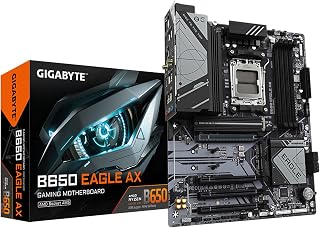
This board fits builders who want triple M.2 storage without stepping up to a pricier chipset, mixing one PCIe 5.0 slot with two PCIe 4.0 slots for flexible drive tiering. WiFi 6E and USB 3.2 Gen2x2 Type-C round out a well-connected AM5 setup for Ryzen 7000 through 9000 chips.
Pros
- Triple M.2 slots including PCIe 5.0 for storage expansion
- 12+2+2 phase VRM supports Ryzen 7000/8000/9000 series reliably
- WiFi 6E and dual Gigabit Ethernet networking
- Q-Flash Plus recovery feature protects BIOS updates
Cons
- B650 chipset lacks some X870 advanced features
- AM5 socket limits to AMD Ryzen only
For builders assembling AMD or Intel systems in 2026, the B650 Eagle AX delivers practical midrange performance on the AM5 platform. Compatibility spans Ryzen 7000, 8000, and 9000 series chips, giving you upgrade headroom as new processors arrive. The 12+2+2 phase VRM handles power delivery reliably, while DDR5 support with AMD EXPO keeps memory performance strong. Storage flexibility is a key strength: one PCIe 5.0 M.2 slot plus two PCIe 4.0 M.2 slots let you mix ultrafast boot drives with larger secondary storage. Four PCIe expansion slots and USB 3.2 Gen2x2 Type-C connectivity future-proof your build. WiFi 6E and dual Gigabit Ethernet cover wireless and wired networking. Thermal management across VRM and M.2 zones prevents throttling during sustained loads. Q-Flash Plus adds recovery protection during BIOS updates, reducing risk. The UEFI is accessible for newcomers yet deep enough for tuning. GIGABYTE backs this board with a 5-year warranty. While the B650 chipset omits some niche X870 features, real-world performance remains strong for gaming, content creation, and everyday intensive tasks.
Socket and Compatibility: Socket AM5, supports AMD Ryzen 7000/8000/9000 series processors. Fully backward compatible with prior generation Ryzen chips on supported BIOS versions.
Memory and Storage: 4 DDR5 DIMM slots, maximum 128GB capacity, 5200MHz support with AMD EXPO profile compatibility. Triple M.2 slots: 1x PCIe 5.0 NVMe, 2x PCIe 4.0 NVMe for total of 3 fast storage drives.
Power Delivery: 12+2+2 phase digital VRM solution with advanced thermal design. 24-pin main power connector supports stable operation under overclocking and heavy workloads.
Connectivity: 4x SATA 3 ports, USB 3.2 Gen2x2 Type-C, 6x USB 3.2 Gen1 Type-A, 4x USB 2.0. Dual Gigabit Ethernet (2 ports) with WiFi 6E module. 1x HDMI display output with integrated audio I/O.
Form Factor and Physical: Standard ATX layout with 4 PCIe expansion slots. Includes Q-Flash Plus utility for BIOS recovery and Smart Fan 6 for custom thermal profiles.
AMD builders seeking a stable foundation with strong expandability should consider this board. Gamers running Ryzen 7000 series chips and content creators handling video editing will appreciate the triple M.2 setup and robust power delivery. Enthusiasts wanting WiFi 6E and dual Ethernet for flexible networking will find value here. Skip it if you need cutting-edge X870 features or plan to build on the Intel platform. Users requiring more than 128GB RAM or eight DIMM slots should look at higher-end models. Budget-conscious builders may find better value in stripped-down B650 variants.

Builders sticking with AM4 for a full ATX layout benefit from the 10+3 power phase design, which gives Ryzen 5000 series chips steady power delivery under load. Dual PCIe 4.0 M.2 slots and a front USB-C header make this a practical DDR4 platform for a longer-term AMD build.
Pros
- 10+3 phase VRM with effective heatsink for stable power
- Q-Flash Plus updates BIOS without CPU installed
- PCIe 4.0 support for NVMe and graphics cards
- Integrated I/O shield and Easy Mode BIOS
Cons
- Automatic RAM overclocking profiles may require manual tuning
- Some connector locations need clearer labeling
The B550 Gaming X V2 targets builders who want to deploy Ryzen 5000, 4000, or 3000 series processors without transitioning to DDR5 platforms or replacing existing DDR4 memory. The 10+3 phase power delivery system with advanced VRM heatsink handles gaming and moderate overclocking without thermal throttling, while PCIe 4.0 support unlocks the full speed of modern NVMe drives and graphics cards. Q-Flash Plus functionality lets you update the BIOS without a CPU installed, simplifying compatibility updates for newer Ryzen chips. The integrated I/O shield speeds assembly, and the refreshed BIOS with Easy Mode interface lowers the learning curve for first-time builders. Dual M.2 slots accommodate boot and secondary storage drives, and front USB-C support via USB 3.2 Gen 2 ports brings modern connectivity to the front panel. Gigabit Ethernet and Bluetooth 5.3 round out the essentials. User feedback consistently highlights immediate improvements in load times and system responsiveness compared to older B450 boards. RGB Fusion support lets you synchronize lighting across compatible components. The full ATX layout provides standard spacing for most builds.
This board suits budget-conscious builders with existing DDR4 memory who want a modern ATX motherboard for Ryzen 5000 series processors without paying for DDR5 platform upgrades. It works well for gaming rigs, productivity builds, and moderate overclocking setups where PCIe 4.0 matters. Skip this if you want guaranteed automatic RAM overclocking without manual tuning or need clearly labeled connectors for first-time assembly. Experienced builders will navigate these quirks easily, but beginners may need external documentation.
Socket and CPU Compatibility: Socket AM4, supports Ryzen 5000/4000/3000 series processors including 5600X, 5600G, 5500, and older generations.
Memory Support: DDR4 with 4 DIMM slots, up to 128GB total capacity, 3200MHz native with XMP support for higher speeds.
Storage and Expansion: 1x PCIe 4.0 x16 slot for graphics, 1x PCIe 4.0 M.2 NVMe slot, 1x PCIe 3.0 M.2 NVMe slot, 4x SATA ports for traditional drives.
Connectivity: 3x USB 3.2 Gen 2 Type-A, 1x USB 3.2 Gen 1 Type-A, 1x Front USB 3.2 Gen 1 Type-C, 2x USB 2.0, 1x Gigabit Ethernet, Bluetooth 5.3, 1x HDMI video output.
Power and Thermal: 24-pin main power connector, 10+3 digital power phases, premium chokes and capacitors, advanced VRM heatsink, supports BIOS updates via Q-Flash Plus. Warranty: 3 years manufacturer coverage.
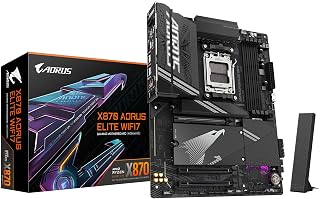
Builders chasing a future-proof AM5 platform will appreciate the X870 chipset paired with PCIe 5.0 across four M.2 slots, giving room to add fast storage over the years ahead. WIFI7 and 2.5GbE cover networking needs without extra cards, while the 8200 MHz memory ceiling suits anyone planning to run Ryzen 9000 series chips at full tilt.
Pros
- 16+2+2 phase VRM for high-end Ryzen 9000 series chips
- Four M.2 slots with thermal guards for storage expansion
- Dual USB4 and WiFi7 for next-gen connectivity
- Five-year warranty and comprehensive thermal management
Cons
- Single 2.5GbE LAN port may limit networking setups
- Full ATX size requires spacious case
The X870 AORUS Elite WiFi7 delivers a complete feature set for AM5 builds centered on Ryzen 9000, 8000, or 7000 series processors. The 16+2+2 phase power delivery system provides headroom for high-core-count chips and overclocking experiments, while comprehensive VRM and M.2 thermal guards keep temperatures in check during intensive workloads. Four M.2 slots with dedicated cooling let you populate a multi-drive storage array without sacrificing speed, and PCIe 5.0 lanes future-proof the platform for next-generation graphics cards and SSDs. Dual USB4 ports bring Thunderbolt-class transfer speeds to external workflows, and WiFi7 adoption positions this board ahead of most competitors in wireless connectivity. The board supports up to 256GB of DDR5 memory with AMD EXPO profiles for validated overclocking, and the EZ-Latch mechanism streamlines RAM installation. Fourteen USB headers and four SATA ports give you room to expand. Gigabyte backs this board with a five-year warranty, reflecting confidence in long-term reliability. The full ATX layout provides ample spacing for cable management and component installation.
Socket and Compatibility: AMD Socket AM5, supports Ryzen 7000/8000/9000 series processors on Windows 11.
Memory Support: 4 x DDR5 DIMM slots, up to 256GB capacity, 8200 MHz support with AMD EXPO profiles.
Storage and Expansion: 4 x M.2 slots with thermal guards, 4 x SATA ports, PCIe 5.0 support, 3 PCIe slots total.
Connectivity: WiFi7, 2.5GbE LAN, dual USB4, USB-C (front and rear), 11 total USB ports, 1 HDMI output, Sensor Panel Link.
Power Delivery: 16+2+2 phase VRM, 24-pin ATX power connector. Form factor: ATX (9.61in L x 12.01in W x 1.38in H). Weight: 1.23 kg. Warranty: 5 years.
This motherboard targets enthusiasts and content creators building flagship AM5 systems who value cutting-edge connectivity and thermal management. It suits users planning multi-drive storage configurations, external workflows via USB4, or wireless setups leveraging WiFi7. Skip this if you need multi-gigabit Ethernet beyond the single 2.5GbE port, have a compact case that cannot accommodate full ATX boards, or want to minimize spending on features like PCIe 5.0 and WiFi7 that may not benefit your workload immediately.

For someone building a compact AM4 rig around older Ryzen 3000 to 5000 chips, the Micro-ATX form factor fits smaller cases while dual M.2 slots on PCIe 4.0 keep storage options modern. DDR4 support at 3200 MHz makes it a sensible pick for reusing existing memory kits.
Pros
- Stable 3+3 phase power delivery for Ryzen 5000 series
- PCIe 4.0 M.2 slot for fast NVMe storage
- Compact micro-ATX footprint for smaller builds
- Q-Flash BIOS update without CPU installed
Cons
- Limited expansion due to micro-ATX layout
- Thermal performance depends on adequate case airflow
The B550M K brings AM4 socket compatibility into a compact micro-ATX package tailored for builders targeting Ryzen 5000, 4000, or 3000 series processors in space-constrained cases. The 3+3 phase VRM with quality capacitors and chokes delivers consistent power to your CPU even during sustained gaming or rendering workloads. Two M.2 slots split between PCIe 4.0 and 3.0 standards give you flexibility to pair a fast boot drive with secondary storage, while the chipset thermal armor helps maintain stable temperatures. Four USB 3.2 Gen 1 ports and Gigabit Ethernet round out the connectivity essentials. The Q-Flash utility simplifies BIOS updates without requiring a CPU installed. With over 1,000 user reviews averaging 4.4 stars, this board has earned a reputation for stability and reliability in budget AMD builds. The compact form factor fits smaller chassis while preserving the core features needed for gaming or productivity rigs. Gigabyte's durable PCB construction and power delivery layout ensure this board can handle modern Ryzen chips without throttling.
Processor Support: Socket AM4, compatible with Ryzen 3000/4000/5000 series. Chipset: AMD B550. Memory: 4x DDR4 slots up to 128GB, 3200MHz native support with XMP profiles. Storage: 4x SATA 3 ports, 2x M.2 slots (1x PCIe 4.0, 1x PCIe 3.0).
Power Delivery: 3+3 VRM with digital PWM and premium chokes. Connectivity: 1x PCIe 4.0 x16 GPU slot, 1x HDMI port, 1x Gigabit Ethernet, 4x USB 3.2 Gen 1, 4x USB 2.0, 1x optical S/PDIF audio. Form Factor: Micro-ATX (10.43 x 10.43 x 2.12 inches). Warranty: 3 years manufacturer coverage.
This board suits builders assembling compact AMD systems in micro-ATX cases or upgrading older AM4 platforms on a tight budget. It works well for single-GPU gaming rigs and general productivity builds where PCIe 4.0 storage matters but extensive expansion does not. Skip this if you need multi-GPU support, more than two M.2 drives, or plan to push extreme overclocks on high-core-count Ryzen chips. The micro-ATX layout limits expansion slots and may require careful case airflow planning for sustained heavy workloads.

Anyone assembling a Ryzen 7000 or 9000 build on a mainstream budget gets a 14+2+1 power phase design that handles sustained loads well, plus PCIe 5.0 M.2 storage and WIFI6E for a platform that still feels current. The B650 chipset keeps AM5 upgrade paths open for later CPU swaps.
Pros
- 14+2+1 phase power with 70A stages handles high-end Ryzen CPUs
- PCIe 5.0 M.2 slot with thermal guard for fast storage
- WiFi 6E and 2.5GbE networking plus front/rear USB-C
- Q-Flash updates BIOS without CPU installed
Cons
- Only four SATA ports for traditional storage
- Single HDMI output limits integrated graphics flexibility
When choosing a Gigabyte board for AMD builds, the B650 AORUS Elite AX balances features and budget effectively. This AM5 ATX platform supports Ryzen 7000, 8000, and 9000 series chips with a 14+2+1 phase power system using 70A stages and an 8-layer PCB for stability under load. DDR5 compatibility with AMD EXPO unlocks fast memory speeds, while four DIMM slots accommodate up to 128GB for future expansion. Storage includes a PCIe 5.0 M.2 slot for next-generation SSDs, complemented by M.2 thermal guards to prevent throttling. Thermal design incorporates 6mm heatpipes and comprehensive heatsinks that manage heat during gaming or rendering. WiFi 6E provides strong wireless performance, and 2.5GbE Ethernet handles wired connections. USB-C 3.2 Gen 2 ports appear on both front and rear panels. PCIe ultra-durable armor reinforces the GPU slot. EZ-Latch simplifies component installation, and Q-Flash allows BIOS updates without a CPU installed. Four SATA ports handle traditional drives, though this is fewer than some alternatives. A single HDMI output may limit multi-monitor flexibility without a dedicated GPU. The board omits ultra-premium X870 features but delivers strong midrange capability for the price.
Processor Support: AMD Socket AM5, compatible with Ryzen 7000, 8000, and 9000 series.
Memory: 4 DDR5 DIMM slots, up to 128GB maximum, 4400 MHz native speed, AMD EXPO and Intel XMP support.
Power Delivery: 14+2+1 power phases, 70A per stage, 8-layer 2X copper PCB.
Storage: 4 SATA III ports, 1 PCIe 5.0 NVMe M.2 slot, 1 PCIe 4.0 NVMe M.2 slot.
Connectivity: WiFi 6E, 2.5GbE ethernet, 12 USB ports (including USB 3.2 Gen 2 with front/rear USB-C), 1 HDMI output.
Expansion: 3 PCIe slots, comprehensive thermal armor.
Warranty: 5 years with online registration.
AMD system builders targeting Ryzen 7000/8000/9000 series processors will find this board hits a practical sweet spot. Gamers and streamers benefit from the robust power delivery and PCIe 5.0 storage support. Content creators needing DDR5 speed and solid thermal management during renders should consider this option. Wireless-focused users wanting WiFi 6E will appreciate the connectivity. Skip it if you need extensive SATA storage with more than four drives or plan multiple monitors via integrated graphics. Intel builders and users requiring X870-specific features should explore alternatives.

Pros
- Strong power delivery supports demanding Intel Core processors and sustained workloads.
- Four M.2 slots provide generous fast-storage expansion for games, applications, and media libraries.
- Comprehensive connectivity includes WiFi 6E, 2.5GbE, USB-C, and optical audio.
- Clear labeling, practical BIOS controls, and EZ-Latch features make installation approachable for first-time builders.
- DDR5 and XMP 3.0 support provide a strong upgrade path for modern gaming systems.
Cons
- DDR5 XMP settings may require manual tuning or BIOS adjustments for reliable stability at higher speeds.
- The board is designed for DDR5 memory, so existing DDR4 modules cannot be reused.
- Some users may need to adjust BIOS settings for faster boot behavior and optimal startup lighting.
The GIGABYTE Z790 AORUS Elite AX is a full-size ATX motherboard for Intel LGA 1700 processors. It is aimed at gamers, creators, and system builders who want a modern DDR5 platform with strong expansion options and support for 12th, 13th, and 14th Gen Intel Core CPUs.
Its standout quality is the balance between performance and connectivity. The 16+1+2 phase digital VRM with 70A power stages supports demanding processors, while four M.2 slots, WiFi 6E, 2.5GbE, and USB-C provide useful speed for gaming, storage, networking, and everyday productivity.
The board is built for practical long-term use, with M.2 Thermal Guard III, covered MOSFET heatsinks, PCIe Ultra Durable Armor, and a 6-layer PCB. EZ-Latch features, Q-Flash support, labeled headers, and RGB Fusion also make installation, maintenance, and customization more convenient.
There are a few considerations for buyers. High-speed DDR5 XMP profiles may not be immediately stable in every system, so manual memory tuning or BIOS changes may be necessary. Some startup behavior, including boot times and lighting, can also improve after adjusting BIOS settings.
Overall, the Z790 AORUS Elite AX is a capable choice for a feature-rich Intel gaming or productivity build. Its robust power design, four M.2 slots, modern networking, and broad I/O make it especially appealing to builders who want room to expand without moving to a higher-end enthusiast platform.

High-end AM5 builders wanting headroom for Ryzen 9000 series CPUs will value the X870E chipset's four PCIe 5.0 M.2 slots and USB4 connectivity, which support fast storage arrays and modern peripherals alike. WIFI7 and 2.5GbE LAN round out a board built for demanding, future-facing configurations.
Pros
- 16+2+2 phase power with 80A stages for extreme overclocking
- Four PCIe 5.0 M.2 slots and dual USB4 ports
- WiFi 7 and comprehensive thermal management
- 5-year warranty demonstrates build quality confidence
Cons
- Premium price exceeds budget build targets
- Complex BIOS may challenge first-time builders
The X870E AORUS PRO ICE represents Gigabyte's flagship approach to AMD motherboards, delivering maximum capability for demanding 2026 builds. AM5 socket compatibility covers Ryzen 7000, 8000, and 9000 series processors, backed by a premium 16+2+2 phase design with 80A Smart Power Stages for exceptional stability during overclocking or heavy workloads. Four M.2 slots all support PCIe 5.0, positioning this board at the front of storage performance. Dual USB4 ports provide cutting-edge throughput for professional peripherals and high-bandwidth devices. DDR5 memory scales to 256GB across four DIMM slots. Comprehensive thermal architecture includes VRM and M.2 guards that prevent heat-related throttling. WiFi 7 offers the latest wireless standard, while 2.5GbE handles wired connections. Rear I/O is extensive, with both front and rear USB-C ports. EZ-Latch installation simplifies builds, and a 5-year warranty backs long-term reliability. The X870E chipset brings advanced features absent from B650 models. BIOS depth offers granular control for experienced tweakers but may overwhelm newcomers. The premium positioning comes with a higher price that challenges budget-focused builders. Four DIMM slots max at 256GB, trailing boards with eight slots.
Socket and Processor Compatibility: AMD Socket AM5, supports Ryzen 7000, 8000, and 9000 series processors
Memory: 4x DDR5 DIMM slots, maximum 256GB capacity, AMD EXPO support for optimized performance
Storage: 4x M.2 slots with PCIe 5.0 support, 4x SATA ports for traditional drives
Power Delivery: 16+2+2 phases, 80A Smart Power Stages, 24-pin main connector
Connectivity: PCIe 5.0, dual USB4 ports, WiFi 7, 2.5GbE LAN, 1x HDMI, 13 total USB ports including front and rear USB-C
Physical: ATX form factor, 13.4" L x 10.8" W x 3.3" H, 2180g weight
Warranty: 5-year manufacturer coverage
High-end AMD builders assembling top-tier gaming rigs or professional workstations will benefit from this flagship board. Enthusiasts overclocking Ryzen 9000 series CPUs need the robust power delivery. Content creators requiring four PCIe 5.0 M.2 slots and dual USB4 ports for fast workflows should consider this option. Users wanting WiFi 7 and extensive future-proofing will find value. Skip it if budget constraints are tight or you only need basic B650 features. Beginners intimidated by complex BIOS options may prefer simpler boards. Builders needing more than 256GB RAM or Intel compatibility should look elsewhere.

Pros
- Excellent power delivery system handles high-end Ryzen CPUs without stability concerns
- Premium connectivity options including WiFi 7, 10GbE, and USB-C set it apart from budget alternatives
- PCIe 5.0 support future-proofs your investment for upcoming GPUs and storage devices
- Strong thermal management prevents performance throttling during extended workloads
- Competitive pricing for the feature set compared to higher-end AM5 boards
Cons
- No user reviews available yet, so real-world reliability data from owners is limited
- B850 chipset lacks some premium features found on X870 boards, such as advanced overclocking tools
- Four DIMM slots max out at 256GB RAM, which may be limiting for certain professional workloads
The GIGABYTE B850 AI TOP is an AM5 motherboard engineered for builders who want modern performance without premium pricing. It supports the latest AMD Ryzen 9000, 8000, and 7000 series processors, making it a practical choice for gamers, content creators, and enthusiasts building high-performance systems.
The standout feature is the robust 16+2+2 power delivery system with 110A Smart Power Stage, which provides stable, efficient power to demanding CPUs. Combined with DDR5 support up to 8600MT/s, three M.2 slots with thermal guards, and full PCIe 5.0 connectivity, this board delivers genuine performance credentials. The inclusion of WiFi 7, 10GbE Ethernet, and USB-C ports shows GIGABYTE's commitment to modern connectivity standards.
Build quality is solid with thermal management across both the VRM and M.2 storage, protecting components during sustained loads. The board's layout and feature set suggest careful design for usability and reliability. The EZ-Latch mechanism simplifies RAM installation, a thoughtful touch for first-time builders.
The main limitation is the B850 chipset, which omits some overclocking tools and premium features reserved for X870 boards. Additionally, with no user reviews yet available, real-world long-term reliability remains to be seen. The 256GB RAM maximum may also feel tight for specialized professional workflows.
The GIGABYTE B850 AI TOP is a well-rounded AM5 platform that balances modern features with sensible pricing. It's the right choice for builders seeking a stable foundation for high-end gaming, streaming, or creative work without overcommitting to premium-tier boards.
Processor Support: AMD Socket AM5, compatible with Ryzen 9000, 8000, and 7000 series
Memory: 4 DIMM slots, DDR5 up to 8600MT/s, maximum 256GB capacity
Power Delivery: 16+2+2 phase design with 110A Smart Power Stage, 24-pin main connector
Storage: 3 M.2 slots with PCIe 5.0 support and thermal guards
Connectivity: PCIe 5.0, WiFi 7, 10GbE Ethernet, USB-C (10G standard, 40G with Ryzen 8000 CPU), 12 total USB ports
Dimensions: 12 inches L x 9.6 inches W x 1 inch H, ATX form factor
Warranty: 5-year manufacturer coverage
How to Choose the Right Gigabyte Motherboard
Start With Your Processor Socket and Memory Type
Lock in your CPU platform before comparing features. The AM5 choices here, including the GIGABYTE B650 Eagle AX AM5 LGA 1718 ATX and GIGABYTE X870 AORUS Elite WIFI7 AMD AM5 LGA 1718, support Ryzen 7000, 8000, and 9000 series processors and require DDR5 memory. AM5 is the stronger route when you want a current AMD platform with room for future component upgrades.
AM4 remains useful when you already own compatible DDR4 memory or a Ryzen 3000, 4000, or 5000 CPU. The GIGABYTE B550 Gaming X V2 AMD AM4 ATX Motherboard offers more expansion room, while the GIGABYTE B550M K AMD AM4 Micro-ATX Motherboard suits smaller systems. Intel builders should choose the GIGABYTE Z790 AORUS Elite AX LGA 1700 ATX for 12th, 13th, or 14th Gen Core processors and DDR5 support. Browse the full motherboard category to compare additional platform types.
Choose Power Delivery for Your CPU and Workload
VRM design matters most when you pair the board with a higher-core-count processor or expect long gaming and creative sessions. The B550M K uses a modest 3+3 digital VRM design, making it a sensible fit for practical AM4 builds with reasonable power demands. For a more substantial AM4 foundation, the B550 Gaming X V2 brings a 10+3 power-phase layout and larger VRM cooling hardware.
For stronger Ryzen CPUs, look to boards with deeper power stages and comprehensive heatsinks. The GIGABYTE B650 AORUS Elite AX AMD AM5 ATX has a 14+2+1 phase design, while the GIGABYTE X870E AORUS PRO ICE AMD AM5 LGA 1718 and GIGABYTE B850 AI TOP AMD AM5 ATX each use a 16+2+2 arrangement. These specifications add useful headroom, but case airflow and a correctly sized CPU cooler still matter.
Plan Storage and USB Expansion Before You Build
Count the drives you expect to install now and later. The B650 Eagle AX provides one PCIe 5.0 M.2 slot plus two PCIe 4.0 M.2 slots, an appealing mix for a gaming PC with a fast primary drive and additional capacity. If next-generation SSD support is central to your build, our guide to motherboards with PCIe 5.0 SSD slots can help narrow the field.
Users with larger game libraries, media projects, or several work drives should favor boards with four M.2 slots. The X870 AORUS Elite WIFI7 includes four M.2 slots and dual USB4 ports, while the Z790 AORUS Elite AX supplies four PCIe 4.0 x4 M.2 slots and a USB 3.2 Gen 2×2 Type-C connection. Check lane-sharing notes in the board manual if you plan to fill every storage and PCIe slot.
Confirm Case Fit, Headers, and Network Hardware
Most of these choices use the ATX form factor, which gives you more physical room for slots, headers, and cooling. Before committing, confirm that your case supports ATX, has room for your graphics card, and includes the front USB connections you want. The micro-ATX B550M K is the compact alternative, retaining four DDR4 slots and two M.2 slots without requiring a full-size case. For more practical build comparisons, explore our mainstream motherboard comparison.
Networking needs also separate these boards. The B650 Eagle AX combines WiFi 6E with Gigabit Ethernet, the B650 AORUS Elite AX adds 2.5GbE, and the X870 AORUS Elite WIFI7 steps up to WiFi 7 and 2.5GbE. The B850 AI TOP is designed for specialized wired networks with 10GbE, though its USB-C capability varies with the installed Ryzen 8000 processor. Consider our high-performance motherboard options if connectivity and expansion are your leading priorities.
Final Thoughts
For a well-rounded modern Ryzen build, the GIGABYTE B650 Eagle AX AM5 LGA 1718 ATX delivers the AM5 essentials, useful storage flexibility, and WiFi 6E. Choose the GIGABYTE B550M K AMD AM4 Micro-ATX Motherboard when you want a compact DDR4 platform for an existing AM4 processor and a straightforward everyday system.
Frequently Asked Questions
Which Gigabyte motherboard should I choose for a Ryzen 9000 CPU?
Every AM5 model in this guide lists support for Ryzen 9000 processors, but your ideal choice depends on expansion and networking needs. The B650 Eagle AX is a balanced option for most gaming systems, while the X870 AORUS Elite WIFI7 brings four M.2 slots, dual USB4, and WiFi 7. Confirm the installed BIOS version and update it through Q-Flash when required before setting up a new processor.
Can I use DDR4 memory in a Gigabyte AM5 motherboard?
No, AM5 Gigabyte boards use DDR5 memory only. That includes the B650, B850, X870, and X870E models listed here. If you have DDR4 memory that you plan to reuse, an AM4 board such as the B550 Gaming X V2 or B550M K is the compatible direction, provided your Ryzen CPU also uses the AM4 socket.
How many M.2 slots do I need on a Gigabyte motherboard?
Two M.2 slots are enough for many PCs that use one operating-system drive and one larger game or file drive. Three slots provide more breathing room for later expansion, while four slots make sense for media work, extensive game collections, or multi-drive productivity systems. Also consider whether you need a PCIe 5.0 M.2 slot or whether reliable PCIe 4.0 storage is sufficient for your workload.
What else should I match to a new Gigabyte motherboard?
Match the motherboard with a compatible CPU, the correct DDR4 or DDR5 memory, an appropriate case, and a cooler that fits the socket and chassis. You should also select a power supply with the needed CPU and graphics card connectors, plus enough capacity for the full system. Our 80 Plus Gold power supply picks can help you complete a dependable component list.


Write Your Review
No reviews yet. Be the first to share your experience!