

Building a high-performance PC in 2026 means future-proofing your storage subsystem. PCIe 5.0 SSDs deliver bandwidth that PCIe 4.0 drives simply can’t match, and choosing a motherboard with native PCIe 5.0 M.2 slots ensures you won’t hit a bottleneck when you upgrade.
This guide evaluates 10 motherboards across AMD and Intel platforms, from budget-friendly B-series chipsets to premium X-series and Z-series boards. Whether you’re running a Ryzen 9000 chip or an Intel Core Ultra processor, you’ll find a board that balances PCIe 5.0 support with the power delivery, connectivity, and cooling your build demands.
Quick answer
This guide compares 10 picks, with ASUS TUF Gaming B650E-PLUS WiFi AM5 Motherboard ranked first. ASUS ROG Strix B550-F Gaming WiFi II AM4 Motherboard holds the highest customer rating among them.

With PCIe 5.0 readiness confirmed on an AM5 B650E chipset, this ATX board gives Ryzen 9000, 8000, and 7000 series users a direct path to Gen 5 SSD speeds without overpaying for a flagship chipset. The 12+2+1 power stages rated at 80A each keep the processor stable during intensive storage benchmarks, and BIOS Flashback simplifies firmware updates to ensure full compatibility as new Gen 5 drives enter the market.
Pros
- Three M.2 slots including one PCIe 5.0 with full heatsink coverage
- 12+2+1 80A DrMOS power delivery on 8-layer PCB
- Q-Release and Q-Latch mechanisms simplify drive installation
- BIOS Flashback and Wi-Fi 6E at mid-range pricing
Cons
- 256GB DDR5 maximum may limit future expansion
- B650E chipset lacks some X870 advanced features
The ASUS TUF Gaming B650E-PLUS WiFi provides three M.2 slots with one PCIe 5.0 position, giving Ryzen 7000, 8000, and 9000 series builders room to grow their storage without overspending on flagship boards. The PCIe 5.0 slot positions your fastest drive where it matters most, while two additional M.2 sockets handle secondary storage needs. All three slots feature enlarged heatsinks that keep NVMe drives thermally stable during extended workloads. The 12+2+1 80A DrMOS power stages and 8-layer PCB ensure voltage delivery stays clean even when pushing modern Ryzen processors. DDR5 support reaches 6000 MHz with four slots accommodating up to 256GB total, providing headroom for memory-intensive applications. Wi-Fi 6E and 2.5Gb Ethernet cover wireless and wired connectivity without bottlenecks. Physical design includes Q-Release mechanisms for tool-free PCIe and M.2 installation, plus BIOS Flashback for safe firmware updates. The B650E chipset balances cost against features, delivering PCIe 5.0 support where X670 boards often command higher prices. For gamers and creators who want a PCIe 5.0 SSD slot without paying for unnecessary extras, this board hits the value target while maintaining TUF's durability standards.
Processor and Memory: Socket AM5 for AMD Ryzen 7000, 8000, 9000 series. Supports DDR5 up to 6000 MHz across four DIMM slots with 256GB maximum capacity.
Power and Thermal: 12+2+1 80A DrMOS with 8-layer PCB, 8+8 pin ProCool connectors, enhanced VRM heatsink, and hybrid fan headers for comprehensive cooling control.
Storage and Connectivity: One PCIe 5.0 M.2 slot, two PCIe 4.0 M.2 slots, four SATA ports, Wi-Fi 6E, 2.5Gb Realtek Ethernet, USB 20Gbps Type-C rear port, USB 10Gbps Type-C front connector, Thunderbolt (USB4) header support. Features 23 total ports including 17 USB ports and one HDMI output.
Expansion: Five PCIe slots including one PCIe 5.0 x16 SafeSlot. AMD B650 chipset with PCIe 4.0 and 5.0 support. 3-year warranty included.
This board suits Ryzen builders who want one PCIe 5.0 M.2 slot plus room for two more drives, all with proper cooling. Gamers upgrading to AM5 and content creators running moderate workloads will appreciate the balance between features and cost. Skip it if you need four or more M.2 slots, or if the 256GB DDR5 limit feels restrictive. Extreme overclockers wanting top-tier VRM configurations should look at X870 flagship models instead.
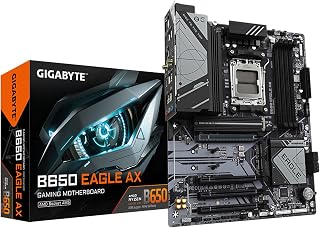
This B650 AM5 board includes one PCIe 5.0 M.2 slot alongside two PCIe 4.0 M.2 slots, making it a practical entry point for users who want Gen 5 SSD capability without stepping up to a premium chipset. WiFi 6E and USB 3.2 Gen2x2 Type-C round out connectivity, and compatibility with Ryzen 7000, 8000, and 9000 series processors means the platform has room to grow alongside faster Gen 5 drives as they become more affordable.
Pros
- PCIe 5.0 M.2 slot plus two PCIe 4.0 M.2 slots for storage expansion
- 12+2+2 phase VRM handles Ryzen 7000/8000/9000 series reliably
- WiFi 6E and dual Gigabit Ethernet for flexible networking
- Q-Flash Plus BIOS recovery and five-year warranty
Cons
- B650 chipset lacks some X870 advanced features
- DDR5 speed limited to 5200 MHz versus higher-end boards
The GIGABYTE B650 Eagle AX delivers PCIe 5.0 storage connectivity in a practical mid-range package built around Socket AM5. Its primary appeal for this use case is the triple M.2 configuration, headlined by a PCIe 5.0 slot ready for next-generation SSDs, plus two PCIe 4.0 slots for additional drives. The board supports AMD Ryzen 7000, 8000, and 9000 series processors with a 12+2+2 phase VRM that maintains stable power delivery under sustained workloads. DDR5 memory runs up to 5200 MHz with AMD EXPO profiles for reliable performance. Build quality includes proper thermal management across VRM zones and M.2 slots, preventing throttling during extended transfers. USB 3.2 Gen2x2 Type-C provides 20Gbps external connectivity, while WiFi 6E and Gigabit Ethernet handle wireless and wired networking. The UEFI interface balances accessibility with tuning options, and Q-Flash Plus offers BIOS recovery without requiring a working CPU. Four PCIe expansion slots and 128GB maximum memory capacity give builders room to scale. The B650 chipset omits some X870 features but delivers the core PCIe 5.0 storage capability this use case demands. A five-year warranty backs the hardware investment.
Socket and Compatibility: Socket AM5, supports AMD Ryzen 7000/8000/9000 series processors. Fully backward compatible with prior generation Ryzen chips on supported BIOS versions.
Memory and Storage: 4 DDR5 DIMM slots, maximum 128GB capacity, 5200MHz support with AMD EXPO profile compatibility. Triple M.2 slots: 1x PCIe 5.0 NVMe, 2x PCIe 4.0 NVMe for total of 3 fast storage drives.
Power Delivery: 12+2+2 phase digital VRM solution with advanced thermal design. 24-pin main power connector supports stable operation under overclocking and heavy workloads.
Connectivity: 4x SATA 3 ports, USB 3.2 Gen2x2 Type-C, 6x USB 3.2 Gen1 Type-A, 4x USB 2.0. Dual Gigabit Ethernet (2 ports) with WiFi 6E module. 1x HDMI display output with integrated audio I/O.
Form Factor and Physical: Standard ATX layout with 4 PCIe expansion slots. Includes Q-Flash Plus utility for BIOS recovery and Smart Fan 6 for custom thermal profiles.
This board suits Ryzen 7000/8000/9000 builders prioritizing PCIe 5.0 storage expansion without premium chipset costs. Gamers and content creators running large file workflows benefit from the triple M.2 layout and stable power delivery. Budget-conscious system builders get modern connectivity and solid thermal design at mid-range pricing. Skip this if you require X870 chipset features, plan to run heavily overclocked Ryzen 9 processors, or need more than three M.2 slots in a single build.

Buyers researching motherboards with PCIe 5.0 SSD slots should note that this B550 AM4 board tops out at PCIe 4.0, making it a poor fit for that specific need. However, for users still on a Ryzen 3rd Gen AM4 platform who are not yet ready to migrate, it offers DDR4 support and WiFi 6E connectivity, serving as a capable stopgap before upgrading to a platform that supports Gen 5 storage.
Pros
- Dual M.2 slots with full PCIe 4.0 bandwidth
- 12+2 power delivery handles Ryzen 5950X reliably
- WiFi 6E and 2.5Gb Ethernet for modern connectivity
- BIOS Flashback simplifies CPU updates
Cons
- Minimalist packaging risks shipping damage
- Motherboard screws not included in box
The ASUS ROG Strix B550-F Gaming WiFi II brings PCIe 4.0 storage to AM4 platforms without X570 pricing, making it a practical choice for builders using 3rd Gen Ryzen processors who want faster NVMe performance. Dual M.2 slots leverage full PCIe 4.0 bandwidth for current-generation SSDs, delivering meaningful speed improvements over PCIe 3.0 boards. The 12+2 power delivery system keeps VRMs within thermal spec even when paired with flagship Ryzen processors like the 5950X under sustained load. High-quality alloy chokes and durable capacitors ensure reliable operation when storage and CPU draw peak power simultaneously. WiFi 6E and 2.5Gb Ethernet maintain network performance to match storage speeds in online gaming and large file transfers. ProCool power connectors and BIOS Flashback simplify CPU compatibility updates, essential for AM4's extended lifespan. The intuitive UEFI BIOS and bundled 60-day AIDA64 Extreme subscription add tangible value. While not PCIe 5.0, this board maximizes what AM4 and B550 chipsets offer for storage performance, making it suitable for builders who prioritize proven platform stability over bleeding-edge specifications.
Processor Compatibility: AMD Ryzen 3000 and 5000 series, plus 5000 and 4000 G-series desktop processors (Socket AM4)
Memory Support: DDR4, up to 128GB across 4 DIMM slots, supports up to 2133 MHz and beyond with overclocking
Connectivity: PCIe 4.0, WiFi 6E (802.11ax) with Bluetooth 5.2, Intel 2.5Gb Ethernet with LANGuard, HDMI 2.1, DisplayPort 1.2, USB 3.2 Gen 2 Type-C
Storage: Dual M.2 slots (PCIe 4.0 ready), 6 SATA 3 ports, BIOS Flashback via USB
Power Delivery: 12+2 teamed power stages with ProCool connector, high-quality alloy chokes and durable capacitors
Other Features: 11 total USB ports, addressable Gen 2 RGB header with Aura Sync, optical S/PDIF output, 3-year warranty, dimensions 10.75 x 13.39 x 2.76 inches
Best for AM4 builders using 3rd Gen Ryzen who want PCIe 4.0 storage without premium X570 costs, especially those with existing DDR4 memory to carry forward. The dual M.2 slots handle fast drives efficiently for gaming and productivity. Skip this if you need PCIe 5.0 support or plan to use newer Ryzen generations requiring AM5 platform migration, as this board locks you into older architecture.

Running on Intel Z790 with LGA 1700 and four M.2 slots including PCIe 5.0 support, this board is a strong fit for Intel 12th, 13th, and 14th Gen users who want Gen 5 SSD performance today. The 16+1 DrMOS power design sustains demanding workloads, DDR5 at 7200 MHz keeps data flowing to the processor, and the inclusion of Thunderbolt 4 means a Gen 5 drive's fast cache and scratch performance can benefit external workflows as well.
Pros
- Four M.2 slots operate simultaneously without disabling SATA
- 16+1 DrMOS handles Core i9 processors without throttling
- Comprehensive cooling for VRM and M.2 drives
- Thunderbolt 4 and WiFi 6 work immediately
Cons
- Windows 11 installation may require networking driver workarounds
- Overpowered for budget CPU builds
The ASUS TUF Gaming Z790-Plus WiFi delivers exceptional PCIe 5.0 storage flexibility with four M.2 slots that all operate simultaneously without disabling SATA ports. Intel's Z790 chipset unlocks full PCIe 5.0 bandwidth for the latest NVMe drives, making this board ideal for storage-intensive workloads and future-proofing. The 16+1 DrMOS power delivery keeps 14th Gen Intel processors stable during sustained operations, ensuring consistent performance when drives are under heavy load. Military-grade components and comprehensive cooling with dedicated VRM and M.2 heatsinks prevent thermal throttling even when all storage slots are populated. Connectivity is thorough with Thunderbolt 4, WiFi 6, and 2.5Gb Ethernet all functional out of the box. The clean geometric design avoids aggressive gaming aesthetics while maintaining the TUF durability philosophy. Four M.2 slots with genuine simultaneous operation give builders serious storage expansion options without compromise, a rarity in this category. The board supports DDR5 up to 7200 MHz and handles Core i9 processors without stability concerns, making it a solid foundation for high-capacity storage arrays paired with demanding CPUs.
Socket and Compatibility: LGA 1700 socket supports Intel Core 12th, 13th, and 14th generation processors. Supports up to 256GB DDR5 memory at 7200 MHz across four DIMM slots.
Connectivity: WiFi 6 AX201 (802.11ax), Intel I225-V 2.5Gb LAN, Thunderbolt 4 (USB4) header, USB 3.2 Gen 2 Type-C port and header, plus 11 USB 2.0 ports. Single HDMI output and optical S/PDIF connector.
Storage: Four M.2/NVMe slots with simultaneous operation, four SATA 3.0 ports, and five PCIe slots (including PCIe 5.0 support).
Power and Cooling: 16+1 DrMOS power delivery with ProCool sockets. Dedicated heatsinks for VRM, PCH, and M.2 slots. Hybrid fan headers with Fan Xpert 4 utility for automated thermal management.
Physical: Standard ATX form factor measuring 10.7 inches long by 14 inches tall. Backed by ASUS' three-year warranty.
Buy this if you're building a system requiring multiple high-speed NVMe drives for gaming libraries, content creation, or video editing with 12th through 14th Gen Intel processors. The four simultaneous M.2 slots and robust power delivery justify the investment for storage-heavy workloads. Skip this if you're pairing it with a budget Intel CPU where Z790 features go unused, or if you only need one or two storage drives where cheaper boards suffice.

Shoppers focused on PCIe 5.0 SSD slots should be aware this B550 AM4 board maxes out at PCIe 4.0 across its two M.2 slots, so it does not satisfy the primary criterion of this article. It remains a reliable DDR4 platform for Ryzen 5000 and 3000 series builds on a tighter budget, with Q-Flash Plus for easy BIOS updates, but users who require a Gen 5 M.2 slot will need to move to an AM5 or Intel LGA 1851 platform instead.
Pros
- Dual M.2 slots with PCIe 4.0 for fast NVMe SSDs
- 10+3 phase power delivery handles Ryzen 5000 series CPUs
- Q-Flash Plus updates BIOS without CPU installed
- Integrated I/O shield and front USB-C header
Cons
- Automatic RAM overclocking profiles can cause system crashes
- Connector locations may confuse first-time builders
The GIGABYTE B550 Gaming X V2 brings PCIe 4.0 connectivity to the AM4 platform, making it a smart pick for builders who want fast NVMe storage without upgrading to newer DDR5 systems. Two M.2 slots with PCIe 4.0 support let you install current-generation SSDs that take full advantage of the increased bandwidth, delivering significantly faster load times and file transfers compared to older B450 boards limited to PCIe 3.0. The 10+3 phase power delivery system ensures stable operation even when pushing Ryzen 5000 series processors hard during gaming or content creation. Q-Flash Plus functionality simplifies BIOS updates, allowing you to prepare the board for newer CPUs without needing to install a processor first. The integrated I/O shield and front USB-C header add convenience during assembly. Real-world users report immediate improvements in system responsiveness after switching from previous-generation boards. RGB Fusion provides basic lighting customization, while GbE LAN and Bluetooth 5.3 round out the connectivity options. Build quality exceeds expectations for this price tier, with effective VRM cooling that handles extended gaming sessions without thermal throttling.
This board suits budget-conscious builders who already own DDR4 RAM and want to maximize PCIe 4.0 SSD performance on the AM4 platform. It's ideal for first-time PC builders assembling gaming or productivity systems with Ryzen 3000, 4000, or 5000 series processors. Skip it if you need more than two M.2 slots for storage expansion, or if you're planning a cutting-edge build where DDR5 and newer platforms make more sense. Experienced overclockers may find the automatic RAM profiles unreliable and prefer boards with more robust memory tuning options.
Socket and CPU Compatibility: Socket AM4, supports Ryzen 5000/4000/3000 series processors including 5600X, 5600G, 5500, and older generations.
Memory Support: DDR4 with 4 DIMM slots, up to 128GB total capacity, 3200MHz native with XMP support for higher speeds.
Storage and Expansion: 1x PCIe 4.0 x16 slot for graphics, 1x PCIe 4.0 M.2 NVMe slot, 1x PCIe 3.0 M.2 NVMe slot, 4x SATA ports for traditional drives.
Connectivity: 3x USB 3.2 Gen 2 Type-A, 1x USB 3.2 Gen 1 Type-A, 1x Front USB 3.2 Gen 1 Type-C, 2x USB 2.0, 1x Gigabit Ethernet, Bluetooth 5.3, 1x HDMI video output.
Power and Thermal: 24-pin main power connector, 10+3 digital power phases, premium chokes and capacitors, advanced VRM heatsink, supports BIOS updates via Q-Flash Plus. Warranty: 3 years manufacturer coverage.

Featuring three M.2 slots and an AM5 socket on the B650 chipset, this board supports current Ryzen 9000, 8000, and 7000 processors but its M.2 slots are limited to PCIe 4.0 rather than Gen 5, which is an important distinction for shoppers specifically hunting PCIe 5.0 SSD compatibility. The 12+2 power stages and DDR5 at 6400 MHz still make it a solid mid-range AM5 choice, though buyers with a Gen 5 drive as a priority should verify slot specifications before purchasing.
Pros
- PCIe 5.0 M.2 slot plus two PCIe 4.0 slots for expansion
- 12+2 power delivery handles multi-core Ryzen workloads
- WiFi 6E and 2.5G LAN for modern connectivity
- Solid construction with clear header labeling
Cons
- Requires BIOS flash before booting newer Ryzen CPUs
- Some users encounter LAN controller driver issues
The ASUS ROG Strix B650-A Gaming WiFi brings PCIe 5.0 storage to the AM5 platform with a dedicated M.2 slot capable of handling next-generation NVMe drives at full bandwidth. Two additional PCIe 4.0 M.2 slots provide ample expansion for multi-drive configurations, making this board suitable for Ryzen 7000, 8000, and 9000 series builds requiring fast storage without X870E pricing. The 12+2 power stage design maintains stability under sustained workloads, important when drives and CPU compete for system resources. VRM heatsinks are strategically positioned to manage thermals across all components. WiFi 6E and 2.5G LAN ensure network speeds keep pace with storage performance, while four SATA connections preserve legacy drive compatibility. USB 3.2 Gen 2x2 Type-C adds high-speed external storage options. The ROG aesthetic integrates cleanly with Aura Sync lighting for unified builds. Solid construction and clear header labeling simplify installation, though BIOS flashing is required before booting with newer Ryzen processors. The B650 chipset balances cost and capability for builders prioritizing storage expansion over extreme overclocking features.
Socket and Compatibility: AM5 socket supports AMD Ryzen 9000, 8000, and 7000 series processors with BIOS update for newer generations. Supports up to 128GB DDR5 memory at speeds up to 6400 MHz across 4 DIMM slots.
Storage and Expansion: One PCIe 5.0 M.2 slot, two PCIe 4.0 M.2 slots, all with heatsinks. Includes 4 SATA 6Gb/s ports for traditional drives. Four PCIe slots total provide GPU and expansion card compatibility.
Power Delivery: 12+2 power stages with 8+4 pin ProCool connectors. Premium alloy chokes and durable capacitors ensure stable multi-core performance and overclocking headroom.
Connectivity: WiFi 6E, 2.5G LAN, 9 USB ports including USB 3.2 Gen 2x2 Type-C, 1 HDMI output, and optical S/PDIF. Comprehensive I/O covers gaming, streaming, and content creation needs.
Form Factor and Design: ATX motherboard with dimensions 10.8in L x 13.4in H. Massive VRM heatsinks with airflow channels and thermal pads maintain cool operating temperatures. Includes 3-year warranty from ASUS.
Ideal for Ryzen 7000 series and newer builders who need PCIe 5.0 storage capability with room for multiple drives in gaming or content creation systems. The combination of one PCIe 5.0 and two PCIe 4.0 M.2 slots handles diverse storage needs efficiently. Skip this if you're running older Ryzen CPUs incompatible with AM5, or if initial BIOS flashing and potential LAN driver troubleshooting sounds too complex for your comfort level.

This AM5 board on the B850 chipset delivers four M.2 slots with PCIe 5.0 support, giving builders multiple options for next-generation SSD placement. The 14+2+2 power stage design keeps a Ryzen 9000 series processor stable under sustained sequential read and write loads, while DDR5 memory clocked at 8000 MHz ensures the memory subsystem does not bottleneck the throughput advantage that a Gen 5 drive provides.
Pros
- Four M.2 slots with PCIe 5.0 support for extensive storage
- 14+2+2 power stages rated 80A per stage for stable Ryzen performance
- WiFi 7 with Q-Antenna and 2.5G LAN for flexible networking
- ASUS AI Advisor simplifies setup and optimization
Cons
- Large CPU coolers may obstruct tall RAM modules
- Simultaneous Ethernet and WiFi can cause connection conflicts
The ASUS ROG Strix B850-A Gaming WiFi brings four M.2 slots with PCIe 5.0 support to Socket AM5, making it a strong contender for storage-focused builds. The 14+2+2 power stage design rated at 80A per stage provides clean power delivery for AMD Ryzen processors, ensuring system stability during multi-threaded workloads and high-speed storage operations. All four M.2 slots accept modern drives, with PCIe 5.0 bandwidth available for maximum transfer speeds when paired with compatible SSDs. The board supports up to 192GB of DDR5 memory at 8000 MHz, offering substantial capacity and speed for large datasets. Heavy heatsinks with high-conductivity thermal pads cover VRM zones and M.2 slots, preventing thermal throttling during sustained transfers. WiFi 7 with Q-Antenna technology delivers low-latency wireless connectivity, while 2.5G LAN handles wired networking. USB 20Gbps Type-C provides fast external storage access. ASUS AI Advisor and AI Networking II streamline initial setup and ongoing optimization. The BIOS interface is straightforward, and Armory Crate software centralizes fan control, RGB lighting, and performance tuning. Build quality reflects careful PCB construction with durable alloy chokes throughout.
Processor and Compatibility: Socket AM5, supports AMD Ryzen 9000, 8000, and 7000 series processors, chipset AMD B850.
Memory: DDR5 support up to 192GB, memory clock speed 8000 MHz, 4 DIMM slots, AEMP technology for enhanced memory performance.
Storage and Connectivity: 4 M.2 slots with PCIe 5.0 support, 2 SATA 6Gb/s ports, 17 USB ports total including USB 20Gbps Type-C, 1 Gigabit Ethernet, WiFi 7 with Q-Antenna, 3 PCIe slots.
Power and Thermal: 14+2+2 power stages at 80A per stage, 8+8-pin ProCool power connectors, integrated I/O cover, thick metal heatsinks with thermal pad coupling to VRMs.
Physical and Warranty: ATX form factor (14.1 inch length x 10.7 inch height x 2.9 inch width), 5 pounds, includes 3-year warranty, 1 unit included.

Built around the AMD B850 chipset on AM5, this board includes a native M.2 Gen5 slot and a PCIe 5.0 x16 lane, directly addressing the core requirement of this article. DDR5 memory support with speeds up to 8400+ MT/s via OC means storage-focused builders also get future-ready RAM bandwidth, and the 80A SPS VRM ensures stable power delivery for high-core-count Ryzen 9000 processors paired with demanding NVMe workloads.
Pros
- Dual M.2 Gen5 slots deliver PCIe 5.0 storage bandwidth
- 14-phase 80A SPS VRM handles high-end Ryzen processors
- WiFi 7, 5G LAN, and USB 20G Type-C for modern connectivity
- EZ DIY features simplify installation and maintenance
Cons
- Only two M.2 slots versus three or four on competing boards
- B850 chipset may lack specific features found on X870 models
The MSI MAG B850 Tomahawk MAX WiFi positions dual M.2 Gen5 slots as its core storage offering for Socket AM5 builders. The 14-phase VRM with 80A SPS delivers consistent power across AMD Ryzen 9000, 8000, and 7000 series processors, supporting aggressive overclocking and sustained workloads without voltage droop. Both M.2 slots run at PCIe 5.0 speeds, providing maximum bandwidth for next-generation SSDs. The board accepts up to 256GB of DDR5 memory at 8400+ MT/s when overclocked, giving builders substantial capacity and speed headroom. Heavy 2oz copper PCBs and solid metal heatsinks with robust thermal pads maintain thermal stability across VRM and storage zones. PCIe 5.0 x16 GPU connectivity ensures graphics cards negotiate full bandwidth immediately. WiFi 7 with Bluetooth 5.4 and Realtek 5G LAN provide cutting-edge wireless and wired networking speeds. USB 20G Type-C rear connectivity handles fast external storage and peripherals. EZ DIY features like quick-release GPU latches and tool-free M.2 installation simplify upgrades and maintenance. The board boots instantly with full hardware detection and requires no BIOS updates for latest-generation Ryzen processors. Clean aesthetics and professional build quality fit any case design.
Chipset and Socket: AMD B850 Chipset, Socket AM5 (Supports Ryzen 9000/8000/7000 Series)
Memory Support: 4x DDR5 DIMM slots, up to 8400+ MT/s (OC), 1DPC 1R configuration
Storage Connectivity: 1x M.2 Gen5 x4 (128Gbps), 1x M.2 Gen5 x4 (128Gbps), 1x M.2 Gen4 x4 (64Gbps), 1x M.2 Gen4 x2 (32Gbps), 6x SATA ports
Power Delivery: 14-Phase Duet Rail Power System, 80A SPS VRM, dual 8-pin CPU connectors, 24-pin ATX main power
Expansion Slots: 1x PCIe 5.0 x16 (128GB/s) with Steel Armor II, multiple PCIe Gen3/Gen4 slots
Networking: Wi-Fi 7 (802.11be) with Bluetooth 5.4, Realtek 5G LAN, USB 20G Type-C
Audio: 7.1 USB High Performance Audio with Audio Boost 5, S/PDIF output support
Thermal Management: 7W/mK MOSFET thermal pads, extended heatsinks, EZ M.2 Shield Frozr II, Combo-fan header (3A)
Warranty: 3-Year Manufacturer Limited Warranty
This board suits builders prioritizing dual PCIe 5.0 M.2 slots with extreme DDR5 memory support on Socket AM5. Gamers running multiple high-speed drives and content creators handling large media files benefit from Gen5 storage bandwidth. Enthusiasts wanting WiFi 7, 5G LAN, and robust overclocking capabilities should evaluate this option. Skip it if you need more than two M.2 slots in a single build, or if B850 chipset features do not meet your specific expansion requirements.

Riding the AMD X870E chipset, this ATX board brings M.2 Gen5 and PCIe 5.0 support alongside USB 40Gbps, a combination that suits content creators and power users who need maximum storage and peripheral bandwidth simultaneously. DDR5 at 7800 MHz and compatibility with Ryzen 9000, 8000, and 7000 series processors give it broad longevity, and Wi-Fi 7 with 5Gbps LAN means network throughput can keep pace with fast local NVMe transfers.
Pros
- Exceptional power delivery and thermal management for overclocking and sustained gaming
- WiFi 7 and dual gigabit LAN combo provides network flexibility and reliability
- PCIe 5.0 future-proofs your build for upcoming graphics cards and NVMe drives
- Generous I/O with 13 USB ports and dual network options for expansive peripherals
- Highly rated by users (4.4/5 stars) with proven reliability in gaming systems
Cons
- ATX form factor requires a larger case, limiting build flexibility for compact setups
- X870E platform requires new DDR5 RAM and compatible Ryzen 9000/8000/7000 processors, increasing overall system cost
The MSI MPG X870E Carbon WiFi is a high-end gaming motherboard engineered for enthusiasts building powerful systems with AMD Ryzen 9000, 8000, or 7000 series processors. If you're planning a premium gaming build, content creation workstation, or high-performance streaming setup, this board delivers the connectivity and stability needed to maximize your investment.
This board's standout features include PCIe 5.0 support for maximum bandwidth to NVMe SSDs and graphics cards, WiFi 7 for ultra-low latency gaming, and dual gigabit LAN for network redundancy. The thermal design is genuinely impressive, with heavy plated MOSFET heatsinks, copper heat pipes, and an integrated M.2 Shield Frozr that keeps your storage running cool during intense gaming sessions or workloads.
Build quality is excellent throughout. The PCIe slot includes an EZ Release button for hassle-free GPU swaps, the power delivery is rock-solid for high-end Ryzen chips, and the RGB lighting system integrates seamlessly with the front LED strip for in-game notifications and aesthetic customization. All 13 USB ports and dual Ethernet connections feel well-engineered and reliable.
The main drawback is cost. At $389.99, you're investing in premium features and future-proofing that budget builds don't need. Additionally, you'll need DDR5 RAM and a compatible Ryzen processor to use this board, so it's not a drop-in replacement for older systems.
Overall, the MPG X870E Carbon WiFi is a solid choice for gamers and creators who want a dependable, future-proof platform with excellent cooling and networking. It justifies its price through superior power delivery, thermal management, and feature set compared to entry-level X870 boards.
Processor Support: AMD Ryzen 9000, 8000, and 7000 series, Socket AM5
Memory: DDR5 with 4 DIMM slots, supports up to 256GB and 7800 MHz speeds
Connectivity: PCIe 5.0, WiFi 7, Bluetooth 5.4, dual gigabit LAN, USB 40Gbps
Storage: 4 SATA 6Gbps ports, M.2 Gen5 slot with integrated heatsink
Ports: 13 USB ports total, 1 HDMI, 2 Ethernet ports, 3 PCIe slots
Power: 24-pin ATX connector, advanced MOSFET thermal design with heat pipes
Form Factor: ATX (13.6" x 10.7")
Ideal For: Gaming enthusiasts building high-end systems, content creators needing reliable power delivery, streamers requiring dual network connectivity, and users planning to upgrade to the latest Ryzen processors
Consider Alternatives If: You're building a budget gaming PC under $1,500 total, need a smaller form factor like micro-ATX, or primarily game at 1080p where this board's premium features won't be fully utilized
Best Value When: Bundled with a Ryzen 9000 series processor or as part of a complete system upgrade, since the board's strengths really shine with high-end components that can take advantage of PCIe 5.0 and dual network options
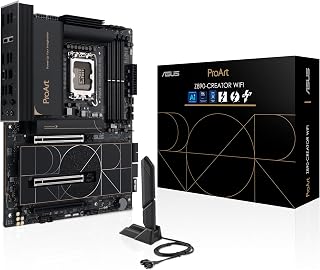
Designed for Intel Core Ultra Series 2 on the Z890 platform, this creator-focused board offers PCIe 5.0, five M.2 slots, and DDR5 memory support up to 9066 MHz, delivering the raw bandwidth that professional video editors and 3D artists need when pairing a Gen 5 SSD with heavy asset pipelines. Thunderbolt 5 Type-C and a 10Gb plus 2.5Gb dual-LAN configuration further ensure that fast NVMe storage speeds are not wasted waiting on peripheral or network transfers.
Pros
- Three M.2 slots with one PCIe 5.0 and thermal coverage
- 12+2+2 phase VRM with DDR5 EXPO support
- Q-Flash Plus enables BIOS recovery without components
- WiFi 6E plus dual Gigabit Ethernet at accessible price
Cons
- 128GB DDR5 maximum lower than competing boards
- B650 chipset lacks some advanced X870 features
The GIGABYTE B650 Eagle AX provides three M.2 slots with one PCIe 5.0 position, giving AM5 builders practical storage expansion without flagship pricing. The single PCIe 5.0 slot accommodates next-generation SSDs while two PCIe 4.0 positions handle additional drives, all protected by thermal solutions that prevent throttling during sustained transfers. DDR5 memory support with AMD EXPO profiles reaches up to 128GB across four slots, and the 12+2+2 phase VRM keeps Ryzen 7000, 8000, and 9000 series processors stable under load. Four PCIe expansion slots add flexibility for GPUs and add-in cards beyond storage. Connectivity includes USB 3.2 Gen2x2 Type-C, WiFi 6E, and dual Gigabit Ethernet for wired redundancy or link aggregation. The Q-Flash Plus feature allows BIOS recovery without CPU or memory installed, reducing update risks. Build quality emphasizes thermal management across VRM and M.2 zones, while the UEFI interface balances accessible controls with advanced tuning options. The B650 chipset positions this board as a value choice that still delivers PCIe 5.0 where it counts. For builders who need one fast SSD slot plus room to grow, this board covers essentials without demanding premium budgets.
Core Specifications: Socket LGA1851 for Intel Core Ultra Series 2 processors, Z890 chipset, 4x DDR5 DIMM slots supporting up to 192GB at 9066MHz, 24-pin main power connector with 8-pin CPU power.
Storage and Expansion: 5x M.2 slots (four PCIe 4.0, one PCIe 5.0), 4x SATA ports, 3x PCIe slots with PCIe 5.0 support on primary GPU slot, extensive USB header support including USB 20Gbps front-panel header.
Connectivity: 2x Thunderbolt 5 ports, 1x Thunderbolt 4 port, 1x 10Gb Ethernet, 1x 2.5Gb Ethernet, WiFi 7, 15x USB ports total, 1x HDMI output, comprehensive audio connectors.
Physical: ATX form factor, 14"W x 11"H x 3.4"L, weight 2.7kg, includes 3-year manufacturer warranty.
Choose this if you're building a Ryzen 7000 or 9000 system and want one PCIe 5.0 M.2 slot plus two more drive positions without overspending. Gamers and creators with moderate storage needs will appreciate the triple-slot configuration and solid VRM. Skip it if you need four or more M.2 slots, or if the 128GB DDR5 limit feels too restrictive. Users wanting cutting-edge chipset features should consider X870 alternatives instead.
What to Look for When Choosing a Motherboard With PCIe 5.0 SSD Slots
Number and Placement of PCIe 5.0 M.2 Slots
Not all motherboards offer the same PCIe 5.0 M.2 configuration. Some boards provide a single PCIe 5.0 slot alongside multiple PCIe 4.0 slots, while others dedicate two or even three slots to Gen 5 speeds.
Check which slot runs at Gen 5 and whether it’s positioned under a heatsink. The first M.2 slot typically gets priority bandwidth, but verify the manual to confirm lane allocation when multiple drives are installed. If you plan to run multiple high-speed SSDs, look for boards that maintain Gen 5 speeds across at least two slots without forcing compromises in PCIe slot bandwidth.
Cooling Solutions for High-Speed Storage
PCIe 5.0 SSDs generate more heat than their predecessors, and sustained thermal throttling will negate the speed advantage. Look for boards with robust M.2 heatsinks that cover all slots, not just the primary one.
Premium boards feature thick aluminum or copper heatsinks with high-conductivity thermal pads. Some designs integrate the M.2 heatsink with the chipset cooler for better airflow. If you’re considering a high-end Intel Z890 board or an AMD X870E model, verify that the thermal solution extends to all M.2 slots rather than leaving secondary slots exposed.
Power Delivery and VRM Design
A motherboard’s VRM determines how well it handles power-hungry CPUs, especially under sustained workloads. Boards with 12-phase or higher VRM designs paired with 80A or greater power stages deliver stable voltage to Ryzen 9000 or Core Ultra processors without thermal stress.
Look for DrMOS or teamed power stage designs with hefty heatsinks. Budget boards often skimp on VRM cooling, which can limit overclocking headroom or cause voltage droop during heavy multitasking. If you’re building a workstation or planning to push your CPU, prioritize boards with robust power delivery and thick VRM heatsinks that connect via heat pipes or large contact surfaces.
Connectivity and Expansion Options
Beyond M.2 slots, evaluate rear I/O and front-panel headers. USB 20Gbps Type-C ports, Thunderbolt 4 or Thunderbolt 5 support, and 2.5Gb or faster Ethernet all matter if you’re moving large files or connecting high-speed peripherals.
Check for WiFi 6E or WiFi 7 if you need wireless connectivity, and confirm the board includes enough fan headers and RGB headers for your cooling setup. Boards like the budget-focused B-series models may offer fewer USB ports or lack Thunderbolt, so match the feature set to your actual workflow rather than paying for connectivity you won’t use.
Final Thoughts
Choosing a motherboard with PCIe 5.0 SSD support comes down to balancing storage speed with the rest of your system’s needs. If you’re building an AMD-based rig and want a solid all-around board with one PCIe 5.0 slot, the ASUS TUF Gaming B650E-PLUS WiFi AMD B650 ATX delivers reliable power delivery and comprehensive cooling without breaking the budget. For Intel builders who need maximum connectivity and multiple Gen 5 slots, the ASUS ProArt Z890-CREATOR WIFI Z890 LGA 1851 ATX brings Thunderbolt 5, dual 10Gb Ethernet, and five M.2 slots with advanced thermal management.
Frequently Asked Questions
Do I really need a PCIe 5.0 SSD slot in 2026?
If you work with large video files, 3D rendering, or database workloads, a PCIe 5.0 SSD can cut transfer times significantly compared to PCIe 4.0 drives. For gaming and general productivity, PCIe 4.0 remains more than adequate. That said, buying a motherboard with at least one PCIe 5.0 slot ensures you won’t need to upgrade the board when faster drives become more affordable.
Can I use a PCIe 4.0 SSD in a PCIe 5.0 slot?
Yes, PCIe is backward compatible. A PCIe 4.0 drive will run at full PCIe 4.0 speeds in a PCIe 5.0 slot with no issues. This makes boards with PCIe 5.0 slots a smart investment even if you’re not ready to purchase a Gen 5 SSD immediately.
What’s the difference between B-series and X-series chipsets for PCIe 5.0 support?
On AMD platforms, B-series chipsets like the B650 and B650E typically offer one or two PCIe 5.0 M.2 slots, while X-series chipsets like the X870E provide more PCIe 5.0 lanes, additional USB ports, and better support for multi-GPU setups. For Intel, Z-series boards deliver unlocked CPU overclocking and more PCIe 5.0 lanes compared to B-series alternatives. Choose based on whether you need the extra connectivity and overclocking features rather than PCIe 5.0 support alone.
How important is M.2 heatsink quality for PCIe 5.0 drives?
PCIe 5.0 SSDs run hotter than PCIe 4.0 models, and inadequate cooling can trigger thermal throttling that reduces sustained write speeds. A quality M.2 heatsink with high-conductivity thermal pads keeps drive temperatures in check during long file transfers or intensive workloads. Boards with integrated heatsinks that connect to the chipset or VRM cooler via heat pipes offer the best thermal performance.


Write Your Review
No reviews yet. Be the first to share your experience!