

Launching a Minecraft world is easy until a Java modpack, distant terrain, shaders, or a busy multiplayer server turns smooth exploration into stutter. The right laptop depends on whether your goal is relaxed Bedrock play, heavily modded Java worlds, or cinematic shader packs with high render distances.
This guide compares capable choices for students, casual builders, and dedicated players who want a machine that can also handle everyday work. If online lag is your bigger concern, pairing your setup with advice from our best WiFi extender for gaming guide can help create a steadier connection.
Quick answer
This guide compares 10 picks, with NEOBIHIER 15.6 Gaming Laptop N95, 16GB RAM, 512GB SSD ranked first. ASUS ROG Strix G16 2025 Gaming Laptop, Intel i7, RTX holds the highest customer rating among them. Acer Aspire 3 15.6 Full HD Laptop | AMD Ryzen 3 7320U has the most customer reviews.

The N95 processor and integrated graphics place this in the ultra-budget category, suitable only for vanilla play or extremely minimal modding. With 512GB of storage, you have space for the launcher and a few small modpacks, but performance will struggle with anything beyond client-side utility mods. RAM and CPU constraints make shader packs and large-scale automation impractical.
Pros
- 16GB RAM provides headroom for lighter mods beyond vanilla requirements
- 512GB SSD ensures fast world loading and chunk generation
- Lightweight 3.5 lb build with 180-degree hinge for flexible positioning
- Anti-glare Full HD display and backlit keyboard for comfortable extended sessions
Cons
- Celeron N95 processor struggles with demanding mods and shader packs
- Integrated graphics cannot handle shader rendering at playable frame rates
For players focused on vanilla Minecraft or lightweight modpacks without demanding shaders, the NEOBIHIER N95 offers an accessible entry point that handles the basics competently. The Intel 12th Gen Celeron N95 running at 3.4GHz provides enough processing power for standard Minecraft gameplay at comfortable frame rates, particularly with Optifine optimization. The 16GB DDR4 RAM exceeds minimum requirements substantially, allowing room for smaller mod collections and multiple applications running alongside the game. The 512GB SSD keeps world saves loading quickly and reduces lag when generating new chunks during exploration. At 3.5 pounds with a 15.6-inch Full HD IPS display, this delivers clear visuals and genuine portability for moving between locations. The anti-glare screen and backlit keyboard support longer play sessions in varied lighting conditions, while the 180-degree hinge adapts to different viewing angles. WiFi connectivity handles multiplayer servers adequately for community gameplay. This works best when expectations stay grounded around lighter gameplay scenarios rather than heavily modded or shader-intensive experiences. The included Windows 11 Pro and basic connectivity through USB 3.0 and mini-HDMI cover essential needs for students or casual players on a strict budget.
Best for casual Minecraft players sticking primarily to vanilla gameplay or very light modpacks without shaders, and students on tight budgets who need a laptop that handles coursework alongside occasional gaming. The 16GB RAM and responsive SSD make it workable for basic Minecraft needs. Skip this entirely if you plan to use any shader packs, run modpacks with more than 30-40 mods, or expect smooth performance in heavily populated multiplayer servers with complex plugins and builds.

Pros
- 16GB RAM handles modded instances comfortably
- RAM and storage both expandable for future modpacks
- Lightweight 1.6kg build is easy to bring to LAN parties or school
- WiFi 6 supports stable multiplayer server connections
Cons
- Integrated graphics limit demanding shader packs
- Sustained performance under long gaming sessions isn't documented
Minecraft is famously forgiving on graphics hardware, which makes this AMD Ryzen 5 7430U laptop a sensible pick for players who stick to vanilla survival, building, or light shader packs rather than ray-traced RTX shaders. The 6-core, 12-thread processor keeps world generation and redstone-heavy builds running smoothly, and 16GB of RAM covers a modded instance with a handful of mods without choking. What really stands out for Minecraft specifically is the upgrade path: RAM expandable to 64GB and storage to 2TB means a player who starts with a few quality-of-life mods can grow into a heavily modded pack later without buying new hardware. The 512GB SSD already handles multiple world saves and resource packs comfortably. WiFi 6 helps with multiplayer server stability, and the numeric keypad is a nice bonus for anyone managing coordinates or crafting recipes. Integrated Radeon graphics means intensive shader packs like Complementary or BSL at high settings will need scaled-back resolution or render distance, but for the broad majority of Minecraft play styles this laptop is well matched.
Processor: AMD Ryzen 5 7430U, 6 cores, 12 threads, up to 4.3GHz
Memory: 16GB LPDDR4, expandable to 64GB dual-channel DDR4
Storage: 512GB M.2 NVMe SSD, upgradeable to 2TB
Graphics: Integrated AMD Radeon Graphics with 2GB DDR4 SDRAM
Display: 15.6-inch FHD LCD, 1920x1080 pixels, thin bezel design
Battery: 54.72Wh lithium-ion, 2.5 to 3-hour full charge
Weight: 1.6kg
Dimensions: 14.07in L x 9in W x 0.66in thickness
Operating System: Windows 11 Pro
Connectivity: WiFi 6 (802.11ax), Bluetooth 5.0
Ports: USB 3.2 x2, Type-C full function x1, HDMI x1, 3.5mm audio/microphone x1, SD card reader x1
Camera: 1x front webcam
Audio: Dual stereo speakers
Keyboard: Backlit gaming keyboard with numeric keypad
Color: Matte grey
Buy this if you play mostly vanilla or lightly modded Minecraft, want room to add mods and worlds over time, and care about portability and battery life for school or travel. Skip it if your goal is running heavy shader packs like SEUS PTGI at high resolution or large modpacks like RLCraft with dozens of concurrent mods, since the integrated graphics will bottleneck those scenarios.

The Ryzen 7 5700U offers solid multi-core performance for hosting small multiplayer servers or running automation-heavy mods locally. With 16GB of RAM, you can allocate 6 to 8GB to Java while keeping the system responsive for background tasks. The 512GB SSD ensures quick world loads and mod initialization, even with dozens of content mods installed.
Pros
- 16GB RAM handles large modpacks and heavy shader loads without crashes
- Ryzen 7 5700U 8-core processor maintains stable frames with intensive mods
- 512GB NVMe SSD provides fast world loading and chunk streaming
- Lightweight 3.6 lb build with comprehensive connectivity for portable setups
Cons
- Integrated graphics limit performance with ultra shader settings and ray tracing
- Battery life requires frequent charging during extended Minecraft sessions
Running Minecraft with demanding shader packs and extensive mod libraries requires both CPU grunt and adequate memory, which this KAIGERR laptop delivers through its AMD Ryzen 7 5700U and 16GB DDR4 configuration. The 8-core processor with turbo speeds reaching 4.3GHz keeps frame rates stable even when rendering complex shader lighting effects and processing hundreds of modded entities simultaneously. That 16GB of RAM is the real advantage here, giving you breathing room for larger modpacks like All The Mods or Enigmatica without constant memory warnings or crashes. The 512GB NVMe SSD ensures fast world loading and smooth chunk streaming as you explore modded dimensions with heavy block varieties. Integrated AMD Radeon graphics handle Minecraft's OpenGL rendering efficiently, delivering playable performance with popular shaders like Complementary or Sildurs Vibrant at medium to high settings. The Full HD display with thin bezels shows off shader detail and modded textures clearly. At 3.6 pounds with a 0.66-inch profile, this stays portable enough for moving between setups. Windows 11 Pro, WiFi 6, and comprehensive connectivity including USB-C and HDMI support external displays and peripherals for expanded workspace during building sessions.
Processor: AMD Ryzen 7 5700U, 8 cores, 16 threads, up to 4.3GHz, 7nm manufacturing, 16MB L3 cache
Memory: 16GB DDR4 SODIMM RAM
Storage: 512GB M.2 2280 NVMe SSD
Display: 15.6-inch Full HD LCD, 1920 x 1080 pixels, 60Hz refresh rate, thin bezels, LED backlight
Graphics: AMD Radeon Integrated Graphics
Connectivity: Wi-Fi 6 (802.11ax), Bluetooth 5.2, HDMI, USB 3.2, Type-C, 3.5mm audio jack, memory card slot
Operating System: Windows 11 Pro
Battery: Solid battery life for daily office work and light use
Weight: 3.6 pounds
Dimensions: 14.06 inches L x 9 inches W x 0.66 inches thick
Power: Type-C 20V/3.25A charging
Ideal for Minecraft players running large modpacks with 100+ mods who need the 16GB RAM to avoid crashes and stuttering, plus those experimenting with multiple shader packs simultaneously. The Ryzen 7 processing power handles heavier computational loads from tech mods and complex redstone. Skip this if you demand cutting-edge RTX ray-tracing shaders at ultra settings, need dedicated GPU horsepower for content creation alongside gaming, or require extended battery life beyond typical office workloads.

The Ryzen 7430U and 16GB of RAM enable smooth performance with lighter mod loaders like Fabric and performance-focused packs. With 512GB of storage, you can maintain multiple profiles for different modding ecosystems without uninstalling between sessions. Integrated graphics limit shader complexity, but the CPU handles logic-heavy mods like Create or Botania efficiently.
Pros
- 16GB RAM handles vanilla Minecraft and light modpacks smoothly
- Slim 0.66-inch profile and light weight for true portability
- 512GB NVMe SSD loads worlds and chunks quickly
- Affordable entry point without sacrificing core specs
Cons
- Integrated graphics limit shader and heavy modpack performance
- 60Hz display restricts competitive gaming experience
Minecraft runs comfortably on modest hardware, and the KAIGERR LX15PRO takes full advantage of that fact to deliver playable performance without a dedicated GPU. The AMD Ryzen 7 7430U running up to 4.3GHz paired with 16GB DDR4 RAM handles vanilla Minecraft easily, maintaining smooth frame rates even in demanding biomes with long render distances. Integrated AMD Radeon graphics manage light shader packs and smaller modpacks without stutter, though you'll need to stay away from heavy resource packs or large-scale technical mods. The 512GB NVMe SSD loads worlds quickly and keeps chunk generation snappy. At 0.66 inches thick and genuinely portable, this laptop works equally well for school, travel, and casual play. The 15.6-inch FHD display provides ample screen space for inventory management and building projects. The 60Hz refresh rate limits competitive PvP performance but won't impact single-player or cooperative building. Windows 11 Pro, WiFi 6, and solid port selection round out a practical package. This laptop prioritizes affordability and everyday versatility over gaming power, making it a sensible choice for players who spend more time crafting than competing.
Display: 15.6-inch FHD LCD, 1920x1080 pixels, 60Hz refresh rate with thin-bezel design
Processor: AMD Ryzen 7 (6-core), base 3.7GHz, up to 4.3GHz maximum
Memory: 16GB DDR4 SODIMM RAM (upgradeable up to 64GB)
Storage: 512GB M.2 NVMe SSD
Graphics: Integrated AMD Radeon Graphics at up to 1200MHz
Operating System: Windows 11 Pro pre-installed
Connectivity: WiFi 6, Bluetooth 5.2, HDMI, USB 3.2, Type-C, 3.5mm audio jack, memory card slot
Battery: 54.72 watt-hours lithium-ion
Dimensions: 14.06 inches L x 9 inches W x 0.66 inches thick
Model: KAIGERR LX15PRO, manufactured by Shenzhen CYX Industrial Co., Ltd.

The AMD Ryzen 5 7535HS brings strong single-thread performance that directly improves chunk loading and tick rate in vanilla and lightly modded play. With 8GB DDR5, you have enough headroom for smaller modpacks and basic shaders on a budget. The integrated Radeon 660M graphics can handle Optifine shaders at lower settings for casual players.
Pros
- Ryzen 5 7535HS handles moderate shaders and mod packs smoothly
- 3-5 hour battery life during gameplay supports portable Minecraft sessions
- Slim 0.7-inch profile and lightweight build for easy transport
- Fast SSD reduces chunk loading stutter and world load times
Cons
- 8GB RAM limits heavy modpack performance and multitasking headroom
- Radeon 660M caps shader quality at moderate settings with playable frames
Minecraft with mods and shaders demands processing headroom and consistent frame delivery, which is where the Lenovo IdeaPad Slim 3 15's AMD Ryzen 5 7535HS and Radeon 660M integrated graphics come into play. This combination handles vanilla Minecraft at high frame rates and maintains playability with moderate shader packs like BSL or Complementary at reduced render distances. The 8GB DDR5 RAM keeps lighter mod packs running smoothly, though heavy modded instances with 100+ mods will push this limit. The 256GB SSD loads worlds and chunks quickly, reducing stuttering when exploring new terrain. Battery life stretches to 3-5 hours during active gameplay, making this genuinely portable for LAN parties or dorm gaming. The 15.3-inch IPS display with wide viewing angles shows off shader lighting and texture detail clearly, while WiFi 6 ensures low-latency multiplayer. At 0.7 inches thick and 15.3 inches across, it fits in most backpacks without the bulk of dedicated gaming machines. The Luna Grey finish and slim profile won't scream gamer in a classroom or library, which matters if you're alternating between coursework and Minecraft sessions.
Processor: AMD Ryzen 5 7535HS, 6-core, 3.3 GHz base frequency
Memory: 8GB DDR5 RAM
Storage: 256GB PCIe SSD
Display: 15.3-inch Full HD+ IPS LCD, 1920x1080 native resolution, 60Hz refresh rate
Graphics: AMD Radeon 660M integrated graphics with shared VRAM
Battery: Up to 8 hours mixed use, 3-5 hours gaming
Connectivity: WiFi 6 (802.11ax), Bluetooth 5.3, HDMI, USB-C with fast charging, USB-A, 3.5mm audio jack
Operating System: Windows 11 Home pre-installed
Dimensions: 13.52 inches L x 9.51 inches W x 0.7 inches thickness
Color: Luna Grey
Best suited for students and casual Minecraft players who want reliable performance with lighter shader packs and small to mid-sized mod collections without carrying a heavy gaming rig. The portability, battery life, and Ryzen 5 processing make it ideal for dorm setups and mobile play. Skip this if you're running massive modpacks with 150+ mods, demand ultra settings with high-end shaders like SEUS PTGI, or need more than 8GB RAM for simultaneous streaming and recording while playing.
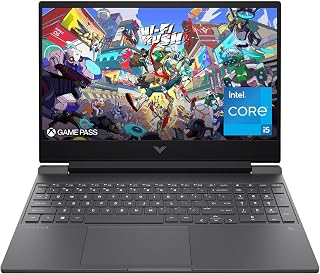
The RTX 3050 provides dedicated graphics acceleration that handles shader rendering and particle effects far better than integrated options. With 16GB of RAM, you can allocate generous memory to Java while running Discord and a browser alongside your game. The 144Hz display ensures you see every frame when exploring builds or engaging in PvP on modded servers.
Pros
- RTX 3050 handles shader packs and mods at 1080p
- 16GB RAM supports large modpack collections
- 144Hz display makes camera movement smooth
- Spill-resistant keyboard adds durability
Cons
- Battery drains quickly during gaming
- RTX 3050 struggles with extreme shader settings
Minecraft with mods and shaders demands more GPU headroom than vanilla gameplay, and the HP Victus delivers exactly that with its RTX 3050 and 144Hz display. The dedicated graphics handle shader packs like BSL and Complementary at playable frame rates, while the 16GB RAM lets you load extensive mod collections without stuttering. The i5-12450H keeps chunk loading smooth even in heavily modded worlds with dozens of entities. The 144Hz screen makes camera movement feel responsive during building or exploration, a noticeable upgrade from standard 60Hz panels. The anti-glare coating reduces eye strain during long sessions, and the spill-resistant keyboard adds peace of mind if you're gaming near drinks. Wi-Fi 6 keeps multiplayer servers stable. The 512GB SSD provides enough room for Minecraft installations, mod libraries, and shader downloads without constant cleanup. At 7 pounds, it remains portable enough for LAN parties or travel. The Performance Blue finish gives it a distinct look. Battery life drops during gaming, so plan to stay plugged in for extended modded sessions. The RTX 3050 is entry-level but proves capable for Minecraft's specific rendering demands.
The RTX 3050 6GB graphics card excels at 1080p gaming, comfortably running popular esports titles like Valorant, CS2, and Fortnite at high framerates. Modern AAA games like Cyberpunk 2077 and Starfield play at medium to high settings with 60+ fps, while demanding titles may require lowering settings to maintain smooth 144Hz performance.
The 144Hz display takes full advantage of the GPU capabilities, delivering noticeably smoother motion compared to standard 60Hz screens. This is particularly beneficial for competitive gaming where responsiveness matters. The anti-glare matte finish reduces reflections during long gaming sessions, minimizing eye fatigue.
Processor: Intel Core i5-12450H (4.4GHz)
Graphics: NVIDIA GeForce RTX 3050 6GB GDDR6
Display: 15.6" FHD IPS (1920x1080) 144Hz with anti-glare coating
Memory: 16GB DDR4-3200
Storage: 512GB PCIe SSD
Connectivity: Wi-Fi 6, Bluetooth
Ports: HDMI output, USB Power Delivery
Weight: 7 pounds
OS: Windows 11 Pro
Battery: Limited capacity for gaming use

The RTX 5060 GPU and 16GB DDR5 memory deliver the horsepower needed for demanding shader packs and large modded worlds without stuttering. The 165Hz display at FHD+ resolution ensures smooth frame delivery even when dozens of mods are active. With 1TB of Gen 4 SSD storage, you can maintain multiple modded instances and shader collections without constantly managing disk space.
Pros
- RTX 5060 and i7 14650HX handle extreme shaders and modpacks effortlessly
- 165Hz 16:10 display provides fluid gameplay with extra vertical space
- Advanced cooling keeps performance consistent during long sessions
- 16GB DDR5 and 1TB SSD eliminate loading and multitasking bottlenecks
Cons
- 2-hour battery life limits unplugged gaming
- Overkill performance for vanilla or lightly modded gameplay
The ASUS ROG Strix G16 2025 is built for players who want Minecraft with everything turned up and running flawlessly. The RTX 5060 with 8GB GDDR6 VRAM and Intel Core i7 14650HX processor tear through even the most demanding shader packs and massive modpacks with hundreds of mods active simultaneously. DLSS 4 support pushes performance further when running complex shaders like Continuum or SEUS PTGI, maintaining high frame rates that fully utilize the 165Hz FHD+ display. The 16GB DDR5 RAM and 1TB Gen 4 SSD handle world loading, chunk generation, and background mod processes without hesitation. The ROG Intelligent Cooling system with vapor chamber and liquid metal keeps temperatures controlled during extended building sessions or technical redstone projects, ensuring consistent performance. The 16-inch 16:10 aspect ratio provides extra vertical space for inventory management and crafting interfaces. Wi-Fi 7 ensures low-latency multiplayer performance on modded servers. At 2.65kg, this laptop remains transportable for LAN events or travel despite its power. The main tradeoff is the 2-hour battery life, which means you'll stay tethered to power during serious play sessions. The RTX 5060 also represents a fixed performance ceiling, though it comfortably exceeds what Minecraft typically demands.
Processor: Intel Core i7 14650HX (16 cores, 2.2 GHz base)
Graphics: NVIDIA GeForce RTX 5060 (8GB GDDR5, DLSS 4)
Display: 16 inch FHD+ (1920x1200) 165Hz IPS LED, 3ms response time
Memory: 16GB DDR5-5600MHz (upgradeable)
Storage: 1TB PCIe Gen 4 SSD (upgradeable)
Connectivity: Wi-Fi 7 (802.11be), USB ports, HDMI output
Audio: Dolby Atmos speakers
Keyboard: Gaming-grade QWERTY with RGB
Battery: 90Wh Lithium-Ion, 2 hours gaming, 50 hours standby
Weight: 2.65kg
Dimensions: 13.94 x 10.55 x 0.9 inches
OS: Windows 11 Home
Warranty: Limited
Best for dedicated Minecraft players who run massive modpacks, extreme shaders, and want performance headroom for content creation or streaming. Ideal if you play on heavily modded multiplayer servers, build complex technical projects, or want the smoothest possible experience with every visual enhancement maxed out. Skip this if you play vanilla or lightly modded Minecraft, where this level of power becomes unnecessary and expensive. Also reconsider if you need long battery life for unplugged gaming sessions away from power outlets.

The RTX 3050 offers dedicated VRAM that prevents texture thrashing when loading high-resolution resource packs and shaders simultaneously. Enhanced thermals keep the CPU and GPU cool during extended build sessions or server hosting. The 512GB SSD provides enough room for the base game plus several curated modpacks without requiring external storage.
Pros
- RTX 3050 runs shader packs at 1080p effectively
- i5-12500H handles chunk loading and mod processes
- IPS display shows shader colors accurately
- Enhanced thermals maintain stability during gameplay
Cons
- 8GB RAM limits headroom for heavy mod and shader combos
- Storage may need expansion for large mod libraries
The HP Victus 15 brings dedicated RTX 3050 graphics to Minecraft modding without demanding premium investment. Shader packs transform Minecraft's visuals but require real GPU power, and the RTX 3050 delivers enough to run popular options like SEUS or Complementary at medium to high settings. The i5-12500H handles background mod processes and chunk generation without bottlenecking, keeping gameplay fluid even in complex modded environments. The Full HD IPS display shows off shader lighting and color accurately from wide viewing angles, making builds look as intended. At 2.29kg, this laptop travels reasonably well for multiplayer sessions or gaming away from home. The backlit keyboard helps during evening sessions, and the fingerprint reader adds convenient security. Windows 11 Home provides a modern foundation. The 512GB SSD holds multiple Minecraft versions, mod repositories, and resource packs comfortably. Enhanced thermals keep the system stable during extended gameplay. The 8GB RAM configuration runs current modpacks adequately but feels tighter when combining heavy mods with shader packs simultaneously. Storage expansion may become necessary for players who collect large mod libraries over time.
Processor: Intel Core i5-12500H (12th Generation)
Graphics: NVIDIA GeForce RTX 3050 with 8GB DDR4 SDRAM
RAM: 8GB DDR4 Memory
Storage: 512GB SSD
Display: 15.6-inch Full HD IPS (1920x1080), 178-degree viewing angles
Operating System: Windows 11 Home
Connectivity: Wi-Fi 5 (802.11ac), Bluetooth, 3x USB ports, 1x HDMI
Weight: 2.29kg
Dimensions: 14.09 inches length x 10.04 inches width x 0.93 inches depth
Security: Fingerprint recognition, Windows 11 security features
Battery: Integrated lithium battery power
What Games Will It Handle?
The RTX 3050 is optimized for competitive and indie gaming at 1080p resolution. You can expect smooth performance in esports titles like Valorant, Fortnite, and CS:GO at high or ultra settings. Demanding AAA titles like Cyberpunk 2077 or Starfield will run at medium settings at playable framerates, though you'll need to balance settings for consistently smooth 60+ fps.
Real-World Performance:
This laptop excels at gaming sessions of 2-4 hours, with the dedicated GPU handling thermal loads efficiently. The 12th-gen Intel processor pairs well with the RTX 3050, eliminating CPU bottlenecking for most 1080p gaming scenarios. For content creation like streaming or video editing while gaming, 8GB RAM is functional but may cause stuttering during demanding renders.
Productivity Beyond Gaming:
The combination of processor and SSD makes this laptop equally capable for office work, video conferencing, software development, and creative tasks. Multitasking across browsers, applications, and lightweight creative software runs smoothly, though heavy video editing or 3D rendering will benefit from future RAM upgrades.
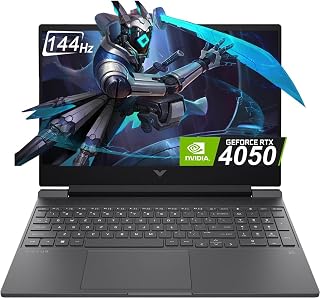
The RTX 4050 with 6GB of dedicated memory handles ray-traced shaders and complex lighting mods with far better stability than previous-gen cards. Paired with 16GB of system RAM, you can run heavy modpacks like All the Mods or Create without hitting memory limits. The 144Hz panel keeps motion fluid when flying with an elytra or navigating dense modded biomes.
Pros
- RTX 4050 handles demanding shaders and large modpacks smoothly
- 144Hz display delivers fluid, responsive gameplay
- 16GB RAM and fast SSD prevent bottlenecks in modded worlds
- Portable at 2.33kg with professional build quality
Cons
- RTX 4050 may struggle with extreme shader and modpack combinations
- 1080p resolution feels standard rather than premium
The HP Victus 15.6 brings dedicated GPU power to Minecraft at a reasonable price point, making it capable of handling heavy shader packs and large modpacks that would choke integrated graphics. The NVIDIA RTX 4050 with 6GB GDDR6 VRAM runs demanding shaders like Complementary or BSL at high settings while maintaining playable frame rates, and the 144Hz FHD display makes every movement feel responsive and fluid. The Intel Core i5-13420H paired with 16GB DDR4 RAM handles modpacks with hundreds of mods without bottlenecking, keeping background processes and world generation smooth. The PCIe Gen4 SSD ensures fast world loading and minimal stuttering during chunk generation. At 2.33kg and 0.83 inches thick, this laptop remains portable enough for LAN parties or travel without feeling like a burden. The backlit keyboard works well for late-night building sessions, and the anti-glare display reduces eye strain during extended play. The main limitation is the RTX 4050's ceiling with extremely demanding shader combinations or massive modpacks that push CPU and GPU limits simultaneously. However, for most Minecraft players exploring shaders, technical mods, and content creation, this laptop delivers smooth performance with headroom to spare.
The RTX 4050 with 6GB GDDR6 VRAM provides capable 1080p gaming across most modern titles. Expect 100+ fps in competitive shooters like Valorant and CS2, smooth 60+ fps in mid-tier AAA games at high settings, and solid performance in esports titles where frame rate matters most.
The 144Hz display paired with a GPU capable of pushing high frame rates creates a genuinely responsive gaming experience. The i5-13420H handles CPU-intensive games well, with good thermal management thanks to HP's Victus cooling design. Gaming sessions remain quiet and stable without thermal throttling issues.
For demanding games or max-setting gameplay, consider lowering resolution scaling or graphics presets. This laptop excels when you prioritize smooth performance over visual maximums, a practical choice for competitive gaming environments.
Processor: 13th Gen Intel Core i5-13420H (8 cores, powerful for multitasking and gaming)
GPU: NVIDIA GeForce RTX 4050 6GB GDDR6 dedicated (excellent 1080p performance)
RAM: 16GB DDR4 (sufficient for gaming and content creation)
Storage: 512GB PCIe Gen4 NVMe SSD (fast boot and load times)
Display: 15.6-inch FHD IPS, 1920x1080, 144Hz, anti-glare (smooth, clear gaming visuals)
Connectivity: WiFi 6, Bluetooth 5.0, 3x USB ports, 1x HDMI, front camera
Design: 2.33kg weight, 0.83-inch thickness, mica silver finish
OS: Windows 11 Home (latest OS with gaming optimizations)

The Ryzen 3 7320U and 8GB of memory provide just enough capability for vanilla gameplay with Optifine and a handful of quality-of-life mods. The 128GB SSD limits how many modpacks you can store simultaneously, making this best suited for players who stick to one or two lightweight configurations. Integrated Radeon graphics handle basic shaders at reduced render distances.
Pros
- Handles vanilla Minecraft and light modpacks smoothly
- Extremely portable at 3.9 pounds
- Battery life supports extended sessions unplugged
- Wi-Fi 6 keeps multiplayer stable
Cons
- 128GB storage fills quickly with mods and worlds
- Integrated graphics cannot handle shader packs
The Acer Aspire 3 handles vanilla Minecraft and light modding thanks to its Ryzen 3 7320U and integrated Radeon Graphics, though it won't satisfy shader enthusiasts. The integrated GPU manages Minecraft at native resolution with Optifine, delivering playable frame rates in vanilla worlds and small modpacks. The 8GB LPDDR5 memory keeps the game responsive during typical gameplay, though heavy mod collections will push limits. The Full HD IPS display shows blocks and builds clearly with natural colors, and the matte finish reduces glare during daytime sessions. At 3.9 pounds and under an inch thick, this laptop travels easily to friends' houses or school. The Ryzen 3 7320U provides enough processing for Minecraft's single-threaded demands without overheating. Wi-Fi 6 keeps multiplayer connections stable. Battery life impresses during lighter gameplay, offering extended sessions away from outlets. The backlit keyboard adds convenience for evening play. The 128GB SSD becomes the primary constraint, filling quickly with Minecraft installations, mod files, and worlds. Shader packs remain largely out of reach due to integrated graphics limitations. Occasional screen blackouts reported by some users suggest potential stability concerns during intensive moments.
Processor: AMD Ryzen 3 7320U Quad-Core with Radeon Graphics
Memory: 8GB LPDDR5 onboard RAM
Storage: 128GB NVMe SSD
Display: 15.6-inch Full HD IPS LCD, 1920x1080 resolution, 60Hz refresh rate, matte finish with narrow bezels
Graphics: Integrated AMD Radeon Graphics with shared system memory
Connectivity: Wi-Fi 6 (802.11ax), Bluetooth 5.2, 2 USB 3.2 ports, 1 USB-C port, 1 HDMI port, 1 DisplayPort
Audio: Built-in speakers and headphone/mic jack
Camera: HD front-facing webcam with Temporal Noise Reduction
Operating System: Windows 11 Home in S mode
Dimensions: 14.29 inches (L) x 9.35 inches (W) x 0.74 inches (H)
Weight: 3.9 pounds
Battery: All-day battery life
Warranty: Limited warranty included
How to Choose a Laptop for Minecraft
Match the Processor and Graphics to Your Minecraft Style
Minecraft relies heavily on processor performance, especially in Java Edition when you add mods, entities, servers, and far-reaching chunks. Integrated Radeon graphics can be a sensible fit for vanilla play, Bedrock Edition, and modest settings, while demanding shader packs benefit greatly from a dedicated NVIDIA graphics card.
The Gaming Laptop, N95, Gray and acer Aspire 3 A315-24P-R7VH Slim Laptop are better suited to uncomplicated worlds and lighter visual settings. For substantially more graphics headroom, the ASUS ROG Strix G16 Gaming Laptop combines an Intel Core i7 processor with an RTX 5060, while the HP Victus 15.6 inch FHD 144Hz Gaming Laptop Intel includes an RTX 4050 for shader-focused play.
Prioritize Memory and Fast SSD Space for Mods
We recommend 16GB of RAM if you intend to use sizable modpacks, run Discord alongside the game, keep browser tabs open, or host a local world. More memory gives the system breathing room, reducing the chance that background tasks distract from your play session.
The MALLRACE Gaming Laptop,16GB RAM 512GB SSD Laptop and both KAIGERR light gaming configurations start with 16GB of memory and a 512GB NVMe SSD. The Light Gaming Laptop, ΑΜD Ryzen 7 5700U adds an eight-core, 16-thread processor, while the Light Gaming Laptop, ΑΜD Ryzen 7430U offers a capable integrated-graphics route. The Lenovo 15 Gaming Laptop, AMD Ryzen 5 7535HS begins with 8GB and a 256GB SSD, so its capacity deserves extra thought if you expect your mod library and saved worlds to grow.
Choose a Clear Display, Then Consider an External Monitor
A Full HD IPS display is an excellent baseline for Minecraft because it keeps text, inventory items, and distant builds clear without placing unnecessary strain on the graphics hardware. A 144Hz or 165Hz panel can make mouse movement and camera panning feel more fluid, although Minecraft does not require a high refresh rate to be enjoyable.
The HP Victus 15.6 inch FHD 144Hz Gaming Laptop and HP Victus 15 Gaming Laptop offer 144Hz Full HD screens, while the ROG Strix G16 reaches 165Hz. If your laptop will become part of a desk setup, our best budget 1440p monitor picks explain what to look for in a sharper external display. Players who also spend time in fast shooters may appreciate our guide to the best monitor for competitive FPS gaming.
Do Not Overlook Cooling, Ports, and Wireless Support
Long gaming sessions generate heat, particularly on systems with dedicated graphics, so a well-designed thermal setup helps sustained performance. The ROG Strix G16 uses a vapor chamber, tri-fan cooling, and liquid metal, while the Victus models are built around gaming-oriented cooling and displays. These details matter more once shaders, high render distances, and other demanding settings enter the picture.
Useful connections include HDMI for an external display, Type-C for modern accessories, multiple USB ports for a mouse and storage, plus WiFi 6 for reliable wireless play. The MALLRACE model offers WiFi 6, HDMI, Type-C, and a backlit keyboard, while the KAIGERR systems include HDMI, Type-C, USB 3.2, WiFi 6, and Bluetooth 5.2. If your broader setup includes demanding games beyond Minecraft, our guide to 4K 240Hz monitors can help you decide whether a premium external screen suits your desk.
Final Thoughts
Choose the HP Victus 15.6 inch FHD 144Hz Gaming Laptop Intel if you want dedicated graphics for ambitious shaders and modded Java worlds. For a versatile everyday machine that is better aligned with vanilla Minecraft, lighter settings, schoolwork, and casual gaming, the MALLRACE Gaming Laptop,16GB RAM 512GB SSD Laptop offers a well-rounded memory and storage configuration.
Frequently Asked Questions
How much RAM do I need for Minecraft mods?
For vanilla Minecraft, 8GB of system memory can work, particularly when few other apps are active. For Java modpacks, shaders, streaming, or multitasking, 16GB is the more practical target. It gives Minecraft room to load more assets while leaving capacity for your operating system and background programs.
Can an integrated graphics laptop run Minecraft?
Yes, an integrated-graphics laptop can run Minecraft well for vanilla worlds, Bedrock Edition, and sensible render-distance settings. Models with modern Ryzen processors and Radeon graphics are generally more appealing than basic entry-level chips for this purpose. Keep shader packs, heavily modded instances, and ultra-high visual settings modest unless the laptop has dedicated graphics.
Do I need a 144Hz laptop screen for Minecraft?
No, a standard Full HD screen is enough for enjoyable Minecraft sessions. A 144Hz panel is a welcome extra if you prefer smoother movement or regularly switch to faster-paced games. For a separate esports display, see our best 500Hz monitor picks for competitive gamers to understand when extremely high refresh rates are worthwhile.
What laptop specs should I prioritize for Minecraft in 2026?
Start with a modern processor, a 512GB SSD, and 16GB of RAM if mods are part of your plan. Add an RTX graphics card when shader packs, high-resolution resource packs, or broader PC gaming are priorities. For straightforward survival worlds and building projects, integrated Radeon graphics with a capable Ryzen processor can be sufficient and easier to carry.








Write Your Review
No reviews yet. Be the first to share your experience!