

Whether you are a student rushing between lectures, a remote worker hopping between cafes, or a frequent traveler who lives out of a carry-on, a heavy laptop slows you down fast. The good news is that today’s slim, lightweight machines deliver real performance without the bulk. From budget-friendly Chromebooks to AI-powered ultrabooks, the market has never had more solid options. If you are also building out a full workstation setup at home, check out the Laptops category for more gear recommendations.
We evaluated ten portable laptops across a range of use cases, from everyday browsing and schoolwork to creative workflows and AI-assisted productivity. This guide is for anyone who wants a machine they can actually carry comfortably and rely on throughout the day.
Quick answer
This guide compares 10 picks, with 15.6in AI Laptop with Windows 11, Office 365, 6GB RAM ranked first. Apple MacBook Air 13-inch M5 2026 16GB RAM 512GB SSD holds the highest customer rating among them. Lenovo 14" FHD Touchscreen Chromebook, MediaTek has the most customer reviews.

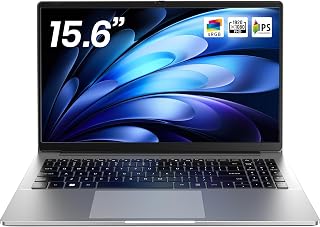
This 15.6-inch option includes a year of Office 365, making it immediately productive for users who need Microsoft's suite out of the box. The 6GB RAM and 128GB SSD handle standard productivity tasks comfortably, while the numeric keypad benefits users working with spreadsheets or financial data. Its lightweight construction and integrated Intel UHD Graphics 600 strike a balance between portability and functionality for budget-conscious students or small business owners.
Pros
- 15.6-inch 1080p IPS display with comfortable viewing angles
- Lightweight build maintains portability despite larger screen
- 7000mAh battery supports full work or school days
- Numeric keypad and 180-degree hinge add practical functionality
Cons
- Celeron J4105 processor not suited for creative or demanding applications
- 128GB base storage requires expansion planning for media libraries
The 15.6-inch screen gives you workspace real estate while the lightweight chassis keeps portability practical for students and mobile workers. That 1920x1080 IPS display offers clear text rendering and comfortable viewing angles for document editing and spreadsheet work, while the dedicated numeric keypad speeds data entry without external peripherals. The Celeron J4105 processor handles Office applications, web browsing, and email smoothly, and the 128GB SSD ensures fast boot times and responsive application launches. The 7000mAh battery capacity supports full academic or office days without constant charging interruptions. Windows 11 arrives pre-installed with AI-assisted features for writing and task management, and the included year of Office 365 removes immediate software costs. The 180-degree hinge design lets you lay the screen flat for collaborative work and presentations, a genuinely useful feature for group projects. Connectivity includes USB 3.2, USB Type-C, Mini HDMI, Wi-Fi 5, and Bluetooth 4.2 for mice, external drives, and displays. Storage expansion options reach 2TB SSD and 1TB microSD, addressing the base capacity limitation. This laptop delivers functional portability without premium pricing, targeting users who prioritize battery life, included software, and practical features over raw processing capability.
Display: 15.6 inch FHD IPS, 1920x1080 resolution, 300 nit brightness, narrow-bezel design
Processor: Intel Celeron J4105, 4-core, 2.5 GHz base speed
Memory: 6GB DDR4 RAM
Storage: 128GB M.2 SSD, expandable to 2TB plus 1TB microSD card support
Graphics: Intel UHD Graphics 600 (integrated)
Battery: 7000mAh capacity
Connectivity: USB 3.2, USB Type-C, Mini HDMI, 3.5mm audio jack, Wi-Fi 5 (802.11ac), Bluetooth 4.2
Operating System: Windows 11 Home with 1-year Office 365 subscription
Design: Space Gray color, 14in L x 9in W x 0.8in thick, 180-degree hinge
Audio: HD audio with 3.5mm jack
Warranty: 1-year limited warranty with 24/7 customer support
Buy this if you need affordable lightweight computing for productivity tasks, online learning, and document work with a larger display and full keyboard layout. Students, home office workers, and anyone managing spreadsheets or data entry will value the numeric keypad and battery endurance. Skip it if you plan to edit video, run creative applications, play modern games, or frequently multitask with demanding software that requires more processing power than the Celeron J4105 provides.

The 16-inch screen provides generous workspace while the 9000mAh battery delivers extended runtime for users who work remotely or travel frequently. Its AMD A9-9400 processor with Radeon R5 graphics handles everyday computing and light multimedia tasks effectively, while the expandability to 1TB storage accommodates growing file collections. Dual-band WiFi and USB 3.0 ensure modern connectivity standards despite the budget-friendly positioning, making it practical for users seeking size without excessive weight.
Pros
- Slim and lightweight for a 16-inch display
- 9000mAh battery for all-day use
- Storage expandable to 1TB
- Numeric keypad and USB 3.0 included
Cons
- 8GB RAM may limit heavy multitasking
- Integrated graphics not suited for demanding visuals
When portability matters most, this 16-inch laptop offers a rare combination of large screen real estate without the typical bulk. The AMD A9-9400 with Radeon R5 graphics handles everyday computing with speeds reaching 3.2 GHz, while the 256GB SSD ensures quick boots and file access. Storage expands to 1TB if you need more room down the line. The 9000mAh battery provides solid endurance for a full day of work or classes, and the slim profile makes it easier to slip into a bag than most machines in this size category. You get a full numeric keypad for spreadsheet work, USB 3.0 ports for fast transfers, and dual-band WiFi for reliable connectivity. Windows 11 comes pre-installed, and the integrated graphics paired with 8GB DDR memory keep multitasking smooth for business tasks, streaming, and student workloads. The lightweight build is the standout here, making this a practical choice when you need a bigger display but refuse to lug around a heavy workstation.
Display and Graphics: 16-inch Full HD IPS LCD with 1920x1080 resolution, 93% screen-to-body ratio, AMD Radeon R5 integrated graphics with 1GB dedicated memory
Performance and Storage: AMD A9-9400 processor up to 3.2GHz with 4 cores, 8GB DDR3 SDRAM, 256GB SSD storage, expandable to 1TB via microSD card slot
Design and Battery: Ultra-slim 1.5cm thickness, lightweight 1.4kg design, 9000mAh lithium-polymer battery (38 watt-hours), HD audio system
Connectivity and Ports: Dual-band WiFi 802.11ac, 2x USB 3.0 ports, webcam, microphone, numeric keypad, compatible with mice, keyboards, external displays, printers, headphones, and storage devices
Operating System and Support: Windows 11, lifetime technical support, 365-day warranty, 12-hour response time for customer inquiries
Students and business users who want a 16-inch screen without the weight penalty will appreciate the portability and numeric keypad. It fits those doing document work, research, presentations, and light media consumption. Skip this if you need high-performance graphics for video editing or gaming, or if you require more than 8GB of RAM out of the box. Power users and creative professionals should look elsewhere for more robust specs.

At just 128GB storage and 4GB RAM, this model strips down to essentials for maximum portability. The Intel N150 processor handles basic tasks like web browsing and document editing efficiently, while the anti-glare coating reduces eye strain during extended use. Its Willow Green colorway and compact 14-inch form make it an approachable choice for students or casual users who prioritize mobility and simplicity over raw performance.
Pros
- 3.24 pounds makes daily carrying manageable
- 11-hour battery handles full school or work days
- 128GB SSD provides responsive boot and application launch times
- Anti-glare 1080p display reduces eye strain during extended use
Cons
- 4GB RAM struggles with heavy multitasking and many open tabs
- Intel N150 processor not suitable for creative work or gaming
Lightweight computing doesn't always require premium pricing, and the HP 14 proves that at 3.24 pounds with practical portability features. The Intel N150 processor paired with 4GB DDR5 RAM manages web browsing, email, document work, and video streaming without drama, while the 128GB SSD ensures the system boots quickly and feels responsive during typical workflows. That 14-inch 1080p display with anti-glare coating makes extended typing sessions comfortable in various lighting conditions, reducing eye strain during full work days. The 11-hour battery rating delivers real endurance for students and office workers, keeping pace with most academic schedules without outlet hunting. Connectivity covers the essentials with USB-C, USB-A, HDMI, and a microSD card reader for storage expansion and peripheral attachment. The Willow Green finish adds personality without looking unprofessional. Build quality feels solid for this segment, and the included Microsoft 365 subscription removes an additional software cost. This machine targets users who understand the tradeoffs inherent in budget computing and prioritize genuine portability, adequate battery life, and everyday reliability over processing headroom or storage abundance.
Processor: Intel N150, 4-core, up to 4.6 GHz
Memory: 4GB DDR5 SDRAM
Storage: 128GB SSD (PCIe x4)
Display: 14-inch HD (1920x1080), anti-glare, 250 nits, LCD
Graphics: Intel Integrated Graphics
Battery: Up to 11 hours
Weight: 3.24 lbs
Dimensions: 12.76in (L) x 8.86in (W) x 0.71in (H)
Operating System: Windows 11
Connectivity: Wi-Fi 802.11 a/b/g/n/ac, Bluetooth, 1x USB-C, 2x USB-A, 1x HDMI, 1x headphone/mic combo jack
Camera: 720p HD webcam
Audio: Dual speakers with HD audio
Color: Willow Green
Included: One year Microsoft 365
Buy this if you need affordable portability for document work, web research, email, and video calls without heavy applications or multitasking demands. Students on tight budgets and remote workers with basic computing needs will appreciate the weight, battery life, and included Office software. Skip it if you regularly work with many browser tabs open simultaneously, edit photos or video, store large media libraries locally, or run demanding applications that require more RAM and processing power.

This option delivers portability without sacrificing screen size, pairing a 15.6-inch FHD display with a design explicitly marketed as lightweight. The 16GB RAM ensures smooth multitasking for students and business users, while the 5000mAh battery provides dependable runtime for those working away from outlets. Windows 11 Pro adds enterprise-grade security and remote desktop capabilities, making it suitable for professionals who need a larger display in a travel-friendly form factor.
Pros
- Weighs just 3 pounds, genuinely light for a 15.6-inch laptop
- Windows 11 Pro and 16GB RAM ready out of the box
- MicroSD slot expands storage up to 1TB
- Full HD 1920x1080 display for clear everyday viewing
Cons
- Battery life tops out around 4 hours, requiring a midday charge on long days
- Entry-level M3-6Y30 processor is not suited for demanding or performance-heavy tasks
When lightweight portability is the priority, the NAIKLULU 15.6-inch checks the most important box first: at just 3 pounds, it is one of the lightest options in its screen-size class, slipping into a backpack without adding noticeable bulk. The 0.78-inch slim profile reinforces that everyday carry appeal. Windows 11 Pro comes preloaded, so there is nothing to set up before getting to work. The M3-6Y30 processor keeps pace with the tasks most users actually need on the move: web browsing, email, document editing, spreadsheets, and video calls all run without lag. Sixteen gigabytes of RAM means juggling multiple browser tabs and apps stays smooth, and the 256GB SSD keeps load times short. The 15.6-inch Full HD 1920x1080 display is clear and sharp enough for lectures, presentations, or streaming on the road. A microSD slot extends storage up to 1TB if the base capacity runs tight. WiFi 5 and Bluetooth 4.2 cover standard wireless needs. The main consideration for a lightweight-focused buyer is battery life, which peaks around 4 hours at full brightness, meaning a charger stays part of the daily carry.
A good fit for students, commuters, and light business users who want a full-sized screen in a sub-3-pound frame without overspending. Windows 11 Pro and the numeric keypad add practical value for office work. Skip it if you need all-day battery life away from an outlet, run processor-intensive software, or need a machine that can handle demanding creative or technical workloads.
Processor: M3-6Y30 dual-core, quad-thread, 2.2GHz max frequency, 7W TDP
Display: 15.6-inch FHD LCD, 1920x1080 resolution, 250 nit brightness, glossy finish
Memory: 16GB RAM (SODIMM)
Storage: 256GB SSD, expandable up to 1TB via microSD card
Battery: 7.7V 5000mAh lithium-polymer, up to 4 hours runtime
Connectivity: WiFi 5 (802.11ac), Bluetooth 4.2, dual USB 3.0, mini HDMI
Operating System: Windows 11 Pro
Security: Fingerprint recognition, front-facing camera
Weight: 3.5 pounds
Dimensions: 14.09 x 9.89 x 0.78 inches
Other: Built-in stereo speakers, analog microphone, numeric keypad
Pros
- Silent fanless cooling keeps noise levels at zero for distraction-free work
- FHD IPS display delivers crisp colors and wide viewing angles at this price point
- Lightweight and compact design fits easily into backpacks for daily commuting
- Type-C PD fast charging is more convenient than older laptop charging standards
- Windows 11 Home provides a modern, secure operating system out of the box
Cons
- 4GB RAM and Celeron N4020 processor limit heavy multitasking and demanding applications
- 128GB storage fills quickly with large files, though expandable via USB
- Entry-level specs mean this is best for light tasks rather than gaming or video editing
The Unowo NB15 is a no-frills 15.6-inch laptop designed for students, remote workers, and anyone needing portable computing without premium pricing. With Windows 11 Home pre-installed, an Intel Celeron N4020 processor, 4GB RAM, and 128GB storage, it handles web browsing, document editing, video conferencing, and streaming with ease.
The standout feature is the fanless cooling system, which means the laptop runs completely silently. Combined with the bright 15.6-inch FHD IPS display featuring narrow bezels, this creates a genuinely pleasant experience for extended study sessions or office work. The Dual-Band AC WiFi and Bluetooth ensure stable connectivity, while the Type-C PD 45W port modernizes charging and data transfer compared to older laptop standards.
Build quality and portability are solid for the price. At just 1.45kg and 0.8 inches thin, the laptop slips easily into backpacks and laptop bags. The lightweight aluminum body feels durable, and the sleek silver finish looks professional. The included HD webcam and high-quality speakers are practical additions for remote work and online classes.
Limitations exist: 4GB RAM and the entry-level Celeron processor mean heavy multitasking, gaming, or video editing will feel sluggish. Storage fills quickly with larger files, though USB expansion is straightforward. This laptop excels at everyday tasks but isn't built for power users.
The Unowo NB15 delivers exceptional value for budget-conscious buyers. If you prioritize silence, portability, and reliable everyday performance over raw power, this laptop is a smart choice for student life or light professional work.
Students need a laptop that won't distract others in libraries and classrooms. The fanless design eliminates noise entirely, making this ideal for study environments. The 15.6-inch display is large enough for comfortable reading and note-taking.
Remote workers and freelancers benefit from the silent operation during video calls and the dependable connectivity for cloud-based tools. Windows 11 Home provides security and familiarity for professional tasks like email, document creation, and virtual meetings.
Budget-conscious buyers get modern features like USB-C charging, IPS display technology, and Windows 11 at a fraction of mainstream laptop prices. This laptop punches above its weight for everyday computing needs.

Weighing just 2.71 pounds, the MacBook Air with M5 chip redefines portability for power users. The 13.6-inch Liquid Retina display delivers stunning visuals while the 16GB unified memory ensures seamless multitasking across demanding applications. Its AI-optimized architecture and 512GB SSD make it exceptionally capable for creative professionals and developers who need desktop-class performance in an ultraportable package. Wi-Fi 7 and Touch ID add cutting-edge connectivity and security to an already compelling mobility solution.
Pros
- 2.7 pounds with 0.44-inch profile makes daily carrying effortless
- 18-hour battery life provides genuine multi-day mobile use
- M5 chip handles creative apps and multitasking without thermal issues
- Liquid Retina display offers 500 nits brightness with accurate color
Cons
- Limited to two Thunderbolt ports requires adapter use
- Memory and storage not user-upgradeable after purchase
Weight and thinness matter when you're carrying a laptop daily, and the MacBook Air delivers both at 2.7 pounds and 0.44 inches thin. The M5 chip's architecture splits workloads intelligently across 10 cores, letting you run creative apps, dozens of browser tabs, and video calls without thermal throttling or fan noise. The 18-hour battery rating translates to genuine multi-day mobility for typical users, removing charger anxiety from your daily routine. That 13.6-inch Liquid Retina display offers 500 nits brightness and accurate color for photo work and design tasks, while the four-speaker system with Spatial Audio outperforms anything in this weight class. Thunderbolt 4 ports handle fast data transfers and external displays. The 16-core Neural Engine accelerates Apple Intelligence features built into macOS, making writing assistance and creative tools feel instantaneous. The 12MP Center Stage camera with Desk View tracks you during calls and offers overhead document views, useful features that most ultraportables skip. The combination of extreme portability, actual all-day battery performance, and M5 processing power makes this the natural choice for users who refuse to compromise mobility for capability.
Design and Build: 13.6-inch Liquid Retina display, 11.97 x 8.46 x 0.44 inches, 2.7 pounds, Midnight color, 100% recycled aluminum enclosure, backlit Magic Keyboard with Touch ID.
Performance: Apple M5 chip with 10-core CPU (4 super cores, 6 efficiency cores), 8-core GPU, 16-core Neural Engine, 153GB/s memory bandwidth, 16GB unified memory, 512GB SSD storage.
Display: 13.6-inch LED-backlit Liquid Retina, 2560 x 1664 resolution, 224 PPI, 500 nits brightness, 1 billion colors, P3 wide color, True Tone technology.
Battery and Power: Up to 18 hours video streaming, 15 hours wireless web browsing, 53.8 Wh lithium-polymer battery, 40W Dynamic Power Adapter, fast-charge capable with 70W adapter.
Camera and Audio: 12MP Center Stage camera with Desk View, three-mic array with directional beamforming, four-speaker system with Spatial Audio and Dolby Atmos support.
Connectivity: Wi-Fi 7 (802.11be), Bluetooth 6, Thread networking, two Thunderbolt 4 ports, MagSafe 3 charging, 3.5mm headphone jack, supports up to two external displays.
Buy this if you need a truly portable machine that handles creative work, multitasking, and all-day mobility without compromise. Students moving between classes, designers working in coffee shops, and professionals who travel frequently will appreciate the weight savings and battery endurance. Skip it if you're outside the Apple ecosystem, need extensive port selection without adapters, require Windows-specific software, or prioritize upgradeability and repairability over integrated design.

Despite its 17.3-inch display, this model maintains portability through thoughtful design and a mica silver finish. The AMD Ryzen 3 processor and 512GB SSD deliver reliable performance for everyday computing, while the FHD IPS panel with 300 nits brightness ensures clear visibility in various lighting conditions. Multiple USB Type-C ports with DisplayPort support make it versatile for users who need a larger workspace without sacrificing connectivity on the go.
Pros
- 4.4 pounds and 0.65 inches thin for a 17.3-inch screen
- Up to 14 hours 15 minutes battery life with 45W fast charging
- Anti-glare IPS display with 300 nits and wide viewing angles
- Comprehensive ports including dual USB-C with DisplayPort and HDMI 2.1
Cons
- No keyboard backlighting, a real drawback in dim or dark environments
- Ryzen 3 processor struggles with heavier multitasking or demanding software
A 17.3-inch laptop making a lightweight list might raise eyebrows, but the HP OmniBook 3 earns its place by weighing just 4.4 pounds and measuring 0.65 inches thin, genuinely slim and portable for its screen class. That large IPS display is the central reason to choose it: 1920x1080 resolution, 300 nits brightness, 178-degree viewing angles, and an anti-glare coating make it comfortable for extended reading, document work, or movie watching without eye strain. The AMD Ryzen 3 processor paired with 8GB LPDDR5 RAM handles everyday workloads like browsing, streaming, email, and document editing without slowdown, and the 512GB PCIe NVMe SSD keeps boot and load times quick. Battery life is a standout, reaching up to 14 hours 15 minutes of real-world use, and the included 45W fast charger restores 50% in 45 minutes. Connectivity covers most setups with Wi-Fi 6, Bluetooth 5.4, dual USB-C with DisplayPort and Power Delivery, dual USB-A, and HDMI 2.1. The matte finish and textured base resist fingerprints. The keyboard lacks backlighting, which limits usability in dim environments, and the Ryzen 3 is not built for heavy multitasking or content creation.
Display: 17.3-inch FHD IPS, 1920x1080, 300 nits, 62.5% sRGB, anti-glare, 178-degree viewing angles
Processor: AMD Ryzen 3 30, 4 cores, 8 threads, up to 4.1 GHz boost, 4MB L3 cache
Memory: 8GB LPDDR5-5500 MT/s onboard
Storage: 512GB PCIe NVMe M.2 SSD
Graphics: AMD Radeon 610M integrated
Connectivity: Wi-Fi 6 (802.11ax), Bluetooth 5.4, 2x USB-A 5Gbps, 2x USB-C 10Gbps (USB-PD 3.1, DisplayPort 1.4), 1x HDMI 2.1, 1x 3.5mm audio jack
Camera: 1080p FHD with HDR auto-switch, dual array microphones
Battery: Up to 14 hours 15 minutes, 45W USB-C GaN fast charger (0-50% in 45 minutes)
Weight: 4.4 pounds
Dimensions: 15.65" x 10.09" x 0.65"
Operating System: Windows 11 Home with Copilot Key
Sustainability: EPEAT Silver Climate+ registered, ENERGY STAR certified

Pros
- Incredibly lightweight and thin without sacrificing build quality or thermal performance
- OLED display delivers exceptional color accuracy and contrast ideal for photo/video editing and content creation
- Impressive all-day battery life (up to 16 hours) makes it genuinely portable for extended work sessions
- Fast charging and compact GaN adapter reduce charging friction compared to traditional laptop chargers
- Premium materials and meticulous design create a laptop that feels as good as it looks
Cons
- Premium pricing positions it above mainstream ultrabooks, so budget-conscious buyers may need to consider alternatives
- Zero customer reviews available yet, so long-term durability data from real users is not established
- Base 512GB SSD may feel tight for creators working with large video or photo libraries
The GEEKOM GeekBook X14 Pro is a premium ultraportable laptop built for creative professionals, business travelers, and power users who refuse to compromise on performance or portability. At 2.2 lbs and 0.23 inches thick, it's one of the lightest laptops in its class, yet it packs enough processing power to handle demanding creative workflows without breaking a sweat.
The standout feature is undoubtedly the 14-inch 2.8K OLED display with 100% DCI-P3 color coverage and 450 nits brightness. This isn't just marketing speak, the OLED technology delivers self-lit pixels that produce true blacks and vibrant colors with cinematic accuracy. Combined with the smooth 120Hz refresh rate, scrolling and animations feel fluid and responsive. For photo editors, video creators, and anyone who spends hours staring at a screen, this display is a game-changer.
Build quality and design set this laptop apart from competitors. The aerospace-grade magnesium alloy chassis receives precision CNC milling and a multi-step coating process that creates a warm, fingerprint-resistant finish. This isn't cold metal, it's refined craftsmanship you can feel in your hand. The laptop also includes thoughtful touches like a physical camera shutter, fingerprint unlock, and a docking station to eliminate dongle clutter.
Performance comes from Intel's latest Meteor Lake architecture with a Core Ultra 5 125U processor, 16GB of LPDDR5 memory, and 512GB PCIe Gen4 SSD. The dedicated NPU integrates with Copilot for on-device AI features like background blur and noise reduction. The IceBlade 2.0 thermal system keeps everything cool and quiet, even under sustained workloads. Battery life reaches up to 16 hours on a single charge, and the 65W GaN charger gets you to 80% in roughly an hour.
The main considerations are price (this is a premium product) and the lack of customer reviews to validate long-term reliability. The base 512GB storage may also feel limiting for creators managing large media files. Despite these factors, the GeekBook X14 Pro delivers exceptional value for professionals who prioritize portability, display quality, and build craftsmanship.
Display: 14-inch 2.8K (2880x1800) OLED, 120Hz refresh rate, 450 nits brightness, 100% DCI-P3 color gamut, 16:10 aspect ratio
Processor: Intel Core Ultra 5 125U with 12 cores, 14 threads, up to 4.3 GHz, 12MB Smart Cache, dedicated NPU
Graphics: Intel Arc Graphics with 8GB DDR5 SDRAM, supports XeSS, ray tracing, and AV1 encoding
Memory and Storage: 16GB LPDDR5 at 6400MHz, 512GB PCIe Gen4 NVMe SSD
Battery and Charging: 72Wh battery with up to 16-hour runtime, 65W GaN PD fast charger with 80% charge in one hour
Design: 2.2 lbs, 0.23 inches thick, aerospace-grade magnesium alloy CNC unibody, Titanium Gray finish
Connectivity: 2x USB4 Type-C with Power Delivery, 1x USB 3.2 Type-A, HDMI 2.1, 3.5mm audio jack, Wi-Fi 6E (2.4/5/6 GHz), Bluetooth 5.4
Security: Fingerprint recognition, physical camera shutter
Operating System: Windows 11, Linux support
Warranty: One-year limited warranty with 24/7 U.S.-based technical support
Perfect For: This laptop is ideal for creative professionals including photo and video editors, designers, and digital content creators who need color-accurate displays and portable performance. Business travelers and students who demand a premium, lightweight machine for all-day use will also appreciate the long battery life and thin design. Anyone prioritizing build quality, design craftsmanship, and privacy features should seriously consider this model.
Not Ideal For: Budget-conscious buyers seeking the lowest price per performance will find more affordable alternatives from mainstream brands. Gamers looking for dedicated graphics performance may want discrete GPU options. Users needing extensive storage out of the box will want to consider the upgrade path for the SSD.

The Aspire 14 combines serious processing power with a compact 14-inch WUXGA screen, making it ideal for users who need performance without bulk. Its Intel Core Ultra 7 processor and dedicated Intel Arc 140V graphics handle demanding applications effortlessly, while the 1TB SSD provides ample storage for large files. The backlit keyboard and Wi-Fi 6E connectivity round out a feature set designed for professionals who travel frequently but refuse to compromise on capability.
Pros
- 3.1 pounds with up to 22-hour battery life for true all-day portability
- Intel Arc 140V GPU supports creative work and 1080p gaming
- 1TB SSD and 16GB LPDDR5X RAM for demanding multitasking
- Backlit keyboard and 180-degree hinge for flexible use anywhere
Cons
- Trackpad has documented inconsistency issues that may require an external mouse
- 14-inch screen can feel limiting during extended creative or multi-window work sessions
For a lightweight laptop that does not trade capability for portability, the Acer Aspire 14 AI makes a strong case. It weighs 3.1 pounds and measures 0.67 inches thin, so it travels easily, but the hardware inside punches well above typical ultraportable specs. The Intel Core Ultra 7 processor with a dedicated Intel Arc 140V GPU handles photo editing, video processing, and 1080p gaming alongside everyday productivity without stuttering. Sixteen gigabytes of LPDDR5X RAM and a 1TB SSD give you headroom for large files and fast access. The Copilot+ platform brings on-device AI features like Recall directly into daily workflows. Battery life reaching 22 hours is the headline figure for lightweight users who hate carrying a charger: a full workday and then some on a single charge is a genuine differentiator. The 14-inch WUXGA 1920x1200 display is sharp and color-accurate, and the backlit keyboard adds usability after dark. The 180-degree hinge opens flat for flexible working positions. The main friction points are a trackpad that some reviewers find inconsistent, pointing toward an external mouse for precision work, and speakers that are functional but unremarkable.
Processor: Intel Core Ultra 7 (Series 2) 256V, 8-core, 2.2 GHz base clock
AI Acceleration: Intel NPU with up to 47 TOPS, Intel Arc 140V GPU with up to 64 TOPS
Memory: 16GB LPDDR5X RAM
Storage: 1TB SSD
Display: 14-inch LCD WUXGA (1920x1200), 300 nits, matte finish
Graphics: Intel Arc 140V (shared graphics memory)
Battery: 46Wh lithium-ion, up to 22 hours battery life
Connectivity: Wi-Fi 6E (802.11ax), Bluetooth 5.3, USB, HDMI, Thunderbolt
Dimensions: 12.56 inches L x 8.86 inches W x 0.67 inches thick
Weight: 3.1 pounds
Operating System: Windows 11 Home
Keyboard: Backlit with AcerSense AI key
Warranty: Limited warranty
A strong match for students, remote workers, and creative professionals who need a light, thin machine that can handle demanding tasks and go all day without a charger. The Arc 140V GPU makes it useful for light creative work and casual gaming. Skip it if trackpad precision is non-negotiable for your workflow, or if you need a larger display for extended creative sessions.

Pros
- Exceptional portability with premium build quality for the price point
- Responsive touchscreen display with excellent color accuracy and brightness
- Superior battery life compared to previous Chromebook generations
- Fast boot times and snappy multitasking with Chrome OS optimization
- Great value proposition for education, remote work, and entertainment use cases
Cons
- Keyboard layout feels wider and different compared to previous Chromebook models, requiring adjustment time
- Not marketed as backlit, though some product descriptions may suggest otherwise
- MediaTek processor is entry-level, not suitable for demanding applications or heavy multitasking
The Lenovo 14-inch Chromebook is a budget-friendly laptop designed for students, remote workers, travelers, and anyone seeking a lightweight device for web browsing, streaming, productivity apps, and video conferencing. It delivers solid real-world performance at an exceptional price, making it an ideal entry point for first-time Chromebook users.
The standout feature is the responsive 14-inch Full HD touchscreen with IPS technology that offers impressive color vibrancy and wide viewing angles. The MediaTek Kompanio 520 octa-core processor provides class-leading battery life and handles everyday multitasking smoothly, allowing you to run multiple browser tabs and cloud-based applications simultaneously without lag. The 4GB RAM and 64GB storage configuration is adequate for typical Chromebook workflows.
At just 2.86 pounds and 0.73 inches thin, this Chromebook prioritizes portability without sacrificing build quality. The quiet keyboard is comfortable for typing, though some users transitioning from traditional laptops may find the key spacing wider than expected. The integrated 720p webcam with privacy shutter and dual-array microphones is fully equipped for Zoom, Google Meet, and remote learning scenarios.
Primary drawbacks include entry-level processor capabilities that restrict performance if you attempt heavy computing tasks, and the keyboard learning curve for users accustomed to different key layouts. The device is also not a flagship model, so expectations should remain grounded in its price tier and use case.
Verdict: This Chromebook delivers exceptional value for students, casual users, and travelers who prioritize portability, reliable everyday performance, and long battery life over raw processing power. The touchscreen, WiFi 6 connectivity, and Chrome OS security features make it a compelling option for budget-conscious buyers.
Display: 14-inch Full HD (1920x1080) IPS touchscreen, 300 nit brightness, LED backlight, capacitive touch technology
Processor: MediaTek Kompanio 520 octa-core (4x A73 @2.0GHz + 4x A53 @2.0GHz) with integrated ARM Mali-G52 2EE MC2 GPU
Memory: 4GB RAM, 64GB eMMC storage with microSD card reader support
Connectivity: WiFi 6 (802.11ax 2x2), Bluetooth 5.1, 1x USB-A 3.2, 1x USB-C 3.2, 3.5mm audio jack
Camera & Audio: 720p HD front webcam with privacy shutter, dual-array microphones
Build: 12.83 inches L x 8.73 inches W x 0.73 inches thick, 2.9 pounds, Abyss Blue color
Operating System: Chrome OS with automatic updates and cloud backup
What to Look for When Buying a Lightweight Laptop
Weight and Build Quality
The whole point of a lightweight laptop is that you barely notice it in your bag. Look for machines under 3.5 pounds for everyday carry, and under 2.5 pounds if you plan to move around constantly. The GEEKOM GeekBook X14 Pro Laptop stands out here, weighing just 2.2 lbs with an aerospace-grade magnesium alloy chassis that feels solid despite its featherlight frame.
Build material matters too. Metal chassis like aluminum or magnesium alloy resist flex and absorb daily wear far better than plastic. If you are on a tighter budget, a durable plastic body like the one on the NAIKLULU Laptop Computer, Win 11 Pro Lap Top can still hold up well as long as the hinge and keyboard deck feel rigid.
Battery Life
A portable laptop that dies halfway through your day defeats the purpose. Aim for at least 8 hours of real-world use, though some machines claim significantly more. The Apple 2026 MacBook Air 13-inch Laptop with M5 leads the pack with up to 18 hours on a charge, while the Acer Aspire 14 AI Copilot+ PC advertises up to 22 hours under specific conditions.
Fast-charge support is a smart bonus when you are running late. The GEEKOM GeekBook X14 Pro includes a compact 65W GaN charger that can bring the battery to 80% in about an hour. Some budget models like the 15.6″ Laptop with Win 11, N4020 CPU, 4GB RAM support Type-C PD fast charging too, which is a welcome feature at that price tier.
Display Quality
Screen size and resolution shape how comfortable your laptop is to use for hours at a stretch. Most of the machines here offer Full HD 1920×1080 IPS panels, which deliver sharp text and wide viewing angles for everyday work and streaming. If you want something more premium, the GEEKOM GeekBook X14 Pro features a 14-inch 2.8K OLED display with 100% DCI-P3 color coverage and a 120Hz refresh rate.
For students and professionals who spend time on presentations or creative work, a higher-quality panel pays off quickly. The Acer Aspire 14 AI Copilot+ PC offers a 14-inch WUXGA 1920×1200 display with a slightly taller aspect ratio, which gives you more vertical space for documents and code. Check out our roundup of the best silent mechanical keyboards if you want to complete your portable workstation setup.
Processor and Performance Tier
Not every lightweight laptop needs a flagship chip, but matching the processor to your workload matters. Budget options like the HP 14 Laptop, Intel N150 Processor, 4GB DDR5 RAM and the 15.6” AI Laptop with Office 365 are well-suited for web browsing, document editing, and video calls. They are not designed for heavy multitasking or creative software.
Step up to the Acer Aspire 14 AI Copilot+ PC with its Intel Core Ultra 7 processor or the Apple 2026 MacBook Air 13-inch with the M5 chip if you need smooth performance across demanding apps. The GEEKOM GeekBook X14 Pro bridges the gap with an Intel Core Ultra 5 125U and Intel Arc graphics, handling creative workflows and AI features without breaking a sweat. If you are curious how these chips compare to desktop builds, our guides on the best PC build for RTX 5070 and the best PC build for RX 9070 offer useful context on what modern processors can do.
Final Thoughts
If portability and all-day battery life are your top priorities, the Apple 2026 MacBook Air 13-inch Laptop with M5 is the most refined machine in this lineup, combining an incredibly thin and light design with up to 18 hours of battery and a brilliant Liquid Retina display. For those who want a capable thin-and-light Windows machine without going all the way to the premium tier, the GEEKOM GeekBook X14 Pro Laptop delivers a stunning OLED screen, a featherlight 2.2 lb chassis, and genuine all-day endurance in a well-built metal body.
Frequently Asked Questions
What is considered a lightweight laptop?
Most people define a lightweight laptop as anything under 3.5 pounds, though ultrabooks and premium thin-and-light models often come in under 2.5 pounds. In 2026, some standout options like the GEEKOM GeekBook X14 Pro push that even further at just 2.2 lbs. Thickness also matters, since a slim profile makes a laptop easier to slide into a bag alongside other gear.
Are lightweight laptops powerful enough for students?
Absolutely. Most students do not need a workstation-class machine. Laptops like the Lenovo Flagship Chromebook, the HP 14 Laptop, Intel N150 Processor, 4GB DDR5 RAM, and the 15.6” AI Laptop with Office 365 handle Google Classroom, video calls, research, and document editing without issue. If your coursework involves video editing, 3D modeling, or data science, you will want to step up to something with a more capable processor and more RAM.
How long should a lightweight laptop battery last?
A good lightweight laptop should give you at least 8 hours of mixed use on a single charge. In 2026, the best options push well beyond that. The Acer Aspire 14 AI Copilot+ PC claims up to 22 hours under video playback conditions, and the MacBook Air M5 delivers up to 18 hours. Budget models typically land in the 4 to 8 hour range, so heavy users should factor that in. If you want peripheral recommendations to pair with a home setup, browse our Home Office category for desk accessories and monitors.
Is a Chromebook a good choice for a lightweight portable laptop?
Chromebooks are an excellent choice if you primarily work within a browser, use Google Workspace, or want a low-maintenance, secure machine for school. The Lenovo Flagship Chromebook is a strong example, offering a 14-inch FHD touchscreen, WiFi 6, and Chrome OS in a slim 2.86 lb body. The main limitation is that Chromebooks do not run Windows software natively, so they are not ideal if you rely on specific desktop applications.
Common questions
What are the best thin and light laptops to buy in 2026?
The best thin and light laptops include the Acer Aspire 14 AI Copilot+ PC at 3.1 pounds with Intel Core Ultra 7 256V and Intel Arc 140V graphics, the Lenovo Flagship Chromebook at 2.9 pounds for budget-focused users needing basic web tasks, and the NAIKLULU at 3 pounds offering Windows 11 Pro with 16GB RAM for portable productivity. These models balance portability with performance, while the HP OmniBook 3 at 4.4 pounds offers a larger 17.3-inch display for users who prioritize screen size over ultimate portability.








Write Your Review
No reviews yet. Be the first to share your experience!