

Your laptop has one or two USB-C ports, but your desk needs more. External monitors, keyboards, mice, ethernet, external drives, and charging cables create a tangled mess that follows you from meeting to meeting. A quality USB-C docking station solves this by turning a single cable connection into a complete desktop setup.
This guide reviews 10 docking stations that balance port selection, display support, charging capacity, and reliability. Whether you need dual 4K monitors for design work or simple expansion for everyday productivity, you’ll find options that fit your specific workflow and home office requirements.
Quick answer
This guide compares 10 picks, with Anker 8-in-1 USB-C Docking Station, Dual 4K HDMI, 85W ranked first.

Anker 8-in-1 USB-C Docking Station, Dual 4K HDMI
Pros
- All-in-one connectivity eliminates the need for multiple adapters and cables
- Dual HDMI ports enable true multi-monitor productivity setup for extended desktop views
- 85W power delivery charges most USB-C laptops at full speed while docked
- Gigabit Ethernet provides faster, more stable internet than WiFi for demanding tasks
- Compact aluminum and ABS construction feels durable and looks professional on any desk
Cons
- Requires 100W PD wall charger and USB-C cable sold separately for full charging capability
- macOS users see identical displays on both external monitors instead of independent displays
- Not compatible with Linux systems, limiting options for certain user bases
The Anker PowerExpand 8-in-1 USB-C Hub is a game-changer for anyone working with a modern USB-C laptop. Whether you use a MacBook, Dell XPS, HP, or Lenovo, this compact dock transforms your single USB-C port into a full command center with 8 distinct ports. It's designed for professionals, content creators, and remote workers who need reliable multi-monitor setup and fast data transfer without desk clutter.
The standout feature is the dual HDMI capability. You can connect two external monitors simultaneously at 4K and 30Hz each, or use a single monitor at crisp 4K and 60Hz. Combined with the USB-C Power Delivery (up to 85W), you can charge your laptop at full speed while working with two displays, USB devices, and Ethernet. The 1Gbps Ethernet port is a genuine advantage for professionals who need stable, fast internet for video conferencing or large file uploads. The microSD and SD card reader built into the dock saves space and eliminates another cable.
Build quality reflects Anker's reputation. The dock feels solid with its ABS plastic and compact 4.65 x 2.01 inch form factor that fits easily next to a monitor or in a bag. The lightweight 3.2-ounce design makes it travel-friendly. Connection stability and data transfer speeds (up to 5120 MB/s on USB 3.0 ports) are reliable for everyday productivity tasks.
A few limitations worth noting: macOS users will see the same content mirrored on both external monitors rather than independent displays, and Linux is not supported. You'll also need to provide your own 100W USB-C power adapter and cable to unlock the full 85W charging capability. These are minor tradeoffs for the price and functionality offered.
Verdict: The Anker 8-in-1 USB-C Docking Station delivers exceptional value for anyone tired of adapter chaos. With dual 4K HDMI support, fast charging, Gigabit Ethernet, and a compact design, it's a genuine productivity upgrade. Highly recommended for USB-C laptop users seeking a reliable, all-in-one dock.
Connectivity Ports: 1x USB-C PD-IN (charging), 2x USB-A 3.0 data, 2x HDMI 2.0, 1x Gigabit Ethernet, 1x microSD/SD card reader
Video Performance: Dual HDMI at 4K@30Hz, or single HDMI at 4K@60Hz. Supports DP Alt Mode for display output.
Power Delivery: Up to 85W pass-through charging (requires 100W PD adapter). Charges laptop while all ports remain active.
Compatibility: USB-C, USB4, and Thunderbolt 3/4 ports. Works with Windows 10+, ChromeOS, and laptops with DP Alt Mode. Not compatible with Linux or older operating systems.
Physical Specs: Dimensions 4.65L x 2.01W x 0.69H inches. Weight 3.2 ounces. ABS plastic construction. Available in gray. Model A83800A1.
Warranty: 18-month worry-free warranty with Anker customer support.
Who Should Buy: This dock is perfect for MacBook, Dell XPS, HP, and Lenovo users who need multi-monitor support without clutter. It's ideal for remote workers, students, content creators, and professionals who benefit from dual displays and stable Ethernet. If you work with USB devices, SD cards, or need fast charging while docked, this is an excellent choice.
Who Might Want to Skip: If you use Linux exclusively or prefer only USB-C charging without Ethernet, you may find simpler docks more cost-effective. macOS users expecting independent multi-monitor displays should note the mirroring limitation. Windows and ChromeOS users get full functionality.
What to Know Before Buying: You will need a separate 100W USB-C PD power adapter and USB-C cable to achieve the full 85W charging speed. The dock itself does not include a power adapter. Make sure your laptop has a USB-C port with Power Delivery and DP Alt Mode support. If you're using this with a MacBook, remember both external displays will show identical content.
Best Practices: Use a high-quality 100W PD charger for optimal performance. Position the dock close to your power source to minimize cable length. This dock works well in home offices, corporate desks, and portable setups with a laptop bag.

Pros
- Robust 100W power delivery eliminates the need for a separate laptop charger
- Quad display support enables true multitasking and content creation workflows
- Compact 8x3.5 inch footprint with just 1.2 pounds keeps desks clean and portable
- Enterprise-grade manageability reduces IT support burden and downtime
- Exceptional sustainability focus with 72% standby power reduction and recycled materials
Cons
- Premium pricing may exceed budget constraints for casual users or home office setups
- Requires compatible devices with USB-C support, limiting use with older laptops
- Four display support depends on operating system and GPU capabilities, which may vary by device
The Dell Pro WD25 is a professional-grade docking station engineered for the modern workplace. It consolidates your entire desktop setup into a single USB-C connection, making it perfect for remote workers, content creators, and corporate environments where efficiency and sustainability matter.
The standout feature is undoubtedly the quad display support combined with 100W power delivery. This means you can drive up to four high-resolution monitors while simultaneously charging your laptop, eliminating cable clutter and the need for multiple chargers. The 6 USB ports and Ethernet connectivity ensure all your peripherals stay connected and responsive, supporting faster data transfers and network speeds essential for productivity.
Build quality reflects Dell's enterprise heritage. The ambidextrous USB-C cable can be routed left or right to match your desk setup, while the robust connector is engineered for durability through frequent connections. At 1.2 pounds and measuring just 8 by 3.5 inches, the docking station remains remarkably compact without sacrificing port density or build quality.
The sustainability credentials are genuinely impressive. The dock uses 65% postconsumer recycled materials and achieves up to 72% power reduction in standby mode, delivering real environmental benefits without compromises. Enterprise IT teams will appreciate the centralized management capabilities through Dell Device Management Console, which streamlines device management across fleets.
The main consideration is compatibility. The WD25 requires USB-C capable devices and works best with newer Windows, Linux, or ChromeOS systems. For professionals seeking a durable, efficient, and environmentally conscious docking solution that powers multiple displays, the Dell Pro WD25 delivers exceptional value and reliability.
Connectivity and Ports: 10 total ports including 6 USB ports, 1 HDMI port, Ethernet, and DisplayPort. Supports up to 4 high-resolution displays simultaneously.
Power Delivery: 100W USB-C power delivery charges compatible laptops while docking. 130W wattage supports full functionality across all ports.
Compatibility: Windows 10, Windows 11, Ubuntu 24.04, Red Hat Enterprise Linux 9.6+, and ChromeOS 137. Works with Dell AI PCs and non-Dell systems supporting USB-C.
Physical Design: Dimensions 8.07 inches length by 3.54 inches width by 1.39 inches height. Weighs 1.2 pounds. Black color with ambidextrous cable routing. Includes 3-year limited hardware warranty with advanced exchange.
Ideal For: Remote workers and hybrid professionals needing a complete desk solution, corporate IT environments prioritizing device management and sustainability, content creators requiring multiple display support, and business travelers seeking a reliable docking station that eliminates cable management.
Best Use Cases: Consolidating home office or corporate workstations, supporting multi-monitor video editing or financial analysis workflows, reducing energy costs through efficient power management, and maintaining enterprise security standards through centralized device management.
Consider Alternatives If: You need docking support for older laptops without USB-C, require specific niche port configurations not covered by the 10-port setup, or operate in budget-constrained environments where the premium price is prohibitive.

Pros
- Dual HDMI ports with 4K@60Hz support deliver exceptional display flexibility for productivity workflows
- Robust 100W power delivery keeps your laptop charged while running multiple USB accessories
- Premium brushed aluminum finish and thoughtful port layout feel professional and durable
- True 5Gbps data speeds validated by users for seamless file transfers and video editing
- No driver installation needed, works immediately on Windows and Mac systems
Cons
- macOS users see identical content on both external monitors due to OS limitations, not a dock limitation
- Occasional wireless peripheral lag reported by some users, though rare and not universal
- USB-A and USB-C data ports do not support charging or video output, limiting some use cases
The UGREEN 10-in-1 USB-C Docking Station is built for professionals and remote workers who demand a reliable multi-port hub without complexity. This dock transforms a single USB-C laptop port into a complete connectivity ecosystem, making it ideal for Dell, HP, Lenovo, and MacBook users who want instant workspace setup.
The standout feature is dual 4K@60Hz HDMI support, letting you run two external monitors for serious productivity gains. Combined with 100W Power Delivery charging, 5Gbps USB data transfer, gigabit ethernet, and SD card reading, this dock eliminates the adapter clutter. Real-world testing confirms the ethernet speed, file transfer rates, and charging performance all meet spec, with users reporting no driver hassles on either Windows or Mac.
Build quality impresses for the price point. The brushed aluminum chassis feels solid and premium rather than plasticky, weighing just 100g so it fits easily in laptop bags. Port orientation and spacing were thoughtfully designed for everyday use, preventing cable conflicts and making it genuinely convenient to plug in multiple peripherals.
Minor limitations exist but are mostly edge cases. macOS restricts both external displays to mirror content rather than extend, a known OS constraint unrelated to the dock itself. A small subset of users reported occasional wireless keyboard lag, though this is uncommon and may relate to specific peripherals. The USB-A and USB-C data ports handle data only, not power or video, which is typical for docks at this price.
This is an excellent all-in-one dock for anyone tired of hunting for adapters. The combination of dual 4K displays, fast charging, gigabit networking, and card reading in one compact unit makes it a smart investment for remote workers, content creators, and laptop users who want a permanent desk setup.
Physical: Dimensions 4.49L x 1.75W x 0.63H inches, Weight 100g, Color grey, Materials aluminum chassis
Connectivity Ports: 2x HDMI 2.0, 1x USB-C PD (100W), 1x USB-C 5Gbps data, 1x USB-A 3.0, 2x USB-A 2.0, 1x RJ45 gigabit ethernet, 1x SD/TF card reader combo
Display Support: Dual 4K@60Hz or single 8K@30Hz via HDMI, verified working on Windows 10+ and macOS 10.15 Catalina+
Power and Charging: 85W USB-C pass-through charging, 15W reserved for other port operation, no external power supply required
Data Transfer: USB-C and USB-A 3.0 support up to 5Gbps, gigabit ethernet delivers 1000Mbps network speeds, SD card reader handles high-speed transfers
Compatibility: Full functionality on USB-C equipped Lenovo, HP, Dell, and MacBook models, Windows 10+, macOS 10.15+
Warranty: 24 months manufacturer coverage, Model 15534
Best for: Remote workers, content creators, and frequent travelers who need a compact multi-monitor dock with fast charging and networking. Also suits students and professionals who want clean desk organization without multiple adapters.
Consider this dock if: You want dual 4K display support, frequently transfer large files, need gigabit ethernet reliability, and value portability. If your laptop has USB-C with Power Delivery support, this dock will work immediately without drivers.
Skip this dock if: You need wireless charging, require audio output, or use older laptops with USB-A only. macOS users should note that dual monitors will mirror content rather than extend the display. If occasional wireless peripheral lag is unacceptable for your workflow, test first with your specific mouse and keyboard.
Pro tip: Pair this dock with a mechanical keyboard and external mouse for the most stable peripherals. Connect the ethernet port for video conferencing reliability if your WiFi is weak. The SD card reader is surprisingly fast for photographers transferring content daily.

Pros
- Triple-monitor setup enables true multitasking for designers, developers, and financial analysts
- Fast 100W charging means no need for separate power adapters, reducing desktop clutter
- Seven USB ports total plus Ethernet give you enough connectivity for peripherals, external storage, and network needs
- Universal compatibility with most modern laptops featuring USB-C or Thunderbolt ports
- Excellent value for a feature-rich docking station at this price point
Cons
- USB ports handle data transfer and charging only, not video output, so you must use HDMI or VGA for displays
- Requires devices with DisplayPort Alternate Mode or Thunderbolt support for full video functionality
- No reviews available yet, so real-world durability and long-term reliability remain unproven
The Selore 14-in-1 USB-C docking station is a comprehensive connectivity solution designed for professionals and remote workers who rely on multiple displays and peripherals. Whether you're a software developer, content creator, or office worker, this hub consolidates seven ports, Ethernet, and dual video outputs into a single compact device.
The standout feature is triple-monitor support with dual 4K HDMI and VGA outputs, allowing Windows users to extend across three screens or Mac users to mirror identical displays on M1 and M2 chips. Data transfer speeds of 10Gbps on USB 3.1 ports make moving large files or working with external storage fast and efficient. The 100W Power Delivery charging eliminates the need for separate power adapters, simplifying your desk setup.
Build quality appears solid with a plastic enclosure designed for durability in daily professional environments. The plug-and-play design means no driver installation on Windows or Mac, so you can connect and work immediately. Ethernet connectivity supports stable network connections, while the 3.5mm audio jack rounds out the essentials for video conferencing.
One important limitation: USB ports handle only data transfer and charging, not video output, so your monitor connections must use the dedicated HDMI or VGA ports. Additionally, your device must support DisplayPort Alternate Mode or Thunderbolt for video functionality to work properly, so compatibility checking before purchase is essential.
Overall, this docking station delivers excellent value for professionals needing multi-display support and fast data transfer without driver hassles. The 2-year warranty and universal compatibility with major laptop brands make it a reliable choice for upgrading your workspace.
Connectivity Ports: 2x 4K HDMI, 1x VGA, 3x USB-C 10Gbps, 4x USB-A (including 2x USB 2.0), 1x Gigabit Ethernet, 1x 3.5mm audio, SD and microSD card readers
Power Delivery: 100W input, 87W output for charging compatible USB-C devices and laptops
Data Transfer Speeds: USB 3.1 up to 10Gbps, USB 2.0 up to 480Mbps, SD/microSD up to 200Mbps
Display Support: Windows: Mirror and Extend modes for three simultaneous displays. Mac: Mirror mode only on M1 and M2 chips
Compatibility: MacBook Pro/Air (2017 and newer), Dell XPS 13/15, Microsoft Surface devices, Lenovo Yoga series, and any device with USB-C or Thunderbolt 3 supporting DisplayPort Alternate Mode
Operating Systems: Windows 7, Windows 10, macOS 9 and later
Warranty: 2 years

Pros
- Exceptional port density solves cable clutter with 13 connections in one compact unit
- Multi-display capability works with MacBooks that normally support only one external monitor
- Powerful 100W charging delivers full power to demanding laptops like MacBook Pro models
- Enterprise compliance certifications make it ideal for corporate standardization programs
- Lifetime support demonstrates manufacturer confidence in build quality and long-term reliability
Cons
- Requires DisplayLink driver installation on Mac for HDMI 2 and 3 functionality, adding setup complexity
- Does not support protected streaming content like Netflix or Hulu on HDMI outputs
- No reviews currently available to verify real-world user experiences and long-term durability
The Plugable USB-C Triple Monitor Docking Station is a comprehensive connectivity hub designed for professionals who demand multi-display workspaces without cable chaos. This 13-in-1 dock targets remote workers, creative professionals, and enterprise IT departments seeking standardized deployment solutions across diverse operating systems.
The standout feature is its triple monitor capability using DisplayLink technology, delivering 4K 30Hz on the primary HDMI port and 1920x1200 60Hz on secondary ports. The 100W rear USB-C charging eliminates the need for separate power adapters, while the front 20W USB-C port charges phones and accessories simultaneously. Combined with 4 USB-A ports, Gigabit Ethernet, and an SD card reader, this dock consolidates your entire desk setup into one connection.
Build quality appears solid with a compact footprint measuring 12 inches long, making it practical for both home offices and shared workspaces. The included 1-meter USB-C cable and power adapter come ready for immediate deployment, while the lightweight design at 400 grams adds minimal desk footprint.
The main limitation is the Mac setup requirement for multiple displays, which demands DisplayLink driver installation and software management. Additionally, the lack of HDCP support means streaming services won't work on the HDMI outputs, a notable restriction for entertainment or presentation scenarios.
This is a powerful tool for anyone needing multi-monitor productivity with universal laptop compatibility. The enterprise compliance certifications and lifetime support reflect genuine build confidence, making it a solid long-term investment despite the current absence of customer reviews to validate real-world performance claims.
This docking station supports Windows 10 and later, macOS 11 and later, and ChromeOS 100 and later on any system with full-featured USB-C, USB4, or Thunderbolt ports. Mac users can connect any MacBook M1 through M5, MacBook Neo, and Intel-based Thunderbolt 3 models from late 2016 onward, though multiple displays require DisplayLink Manager installation.
Windows and ChromeOS users enjoy plug-and-play connectivity with no additional driver requirements for basic functionality. The dock works with Dell XPS and Latitude lines, Microsoft Surface products, HP ProBook and EliteBook series, Lenovo ThinkPad and X1 models, and thousands of other standards-compliant USB-C laptops.

Pros
- Compact design fits easily in laptop bags without adding significant weight
- Dual 4K monitor capability at 60Hz provides crisp visuals for content editing and design work
- All USB ports deliver consistent 10 Gbps speeds for fast file transfers
- 85W charging supports most modern laptops while hub remains powered
- Card reader is convenient for photographers and videographers on the go
Cons
- Requires a separate 100W USB-C power adapter and cable to achieve full 85W charging capacity
- macOS users limited to mirrored displays only, no extended display support
- No Linux compatibility despite universal USB-C support on Windows and Chrome OS
The Anker Nano is an 8-in-1 USB-C docking hub designed for Windows users and professionals who need flexible workspace expansion without the footprint of traditional docks. Its compact 7.87-inch form factor makes it ideal for hybrid workers, video editors, and developers who frequently move between locations while maintaining dual-monitor productivity.
The hub's standout capability is dual 4K@60Hz monitor output via HDMI ports, enabling seamless multitasking across two external displays. Combined with 10 Gbps data transfer on USB-A and USB-C ports, it handles intensive workflows like video editing and large file transfers efficiently. The 85W pass-through charging means you can power your laptop and work simultaneously without additional cables cluttering your desk.
Build quality is solid for its price point. The aluminum-finish casing feels durable, and the cable attachment is secure. With eight distinct ports including SD/TF card readers supporting 104 MB/s transfers, this hub consolidates multiple peripherals into one tidy connection point.
The main limitation is that you'll need a 100W USB-C power adapter to unlock full 85W charging capacity, as 15W is reserved for hub operation. macOS users should note that external monitors will mirror instead of extend, which significantly reduces usefulness on Apple systems. Linux compatibility is also absent despite the device's universal USB-C interface.
Overall, this is a practical investment for Windows-based professionals seeking expandable connectivity and dual-monitor support in a travel-friendly form. It delivers on performance and versatility at a competitive price point, backed by Anker's reputation for reliable products.
Connectivity: 1x USB-C upstream (85W max), 1x USB-C PD input (100W max), 1x USB-C data (10 Gbps), 2x USB-A data (10 Gbps each), 2x HDMI (4K@60Hz), SD/TF card slots (104 MB/s)
Performance: Data transfer rate up to 10 gigabits per second on all USB ports. Dual 4K@60Hz video output with DP 1.4 and DSC 3:1 support. 85W max pass-through charging with 100W PD input.
Physical: Dimensions 7.87"L x 4.13"W x 0.79"H. Weight 3.84 ounces. Color gray. Model A210B.
Compatibility: Windows 10/11, Chrome OS, and USB-C devices supporting DP Alt Mode and Power Delivery. Full functionality with USB-C, USB4, Thunderbolt 3/4/5 laptops from Dell, Lenovo, HP, and others. macOS compatible with display mirroring only.
Warranty: 18-month hassle-free warranty with Anker customer support included.
Best For: Windows professionals, content creators, video editors, software developers, and hybrid workers who need dual-monitor support and reliable laptop charging in a portable package.
Charging Requirements: To achieve the full 85W charging capacity, you must use a separate 100W USB-C power adapter and cable, which are not included in the package. This is important to budget for if you don't already own one.
Monitor Setup: The dual 4K@60Hz capability only works with host devices that support DisplayPort 1.4 with DSC 3:1. Check your laptop's specifications before purchase. macOS users will only see mirrored displays, which limits extended workspace benefits on Apple systems.
Cable Quality Matters: For consistent 10 Gbps speeds on USB ports, use high-quality 10 Gbps-compatible cables. Standard cables may not deliver full performance even though the hub supports it.
Alternatives to Consider: If you use macOS exclusively, look for docking solutions with native extended display support. Linux users will need alternative USB-C hubs designed for that environment.
Pros
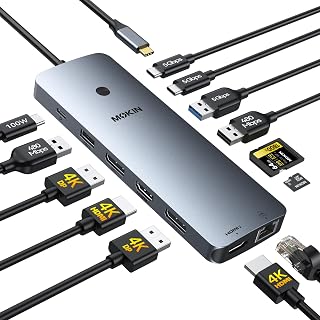
- Exceptional value with 14 ports (2 HDMI, 2 DP, 5 USB, Ethernet, SD/TF reader, power delivery) in a small form factor
- Stable, reliable performance across multiple monitors with zero setup hassle
- Fast data transfer speeds (5Gbps USB 3.0) enable smooth external SSD and backup workflows
- Premium 100W Power Delivery eliminates the need for separate laptop chargers during work
- Genuine warranty coverage and proven durability from thousands of verified user reviews
Cons
- macOS limitation: Supports only Single Stream Transport (SST) mode, mirroring displays instead of extending them
- Power delivery performance may vary depending on your specific charger, with some users reporting reduced wattage
- Peripheral compatibility can be spotty with certain USB dongles and devices due to power management limitations
The MOKiN 14-in-1 Docking Station is a comprehensive connectivity solution built for professionals, remote workers, and content creators who need multiple display outputs and peripheral connections without managing tangled cables. This dock works seamlessly with Thunderbolt 3/4 equipped laptops and MacBooks, consolidating your entire workspace into a single USB-C connection.
The standout feature is the dual 4K video output capability using either 2 HDMI plus 1 DisplayPort or 2 DisplayPort plus 1 HDMI configuration, supporting triple monitor setups on compatible systems. Real-world performance proves solid across the board, with users reporting immediate plug-and-play functionality and stable connections during video calls, gaming sessions, and external SSD workflows. The 5Gbps USB 3.0 ports deliver genuine speed improvements compared to 2.0 connections, enabling smooth file transfers and VM operations.
Design-wise, this dock impresses with its compact footprint and premium build quality, making it portable enough for mobile workspaces yet robust enough for permanent desktop installations. The integrated privacy lock button is a thoughtful feature for security-conscious users, instantly disabling all displays with a single press. The 100W Power Delivery capability means you can charge your laptop while simultaneously powering external monitors and other peripherals.
Limitations exist primarily on the macOS side, where OS constraints force displays into mirror mode rather than extend mode. Windows users receive the full multi-monitor experience without compromise. Additionally, some USB peripherals with power requirements may experience compatibility issues depending on how the dock allocates power from your charger.
The MOKiN 14-in-1 represents excellent value for anyone seeking all-in-one desk consolidation with proven reliability. It's a practical investment for productivity-focused users who want to eliminate desk clutter while gaining the connectivity their professional workflow demands.
Connectivity: 2x HDMI 2.0, 2x DisplayPort 1.2, 1x Gigabit Ethernet (RJ45), 2x USB-C 3.0, 1x USB-A 3.0, 2x USB-A 2.0, SD/microSD card reader, 1x USB-C Power Delivery port
Power: 100W maximum USB-C Power Delivery, plug-and-play operation (external power recommended for optimal performance)
Compatibility: Thunderbolt 3/4 laptops and MacBooks, Windows 10 and later, macOS
Performance: 5Gbps USB 3.0 data transfer, 1000Mbps Ethernet, supports up to 3 external 4K displays (single stream transport on macOS)
Physical: Compact design, 0.1 kg weight, space-saving form factor suitable for desks and travel
Warranty: 2-year manufacturer coverage
Who Should Buy This: Remote workers and professionals with multiple monitors, content creators needing high-speed external storage, frequent travelers needing portable connectivity, anyone seeking to reduce cable clutter on their desk.
Compatibility Note: Verify your laptop has a Thunderbolt 3/4 port before purchasing. While marketed for Dell and HP, this dock requires full-function USB-C, not just standard USB-C ports. Windows users gain full multi-monitor flexibility; Mac users should expect display mirroring due to macOS limitations.
Power Considerations: For optimal charging performance, pair this dock with the laptop's original 100W charger. External USB power is recommended when using multiple high-power peripherals simultaneously to prevent battery drain.
Setup Tips: Connect the dock, attach your monitors using your preferred cable configuration (HDMI, DisplayPort, or mix both), connect peripherals to USB ports, and plug in power. No drivers needed on modern OS versions. Test your specific USB peripherals in advance if you have uncommon dongles or devices requiring additional power.
Pros
- Delivers dual 4K monitor support at an affordable price point, beating pricier competitors
- Solid aluminum build quality with reliable performance over extended daily use
- Single USB-C connection simplifies your workspace and reduces cable clutter
- Fast data transfer speeds with 10Gbps USB ports handle large file workflows
- 2-year warranty provides peace of mind and manufacturer support
Cons
- macOS users cannot display different content on dual monitors due to OS limitations, making this less ideal for Apple laptop owners
- 100W charging requires a compatible 100W+ power adapter, which is not included in the box
- Full functionality requires a laptop with full-function USB-C or Thunderbolt 3/4 port
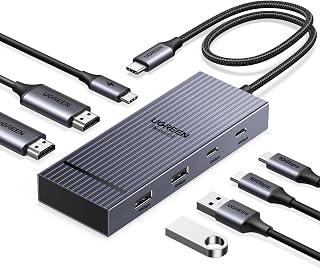
The UGREEN 7-in-1 USB-C docking station is designed for professionals, remote workers, and content creators who need a simple way to transform their laptop into a full workstation. Its primary appeal is delivering dual 4K monitor support through just one USB-C cable, eliminating the cable chaos typical of multi-monitor setups.
The standout feature is the dual 4K@60Hz HDMI output, which works flawlessly on Windows systems and gives you the screen real estate needed for productivity. Combined with 100W USB-C Power Delivery, four high-speed USB ports, and lightweight aluminum construction, this dock handles demanding workflows smoothly. Users report that it outperforms pricier alternatives from established brands while maintaining cool temperatures under load.
Build quality is genuinely solid. The aluminum chassis feels premium despite the budget-friendly price, and the dock stays stable on desks. Setup is truly plug-and-play, with no driver installation required on compatible devices. The compact form factor keeps your workspace organized without taking up excessive desk space.
The main limitation is macOS compatibility. Apple users cannot display different content across dual monitors, as the system defaults to mirror mode. Additionally, reaching the full 100W charging capability requires a separate 100W+ power adapter, which adds to your total investment. Your laptop must also have a full-function USB-C or Thunderbolt port to access all features.
The UGREEN dock is an excellent value for Windows users and Chrome OS users who need reliable dual-monitor expansion and fast charging in one compact device. It's a practical upgrade for anyone tired of juggling multiple adapters.
This docking station works best with laptops featuring full-function USB-C or Thunderbolt 3/4 ports. It's fully compatible with Dell, Lenovo ThinkPad, HP, ASUS ZenBook, Microsoft Surface, and most modern Chromebooks.
Windows systems support true extended dual-monitor display, allowing different content on each screen. macOS devices are limited to mirror mode, so both external displays show identical content. This is an OS limitation, not a dock limitation, and affects all docking solutions on Apple hardware.
For dual 4K support at 60Hz, your laptop must support DisplayPort 1.4. Verify your device specifications before purchase if you're unsure about compatibility.
Connectivity: 2x HDMI 4K@60Hz, 2x USB-A 10Gbps, 2x USB-C 10Gbps, 1x USB-C Power Delivery
Power Delivery: 100W (adapter sold separately, 100W+ required)
Data Transfer: USB 3.2 speeds on all ports (note: 10Gbps rate requires compatible cables)
Build: Aluminum chassis, 91g weight
Colors: Black or grey
Warranty: 2 years
Model: UGREEN 45365
Pros
- Exceptional value: 14 ports at under $50 delivers serious bang for the buck
- True multi-monitor capability: Simultaneously power three displays without daisy-chaining
- Fast data transfers: 5 Gbps USB ports handle large file syncs efficiently
- All-in-one solution: Ethernet, SD slot, and AUX eliminate cable clutter
- Solid build quality: Compact metal construction feels durable for daily use
Cons
- Wall charger not included, so you'll need to source your own 100W USB-C power adapter
- macOS users see identical displays on external monitors rather than extended desktop
- Not compatible with Linux, limiting options for certain developers
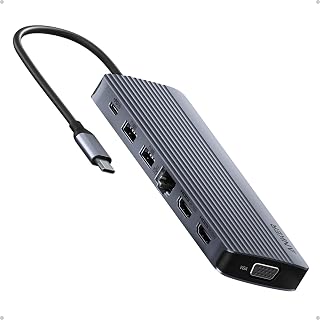
The Anker 14-in-1 is a feature-packed docking station built for professionals who demand multi-monitor productivity without premium pricing. Whether you're a content creator, financial analyst, or remote worker managing multiple applications, this hub consolidates 14 connectivity options into a single, compact device that sits neatly beside your laptop.
Performance-wise, the standout achievement is genuine triple-display support. The dual 4K HDMI ports handle high-resolution work flawlessly, while the VGA port adds backward compatibility with older displays. File transfers hit impressive speeds via the 5 Gbps USB-C and USB-A ports, and the 80W pass-through charging means your laptop stays powered throughout the workday without adding another cable to your desk.
Build quality impresses for the price point. The grey metal chassis feels solid and premium, while the compact footprint minimizes desk clutter. The inclusion of Gigabit Ethernet, SD card reader, and AUX output demonstrates thoughtful engineering for professionals who still rely on these connections.
Real limitations exist: macOS users won't get an extended desktop experience, and Linux compatibility is off the table entirely. You'll also need to source your own 100W wall charger separately. These caveats matter depending on your setup, but they don't diminish the core value proposition.
This is a genuinely strong docking station for the money. It handles legitimate pro workflows, charges your device reliably, and doesn't force you to choose between display support and connectivity. Highly recommended for anyone seeking practical multi-monitor capability without enterprise pricing.
Connectivity: 2x 4K HDMI, 1x 1080p VGA, 1x USB-C (5 Gbps), 1x USB-C PD-IN (100W), 5x USB-A, 1x Gigabit Ethernet, 1x SD/microSD slot, 1x AUX audio
Compatibility: USB-C, USB4, Thunderbolt. Works with MacBook (macOS 12+), Windows 10/11, ChromeOS. Requires DP Alt Mode and Power Delivery support. Not compatible with Linux.
Physical: Weight 0.13 kg, Grey color, Model A8389. Includes 18-month warranty and welcome guide.
Best for: Remote workers, content creators, traders, and developers who work with multiple monitors and need fast file transfers plus device charging in one hub.
Not ideal for: Linux users, anyone requiring extended desktop on macOS, or users who already own multiple specialized adapters and prefer a minimalist setup.
Great alternative to: More expensive docking stations from enterprise brands, while delivering comparable multi-monitor capability at a fraction of the price.

Pros
- Dual 10 Gbps ports (USB-C and USB-A) make file transfers significantly faster than standard hubs
- Supports dual external monitors, ideal for video editing, programming, and multitasking workflows
- Sturdy aluminum build feels premium without adding weight or bulk to your setup
- Gigabit Ethernet delivers reliable wired speeds that rival many standalone adapters
- Excellent value at under $51 with an 18-month warranty and proven customer satisfaction
Cons
- Fixed short cable means limited positioning flexibility if you need to move between devices frequently
- Requires a separate high-quality USB-C power adapter for full 85W charging capability
- macOS mirror displays will show identical content on both external monitors rather than extended displays
The Anker 565 is an 11-in-1 USB-C docking hub designed for professionals who need serious expansion capability. It's ideal for remote workers, content creators, and anyone running multiple monitors or peripherals from a laptop with limited ports. The hub turns a single USB-C connection into a complete workstation hub with dual displays, high-speed data transfer, ethernet, and power delivery all in one compact device.
Performance is where this hub truly shines. The dual 10 Gbps data ports (one USB-C, one USB-A) deliver file transfer speeds that put standard USB 2.0 hubs to shame, while the Gigabit Ethernet port achieved verified speeds up to 950 Mbps in real-world testing. The dual video outputs support up to 2K resolution at 60Hz via DisplayPort or 4K via HDMI, making it suitable for creative professionals who need accurate color reproduction and smooth video playback across multiple screens.
Build quality is solid and professional. The aluminum enclosure feels premium, resists fingerprints, and maintains a slim profile that doesn't dominate your desk. The hub measures just 5.4 inches long and 4.8 ounces, making it portable enough for hot-desking or moving between office locations. Every connection feels secure and well-engineered without any plastic flex or cheap construction.
The main limitation is the fixed cable connection, which makes it less convenient if you frequently swap between multiple devices. Additionally, on macOS, dual external displays will mirror each other rather than extend the workspace. Users also need to provide their own high-quality USB-C power adapter to unlock the full 85W charging capability.
Overall, the Anker 565 delivers exceptional value for professionals needing serious port expansion and multi-monitor support. With strong real-world performance, durable construction, and verified customer satisfaction, it's a smart investment for any USB-C equipped laptop owner.
Connectivity: 1x USB-C 10 Gbps, 1x USB-A 10 Gbps, 2x USB-A 480 Mbps, 1x HDMI 4K, 1x DisplayPort 4K, 1x Gigabit Ethernet, 1x 3.5mm audio, microSD/SD card slots, 1x USB-C Power Delivery (100W input, 85W pass-through max)
Performance: 10 Gbps data transfer rate on high-speed ports, 104 MB/s card reader, DisplayPort 1.4 support for 2K@60Hz, HDMI for 4K display output
Physical: 5.39 inches x 2.24 inches x 0.55 inches, 4.8 ounces, aluminum construction, gray color
Compatibility: USB-C, USB4, and Thunderbolt equipped devices, macOS 12+, Windows 10/11, ChromeOS, DP Alt Mode support. Note: Not compatible with Linux
Warranty: 18-month manufacturer warranty with customer support
Who Should Buy This Hub? Remote workers with multi-monitor setups, video editors and content creators needing dual displays, professionals who need Gigabit Ethernet for fast wired connectivity, and anyone with a USB-C laptop looking to expand functionality. It's particularly valuable for those using MacBooks, Dell XPS, Lenovo ThinkPad, or similar USB-C equipped devices.
What to Know Before Purchasing: You must provide your own USB-C power adapter for charging capability. The hub works best with high-quality adapters to ensure stable power delivery to all peripherals. The fixed cable means you cannot use traditional adapters with other devices, so consider whether you need portability between multiple computers.
Performance Expectations: File transfers on the 10 Gbps ports will be noticeably faster than older hubs. Ethernet performance depends on your ISP and network quality but typically achieves 90+ percent of your subscription speed. Dual monitor support requires compatible laptops with DisplayPort Alt Mode, and resolution depends on your graphics card capabilities.
Alternative Uses: This hub works well for turning mobile devices like Android tablets or newer smartphones into workstations when connected to a dock and external displays, similar to Samsung DeX mode functionality.
Buying Guide: What to Consider Before You Buy
Display Configuration and Resolution Support
Your monitor setup determines which dock makes sense. Dual 4K at 60Hz requires DisplayPort 1.4 support and sufficient bandwidth, which not all hubs provide. The Anker Laptop Docking Station Dual Monitor delivers dual 4K@30Hz or single 4K@60Hz, while the UGREEN USB C Docking Station Dual Monitor achieves dual 4K@60Hz when your laptop supports DP 1.4.
MacOS users face a significant limitation. Most docks only mirror content across external displays due to operating system restrictions. The Plugable USB-C Triple Monitor Docking Station uses DisplayLink technology to bypass this limitation, enabling true extended displays on M1, M2, M3, and M4 MacBooks, though it requires driver installation.
Power Delivery and Charging Capacity
Pass-through charging keeps your laptop powered while using the dock. Most docks reserve 10-15W for hub operation, so a 100W input typically delivers 85-87W to your device. The Dell Pro Laptop Docking Station WD25, USB-C, 100W provides the full 100W to compatible Dell systems, while the Anker Laptop Docking Station 3 Monitors offers 80W pass-through.
Verify your laptop’s charging requirements before choosing. High-performance machines like the laptops engineers and designers use often need 90W or more under load. Insufficient charging means your battery drains during intensive work, even when connected.
Port Selection and Data Transfer Speeds
Count your peripherals and verify the dock provides enough ports at the speeds you need. USB 3.2 Gen 2 ports transfer at 10Gbps, perfect for external SSDs and high-resolution webcams. USB 2.0 ports at 480Mbps work fine for keyboards and mice but bottleneck file transfers.
The MOKiN Laptop Docking Station Dual Monitor 4K HDMI includes SD and microSD slots alongside multiple USB ports, useful for photographers and content creators. Ethernet ports matter if you handle large file transfers or need reliable connectivity for video calls. The UGREEN USB C Docking Station Dual Monitor provides gigabit ethernet alongside its display and USB expansion.
Compatibility and Operating System Requirements
Not all USB-C ports support video output or power delivery. Your laptop needs a full-function USB-C port with DisplayPort Alt Mode and Power Delivery. Thunderbolt 3 or 4 ports meet these requirements automatically. Check your laptop specifications before purchasing, especially if you own an older model.
Windows users get full extended display functionality with most docks. ChromeOS compatibility varies by model. Linux users face limitations, as many manufacturers explicitly state their docks don’t support Linux distributions. The Anker Nano Laptop Docking Station Dual works with Windows, ChromeOS, and recent macOS versions but excludes Linux support.
Final Thoughts
The right docking station depends on your specific display requirements, charging needs, and operating system. For Windows users seeking reliable dual 4K@60Hz output with solid build quality, the UGREEN USB C Docking Station Dual Monitor delivers exceptional value with 10Gbps data ports and 100W charging. Mac users who need true extended displays across multiple monitors should choose the Plugable USB-C Triple Monitor Docking Station, which uses DisplayLink technology to overcome macOS limitations and supports up to three displays with reliable performance.
Frequently Asked Questions
Can I use a USB-C docking station with my MacBook Pro?
Yes, but MacBooks mirror content across external displays with most standard docks due to macOS limitations. For extended displays on M1, M2, M3, or M4 MacBooks, you need a DisplayLink-based dock like the Plugable model, which requires installing DisplayLink Manager software. Standard docks work fine if you only need a single external monitor or don’t mind mirrored displays.
What’s the difference between a USB-C hub and a docking station in 2026?
The terms overlap, but docking stations typically offer more ports, higher power delivery, and better build quality for permanent desk setups. Hubs tend to be smaller, more portable devices with fewer ports. Many products labeled as hubs actually function as full docking stations. Focus on the specific ports, charging capacity, and display support rather than the marketing terminology.
Do USB-C docks work with Thunderbolt laptops?
Yes, Thunderbolt 3 and 4 ports are backward compatible with USB-C docks. However, a standard USB-C dock connected to a Thunderbolt port operates at USB-C speeds, not full Thunderbolt bandwidth. For business laptops with Thunderbolt ports, a USB-C dock provides excellent functionality at lower cost than dedicated Thunderbolt docks.
Why does my docking station get warm during use?
Heat generation is normal when a dock handles power delivery, multiple displays, and data transfer simultaneously. Quality docks include proper thermal management to dissipate heat safely. Excessive heat that makes the dock uncomfortable to touch may indicate a problem or insufficient ventilation. Ensure your dock has airflow around it and isn’t covered by papers or other objects that trap heat.
Common questions
What is the best laptop docking station for dual monitors?
The Anker 8-in-1, MOKiN 14-in-1, and both UGREEN docks (10-in-1 and 7-in-1) all support dual 4K HDMI monitors and work with Dell, HP, and Lenovo laptops. The MOKiN offers the most ports at 14 total, while the UGREEN 7-in-1 is the most compact at 91 grams. Note that on macOS, dual external monitors will mirror the same display rather than extending independently. Choose based on the number of peripherals you need to connect and whether you prioritize portability or port count.






Write Your Review
No reviews yet. Be the first to share your experience!