

An NVMe SSD can seem perfectly fine until a long game install, large folder transfer, or video project pushes its controller hard for several minutes. When heat builds, the drive may reduce speed to protect itself, which is why choosing the right cooling solution matters for more than just high-end PCs. If you also use portable storage, our M.2 to USB adapter picks can help you build a practical external-drive setup.
Whether you need a heatsink depends on your SSD generation, workload, case airflow, and the cooling already included with your motherboard or console. We compared the listed dimensions, pad arrangements, and mounting styles of seven 2280 options so you can make a confident choice. For a broader AMD upgrade, our RAM for AM5 guide can help you round out the rest of your build.
Quick answer
This guide compares 7 picks, with M.2 2280 SSD Heatsink for PS5 & PC - Dual-Sided ranked first.

If your NVMe drive is throttling under sustained loads, dual-sided coverage matters since heat builds on both the controller and backside NAND. This heatpipe heatsink wraps both sides of a 2280 drive rather than just the top, giving PS5 and PC builders a more complete thermal path than single-plate designs that only address half the problem.
Pros
- Dual-sided aluminum design with heat-dissipating grooves
- Reported 10 to 30°C temperature drops
- Nano Silicon thermal pads protect labels and warranty
- Slim profile fits PS5 slots and NAS enclosures
Cons
- Screw-tension mounting can loosen, requiring occasional checks
- Results vary by ambient temperature and SSD model
If you are trying to decide whether an NVMe drive actually needs a heatsink, this MHQJRH model is a good test case for the low-cost end of that decision. It is a dual-sided aluminum cooler built around heatpipe-style grooves that increase surface area, and owners have reported drops of 10 to 30°C, including one case of 160°F down to 135°F. For anyone whose SSD runs hot under sustained writes but who doesn't want to spend much to find out if cooling helps, this is a reasonable first step. The silver-plated, anodized aluminum body resists static and holds up structurally, and Nano Silicon thermal pads handle the SSD contact without damaging labels. Installation uses adjustable height screws rather than spring clips, which works fine but means the mount can loosen over time, so periodic temperature checks are worth doing. At 3 x 0.95 x 0.4 inches, it slides into PS5 slots and NAS bays without clearance issues. For a non-urgent cooling need or a first upgrade, it answers the question cheaply.
Dimensions: 3 inches L x 0.95 inches W x 0.4 inches H
Weight: 1 ounce
Material: Aluminum alloy with anodic oxidation and silver plating
Compatibility: M.2 2280 format, PCIe NVMe and SATA SSD
Installation Height Requirement: Minimum 12mm clearance
Included Accessories: Nano Silicon thermal pads, 6 adjustable height screws, screwdriver
Cooler Type: Passive heatsink with dual-sided cooling
Part Number: SRP-002
Good for PS5 owners, budget PC builds, and NAS setups where you want to see if cooling makes a measurable difference without committing to a premium part. Skip it if you want set-and-forget reliability, since the screw-tension mounting needs occasional checking rather than constant spring pressure. Also skip it if your case already has strong airflow and your drive runs cool regardless.

Double-sided cooling with a bundled thermal silicone pad means you are not hunting for a separate pad to get proper contact on the backside chips. For someone deciding whether their 2280 NVMe drive actually needs a heatsink, this covers both faces of the PCB, which matters more than top-only designs when PS5 or PC slots run hot under load.
Pros
- Rated 10 to 20°C cooling effect
- Compatible with 50+ SSD models including popular Samsung drives
- Self-adjusting double-sided clip simplifies installation
- Ultra-thin 0.4-inch profile avoids GPU and RAM collisions
Cons
- Thermal pads are single-use, requiring replacements if swapping drives
- Cooling results depend on case ventilation and ambient conditions
The question of whether you need a heatsink often comes down to whether your drive throttles under load, and this SGTKJSJS cooler is built to answer that directly for a wide range of drives. It is rated for a 10 to 20°C cooling effect and lists compatibility across more than 50 SSD models, including Samsung 970 EVO, 980 Pro, and 990 EVO, so compatibility uncertainty is mostly removed from the decision. The double-sided clip design adjusts automatically to different module heights, which simplifies the install step that trips up a lot of first-time heatsink buyers. Anodized aluminum construction resists static and feels solid, and pre-applied thermal pads mean there is no separate pad-shopping step. The 0.4-inch profile stays clear of GPUs and RAM in tight builds, and the black finish suits clear-sided cases. The tradeoff is that thermal pads are single-use, so swapping drives later means buying replacements, and actual results still depend on case ventilation.
Dimensions: 3 inches L x 0.95 inches W x 0.4 inches H
Weight: 0.04 kg
Material: Aluminum alloy with anodic oxidation surface treatment and silver plating
Mounting Type: Double-sided clip design
Thermal Cooling Effect: 10-20°C reduction (varies by environment)
Compatibility: M.2 2280 NVMe NGFF SSDs, single and double-sided modules. Compatible with Samsung 860/960/970/980 series, Intel 760P/660P, Kingston A400, WD Blue, XPG Gammix, Crucial, and 50+ additional models
Included Components: Heatsink with pre-applied thermal pads
Best For: PS5 expansion drives, desktop PC M.2 slots, high-performance gaming and workstation builds
A solid pick for PS5 expansion slot upgrades and PC builds using common Samsung or similar NVMe drives where thermal headroom is a known concern. Worth skipping if you plan to swap SSDs frequently, since the pads are not reusable, or if your case already has poor airflow that no heatsink alone will fix.

Aluminum construction paired with two layers of thermal conductivity material targets steady heat dissipation rather than just looking the part. For readers weighing whether a basic drive runs cool enough on its own, this gives a desktop-focused option built specifically for sustained performance under heavier, high-throughput workloads.
Pros
- Reported 7 to 30°C temperature reduction
- Dual-sided thermal pads with anodized aluminum build
- Compact low-profile dimensions at 70x24x13mm
- Broad compatibility with Samsung and Crucial drives
Cons
- No active cooling or heatpipes for extreme workloads
- Tight ITX cases may face clearance issues near GPU coolers
For readers weighing whether a heatsink is worth adding at all, the Thermalright TR-M.2 2280 makes the case for passive cooling without extra features getting in the way. It is a simple extruded aluminum heatsink with a sandblasted finish and a stamped steel lower half that sandwiches the drive, backed by reported temperature reductions of 7 to 30°C depending on airflow and workload. That range itself is useful context for this article's question: the benefit is real but variable, which is exactly the nuance worth knowing before buying. Dual-sided thermal pads handle contact on both sides of the drive, and the compact 70x24x13mm size keeps it low profile. Compatibility covers Samsung 990 Pro, 980 PRO, Crucial P5, and most other 2280 drives. There is no active cooling or heatpipe here, so it suits moderate thermal loads rather than extreme overclocking, and tight ITX cases may need a tolerance check before installing, especially with rear-mounted slots near a GPU cooler.
Installation is straightforward and requires no special tools. The heatsink comes with thermal pads pre-applied to both the aluminum top and steel bottom pieces. Simply align the assembly over your M.2 SSD, insert the included screws, and tighten. The thermal pads act as mild adhesive, holding the heatsink in place even during removal. Video tutorials are included for visual learners.
Compatibility is broad across all M.2 2280 SSDs. The design is confirmed to work with Samsung 990 Pro, 980 PRO, 850 EVO, 860 EVO, 960 EVO, 970 EVO, 950 PRO, 960 PRO, and 970 PRO series drives. It also fits most other M.2 2280 form factor SSDs from Crucial, Western Digital, Kingston, and other brands. The compact profile (2.76L x 0.94W x 0.47H inches) won't interfere with PCI-E slot devices or RAM.
Important note: Users with Fractal Terra Mini ITX cases or other space-constrained builds should verify clearances before purchasing, as rear-mounted SSDs with this heatsink may create tight fits with GPU coolers. For standard ATX and most ITX builds, installation is problem-free.
Model: Thermalright TR-M.2 2280 TYPE A B. Dimensions: 70x24x13mm (2.76L x 0.94W x 0.47H inches). Weight: 41 grams. Material: Anodized aluminum alloy top with stamped steel bottom. Mounting: M.2 2280 socket with dual-clip design and included screws. Thermal interface: High-conductivity thermal pads on both sides. Compatibility: M.2 2280 SSDs for desktop PCs with M.2 interface sockets. Mounting type: Chassis mount via M.2 slot.

A recognizable thermal brand backing a dedicated 2280 cooler gives some reassurance when you are unsure if your drive needs active help. Compatibility with both PC and PS5 means the same unit works whether you are solving console thermal throttling or chasing lower temps in a desktop build without hunting for separate parts.
Pros
- About 12C temperature reduction under load
- Tool-free click mounting, no screws needed
- TP-3 pads adjust for component height differences
- 6 year manufacturer warranty
Cons
- Covers only one SSD per unit
- May not clear space under large CPU coolers in tight builds
If you're trying to figure out whether your NVMe drive actually needs a heatsink, the ARCTIC M2 Pro is a good case study in doing it right without overthinking it. It's built specifically for M.2 2280 drives in PCs and PS5 consoles, and it answers the cooling question with hard numbers: roughly a 12 degree Celsius drop during heavy read and write work. That's the difference between a drive that throttles mid-task and one that holds its speed through gaming sessions or content exports. What makes it a smart pick rather than overkill is how little it asks of you. The aluminum body is light, the silver finish stays neutral in most builds, and the TP-3 thermal pads are shaped to handle height differences between SSD components automatically. A tool-free click mount and dual adhesive strips mean you're not reaching for a screwdriver. In cramped cases it may end up tucked under a large CPU cooler, but that placement doesn't change how well it performs. Backed by a 6 year warranty, it's a confident answer for anyone wondering if a dedicated heatsink is worth adding.
Compatibility: M.2 2280 NVMe SSDs, PS5, PS5 Slim
Material: Aluminum
Mounting: Click mechanism with adhesive thermal pads
Dimensions: 2.9 inches L x 0.9 inches W x 0.4 inches H
Weight: 40.5 grams
Included Components: ARCTIC M2 Pro heatsink, two TP-3 thermal pads
Warranty: 6 years
Model: ACOTH00002A
Step 1: Prepare Your SSD Power off your system and locate your M.2 2280 slot. Remove any existing heatsink if present. Ensure the SSD is free of dust and debris.
Step 2: Apply Thermal Pads Peel the backing from one TP-3 thermal pad and apply it to one side of the ARCTIC M2 Pro heatsink, pressing firmly for 3 seconds. Repeat on the other side of the heatsink.
Step 3: Align and Click Position the heatsink over your M.2 drive and gently press down until you hear a satisfying click. The click mechanism confirms secure mounting without tools or excessive force.
Step 4: Verify Installation Ensure the heatsink sits flush against the drive with no gaps. Power on your system and verify SSD recognition in BIOS or system settings. Monitor temperatures using your preferred software to confirm thermal improvement.

Buying two heatsinks at once makes sense if you are outfitting both a PS5 and a desktop, or adding a second drive down the line. Sized precisely at 22x70x3mm for standard 2280 NVMe or SATA drives, with a thermal pad included, this skips the guesswork on fit for console or desktop builds.
Pros
- 5-20C measured temperature reduction
- No fan means silent, passive operation
- Removable mounting leaves no residue
- 2-pack covers two drives or future builds
Cons
- Not compatible with laptops
- Thermal pads may need replacing after repeated reinstalls
The question of whether an NVMe drive needs a heatsink usually comes down to one thing: does it throttle under load. GLOTRENDS answers that directly with a passive aluminum design that cuts temperatures by 5 to 20 degrees Celsius, which is enough margin to keep a drive out of thermal throttling during game installs, 4K exports, or big file transfers. Because there's no fan, you're not trading heat for noise or adding another part that can fail. This is a 2-pack, so it suits anyone outfitting two drives, maybe a boot drive and a storage drive, or a PS5 plus a desktop. Mounting uses metal clasps and rubber bands rather than fixed adhesive, so you can remove or swap the heatsink later without leaving residue or voiding a warranty. It's not designed for laptops, where space and airflow work differently, and passive cooling like this has limits if you're pushing extreme overclocks or running in a genuinely hot environment. For standard desktop and console use, though, it's a clear way to settle the heatsink question in favor of yes.
Dimensions: 22 x 70 x 3mm per heatsink, 2.76 inches L x 0.87 inches W x 0.12 inches H
Compatibility: All 2280 M.2 SSDs including NVMe Gen3, Gen4, Gen5 and SATA drives. Fits PS5, PS5 Slim, desktop PCs, and M.2 riser cards. Not for laptops.
Cooling Method: Passive aluminum fin design with low-viscosity thermal pads
Included Components: 2 aluminum heatsinks, 2 thermal pads, 4 metal clasps, 4 rubber bands, user manual
Weight: 0.03 kg total
Installation: Tool-less, no adhesive, no warranty impact
Good for desktop builders and PS5 owners who want flexible, removable cooling for one or two drives without committing to adhesive-only mounting. Also fits anyone who wants spare cooling on hand for a future build. Skip it for laptop installs, which this isn't designed for, or if you need maximum cooling for extreme overclocking, since passive aluminum has a ceiling.
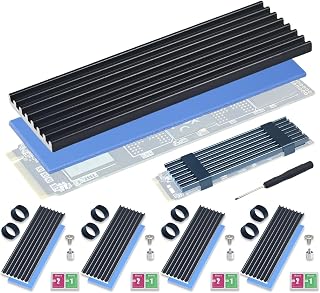
Five heatsinks in one pack suits anyone cooling multiple drives across a workstation or building out several PCs, rather than paying per-unit prices for a single cooler. Each one includes its own thermal silicone pad, so you are not stuck sourcing extra pads separately just to get solid contact on every 2280 SSD.
Pros
- Reports of 10-20C temperature drops in real use
- 5 complete kits including spare screws and screwdriver
- Tool-free silicone band mounting
- 4.4 star rating across 98 reviews
Cons
- Fin design is basic compared to premium heatsinks
- Limited to M.2 2280 form factor only
For anyone weighing whether their NVMe SSD actually needs a heatsink, the Atdcoek 5-pack makes the case with real numbers rather than guesswork. Users report idle temperatures dropping from around 40C into the high 20s and peak loads falling from 68C to the mid-40s, which is the kind of swing that keeps a drive out of throttling territory entirely. The combination of aluminum fin construction and a pre-applied 2.0 W/mK thermal silicone pad does the actual cooling work, while a tool-free silicone band system handles mounting without screws. Since it comes as a 5-pack with 5 heatsinks, 5 pads, 10 bands, spare screws, and a screwdriver, it works well for anyone cooling multiple drives across PS5 upgrades, gaming PCs, mini PCs, or workstations, or for someone who wants spares on hand for future builds. The fin design is fairly basic next to premium options, and it's built specifically for the 2280 form factor, so compatibility outside that is limited. But for settling the question of whether a given drive needs cooling, this gives you enough coverage for several drives at once.
Compatibility: M.2 2280 NVMe SSD (single-sided and double-sided)
Material: Precision aluminum with fin-type design
Thermal Pad: 2.0 W/mK thermal conductivity, pre-applied and removable
Mounting: Tool-free silicone elastic bands (2 per heatsink)
Dimensions: 2.83 inches L x 0.91 inches W x 0.4 inches H
Weight: 2.3 ounces per pack
Package Contents: 5 aluminum heatsinks, 5 thermal pads, 10 silicone bands, cross-head screwdriver, M.2 screw kit
Step 1: Prepare the SSD Ensure your M.2 2280 NVMe SSD is installed in its slot. If you haven't installed it yet, follow your motherboard manual for proper insertion.
Step 2: Remove Protective Film Peel off the clear protective film from both sides of the thermal pad on the heatsink. Do not skip this step or thermal transfer will be compromised.
Step 3: Align and Apply Position the heatsink over your SSD, ensuring the thermal pad makes full contact with the NAND and controller chips. Press firmly to establish good contact.
Step 4: Secure with Bands Stretch the two included silicone bands over the ends of the heatsink, securing it to the SSD. The bands should be snug but not over-tightened.
Step 5: Verify Contact Gently try to move the heatsink to confirm it is securely attached. You should not see any gaps between the thermal pad and the SSD surface.

Dark gray aluminum alloy construction with double surface thermal dissipation addresses heat from both sides of a 2280 drive, which matters most for readers whose SSD runs hot under sustained reads and writes. The included extra silicone pads and screwdriver mean you have what you need for a clean install without extra purchases.
Pros
- Double-sided hollow design for two-surface heat dissipation
- Includes thermal pad, screws, and screwdriver for easy install
- Lightweight aluminum alloy with clean matte finish
- Fits both PS5 and PC builds without aesthetic mismatch
Cons
- Limited user reviews make long-term durability unverified
- Thermal conductivity is decent but not best-in-class
If you're trying to decide whether your NVMe drive actually needs a heatsink, the honest answer is: it depends on your workload, and this Bestoss unit is a sensible way to hedge that bet without overcommitting. Its double-sided hollow aluminum alloy design moves heat away from the drive on two surfaces instead of one, which matters most if you're copying large files repeatedly, gaming on PS5, or running sustained workloads that trigger thermal throttling. The bundled silicone thermal pad closes the microscopic gaps between drive and metal that otherwise choke heat transfer, so you're not just bolting on metal for looks. Everything needed for a clean install, screws, pad, and even a screwdriver, comes in the box, so there's no guessing about compatibility accessories. For a 2280 drive running hot in a cramped case or console, this is the kind of low-effort addition that answers the 'do I need one' question with 'probably, and here's an easy option.' It won't turn a cool-running drive into something it isn't, but for throttling-prone setups it's a reasonable first step.
Product Details: Model GM528, Part Number HS02B, manufactured by Shenzhen Ution-Best Electronic Co., Ltd.
Compatibility: M.2 2280 form-factor SSDs for desktop PCs, PS5, and standard systems
Materials: Aluminum alloy heatsink, silicone thermal pad with 3 W/(m·K) thermal conductivity
Dimensions and Weight: 0.02 kg total package weight
Included Components: Dark gray heatsink (1), silicone thermal pads (3), mounting screws (5), screwdriver (1)
Performance: Temperature reduction of 8-13°C compared to unheated drives during intensive read/write operations
Design: Three-sided hollow thermal dissipation design with minimalist lines and deep matte texture finish
How to Choose an NVMe Heatsink
Match cooling to your workload, drive, and platform
A heatsink is not an automatic requirement just because a drive is NVMe. A lightly used PCIe Gen3 drive in a ventilated desktop may run reliably with the motherboard’s existing M.2 cover or no extra cooler at all. Faster PCIe Gen4 and Gen5 drives, however, are more likely to benefit when you regularly perform sustained writes, create media caches, or install very large games.
Think about your longest, heaviest routine rather than short bursts of everyday use. A drive used for web browsing and documents has different thermal needs than one handling raw footage or frequent data migrations. If you are also selecting a new drive, our guide to TeamGroup SSD options for PC upgrades offers useful context on matching storage hardware to your system.
Measure clearance before ordering
Confirm that your SSD is the common 2280 size, then inspect the available height around the M.2 slot. Graphics cards, motherboard shrouds, riser cards, and a console expansion bay can all limit your options. A low-profile cooler may be the safer route when space above the drive is tight.
Do not stack an aftermarket heatsink on top of a motherboard M.2 cover unless the board maker specifically allows it. The M.2 2280 SSD heatsink for PC / PS5 M.2 PCIE NVMe lists a 12 mm minimum installation-height requirement, illustrating why vertical room matters. If you are still deciding on the drive itself, compare capacities and form factors in our Sabrent SSD guide before finalizing the cooler.
Choose between slim and double-sided cooling
Thin, single-piece aluminum designs are useful where clearance is limited. The GLOTRENDS 2-Pack M.2 NVMe SSD Heatsink 22x70x3mm uses a slim 3 mm aluminum body and includes mounting accessories for two drives. It is intended for desktop and console installations rather than laptops, a distinction worth taking seriously before you buy.
Double-sided models add more mass and can make contact on both sides of a compatible drive. The Thermalright TR-M.2 2280 Type A B 2280 heatsink and M.2 Heatsink Cooler 2280 SSD Double-Sided Heat use aluminum sections with thermal pads and clips. The ARCTIC M2 Pro uses a click mechanism and two fitted pads, while the Bestoss M.2 2280 SSD NVMe Heatsink,Double Surface uses a hollow aluminum layout intended to encourage airflow around the cooler.
Prioritize thermal-pad contact and a secure mount
The thermal pad is the bridge between the SSD’s hot components and the aluminum heatsink. It should cover the controller cleanly without touching the connector contacts or bunching up at the edges. Softer pads are helpful because SSD controllers, NAND packages, and labels can sit at slightly different heights.
Mounting methods also change the installation experience. The MHQJRH and SGTKJSJS designs use adjustable clip systems, while the Atdcoek 5 Pack SSD Heat Sink Cooler for 2280 SSD relies on silicone bands for tool-free fitting. For a workstation or home server with several 2280 drives, the Atdcoek multi-pack can simplify a consistent cooling approach, provided every slot has enough clearance.
Final Thoughts
You do not need to add a heatsink to every NVMe drive, but it is a sensible safeguard for sustained workloads, warm cases, and PS5 storage expansions without built-in cooling. The ARCTIC M2 Pro – Heatsink Cooler for M.2 2280 SSD is a convenient fit for PS5-focused buyers, while the M.2 2280 SSD heatsink for PC / PS5 M.2 PCIE NVMe suits desktop builders who want adjustable mounting.
Frequently Asked Questions
Do you need a heatsink for NVMe drives in 2026?
Not always. Many NVMe drives work well without an aftermarket cooler during light, intermittent use, especially if the motherboard already has an M.2 thermal cover. A heatsink becomes more compelling for fast drives that handle long writes, frequent game installs, video editing, or other sustained tasks.
Is the M.2 cover on my motherboard already a heatsink?
In many cases, yes. Motherboard M.2 covers often include a thermal pad and are designed to draw heat away from the SSD controller. Use that integrated solution first when it fits your drive properly, and avoid adding a second heatsink under the cover unless your motherboard documentation supports that arrangement.
Can I put an NVMe heatsink in a PS5 or PS5 Slim?
Yes, as long as the cooler and SSD together fit Sony’s expansion-bay clearance requirements. Select a 2280 heatsink that is explicitly described for PS5 use, then follow the console installation guidance carefully. The ARCTIC M2 Pro is specified as compatible with both PS5 and PS5 Slim, while several other options in this roundup are also designed for console storage bays.
Should I add a heatsink to an NVMe SSD in a laptop?
Usually, no, unless your laptop manufacturer provides the needed space and guidance. Desktop-style M.2 heatsinks can press against the bottom cover or interfere with factory thermal parts. For recurring backups and easy access to separate drives, our hard drive dock picks for backups may be a better fit than modifying a tightly packed laptop.





Write Your Review
No reviews yet. Be the first to share your experience!