

A ranked match can feel unplayable even when your download speed looks excellent. The usual culprit is not raw bandwidth, but inconsistent latency, radio interference, or a busy home network that makes your ping jump at the worst moment.
This ethernet vs wifi for gaming guide explains when a wired link is worth the effort and when a wireless upgrade makes more sense. It is built for PC and console players who want steadier online play, and it also pairs well with a performance-focused GPU for video upscaling when you are improving the full gaming setup.
Quick answer
This guide compares 10 picks, with TP-Link Archer TX3000E WiFi 6 PCIe Card with Bluetooth ranked first. Nineplus AC1300 Dual-Band USB WiFi Adapter with 5dBi has the most customer reviews.

If wireless freedom wins out over running cable through walls, this card closes most of the gap. AX3000 dual band speeds up to 2400Mbps and the low latency tuning in the 802.11ax standard matter most for gaming, where lag spikes hurt more than raw throughput. MU-MIMO keeps performance steady even with other devices on the network, something a wired-only household never has to think about.
Pros
- WiFi 6 with OFDMA and MU-MIMO reduces gaming lag
- Magnetized external antennas for flexible signal positioning
- Heatsink and gold-plated connectors for stable performance
- Fast installation, typically recognized immediately on Windows 10/11
Cons
- Bluetooth needs an extra USB header cable connection
- External antennas may crowd compact PC cases
If your gaming rig can't reach an Ethernet cable, the question becomes how close to wired performance a wireless connection can get. The Archer TX3000E is built for exactly that gap. WiFi 6 with OFDMA and MU-MIMO is specifically designed to cut latency, which matters more for gaming than raw throughput does, since a laggy connection ruins matches even when download speed looks fine. The dual magnetized antennas let you angle for the strongest signal rather than being stuck with whatever direction the card happens to face, which helps when your router isn't in the same room. Build quality supports sustained gaming sessions too, with a heatsink to manage heat during long play and gold-plated connectors for a stable connection over time. Bluetooth 5.3 is a bonus for wireless headsets or controllers, though it needs its own USB header cable. For anyone weighing wired stability against wireless freedom, this card narrows that gap considerably.
Connectivity and Performance: WiFi 6 (802.11ax) with speeds up to 2.4 Gbps, dual-band support (2.4 GHz and 5 GHz), Bluetooth 5.3, MU-MIMO and OFDMA technology
Physical Design: Dimensions 4.76 inches length x 3.75 inches width x 0.85 inches height, weight 16 ounces, black color with magnetized antenna base and low-profile bracket
Compatibility: Windows 10 and Windows 11 (64-bit only), requires PCIe slot, motherboard F_USB connector for Bluetooth functionality
Included Accessories: Archer TX3000E card, Bluetooth header cable, quick installation guide, resource CD with drivers, low-profile bracket, magnetized antenna base with cable, two high-gain antennas
Warranty and Support: 2-year manufacturer warranty, driver and firmware downloads available from TP-Link support website
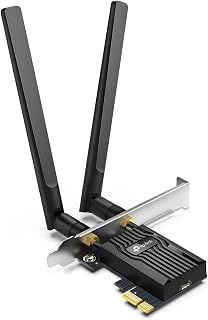
For gamers weighing wireless convenience against a wired connection's consistency, WPA3 security and AX3000 speeds on 2.4 and 5Ghz bands give this card a real shot at closing the latency gap. The low latency wireless adapter design targets exactly what matters in competitive play, while MU-MIMO prevents other household devices from degrading your connection mid match.
Pros
- WiFi 6 with OFDMA and MU-MIMO lowers lag on busy networks
- Reviewers report stable connections with minimal disconnects
- High-gain antennas for reliable signal at distance
- Includes both standard and low-profile brackets
Cons
- Driver installation can be tedious without a CD drive or pre-downloaded files
- Bluetooth requires a free motherboard F_USB header
For gamers deciding between running Ethernet or sticking with WiFi, the Archer TX55E makes the wireless side of that decision less risky. It runs WiFi 6 with OFDMA and MU-MIMO, the same lag-reducing technology found in pricier adapters, so a congested home network is less likely to tank your ping. Reviewers note rock-solid stability and minimal disconnects, which is the main worry anyone has about trading a cable for wireless. The high-gain antennas are built to hold a reliable signal even when your PC is a room or two from the router, which is often the actual reason someone considers WiFi over Ethernet in the first place. A thermal heatsink and gold-plated connectors round out the build for sustained use during long sessions. Bluetooth 5.2 adds wireless peripheral support, useful if you also want a cordless headset. If cable routing isn't realistic in your setup, this card makes wireless gaming a reasonable alternative rather than a compromise.
Connectivity: WiFi 6 (802.11ax), Dual-band (2.4 GHz + 5 GHz), Bluetooth 5.2
Speeds: Maximum 2.4 Gbps total (2402 Mbps @ 5 GHz, 574 Mbps @ 2.4 GHz)
Technology: OFDMA, MU-MIMO, 1024-QAM, 160 MHz bandwidth, WPA3 security
Interface: PCIe slot with standard and low-profile mounting brackets
Antennas: Two 5 dBi high-gain external antennas
Compatibility: Windows 10 and 11 64-bit only, PCIe slot required
Dimensions: 4.72 inches L x 3.09 inches W x 0.83 inches H
Warranty: 2 years
Good for gamers upgrading an older desktop that lacks modern WiFi and can't run an Ethernet line to the router. Also fits anyone who wants WiFi 6 lag reduction without paying for premium extras. Skip it if your setup already allows a wired connection, since Ethernet will still outperform any wireless card for consistency, or if your PC lacks a free F_USB header for the Bluetooth function.

Pros
- Incredibly easy setup using WPS pairing or web UI interface, takes under 10 minutes
- Exceptional device compatibility covers printers, smart TVs, gaming consoles, streaming devices, and retro hardware
- Strong WiFi reception from dual external antennas ensures reliable connection through walls and obstacles
- Dual-band operation delivers noticeably faster speeds on 5GHz networks when available
- Budget-friendly solution eliminates expensive rewiring or vendor service calls
Cons
- Speed ceiling of around 100-150Mbps in practice may disappoint users with high-end 2.5GbE network equipment
- Single unit covers one device, so multiple wired devices require multiple adapters
- Range depends on WiFi router strength and environmental factors like walls and interference
The BrosTrend AC1200 WiFi Bridge solves a common connectivity problem: getting internet to devices that only have Ethernet ports. Whether you're stuck with a printer in a dead zone, want to untether a legacy smart TV, or need to connect a Raspberry Pi without running cables across your home, this adapter delivers practical wireless freedom. It's designed for anyone who values convenience over dealing with long cable runs or expensive technician visits.
Performance is where this adapter shines. Dual-band operation on both 2.4GHz and 5GHz networks gives you flexibility, with 5GHz delivering roughly 3x faster speeds when available. Reviewers consistently praise the stable, reliable connection, with real-world use cases ranging from outdoor camera feeds in harsh conditions to office printer networks. The two external antennas significantly outperform internal designs, penetrating walls and obstacles effectively across typical home distances.
Setup is genuinely frictionless. WPS pairing takes seconds, while the web interface allows manual network selection and advanced settings without requiring driver installation. The compact white form factor blends into most setups. Build quality appears solid, with reviewers noting durability even in extreme temperature environments. The 2-year warranty provides peace of mind for the $45.99 price point.
One honest limitation: maximum throughput tops out around 100-150Mbps in practice, which won't satisfy power users with 2.5GbE networking equipment seeking gigabit speeds. Additionally, each adapter handles one device, so connecting multiple Ethernet-only devices requires multiple units. Environmental factors like WiFi channel congestion and router distance still apply as with any wireless solution.
Verdict: This is a straightforward, reliable tool that does exactly what it promises. For connecting legacy hardware or devices in WiFi-dead zones, the AC1200 offers excellent value and dependability. Highly recommended for household convenience and modest business applications.
This adapter works with any device featuring an Ethernet (RJ45) port. Common compatible devices include inkjet and laser printers, smart TVs, Blu-ray players, streaming boxes (Apple TV, Roku, etc.), game consoles (PlayStation, Xbox), network cameras, Raspberry Pi, Arduino boards with Ethernet shields, VoIP phones, audio receivers, and desktop or laptop computers. Even older devices and specialty hardware typically work without issues as long as they support standard Ethernet connectivity.
Operating system compatibility includes Windows, Linux, and Mac systems (when connected via wired devices), though the adapter itself is OS-agnostic after initial setup. No drivers are needed for most devices since it operates at the network layer. The web UI interface works from any browser on the same network, making configuration straightforward regardless of your equipment.

Pros
- Dramatically improves WiFi reliability and speed compared to built-in adapters
- Excellent real-world performance, with users reporting 450+ Mbps downloads and low latency
- Flippable antenna and compact cradle provide flexible placement for any setup
- Works immediately out of the box with minimal configuration needed
- Strong build quality backed by user confidence, many customers buy multiple units
Cons
- Requires a WiFi 6E router to access the new 6GHz band, limiting benefits with older routers
- Initial setup may require troubleshooting and driver installation on some Windows systems
- Some users report occasional connection quirks that resolve with optimization
The NETGEAR Nighthawk A8000 is a USB 3.0 wireless adapter designed for Windows PC users seeking faster, more reliable WiFi connectivity. Whether you're upgrading from a frustratingly slow built-in adapter or stepping into WiFi 6E technology, this compact dongle plugs directly into any USB port without requiring internal hardware installation.
Performance is the standout feature here. Users consistently report download speeds of 450+ Mbps with excellent latency around 14ms, making this adapter ideal for competitive gaming, video conferencing, and 4K streaming. The flippable antenna design intelligently finds the strongest WiFi signal, while the included cradle allows flexible placement for optimal coverage. The real-world speed improvements are dramatic, especially for users whose laptops suffered from poor onboard WiFi performance.
Build quality feels premium and durable. The sleek black design is compact enough to carry between locations, and the sturdy construction has proven reliable through years of daily use. Setup is straightforward, though some users may need to install drivers or perform minor troubleshooting to achieve peak performance.
The main limitation is that you'll need a WiFi 6E router to fully utilize the adapter's 6GHz band capabilities. With WiFi 6 routers, it works excellently on 2.4GHz and 5GHz bands, but won't access the newest spectrum. Occasionally, users report minor connection quirks that typically resolve through driver updates or optimization.
The NETGEAR Nighthawk A8000 is an excellent investment for anyone frustrated with weak WiFi, upgrading their PC setup, or ready to embrace WiFi 6E technology. Its combination of reliable performance, easy setup, and proven durability makes it a smart choice for serious internet users.
Connectivity: WiFi 6E (802.11ax) with support for 2.4GHz, 5GHz, and 6GHz bands. Maximum speed of 3Gbps (AXE3000). Compatible with any WiFi 6E or WiFi 6 router or mesh system.
Hardware: USB 3.0 interface, compact design measuring 3.66L x 1.24W x 0.57H inches, weighs 28g. Includes flippable antenna and flexible cradle for optimal placement.
Compatibility: Windows 10 and newer operating systems. Works with laptops and desktops. Model number A8000-100PAS includes 1-year manufacturer warranty.
Performance: Data transfer rate rated at 1201 Mbps per standard specifications, with real-world user reports of 450+ Mbps downloads depending on router capability and signal strength.
Best For: Gaming enthusiasts needing low-latency connectivity, remote workers requiring stable video conferencing, content streamers, and anyone with weak built-in WiFi adapters. Also ideal for users with WiFi 6E routers wanting to maximize their network investment.
Consider This Adapter If: Your laptop or desktop has unreliable or slow WiFi, you have a WiFi 6E or WiFi 6 router at home, you need portable connectivity between locations, or you're frustrated with dropped connections and want a proven solution.
May Not Be Right If: You have an older WiFi 5 router and aren't planning to upgrade, you prefer internal card installations, or you exclusively use wired ethernet. WiFi 6E-specific features require a WiFi 6E router, so ensure your network supports this technology first.
Setup Tips: Use a USB 3.0 port for best performance, position the antenna for clear line of sight to your router, install the latest drivers from NETGEAR's website, and allow time for the adapter to fully initialize on first connection. Most users see immediate improvements without extensive configuration.

Pros
- Exceptional whole-home coverage with zero dead zones, even across multiple floors
- Delivers full gigabit speeds reliably, verified by users with fiber connections
- Intuitive Deco app makes setup and management effortless for non-technical users
- AI roaming keeps devices connected smoothly when moving between rooms
- Future-proof WiFi 6E technology handles everything from 4K streaming to online gaming
Cons
- Single-unit pack covers large areas but may require additional units for homes exceeding 2,900 square feet
- WiFi 6E support is still limited on many consumer devices, though backward compatible with older WiFi standards
- Premium pricing reflects the latest technology, making it a significant investment compared to WiFi 6 alternatives
The TP-Link Deco XE70 Pro is a premium mesh WiFi system designed for homeowners seeking whole-home coverage without compromise. This single-unit mesh router is engineered for large homes, content creators, gamers, and anyone frustrated by dead zones and spotty connections. If you're upgrading from standard ISP equipment or struggling with an aging router, this system delivers the reliability and speed modern households demand.
What sets this router apart is its WiFi 6E technology, which leverages the new 6 GHz band to eliminate congestion plaguing traditional networks. The tri-band system reaches speeds up to 4.9 Gbps and supports 200+ devices simultaneously, handling everything from 4K streaming and online gaming to dozens of smart home gadgets. Real-world users consistently report full-speed delivery on fiber connections and seamless coverage across multi-story homes and yards without signal drops or manual reconnection.
The hardware is compact and well-designed with four internal antennas and a 1 GHz dual-core processor optimized for mesh performance. It features robust connectivity options including a 2.5 Gbps WAN/LAN port and two gigabit ports, enabling high-speed wired connections for gaming PCs, NAS servers, and other bandwidth-hungry devices. The AI-powered roaming automatically optimizes connections as you move throughout your home under a single unified network name.
The main limitation is that single-unit coverage tops out at 2,900 square feet, so homes significantly larger than this may require purchasing additional units. Additionally, while WiFi 6E is future-proof, most consumer devices still use older standards, though full backward compatibility ensures no headaches with existing equipment. The premium price reflects cutting-edge technology, but delivers clear performance gains over older WiFi 6 alternatives.
Verdict: The Deco XE70 Pro is an excellent investment for anyone serious about eliminating WiFi problems in a large home. Combined with military-grade WPA3 security, CISA-verified security practices, and intuitive app management, this router delivers reliability, speed, and peace of mind. Recommended for gamers, remote workers, streaming enthusiasts, and anyone with 10+ connected devices.
Core Specs: WiFi 6E, 4.9 Gbps tri-band mesh system, 2,900 square foot coverage, supports 200+ devices simultaneously.
Hardware: 1 GHz dual-core processor, 4 internal antennas, 1 x 2.5 Gbps WAN/LAN port, 2 x 1 Gbps LAN ports, 120V AC powered.
Connectivity: 802.11ax (WiFi 6E), 802.11ac, 802.11n, 802.11g, 802.11b compatible. Supports Ethernet backhaul plus wireless backhaul simultaneously.
Security: WPA3, WPA2-PSK, WPA-PSK encryption. HomeShield premium security service with parental controls and IoT protection. CISA Secure-by-Design pledge signatory.
Control: Deco app (iOS and Android), remote management, Amazon Alexa and Google Assistant compatible. Dimensions: 4.1 x 4.1 x 6.7 inches. Weight: 1.1 pounds. Warranty: 2 years manufacturer.
Is This Right for You? The Deco XE70 Pro suits homes 2,000-2,900 square feet with 10+ connected devices. It's ideal if you game online, stream 4K content, run smart home systems, or work from home and need rock-solid speeds everywhere.
Performance Expectations: Expect full speed delivery throughout your home and yard with zero dead zones. Users report seamless roaming between floors, uninterrupted video calls while walking, and consistent performance whether streaming, gaming, or working simultaneously.
Setup and Support: Setup takes under 10 minutes via the Deco app. No technical expertise required. TP-Link support is strong, and thousands of positive reviews validate real-world reliability.
When to Skip It: If your home exceeds 2,900 square feet, budget for additional mesh units. If you need enterprise-grade features or your home has extensive WiFi dead zones requiring multiple units, evaluate bundles. If most devices are WiFi 5 or older, WiFi 6 (non-6E) models offer better value.
Best Alternative: For smaller homes under 2,000 square feet, TP-Link's Deco XE75 Pro or WiFi 6 models may be sufficient. For budget-conscious buyers, standard WiFi 6 mesh systems cost less but sacrifice 6 GHz benefits.

Pros
- Exceptional value, costs six times less than comparable Netgear models while delivering similar performance
- External antenna design noticeably improves weak signal reception and coverage compared to built-in alternatives
- Reliable WiFi 6 speeds enable lag-free 4K streaming and competitive gaming without buffering
- Immediate driver recognition on Windows systems, no technical knowledge required for installation
- Compact and portable, ideal for laptops and desktop setups that need flexible connectivity
Cons
- AP mode limited to 5GHz band only, restricting backward compatibility in hotspot scenarios
- Some users report manual driver installation needed on certain systems despite preloaded driver claim
- No Bluetooth support, limiting functionality for wireless peripheral users
The Tenda U11Pro is a budget-friendly WiFi 6 USB adapter designed for Windows users seeking faster internet speeds without premium pricing. It targets gamers, content streamers, video conferencing professionals, and anyone with older laptops or desktops lacking modern WiFi 6 capability. At just under $11, it delivers performance typically found in adapters costing significantly more.
The standout feature is its external 6dBi omnidirectional antenna, which provides measurable improvements in weak signal reception compared to built-in alternatives. Real-world testing confirms smooth 4K streaming, lag-free gaming, and stable video calls from multiple rooms. The dual-band support (600Mbps on 5GHz, 286Mbps on 2.4GHz) ensures compatibility with various router configurations and use cases. WiFi 6 performance delivers up to 38% faster 5GHz and 43% faster 2.4GHz speeds versus older AC600 adapters.
The device excels in design simplicity. It measures just 2.33 inches with minimal footprint, making it ideal for portable setups. The preloaded driver approach typically enables installation in seconds without technical expertise. The AP mode feature allows your PC to broadcast its own WiFi hotspot for up to 8 devices, though this operates on 5GHz only.
Drawbacks are minor but worth noting. Some users encountered manual driver setup despite the preloaded claim, and the AP mode restriction to 5GHz may frustrate those needing backward compatibility. The lack of Bluetooth connectivity disappointed a few reviewers seeking an all-in-one solution.
The Tenda U11Pro represents exceptional value for budget-conscious users and offers genuine WiFi 6 performance improvements. It's an easy recommendation for anyone upgrading older systems, and the combination of speed, range, and price makes it the smarter choice over costlier competitors.
Core Specs: WiFi Standard: 802.11ax (WiFi 6), Speed: 600Mbps (5GHz) + 286Mbps (2.4GHz), Interface: USB 2.0, Antenna: External 6dBi omnidirectional high-gain, Weight: 30g, Dimensions: 2.33L x 0.79W x 8.11H inches
Compatibility: Operating Systems: Windows 11, Windows 10, Windows 7 (minimum), Compatible Devices: Desktop, Laptop, Smartphone, Warranty: 1 year, Model: Tenda U11Pro
Features: Dual-band WiFi 6 connectivity, AP mode (5GHz only), MU-MIMO support, Preloaded drivers for instant setup, Multi-dimensional antenna rotation capability
Who Should Buy This: Perfect for Windows users with laptops or desktops lacking WiFi 6, gamers needing lag-free connectivity, streamers requiring stable 4K performance, remote workers in areas with poor WiFi coverage, and budget-conscious buyers seeking genuine performance upgrades.
When to Consider Alternatives: If you need Bluetooth connectivity, require AP mode on 2.4GHz band, use non-Windows operating systems, or seek premium support features. Linux users should verify compatibility before purchasing.
Installation Tips: While drivers are preloaded, have the setup.exe file ready on desktop if auto-install doesn't trigger. Ensure USB port provides adequate power. Position the antenna for optimal multi-dimensional rotation in areas with interference. For best results, use 5GHz band when possible for higher speeds.
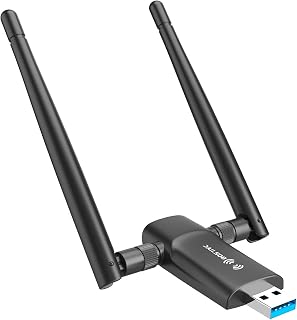
Not every setup needs a PCIe card, and this USB adapter fits gamers who want a quick wireless upgrade without opening their case. Dual 5Dbi antennas on both 5G and 2.4G bands help pull a stronger signal to the router, narrowing the stability gap against Ethernet for casual sessions where plug and play simplicity outweighs chasing the lowest possible latency.
Pros
- 867Mbps 5GHz band supports lower-latency gaming
- Dual 5dBi antennas improve signal over single-antenna adapters
- USB 3.0 avoids bottlenecking available bandwidth
- Compact, lightweight design
Cons
- Windows-only, no Mac or Linux support
- Real-world speeds fall short of theoretical maximums
When Ethernet simply isn't an option, the question shifts to how much WiFi can realistically support gaming, and the Nineplus AC1300 answers that for budget builds. Its 5GHz band hits 867Mbps, aimed squarely at lower-latency performance for gaming and smooth 4K streaming, while the 2.4GHz band trades speed for better range through walls when your setup is far from the router. The dual 5dBi antennas are the key hardware feature here, meaningfully boosting signal capture compared to single-antenna adapters, which can be the difference between a playable connection and constant drops several rooms away from your router. USB 3.0 keeps the adapter from becoming the bottleneck. It's compact enough not to clutter a desk, with the antennas as the only real design compromise. Real-world speeds won't hit theoretical maximums, so treat this as a workable wireless option rather than a wired replacement, but for casual to moderately competitive gaming it holds up.
Wireless Standards: 802.11ac, 802.11n, 802.11g, 802.11b
Speed: AC1300 total (867Mbps on 5GHz, 400Mbps on 2.4GHz)
Antennas: Dual 5dBi external antennas
Interface: USB 3.0 (backward compatible with USB 2.0)
Dimensions: 2.6 inches L x 0.82 inches W x 0.39 inches H
Weight: 12 grams
Color: Black
Operating Systems: Windows 7, Windows 8, Windows 8.1, Windows 10, Windows 11
Warranty: 2 years with online technical support
Fits desktop or laptop gamers on Windows who can't wire their PC to the router and want better range and speed than a basic single-antenna adapter. Reasonable for budget builds needing 5GHz support for the first time. Skip it if you're on Mac or Linux, since it's Windows-only, or if you need guaranteed wired-level stability for competitive play, since actual speeds fall short of the rated maximums.

Pros
- Truly plug-and-play installation with no driver setup or technical knowledge required
- Excellent real-world reliability with customers reporting stable connections for extended periods
- Dual external antennas provide noticeably stronger signal pickup than internal alternatives
- Works with virtually any Ethernet-enabled device, from smart TVs to office printers
- Best Sellers ranking in its category demonstrates proven customer satisfaction
Cons
- Speed performance can vary by environment and distance from router, requiring some trial and error
- AC1200 speeds are competent but not cutting-edge for demanding bandwidth applications
- Requires an electrical outlet nearby for operation, limiting placement flexibility in some setups
The BrosTrend AC1200 is a wireless Ethernet adapter designed for anyone stuck with wired-only devices in locations far from their router. Whether you have a network printer in another room, a smart TV that needs internet, or a gaming console gathering dust because the Ethernet port is inconvenient, this adapter solves the problem without requiring expensive rewiring or whole-system upgrades.
Performance is solid for typical home use. The dual-band AC1200 specification translates to real-world speeds of up to 867Mbps on 5GHz and 300Mbps on 2.4GHz, which easily handles streaming, gaming, and office work. The dual external antennas make a tangible difference in signal strength compared to internal options. Customers consistently report that setup takes only a few minutes, and the connection remains stable once configured, with no random disconnects or reliability issues.
Build quality is straightforward and no-frills. The compact design fits easily into tight spaces, and the adjustable antennas can be positioned for optimal signal. The universal compatibility with any 802.11ac/a/b/g/n router and zero driver requirements mean you can set this up on virtually any network without hassle. It's genuinely plug-and-play in the truest sense.
The main limitation is that speed performance depends heavily on your distance from the router, signal interference, and environmental factors. Some users may experience slower-than-expected throughput if their setup has obstacles or distance issues. Also, you need a nearby electrical outlet, which can restrict placement in some homes. These are minor trade-offs for the convenience of wireless connectivity to a wired device.
This adapter delivers real value for its price point. It solves a common problem elegantly, customers love it, and it ranks as a best seller in its category for good reason. If you have Ethernet devices that need wireless connectivity, this is a reliable, easy solution that actually works as advertised.
Network printers and multi-function devices in offices or homes where cable runs are impractical.
Smart TVs, streaming devices, and media players that lack built-in WiFi.
Gaming consoles, Blu-ray players, and other entertainment devices needing stable internet.
Desktop computers and workstations without WiFi capabilities in rooms far from your router.
Anyone wanting a quick, no-setup-needed solution to add wireless connectivity to wired hardware.

Pros
- Plug-and-play setup with WPS pairing takes under 10 minutes for most users
- Gigabit ethernet port delivers 10x faster speeds than standard fast ethernet
- Excellent value for extending WiFi 6 to legacy wired devices
- Reliable performance across multiple use cases including VoIP and streaming
- Helpful dual-mode configuration options for extender or access point use
Cons
- Initial setup may require multiple resets to ensure stable connection on first attempt
- Firmware update links reported as non-functional in some user experiences
- Performance is lower than direct wired connection to access points
The BrosTrend AX1500 solves a common problem: older wired devices that need WiFi 6 connectivity but lack built-in wireless capability. This adapter bridges that gap, making it essential for anyone with legacy printers, smart TVs, game consoles, or stationary computers that would benefit from high-speed wireless without running ethernet cable through walls.
Performance stands out with 1201Mbps on the 5GHz band, a meaningful boost over comparable AC1200 adapters. Real-world testing shows reliable connections for streaming, gaming, and office use. The dual band design lets you choose between speed on 5GHz or range on 2.4GHz depending on your environment. Setup is genuinely fast when you follow the included instructions, which clearly outline extender or access point configurations.
The compact black design fits unobtrusively near routers or devices. Build quality feels solid for the price point. Included accessories are practical: a 5-foot ethernet cable handles most placement scenarios, and the quick start guide has clear screenshots that address common questions upfront.
Some users report needing multiple resets during initial configuration to lock in proper settings, though this resolves within the first session. Firmware updates may be limited through the web interface. Despite these minor friction points, users consistently report months of stable operation after successful setup.
This adapter delivers genuine value for anyone needing WiFi 6 speeds on wired devices. The combination of easy setup, reliable performance, and gigabit ethernet speeds makes it a smart upgrade over running long ethernet cables or replacing aging equipment.
Connectivity: WiFi 6 with dual band support. 1201Mbps on 5GHz (802.11ax), 300Mbps on 2.4GHz (802.11n). Gigabit ethernet port (1Gbps). Backward compatible with 802.11ac/n/a/g/b.
Physical: Dimensions 3.5 inch L x 2.6 inch W x 8.4 inch H. Weight 230g. Black finish with adjustable external antennas for signal optimization.
Included: WiFi to Gigabit Ethernet Adapter, 5-foot ethernet cable, quick installation guide, WPS pairing button.
Warranty: 2-year manufacturer warranty. No driver software required for Windows or Mac.
When to Buy: You have a wired device (TV, printer, game console, computer) that supports ethernet but lacks modern WiFi capability. You want to connect to a WiFi 6 router without running ethernet cables. You need faster speeds than standard fast ethernet (100Mbps) provides.
Setup Tips: Position the adapter in an open area pointed toward your router. Connect to the 5GHz band if your router supports it, as it has less interference. Avoid placing near microwaves, electric ovens, or high-power appliances. Use WPS pairing for fastest connection. Allow extra time on first setup if this is your first networking bridge device.
Best Use Cases: Gaming consoles needing stable internet, smart TVs in media rooms, home office printers, network storage devices, VoIP phones, older computers or laptops without WiFi 6 capability.
Alternatives to Consider: If you need a mesh system instead of a bridge adapter, look at full mesh WiFi 6 systems. If your device has WiFi 6 already, this adapter is unnecessary. If you need maximum wired speed, run ethernet directly from your router.

Pros
- Gigabit performance eliminates slow ethernet connections and enables smooth 4K streaming and gaming
- Universal compatibility with any wired device featuring an ethernet port
- Quick setup with WPS button or smartphone web interface, no technical knowledge needed
- Eliminates need for long cable runs, reducing clutter and improving aesthetics
- Solid 4.1 out of 5 star rating from verified customer reviews
Cons
- Performance depends on WiFi signal strength from your router, not ideal for distant rooms
- Limited to devices with ethernet ports, cannot connect WiFi-only devices
- AC1200 standard may show performance limitations compared to newer WiFi 6 adapters in high-bandwidth scenarios
The BrosTrend AC1200 WiFi to Gigabit Ethernet Adapter is a wireless bridge designed for anyone with wired devices that need internet access without running cables. This adapter is perfect for smart TV owners, gamers, and anyone with network-dependent devices in areas far from their router.
The standout feature is the gigabit ethernet port, which delivers 1 Gbps speeds over a wireless connection. The dual-band AC1200 WiFi (867 Mbps at 5 GHz and 300 Mbps at 2.4 GHz) maintains a stable uplink, ensuring your wired device gets consistent high-speed internet. This means smooth 4K streaming, responsive gaming, and fast downloads without the 10x speed limitation of older Fast Ethernet ports.
Setup is refreshingly simple. You can connect via the one-button WPS feature in seconds or configure through a web interface on any device. No driver installation or technical setup required, making this accessible to users of any skill level. The compact black design fits discreetly near entertainment systems or on desks.
The main limitation is WiFi signal dependency. Performance will degrade in distant rooms or areas with weak WiFi coverage. Additionally, this adapter only works with devices that have ethernet ports, so it cannot help WiFi-only devices. As an AC1200 adapter, it may not fully leverage future WiFi 6 networks if you upgrade.
Overall, the BrosTrend AC1200 is a reliable, user-friendly solution for connecting wired devices to WiFi with minimal fuss and strong gigabit performance. Backed by a 2-year warranty and supported by solid customer ratings, it's a smart choice for eliminating cable clutter without sacrificing speed.
WiFi Standards: IEEE 802.11ac/n/a (5 GHz), IEEE 802.11n/b/g (2.4 GHz)
Speed: AC1200 total (867 Mbps at 5 GHz, 300 Mbps at 2.4 GHz), Gigabit Ethernet port (1 Gbps)
Ports: 1 x RJ45 Gigabit Ethernet port
Dimensions: 2.8 inches L x 1.9 inches W x 6.3 inches H
Weight: 0.17 kg
Color: Black
Warranty: 2-year (register after purchase)
Included: AC1200 adapter, quick installation guide, ethernet cable
Who Should Buy: This adapter is ideal for smart TV owners, PC gamers, home office workers, and anyone with network devices that need gigabit ethernet connectivity without running cables. It works great for printers, Blu-ray players, VoIP phones, and gaming consoles.
When to Consider Alternatives: If you need WiFi 6 speeds or plan to use this in areas with very weak WiFi signals, consider a mesh WiFi system instead. If your device lacks an ethernet port, this adapter won't help.
Setup Tips: Position the adapter within reasonable WiFi range of your router for best performance. Use the 5 GHz band if your device supports it for faster speeds and lower interference. If WPS isn't available on your router, the web interface setup takes just a few minutes on your smartphone or computer.
How to Choose Between Ethernet and Wi-Fi for Gaming
Prioritize steady latency over advertised speed
For gaming, consistency matters more than a huge top-end speed figure. Ethernet sends data through a physical cable, which normally avoids the interference, channel crowding, and signal swings that can create jitter, packet loss, or abrupt ping spikes on Wi-Fi.
If you can run a cable directly from the router to your PC or console, that is usually the preferred choice for competitive shooters, fighting games, and racing titles. A stable local connection also helps when you stream or upload clips, alongside a capable choice from our GPU for video encoding recommendations.
Consider router distance, wireless band, and home congestion
Wi-Fi can still be excellent for gaming when your gaming space is close to a strong router or mesh node. Use the 5 GHz band when possible, or 6 GHz with compatible Wi-Fi 6E hardware, because these bands generally have more available capacity and less interference than 2.4 GHz.
The TP-Link Deco XE70 Pro AXE4900 Tri-Band WiFi 6E is aimed at homes where coverage is the real issue, combining tri-band Wi-Fi 6E with a 2.5 Gigabit port. A mesh system is especially helpful when your gaming area sits beyond several walls, but node placement still determines whether wireless play feels responsive.
Match the adapter style to your PC or laptop
A PCIe card is usually the cleanest wireless upgrade for a desktop with an open expansion slot. The TP-Link WiFi 6 PCIe WiFi Card for PC offers AX3000 Wi-Fi 6 capability, a magnetized antenna base for flexible placement, and Bluetooth support for controllers, headphones, and keyboards.
The TP-Link WiFi 6 PCIe WiFi Card for Desktop PC is another strong desktop option, with high-gain antennas, Wi-Fi 6 features such as OFDMA and MU-MIMO, and a low-profile bracket for compact cases. If your machine handles work as well as games, our guide to PC hardware for Premiere Pro can help you balance broader system priorities.
USB adapters are more convenient for laptops and desktops without a spare PCIe slot. The NETGEAR Nighthawk WiFi 6E USB 3.0 Adapter (A8000) is the premium portable choice for compatible 6 GHz networks, while the Nineplus Wireless USB WiFi Adapter for PC and Tenda AX900 WiFi Adapter WiFi 6 are practical options with external antennas to improve reception.
Remember that the router and client need compatible standards before you can use Wi-Fi 6E benefits. For a new desktop build that also supports demanding development work, compare processor requirements with our CPU picks for compiling code before committing to an expansion-card layout.
Understand what a Wi-Fi-to-Ethernet bridge can and cannot do
A wireless bridge is useful when your console, smart TV, or wired-only PC is far from the router. It connects to Wi-Fi, then supplies an Ethernet port to the device, so you avoid a long cable run and often gain better antenna placement than the device’s built-in wireless hardware provides.
However, the bridge-to-router portion remains wireless, so it does not provide the same end-to-end consistency as a direct Ethernet cable. The BrosTrend AX1500 WiFi 6 Universal WiFi to Ethernet adds a Gigabit port and Wi-Fi 6 uplink, while the BrosTrend Dual Band 1200Mbps WiFi Bridge and BrosTrend AC1200 WiFi to Ethernet Adapter Dual offer dual-band alternatives for older wireless networks.
For the strongest result, put the bridge in an open location, point its adjustable antennas toward the router, and select the 5 GHz network where signal strength remains good. The BrosTrend AC1200 WiFi to Ethernet Adapter also uses a Gigabit Ethernet port, which prevents a slower Fast Ethernet port from becoming the limiting link for a capable connection.
Plan the installation before buying hardware
A direct Ethernet run needs an available router port, a suitably sized cable, and a route that will not create a tripping hazard. If that path is easy, it is hard to beat, particularly for a fixed desktop or console that sees frequent multiplayer use.
For wireless hardware, place antennas away from metal obstructions and large appliances, then keep the router firmware current. PCIe Bluetooth functions may also require an internal motherboard USB connection, while USB adapters perform more reliably when they are not hidden behind a PC chassis or crowded by other wireless peripherals.
Final Thoughts
Ethernet remains the clear choice if you can run a cable, but a well-positioned Wi-Fi upgrade is a smart answer for rooms where wiring is impractical. Choose the TP-Link WiFi 6 PCIe WiFi Card for PC for a capable desktop wireless upgrade, or the BrosTrend AX1500 WiFi 6 Universal WiFi to Ethernet when a wired-only console or device needs a dependable wireless bridge.
Frequently Asked Questions
Is Ethernet always better than Wi-Fi for gaming?
Ethernet is normally better for consistency because the cable is not affected by wireless interference or distance from the router. That does not mean every Wi-Fi connection is poor, since a nearby Wi-Fi 6 or Wi-Fi 6E router on a clean channel can support smooth casual and competitive play. Your internet provider, game server location, and household traffic still influence final ping.
Is Wi-Fi 6 or Wi-Fi 6E good enough for gaming in 2026?
Yes, Wi-Fi 6 and Wi-Fi 6E can be good enough for gaming when the signal is strong and the network is not overloaded. Wi-Fi 6 improves efficiency in homes with many connected devices, while Wi-Fi 6E can use the less congested 6 GHz band. You need a compatible router and client device to access the 6 GHz band.
Can I connect a gaming console to Wi-Fi with an Ethernet adapter?
Yes, a Wi-Fi-to-Ethernet bridge can connect a console’s LAN port to your home wireless network. It can be a useful upgrade if the console’s built-in Wi-Fi has weak range or limited antenna placement. The adapter does not turn the complete route into true wired Ethernet, so its placement and wireless signal quality remain important.
Will a faster internet plan lower gaming ping?
Not always. Online games use relatively little bandwidth, so more speed mainly helps when downloads, streams, or other devices are crowding your connection. Reducing local Wi-Fi interference and avoiding buffer-heavy background activity often improves consistency more than increasing plan speed, and a clear-call setup from our headset guide for online meetings can make game chat and work calls easier to manage.



Write Your Review
No reviews yet. Be the first to share your experience!