

At a normal desk distance, jumping from 1440p to 4K can make foliage, map labels, HUD text, and distant architecture look markedly cleaner. Yet those extra pixels make your PC work harder, so a display that looks spectacular in a screenshot can be a poor fit if it forces you to trade away the frame rate you enjoy.
This guide answers is 4k worth it for gaming for PC and console players choosing their next display. We focus on practical tradeoffs, then place the available options in the context of our broader monitor buying coverage, from straightforward 4K screens to fast OLED and dual-mode models.
Quick Comparison
Ratings reflect the most recent data pull. Check each listing for current price and availability.
Quick answer
This guide compares 8 picks, with LG 27UP650K-W 27-Inch 4K UHD IPS Monitor with HDR400 ranked first. CRUA 32 inch 4K Curved Gaming Monitor 160Hz AMD has the most customer reviews. Acer Nitro 27in 4K 160Hz IPS Gaming Monitor with AMD leads this list on refresh rate.

For readers questioning whether 4K matters outside pure gaming speed, this IPS monitor leans into image quality with DisplayHDR 400 support and accurate color reproduction, better suited to visual fidelity than high refresh chasing at 60Hz. Flicker Safe technology adds comfort during long sessions, making it a sensible pick for story-driven or visually detailed titles.
Pros
- Sharp 4K IPS panel with wide 178-degree viewing angles
- 95% DCI-P3 color coverage suits photo and creative work
- DisplayHDR 400 support adds depth for compatible content
- Height, tilt, and pivot adjustable stand for ergonomic setup
Cons
- 60Hz refresh rate is not suited to competitive gaming
- No USB-C video input or built-in speakers listed
This article is about whether 4K is worth it for gaming, and the honest answer for this monitor is: not primarily for that. The LG 27UP650K-W is built around sharp, detailed 4K imagery for productivity and everyday computing rather than competitive play, with a 60Hz refresh rate that caps how much it can offer fast-twitch gamers. Dynamic Action Sync does add some responsiveness for casual gaming sessions, but this isn't a monitor chasing high frame rates. Where it earns a place in a 4K buying guide is as the counterpoint: if your gaming is casual or single-player and you also want a crisp, color-accurate screen for work, photo editing, or streaming, the IPS panel's 95% DCI-P3 coverage and 178-degree viewing angles deliver image quality that a gaming-first panel might not match. DisplayHDR 400 adds some value for compatible content, and the adjustable stand helps with desk ergonomics. For anyone shopping 4K specifically for competitive gaming performance, this is a clear skip in favor of a higher refresh option.

Readers debating 4K's worth will find a strong argument in this OLED's dual-mode 165Hz/330Hz refresh and 0.03ms response time, delivering both pixel density and near-instant pixel transitions. The 1500000:1 contrast ratio makes dark scenes genuinely deep, and G-SYNC plus FreeSync Premium Pro support ensures compatibility across GPU brands for competitive and cinematic play alike.
Pros
- True 4K OLED at 165Hz with 1080p/330Hz mode
- 0.03ms response time with no ghosting
- TrueBlack 400 HDR with extremely high contrast
- G-SYNC and FreeSync Premium Pro support
Cons
- Glossy finish reflects ambient light heavily
- Switching inputs between systems is inconvenient
If the question is whether 4K gaming is worth it, the LG 32GX850A-B argues yes, when the panel technology matches the resolution. This is a 32-inch OLED with true 4K at 165Hz, and its dual-mode design lets you drop to 1080p at 330Hz for competitive shooters or stay at full 4K/165Hz for immersive single-player titles. That flexibility directly addresses the article's central tradeoff: 4K often means sacrificing frame rate, but this monitor lets you choose per game. The 0.03ms response time and TrueBlack 400 HDR with 1,500,000:1 contrast push visual quality well beyond typical LCD gaming monitors, with the 98.5% color gamut adding accuracy for creative work on the side. This is the monitor for someone who has decided 4K gaming is worth it and wants the best execution of that idea, not a budget entry point. The glossy finish and premium cost mean it suits a specific kind of buyer rather than everyone considering the jump to 4K.
Display: 32-inch 4K UHD (3840 x 2160) glossy OLED, 16:9 aspect ratio, 0.18mm pixel pitch
Performance: 165Hz at 4K or 330Hz at Full HD, 0.03ms response time (GtG), 1500000:1 contrast ratio, 275 nits brightness
Color: VESA DisplayHDR True Black 400, 98.5% DCI-P3 gamut, HDR10 support
Connectivity: 1x DisplayPort, 2x HDMI 2.1, 3x USB 3.0, 2x audio outputs
Adaptive Sync: NVIDIA G-SYNC Compatible, AMD FreeSync Premium Pro
Stand: Height, tilt, swivel, and pivot adjustment. Dimensions: 28.1"W x 24.4"H x 9.8"D, 20.1 lbs
Certifications: UL Anti-Glare, UL Flicker-Free, UL Low Blue Light
Warranty: 2-year manufacturer coverage
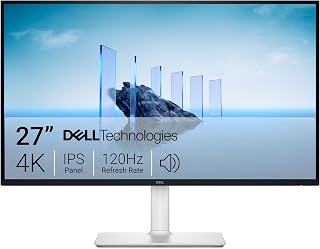
For gamers weighing whether 4K is worth the jump, this 27-inch IPS panel makes the case with a 120Hz refresh rate and 5ms response time, giving sharp UHD detail without sacrificing motion clarity. FreeSync Premium keeps tearing in check during fast-paced play, while the matte finish cuts glare in bright rooms, a practical balance for anyone easing into 4K gaming.
Pros
- 4K resolution paired with 120Hz refresh rate
- 99% sRGB color accuracy for work and play
- FreeSync Premium prevents screen tearing
- Fully adjustable stand with height, tilt, pivot, swivel
Cons
- 4-8ms response time trails dedicated gaming monitors
- Default brightness runs too high out of the box
The core question of this guide is whether 4K is worth it for gaming, and the Dell S2725QS is a solid case study for the 'yes, if you pick wisely' answer. You get real 3840x2160 resolution with a 120Hz refresh rate and AMD FreeSync Premium, so fast motion stays tear-free while text and detail stay sharp. That combination answers the biggest fear buyers have about 4K gaming monitors: that you'll be stuck at 60Hz or forced into a weak panel to afford the resolution. The 99% sRGB coverage also means this isn't a one-trick gaming display, it holds up for creative work and everyday browsing too. The 1500:1 contrast and 350 nit brightness are typical IPS numbers, not flagship HDR territory, so don't expect deep blacks. For someone deciding if 4K gaming is worth the jump without going all-in on a premium OLED, this monitor represents the practical middle ground the article is built around.
Display: 27-inch IPS LED panel, 4K UHD (3840x2160), 16:9 aspect ratio, matte anti-glare finish
Color: 99% sRGB color gamut, 1500:1 contrast ratio, 350 nits brightness
Refresh Rate: 120Hz with AMD FreeSync Premium adaptive sync technology
Response Time: 0.03ms, 4-8ms gray-to-gray
Viewing Angle: 178 degrees horizontal and vertical
Connectivity: DisplayPort, 2x HDMI 1.4, 3.5mm audio jack
Adjustments: Height, tilt, pivot, and swivel adjustments, VESA 100x100 compatible
Audio: Built-in 2W stereo speakers with enhanced audio quality
Features: ComfortView Plus blue light reduction, Energy Star certified, USB hub connectivity
Dimensions: 24.08 inches wide, 7.89 inches deep, 15.3 inches high (with stand)
Weight: 14.3 pounds
Power Consumption: 24.6 watts
Warranty: 1-year advanced exchange service and premium panel exchange
Buy this if you want to try 4K gaming without committing to OLED pricing or complexity, especially for story-driven or casual competitive play. Content creators and students who split time between work and gaming are a good match too. Skip it if you're chasing esports-level response times or need sub-1ms reaction speed, since the 4-8ms gray-to-gray rating and 120Hz ceiling fall short of dedicated competitive gaming panels.

Those considering a larger 4K upgrade will appreciate this 32-inch curved VA panel's 1500R curvature for immersion alongside a 160Hz refresh rate that keeps fast motion fluid. A 3000:1 contrast ratio gives deeper blacks than typical IPS alternatives, and AMD FreeSync support helps smooth out frame delivery, making the resolution bump feel worthwhile rather than just sharper pixels.
Pros
- 160Hz refresh rate keeps 4K smooth for fast-paced games
- 1500R curve adds immersion that flat 4K panels lack
- 120% sRGB and 3000:1 contrast support light creative work
- HDMI 2.1 and DisplayPort 1.4 cover modern consoles and GPUs
Cons
- VA panel has narrower viewing angles than IPS alternatives
- No established customer review history to confirm durability
If you're sold on 4K for gaming but want the immersion factor turned up, this 32-inch curved CRUA is worth a look. The question this article asks is whether 4K is worth it for gaming, and this monitor answers it with a 160Hz refresh rate and AMD FreeSync, so you get sharp 4K detail without giving up the smooth motion competitive play demands. The 1500R curve wraps the screen into your peripheral vision, which makes the extra resolution feel more enveloping than it would on a flat panel. A 120% sRGB gamut and 3000:1 contrast ratio mean the image holds up for more than just gaming, useful if you also edit photos or video on the same screen. HDMI 2.1 and DisplayPort 1.4 cover current consoles and graphics cards, and built-in speakers simplify your desk setup. The tradeoffs are a VA panel with narrower viewing angles than IPS, and no track record of customer reviews yet, so some of this rests on spec sheet trust rather than proven history.
Display: 32-inch 4K UHD (3840 x 2160) curved VA panel, 1500R curvature, 16:9 aspect ratio, matte finish
Performance: 160Hz refresh rate, 1ms response time, 320cd/m2 brightness, 3000:1 contrast ratio, 120% sRGB color gamut, 178-degree viewing angle
Connectivity: 2x HDMI 2.1 ports, DisplayPort 1.4, 2x component outputs, built-in speakers with audio jack
Physical: 28-inch width, 16.6-inch height, 1-inch depth, 7.19kg weight, 75mm x 75mm VESA wall mount compatible, desk mount included
Features: Blue light filter, RGB lighting, AMD FreeSync adaptive sync, supports gaming consoles and PC
Warranty: 1-year manufacturer warranty with 30-day free returns and exchanges

Gamers weighing 4K against responsiveness get a strong middle ground here, with a 160Hz refresh rate pairing high resolution with genuinely fast-paced gameplay. G-SYNC support keeps frames synced to the display to eliminate tearing, while the matte LED panel reduces glare, making the case that 4K doesn't have to mean giving up competitive-level smoothness.
Pros
- 160Hz refresh rate at full 4K resolution with 1ms response
- ELMB Sync plus G-SYNC Compatible and FreeSync Premium cuts tearing
- HDMI 2.1 enables 4K at 120Hz for current consoles
- Sturdy build with flexible 100x100 VESA mounting
Cons
- Requires a powerful graphics card to reach full 160Hz at 4K
- Only one HDMI port limits multi-source connectivity
For anyone weighing whether 4K is actually worth it for gaming, the ASUS TUF VG27UQ1A is close to a model answer. It pairs a 160Hz refresh rate with full 4K resolution on a fast 1ms panel, which is exactly the combination that makes high-resolution gaming feel worth the investment rather than a tradeoff against smoothness. ASUS's ELMB Sync works with G-SYNC Compatible and AMD FreeSync Premium, cutting down ghosting and tearing so the extra pixels don't come at the cost of fluid motion. HDMI 2.1 support means console gamers can run 4K at 120Hz too, not just PC players with top-tier GPUs. Build quality is sturdy at 10.6 pounds with 100x100 VESA mounting for flexible setups, and brightness and contrast are solid enough for varied lighting. The catch is that you need a capable graphics card to actually push 160Hz at 4K, so part of the value depends on the rest of your rig, and the single HDMI port limits how many sources you can connect at once.
Display and Resolution: 27-inch Fast IPS LCD panel with 3840 x 2160 pixel native resolution, 16:9 aspect ratio, 1ms response time, and 1000:1 contrast ratio.
Refresh Rate and Sync: 160Hz refresh rate with NVIDIA G-SYNC Compatible, AMD FreeSync Premium, and ASUS Extreme Low Motion Blur Sync (ELMB Sync) technology for adaptive refresh-rate gaming.
Color and Brightness: 95% DCI-P3 professional color gamut, HDR support, 1027.8 lm peak brightness, and 178-degree viewing angles for consistent color across positions.
Connectivity: DisplayPort and HDMI 2.1 (1 port) with support for up to 4K 120Hz via HDMI without chroma subsampling. 100x100 VESA mounting compatibility.
Warranty and Included Accessories: 3-year warranty with advanced replacement and repair service, DisplayPort cable, power cord, L-shaped screwdriver, and quick start guide included. Complimentary 3-month Adobe Creative Cloud subscription.
Right for gamers who want 4K's clarity without dropping to a lower refresh rate, provided they have a graphics card strong enough to drive it. Console players benefit from the HDMI 2.1 120Hz support too. Skip it if your GPU can't keep up with 4K at high frame rates, or if you need multiple HDMI sources connected simultaneously.

Pros
- Exceptional value for a large 4K curved display with high refresh rate capability
- Vibrant colors and strong contrast ratio ideal for both gaming and creative work
- Smooth 160Hz performance reduces motion blur and input lag in competitive titles
- Flexible power and mounting options add real-world versatility
- Immersive curved design enhances peripheral vision and gaming immersion
Cons
- Some users reported display failures within 3 months, raising durability concerns
- Brightness may struggle in very bright environments or rooms with direct sunlight
- Limited to 1-year warranty with only 30-day return window, offering minimal long-term protection
The CRUA 32-inch 4K curved gaming monitor represents a compelling option for gamers, streamers, and creative professionals seeking a large, high-refresh display without breaking the bank. With its 3840x2160 resolution, 160Hz refresh rate, and immersive 1500R curve, this monitor targets users who value both performance and visual impact for gaming, content creation, and multitasking.
Performance and visuals are the standout strengths here. The 160Hz refresh rate combined with 1ms response time delivers smooth, responsive gameplay in fast-paced titles, while AMD FreeSync eliminates screen tearing for AMD GPU owners. The 120% sRGB color gamut and 3000:1 contrast ratio on the VA panel produce vibrant, punchy visuals with excellent black levels. The curved design genuinely enhances immersion, pulling your view inward naturally across the wide 32-inch screen. Built-in RGB lighting and dual speakers add polish to gaming setups without requiring additional peripherals.
Design and build quality feel solid for the price point. The white finish is clean and modern, the 1500R curve is pronounced enough to notice without feeling gimmicky, and connectivity is comprehensive with HDMI 2.1, DisplayPort 1.4, and flexible mounting support. An interesting practical advantage emerged from user reviews: the monitor runs on 12 volts, making it viable for RVs, boats, and off-grid setups with proper wiring.
The main concern is reliability. Several users reported display failures or degradation within three months, and the 30-day return window combined with a limited 1-year warranty offers minimal recourse. Brightness can also lag in very sunny environments, though this is rarely an issue for typical indoor use. These factors suggest checking return policies and considering extended warranty options.
Verdict: The CRUA 32-inch 4K 160Hz curved monitor delivers impressive specs and visual performance at a budget-friendly price. It is ideal for gamers, content creators, and multitaskers who prioritize screen real estate and smooth gaming over premium build durability. Be aware of reported reliability issues and verify return policies before purchase.
Display Specs: 32-inch VA panel with 3840x2160 4K UHD resolution, 160Hz refresh rate, 1ms response time, 1500R curvature, 178-degree viewing angle, 3000:1 contrast ratio, 120% sRGB color gamut, and 320 cd brightness. Matte finish reduces glare.
Connectivity: 2x HDMI 2.1 ports, DisplayPort 1.4, and 3.5mm audio jack. Built-in stereo speakers for convenient audio playback without external speakers.
Mounting and Design: Includes desk mount stand and supports 75x75mm VESA wall mounting. Dimensions: 28 inches wide, 16.6 inches tall, 1 inch deep. White color with RGB lighting accents.
Power and Warranty: Operates on 12V DC with included 110V AC power adapter. 1-year manufacturer warranty with 30-day free return and exchange through Amazon.
Ideal For: Gamers seeking high refresh 4K visuals on a budget, PC and console streamers who need immersive displays, content creators working with color-critical tasks, productivity users managing multiple windows, and enthusiasts in RVs or mobile setups leveraging 12V compatibility.
Consider Alternatives If: You require ultra-bright displays for outdoor use, prioritize extended warranty protection and proven durability track records, or need HDMI 2.0 for older systems without HDMI 2.1 support.
Bottom Line: This monitor punches well above its price point on performance and features. Proceed with confidence if you can accept moderate durability concerns and have a clear return window to test reliability in your environment.

For gamers unsure if 4K sacrifices smoothness, this monitor's DFR tech lets it toggle between full 4K at 72Hz and a sharper 144Hz at reduced resolution, giving flexibility between detail and speed. The IPS panel and AMD FreeSync support help justify the resolution upgrade without demanding a top-tier GPU to keep frame rates playable.
Pros
- Dynamic refresh rate: 4K/72Hz or 1080p/144Hz
- Matte IPS panel resists glare
- AMD FreeSync reduces screen tearing
- Zero-frame bezels suit multi-monitor setups
Cons
- HDR10 support is weak in practice
- VESA mount screws not included
For readers weighing whether 4K is worth it for gaming, the Acer Nitro VG270K offers a built-in answer: toggle between full 3840x2160 at 72Hz or drop to 1080p at 144Hz depending on the game. That dynamic refresh rate feature means you're not locked into one resolution tradeoff, you decide per title whether detail or smoothness matters more. The IPS panel and AMD FreeSync keep motion clean at either setting, and HDR10 support adds some extra range, though real-world reports suggest the HDR implementation is more marketing checkbox than meaningful upgrade. Zero-frame bezels make this a strong candidate for a multi-monitor 4K setup, which is worth considering if you're debating single ultra-wide 4K versus multiple panels. The matte coating also helps in brighter rooms, a practical plus if the glossy OLED options in this category feel impractical for your space. This is a good pick for anyone who wants to experiment with 4K gaming without fully giving up high refresh rate play.
Display: 27-inch IPS LCD, 3840x2160 (4K UHD), 16:9 aspect ratio, matte finish
Refresh Rate: 72Hz native at 3840x2160, up to 144Hz at 1920x1080 with Dynamic Refresh Rate
Response Time: 0.5ms Gray-to-Gray
Color: DCI-P3 95% gamut, HDR 10 support
Sync Technology: AMD FreeSync
Ports: 1x DisplayPort 1.4, 2x HDMI 2.0 (cable included)
Adjustments: Height, tilt, swivel, pivot, VESA 100x100mm compatible
Dimensions: 24.18in W x 18.15in H x 7.84in D
Features: Built-in speakers, flicker-less technology, low dimming (ComfyView)
Warranty: 3-year parts and labor
Good for gamers who want to try both 4K at 72Hz and 1080p at 144Hz depending on genre, and who value a matte, glare-resistant panel for brighter rooms. Also fits multi-monitor setups thanks to thin bezels. Skip it if you need real HDR performance or console compatibility with HDR, and skip it if you want full 4K at higher refresh rates without resolution scaling.
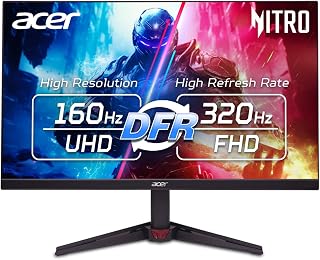
For readers asking if 4K can keep up with high refresh demands, this monitor's DFR feature pushes to 320Hz at reduced resolution while still offering full 4K detail at 160Hz, covering both ends of the tradeoff. The IPS panel keeps colors consistent across viewing angles, making it a flexible answer for gamers who want speed and sharpness in one display.
Pros
- Switches between 4K 160Hz and 1080p 320Hz
- AMD FreeSync Premium prevents tearing and stutter
- 0.5ms response time limits ghosting
- HDR10 with 90% DCI-P3 for rich color and contrast
Cons
- Needs a powerful GPU to sustain 4K frame rates
- Stand only tilts, no height or swivel adjustment
The question of whether 4K is worth it for gaming usually comes down to one tradeoff: resolution versus frame rate. The VG270K V4 answers that by refusing to pick a side. Its Dynamic Refresh Rate feature lets you run full 4K at 160Hz when you want the sharpness, or drop to 1080p and hit 320Hz when competitive responsiveness matters more. That flexibility is exactly what someone weighing a 4K monitor purchase needs to see, since it removes the fear of being locked into a resolution that tanks your frame rate in fast titles. AMD FreeSync Premium keeps motion smooth and tear-free across that range, and a 0.5ms gray-to-gray response time keeps ghosting out of the picture during action sequences. HDR10 with 90% DCI-P3 means the 4K mode actually looks like a visual upgrade, not just more pixels. The IPS panel adds wide viewing angles and accurate color, useful if the monitor doubles as a creative workstation. For anyone deciding whether 4K gaming is a worthwhile step up, this monitor makes a strong case by letting you have both resolution and speed on demand.
Display: 27-inch IPS LCD, 4K UHD (3840x2160), 16:9 aspect ratio, matte finish
Refresh Rate: 160Hz at 3840x2160, up to 320Hz at 1920x1080 with Dynamic Refresh Rate
Response Time: 0.5ms gray-to-gray
Color: DCI-P3 90% gamut, HDR 10 support, 1000:1 contrast ratio
Adaptive Sync: AMD FreeSync Premium
Connectivity: 1x DisplayPort 1.4, 2x HDMI 2.1, built-in speakers
Ergonomics: VESA 100x100mm mount, tilt adjustment (-5 to +25 degrees)
Dimensions: 24.2in W x 18.2in H x 7.8in D
Warranty: 3-year parts and labor
Best for gamers upgrading to 4K who still want a true high refresh rate option for competitive play, and for anyone who splits time between gaming and color-sensitive creative work. Skip it if your GPU is below an RTX 4070, since sustaining 160fps at 4K requires serious horsepower, or if you need adjustable monitor height and swivel, as this stand only tilts.
What Matters When Choosing a 4K Gaming Monitor
Your GPU, game settings, and frame-rate target
A 4K panel has 3840 by 2160 pixels, roughly 8.3 million in every frame. That is four times the pixel count of 1080p, which means demanding games often need reduced visual settings, upscaling, or a more capable GPU to hold the same performance level you would see at a lower resolution.
Set a realistic target before shopping. The Dell 27 Monitor S2725QS supports 4K at up to 120Hz with FreeSync Premium, while the ASUS TUF Gaming VG27UQ1A targets 4K at up to 160Hz. The LG 32GX850A-B adds a choice between 4K at 165Hz and Full HD at 330Hz, but that flexibility matters most if your system can supply the frames. Our GPU recommendations for Baldur’s Gate 3 illustrate why game settings and graphics hardware deserve equal attention.
Screen size and viewing distance shape the 4K benefit
Pixel density matters as much as resolution. On a 27-inch display, 4K produces very fine detail that helps text, interfaces, strategy maps, and distant game scenery look exceptionally sharp. At 32 inches, you still get a detailed image while gaining a larger, more cinematic view that can feel more natural from a deeper desk.
The LG 27UP650K-W and Dell 27 Monitor S2725QS make sense when your setup is compact or you prefer a concentrated desktop view. Both CRUA 32-inch curved models use a 1500R curve for a more enveloping large-screen presentation, which can suit racing games and open-world exploration. If you are weighing more gaming-oriented display designs, our guide to GIGABYTE monitors for gaming and hybrid desks provides useful comparison context.
Refresh rate, adaptive sync, and response behavior
Resolution alone does not guarantee satisfying gameplay. A 4K 60Hz monitor such as the LG 27UP650K-W can be a sensible match for relaxed single-player games, but fast shooters, racers, and competitive titles feel more immediate when you can maintain a higher refresh rate. Adaptive-sync support helps keep motion smoother when your frame rate varies during busy scenes.
The CRUA curved displays and ASUS TUF Gaming VG27UQ1A are rated for up to 160Hz at 4K, while the Acer Nitro VG270K V4 can switch between 4K at 160Hz and Full HD at 320Hz through DFR. The Acer Nitro VG270K L1 takes a similar approach at 4K 72Hz or Full HD 144Hz. A dual-mode monitor is especially appealing if you split time between immersive games and esports, but browse the graphics cards category before assuming your current PC can fully use its fastest mode.
Panel technology, HDR, and connections complete the experience
For dark rooms and cinematic games, contrast has a major influence on whether 4K feels genuinely more immersive. The LG 32GX850A-B pairs its glossy OLED panel with True Black 400 certification, a 1.5M:1 contrast ratio, and a wide DCI-P3 color gamut. IPS models such as the ASUS, Dell, and Acer options prioritize wide viewing angles and crisp color, while the CRUA models use high-contrast VA panels.
Look beyond the HDR label and confirm the ports you need. HDMI 2.1 is important for compatible 4K 120Hz console play, and the ASUS TUF Gaming VG27UQ1A and CRUA models list HDMI 2.1 connectivity. If your monitor will also serve spreadsheets, media, and long workdays, sharp 4K text is a real advantage, so our monitor picks for stock trading can help you compare productivity-focused priorities with gaming features.
Final Thoughts
4K is worth it for gaming when you value sharp image detail and have a PC or console setup that can meet your preferred performance target. The LG 32GX850A-B 32" UltraGear 4K UHD (3840 x 2160) is the compelling choice for premium OLED immersion and flexible speed, while the Acer Nitro 27in 4K 3840×2160 IPS 160Hz DFR 320Hz suits players who want to switch between detailed 4K play and exceptionally fast competitive action.
Frequently Asked Questions
Is 4K worth it for gaming on PS5 or Xbox Series X?
4K can be a strong console upgrade if you value sharper image quality in cinematic, sports, racing, or open-world games. Check your console’s output modes and the monitor’s port specifications, because HDMI 2.1 is the practical feature to seek for compatible 4K 120Hz play. Some games favor visual detail, while others offer higher-frame-rate modes at a lower internal resolution.
Is 4K 60Hz or 4K 144Hz better for gaming?
Neither option is automatically better because your favorite genres and hardware decide the answer. A 4K 60Hz monitor can deliver excellent clarity for slower-paced adventures, simulation games, and casual console play. For competitive shooters, fighting games, and racing titles, a high-refresh 4K screen offers clearer motion and more responsive-feeling control if your GPU can maintain the necessary frame rate.
Do I need a high-end GPU for 4K gaming in 2026?
A more capable GPU is helpful for modern 4K gaming, especially when you want high settings, ray tracing, and refresh rates above 120Hz. You do not need maximum settings in every game, however, because resolution scaling and upscaling technologies can reduce the workload while preserving much of the detail. Plan around the games you actually play instead of chasing a frame-rate target that does not affect your experience.
Can one 4K monitor handle gaming and work?
Yes, and that is one of 4K’s biggest advantages. The added pixel density makes documents, creative applications, browsing, and multitasking feel more spacious, while a high-refresh panel remains ready for games after work. For notebook-focused setups, compare connection needs and ergonomic features with our MacBook Pro monitor guide before choosing a display.






Write Your Review
No reviews yet. Be the first to share your experience!