

You’ve landed on the RX 9060 XT and now you’re staring at one question: 8GB or 16GB? At 1080p, 8GB can still hold its ground in many titles, but the moment you push toward 1440p with high texture packs or plan to keep this card for three-plus years, VRAM headroom starts to matter a lot more than most buyers expect.
This guide focuses on the 16GB variants currently on the market, since that’s where the real future-proofing argument lives. Whether you’re building a new rig or upgrading from a previous generation, the picks below cover the full range of cooler designs, boost clocks, and build quality from brands like ASRock, XFX, Gigabyte, ASUS, and PowerColor.
Quick Comparison
Ratings reflect the most recent data pull. Check each listing for current price and availability.
Quick answer
This guide compares 10 picks, with Yeston Sakura Radeon RX 9060 XT 16GB GDDR6 Graphics ranked first. ASRock Radeon RX 9060 XT Challenger 16GB GDDR6 PCIe 5.0 holds the highest customer rating among them. Gigabyte Radeon RX 9060 XT 16GB GDDR6 Gaming Graphics has the most customer reviews.
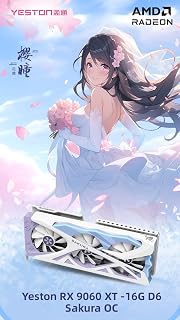
Sakura's 16GB GDDR6 configuration tackles the core question directly. While the 2620 MHz clock sits lower than some competitors, the doubled memory capacity matters more for longevity as game engines increasingly demand higher VRAM allocations. For users planning to keep their card through multiple game release cycles, this ensures headroom against texture quality compromises.
Pros
- 16GB GDDR6 provides meaningful headroom over 8GB cards at 1440p and 4K
- 2620MHz GPU clock with FSR 4 and Anti-Lag 2 support for optimized frame rates
- Dual ball bearing fans and composite heat pipes for sustained thermal stability
- Compact 331x137x60mm footprint fits most standard desktop cases
Cons
- Single 8-pin power connector may limit flexibility on some PSU cable layouts
- 650W minimum PSU requirement demands a quality power supply be factored into the build
When the debate is 8GB versus 16GB, the Yeston Sakura makes the case for the larger buffer without much argument. Its 16GB of GDDR6 runs at 2518MHz and pairs with a 2620MHz GPU clock, giving it the headroom that 8GB cards simply cannot match once texture-heavy AAA titles or high-resolution asset packs push memory usage past that ceiling. For anyone drawn to 1440p or eyeing 4K at up to 7680x4320, having double the VRAM means fewer compromises on texture quality settings today and more runway as future titles grow more demanding. AMD FidelityFX Super Resolution 4 and Radeon Anti-Lag 2 extend that runway further by recovering frame rates without sacrificing visual fidelity. The cooling setup, composite heat pipes, dual 9.1cm ball bearing fans spinning up to 2800RPM, and a nickel-plated copper base, keeps thermals stable under sustained load. At 331x137x60mm, the card fits most standard cases. The 650W minimum PSU requirement and single 8-pin connector are straightforward asks for a build of this caliber. If memory capacity is your deciding factor, this card answers the question directly.
GPU: AMD Radeon RX 9060 XT, 2048 unified shaders, 16GB GDDR6 128-bit memory interface
Clock Speeds: Base 2620MHz, Boost 3230MHz (STD), Variable 2780/3320MHz, Memory 2518MHz at 20Gbps
Output: Dual DisplayPort 2.1a, single HDMI 2.1b, maximum 7680x4320 resolution
Architecture: DirectX 12, PCI Express 5.0 x16, 6+3 phase power, 8-pin connector
Cooling: YFST4B-Y heat sink with 4x6mm composite heat pipes, dual 9.1cm ball bearing fans, adjustable to 2800 RPM with ARGB lighting
Physical: 331x137x60mm (excluding bracket), 342x152x60mm (including bracket), 1077g, Windows 10/11 compatible
Power: 650W PSU recommended, 1-year manufacturer warranty
Buy this if you primarily game at 1440p or 4K and want the 16GB buffer to avoid VRAM bottlenecks in current and upcoming titles. It also suits creators handling GPU-accelerated workloads where memory capacity matters. Skip it if you game exclusively at 1080p on a modest rig, where the extra VRAM over the 8GB variant rarely translates to visible gains and the 650W PSU requirement may be overkill.

The Challenger's 16GB configuration eliminates VRAM concerns entirely for this generation. With a 3290 MHz boost clock, it's among the fastest 9060 XT models available, giving you headroom for texture-heavy games and multitasking scenarios where 8GB cards start swapping. The 0dB silent mode keeps noise down during lighter workloads, making it practical for everyday use beyond gaming.
Pros
- 3290 MHz boost clock with 16GB GDDR6 removes VRAM as a bottleneck at 1440p
- Sustained mid-60s temps under load with 0dB idle fan mode for quiet operation
- 550W PSU minimum makes it a straightforward drop-in upgrade for most existing systems
- Compact 249mm length fits virtually any modern case
Cons
- 128-bit memory bus limits bandwidth headroom for 4K gaming and heavy professional workloads
- Dual-fan cooler, while effective, does not match the thermal headroom of triple-fan designs
The central question of 8GB versus 16GB on the RX 9060 XT finds a clear answer in the ASRock Challenger 16GB OC. At 1440p, which is the card's intended target, 16GB GDDR6 means texture budgets and asset streaming do not bottleneck the 3290 MHz boost clock or the RDNA 4 compute units. Users report 60fps and above on high settings in modern titles, with meaningfully better frame rates in demanding games compared to older mid-range hardware. The 0dB idle fan mode and mid-60s temperatures under full load show the cooler is matched well to the chip's efficiency. Practically, the single 8-pin connector and 550W PSU requirement mean the 16GB model does not punish your existing system. At 249mm the card fits most cases without planning. The 128-bit memory bus is the honest trade-off to note: the 16GB capacity protects you against VRAM starvation, but bandwidth is tighter than wider-bus alternatives at the same price tier, which matters most in 4K workloads rather than 1440p targets.
GPU: AMD Radeon RX 9060 XT (RDNA 4, 32 Compute Units)
Memory: 16GB GDDR6 at 20 Gbps on 128-bit bus
Clock Speeds: 3290 MHz boost, 2700 MHz game clock
Output: DisplayPort 2.1a, HDMI 2.1b
Max Resolution: 7680x4320 pixels
Power: Single 8-pin connector, 550W PSU recommended
Size: 249mm (L) x 132mm (W) x 41mm (H), 2-slot design
Cooling: Dual fans, 0dB idle mode
Interface: PCIe 5.0 x16
Weight: 0.98 kg
Warranty: 2 years manufacturer
The right pick for 1440p gamers on existing builds who want the memory safety of 16GB without upgrading their power supply or case. Also suits light content creators who edit at 1440p or below. Skip it if 4K gaming at high settings is the goal, since the 128-bit bus becomes a limiting factor there, or if you need the absolute lowest frame-time variance in competitive titles.

This triple fan design with 16GB GDDR6 handles the memory capacity debate decisively. The extra cooling from three fans ensures sustained performance during extended sessions, preventing thermal throttling that can offset the benefits of higher VRAM. If you're planning to keep your card through 2026 and beyond, the 16GB buffer protects against future texture requirements in AAA titles.
Pros
- 16GB GDDR6 at 20GHz memory clock handles texture-heavy 1440p and VR workloads
- Triple-fan cooling delivers low temperatures and quiet operation under load
- RDNA 4 architecture provides efficient rasterization scaling from 1080p to 1440p
- Compact 11.42-inch form factor fits a wide range of desktop cases
Cons
- AMD driver software is less refined than NVIDIA's competing tools
- Ray tracing performance lags behind comparable NVIDIA cards at this tier
Choosing 16GB over 8GB on the RX 9060 XT comes down to one question: how much buffer do you need before VRAM becomes the bottleneck? The XFX Swift answers with 16GB GDDR6 at 20GHz memory clock, backed by AMD's RDNA 4 architecture and a 3320MHz boost clock. That memory bandwidth advantage over the 8GB variant is felt most at 1440p with high texture presets and in VR, where stable, uninterrupted frame delivery depends on assets staying in VRAM rather than being streamed. Three fans keep thermals low and acoustics quiet under sustained load, a genuinely rare pairing. The minimalist design at 11.42 inches integrates cleanly into most cases. The RDNA 4 core also enables efficient rasterization performance across demanding titles, scaling well from 1080p up through 1440p. The tradeoffs are real: AMD's driver ecosystem lacks NVIDIA's polish, and ray tracing performance trails competing hardware at this tier. But for gamers who play primarily rasterized titles and want the 16GB version's staying power, the XFX Swift is a well-rounded pick that does not compromise on cooling or build quality.
Core Specifications: AMD Radeon RX 9060 XT chipset, RDNA 4 architecture, 1900MHz base clock, 3320MHz boost clock, 16GB GDDR6 memory at 20GHz, PCI-Express x16 interface.
Display Outputs: 1x HDMI 2.0, 2x DisplayPort connectors support up to 3840x2160 resolution. Optimal for 1440p gaming or multi-monitor setups.
Thermal Design: XFX SWFT triple-fan cooling solution, compact 11.42-inch length, 1.5kg weight. Fits standard mid-tower cases with typical clearance requirements.
Warranty: 3-year manufacturer protection covers defects and failures, providing peace of mind for multi-year ownership.
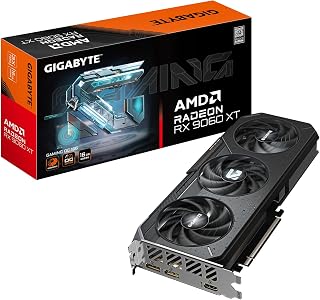
The Gaming OC series provides 16GB of GDDR6 memory, directly addressing the central question of this comparison. At 2700 MHz, it offers solid clock speeds while the larger memory pool ensures you won't hit VRAM limits in modern games at 1440p or when running multiple applications. PCIe 5.0 support future-proofs connectivity for upcoming platform upgrades.
Pros
- 16GB GDDR6 at 20000MHz with PCIe 5.0 support for current and future compatibility
- 2700MHz base GPU clock is the highest among these 16GB RX 9060 XT options
- WINDFORCE cooling holds temperatures below 68C with low fan noise under load
- Sturdy backplate and build quality support long-term reliability
Cons
- Single HDMI port restricts multi-monitor setups that depend on HDMI connections
- Users targeting high-refresh 4K gaming may find this card's ceiling limiting
For a direct comparison of 8GB versus 16GB on the RX 9060 XT, the GIGABYTE Gaming OC lands firmly in the 16GB column with a compelling thermal and performance story. The PCIe 5.0 interface and 20000MHz memory clock give it forward compatibility that the 8GB variant cannot match, and the 2700MHz GPU clock is the highest base speed among these 16GB options. At 1440p, the card runs modern titles at high to ultra settings with smooth, consistent frame rates, and its 7680x4320 maximum resolution support shows it can reach toward 4K territory. The WINDFORCE cooling system, using server-grade thermal conductive gel alongside multiple fans, holds temperatures below 68 degrees Celsius during extended sessions while keeping noise levels low, a combination that matters for long gaming sessions. Build quality is reinforced by a sturdy backplate designed for long-term durability. The one practical frustration is the single HDMI output, which limits multi-monitor configurations for users who rely on HDMI rather than DisplayPort. Targets at high-refresh 4K may also want to look at higher-tier hardware. Within the 8GB versus 16GB decision, though, this card's memory capacity and thermal credentials make a strong argument.
GPU Architecture: AMD RDNA 4, Radeon RX 9060 XT with 16GB GDDR6 memory and 20,000 MHz memory speed. Clock speed reaches 2,700 MHz with PCIe 5.0 interface for maximum bandwidth.
Gaming Performance: Delivers smooth 1080p gaming at ultra settings with frame rates exceeding 100 FPS in most titles. At 1440p on high to ultra settings, frame rates remain consistent and smooth. Esports games run at very high FPS with minimal temperature impact.
Display Support: Supports 7680x4320 resolution output via DisplayPort and HDMI, accommodating ultra-wide and professional multi-monitor configurations. Compact dimensions (11.06 inches length) fit most standard desktop cases.
Thermal Performance: The WINDFORCE cooling system excels, maintaining temperatures under 68 degrees Celsius during intensive workloads. Fans operate quietly throughout normal gaming and even demanding professional applications.
Best suited for 1440p builders and mid-range enthusiasts who want the 16GB version's VRAM advantage, quiet thermals, and PCIe 5.0 readiness in one package. Also a good fit for users running GPU-accelerated productivity tools alongside gaming. Skip it if your multi-monitor setup depends on multiple HDMI connections, or if you are targeting high-refresh rates at native 4K, where a higher-tier card would serve better.

Steel Legend's 16GB capacity resolves the 8GB versus 16GB debate with room to spare. The 3275 MHz boost clock ranks among the highest for 9060 XT models, extracting maximum performance while the triple fan array maintains thermals. If you're weighing memory size in 2026, this configuration removes bandwidth bottlenecks in texture-intensive scenarios and content creation workloads.
Pros
- 16GB GDDR6 provides long-term headroom that 8GB models cannot match
- 3275 MHz boost clock and 32 compute units deliver strong 1440p frame rates
- Triple-fan 0dB cooling runs silent during light loads
- PCIe 5.0 and DisplayPort 2.1a keep the card relevant on current and next-gen platforms
Cons
- ARGB sync cable is not included, complicating independent lighting setups
- Some users have reported PCIe detection issues requiring BIOS adjustments
When the question is 8GB versus 16GB, the ASRock Steel Legend settles it quickly. Its 16GB GDDR6 buffer means texture-heavy titles, high-resolution asset packs, and concurrent streaming workloads are unlikely to hit a memory wall any time soon. The RDNA 4 architecture with 32 compute units and a 3275 MHz boost clock drives strong 1440p throughput, routinely clearing 100 fps in modern titles at high settings. Third-generation ray tracing and FSR 4 support extend that headroom further when visuals are cranked up. For anyone weighing whether the extra VRAM is worth it, the Steel Legend makes the 16GB argument concrete: games releasing now and through the next few upgrade cycles will have room to breathe. The triple-fan 0dB system stays completely silent under light loads, and military-grade components back up the long-term investment. PCIe 5.0 compatibility keeps it paired well with current platforms.
GPU Specifications: AMD Radeon RX 9060 XT with RDNA 4 architecture, 32 Compute Units, 3rd Gen Ray Tracing, 2nd Gen AI Acceleration. 3275 MHz Boost Clock.
Memory: 16GB GDDR6, 2500 MHz memory clock.
Connectivity: DisplayPort 2.1a, HDMI 2.1b, PCIe 5.0 x16. Supports up to 8K 120Hz or 4K 240Hz displays.
Cooling: Triple striped-ring fans with ultra-fit heatpipes, 0dB passive cooling under low load.
Physical: 11.73 inches length, 2.01 inches width, 1155g weight. Metal backplate included. DisplayPort 2.1a, HDMI 2.1b.
Warranty: 2 years manufacturer coverage.
The Steel Legend 16GB suits gamers who plan to keep a card for several years and want VRAM headroom as titles grow more demanding. It also fits streamers encoding while gaming and creators running moderately heavy workloads. Skip it if you are on a tight budget and mostly play older or less memory-intensive games where 8GB would suffice without penalty.

The white edition offers 16GB GDDR6, which is the crucial factor for this comparison. While aesthetics differentiate it visually, the doubled memory capacity prevents VRAM bottlenecks in texture-heavy games and content work. If you're choosing between 8GB and 16GB variants in 2026, this configuration ensures you won't face memory limitations as game requirements continue climbing.
Pros
- 16GB GDDR6 with a 3320 MHz boost clock supports demanding 1440p and 4K workloads
- Triple-fan cooler provides sustained thermal headroom during extended gaming sessions
- Compact 10.63-inch length for a triple-fan card fits most mid-tower cases
- Dual DisplayPort 2.0 and HDMI outputs enable flexible multi-monitor setups
Cons
- 1900 MHz base clock is low relative to the boost figure, meaning sustained clocks depend heavily on cooler performance
- Maximum display resolution listed at 3840x2160, which offers no overhead beyond 4K for future display upgrades
When comparing the RX 9060 XT 8GB to the 16GB, the XFX Swift 16GB OC White Edition makes the case that 16GB is the version worth buying, and the spec sheet backs that up. The card pairs its 16GB GDDR6 with a boost clock reaching 3320 MHz and an RDNA 4 architecture tuned for 1440p and 4K, so the memory capacity has a GPU behind it capable of using it. The triple-fan cooling system keeps thermals in check during extended sessions, a meaningful advantage over dual-fan alternatives when the GPU is pushed hard at higher resolutions. Dual DisplayPort and HDMI outputs support multi-monitor configurations without adapters. At 10.63 inches the card stays compact relative to other triple-fan designs, which helps in mid-tower builds where a larger card would require careful planning. The 8GB version of the 9060 XT will show strain sooner as game asset sizes grow; the 16GB variant represented here sets a runway that aligns with where modern AAA titles are heading in 2026.
GPU: AMD Radeon RX 9060 XT (RDNA 4)
Memory: 16GB GDDR6 at 20 GHz
Clock Speeds: Base 1900 MHz, Boost 3320 MHz
Connectivity: 1x HDMI 2.1, 2x DisplayPort 2.1
Interface: PCI-Express x16
Cooling: Triple-fan design
Max Resolution: 4K (3840 x 2160)
Dimensions: 10.63"L x 4.88"W
Model: XFX Swift RX-96TSW16WQ

With 16GB GDDR6 and a 3320 MHz core clock, this addresses both sides of the buying decision. The higher memory capacity prevents the stuttering and texture pop-in that 8GB cards may experience in demanding 2026 titles, while the aggressive clock speed maximizes frame rates. The 128-bit interface pairs efficiently with the increased memory buffer for balanced performance.
Pros
- 3320 MHz core clock is the highest in this comparison, offering a real speed advantage
- 16GB GDDR6 removes memory pressure from demanding modern titles
- Dual BIOS lets you prioritize performance or efficiency depending on the workload
- WINDFORCE cooling maintains stable temperatures over long gaming sessions
Cons
- 4K at ultra settings will produce lower frame rates than 1440p, which is the card's intended sweet spot
- Mid-range positioning means driver optimization may lag slightly behind higher-tier products
Choosing between 8GB and 16GB often comes down to how long you plan to own the card and what you play. The Gigabyte Gaming OC answers that directly: 16GB GDDR6 over a 128-bit bus gives modern AAA titles and texture-heavy games room that the 8GB variant simply does not have. The 3320 MHz core clock is the highest among these options, which translates to a small but real performance edge at 1440p high settings. WINDFORCE cooling keeps temperatures stable across extended sessions, and the dual BIOS is particularly relevant here since you can shift to an efficiency-first profile when VRAM capacity matters more than raw clock speed. Two DisplayPort outputs and one HDMI port cover multi-monitor configurations without requiring adapters. For a buyer who has weighed 8GB against 16GB and decided the extra memory is the right call, the Gigabyte Gaming OC provides that upgrade in a well-cooled, sensibly designed package with strong reliability ratings to back it up.
GPU: Radeon RX 9060 XT
Memory: 16GB GDDR6
Memory Interface: 128-bit
Core Clock: 3320 MHz
PCIe Standard: PCI-E 5.0
Video Outputs: 2x DisplayPort, 1x HDMI
Cooling: WINDFORCE system
Features: RGB Lighting, Dual BIOS, Reinforced Structure
Model: GV-R9060XTGAMING OC-16GD

ASUS Prime's 16GB GDDR6 OC Edition settles the capacity question definitively. The 3310 MHz boost clock ensures you're not sacrificing speed for memory, delivering both high frame rates and the VRAM headroom that newer games require. For buyers concerned about texture quality settings and future-proofing in 2026, this configuration removes the 8GB compromise entirely.
Pros
- Compact 2.5-slot design brings 16GB VRAM to smaller builds that cannot fit thicker cards
- 3330 MHz memory clock is the highest in this group
- Dual-ball bearing fans and Auto-Extreme manufacturing support long-term reliability
- Dual BIOS and 0dB technology give flexible control over noise and performance
Cons
- Not designed for consistent high-refresh 4K or heavy compute workloads
- Lower performance density compared to larger cards, which may disappoint users expecting flagship output
The 8GB versus 16GB debate is partly about today and partly about tomorrow. The ASUS Prime RX 9060 XT 16GB addresses both: with 16GB GDDR6 and a 3330 MHz memory clock, it holds a clear advantage over the 8GB configuration in workloads where VRAM fills up fast, including high-texture 1440p gaming, multi-application creative work, and anything involving large asset caches. The 3310 MHz GPU boost clock is competitive, and the RDNA 4 foundation ensures efficiency remains strong throughout. What makes this card stand apart in the 8GB versus 16GB conversation is the form factor: a 2.5-slot compact build with three Axial-Tech dual-ball bearing fans means the 16GB version fits cases where larger cards do not. The dual BIOS switch and 0dB fan stop add practical day-to-day value. For a buyer who needs the extra memory but cannot accommodate a thick, heavy card, the ASUS Prime is the obvious answer in this comparison.
GPU Architecture: AMD Radeon RX 9060 XT with 16GB GDDR6 memory. Boost clock up to 3330 MHz in OC mode, game clock up to 2760 MHz. Standard mode reaches 3310 MHz boost and 2740 MHz game clock.
Real-World Benchmarks: 3DMark Steel Nomad (DX12) scored 3,696 points with approximately 36.96 FPS on graphics tests, demonstrating consistency with industry averages for this class. No thermal throttling or instability detected under sustained load.
Display Output: Supports 4K resolution (3840 x 2160) via DisplayPort and HDMI 2.1. Suitable for single or multi-monitor setups with room for content creation workflows.
Power Efficiency: Draws significantly less power than competing high-end cards, making it suitable for systems with standard power supplies. 0dB fan technology activates during low-load scenarios, reducing electricity consumption during light tasks.
Best suited for builders in smaller cases who need 16GB VRAM without a full-size triple-slot card, and for 1440p gamers who want quiet operation alongside genuine memory headroom. Also a good fit for content creators who value reliability through Auto-Extreme manufacturing. Skip it if you need maximum 4K performance or compute-intensive workloads where larger flagships are more appropriate.

Pros
- 16GB GDDR6 provides substantial headroom over 8GB as game assets grow
- 2740MHz GPU clock delivers strong 1440p performance with headroom toward 4K
- Triple-fan cooling runs quietly under full load
- DisplayPort 2.1a and HDMI 2.1b support current and next-gen displays
Cons
- 310mm length requires careful case clearance planning
- Ships with no accessories or printed documentation
When the debate is 8GB versus 16GB, the PowerColor Hellhound RX 9060 XT 16GB makes the case for doubling up on memory in a straightforward way. Modern AAA titles are pushing asset sizes that regularly stress 8GB framebuffers, and the 16GB GDDR6 buffer on this card provides meaningful headroom for that reality. Paired with a 2740MHz GPU clock, performance at 1440p is consistently strong, and the card can push into 4K territory without immediately running into a memory wall. For buyers torn between the two variants, the 16GB version is the one that stays relevant longer as game assets continue to grow. The triple-fan cooling keeps thermals controlled under sustained load, which matters during long sessions. Connectivity covers current and next-generation displays through DisplayPort 2.1a and HDMI 2.1b. The card handles creative workloads like video editing and 3D rendering alongside gaming, so the extra VRAM serves dual-use machines well. At 310mm it requires a case with adequate clearance, and a 550W system requirement is modest enough that most existing builds will not need a PSU swap.
GPU and Memory: AMD Radeon RX 9060 XT with 16GB GDDR6 memory at 20GHz clock speed. 2740MHz GPU boost clock delivers consistent performance across demanding workloads.
Power and Cooling: Single 8-pin PCI Express connector, 550W system power requirement, three-fan cooling array for thermal management. Weight: 807 grams.
Connectivity and Output: One HDMI 2.1b port and two DisplayPort 2.1a ports support multiple displays and high-refresh gaming setups. PCI-Express x16 interface for desktop installation.
Physical Specifications: 310mm length by 100mm height by 40mm depth. Fits most modern cases but requires verification for tight builds. 2-year limited manufacturer warranty included.
Best suited for gamers targeting 1440p who want room to grow toward 4K, and for creators running video editing or 3D rendering alongside gaming. The 16GB buffer is the right call if you play texture-heavy AAA titles or run memory-intensive workloads. Skip it if you game exclusively at 1080p and want to minimize spend, or if your case cannot accommodate a 310mm card.

If you're considering the RX 9060 XT but need extra headroom, this 9070 XT with 16GB GDDR6 offers a meaningful step up in raw GPU power. The 3060 MHz clock speed delivers stronger performance for high refresh rate gaming at 1440p or demanding workloads where the 9060 XT might struggle in 2026. It's the upgrade path if you want longevity beyond the standard choice.
Pros
- 16GB GDDR6 eliminates the VRAM debate that defines the 8GB vs 16GB 9060 XT decision
- 160 to 220fps reported at 1440p in modern AAA titles at high settings
- PCIe 5.0 interface ensures compatibility with current and upcoming platforms
- WINDFORCE cooling with Hawk fans runs quietly under sustained load
Cons
- 11.34-inch length requires case compatibility check before purchase
- Minimum 750W power supply requirement may mean an additional upgrade for older builds
If you are weighing the RX 9060 XT 8GB against the 16GB model, the GIGABYTE Radeon RX 9070 XT reframes the conversation entirely by showing what a full 16GB GDDR6 card can accomplish without the ceiling concerns that follow the 8GB version. At 1440p, users consistently report 160 to 220fps in modern AAA titles at high settings, and the card handles 4K at medium to high settings as well. That headroom matters directly to this article's question: the 16GB advantage on the 9060 XT closes part of the gap, but the 9070 XT demonstrates that 16GB paired with a stronger GPU is where VRAM constraints truly disappear. PCIe 5.0 support keeps the platform relevant for upcoming titles, and the WINDFORCE cooling with Hawk fans and server-grade thermal gel maintains quiet, stable temps under load. For anyone who finds themselves debating 8GB versus 16GB because future-proofing worries them, this card eliminates those worries at the architecture level rather than just the memory level.
Core Specifications
GPU: AMD Radeon RX 9070 XT
Memory: 16GB GDDR6
Memory Clock: 2600 GHz
GPU Clock: 3060 MHz
Interface: PCIe 5.0 x16
Max Resolution: 7680 x 4320 (8K)
Physical and Connectivity
Dimensions: 11.34 inches (L) x 5.2 inches (W)
Weight: 1.78 kg
Output: DisplayPort
Power Connectors: Dual 8-pin (750W+ PSU recommended)
Cooling: WINDFORCE system with Hawk fans and thermal gel
Warranty and Support
Manufacturer: GIGABYTE
Warranty: 3 years
Model: GV-R9070XTGAMING OC-16GD
Gaming Performance at Common Resolutions
1440p Gaming: 160-220fps on most modern AAA titles at high settings. Excellent for competitive gaming and high-refresh monitors.
4K Gaming: Playable at high settings on most titles, medium settings on demanding new releases. Solid for content creators monitoring in 4K.
Esports Titles: 300+ fps possible on optimized competitive games for ultra-high refresh gameplay.
Real-World Use Cases
Best suited for 1440p gaming at 144+ fps, 4K content creation workflows, professional 3D rendering, and VR gaming. Handles flight simulators like DCS at high settings with 4K head tracking. Eliminates VRAM constraints for media professionals working with large files.
Driver Recommendations
Run DDU (Display Driver Uninstaller) before installation if upgrading from another card. Install latest AMD drivers for maximum stability and performance. Update BIOS if required by your system for PCIe 5.0 compatibility.
What to Look for When Buying an RX 9060 XT
VRAM: 8GB vs 16GB and Why It Matters Now
The core debate around the RX 9060 XT 8GB vs 16GB is really a debate about longevity. Modern titles like Hogwarts Legacy, Alan Wake 2, and any recent open-world game regularly breach 8GB of VRAM at 1440p with high settings, causing stutters and compressed textures that tank visual quality.
Every card in this roundup carries 16GB of GDDR6 on a 128-bit bus running at 20 Gbps. That gives you a meaningful buffer for current games and a much more comfortable runway heading into 2026 and beyond. If you’re buying a card you expect to use for four or five years, the 16GB version is the only version worth serious consideration.
Cooling Design and Noise Levels
Cooling is where these cards really differentiate themselves. The ASRock Radeon RX 9060 XT Steel Legend 16GB GDDR6 and the XFX Swift AMD Radeon RX 9060 XT OC Triple Fan both use triple-fan setups for aggressive heat dissipation, making them well suited to cases with good airflow. The ASRock Radeon RX 9060 XT Challenger 16GB OC, by contrast, uses a compact dual-fan design at just 249mm long, which is a real advantage in smaller mid-tower and mATX builds.
Several cards also feature 0dB silent modes, including the ASRock Challenger and the ASUS Prime Radeon RX 9060 XT 16GB GDDR6 OC Edition, where fans stop spinning entirely under light loads. If you use your PC for productivity or media consumption during the day and only game occasionally, that passive silence is genuinely appreciated.
Boost Clock and Overclocking Headroom
Factory boost clocks across these 16GB cards range from around 3230MHz on the Yeston Sakura Radeon RX 9060 XT 16G GDDR6 Computer up to 3330MHz on the ASUS Prime in OC mode. In real-world gameplay the differences between these figures are modest, but they do reflect the quality of the power delivery and VRM design under each cooler.
If you plan to push the card further with manual overclocking, look for cards with robust phase power designs. The Yeston Sakura uses a 6+3 phase layout, and ASRock’s Steel Legend leans on Military-Grade Super Alloy components. The PowerColor Hellhound AMD Radeon RX 9060 XT 16GB keeps things clean and compact at 310mm with a single 8-pin connector, making it an easy fit in a wide variety of cases.
Display Connectivity and Resolution Targets
Every card here ships with at least one HDMI 2.1b and two DisplayPort 2.1a outputs, meaning they all support 4K at high refresh rates and 8K display connections. That connectivity matters if you’re pairing this card with a high-refresh 1440p monitor today but plan to step up to a 4K display later.
AMD’s full RDNA 4 software stack also comes along for the ride: FSR 4, Fluid Motion Frames, Anti-Lag 2, and FreeSync all work regardless of which AIB partner you choose. Hardware-accelerated AV1 encoding and decoding is baked in as well, which is a genuine bonus if you stream or capture footage regularly.
Final Thoughts
For most buyers, the 16GB RX 9060 XT is simply the smarter long-term choice, and the options here span compact dual-fan builds all the way to triple-fan premium designs. If you want the best balance of size, silence, and overclocked performance in a straightforward package, the ASRock Radeon RX 9060 XT Challenger 16GB OC is hard to beat for its compact footprint and strong out-of-box clocks. Those who prioritize aesthetics and want RGB synchronization baked into a more premium build should take a close look at the ASRock Radeon RX 9060 XT Steel Legend 16GB GDDR6, which pairs Polychrome SYNC lighting with a reinforced metal backplate and triple-fan cooling in one well-rounded package.
Frequently Asked Questions
Is the RX 9060 XT 8GB enough for 1440p gaming in 2026?
At 1440p with high or ultra settings, 8GB of VRAM is increasingly marginal in 2026. Texture-heavy titles and open-world games frequently exceed that ceiling, leading to stuttering or forced texture downgrades. The 16GB versions of the RX 9060 XT eliminate that concern and are the safer purchase if you plan to hold onto the card for several years.
Does the RX 9060 XT support ray tracing?
Yes. The RX 9060 XT is built on AMD’s RDNA 4 architecture, which includes 3rd Generation Ray Tracing hardware. This is a significant leap over RDNA 3 in ray tracing efficiency. Combined with FSR 4 upscaling and Fluid Motion Frames, you can run ray tracing at 1440p without a major framerate penalty in supported titles.
How does the RX 9060 XT compare to the RX 9070 XT?
The GIGABYTE Radeon RX 9070 XT Gaming OC 16G Graphics card sits a tier above the RX 9060 XT with more Compute Units and higher overall throughput, making it the better pick if your primary target is 4K gaming or demanding creative workloads. The RX 9060 XT delivers excellent 1440p performance at a notably lower cost, so the right choice depends on your resolution and refresh rate goals.
What power supply do I need for the RX 9060 XT 16GB?
Most RX 9060 XT 16GB cards recommend a minimum of 550W to 650W, depending on the specific model and your other components. All of the cards reviewed here use a single 8-pin PCIe power connector, which keeps cable management straightforward. If your build includes a high-end CPU, make sure to budget headroom above the card’s stated minimum PSU recommendation.





Write Your Review
No reviews yet. Be the first to share your experience!