

You have enough desk space for a larger screen, but that does not automatically make it the right gaming display. Sit too close to a large 1080p panel and individual pixels can stand out; choose too small a panel and cinematic games can lose their sense of scale.
If you are asking what size monitor for gaming, this guide sorts the practical choices into 22- to 24-inch, 27-inch, and 32-inch categories. We weigh viewing distance, resolution, refresh requirements, and panel shape, while also pointing you toward gaming-ready GIGABYTE monitor options if you are building a broader setup.
Quick Comparison
Ratings reflect the most recent data pull. Check each listing for current price and availability.
Quick answer
This guide compares 10 picks, with Sceptre 24-inch Curved Gaming Monitor 1080p 75Hz ranked first.

Sceptre 24-inch Curved Gaming Monitor 1080p 75Hz
At 24 inches with a 1500R curve, this suits readers who want a tighter, more pronounced curve than larger panels typically offer, since smaller screens handle sharp curves without warping edges. The VA panel's 3000:1 contrast ratio also helps anyone comparing size options who still wants deeper blacks in a compact monitor.
Pros
- 1500R curve adds immersion in a compact 24-inch size
- 98% sRGB and 3000:1 contrast ratio for vivid, deep colors
- Built-in speakers and VESA mount support simplify setup
- Dual HDMI and VGA ports for flexible device connections
Cons
- 75Hz refresh rate is low for competitive gaming
- 1080p resolution is entry-level by current standards
Not every gamer needs to go big and expensive to get a size and shape that feels right, and the Sceptre C248W shows what a 24-inch curved screen looks like at the budget end of this guide's spectrum. The 1500R curve gives a wrap-around feel without the panel size of larger curved monitors, which keeps desk footprint manageable while still changing how games feel compared to a flat screen. A 75Hz refresh rate and 1ms response time are modest next to higher-end options covered elsewhere, but they're enough for casual and console gaming where frame rate chasing isn't the priority. The 98% sRGB coverage and 3000:1 contrast ratio punch above expectations for this tier, keeping colors vivid despite the lower refresh rate. For readers of this guide weighing whether a smaller curved monitor can still deliver a satisfying gaming feel, this model answers yes, provided your expectations for refresh rate match the price point. Built-in speakers and dual HDMI plus VGA ports round out a setup that's simple to connect to multiple devices.
Display: 24-inch curved VA panel, 1920 x 1080 (1080p FHD), 16:9 aspect ratio, 1800R curvature
Performance: 75Hz refresh rate, 1ms response time, 250 cd/m2 brightness, 3000:1 contrast ratio, 178-degree viewing angle
Color: 98% sRGB color gamut, matte finish display
Connectivity: 2x HDMI ports, VGA, 3.5mm audio input, built-in speakers
Features: Adaptive Sync, VESA wall mount ready (100x100mm), tilt adjustment, metal black finish
Dimensions: 21.61 inches wide x 9.06 inches tall x 16.04 inches deep, weighs 6 pounds
Power: 29 watts consumption, 120V compatible, 30,000+ hour lamp life
Warranty: 1-year limited manufacturer warranty
Buy this if you want a compact curved monitor for casual or console gaming and don't need high refresh rates. It's a reasonable pick for budget-conscious upgrades from a flat display. Skip it if you play competitively or own a higher-end GPU, since the 75Hz refresh rate will bottleneck systems built for faster, more demanding gaming.

For readers unsure whether to size down from 27 inches, 23.8 inches keeps the whole screen in view without head movement, a common concern at closer desk distances. The 240Hz refresh rate matches larger rivals, so this fits anyone prioritizing a compact size without sacrificing competitive-grade smoothness.
Pros
- 240Hz refresh rate with 0.5ms response time for competitive titles
- IPS panel with 99% sRGB and 178 degree viewing angles
- Compact 23.8-inch size easy to position and tilt
- TUV eye comfort certification for long sessions
Cons
- 1080p resolution can look soft at this screen size
- Contrast ratio is unremarkable for an IPS panel
If you're sizing a monitor around what your games actually need rather than maximizing inches, 23.8 inches at 240Hz makes a strong case that smaller can be the right call for competitive play. This size keeps the entire screen within quick eye movement range, which pairs naturally with the fast refresh rate and 0.5ms response time, both of which matter more than resolution in titles like Valorant or CS2. The IPS panel adds 178 degree viewing angles and 99% sRGB coverage, so color stays accurate even though the resolution tops out at 1920x1080. For a guide focused on matching monitor size to the gaming experience you want, this model represents the case for staying compact and fast rather than going big. The matte finish resists glare and the stand tilts, both practical for a dedicated gaming desk. The tradeoff is that 1080p on a 24-inch screen can look soft for anything beyond gaming, so this size and resolution pairing is best understood as a competitive-play choice, not a general upgrade.
Display: 24-inch FHD IPS, 1920x1080 native resolution, 16:9 aspect ratio, 93 pixel pitch, 1000:1 contrast ratio, 178-degree viewing angles, 300 nits brightness, 99% sRGB color gamut
Performance: 240Hz refresh rate, 0.5ms response time, AMD FreeSync Premium, HDMI VRR support, TÜV Rheinland 3-star blue light reduction
Connectivity: 2x HDMI 2.0, 1x DisplayPort 1.4, Power input
Physical: 21.21 inches wide, 16.23 inches tall, 7.04 inches deep, 7.4 pounds, black matte finish, desk mount with tilt adjustment
Power and Warranty: 14 watts typical consumption, 240V AC input, 1-year advanced exchange service, includes HDMI cable, stand, power cable, and documentation
Buy this if competitive FPS performance matters more to you than screen size or resolution, and you want a compact monitor that's easy to position close to your eyes. Skip it if you're choosing a bigger monitor for immersion or creative work, since the 1080p resolution on this smaller panel won't deliver the sharpness or scale that larger displays in this guide offer.
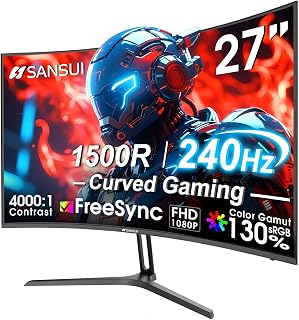
Readers torn between a 24-inch and 27-inch curved monitor will find this lands in the middle with a 1500R curve suited to that size, tight enough to wrap the view without the extreme bend larger ultrawides use. A 240Hz refresh rate rounds it out for anyone wanting mid-size screen real estate paired with fast motion.
Pros
- 240Hz refresh rate with 1ms MPRT for smooth motion
- 1500R curve suited to the 27-inch size
- 130% sRGB and HDR support add versatility
- Metal stand with VESA mounting
Cons
- FHD resolution limits sharpness compared to higher-res panels
- Limited viewing angles require head-on positioning
When you're sizing up a monitor for gaming, 27 inches sits in a sweet spot: large enough to feel immersive, small enough that FHD still looks sharp and 240Hz stays easy to drive without a top-tier GPU. That balance is exactly what makes this SANSUI worth a look if screen size is your main decision factor. The 1500R curve adds wraparound presence at this size without feeling exaggerated the way curves can on bigger panels, and the 240Hz refresh rate with 1ms MPRT keeps fast-paced games fluid. FreeSync support cuts down tearing, which matters more as refresh rates climb. The 130% sRGB coverage and HDR give it some flexibility beyond pure gaming, so it doesn't feel like a one-trick display. A metal stand with VESA mounting means you have room to adjust it as your desk setup evolves. For anyone comparing monitor sizes specifically for gaming performance, 27 inches with this spec sheet is a reasonable anchor point to measure other options against.
Display: 27-inch curved LED, 1920x1080 FHD resolution, 16:9 aspect ratio, 1500R curvature
Performance: 240Hz refresh rate, 1ms MPRT response time, 4000:1 contrast ratio, 300 nits brightness
Color: 130% sRGB, 95% DCI-P3 color gamut, HDR support
Features: FreeSync adaptive sync, anti-flicker, low blue light, anti-glare matte finish, black level adjustment, game modes, crosshair overlay
Connectivity: DisplayPort 1.4, HDMI, 3.5mm audio jack
Design: Metal stand with tilt adjustment -5 to +15 degrees, VESA 100x100mm compatible
Dimensions: 24.13"W x 17.84"H x 7.66"D, weighs 7.3 lbs
Warranty: 1-year manufacturer warranty with 30-day money-back guarantee and lifetime technical support

Readers weighing a 27-inch monitor against a curved option will note the 1440P resolution here, which fills that screen size with sharper detail than FHD alternatives at the same dimension. A 4000:1 contrast ratio adds depth to darker scenes, suiting anyone who wants their 27-inch pick to also look richer, not just bigger.
Pros
- 1440P QHD resolution at 144Hz for sharp, smooth visuals
- 1500R curve adds immersion at 27 inches
- HDR400 with 129% sRGB color gamut
- Adaptive-Sync works across NVIDIA and AMD
Cons
- Narrow tilt adjustment range
- Some reports of power-on issues after sleep mode
Choosing a monitor size for gaming isn't only about diagonal inches, it's about how that size is used, and the KTC H27S5C makes its case with a 1500R curve on a 27-inch QHD panel. The curvature pulls the edges of the screen into your field of view, so the effective immersion feels larger than the stated 27 inches on a flat panel. At 2560x1440 with a 144Hz refresh rate, it also answers the common follow-up question in this guide: do you need higher resolution at this size. The sharper QHD image, combined with HDR400 and a 129% sRGB color gamut, delivers richer visuals than a 1080p panel at the same size. Adaptive-Sync keeps motion tear-free on both NVIDIA and AMD systems, and Low Blue Light plus Flicker-Free features add comfort for longer sessions. Dual HDMI 2.0 and DisplayPort 1.4 cover most gaming PCs and consoles. For readers deciding on 27 inches but wanting more resolution and curve than a standard flat 1080p option, this is the stronger fit.
Display: 27-inch curved LCD, 1500R curvature, 1440P QHD (2560x1440), 16:9 aspect ratio, matte finish
Performance: 144Hz refresh rate, 5ms response time, 4000:1 contrast ratio, 400 nits brightness, 178-degree viewing angle
Color & HDR: 16.7 million colors, 129% sRGB, 110% DCI-P3 gamut, HDR400 support
Connectivity: 2x HDMI 2.0, 1x DisplayPort 1.4, 1x 3.5mm audio jack, 1x USB 2.0
Features: Adaptive-Sync (G-Sync and FreeSync compatible), Low Blue Light, Flicker-Free, tilt adjustment (-5 to +20 degrees), 100mm x 100mm VESA mount
Dimensions: 24.05 inches W x 18.58 inches H x 6.14 inches D. Includes curved monitor, adapter, base, HDMI cable, and power cord. 3-year manufacturer warranty.

For readers leaning toward a smaller footprint, a 22-inch panel keeps pixel density tight and desk space minimal, which matters most on compact setups. The 144Hz refresh rate still delivers smooth motion for competitive titles, making this a fit for anyone who wants fast gaming without stepping up to a bulkier screen size.
Pros
- 144Hz refresh rate with 1ms response time
- Built-in speakers save desk space
- Minimal bezels suit multi-monitor setups
- Blue Light Shift and matte screen reduce eye strain
Cons
- 22-inch size may feel small for immersive gaming
- 1080p resolution, no USB-C connectivity
At 22 inches, this Sceptre monitor sits at the smaller end of what gamers typically consider, which makes it a useful reference point in sizing out a gaming setup. If you're deciding between a compact, desk-friendly screen and something larger, this model shows what you get at the smaller size: 144Hz refresh rate, 1ms response time, and FreeSync adaptive sync, all tuned for smooth motion rather than screen real estate. The minimal bezel design also matters for sizing decisions, since it makes multi-monitor setups more viable if you'd rather go wide with two smaller screens than wide with one large one. Built-in speakers mean you can skip a separate audio setup entirely. Blue Light Shift and a matte finish help during long sessions. The 1920x1080 resolution is appropriately matched to the 22-inch panel, avoiding the oversized-pixel look that bigger 1080p monitors can suffer from. For anyone weighing screen size against desk space and budget, this is the compact end of the spectrum done well.
Display: 22-inch FHD LED with 1920x1080 native resolution, 16:9 aspect ratio, matte screen finish
Performance: 144Hz refresh rate, 1ms response time, 2000:1 contrast ratio, 170-degree viewing angles, 100 color gamut
Connectivity: 1x HDMI, DisplayPort, FreeSync adaptive sync
Features: Built-in speakers, Blue Light Shift eye care technology, minimal bezel design, wall mount compatible
Physical: 19.9in W x 15.5in H x 7in D, 7 pounds, machine black color
Warranty: 1-year limited manufacturer warranty
Good for gamers with limited desk space, students, or anyone building a multi-monitor setup who wants a smaller panel without giving up 144Hz performance. Also fits casual and competitive players upgrading from a 60Hz display. Skip it if this guide has you leaning toward a larger screen, since 22 inches will feel cramped compared to 27-inch options for immersive gaming.

At 24 inches, this suits readers who've decided smaller is better for pixel density and desk fit, common conclusions for tight spaces or secondary setups. The VA panel's 4000:1 contrast ratio adds visual depth often lost on smaller screens, while 180Hz keeps motion smooth for anyone prioritizing size over sheer refresh specs.
Pros
- 180Hz refresh rate with 1ms MPRT response time
- 4000:1 contrast ratio from the VA panel
- HDR and eye care features for extended sessions
- Compact 24-inch size suited to smaller desks
Cons
- VA panel has typical viewing angle limitations
- No built-in speakers
Not everyone shopping for a gaming monitor wants to go big. This 24-inch SANSUI is worth including in a size-focused guide because it represents the compact end of the spectrum, where FHD resolution looks its sharpest and desk space stays minimal. At 180Hz with 1ms MPRT response time, it still delivers genuinely smooth gameplay, just without pushing into the 240Hz territory that often demands a beefier GPU to sustain. The VA panel's 4000:1 contrast ratio gives it some visual depth that LED alternatives at this size sometimes lack, and HDR support with eye care features like anti-flicker and low blue light rounds out the comfort side for long sessions. It's a sensible pick for anyone who has decided that a smaller, sharper screen matters more than sheer immersion, whether that's due to desk constraints or personal preference for tighter pixel density.
Display: 24-inch VA LCD panel, 1920x1080 FHD resolution, 16:9 aspect ratio, 180Hz refresh rate, 1ms MPRT response time, 4000:1 contrast ratio, 300 cd/m² brightness, 110% sRGB color gamut, DCI-P3 80%, matte finish
Connectivity: One HDMI 2.0 port (up to 180Hz), one DisplayPort 1.4 port (up to 180Hz), 3.5mm audio jack, VESA 75mm mount
Features: FreeSync adaptive sync, flicker-free technology, low blue light eye care, game overlays (crosshair, timer, FPS, RTS, Racing modes), HDR support
Physical: Dimensions 21.2 inches deep x 7.93 inches wide x 16.28 inches high, weight 3.95 kg, matte black finish
Warranty: 1-year manufacturer warranty, 30-day money-back guarantee, lifetime technical support

Pros
- Incredibly smooth 160Hz gaming performance at an unbeatable price
- Curved design provides natural eye alignment and reduces fatigue during extended gaming sessions
- Fast 1ms response time minimizes ghosting and motion blur in fast-paced games
- Rich color reproduction and HDR support enhance visual quality across games and media
- Hassle-free setup and intuitive controls make it accessible for first-time gaming monitor users
Cons
- Some units report backlight clouding or uneven brightness at screen edges
- Height adjustment is not available, limiting ergonomic positioning options
- Limited cable accessories included in the box, may require additional purchases
The SANSUI 24-inch curved gaming monitor is designed for competitive gamers and casual players alike who want smooth, immersive gameplay without spending a premium. At this price point, it offers surprising value with a solid 160Hz refresh rate and 1ms response time, making it competitive against monitors costing significantly more.
The standout feature is the aggressive 1500R curve combined with the 160Hz display, which creates a genuinely immersive gaming experience. Paired with FreeSync technology, screen tearing becomes a non-issue. The 110% sRGB color gamut and HDR support mean colors pop with vibrancy, while the multiple game modes (FPS, RTS, Movie, Standard) let you optimize the image for whatever you're playing. Real-world testing confirms smooth performance across demanding titles.
Build quality is solid for the price tier. The curved display is sturdy, and the minimal bezel design looks clean and modern. The monitor accepts both HDMI 2.0 and DisplayPort 1.4 connections, giving you flexibility with your hardware. Setup is genuinely quick, taking most users just minutes to get running.
The main drawbacks are worth noting: some users report backlight clouding in corners, height adjustment is missing entirely, and you only get one display cable in the box. The non-adjustable stand may be a dealbreaker for those with specific ergonomic needs, though the tilt range handles basic positioning.
For budget-conscious gamers wanting a curved, high-refresh monitor, this SANSUI delivers real value. It won't match expensive flagships, but for competitive gaming and entertainment, it punches well above its weight class.
Display: 24-inch curved VA panel with 1500R curve, 1920x1080 FHD resolution, 16:9 aspect ratio, matte finish
Performance: 160Hz refresh rate, 1ms MPRT response time, 3000:1 contrast ratio, 300 nits brightness, 110% sRGB color gamut, 16.7M display colors
Technology: HDR support, FreeSync adaptive sync, Dynamic Action Sync, game modes for FPS/RTS/Movie/Standard, crosshair and game timer overlays, black level adjustment
Connectivity: DisplayPort 1.4 (up to 160Hz), HDMI 2.0 (up to 160Hz), 3.5mm audio jack
Design: Frameless design, tilt adjustment range from -5 to +15 degrees, VESA 75x75mm compatible, no built-in speakers, dimensions 23.78 inches deep x 15.55 inches wide x 4.69 inches tall
Warranty: 30-day money-back guarantee, free replacement warranty, and lifetime technical support
Who Should Buy: This monitor is ideal for budget gamers, esports enthusiasts, and anyone upgrading from a 60Hz display. It's perfect if you play fast-paced games like Valorant, CS2, or Apex Legends and want high refresh rates without premium pricing. The curved design appeals to players seeking immersion without ultrawide complexity.
Who Might Want to Skip: If you need height-adjustable stands for precise ergonomic setup, this monitor's fixed-height design is a limitation. Professional content creators requiring 1440p or 4K resolution won't find that here. Users extremely sensitive to backlight uniformity should read reviews carefully before purchasing.
Setup Tips: Use DisplayPort 1.4 if your GPU supports it for the most reliable 160Hz connection. Take advantage of game mode presets rather than manually tweaking settings. Allow 30 minutes for colors to stabilize before final adjustments. The crosshair and game timer features are disabled by default in the on-screen menu if you prefer a clean display.
Performance Expectations: Expect smooth gaming at 160Hz with modern GPUs rated for 1080p gaming. The curved design genuinely reduces eye fatigue, and FreeSync sync compatibility eliminates tearing across AMD and newer NVIDIA cards. Real-world use shows this monitor performs as advertised for fast-paced competitive titles.

For readers set on going big, 32 inches is near the upper end discussed for gaming setups, giving maximum screen presence for immersive play. The curved design helps offset the size by keeping edges within natural viewing angle, and the 240Hz refresh rate ensures that larger canvas still handles fast-paced games smoothly.
Pros
- 240Hz refresh rate with 1ms response time
- 1500R curve suited to a larger 32-inch size
- Wide 178-degree viewing angles
- FreeSync adaptive sync reduces tearing
Cons
- FHD resolution shows lower pixel density at 32 inches
- No built-in speakers, so you'll need separate audio
If your monitor size decision is leaning toward something bigger for gaming, this 32-inch SANSUI is a useful reference point for what that size trade-off actually looks like. Larger screens pull you deeper into the action, and the 1500R curve reinforces that at 32 inches, keeping the edges of the display within a natural field of view rather than requiring you to turn your head. The 240Hz refresh rate and 1ms response time mean the extra screen real estate doesn't come at the cost of competitive responsiveness, and FreeSync helps keep motion clean. Wide 178-degree viewing angles are a practical plus at this size, since more of the panel sits off-center from where you're seated. The honest consideration at 32 inches is that FHD resolution spreads over more screen, so pixel density drops compared to a 27-inch panel at the same resolution. For this guide's purpose, it's a clear illustration of the size versus sharpness balance gamers need to weigh before buying bigger.
Display: 32-inch curved LCD, 1500R curvature, 16:9 aspect ratio, matte finish
Resolution: Full HD 1920x1080 pixels
Refresh Rate: 240Hz native
Response Time: 1ms MPRT
Color: 125% sRGB gamut, 16.7 million colors, 300 nits brightness, 3500:1 contrast ratio
Connectivity: 1x HDMI 2.1 (240Hz), 1x DisplayPort 1.4 (240Hz), 3.5mm audio jack
Features: FreeSync, flicker-free, low blue light filter, HDR technology, 178-degree wide viewing angle
Ergonomics: Tilt adjustment (negative 5 to positive 15 degrees), VESA mount compatible (100x100mm), desk and wall mount support
Physical: 28.16 inches wide, 16.62 inches tall, 4.26 inches deep, weighs 5.4kg
Warranty: 1-year manufacturer warranty with 30-day money-back guarantee and lifetime technical support
Included: Monitor, DP cable, metal stand, power adapter, user manual
Suited to gamers who specifically want a larger screen and are willing to trade some pixel density for scale and immersion, especially fans of fast-paced competitive titles. Also fits anyone upgrading from a 60Hz display who wants both size and speed. Skip it if sharp text and fine detail matter to you, or if you'd rather stay at 27 inches where FHD resolution looks tighter.

Readers deciding how big to go for immersive gaming will find the 32-inch 1000R curve a strong case for sizing up without losing wraparound feel, since the tighter curve matches the screen's larger dimensions to keep edges from distorting. Paired with a 165 hertz refresh rate, it suits anyone treating screen size as the main upgrade over a cramped 24-inch setup.
Pros
- 32-inch 1000R curve maximizes immersion and field of view
- QHD resolution keeps the larger screen sharp
- 165Hz refresh rate with 1ms response time for fast action
- HDR10 support adds noticeable color and contrast depth
Cons
- Plastic stand lacks tilt adjustment
- No onboard audio and manual OSD setup needed for full refresh rate
Picking a monitor size for gaming often comes down to how much screen you want in your field of view, and 32 inches with a 1000R curve answers that directly. This Odyssey panel wraps the display around your peripheral vision more aggressively than flatter, smaller screens, which matters if immersion is part of why you're sizing up in the first place. QHD resolution means that extra screen real estate stays sharp rather than stretching a 1080p image thin, a common problem when buyers jump to larger panels without upping resolution. At 165Hz with a 1ms response time, it still holds up for fast-paced titles, so you're not trading size for speed. The 2500:1 contrast ratio and 178 degree viewing angle keep the bigger canvas looking consistent edge to edge. If your question is specifically how big you can go while keeping image quality intact, this is a solid answer. Just budget time to set the refresh rate manually in the OSD menu, since Windows won't always default to it.
Display: 32-inch QHD (2560 x 1440), 16:9 aspect ratio, 1000R curvature, glossy finish, 178-degree viewing angle
Performance: 165Hz refresh rate, 1ms MPRT response time, 2500:1 contrast ratio, 300 cd/m2 brightness
Features: HDR10, AMD FreeSync adaptive sync, Eye Saver Mode (blue light reduction), flicker-free technology
Connectivity: 1x DisplayPort, 1x HDMI, 2x component outputs
Physical: 28" wide, 21.01" tall, 10.7" deep, 11.5 lbs. Includes DP cable, power cable, and stand. Wall mount compatible. 1-year manufacturer warranty.
Buy this if you want a large, curved screen that fills your vision for single-player and immersive gaming without sacrificing sharpness. It also suits players splitting time between competitive and story-driven titles. Skip it if you prefer a flat panel, need onboard audio, or want a premium metal stand with tilt adjustment, since this one ships with a basic plastic base.

At 27 inches, this hits the size most guides call the competitive sweet spot, large enough for detail but not so big that peripheral vision suffers in fast games. The 240Hz refresh rate backed by IPS technology also appeals to readers who want that mid-size screen to double as a sharp, responsive choice for shooters.
Pros
- 240Hz refresh rate for fluid, competitive gameplay
- IPS panel keeps color accurate at wide viewing angles
- AMD FreeSync Premium and HDMI VRR reduce screen tearing
- Matte finish resists glare, tilt adjustment included
Cons
- 1080p resolution means lower pixel density at 27 inches
- Plastic build and no built-in speakers
If your idea of 'what size' really means 'how fast,' the Dell SE2726HG answers with 27 inches at 240Hz. For gaming at this size, the question isn't just screen real estate but whether the panel can keep up with your reflexes, and this one does. The IPS panel keeps colors consistent even at wide viewing angles, something many 27-inch gaming monitors sacrifice for speed. AMD FreeSync Premium and HDMI VRR handle tearing, so fast camera pans and quick turns in competitive shooters stay clean. At 1080p, the resolution won't match 27-inch 1440p rivals in sharpness, but that's the tradeoff for hitting 240Hz without pushing your GPU to its limits. Two HDMI 2.0 ports and DisplayPort 1.4 cover most setups, and tilt adjustment plus a matte coating round out a straightforward, glare-resistant package. For a 27-inch footprint built around speed rather than pixel density, this fits squarely into the competitive gaming category this guide addresses.
Display: 27-inch IPS LCD panel, 1920x1080 FHD resolution, 16:9 aspect ratio, 240Hz refresh rate, 0.5ms response time, 1000:1 contrast ratio, 300 nits brightness, 178-degree viewing angles.
Color: 99% sRGB gamut with matte anti-glare finish. TÜV Rheinland 3-star eye care certification with blue light reduction.
Connectivity: 2x HDMI 2.0, 1x DisplayPort 1.4, 1x 3.5mm audio output. AMD FreeSync Premium and HDMI VRR support for tear-free gaming.
Physical: Dimensions 24.05in W x 17.83in H x 7.4in D. Weight 8.2 pounds. Tilt adjustment capability. Includes stand, power cable, HDMI 2.0 cable, and documentation. Power consumption 19.7 watts.
Warranty: 3-year limited warranty from Dell.
Buy this if you want a 27-inch screen built for competitive, fast-paced gaming where refresh rate matters more than resolution. Esports players and FPS fans benefit most from the 240Hz panel. Skip it if you want 27 inches for sharper detail or non-gaming work, since 1080p at this size has lower pixel density than 1440p alternatives, and skip it if you need built-in speakers.
How to Choose the Right Gaming Monitor Size
Screen size only helps when it suits the rest of your setup. As you compare models in the gaming monitor category, start with your desk depth and the kind of games you play, then narrow the field by resolution and refresh rate.
Match the Screen to Your Viewing Distance
A 22- or 24-inch monitor is a natural fit for a conventional desk where you sit roughly 20 to 30 inches away. It keeps the whole screen inside your field of view, which is useful in shooters, racing games, and any title where you constantly scan maps, HUD elements, and scoreboards.
The compact Sceptre New 22-Inch Gaming Monitor, FHD 1080p suits a smaller desk and adds up to 144Hz capability plus built-in speakers. For a more responsive 24-inch option, the SANSUI 24 Inch 180Hz Gaming Computer Monitor and Dell 24 240Hz Gaming Monitor – SE2426HG give you faster motion without demanding a larger viewing distance.
A 27-inch screen is the flexible middle ground for many players. It gives games more visual presence than a 24-inch display, yet it remains comfortable on a desk around 28 to 34 inches deep. Move to 32 inches when you can sit farther back, use a deeper desk, or want a display that also handles movies and controller-based games well.
Keep Resolution Proportional to Screen Size
Resolution and size should be chosen together. Full HD looks appropriately sharp on a 24-inch panel at close range, but spreading that same 1920 by 1080 image across 27 or 32 inches reduces pixel density. That does not rule out larger FHD models, but it makes them a choice for smooth gameplay rather than close-up detail.
The SANSUI 27 Inch Curved 240Hz Gaming Monitor FHD and Dell 27 240Hz Gaming Monitor – SE2726HG make sense when high refresh action matters more than fine pixel density. For a more detailed 27-inch experience, the KTC H27S5C 27 Inch Curved Gaming Monitor combines QHD resolution with a 144Hz refresh rate. Make sure your PC can drive that resolution by comparing suitable graphics card options, especially for demanding games.
At 32 inches, QHD is the more balanced choice for a desk-based gaming setup. The Samsung 32" Odyssey (G55C) pairs QHD detail with a 165Hz refresh rate and a deep 1000R curve, while the SANSUI 32 Inch Curved 240Hz Gaming Monitor favors 1080p speed and recommends a more distant seating position. If your favorite games are visually demanding, our GPU guide for Baldur’s Gate 3 can help frame the hardware side of the decision.
Let Your Games Determine the Refresh Rate
Do not let physical size obscure the importance of refresh rate. Competitive multiplayer players often benefit from a 24-inch screen with 180Hz or 240Hz performance because it is easier to monitor the entire image during rapid play. The Dell 24 240Hz model combines a fast IPS panel, FreeSync Premium, and a specified 0.5ms response time for this style of setup.
If you prefer a larger FHD display for fast games, both the SANSUI 27-inch and 32-inch curved models offer up to 240Hz with FreeSync support. Confirm that your computer, console, cable, and chosen HDMI or DisplayPort input all support the refresh mode you intend to use. A monitor cannot display frames your source device does not deliver.
Single-player adventures, strategy games, and simulators often reward extra resolution and screen space more than an extreme refresh target. In that case, a 27-inch QHD monitor such as the KTC can provide a particularly balanced view, with enough detail for scenery and menus while preserving fluid 144Hz gameplay.
Choose a Flat or Curved Panel for Your Desk Habits
Curved screens are most useful when the display is large enough to fill more of your peripheral vision. The Sceptre Curved 24-inch Gaming Monitor 1080p R1500 uses an 1800R curve for a subtle wraparound effect, while the SANSUI 24 Inch Curved 160Hz Gaming Monitor,1500R uses a tighter curve and 160Hz performance. Either can make a compact single-monitor desk feel more focused.
At 27 and 32 inches, a curve can feel more natural for games and movies, although a flat screen may be easier to position in a dual-monitor layout. Consider panel technology as well: the Dell models use IPS panels for wide viewing angles and accurate 99% sRGB color coverage, while the SANSUI VA options emphasize high contrast. If the monitor also serves a laptop workspace, consult our MacBook Pro monitor guide before committing to a gaming-focused design.
Final Thoughts
Most players who want speed at a typical desk will be well served by the Dell 24 240Hz Gaming Monitor – SE2426HG, while players seeking a more detailed and cinematic middle ground should consider the KTC H27S5C 27 Inch Curved Gaming Monitor. Match the screen to your seating distance and graphics hardware, and your games will feel more comfortable from the first session.
Frequently Asked Questions
Is a 24-inch or 27-inch monitor better for competitive gaming?
A 24-inch monitor is often easier for competitive gaming because you can take in the entire image without moving your eyes as far. It also keeps 1080p looking crisp at normal desk distance. Choose 27 inches when you want a larger image and have enough desk depth to sit slightly farther away.
Is a 32-inch monitor too large for PC gaming?
Not necessarily, but a 32-inch monitor needs more room than a 24- or 27-inch model. It works especially well on a deep desk, with a monitor arm, or when you play from farther back with a controller. QHD resolution is generally a more comfortable match at this size than FHD when you sit close.
Should I choose 1080p or 1440p for gaming in 2026?
Choose 1080p if you prioritize high frame rates, play esports titles, or want a 22- to 24-inch display. Choose 1440p if you want more detail, especially on a 27-inch screen, and your graphics card can keep up. For many PC players in 2026, 27-inch QHD remains a strong balance of clarity, screen space, and performance.
What monitor size works well for PS5 and Xbox gaming?
A 27-inch monitor is a versatile console size because it feels immersive at a desk without taking over the room. A 32-inch model is appealing for relaxed, controller-based play from a greater distance. Before buying, confirm the monitor’s supported HDMI modes and refresh behavior, then pair it with appropriate cable and adapter recommendations for your setup.






Write Your Review
No reviews yet. Be the first to share your experience!