

You’ve just upgraded your GPU and now the monitor question is staring you down: do you go 1440p or 4K? It’s one of the most common crossroads for PC gamers right now, and the answer isn’t as simple as “higher resolution equals better gaming.” Frame rates, GPU demand, panel type, and the kinds of games you play all factor into the right call. Whether you’re building a competitive setup or a cinematic single-player rig, this guide covers both sides and highlights the best monitors across both resolutions available in 2026. If you’re also evaluating display options for productivity or creative work, our roundup of the best monitors for MacBook Pro covers some strong overlap.
Below you’ll find nine evaluated monitors spanning 1440p and 4K, from budget-friendly QHD panels to high-end OLED displays. We’ve assessed each one for refresh rate, panel quality, sync technology, and overall value to match different gaming styles and GPU tiers.
Quick Comparison
Ratings reflect the most recent data pull. Check each listing for current price and availability.
Quick answer
This guide compares 9 picks, with AOC Q27G4XN 27-Inch QHD Gaming Monitor, VA, 180Hz, 1ms ranked first. ASUS TUF Gaming VG27AQ3A 27" 1440p 180Hz IPS Monitor holds the highest customer rating among them. SANSUI 27" WQHD Curved Gaming Monitor 200Hz 1ms has the most customer reviews. ASUS ROG Swift PG27AQDP 27-Inch QHD 1440p 480Hz WOLED leads this list on refresh rate.

Pros
- Excellent combination of QHD sharpness and high refresh rate for PC gaming
- Responsive 1ms GtG performance with Adaptive-Sync support
- Wide viewing angles and vivid color coverage enhance games and everyday content
- Ergonomic stand offers height, tilt, swivel, and pivot adjustments
- Compatible with PC, Xbox, PS5, and Switch, with up to 120Hz on supported consoles
Cons
- The full 180Hz refresh rate requires a DisplayPort connection, while console performance depends on the specific device and game
- The glossy finish may reflect ambient light in bright rooms
- The supplied specifications reference both VA and Fast IPS technology, so buyers who require a specific panel type should verify the current listing
The AOC Q27G4XN is a 27-inch QHD gaming monitor designed for PC players, console gamers, and multitaskers who want sharper visuals without moving to a larger display. Its 2560 x 1440 resolution offers a noticeable step up from 1080p, while the 16:9 format works well for gaming, streaming, and everyday desktop use.
Its strongest feature combination is the 180Hz refresh rate and 1ms GtG response time. Connected through DisplayPort 1.4, the monitor is built to make quick camera movements and competitive action look smoother, while Adaptive-Sync helps reduce tearing and stutter with compatible hardware.
Color performance is supported by HDR 400 and up to 127.8% sRGB coverage, giving games and media more vibrant presentation. The wide 178-degree viewing angle helps maintain a consistent image when viewing from different positions, and console users can access up to 120Hz where their system supports it.
The included stand adds practical flexibility with height, tilt, swivel, and pivot adjustment, which is useful for extended sessions or portrait-oriented secondary displays. A 3-sided frameless design keeps bezels unobtrusive for multi-monitor setups, while VESA compatibility allows alternative mounting options.
There are a few details to consider before buying. The glossy finish can pick up reflections, the complete 180Hz capability depends on using DisplayPort, and the supplied specifications are inconsistent about whether the panel technology is VA or Fast IPS. Overall, it is a well-equipped choice for buyers prioritizing QHD clarity, responsive gaming, and ergonomic adjustability.
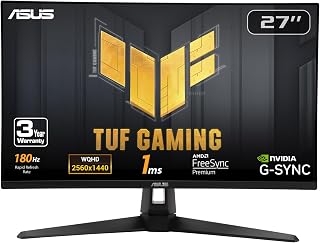
If you're weighing 1440p against 4K for high frame rate gaming, this one makes the case for staying at QHD. The 180Hz refresh rate paired with Fast IPS panel technology delivers smooth, responsive motion that a 4K panel at similar price points often can't sustain, since GPUs push far higher frame rates at 1440p than at 4K.
Pros
- 180Hz refresh rate achievable without high-end GPU demands
- 1ms response time with Fast IPS panel
- Wide color gamut (130% sRGB) with HDR support
- G-SYNC, FreeSync Premium, and ELMB Sync for tear-free play
Cons
- Weak, tinny built-in speakers
- Ships overly bright, needs manual adjustment
If you're weighing 1440p against 4K for gaming, the VG27AQ3A makes a strong case for sticking with QHD. At 27 inches, 1440p lands in a sharp spot, detailed enough to look great, but light enough that a mid-range GPU can push the 180Hz refresh rate consistently, something 4K at this speed would demand far more hardware to achieve. The Fast IPS panel keeps a 1ms response time while still delivering 178-degree viewing angles and a 130% sRGB gamut with HDR, so you're not giving up color quality for speed. ELMB Sync, G-SYNC compatibility, and FreeSync Premium cover tearing and stutter across AMD and NVIDIA setups alike. For shooters, racing games, or any genre where frame rate matters more than pixel count, this monitor shows why 1440p remains the practical sweet spot rather than a compromise. The matte finish and frameless design also suit multi-monitor setups well. Audio is a weak point, so plan on external speakers.
Display: 27-inch Fast IPS, 2560 x 1440 (QHD), 16:9 aspect ratio, 178-degree viewing angles
Refresh Rate: 180Hz native. Supports G-SYNC compatible, FreeSync Premium, and AdaptiveSync with variable refresh rate
Response Time: 1ms (moving picture response time)
Color: 130% sRGB gamut, HDR-10 support, 856.5 lm brightness, 1000:1 contrast ratio
Connectivity: 2x HDMI 2.0, 1x DisplayPort 1.4, 3.5mm audio jack
Physical: 24.2" depth, 8.4" width, 17.9" height, 4.6 kg weight. VESA 100x100 mount compatible. Flat panel with matte screen finish
Features: Blue light filter, flicker-free technology, integrated 2W stereo speakers, frameless design, built-in GamePlus menu with FPS counter and crosshair overlay
Warranty: 3-year warranty with accidental damage replacement
Buy this if you want high refresh rate gaming at 1440p without needing a flagship GPU to sustain it, especially for competitive or fast-paced titles. It also suits creators who want accurate color on a budget. Skip it if your goal is maximum visual detail and you're set on 4K, or if you need strong built-in audio.

For gamers prioritizing fluid motion over pixel density, the 180Hz refresh rate on this QHD Fast IPS panel shows why 1440p remains the sweet spot for competitive play. Matte screen surface cuts glare during long sessions, and the resolution keeps frame rates high without demanding the GPU horsepower that 4K gaming requires.
Pros
- 180Hz refresh rate with 1ms response time
- More GPU-friendly than 4K at similar speeds
- 95% DCI-P3 color coverage with DisplayHDR 400
- G-SYNC support for tear-free gameplay
Cons
- Needs a mid to high-end GPU to sustain 180Hz in demanding games
- Pixel density at 1440p may look soft to those used to 1080p sharpness up close
When deciding between 1440p and 4K for gaming, the AW2725DM represents the case for choosing resolution that matches your GPU rather than chasing pixel count. Its QHD 1440p panel pairs with a 180Hz refresh rate and 1ms response time, giving you fluid, tear-free motion that's genuinely achievable on mid-range rigs, unlike 4K at similar refresh rates, which typically needs a high-end card to sustain. G-SYNC support locks in that smoothness without screen tearing. The fast IPS panel keeps colors accurate with 95% DCI-P3 coverage and DisplayHDR 400, so you're not sacrificing visual quality for speed, just trading some pixel density for a more attainable frame rate. This makes it a sensible stopping point for gamers who find 1080p too soft but see 4K as overkill for their hardware or budget. The matte finish helps in bright rooms, and Alienware's build quality holds up well. Just know that hitting 180Hz consistently in demanding titles still calls for a competent graphics card like an RTX 4070 or similar.
Display: 27-inch QHD (2560 x 1440) IPS panel, 16:9 aspect ratio, matte finish
Refresh Rate: 180Hz
Response Time: 1ms gray-to-gray
Color Gamut: 95% DCI-P3
HDR: DisplayHDR 400 certified
Sync Technology: NVIDIA G-SYNC
Additional Features: Console mode, hardware blue light filter, VESA mountable
Brand: Alienware (Dell)
Good fit for gamers moving up from 1080p who want sharper detail and higher refresh rates without needing 4K-class hardware. Also works for players splitting time between story-driven games and competitive titles. Skip it if you already own a GPU capable of strong 4K performance, or if you're sensitive to pixel density at 27 inches.

Debating 1440p versus 4K often hinges on contrast and motion clarity, and this curved panel's 5000:1 contrast ratio combined with 200Hz refresh rate and 1ms MPRT response time makes a strong case for QHD. Deep blacks and minimal motion blur matter more to competitive gamers than the extra pixels 4K provides.
Pros
- 200Hz refresh rate and 1ms MPRT keep 1440p gaming fluid
- 1500R curve adds immersion and reduces eye strain versus flat panels
- FreeSync and HDR support with a 5000:1 contrast ratio
- Matte finish and dual DisplayPort 1.4 inputs for flexible setups
Cons
- No built-in speakers, so external audio is required
- Viewing angles show color shift off-axis, and HDMI maxes at 144Hz
Choosing between 1440p and 4K for gaming often comes down to whether you want raw resolution or smoother, more immersive performance, and the SANSUI ES-G27C1Q leans firmly into the latter. Its 2560x1440 WQHD resolution paired with a 200Hz refresh rate and 1ms MPRT response time means your GPU can push high frame rates without the strain 4K demands, while the 1500R curve adds a sense of depth and immersion that flat 4K panels at this level don't offer. FreeSync support keeps motion tear-free, and HDR plus a 5000:1 contrast ratio give colors and shadow detail real punch. For anyone leaning toward 1440p because they'd rather have fluid, responsive gameplay than squeeze every pixel out of 4K, this monitor backs that choice up with genuinely gaming-focused specs. The matte finish helps in brighter rooms, and dual DisplayPort inputs cover multi-source setups. Just plan to use DisplayPort for full refresh rate, since HDMI tops out lower.
Display Specs: 27-inch curved VA panel, 2560x1440 WQHD resolution, 16:9 aspect ratio, 1500R curvature, 5000:1 contrast ratio, 300 nits brightness, 178-degree viewing angle.
Performance: 200Hz refresh rate (via DisplayPort), 1ms MPRT response time, FreeSync adaptive sync, HDR support, 90% DCI-P3 and 120% sRGB color gamut.
Connectivity: 2x DisplayPort 1.4 (up to 200Hz), 2x HDMI 2.0 (up to 144Hz), 3.5mm audio jack (no speakers).
Physical: 24.11" width x 17.81" height x 7.64" depth, 7.7 lbs, matte screen finish, tilt adjustment (-5° to +15°), VESA compatible (100x100mm), Kensington lock slot.
Warranty: 30-day money-back guarantee, 1-year quality warranty, lifetime technical support.
Good for gamers picking 1440p over 4K specifically for the frame rate and immersion benefits, particularly those drawn to curved displays for fast-paced or atmospheric titles. Also suits buyers wanting HDR and strong contrast without 4K's GPU overhead. Skip it if you need built-in speakers, prefer flat panels, or your decision is already leaning toward 4K for sharper detail work.
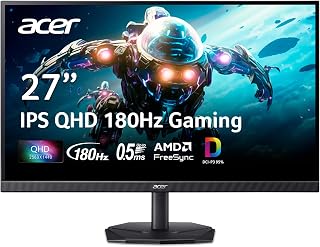
Choosing between 1440p and 4K often comes down to balancing clarity with performance, and this IPS panel's 180Hz refresh rate leans toward the smoother end of that tradeoff. QHD resolution at 2560x1440 offers a visible sharpness boost over 1080p while staying light enough on GPU load to sustain high frame rates consistently.
Pros
- 180Hz refresh rate with 0.5ms response time
- 95% DCI-P3 color accuracy with HDR 10 support
- Zero-frame bezel suited to multi-monitor setups
- AMD FreeSync for smoother, tear-free motion
Cons
- HDMI limited to 120Hz, DisplayPort needed for full 180Hz
- Included stand feels less stable than premium alternatives
In the 1440p vs 4K debate, the Acer Nitro KG271U highlights why many gamers still choose QHD: it hits 180Hz with a 0.5ms response time, a combination that's far easier to sustain than at 4K resolution. That speed advantage matters most in competitive shooters and fast-paced titles where frame rate wins over pixel count. The IPS panel still delivers 178-degree viewing angles and 95% DCI-P3 color with HDR 10 support, so visuals don't feel like an afterthought next to the performance focus. AMD FreeSync handles tearing and stuttering, and the zero-frame bezel design makes it a solid choice if you're considering a multi-monitor QHD setup instead of a single 4K display, since driving multiple 4K panels at high refresh rates would be a much heavier GPU lift. Built-in speakers and multiple ports (DisplayPort and dual HDMI) round things out, though HDMI tops out at 120Hz, so DisplayPort is needed for the full 180Hz. The included stand is functional but not premium, so wall mounting is worth considering for stability.
Display: 27 inches, IPS LCD, 2560x1440 (QHD), 16:9 aspect ratio, matte finish
Performance: 180Hz refresh rate, 0.5ms response time (GTG), 1000:1 contrast ratio, 250 nits brightness
Color: DCI-P3 95%, HDR 10 support, 178-degree viewing angles
Connectivity: DisplayPort (1), HDMI (2), built-in speakers
Physical: 24.2" W x 18.14" H x 8.28" D, 5.5 kg, tilt adjustment, wall mount compatible
Power & Warranty: 26W power consumption, 3-year parts and labor warranty
Included: Display, DisplayPort cable, power cord, stand
Suited to gamers and creators who want high refresh rate performance at a resolution their GPU can actually drive, including those considering multi-monitor QHD setups. Less suited to anyone prioritizing maximum pixel density over frame rate, or who needs HDMI to hit the full refresh rate. Skip if you plan to connect only via HDMI.

Pros
- Exceptional 4K resolution at 160Hz refresh rate delivers stunning visuals with buttery-smooth motion
- Dual adaptive sync (G-SYNC Compatible and FreeSync Premium) works across nvidia and AMD systems
- Professional-grade color gamut and HDR performance make it excellent for content creators
- Fast IPS panel provides wide 178-degree viewing angles without color shift
- Robust build quality and 3-year warranty with advanced replacement service offer peace of mind
Cons
- Single HDMI port limits multi-source connectivity compared to some competing models
- Premium pricing at this spec level may exceed budgets for casual gamers
- 27-inch 4K pixel density requires powerful GPU to maintain 160Hz at high settings in demanding games
The ASUS TUF VG27UQ1A is a premium 27-inch 4K gaming monitor purpose-built for players and professionals who refuse to compromise on performance or image quality. This monitor targets competitive gamers seeking high refresh rates without sacrificing resolution, as well as creative professionals who demand accurate color reproduction.
Its standout strength lies in the combination of 160Hz refresh rates at 4K resolution with a fast 1ms IPS panel. The ELMB Sync technology works alongside G-SYNC Compatible and AMD FreeSync Premium, ensuring silky-smooth gameplay while eliminating ghosting and tearing. For console gamers, the HDMI 2.1 support delivering 4K at 120Hz provides a compelling upgrade path for next-generation systems.
Design and build quality are solid throughout. The monitor features a professional aesthetic with a matte finish, sturdy construction at 10.6 pounds, and extensive connectivity via DisplayPort and HDMI. The 100x100 VESA mount support allows flexible positioning, while the 1027.8 lm brightness and 1000:1 contrast ratio ensure visibility in various lighting conditions.
The primary limitation is the single HDMI port, which constrains multi-source setups. Additionally, driving this monitor to its full potential requires a capable graphics card, so the performance you gain depends on your system specs. The premium price point also positions this as an investment rather than an entry-level option.
The ASUS TUF VG27UQ1A represents an excellent choice for serious gamers and content creators who want a single monitor to handle both competitive gaming and professional work. With its combination of high refresh rates, accurate color, strong build quality, and comprehensive warranty, it delivers genuine value for those willing to invest in a premium display.
Display and Resolution: 27-inch Fast IPS LCD panel with 3840 x 2160 pixel native resolution, 16:9 aspect ratio, 1ms response time, and 1000:1 contrast ratio.
Refresh Rate and Sync: 160Hz refresh rate with NVIDIA G-SYNC Compatible, AMD FreeSync Premium, and ASUS Extreme Low Motion Blur Sync (ELMB Sync) technology for adaptive refresh-rate gaming.
Color and Brightness: 95% DCI-P3 professional color gamut, HDR support, 1027.8 lm peak brightness, and 178-degree viewing angles for consistent color across positions.
Connectivity: DisplayPort and HDMI 2.1 (1 port) with support for up to 4K 120Hz via HDMI without chroma subsampling. 100x100 VESA mounting compatibility.
Warranty and Included Accessories: 3-year warranty with advanced replacement and repair service, DisplayPort cable, power cord, L-shaped screwdriver, and quick start guide included. Complimentary 3-month Adobe Creative Cloud subscription.
Is This Monitor For You? The VG27UQ1A excels for enthusiast gamers with high-end GPUs seeking both 4K clarity and fast refresh rates, as well as content creators needing accurate color in a gaming-capable package. If you need multiple HDMI inputs, prefer lower pricing, or use integrated graphics, consider alternatives.
GPU Requirements: This monitor's 160Hz potential at 4K requires an RTX 4070 or higher, or equivalent AMD GPU for demanding titles. For less demanding games or esports titles, lower-tier cards can still deliver high frame rates.
Setup Considerations: Pair with DisplayPort for maximum refresh rate and performance. The single HDMI port works well for console gaming but limits simultaneous multi-source connections. Plan your cable management accordingly.
Value Assessment: At this price point, you're investing in professional-grade color accuracy, high refresh rates, and solid build quality. Factor in the 3-month Adobe subscription and 3-year warranty, both of which add tangible value.

Pros
- Industry-leading 1440p 480Hz refresh rate for competitive gaming
- Extremely fast 0.03 ms response time supports clear, responsive gameplay
- Excellent OLED contrast with 99% DCI-P3 color coverage and true 10-bit color
- G-SYNC compatibility, HDR support, and OLED protection features improve both usability and longevity
Cons
- A powerful gaming PC is needed to take full advantage of 480Hz at 1440p
- OLED panels still require careful use and maintenance despite the included OLED Care+ tools and burn-in coverage
- The single HDMI port may limit flexibility for setups with multiple HDMI-connected devices
The ASUS ROG Swift PG27AQDP is a 26.5-inch QHD WOLED gaming monitor designed for competitive PC players, esports enthusiasts, and gamers who want premium motion clarity. Its 1440p resolution balances image detail with the high frame rates needed to benefit from a 480Hz refresh rate.
Fast games feel exceptionally fluid thanks to the 0.03 ms response time and 480Hz refresh rate, which help keep moving targets sharp. OLED contrast, 99% DCI-P3 coverage, true 10-bit color, and DisplayHDR 400 True Black support also make AAA games and video content look rich and immersive.
The matte screen finish helps reduce distracting reflections, while G-SYNC compatibility supports smoother gameplay with less tearing. ASUS adds OLED Anti-Flicker technology, a custom passive heatsink, and OLED Care+ software to improve comfort and help protect the panel over time.
This monitor is specialized hardware, so users need a powerful graphics card to reach very high frame rates at 1440p. The single HDMI port may also be limiting for multi-device setups, and OLED technology still requires sensible panel-care habits even with burn-in protection and a three-year warranty.
Overall, the PG27AQDP is an excellent choice for serious competitive gamers who prioritize speed without giving up OLED image quality. It is less necessary for casual users, but its combination of 480Hz performance, fast response, vivid color, and panel-care features makes it a standout premium gaming display.

For readers deciding if 4K's extra detail is worth sacrificing frame rate, this IPS display's 240Hz refresh rate argues strongly for 1440p instead. That speed lets fast-paced titles run buttery smooth on mid range to high end GPUs, something 4K panels struggle to match without significantly more rendering power behind them.
Pros
- 240Hz refresh rate at 1440p balances smoothness with achievable GPU demands
- 1ms response time and FreeSync Premium for tear-free, sharp motion
- 99% color gamut IPS panel avoids the washed-out look of TN panels
- Fully adjustable stand and slim bezels for multi-monitor setups
Cons
- IPS backlight bleed can appear in some units, especially at corners
- Full 240Hz only available over DisplayPort; HDMI limits to 144Hz
If you're weighing 1440p against 4K for gaming, the Acer Nitro XV272U makes a strong case for staying at QHD. Running 1440p at 240Hz is far easier on a GPU than chasing 4K, and this monitor shows what that tradeoff buys you: a 1ms response time, AMD FreeSync Premium for tear-free motion, and an IPS panel with 99% color gamut so visuals stay vibrant rather than washed out. For competitive and fast-paced titles, that higher frame rate matters more than extra pixel density, and 1440p hits a sweet spot where current GPUs can actually sustain high frame rates instead of struggling to fill a 4K panel. The fully adjustable stand and compact bezels also make it easy to pair with a second display later. Just note that HDMI caps out at 144Hz, so you'll want DisplayPort to unlock the full 240Hz, and factory brightness runs dark out of the box. For anyone deciding that smooth, responsive gameplay outweighs 4K's extra sharpness, this monitor delivers a convincing argument for 1440p.
Display: 27-inch QHD IPS, 2560 x 1440 resolution, 16:9 aspect ratio, 0.233mm pixel pitch
Performance: 240Hz refresh rate (DisplayPort), 144Hz (HDMI), 1ms response time (0.5ms GtG), 1000:1 contrast ratio, 400 nits brightness
Connectivity: 1x DisplayPort 1.4, 2x HDMI 2.0, 1x audio out, dual 2W speakers
Design: Fully adjustable ergostand with tilt -5 to +15 degrees, 4.7-inch height adjustment, 360-degree swivel, plus/minus 90-degree pivot, 100x100mm VESA mounting
Power and Warranty: 26W power consumption, 3-year manufacturer warranty covering parts and labor
Best for gamers choosing 1440p specifically to hit high refresh rates without needing a top-tier GPU, especially competitive and fast-paced game players. Content creators who want decent color accuracy alongside speed will also find it capable. Skip it if your priority in the 1440p vs 4K decision is maximum resolution and detail, or if you already have a GPU powerful enough to drive 4K comfortably.
Pros
- Exceptional image quality with native 4K resolution and IPS panel technology providing accurate colors
- Flexible refresh rate modes support both competitive gaming and demanding workloads without switching monitors
- Ultra-responsive 0.5ms input lag gives competitive players the edge in fast-paced titles
- HDR support and excellent color gamut enhance both gaming immersion and creative work
- Space-efficient design with minimal bezels allows for practical multi-monitor configurations
Cons
- 160Hz at 4K may require high-end GPU investment to maintain frame rates in demanding titles
- No built-in adjustment options beyond tilt, limiting ergonomic customization for extended sessions
- IPS panel has slower pixel response compared to VA or TN alternatives, though 0.5ms still performs well
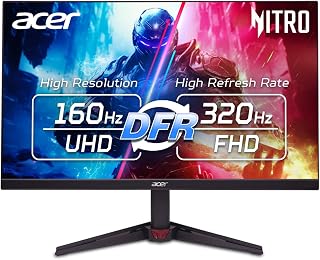
The Acer Nitro VG270K V4 is a premium 27-inch gaming monitor designed for players and creators who refuse to compromise between resolution clarity and refresh rate performance. This monitor targets competitive gamers seeking 4K visual fidelity alongside smooth, responsive gameplay, as well as content creators who need accurate color reproduction for creative work.
The standout feature is the Dynamic Refresh Rate technology that lets you choose between 160Hz at full 4K or boost to 320Hz at 1920x1080. Paired with AMD FreeSync Premium, the monitor eliminates screen tearing and stuttering while the ultra-fast 0.5ms gray-to-gray response time ensures no ghosting during intense action sequences. HDR 10 support with 90% DCI-P3 color gamut transforms both gaming visuals and professional content with superior contrast and color depth.
Build quality reflects its gaming-focused design with a near bezel-less zero-frame aesthetic that maximizes usable screen space and enables clean multi-monitor configurations. The matte IPS panel provides wide viewing angles and vibrant colors, though IPS technology inherently has slower response times than TN or VA alternatives. Connectivity includes DisplayPort 1.4 and dual HDMI 2.1 ports with included cables, plus VESA mounting support for flexible desk arrangements.
The primary consideration is GPU requirements. Achieving consistent 160fps at 4K demands a powerful graphics card (RTX 4070 or better). Additionally, the monitor lacks height, swivel, or pivot adjustments beyond tilt, which may limit ergonomic positioning for prolonged gaming sessions or creative work at a desk.
The VG270K V4 delivers exceptional value for gamers and creators prioritizing pristine 4K clarity with responsive gaming performance. The combination of smooth adaptive sync, rapid pixel response, and vibrant HDR visuals makes this an excellent investment for high-end gaming rigs and creative workflows that can leverage its capabilities.
Display: 27-inch IPS LCD, 4K UHD (3840x2160), 16:9 aspect ratio, matte finish
Refresh Rate: 160Hz at 3840x2160, up to 320Hz at 1920x1080 with Dynamic Refresh Rate
Response Time: 0.5ms gray-to-gray
Color: DCI-P3 90% gamut, HDR 10 support, 1000:1 contrast ratio
Adaptive Sync: AMD FreeSync Premium
Connectivity: 1x DisplayPort 1.4, 2x HDMI 2.1, built-in speakers
Ergonomics: VESA 100x100mm mount, tilt adjustment (-5 to +25 degrees)
Dimensions: 24.2in W x 18.2in H x 7.8in D
Warranty: 3-year parts and labor
Ideal for: Competitive gamers with high-end graphics cards who want 4K visual quality without sacrificing smooth frame rates. Video editors, motion designers, and digital artists benefiting from accurate color representation and HDR support. Multi-monitor enthusiasts leveraging the zero-frame design for seamless setups.
May not be ideal for: Budget-conscious gamers with mid-range GPUs that struggle to maintain 160fps at 4K. Esports players who prioritize extreme refresh rates (240Hz+) over resolution. Users requiring extensive ergonomic adjustments like height or pivot functionality.
Buying Guide: What to Consider Before You Choose
Resolution and GPU Demand
1440p (2560×1440) strikes a balance between sharpness and performance. On a 27-inch screen, the pixel density is high enough to look crisp without crushing your GPU. Monitors like the AOC 27 Inch Gaming Monitor 2K QHD 180Hz VA 1ms and the ASUS TUF Gaming VG27AQ3A 27 Inch 1440p 180Hz deliver fluid high-refresh gameplay on mid-range hardware.
4K (3840×2160) demands significantly more from your graphics card. Monitors like the ASUS TUF Gaming VG27UQ1A 27 Inch 4K 160Hz G-SYNC and the Acer Nitro 27in 4K 3840×2160 IPS 160Hz DFR 320Hz produce stunning detail, but you’ll need a top-tier GPU to sustain high frame rates at that resolution. If your card is mid-range, 1440p will almost always feel smoother in practice.
Refresh Rate and Competitive Play
In fast-paced or competitive titles, refresh rate matters more than resolution. A 1440p panel running at 180Hz or higher will feel dramatically smoother than a 4K panel at 60Hz. The ASUS ROG PG27AQDP 27 Inch 1440p 480Hz OLED represents the extreme end of this, pairing QHD resolution with a 480Hz OLED panel for esports play where every millisecond of response time is consequential.
Even more accessible 1440p options like the MONITOR Acer Nitro 27in QHD 2560×1440 IPS 240Hz and the SANSUI 27 Inch WQHD 2560X1440 Curved (rated at 200Hz) give competitive gamers a clear edge over 4K panels that cap out at 120Hz to 160Hz. If you want recommendations for GPU pairings to hit those frame rates, our guide on the best GPUs for demanding titles is a useful reference.
Panel Technology and Visual Quality
IPS panels dominate this list for good reason: wide viewing angles, accurate colors, and fast response times. The Alienware 27 Gaming Monitor AW2725DM uses a Fast IPS panel with 95% DCI-P3 color coverage, making it a strong pick for gamers who also care about visual richness in open-world titles. The Acer Nitro 27in QHD 2560×1440 IPS 180Hz hits 95% DCI-P3 as well, at a more accessible price point.
VA panels, like the one in the AOC Q27G4XN, offer a higher contrast ratio (5000:1 on the SANSUI) for deeper blacks, which benefits dark game environments. OLED panels, as seen in the ASUS ROG PG27AQDP, take this further with near-infinite contrast and 0.03ms response times, though they require burn-in management over long sessions. For more display comparisons across brands, the best GIGABYTE monitor roundup and the best BenQ monitor guide are worth a look alongside this one.
Sync Technology and Tear-Free Gameplay
All nine monitors on this list support some form of adaptive sync, whether that’s G-SYNC Compatible, AMD FreeSync Premium, or VESA AdaptiveSync. This eliminates screen tearing and smooths out frame-rate fluctuations, which matters more in GPU-intensive 4K scenarios where your card may dip below your monitor’s peak refresh rate.
The ASUS TUF Gaming VG27AQ3A 27 Inch 1440p 180Hz covers both FreeSync Premium and G-SYNC compatibility simultaneously via ELMB Sync, which is particularly useful if you switch between AMD and NVIDIA setups. The Alienware AW2725DM adds a dedicated console mode, making it versatile across both PC and console 4K gaming.
Final Thoughts
For most gamers in 2026, 1440p remains the sweet spot: you get sharp visuals, high refresh rates, and broad GPU compatibility without the demanding overhead of 4K. If you’re a competitive player who prioritizes frame rate above all else, the AOC 27 Inch Gaming Monitor 2K QHD 180Hz VA 1ms delivers reliable 180Hz QHD performance at a strong value. If you’re ready to commit to 4K for immersive single-player experiences and have the GPU to back it up, the ASUS TUF Gaming VG27UQ1A 27 Inch 4K 160Hz G-SYNC offers a well-rounded 4K panel with HDMI 2.1 console support and G-SYNC compatibility built in.
Frequently Asked Questions
Is 1440p noticeably better than 1080p for gaming?
Yes, the jump from 1080p to 1440p is clearly visible on a 27-inch screen. The higher pixel density sharpens fine details like foliage, distant textures, and HUD elements. You’ll also find that many 1440p monitors now ship with 180Hz or higher refresh rates, so you’re not sacrificing competitive performance for the resolution upgrade.
Do you need a high-end GPU for 4K gaming at 60fps or above?
For 4K at 60fps in demanding titles, you generally need at minimum a current-generation mid-to-high-end GPU. Hitting 120Hz to 160Hz at 4K consistently requires flagship hardware. The Acer Nitro VG270K’s DFR technology offers a practical middle ground, letting you run 4K at 160Hz or drop to 1080p at 320Hz depending on what you’re playing, which gives more flexibility across GPU tiers. Our graphics cards category has options to pair with a 4K display.
Is 4K worth it for competitive games like FPS or battle royale titles?
For most competitive players, no. In fast-paced FPS and battle royale games, refresh rate and response time have a more direct impact on performance than resolution. A 1440p monitor at 240Hz or 480Hz will give you a measurable competitive advantage over a 4K display running at 60Hz to 120Hz. Save 4K for single-player or strategy titles where visual detail enhances the experience rather than hindering reaction speed.
What is the best resolution for console gaming on a PC monitor in 2026?
Current-generation consoles output up to 4K at 120Hz via HDMI 2.1, so a 4K monitor with HDMI 2.1 support gets the most out of that signal. The ASUS TUF Gaming VG27UQ1A supports 4K 120Hz over HDMI 2.1 without chroma subsampling, and the Alienware AW2725DM includes a dedicated console mode for extended sessions. If you’re using an older console, a 1440p monitor with a high refresh rate is a solid match for upscaled output.






Write Your Review
No reviews yet. Be the first to share your experience!