

Choosing a monitor becomes complicated when one screen must keep a laptop workspace comfortable, present accurate color for creative work, and still feel responsive after hours. BenQ covers that range with eye-care office displays, Mac-ready creative panels, and high-refresh esports models. The useful choice comes down to the work on your desk, the computer you connect, and how long you look at the screen.
This guide compares leading BenQ monitor options for home offices, creators, MacBook users, and competitive players. We weigh resolution, refresh rate, color coverage, ports, and stand adjustment so you can focus on the features that affect daily use. If quick competitive action is your priority, our 1080p gaming monitor guide offers useful context alongside the Zowie option below.
Quick Comparison
Ratings reflect the most recent data pull. Check each listing for current price and availability.
Quick answer
This guide compares 10 picks, with BenQ GW2491 23.8-Inch FHD 100Hz IPS Monitor, Eye-Care ranked first. BenQ GW2490 24-Inch FHD IPS Monitor, 100Hz, 99% sRGB has the most customer reviews. BenQ Zowie XL2540X+ 24.1-Inch 280Hz Fast TN Esports leads this list on refresh rate.

Pros
- Accurate IPS color reproduction with wide viewing angles
- Smooth 100Hz refresh rate with FreeSync support
- Strong eye-care package with TÜV certification, Flicker-Free, and Low Blue Light features
- Slim bezel and matte finish suit modern desk setups
- Three-year manufacturer warranty
Cons
- Full HD resolution is practical for a 23.8-inch screen but less detailed than QHD or 4K alternatives
- Only one HDMI port may be limiting for users with several HDMI devices
- Built-in speakers and USB ports are not listed in the provided specifications
The BenQ GW2491 is a 23.8-inch Full HD IPS monitor designed for home offices, students, everyday computing, streaming, and casual gaming. Its 1920 x 1080 resolution offers a practical balance of clarity and performance for common desktop tasks.
Its 99% sRGB coverage and IPS panel deliver vivid colors and consistent images across wide viewing angles. The 100Hz refresh rate makes scrolling and general navigation feel smoother, while FreeSync support can help reduce visible tearing during compatible gameplay.
BenQ gives comfort a strong focus with TÜV-certified Flicker-Free and Low Blue Light technologies, Eyesafe 2.0, and an ePaper Mode for lengthy reading sessions. The matte surface helps limit distracting reflections, and the ultrathin bezel gives the display a clean, modern appearance.
The main limitations are its standard Full HD resolution and single HDMI input, which may not satisfy users seeking maximum workspace detail or multiple HDMI connections. The provided specifications also do not list built-in speakers or USB ports.
Overall, the GW2491 is a well-rounded monitor for productive daily use and casual entertainment. Its smooth refresh rate, color-capable IPS panel, and comprehensive eye-care features make it especially appealing for users who spend long hours in front of a screen.

Pros
- Smooth 144Hz refresh rate is useful for both productivity and casual gaming.
- USB-C connectivity simplifies laptop setup and helps reduce cable clutter.
- Height and tilt adjustment make it easier to create a comfortable workstation.
- Eye-care features are well suited to extended work and study sessions.
- Positive user feedback highlights easy setup, clear image quality, and reliable BenQ build quality.
Cons
- Full HD resolution is less detailed than QHD on a 27-inch screen, especially for text-heavy work.
- USB-C power delivery specifications are not listed, so charging performance may vary by laptop.
- The 144Hz refresh rate is useful for smooth motion, but this monitor is not designed as a high-end gaming display.
The BenQ GW2790TC is a 27-inch Full HD IPS monitor designed for home offices, study areas, remote work, and everyday computing. Its spacious screen provides a practical workspace for documents, spreadsheets, web browsing, and video calls.
Its standout feature is the 144Hz refresh rate, which makes scrolling and window movement feel smoother than on a standard 60Hz display. USB-C connectivity also streamlines laptop use by supporting video, data, and power delivery through a single cable.
The adjustable stand supports height and tilt changes, with pivot capability listed for added flexibility. A matte screen finish helps limit reflections, while the slim bezel design gives the monitor a clean appearance that fits well into modern desk setups.
There are a few limitations to consider. Full HD is adequate for general productivity but provides less desktop detail than QHD at this screen size, and the unspecified USB-C power delivery rating may not meet the charging needs of every laptop.
Overall, the GW2790TC is a well-rounded productivity monitor for buyers who value smooth everyday performance, ergonomic adjustment, USB-C convenience, and eye-care features. It is especially suitable for office work and casual gaming rather than demanding, high-resolution gaming.

Pros
- Excellent motion clarity for esports and other fast-paced games
- Very high 280Hz refresh rate with a 0.5ms response time
- Reduced overshoot compared with older Fast TN designs
- Sturdy, adjustable design with height adjustment and wall-mount support
- Strong user feedback for sharp visuals, low blur, and reliable build quality
Cons
- FHD resolution is less detailed than 1440p or 4K monitors, especially for productivity and media
- TN technology can offer narrower viewing angles and less impressive color depth than quality IPS or OLED panels
- The full 280Hz refresh rate requires DisplayPort, while customer feedback indicates HDMI supports up to 240Hz
The BenQ Zowie XL2540X+ is a 24.1-inch FHD gaming monitor designed primarily for competitive PC players. Its combination of a 280Hz refresh rate, Fast TN panel, and 0.5ms response time targets gamers who value immediate feedback and clear motion during esports matches.
In real-world play, the high refresh rate makes rapid aiming, tracking, and camera movement feel fluid when the graphics card can deliver the required frame rates. BenQ's updated Fast TN design is intended to reduce overshoot, while FreeSync helps limit tearing and stuttering with compatible hardware.
The monitor uses a flat matte display that helps reduce distracting reflections during long sessions. Its height adjustment system uses a bearing-based design for smoother positioning, and the monitor also supports wall mounting for users building a dedicated gaming setup.
There are practical tradeoffs to consider. The 1920 x 1080 resolution is well suited to competitive gaming but provides less workspace and detail than a 1440p display, while TN technology may not match modern IPS or OLED panels for viewing angles and color richness.
Overall, the XL2540X+ is a focused esports monitor with strong motion performance, responsive controls, and useful ergonomic adjustment. It is best for serious competitive players who want speed and clarity first, and who can accept FHD resolution and the visual compromises of TN technology.

Pros
- Excellent color accuracy and wide-gamut coverage for professional creative work
- Deep contrast for an IPS display, supported by a 2000:1 IPS Black panel
- Useful one-cable Thunderbolt workflow with 85W charging and daisy chaining
- Premium ergonomic construction with extensive positioning adjustments
- Mac-focused features, including M-Book mode and Display Pilot 2 support
Cons
- The 32-inch screen and substantial stand require considerable desk space
- Advanced color and connectivity features may be more than casual office users need
- Thunderbolt, KVM, and daisy-chain benefits depend on compatible devices and workflow equipment
The BenQ PD3225U is a 32-inch 4K UHD monitor built for Mac designers, photographers, video editors, and other professionals who need a large, accurate workspace. Its Mac-focused features and high-resolution panel make it especially well suited to detailed creative tasks.
Its standout strength is image quality. IPS Black technology provides a 2000:1 contrast ratio for deeper blacks, while 98% P3 and 100% sRGB coverage, Delta E ≤ 2 accuracy, Pantone Validation, and Calman verification support dependable color work.
Thunderbolt 3 adds practical value beyond the display itself, carrying video, data, and charging through one connection with 40Gb/s bandwidth and up to 85W USB-C power. Daisy chaining, the USB hub, KVM switch, Display Pilot 2, and Hotkey Puck can also reduce desk clutter and simplify multi-device workflows.
The anodized metal design gives the monitor a premium appearance, while the stand provides height, tilt, swivel, and pivot adjustment. The main considerations are its substantial desk footprint and the fact that its advanced connectivity and color tools may be excessive for basic office use.
Overall, the BenQ PD3225U is a strong professional monitor for Mac-based creative work. Buyers who prioritize calibrated color, deep contrast, ergonomic flexibility, and streamlined Thunderbolt connectivity will get the most from this display.
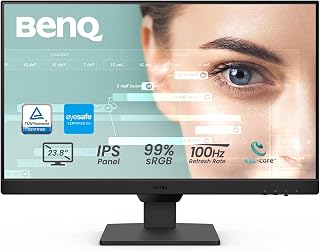
Pros
- Smooth 100Hz refresh rate at an accessible Full HD resolution
- Accurate 99% sRGB color and clear IPS image quality
- Useful eye-care modes for extended work and study sessions
- Flexible HDMI and DisplayPort connectivity with easy input switching
- Built-in speakers and VESA mounting support add everyday convenience
Cons
- Full HD resolution provides less workspace and detail than a QHD monitor
- The 250-nit brightness may feel modest in very bright rooms
- Built-in speakers are convenient, but users seeking richer audio may prefer external speakers or headphones
The BenQ GW2490 is a 24-inch Full HD IPS monitor designed for home offices, study areas, everyday desktop use, and casual gaming. Its 16:9 screen delivers a practical balance of workspace, compatibility, and easy placement for laptops, desktops, and gaming consoles.
Its 100Hz refresh rate makes scrolling, video playback, and supported games look smoother than a standard 60Hz display. The 99% sRGB color gamut produces natural-looking color, while the 178-degree viewing angle helps maintain image consistency when viewed from the side.
Long work sessions benefit from BenQ eye-care features, including Low Blue Light Plus, flicker-free technology, ePaper Mode, and Brightness Intelligence technology. Two HDMI ports and DisplayPort make it easy to connect multiple devices, while the input hotkey simplifies switching between work and entertainment.
The matte screen finish helps reduce distracting reflections, and the slim-bezel design suits a clean desk or multi-monitor arrangement. VESA mounting support adds placement flexibility, while built-in speakers provide convenient audio without requiring separate desktop speakers.
The main limitations are the standard 1920 x 1080 resolution and moderate 250-nit brightness, which may not satisfy users who need extensive workspace, high-detail creative work, or strong performance in a sunlit room. For office productivity, browsing, streaming, and casual gaming, the GW2490 offers a well-rounded feature set with particularly useful comfort features.

Pros
- USB-C supports display, data, and 60W laptop charging through a single cable.
- Ergonomic height and pivot adjustment helps create a more comfortable workstation.
- IPS panel delivers consistent color and broad viewing angles for office and creative tasks.
- Built-in eye-care features and adaptive brightness are useful for extended work sessions.
- Noise-cancelling microphone adds practical value for USB-C video conferencing setups.
Cons
- The 1920 x 1080 resolution provides less workspace than a QHD monitor for detailed editing or heavy multitasking.
- The 250-nit brightness and 1000:1 contrast ratio may be less suitable for very bright rooms or HDR-focused viewing.
- The built-in microphone works with laptops and external PCs only through a USB-C connection.
The BenQ GW2486TC is a 24-inch Full HD IPS monitor designed for home offices, business desks, coding, online meetings, and general entertainment. Its compact size and flat edge-to-edge screen make it a practical fit for single-monitor workstations or multi-display arrangements.
Its strongest feature is the USB-C connection, which can carry video and data while delivering up to 60W of power to a compatible laptop. HDMI, DisplayPort, and USB connectivity add flexibility, while the 75Hz refresh rate, 3ms response time, and FreeSync support make everyday motion feel smoother than a standard 60Hz office display.
Long-session comfort is a clear priority. Eye-Care technology, Brightness Intelligence, flicker-free operation, blue light filtering, and a matte finish help reduce visual strain, while height and pivot adjustments make it easier to position the screen correctly. The built-in noise-cancelling microphone is also useful for calls when connected through USB-C.
There are a few limitations to consider. Full HD is sufficient for routine productivity but offers less room for detailed editing and multitasking than a QHD panel, and the 250-nit brightness is better suited to typical indoor environments than bright rooms. The microphone also depends on a USB-C connection to an external computer.
Overall, the GW2486TC is a well-equipped office monitor for users who value simple laptop docking, ergonomic flexibility, and eye-comfort features. It is especially appealing for USB-C workstations and video conferencing, while users seeking high-resolution creative work or HDR viewing should consider a more advanced display.

Pros
- Accurate factory-calibrated color with broad P3, sRGB, and Rec.709 coverage
- Mac-focused ICCsync support and convenient 90W USB-C connectivity
- Sharp 2560 x 1440 resolution with a smooth 100Hz refresh rate
- Matte nano panel and fully adjustable ergonomic stand
- Strong fit for creative professionals, photographers, and MacBook users
Cons
- One reviewer found the screen less bright than a laptop display, which may matter for some photo or video workflows
- The 1000:1 contrast ratio is typical for an IPS panel but cannot match the deep blacks of OLED displays
- The built-in speakers were criticized in a review, so dedicated speakers or headphones may be preferable
The BenQ PD2706QN is a 27-inch QHD IPS monitor built for Mac users, creative professionals, and anyone who needs a reliable productivity display. Its 2560 x 1440 resolution offers useful workspace for editing, multitasking, and detailed design work.
Color accuracy is the main attraction. With 95% P3, full sRGB and Rec.709 coverage, factory calibration, and an average Delta E of 2 or less, the monitor is well suited to photography, video, and graphic design. ICCsync further helps maintain consistent profiles when switching color modes on a Mac.
The 90W USB-C connection simplifies a MacBook setup by carrying video, data, and charging through one cable. HDMI support, USB connectivity, and MST daisy chaining add flexibility, while the 100Hz refresh rate and 2ms response time make daily navigation feel smooth and responsive.
Its nano matte surface helps reduce glare and diffuse ambient light during extended sessions. The solid adjustable stand supports tilt, pivot, swivel, and height changes, although one reviewer found the display less bright than a laptop, and the speakers may not satisfy users seeking strong built-in audio.
Overall, the PD2706QN is a well-rounded monitor for Mac-centered creative and office work. Buyers who value accurate color, streamlined USB-C connectivity, and ergonomic flexibility will find it particularly appealing, while users who prioritize very high brightness or deep contrast may want to consider other panel types.

Pros
- Strong color coverage and factory-calibrated Delta E ≤3 accuracy for creative work.
- 90W USB-C simplifies Mac connectivity while providing laptop charging.
- KVM switch supports efficient control of two computer systems.
- 4K UHD resolution delivers crisp detail on a practical 27-inch screen.
- Ergonomic features, HotKey Puck, and eye-care technologies support extended use.
Cons
- The 60Hz refresh rate is better suited to creative work and productivity than high-refresh gaming.
- 250-nit brightness may feel limited in very bright rooms and is not ideal for demanding HDR viewing.
- The 1000:1 contrast ratio is typical for an IPS monitor but cannot match the deeper blacks of VA or OLED displays.
The BenQ PD2706U is a 27-inch 4K UHD IPS monitor designed for creative professionals, Mac users, and productivity-focused buyers. Its sharp 3840 x 2160 resolution provides plenty of workspace for design files, photos, video timelines, and detailed documents.
Color performance is the main attraction, with 95% P3 and 99% sRGB and Rec.709 coverage, Delta E ≤3 accuracy, and factory calibration. Pantone, Pantone SkinTone, and Calman validation add useful reassurance for color-sensitive work, while ICCsync helps apply the correct color mode quickly.
The 90W USB-C connection can carry video, data, and charging through one cable, making it a convenient match for compatible Mac laptops. A KVM switch also lets one keyboard and mouse control two computers, and the HotKey Puck provides quick access to frequently used settings.
Its ergonomic design, matte anti-glare surface, Flicker-Free operation, and Low Blue Light support make long work sessions more comfortable. The main limitations are the 60Hz refresh rate and 250-nit brightness, which make this a work-oriented monitor rather than a strong choice for fast gaming or bright-room HDR viewing.
Overall, the PD2706U is a well-rounded 4K display for users who prioritize accurate color, USB-C convenience, and a tidy multi-computer setup. It is a particularly practical choice for Mac-based creative workflows, office productivity, and content creation.

Pros
- Exceptional color accuracy tailored specifically for MacBook workflows and creative professionals
- Charge your MacBook and power the display with a single cable for true simplicity
- MacBook keyboard controls integrate seamlessly for faster brightness and volume adjustments
- Versatile connectivity with USB hub reduces cable clutter on your desk
- Excellent build quality and ease of setup confirmed by real user feedback
Cons
- 60Hz refresh rate limits appeal for gaming or motion graphics work
- 3-4 second wake time from sleep mode may feel slightly sluggish for some users
- Premium price point reflects Mac-specific engineering and color calibration
The BenQ MA270U is a purpose-built external monitor for MacBook Pro and MacBook Air users who demand professional-grade display quality. This 27-inch 4K monitor bridges the gap between Apple's expensive Studio Display and cheaper generic options by delivering Mac-specific integration at a reasonable price point. It's designed for creative professionals, remote workers, and anyone seeking a clutter-free setup with zero compromise on color accuracy.
The standout feature is the unified USB-C connection that simultaneously delivers 4K video, 90W power delivery for your MacBook, and acts as a USB hub for peripherals. Mac color calibration with P3 gamut ensures photos, videos, and design work display exactly as intended. The matte IPS panel with 400 nits brightness eliminates glare during extended work sessions. Native MacBook keyboard integration allows brightness and volume adjustments directly from your keyboard without interrupting workflow, a feature unique to this monitor.
Build and design quality exceed expectations at this price. The monitor ships fully assembled with minimal setup required. The adjustable stand provides height, tilt, swivel, and pivot adjustments to dial in perfect ergonomics. The silver finish and compact footprint complement modern Apple aesthetics. User feedback consistently praises the build quality and how seamlessly it integrates with MacBook workflows, with several reviewers noting they preferred this to Apple's own Studio Display.
The primary limitation is the 60Hz refresh rate, which doesn't matter for most work but rules it out for gaming or motion graphics editing. Some users report a brief 3-4 second wake time from sleep mode. The premium price reflects the Mac-specific engineering and color calibration, making it more expensive than generic 4K monitors, though comparable to Apple's offerings.
The BenQ MA270U delivers everything Mac users actually want in an external display: brilliant color, clean cabling, thoughtful Mac integration, and reliable build quality. For MacBook owners doing creative work or needing a second display, this monitor justifies its premium with everyday convenience and professional results.
Display: 27-inch 4K UHD (3840x2160) IPS matte panel, 60Hz, 400 nits brightness, 2000:1 contrast, 3ms response time, 178-degree viewing angles
Color: P3 wide color gamut with BenQ Mac color tuning technology, blue light filter for eye care
Connectivity: 2x USB-C ports with 90W power delivery to MacBook and 15W to iPad/iPhone, 2x HDMI, integrated 4-port USB hub
Design: Height, tilt, swivel, and pivot adjustable stand, 24"D x 22"W x 8.6"H, silver finish, desk mount, includes 3-year manufacturer warranty
Compatibility: MacBook Pro and MacBook Air with native keyboard control integration
Best for: MacBook Pro or Air users who work with photos, video, design, or need a second monitor for productivity without desk cable chaos.
Not ideal for: Gaming enthusiasts seeking high refresh rates, general Windows users seeking a cheaper 4K display, or those unwilling to invest in Mac-ecosystem integration.
What makes it different: Unlike generic 4K monitors, this display combines Mac color calibration, native keyboard controls, and single-cable charging. Unlike Apple's Studio Display, it costs less, includes more ports, and adjusts in every direction.
Real-world value: Users report it pays for itself through reduced desk clutter, eliminated cable management headaches, and faster daily workflows. The ability to charge your MacBook while working is a genuine productivity gain, not a gimmick.

Pros
- Sharp 3840 x 2160 4K resolution with vibrant Mac-focused color tuning
- Single-cable USB-C connection with up to 90W MacBook power delivery
- Brightness and volume controls work directly from a MacBook keyboard
- Flexible stand supports height, tilt, swivel, and pivot adjustment
- Large 32-inch screen provides a noticeable workspace upgrade over a laptop display
Cons
- The 60Hz refresh rate is less suited to high-refresh gaming
- Glossy screen finish may show reflections in brightly lit rooms
- Mac-specific features offer less benefit to users who do not use Apple devices
The BenQ MA320UP is a 32-inch 4K monitor built for MacBook Pro, MacBook Air, and Mac Studio users who want more workspace without giving up a Mac-focused experience. Its large IPS panel and 3840 x 2160 resolution make it well suited to office work, design, photo editing, and everyday multitasking.
BenQ's Mac color tuning and P3 wide color gamut are the monitor's standout features, helping colors look consistent with a compatible MacBook. Users also benefit from USB-C connectivity, up to 90W power delivery, and keyboard controls for adjusting brightness and volume without reaching for the display menu.
The connectivity is practical for a modern desk setup, with two USB-C ports, two HDMI ports, and an integrated USB hub. The included stand adds useful flexibility through height, tilt, swivel, and pivot adjustments, while 400-nit brightness and wide 178-degree viewing angles support comfortable viewing in varied positions.
There are a few limitations to consider. The 60Hz refresh rate is designed more for productivity and creative work than fast gaming, and the glossy finish can introduce reflections in bright rooms. Windows users may also gain less from the Mac-specific controls and color tuning.
Overall, the BenQ MA320UP is a strong Mac-centered monitor for users who value sharp 4K detail, accurate-looking color, one-cable laptop connectivity, and ergonomic positioning. It combines a generous screen size with thoughtful controls that make it especially convenient for a MacBook-based workstation.
Buying Guide: How to Choose a BenQ Monitor
Start with your most demanding routine, not just the screen size that sounds appealing. A display for reports, coding, photo work, console play, or a MacBook dock can require very different strengths. Once you settle on the purpose, selecting a resolution, panel type, and connection layout becomes much clearer.
Match Screen Size and Resolution to Your Viewing Distance
A 23.8-inch or 24-inch Full HD monitor remains a sensible fit for smaller desks and close viewing. The BenQ GW2491 and GW2490 pair this familiar resolution with IPS viewing angles, 99% sRGB coverage, and 100Hz motion. Their compact format also makes a dual-monitor arrangement easier to position without overwhelming your workspace.
Moving to 27 inches gives you more physical room for windows, while 4K adds noticeably finer text and detail for dense documents or artwork. The GW2790TC takes a larger Full HD approach, whereas the MA270U and PD2706U bring 4K sharpness to the same general size. For expansive timelines and broad side-by-side workflows, compare these choices with our 34-inch ultrawide monitor recommendations before deciding how much horizontal space you truly need.
Choose a Refresh Rate That Fits Your Pace
A 100Hz refresh rate, found on the GW2491 and GW2490, makes scrolling, cursor movement, and casual games feel more fluid than a basic 60Hz screen. The 144Hz GW2790TC goes further for responsive multitasking and gaming while retaining the broad viewing angles associated with IPS. These models make sense when your day moves between documents, browser tabs, video, and lighter play.
For dedicated esports play, the Zowie XL2540X+ is the specialist choice with a 280Hz Fast TN panel designed around motion clarity and reduced overshoot. Fast TN is built for speed, while IPS generally provides stronger viewing angles for shared viewing and mixed productivity. Your computer and cable must also support the display’s intended refresh setting, so confirm your graphics output before you commit. Players drawn to especially vivid screen surfaces can also browse our glossy gaming monitor picks.
Prioritize Color Coverage for Creative and Mac Work
Color-focused work calls for more than a high resolution label. The PD2706QN offers 95% P3 plus 100% sRGB and Rec.709 coverage with factory-calibrated color performance, while its Nano Matte panel helps diffuse ambient light. The PD2706U combines 4K resolution, 95% P3 coverage, 99% sRGB and Rec.709, DisplayHDR 400, and a KVM switch for creators who use more than one system.
MacBook users should pay close attention to the MA270U and MA320UP, which are tuned for Mac colors and allow brightness and volume control through the MacBook keyboard. The PD3225U adds a 32-inch 4K IPS Black panel, 98% P3 coverage, and M-Book mode for demanding Apple-centered studios. For photography, branding, or video delivery, choose the gamut that matches your output, then keep your apps and display color settings consistent.
Look Closely at USB-C Power, Hubs, and Ergonomics
A single USB-C cable can make a laptop desk dramatically cleaner by carrying video, data, and charging power together. The MA270U, MA320UP, PD2706U, and PD2706QN provide 90W USB-C charging, while the GW2486TC offers 60W power delivery with a USB hub. Match the monitor’s charging capability to your laptop’s requirements, especially if you regularly run demanding creative apps or connect several accessories.
Connectivity matters just as much when you manage multiple devices. The PD3225U supports Thunderbolt connectivity and daisy chaining, and the PD2706U KVM feature lets one keyboard and mouse work across two computers. Do not overlook posture either: height, tilt, swivel, and pivot adjustments on the MA series and professional PD models help you place the image at a comfortable level, while the GW2486TC adds a noise-cancelling microphone for cleaner calls.
Final Thoughts
For a compact everyday desktop, the BenQ GW2491 23.8” 1080p FHD 100Hz IPS Eye-Care combines smooth IPS viewing with practical eye-care features. Mac-focused creators who need 4K detail, wide color coverage, and Thunderbolt connectivity should look to the BenQ PD3225U 32 Inch 4K IPS Black UHD Thunderbolt.
Frequently Asked Questions
Is a BenQ monitor good for competitive gaming?
Yes, but the right BenQ model depends on the type of game you play. The Zowie XL2540X+ is purpose-built for competitive Full HD gaming, using a 280Hz Fast TN panel focused on clean motion. For mixed work and casual play, 100Hz and 144Hz IPS options can be more versatile. If you play from a phone or tablet as well, pair your display research with our mobile gaming controller recommendations.
Which BenQ monitor works well with a MacBook?
The MA270U and MA320UP are especially compelling for MacBook Pro and MacBook Air users because they provide Mac color matching, dual USB-C connectivity, and 90W power delivery. Their integrated brightness and volume controls also make the external display feel more cohesive with macOS. The PD2706U and PD3225U are strong alternatives when you need a more specialized creative workflow, KVM support, or Thunderbolt daisy chaining.
Do I need 4K for coding and office work?
You do not need 4K for email, documents, and general browser work, and a 24-inch Full HD model can remain comfortable at normal desk distance. A 27-inch 4K monitor provides more pixel density for fine text, detailed spreadsheets, and side-by-side apps, particularly when you value extra workspace. Remember that a sharp display cannot solve slow file loading or limited storage, so an SSD for a laptop upgrade may be a useful companion improvement.
What BenQ monitor suits a flight simulator setup?
For flight simulation, a 27-inch or 32-inch 4K BenQ monitor can make cockpit instruments, terrain, and interface details easier to read from a comfortable viewing distance. The MA320UP and PD3225U offer large 4K canvases, while the PD2706QN provides QHD clarity and 100Hz motion in a 27-inch size. A thoughtful simulator setup also benefits from precise controls, so explore our rudder pedals for flight sim guide when building a more immersive station.






Write Your Review
No reviews yet. Be the first to share your experience!