

You sit down for a late-night session and within minutes you notice the screen tearing, the input lag, the washed-out colors pulling you out of the moment. A capable 1080p gaming monitor fixes all of that without demanding a major investment. Whether you play fast-paced shooters, immersive RPGs, or just want a sharper everyday display, Full HD is still the sweet spot for smooth, responsive visuals at a reasonable cost. If you’re building out your setup, check out our guide to the best dual monitor arms to pair with any display on this list.
This guide covers nine of the most well-regarded 1080p monitors available right now in 2026, ranging from compact 22-inch everyday screens to sweeping 32-inch curved panels pushing 240Hz. We evaluated each one on refresh rate, panel technology, adaptive sync support, and overall value for gaming and daily use.
Quick Comparison
Ratings reflect the most recent data pull. Check each listing for current price and availability.
Quick answer
This guide compares 9 picks, with Dell SE2426HG 24 inch 240Hz Gaming Monitor - FHD IPS ranked first. Acer KB272 G0bi 27in FHD 120Hz Gaming Monitor holds the highest customer rating among them. SANSUI 32 Inch Curved 240Hz Gaming Monitor 1080P FHD has the most customer reviews.

Competitive players chasing every frame will appreciate the 240Hz refresh rate here, paired with IPS technology for accurate color and wide viewing angles that many high-refresh panels sacrifice. AMD FreeSync Premium keeps tearing at bay during intense firefights, and dual HDMI ports make it easy to switch between a gaming PC and a console.
Pros
- 240Hz refresh rate with 0.5ms response time
- IPS panel with 178-degree viewing angles
- TUV Rheinland 3-star eye comfort certification
- Dual HDMI and DisplayPort 1.4 for multiple devices
Cons
- 1080p resolution can look soft on a 24-inch screen for non-gaming use
- Contrast ratio is typical for IPS, not exceptional
When you're comparing 1080p gaming monitors for 2026, the SE2426HG earns its spot through raw speed. It runs a 240Hz refresh rate paired with a fast IPS panel, a combination that's genuinely uncommon at this tier and makes it a standout pick for anyone chasing fluid motion in Valorant, CS2, or Fortnite. AMD FreeSync Premium keeps tearing out of the picture, and 99% sRGB coverage means the image stays accurate rather than washed out. IPS also brings 178-degree viewing angles, so color holds up even off-axis. Dell backs it with TUV Rheinland 3-star eye comfort certification, which matters if you're logging long sessions, since it cuts blue light without wrecking color accuracy. The 23.8-inch matte panel resists glare, and dual HDMI plus DisplayPort 1.4 let you juggle a PC and a console without constant cable swapping. For this list's focus on 1080p gaming specifically, it's one of the strongest refresh-rate options included, even though contrast is standard IPS fare.
Display: 24-inch FHD IPS, 1920x1080 native resolution, 16:9 aspect ratio, 93 pixel pitch, 1000:1 contrast ratio, 178-degree viewing angles, 300 nits brightness, 99% sRGB color gamut
Performance: 240Hz refresh rate, 0.5ms response time, AMD FreeSync Premium, HDMI VRR support, TÜV Rheinland 3-star blue light reduction
Connectivity: 2x HDMI 2.0, 1x DisplayPort 1.4, Power input
Physical: 21.21 inches wide, 16.23 inches tall, 7.04 inches deep, 7.4 pounds, black matte finish, desk mount with tilt adjustment
Power and Warranty: 14 watts typical consumption, 240V AC input, 1-year advanced exchange service, includes HDMI cable, stand, power cable, and documentation
Best for competitive players who care more about frame smoothness than pixel density, especially in fast-paced shooters and battle royales. Also a good pick if eye comfort during long sessions is a priority. Skip it if you split time between gaming and detail-heavy creative work, where 1080p on a 24-inch screen will look soft, or if you want higher contrast for movies and darker scenes.

Anyone splitting time between spreadsheets and shooters will like this IPS panel's dual identity. A 144Hz refresh rate and 1ms response handle fast-paced titles, while the slim bezels and VESA mount support suit a clean multi-monitor desk setup. HDR Ready output adds punch to supported game content without needing a dedicated gaming-only display.
Pros
- 144Hz refresh rate with 1ms response time
- 1500:1 contrast ratio, above typical IPS panels
- TUV-certified flicker-free and low blue light tech
- Tilt stand plus VESA 100x100mm mounting support
Cons
- Single HDMI port limits simultaneous device connections
- Lower pixel density than 27-inch alternatives at this resolution
In a roundup of 1080p gaming monitors, the MSI PRO MP243L E14 stands out as the option for players who also need the screen to pull double duty at a desk. It delivers a 144Hz refresh rate and 1ms response time, enough to feel a real difference in fast titles without stepping into premium territory. The IPS panel keeps colors accurate and viewing angles wide at 178 degrees, and a 1500:1 contrast ratio is a notch above typical IPS panels in this class. MSI adds TUV-certified flicker-free tech and low blue light filtering, both genuinely useful if you're gaming for hours after a full workday on the same screen. The tilt-adjustable stand moves from minus 5 to plus 20 degrees, and VESA 100x100mm mounting means it fits arm setups if desk space is tight. Its one HDMI port is a limiting factor if you want to keep a console and PC both connected, though the VGA port is a nice bonus for older hardware. For anyone who wants a 1080p gaming display that also earns its keep during the workday, this is a sensible pick.
Good for gamers on a budget who also use their monitor for office work and want smooth performance without paying for extras they won't use. Also worth it if eye strain during long sessions is a concern. Skip it if you need multiple simultaneous inputs without swapping cables, or if you want the absolute highest refresh rate this list offers.

Readers wanting a larger canvas without giving up smoothness should note the 27-inch IPS panel running at 120Hz, a solid step up from entry-level 60Hz screens for tracking fast-moving targets. The extreme contrast ratio spec helps dark scenes retain detail, making it a practical pick for open-world or horror titles that lean on shadow work.
Pros
- 27-inch screen size, larger than most 1080p options here
- 120Hz refresh rate for smoother motion than standard displays
- FreeSync Compatible Adaptive-Sync support
- 99% color gamut coverage with matte anti-glare finish
Cons
- Lower pixel density than smaller 1080p monitors due to larger screen
- 120Hz is slower than other high-refresh options in this category
For shoppers in this 1080p roundup who want a larger screen without giving up smoothness, the Acer KB272 G0bi offers a 27-inch canvas with a 120Hz refresh rate and IPS-based color performance. It's built with Adaptive-Sync support that's FreeSync Compatible, so tearing stays in check on compatible AMD systems during fast-paced play. The 99% color gamut coverage keeps visuals looking accurate rather than flat, and a matte finish helps cut down on glare in rooms with bright overhead lighting or windows nearby. Its contrast ratio spec is listed extremely high, which on paper suggests strong distinction between light and dark scenes, though real-world results depend on viewing conditions. At 27 inches, this monitor spreads 1080p pixels over more screen space than the 24-inch options in this list, which is worth weighing if sharpness at close range matters to you. Still, 120Hz plus IPS-style color makes it a reasonable middle ground for gamers who want a bigger, more immersive screen while staying within 1080p and want smoother motion than a standard 60Hz display can offer.
Display: 27-inch IPS LCD, 1920x1080 Full HD, 16:9 aspect ratio, 250 nits brightness, 100,000,000:1 contrast ratio, 99% color gamut
Performance: 120Hz refresh rate, 1ms VRB response time, FreeSync adaptive sync support, matte screen finish
Connectivity: 1x HDMI, 1x VGA, 1x audio jack
Physical: 24.07 inches wide, 17.44 inches tall, 8.27 inches deep, 4.99 kg weight, tilt adjustment, wall mount compatible
Power & Warranty: 18 watts power consumption, 3-year full parts and labor warranty included
Suited to gamers who want a larger 27-inch screen and value screen size over the very highest refresh rates on this list. Also fits anyone on an AMD system who wants FreeSync-compatible smoothness. Skip it if pixel sharpness matters most to you, since 1080p spread over 27 inches will look less crisp than the same resolution on a 24-inch panel.

Fast-twitch shooter fans will value the 165Hz refresh rate on this 23.8-inch panel, which sits comfortably above the common 144Hz tier for smoother tracking during quick flicks. Its compact size keeps the whole screen within easy eye movement, a real advantage for players who prioritize reaction speed over sprawling desktop real estate.
Pros
- 165Hz refresh rate with AMD FreeSync Premium
- 1ms response time for fast-paced titles
- VA panel with 72% color gamut for decent visuals beyond gaming
- Zero-frame bezel design suited to multi-monitor setups
Cons
- VA panel shows color shift and glare at extreme viewing angles
- Some units reported with refresh rates closer to 120Hz
When you're comparing 1080p gaming monitors, the KG241Y earns its spot through a straightforward formula: 165Hz refresh rate plus AMD FreeSync Premium, priced for gamers who don't want to overspend on a secondary display feature set. For this list, it represents the entry point into genuinely fast competitive gaming, not just a marginal step up from 60Hz office monitors. The VA panel gives it an edge over cheaper alternatives with solid contrast and a 72% color gamut, meaning it doubles reasonably well for non-gaming tasks. Zero-frame bezels also make it a practical pick if you're building a multi-monitor competitive setup rather than running a single screen. The tradeoffs are typical of VA technology: color and contrast shift at extreme viewing angles, and buyers should double check the refresh rate on their unit since some reports mention units closer to 120Hz. For a 1080p-focused shortlist, this monitor fits the profile of best value-to-performance ratio for players who care more about frame delivery than panel perfection.
Display Specs: 23.8-inch Full HD VA panel, 1920x1080 native resolution, 16:9 aspect ratio, 250 nits brightness, 100,000,000:1 contrast ratio.
Performance: 165Hz refresh rate, 1ms response time (VRB), AMD FreeSync Premium adaptive sync technology.
Connectivity: 1x DisplayPort 1.2, 2x HDMI 2.0 (cable included), VESA mount compatible (100x100mm).
Design: Zero-frame construction, tilt adjustment -5 to 15 degrees, 3.8 kg weight, dimensions 21.27W x 16.3H x 7.44D inches.
Features: Flicker-free technology, ComfyView display modes, blue light filter, HDR ready, matte screen finish. Model: UM.QX1AA.S01, includes 3-year parts and labor warranty.
Best for esports and competitive multiplayer gamers upgrading from a 60Hz monitor who want a noticeable jump in smoothness without paying for extras they won't use. Also suits anyone setting up a bezel-light multi-monitor arrangement. Skip it if you need consistently accurate off-axis viewing angles, do color-critical work, or want guaranteed 165Hz performance without any variance risk.
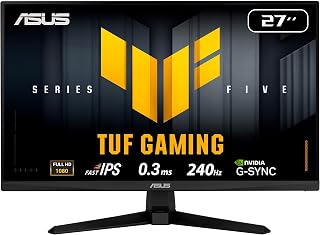
Esports-minded players who won't compromise on responsiveness will gravitate toward this 27-inch Fast IPS panel's 240Hz refresh rate combined with G-SYNC support, which virtually eliminates screen tearing during rapid camera swings. The larger 27-inch size gives enough screen real estate for spotting enemies at range without sacrificing the color accuracy IPS panels are known for.
Pros
- 240Hz refresh rate for fast-paced 1080p gaming
- Fast IPS panel with 178 degree viewing angle
- Works with both G-SYNC Compatible and FreeSync Premium
- TÜV certified flicker-free and low blue light
Cons
- Brightness capped at 300 cd/m2
- Contrast ratio of 1000:1 is standard, not standout
If your search for a 1080p gaming monitor starts and ends with smooth, tear-free motion, this 27 inch TUF display is built around that goal. A 240Hz refresh rate paired with Fast IPS technology puts it near the top of the field for competitive play at Full HD, and both G-SYNC Compatible and AMD FreeSync Premium support mean it plays nicely with either graphics card camp without forcing a sync mismatch. The IPS panel also brings a 178 degree viewing angle and a 99% color gamut, so image quality doesn't get sacrificed for speed the way it can on cheaper TN alternatives. TÜV certification for flicker-free performance and low blue light adds a comfort layer for longer sessions. At 300 cd/m2 brightness it's not built for bright rooms, but for a dedicated gaming setup aiming at high refresh 1080p, it checks the core boxes this list is built around.
Display: 27-inch Fast IPS LCD, 1920x1080 (16:9 aspect ratio), 240Hz refresh rate, 0.3ms response time (min). Brightness: 300 nits, Contrast: 1000:1, Viewing angles: 178 degrees.
Color and Visual Tech: 99% sRGB gamut coverage, matte anti-glare finish, TUV flicker-free, TUV low blue light, ASUS ELMB SYNC, Shadow Boost, GameVisual presets.
Adaptive Sync: AMD FreeSync Premium, NVIDIA G-SYNC compatible, VESA AdaptiveSync.
Connectivity: 1x DisplayPort 1.4, 1x HDMI 2.0, 1x 3.5mm audio jack. Built-in stereo speakers (2W+2W). Power consumption: 18 watts at 240V.
Physical Specs: Dimensions 24.21"W x 17.83"H x 7.6"D, weight 9.9 lbs. Includes DisplayPort cable, power cord, L-shaped screwdriver, quick start guide. 3-year manufacturer warranty with ARR.
Buy this if you want a high refresh IPS panel with broad sync compatibility across AMD and NVIDIA GPUs and value color accuracy alongside speed. Skip it if you need a very bright display for a sunlit room, since 300 cd/m2 is modest, or if you specifically want a VA or TN panel for its particular contrast or response characteristics rather than IPS.

For gamers hunting a budget-friendly secondary rig or console setup, this 22-inch pick delivers a 144Hz refresh rate that noticeably smooths fast motion over standard 60Hz panels. Built-in speakers mean one less cable to manage, and with both HDMI and DisplayPort, it plays nicely with older GPUs and current-gen consoles alike without forcing an adapter purchase.
Pros
- 144Hz refresh rate with FreeSync adaptive sync
- Built-in speakers reduce need for separate audio setup
- Blue Light Shift and matte finish for eye comfort
- Compact 22-inch size fits smaller desks
Cons
- No USB-C or other premium connectivity options
- 1080p resolution limits detail work despite adequate size
For a roundup focused on 1080p gaming monitors, the Sceptre E225W-FW144 stands out as the pick for gamers who also use their setup for work or school and don't want to juggle separate peripherals. Its 144Hz refresh rate and FreeSync support cover the core gaming need this article is built around, while built-in speakers mean you can skip a separate audio setup entirely, a rare convenience at this level. Blue Light Shift and a matte finish address the eye strain that comes from long sessions, whether that's gaming late into the night or grinding through work deadlines. The 22-inch size is compact enough for tight desks but still comfortable for fast-paced play. It won't compete with larger or higher-refresh panels on this list for pure performance, but as a practical, all-in-one 1080p gaming display, it covers the essentials without asking you to compromise on smoothness.
Display: 22-inch FHD LED with 1920x1080 native resolution, 16:9 aspect ratio, matte screen finish
Performance: 144Hz refresh rate, 1ms response time, 2000:1 contrast ratio, 170-degree viewing angles, 100 color gamut
Connectivity: 1x HDMI, DisplayPort, FreeSync adaptive sync
Features: Built-in speakers, Blue Light Shift eye care technology, minimal bezel design, wall mount compatible
Physical: 19.9in W x 15.5in H x 7in D, 7 pounds, machine black color
Warranty: 1-year limited manufacturer warranty
Good for gamers who double as students or remote workers and want one monitor that handles both roles well, especially if desk space or a minimal setup matters. The built-in speakers make it convenient for anyone who doesn't want extra cables. Skip it if you need a larger screen for detail work, want USB-C connectivity, or are chasing the highest refresh rates on this list.

Pros
- 180Hz refresh rate paired with 1ms response time delivers exceptionally smooth, responsive gaming performance
- Excellent color accuracy with 110% sRGB gamut and HDR support makes visuals pop for both gaming and content creation
- Dual high-speed ports (HDMI 2.0 and DisplayPort 1.4) provide flexible connectivity for multiple devices
- Built-in gaming overlays like crosshair and game timers add convenience without external software
- Lifetime technical support and 30-day money-back guarantee demonstrate strong manufacturer confidence
Cons
- VA panel viewing angles can appear washed out when viewing from extreme side angles, requiring some screen positioning
- No built-in speakers means you'll need separate audio output or headphones
- Some users report needing initial calibration adjustments to brightness and sharpness to achieve optimal picture quality
The SANSUI 24-inch 180Hz gaming monitor is a budget-friendly option designed primarily for casual to competitive gamers and multitasking professionals. With its high refresh rate, rapid response time, and adaptive sync technology, it targets users who want smooth, responsive performance without spending premium dollars on gaming displays.
The standout feature is the combination of 180Hz refresh rate and 1ms MPRT response time, which creates a noticeably fluid gaming experience. Colors are vibrant with 110% sRGB coverage and HDR support, arriving calibrated well enough out of the box that most users report satisfaction. The dual connectivity ports and game-specific overlays add practical value for competitive players.
Build quality is solid for the price point. The 24-inch 1080p matte display feels sturdy, VESA mounting is supported, and the included HDMI cable means no additional purchases needed to get started. The design is functional rather than flashy, with minimal bezels that maximize screen real estate.
Some drawbacks deserve mention. The VA panel exhibits typical viewing angle limitations, and certain users report initially finding the picture soft until adjusting settings in the menu. The lack of built-in speakers may inconvenience those without existing audio solutions. These are minor compromises for the aggressive price positioning.
Verdict: The SANSUI ES-G24F4H delivers legitimate 180Hz gaming performance at a price point that undercuts most competitors by a significant margin. If you prioritize high refresh rates and responsive gameplay over premium aesthetics or cutting-edge features, this monitor represents strong value. Budget gamers and productivity users will find it compelling.
Display: 24-inch VA LCD panel, 1920x1080 FHD resolution, 16:9 aspect ratio, 180Hz refresh rate, 1ms MPRT response time, 4000:1 contrast ratio, 300 cd/m² brightness, 110% sRGB color gamut, DCI-P3 80%, matte finish
Connectivity: One HDMI 2.0 port (up to 180Hz), one DisplayPort 1.4 port (up to 180Hz), 3.5mm audio jack, VESA 75mm mount
Features: FreeSync adaptive sync, flicker-free technology, low blue light eye care, game overlays (crosshair, timer, FPS, RTS, Racing modes), HDR support
Physical: Dimensions 21.2 inches deep x 7.93 inches wide x 16.28 inches high, weight 3.95 kg, matte black finish
Warranty: 1-year manufacturer warranty, 30-day money-back guarantee, lifetime technical support

Pros
- Outstanding 240Hz refresh rate and 1ms response time keeps competitive gamers ahead of the competition
- Subtle but effective 1500R curve creates genuine immersion without being overwhelming
- Solid metal construction and rigid stand feel premium despite the affordable price point
- Built-in speakers provide surprisingly good audio quality for gaming and multimedia
- Multi-device compatibility supports Windows, Mac, consoles, and mobile devices
Cons
- Built-in speakers are positioned underneath the monitor which produces muffled audio quality
- 1080p resolution may feel dated for non-gaming work or future-proofing concerns
- HDMI cables not included in box despite having dual HDMI ports
The Sceptre C255B-FWT240 is a 24.5-inch curved gaming monitor built for competitive players seeking high-refresh-rate performance without the premium price tag. Its 240Hz refresh rate and 1ms MPRT response time make it ideal for fast-paced shooters, fighting games, and esports titles where every frame matters.
The standout feature is the 1500R curved display, which creates a genuinely immersive gaming experience. Reviewers confirm the curve is noticeable from the sides and pulls you into the action without feeling gimmicky. Paired with AMD FreeSync Premium, the monitor eliminates screen tearing and delivers buttery-smooth gameplay. The 1920x1080 resolution is perfectly matched to these specs, allowing high-end GPUs to maintain 240Hz without unnecessary processing overhead.
Build quality exceeds expectations at this price. The metal stand and included mounting hardware feel sturdy and durable. Setup is straightforward with included cables and a helpful manual. The 3.5mm audio jack and built-in speakers add versatility, though the bottom-mounted speakers deliver muffled sound. The tilt-adjustable base works well for most desk setups, and the frameless design minimizes visual distractions.
The main trade-offs are the muffled speaker quality and 1080p resolution. If you need sharp text for productivity work or higher pixel density, this monitor isn't the answer. However, for gaming-focused users, 1080p at 240Hz is the sweet spot between visual quality and performance.
The Sceptre C255B-FWT240 delivers genuine gaming performance at an exceptional price. It's the ideal second monitor for esports fans or the main display for budget-conscious console gamers. If high refresh rates matter more to you than pixel count, this curved monitor is absolutely worth buying.
Display: 24.5-inch curved LCD, 1920x1080 (1080p), 16:9 aspect ratio, 99% color gamut, 1,000,000:1 contrast ratio
Performance: 240Hz refresh rate, 1ms MPRT response time, 1500R curvature, 178-degree viewing angle, 0.36mm pixel pitch
Connectivity: 2x DisplayPort, 2x HDMI, 3.5mm audio jack, built-in speakers
Features: AMD FreeSync Premium, Blue Light Filter, frameless design, tilt adjustment, wall mount compatible, built-in speakers
Power: 32 watts, 12V input, 1-year limited warranty
Dimensions: 21.99" wide x 16.38" high x 8.54" deep, 6.9 lbs
Best For: Competitive esports gamers, console players, content creators on a budget, and multi-device users who value high refresh rates and smooth motion.
Consider Alternatives If: You prioritize 1440p or 4K resolution, need color-accurate work for professional design, or require a flat (non-curved) display.
Perfect For: ROG Ally, Steam Deck docking, Xbox and PlayStation gaming, competitive Fortnite/Call of Duty players, anime binge-watching, and studying with multiple input sources.

Immersion-focused gamers who want to wrap the action around their peripheral vision will find the 32-inch curved format compelling, especially paired with a 240Hz refresh rate that keeps fast-paced racing or shooter titles fluid. The larger curved surface reduces distortion at the edges compared to flat panels of similar size, aiding spatial awareness in open-world games.
Pros
- 240Hz refresh rate, highest among typical 1080p options
- 1500R curved 32-inch screen for immersive gaming
- Wide 178-degree viewing angles maintain color accuracy
- FreeSync adaptive sync for smooth, tear-free motion
Cons
- Lower pixel density than smaller 1080p panels due to 32-inch size
- No built-in speakers, requiring separate audio setup
If this list is ranking 1080p gaming monitors by sheer speed, the SANSUI ES-G32C1F belongs near the top thanks to its 240Hz refresh rate, the highest among typical 1080p options. That number matters most for competitive titles like CS2, Valorant, and Apex Legends, where frame delivery outweighs resolution. The 1500R curve and 32-inch size add an immersive, larger-screen feel that most 1080p monitors in this class don't offer, while wide 178-degree viewing angles keep the picture consistent even off-axis. FreeSync adaptive sync rounds out the performance picture, keeping motion smooth without tearing. The catch for a 1080p-focused article is pixel density: stretching that resolution across 32 inches means text and fine details look softer than on smaller panels, a real consideration if visual clarity matters alongside speed. There are no built-in speakers either. Still, for readers prioritizing raw refresh rate and screen size over pixel-level sharpness, this is a standout entry.
Display: 32-inch curved LCD, 1500R curvature, 16:9 aspect ratio, matte finish
Resolution: Full HD 1920x1080 pixels
Refresh Rate: 240Hz native
Response Time: 1ms MPRT
Color: 125% sRGB gamut, 16.7 million colors, 300 nits brightness, 3500:1 contrast ratio
Connectivity: 1x HDMI 2.1 (240Hz), 1x DisplayPort 1.4 (240Hz), 3.5mm audio jack
Features: FreeSync, flicker-free, low blue light filter, HDR technology, 178-degree wide viewing angle
Ergonomics: Tilt adjustment (negative 5 to positive 15 degrees), VESA mount compatible (100x100mm), desk and wall mount support
Physical: 28.16 inches wide, 16.62 inches tall, 4.26 inches deep, weighs 5.4kg
Warranty: 1-year manufacturer warranty with 30-day money-back guarantee and lifetime technical support
Included: Monitor, DP cable, metal stand, power adapter, user manual
Best for competitive gamers who want the highest refresh rate on this list along with a bigger, curved screen for immersion. Also fits players upgrading from 60Hz who want a noticeably larger display. Skip it if pixel density and text sharpness matter to you, if you want built-in audio, or if you do color-sensitive work outside of gaming.
What to Look for in a 1080p Gaming Monitor
Refresh Rate and Response Time
Refresh rate is one of the most impactful specs for gaming. A 144Hz panel like the msi PRO MP243L E14 24-inch IPS 1920 x 1080 (FHD) delivers noticeably smoother motion than a standard 60Hz display, while 240Hz options like the Dell 24 240Hz Gaming Monitor – SE2426HG take it even further for competitive play.
Response time works alongside refresh rate to reduce ghosting and motion blur. Look for 1ms (MPRT or GtG) for fast-paced titles. Most monitors on this list hit that mark, which keeps movement looking sharp during intense scenes.
Panel Type: IPS vs. VA
IPS panels offer wide viewing angles and accurate color reproduction, making them a strong choice for both gaming and productivity. The Acer 27in FHD 1920×1080 IPS 120Hz Gaming Monitor and the ASUS TUF VG279QM5A 27 Inch 1080p 240Hz Fast IPS are good examples of how IPS technology balances speed and color quality.
VA panels, used in monitors like the Acer Nitro 23.8in FHD 1920×1080 180Hz, offer deeper blacks and higher contrast ratios. They can show slightly more motion blur than IPS, but the contrast advantage is meaningful in darker game environments.
Adaptive Sync Support
Screen tearing happens when your GPU’s frame output doesn’t sync with your monitor’s refresh cycle. AMD FreeSync Premium, available on monitors like the Sceptre Curved 24.5-inch Prime Gaming Monitor, eliminates tearing dynamically. NVIDIA G-SYNC compatibility, found on the ASUS TUF VG279QM5A 27 Inch 1080p 240Hz Fast IPS, extends that benefit to green-team GPU owners.
If you game on a console as well as a PC, look for HDMI VRR support. The Dell 24 240Hz Gaming Monitor – SE2426HG supports HDMI VRR alongside FreeSync Premium, giving you tear-free gameplay across platforms. For console-focused setups, our best monitor for Xbox Series X guide goes deeper on that topic.
Screen Size and Curvature
At 1080p resolution, screen size affects pixel density. A 24-inch panel like the SANSUI 24 Inch 180Hz Gaming Computer Monitor keeps pixels tight and images sharp at typical desk distances. Stepping up to 27 inches remains comfortable, while 32 inches at 1080p starts to show softer pixel density up close.
Curved displays, such as the SANSUI 32 Inch Curved 240Hz Gaming Monitor with its 1500R curve, add a sense of immersion that flat panels can’t replicate at larger sizes. If you spend long sessions in open-world or racing games, the wrap-around feel is worth considering. You can explore larger-panel options in our best 32-inch gaming monitor roundup as well.
Final Thoughts
There’s a strong option here for every kind of player. If you want the sharpest competitive edge with excellent color accuracy and a certified eye-comfort rating, the Dell 24 240Hz Gaming Monitor – SE2426HG is hard to beat as an all-around performer. For those who want maximum screen real estate with a dramatic curved display at 240Hz, the SANSUI 32 Inch Curved 240Hz Gaming Monitor delivers an immersive experience that stands out in its class.
Frequently Asked Questions
Is 1080p still good for gaming in 2026?
Absolutely. Full HD 1080p remains one of the most practical resolutions for gaming in 2026, especially at screen sizes up to 27 inches. It’s easier on your GPU than 1440p or 4K, which means you can hit higher frame rates and take full advantage of 144Hz or 240Hz refresh rates without needing top-tier hardware.
What refresh rate should I look for in a gaming monitor?
For casual gaming, 120Hz or 144Hz is a significant upgrade over 60Hz and will feel noticeably smoother. If you play competitive shooters or fast-paced games where every frame counts, a 180Hz or 240Hz display gives you a meaningful edge. Several monitors in this roundup, including the Acer Nitro 23.8in FHD 1920×1080 180Hz, hit that middle ground well.
Do I need G-SYNC or FreeSync?
Adaptive sync technology makes a real difference in smoothness and prevents screen tearing without requiring a fixed frame rate cap. FreeSync works natively with AMD GPUs and is found on most monitors in this list. G-SYNC compatibility, like on the ASUS TUF VG279QM5A 27 Inch 1080p 240Hz Fast IPS, extends that benefit to NVIDIA cards. Either way, having some form of adaptive sync is worth prioritizing.
What’s the best screen size for a 1080p gaming monitor at a desk?
For most desk setups, 24 to 27 inches is the ideal range at 1080p. You get a sharp pixel density without sitting too close or too far away. Larger panels like 32 inches can work well in living room or couch setups where you’re sitting further back. If you’re also thinking about mounting options, our best portable monitor guide covers flexible display solutions worth considering alongside a primary setup.






Write Your Review
No reviews yet. Be the first to share your experience!