

Your GPU can push 1440p at high refresh rates, but your aging 1080p display can’t keep up. You’re ready for the visual clarity of QHD without the performance penalty of 4K, but the monitor market offers dozens of 1440p panels with wildly different specs and price tags.
This guide covers nine monitors that balance resolution, speed, and value across IPS, Fast IPS, and OLED panel technologies. Whether you’re building a budget setup or chasing competitive frame rates, you’ll find a display that fits your GPU and gaming priorities. If you’re pairing a new monitor with an NVIDIA card, check out our roundup of the best monitors for RTX 5070 Ti for GPU-specific recommendations.
Quick Comparison
Ratings reflect the most recent data pull. Check each listing for current price and availability.
Quick answer
This guide compares 9 picks, with Samsung 27 Odyssey G5 QHD 1440P 180Hz Gaming Monitor ranked first. ASUS TUF Gaming VG27AQ3A 27" 1440p 180Hz IPS Monitor has the most customer reviews.
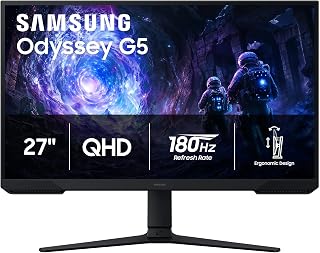
The Odyssey G5 uses VA panel technology with a 3000:1 contrast ratio, delivering deeper blacks and richer color depth than typical IPS panels. This makes it ideal for gamers who play atmospheric titles or darker games where shadow detail matters. The 180Hz refresh rate ensures smooth motion in fast-paced shooters and competitive games, while the matte finish reduces glare during extended sessions.
Pros
- 3000:1 contrast ratio delivers exceptional black depth for a gaming monitor
- 180Hz refresh and 1ms response handle competitive play smoothly
- Matte finish effectively reduces glare during extended sessions
- Black Equalizer brightens shadows without destroying overall contrast
Cons
- VA viewing angles narrower than IPS alternatives
- Requires capable GPU to fully utilize 180Hz at 1440p
The Samsung Odyssey G5 brings a VA panel to the 1440p gaming space, which immediately sets it apart from the IPS crowd. That 3000:1 contrast ratio delivers deeper blacks and more dimensional image depth than typical gaming monitors, making atmospheric games feel genuinely immersive. The 180Hz refresh rate and 1ms response time handle competitive play without hesitation, while AMD FreeSync keeps frame delivery smooth across variable performance windows. At 2560x1440 on 27 inches, pixel density hits the sweet spot where text stays sharp and game assets reveal detail without requiring GPU brute force. The matte finish cuts glare effectively during marathon sessions. HDR10 support leverages that native contrast advantage to render highlight and shadow detail with convincing range. Black Equalizer brightens dark zones without washing out the entire image, a practical tool for spotting enemies in shadowy corners. The stand offers full ergonomic adjustment including pivot, and connectivity covers DisplayPort plus dual HDMI. Build quality reflects Samsung's display heritage with solid construction and thoughtful design touches throughout.
Display: 27-inch QHD VA panel, 2560 x 1440 resolution, 16:9 aspect ratio, 178-degree viewing angles
Performance: 180Hz refresh rate, 1ms response time (MPRT), 300 cd/m brightness, 3000:1 contrast ratio
Features: HDR10, AMD FreeSync, Black Equalizer, matte screen finish
Connectivity: 2x HDMI, 1x DisplayPort, 1x power connector
Design: Adjustable stand with tilt, pivot, and height settings, desk mount, flat panel shape
Dimensions: 24.34 inches wide, 9.22 inches deep, 20.5 inches tall, 10.1 pounds
Power: 35 watts consumption, 240 volts
Warranty: 1-year manufacturer coverage

Pros
- Fast 180Hz refresh rate and 1ms response time ideal for competitive gaming and esports
- IPS panel delivers vibrant colors and 178-degree viewing angles rare at this price point
- Native QHD resolution strikes perfect balance between sharpness and GPU requirements
- Excellent compatibility with both NVIDIA and AMD graphics cards via G-SYNC and FreeSync
- Comprehensive ergonomic adjustments and gamer-centric software enhance comfort and performance
Cons
- 180Hz base refresh rate is lower than some competing 240Hz models at similar prices
- IPS panel response time may show slight ghosting compared to faster TN panels in extreme scenarios
- Limited to 28.92W power consumption means basic brightness levels, requiring good ambient lighting
The LG 27GS75Q-B is a QHD gaming monitor designed for players who want smooth, responsive gameplay without the premium price tag. It combines a 180Hz refresh rate, 1ms response time, and 2560x1440 resolution in a 27-inch package, making it suitable for both competitive shooters and story-driven titles where visual quality matters.
The standout feature is the IPS panel technology, which delivers 99% sRGB color accuracy and HDR10 support while maintaining fast response times. This means you get vibrant, lifelike visuals from virtually any viewing angle, plus NVIDIA G-SYNC Compatible and AMD FreeSync synchronization eliminates screen tearing and stuttering for smooth, tear-free gameplay across all graphics cards.
The build quality reflects LG's gaming pedigree with a gamer-centric design that includes a borderless 3-side display, fully adjustable stand with height, tilt, and pivot options, and thoughtful software features like an FPS counter, crosshair overlay, and game-mode profiles optimized for FPS and RTS titles. The 27-inch form factor with QHD resolution strikes an ideal balance, delivering noticeably sharper visuals than 1080p without demanding excessive GPU power.
The primary limitation is the 180Hz refresh rate, which trails some competitors offering 240Hz at comparable prices. Additionally, while IPS panels excel in color and viewing angles, they can exhibit slight ghosting compared to TN panels in extreme competitive scenarios, though this is minimal in real-world usage. The monitor also has modest brightness output, so optimal performance depends on adequate ambient lighting.
Verdict: The LG 27GS75Q-B represents outstanding value for gamers seeking a well-balanced 1440p gaming display with fast response times and excellent color reproduction. It excels for players who prioritize visual quality alongside competitive performance and will appreciate the ergonomic flexibility and reliable compatibility with any modern graphics card.
Display Specifications: 27-inch QHD (2560 x 1440) IPS LCD panel with 16:9 aspect ratio, 1000:1 contrast ratio, and 178-degree viewing angles. Native refresh rate of 180Hz (overclockable to 200Hz), with 1ms GtG response time and 300 nits brightness.
Color and Picture Quality: 99% sRGB color gamut coverage with HDR10 support for enhanced picture quality. Matte screen finish reduces glare. Pixel pitch of 0.23mm delivers sharp, detailed visuals.
Connectivity: Two HDMI 2.0 ports, one DisplayPort, and one USB port. DisplayPort and HDMI provide full G-SYNC Compatible and FreeSync support for variable refresh rate gaming.
Design and Ergonomics: Height adjustable, tilt adjustable, and pivot adjustable stand. Three-side borderless design minimizes distractions. Dimensions are 24.2 inches wide, 10 inches deep, and 22.7 inches high. Weight is 13.2 pounds. Wall mount compatible.
Software Features: Multiple display presets including Gamer, FPS, and RTS modes. FPS counter, crosshair overlay, Black Stabilizer, and Dynamic Action Sync for enhanced gaming performance. 1-year parts and labor warranty included.
Who Should Buy: Competitive gamers and esports players seeking a fast, responsive 1440p display. Content creators and designers who value color accuracy and wide viewing angles. Budget-conscious buyers wanting a premium gaming monitor without flagship pricing. Players with mid-range to high-end graphics cards (GTX 1660 or better, RTX 3060 or better).
Who Might Want to Look Elsewhere: Professional competitive gamers who demand 240Hz or higher refresh rates. Users needing maximum brightness for very bright rooms. Streamers who require advanced color grading tools and calibration options. Those prioritizing ultra-fast TN panel response times over color quality.
GPU Pairing Recommendations: NVIDIA GTX 1080 Ti and RTX 2080 Ti can push 144+ fps at QHD. RTX 3060 Ti to RTX 4070 handles 100-144 fps at QHD high settings. AMD RX 5700 XT and newer offers similar performance with FreeSync support. For 144+ fps at QHD on newer AAA titles, RTX 4070 or better recommended.
Setup Tips: Position the monitor at arm's length with the top of the screen at or slightly below eye level using the height adjustment. Enable NVIDIA G-SYNC or AMD FreeSync in driver settings for tear-free gaming. Use one of the gaming presets to optimize for your preferred game genre, then fine-tune brightness and contrast for your room's lighting.

The Q27G41ZE stands out with a 240Hz overclocked refresh rate, providing ultra-smooth motion clarity for competitive FPS and esports titles at 1440p resolution. Its IPS panel ensures wide viewing angles and accurate color reproduction. The glossy finish enhances color vibrancy and contrast perception, appealing to gamers who prioritize visual punch and play in controlled lighting environments.
Pros
- 240Hz refresh at 1440p resolution eliminates the speed versus clarity tradeoff
- 0.3ms MPRT response delivers minimal ghosting in rapid motion
- Three-sided frameless design suits multi-monitor configurations cleanly
- Lightweight 6.15kg construction simplifies positioning and adjustments
Cons
- No integrated speakers, only audio output for external devices
- Basic tilt-only stand lacks height adjustment and pivot features
AOC pushes the Q27G41ZE into serious competitive territory with a 240Hz IPS panel that refuses to compromise resolution. Where most high-refresh monitors force you to choose between 1080p speed or 1440p clarity, this one delivers both. The 0.3ms MPRT response time produces minimal ghosting even in rapid motion sequences, while G-SYNC compatibility and Adaptive-Sync eliminate tearing across modern graphics cards. That 2560x1440 resolution on 27 inches renders noticeably sharper game assets and crisper text compared to 1080p alternatives, and the IPS panel maintains accurate color reproduction with wide viewing angles. The three-sided frameless design creates a clean aesthetic that suits multi-monitor setups. At 6.15kg the monitor remains easy to reposition, and the adjustable tilt stand offers minus 3 to plus 21 degrees for ergonomic positioning. Shadow Control and Game Mode presets let you optimize settings quickly without menu diving. Connectivity covers DisplayPort 1.4 and dual HDMI 2.0 for flexible device switching. The 240Hz ceiling means your GPU investment translates directly into visible smoothness, rewarding high-performance hardware with fluid frame delivery that transforms competitive play and fast single-player titles alike.
Display: 27-inch IPS, 2560x1440 QHD, 16:9 aspect ratio, 300-nit brightness, 1000:1 contrast ratio, glossy finish
Performance: 240Hz refresh rate (via DisplayPort), 0.3ms MPRT response time, Adaptive-Sync, G-Sync compatible
Connectivity: 1x DisplayPort 1.4, 2x HDMI 2.0, audio output jack
Design: Three-sided frameless, tilt adjustment from minus 3 to plus 21 degrees, textured black and red finish
Dimensions: 24.17 inches wide, 7.46 inches deep, 17.7 inches tall, 6.15kg weight
Features: Blue Light Filter, Flicker-Free, Shadow Control, Game Mode presets, graphical OSD menu
Warranty: 3-year manufacturer coverage
Perfect for competitive players who want esports-grade refresh rates without dropping to 1080p resolution. The 240Hz capability rewards high-end GPU owners who can push frame rates to match. Enthusiasts running multi-monitor setups benefit from the frameless design and lightweight construction. Skip this if you need integrated speakers for audio or require premium stand features like height adjustment and pivot. The glossy finish may cause glare in bright rooms, and some edge dimming appears at extreme viewing angles, typical for IPS but worth noting.
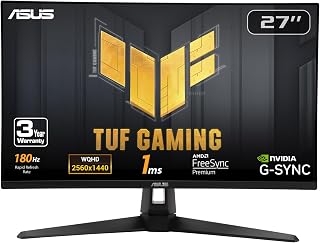
The VG27AQ3A features Fast IPS technology for rapid 1ms response times, minimizing ghosting and motion blur in competitive gaming scenarios. Its 180Hz refresh rate paired with G-SYNC compatibility ensures tear-free gameplay across variable frame rates. The matte screen finish helps maintain visibility in brightly lit rooms, making it suitable for gamers who need consistent performance without environmental distractions.
Pros
- Fast IPS delivers 1ms response without sacrificing color accuracy
- ELMB Sync works with both G-SYNC and FreeSync simultaneously
- 130% sRGB gamut with HDR for vibrant, lifelike visuals
- Three-year warranty includes accidental damage protection
Cons
- Integrated 2W speakers lack volume and bass for gaming immersion
- Ships with overly bright default settings requiring manual adjustment
ASUS built the TUF Gaming VG27AQ3A around a Fast IPS panel that solves the traditional speed versus color accuracy dilemma. The 180Hz refresh rate pairs with genuine 1ms response time, unusual performance for IPS technology, while the 130% sRGB gamut with HDR support renders vibrant, lifelike color. ELMB Sync works simultaneously with both G-SYNC compatibility and FreeSync Premium, eliminating motion blur and tearing regardless of your graphics card choice. Real-world gameplay shows silky frame delivery with no perceptible ghosting even in high-contrast scenes. The 2560x1440 resolution at 27 inches provides sharp detail for spotting distant targets while maintaining smooth performance on mid-range hardware. Matte anti-glare coating holds up during long sessions, and the frameless design suits multi-monitor arrangements. GamePlus overlays include frame counters and crosshair tools without requiring third-party software. Build quality feels robust, backed by a three-year warranty that covers accidental damage. Connectivity includes both DisplayPort and HDMI cables in the box. The monitor arrives with aggressive brightness settings that require manual adjustment, but once calibrated it delivers professional-grade image quality for gaming and creative work alike.
Display: 27-inch Fast IPS, 2560 x 1440 (QHD), 16:9 aspect ratio, 178-degree viewing angles
Refresh Rate: 180Hz native. Supports G-SYNC compatible, FreeSync Premium, and AdaptiveSync with variable refresh rate
Response Time: 1ms (moving picture response time)
Color: 130% sRGB gamut, HDR-10 support, 856.5 lm brightness, 1000:1 contrast ratio
Connectivity: 2x HDMI 2.0, 1x DisplayPort 1.4, 3.5mm audio jack
Physical: 24.2" depth, 8.4" width, 17.9" height, 4.6 kg weight. VESA 100x100 mount compatible. Flat panel with matte screen finish
Features: Blue light filter, flicker-free technology, integrated 2W stereo speakers, frameless design, built-in GamePlus menu with FPS counter and crosshair overlay
Warranty: 3-year warranty with accidental damage replacement
Ideal for players upgrading from older 144Hz displays who want IPS color accuracy without sacrificing competitive response times. The ecosystem-agnostic sync support makes it perfect if you switch between AMD and NVIDIA hardware or plan future GPU upgrades. Content creators benefit from accurate sRGB coverage for color-critical work between gaming sessions. Skip this if you demand premium audio from integrated speakers or need factory-calibrated brightness out of the box. The 180Hz ceiling may feel limiting if you consistently push 240fps in esports titles.

The AW2725DM uses Fast IPS technology to deliver quick response times alongside the color accuracy IPS panels are known for at WQHD resolution. Its 180Hz refresh rate with G-SYNC support ensures adaptive synchronization for stutter-free gaming. The matte screen surface and VESA mounting compatibility make it versatile for different setups, from desk placement to monitor arms.
Pros
- 1440p resolution balances sharpness with performance
- 180Hz with G-SYNC for smooth, tear-free motion
- Fast IPS panel combines color accuracy with 1ms response
- DisplayHDR 400 and wide color gamut enhance visuals
Cons
- Needs mid to high-end GPU for consistent high refresh
- Pixel density may feel coarse to some users
At 1440p, the AW2725DM delivers the resolution sweet spot that defines modern sharp gaming. The 27-inch QHD panel renders detail crisply without the GPU strain of 4K, letting mid-range cards push high frame rates while still showcasing textures and UI elements with excellent clarity. The fast IPS technology combines vibrant color with a 1ms response time, ensuring motion stays clean during rapid camera pans and firefights. NVIDIA G-SYNC synchronization keeps frame pacing consistent across varying loads, eliminating stutter and tearing that can break immersion in visually dense scenes. The 180Hz refresh ceiling provides headroom for competitive titles while remaining realistic for story-driven games at high settings. DisplayHDR 400 and 95% DCI-P3 coverage bring out color depth in both HDR-enabled AAA releases and older catalog titles. The matte finish cuts reflections during long sessions. Alienware's build quality shows in the sturdy stand and clean cable management, while VESA mounting offers desk flexibility for multi-monitor layouts or ergonomic positioning.
Display: 27-inch QHD (2560 x 1440) IPS panel, 16:9 aspect ratio, matte finish
Refresh Rate: 180Hz
Response Time: 1ms gray-to-gray
Color Gamut: 95% DCI-P3
HDR: DisplayHDR 400 certified
Sync Technology: NVIDIA G-SYNC
Additional Features: Console mode, hardware blue light filter, VESA mountable
Brand: Alienware (Dell)
This monitor suits gamers upgrading from 1080p who want sharper visuals without requiring a flagship GPU. It works well for those balancing competitive shooters with single-player adventures, and for creators who edit video or photos between gaming sessions. Skip it if you already own a higher refresh display, if your card struggles to maintain 60fps at 1440p, or if you prefer ultra-wide aspect ratios for immersion.

Pros
- Picture quality is exceptional with deep blacks, vibrant colors, and impressive contrast ratio of 1,500,000:1
- 240Hz refresh rate combined with 0.03ms response time provides responsive, blur-free competitive gaming
- Glossy finish OLED display makes colors pop and eliminates dull, washed-out visuals common in matte screens
- Future-proof connectivity with dual HDMI 2.1, DisplayPort 1.4, and USB 3.2 ports
- Built-in OLED care features and automatic pixel protection cycles extend monitor lifespan
Cons
- May display occasional out-of-range signal issues with PS5 Pro at certain refresh rate and resolution combinations
- Glossy finish can show reflections and requires regular cleaning to maintain clarity
The LG 27GX704A-B is a cutting-edge 27-inch QHD OLED gaming monitor engineered for players and creators who refuse to compromise on performance or visuals. This monitor targets competitive gamers, esports enthusiasts, and content professionals who need responsive gameplay without sacrificing picture quality.
The standout performance features are genuinely impressive. A 0.03ms response time paired with 240Hz refresh rates delivers near-instantaneous input response that gives competitive players a real edge. The 98.5% DCI-P3 color gamut and DisplayHDR TrueBlack 400 certification transform gaming visuals into something truly cinematic, with blacks so deep they feel infinite and highlights that peak at 1300 nits. The glossy OLED panel makes colors appear more saturated and lifelike compared to traditional matte displays, and customer reviews consistently praise the visual impact.
Build quality reflects the premium positioning, with a fully adjustable stand offering height, tilt, swivel, and pivot adjustments for any setup. Connectivity is comprehensive with dual HDMI 2.1 ports, DisplayPort 1.4, and USB 3.2 options that support both current and next-gen hardware. LG included thoughtful OLED-specific features like automatic pixel care cycles and brightness adjustment controls to protect against image retention and extend display lifespan.
The main drawbacks involve the glossy finish, which shows reflections and requires regular cleaning, and occasional compatibility quirks with the PS5 Pro at certain resolution settings. Some users report subpixel fringing on text, though this is minor and characteristic of OLED panels. The $479 price is premium but justified by the superior technology and performance specs.
This is an excellent choice for anyone serious about gaming or color-critical work who wants OLED visual quality paired with genuinely fast gaming performance. The 1440p resolution balances stunning clarity with consistent high frame rates, making it more practical than 4K for demanding games.
Display: 27-inch glossy OLED, 2560x1440 QHD, 16:9 aspect ratio, 98.5% DCI-P3 color gamut, 1,500,000:1 contrast ratio
Performance: 240Hz refresh rate, 0.03ms response time, VESA ClearMR 13000 certification, VESA DisplayHDR TrueBlack 400
Brightness: 275 nits standard, 1300 nits peak (HDR)
Adaptive Sync: NVIDIA G-Sync Compatible, AMD FreeSync Premium Pro
Connectivity: 2x HDMI 2.1, 1x DisplayPort 1.4, 3x USB 3.2 ports, 3.5mm audio jack
Design: Adjustable stand (height, tilt, swivel, pivot), borderless design, 15.9 lbs, dimensions 23.8W x 21H x 8.7D inches
Features: Dynamic Action Sync, HDR10 support, three UL certifications (anti-glare, flicker-free, low blue light), automatic OLED pixel care
Warranty: 2-year parts and labor
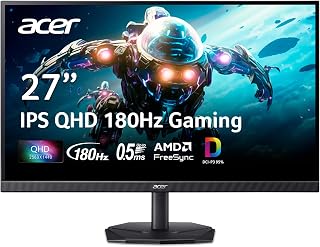
The Nitro KG271U N3bmiipx combines IPS display technology with 180Hz refresh rate for balanced color accuracy and smooth motion handling at QHD resolution. The 1000:1 contrast ratio and matte finish provide consistent performance across various lighting conditions. This makes it a practical choice for gamers seeking reliable all-around performance without specialized features or extreme refresh rates.
Pros
- 0.5ms response time keeps motion exceptionally clear
- IPS panel with wide viewing angles and accurate color
- Zero-frame bezel ideal for multi-monitor setups
- HDR 10 and DCI-P3 95% enhance visual depth
Cons
- Stand may feel less stable than premium options
- HDMI limited to 120Hz; DisplayPort needed for 180Hz
The KG271U N3bmiipx targets 1440p gaming with a focus on competitive responsiveness and practical visual fidelity. Its 2560x1440 IPS panel sharpens every UI element and texture compared to 1080p while maintaining the frame rate headroom that esports demand. The 180Hz refresh rate via AMD FreeSync keeps motion fluid whether you're tracking opponents in tactical shooters or exploring open worlds, and the 0.5ms gray-to-gray response time ensures ghosting stays minimal even during snap turns. IPS technology preserves 178-degree viewing angles and consistent color across the screen, avoiding the washed-out look of cheaper VA or TN alternatives. HDR 10 support and 95% DCI-P3 coverage add depth to supported games and make the display viable for photo editing or video work between sessions. The zero-frame bezel design suits multi-monitor setups, letting you tile displays edge to edge for panoramic gaming or expanded workspace. Connectivity includes DisplayPort for full 180Hz and dual HDMI for consoles or secondary devices, while the matte finish reduces glare under varied lighting.
Display: 27 inches, IPS LCD, 2560x1440 (QHD), 16:9 aspect ratio, matte finish
Performance: 180Hz refresh rate, 0.5ms response time (GTG), 1000:1 contrast ratio, 250 nits brightness
Color: DCI-P3 95%, HDR 10 support, 178-degree viewing angles
Connectivity: DisplayPort (1), HDMI (2), built-in speakers
Physical: 24.2" W x 18.14" H x 8.28" D, 5.5 kg, tilt adjustment, wall mount compatible
Power & Warranty: 26W power consumption, 3-year parts and labor warranty
Included: Display, DisplayPort cable, power cord, stand
Buy this if you want sharp 1440p gaming without premium pricing, especially for fast-paced competitive titles where response time matters. It also fits creators who edit visuals and need accurate color alongside gaming capability. Skip it if you need NVIDIA G-SYNC specifically, if your desk lacks VESA mounting for added stability, or if HDMI-only connectivity limits you since HDMI caps at 120Hz on this model.

Pros
- Outstanding OLED display quality with deep blacks, vibrant colors, and exceptional contrast ratio of 1500000:1
- Lightning-fast 0.03ms response time and 240Hz refresh rate deliver responsive, smooth gameplay
- Versatile connectivity with HDMI 2.1, DisplayPort 1.4, and USB hub supports multiple gaming platforms
- Ergonomic design with extensive adjustment options ensures comfort during marathon gaming sessions
- Premium build quality with Flicker-Free technology and HDR support for extended viewing
Cons
- Glossy screen finish can reflect ambient light and studio lighting, though minimal impact during active use
- DisplayPort connection required to achieve full 240Hz performance, HDMI limited to 60Hz
- No integrated speakers, requiring separate audio solution for complete setup
The AOC Q27GAZDV is a 27-inch OLED gaming monitor designed for serious gamers who demand top-tier visual performance and responsive gameplay. This monitor combines cutting-edge QD-OLED panel technology with competitive gaming specs, making it an excellent choice for esports enthusiasts, content creators, and anyone seeking premium display quality without an enterprise-level price tag.
The standout feature is undoubtedly the QD-OLED display, which delivers true blacks, infinite contrast, and exceptional color accuracy at 147% sRGB and 110% DCI-P3. Combined with the 240Hz refresh rate and 0.03ms response time, every frame looks crisp and motion appears buttery smooth. Whether you are playing fast-paced competitive shooters or watching HDR content, the visual experience is genuinely transformative compared to traditional LCD monitors.
Design and build quality are premium throughout. The ergonomic stand offers height, tilt, swivel, and pivot adjustments to accommodate any desk setup, while the integrated USB 3.2 hub adds practical convenience. The monitor supports both HDMI 2.1 and DisplayPort 1.4, with full 240Hz performance via DisplayPort and compatibility with PS5, Xbox Series X, and PC gaming platforms. The glossy finish occasionally reflects ambient light, but this has minimal impact during active gaming or content viewing.
One consideration is that this monitor lacks integrated speakers, requiring a separate audio solution. Additionally, achieving the full 240Hz refresh rate requires DisplayPort connection, as HDMI performance caps at 60Hz. These are minor compromises that do not detract from the overall experience for most users.
The AOC Q27GAZDV delivers exceptional value in the OLED gaming monitor segment. The combination of superior display technology, responsive performance specs, and thoughtful ergonomic design makes this monitor a legitimate best-in-class choice for gaming and professional use. Highly recommended for anyone ready to upgrade their gaming setup.
Display Technology: QD-OLED with HDR True Black support
Screen Size: 27 inches with 16:9 aspect ratio
Resolution: QHD 1440p (2560 x 1440 pixels)
Refresh Rate: 240Hz with 0.03ms response time
Color Accuracy: 147% sRGB, 110% DCI-P3 with contrast ratio of 1500000:1
Connectivity: 2x HDMI 2.1 ports, 1x DisplayPort 1.4, USB 3.2 Gen 1 hub with 2 ports
Adaptive Sync: G-SYNC Compatible for AMD and NVIDIA graphics
Ergonomics: Height, tilt, swivel, and pivot adjustments, VESA mount compatible
Additional Features: Flicker-Free technology, Eye Care, frameless design
Dimensions: 23.99 inches (width) x 21.17 inches (height) x 9.45 inches (depth)
Warranty: 3-year manufacturer warranty
Best For: Competitive gamers seeking the ultimate combination of speed and visual quality, esports players who demand responsive gameplay with stunning graphics, content creators working with color-critical video and photo editing, and anyone upgrading from older 1080p or 60Hz displays.
Consider Alternatives If: You primarily use integrated graphics or older graphics cards that may struggle with high refresh rates, your desk space is extremely limited, or you need integrated speakers as part of your monitor setup.
Gaming Platforms: Fully compatible with PC gaming rigs, PlayStation 5, and Xbox Series X. Requires DisplayPort for full 240Hz performance on PC and HDMI 2.1 for high refresh rates on consoles.

Pros
- Exceptional smoothness and responsiveness, especially noticeable in fast-paced competitive titles
- Beautiful color accuracy and HDR performance right out of the box with minimal calibration needed
- Robust, adjustable stand feels premium and provides flexible desk positioning
- Works with both NVIDIA and AMD graphics cards without compromise
- Strong value proposition for 1440p 240Hz gaming performance at this price tier
Cons
- Quality control concerns reported by some users with stuck or dead pixels on arrival
- LG customer service and warranty support has received negative feedback for repair timelines
- Limited to 1ms response time on IPS technology, which some ultra-competitive gamers may find insufficient
The LG 27GR83Q-B is a competitive gaming monitor that targets esports players and fast-paced gaming enthusiasts who want 1440p clarity without sacrificing the high refresh rates needed for smooth, responsive gameplay. This 27-inch IPS display balances competitive performance specs with everyday usability at a price point that won't break the bank.
The standout feature is the pairing of 240Hz refresh rate with a 1ms response time on an IPS panel, a combination that delivers both smooth motion and vibrant color. Users report that movement feels incredibly responsive in competitive titles, while the QHD resolution keeps visuals sharp and detailed compared to 1080p alternatives. The panel covers 95% of the DCI-P3 color gamut and supports VESA DisplayHDR 400, resulting in colors that look good immediately out of the box and hold up well for creative work or casual HDR gaming.
Build and design stand out as highlights. The adjustable stand offers height, tilt, and pivot adjustments for ergonomic positioning, and the 3-side borderless design helps immerse you in gameplay without clutter. The monitor supports both HDMI 2.1 and DisplayPort 1.4, ensuring future compatibility, and the 4-pole headphone jack with DTS Headphone:X support adds practical value for competitive gamers. The overall construction feels solid and premium.
The main drawback is quality control. Multiple reviews mention stuck or dead pixels arriving on the unit, which is concerning for a monitor in this price range. Additionally, LG's support and warranty process has received criticism for slow turnaround times on repairs and replacements. These are legitimate concerns if you rely on immediate support.
Verdict: The 27GR83Q-B delivers excellent performance and value for competitive gamers and esports players. If you get a unit without pixel issues, you're looking at one of the best 1440p 240Hz monitors available at this price. However, inspect your unit carefully upon arrival and understand that LG support may be slow if issues arise.
Display: 27-inch IPS LCD, 2560x1440 (QHD), 16:9 aspect ratio, 178-degree viewing angles, 0.23mm pixel pitch
Refresh Rate & Response: 240Hz via DisplayPort or HDMI 2.1, 1ms (GtG) response time, matte screen finish
Color & HDR: 1000:1 contrast ratio, 95% DCI-P3 color gamut, VESA DisplayHDR 400, 400 cd/m2 brightness
Connectivity: 2x HDMI 2.1, 1x DisplayPort 1.4, USB Type-C, 4-pole headphone jack, supports G-SYNC Compatible and FreeSync Premium
Design: Adjustable stand with height, tilt, and pivot, compatible with VESA wall mounts, 24.2W x 22.7H x 10D inches, 13.7 lbs
Power & Warranty: 29.2W power consumption, 1-year manufacturer warranty (parts and labor)
Best for: Esports players, competitive gamers in first-person and real-time strategy titles, and gaming enthusiasts who prioritize smooth motion and response time while wanting 1440p sharpness and color accuracy.
Great for: Anyone upgrading from a 1080p or 60Hz monitor, streamers who want both gaming performance and color fidelity for content capture, and those building a mid-range gaming setup where a single monitor needs to handle both competitive play and everyday use.
Consider alternatives if: You primarily play slower-paced single-player games where 144Hz is sufficient, require the absolute fastest response times available, need robust warranty support with minimal hassle, or prefer working with a specific GPU manufacturer's exclusive adaptive sync features.
Buying Guide
Refresh Rate and Response Time
Refresh rate determines how many frames per second your monitor can display. For 1440p gaming, 180Hz represents the sweet spot for most players, delivering smooth motion in fast-paced titles without demanding the extreme GPU horsepower that 240Hz+ requires.
Response time measures pixel transition speed, typically expressed as gray-to-gray (GtG) or moving picture response time (MPRT). IPS panels typically achieve 1ms GtG, while OLED technology drops to 0.03ms for near-instantaneous pixel response. Competitive players prioritize low response times to minimize motion blur and ghosting during rapid camera movements.
Panel Technology
IPS panels dominate the 1440p market thanks to accurate color reproduction, wide viewing angles, and response times now fast enough for competitive gaming. Fast IPS variants push response times down to 1ms while maintaining the color advantages that made IPS popular with content creators and gamers alike.
OLED panels deliver perfect blacks and infinite contrast ratios through self-emissive pixels that turn completely off when displaying black. This technology creates stunning HDR visuals and eliminates IPS glow, but comes with higher prices and potential burn-in concerns for users who display static UI elements for extended periods. For broader display options across different GPU tiers, explore our guide to the best monitors for RTX 5070.
Adaptive Sync Technology
Adaptive sync matches your monitor’s refresh rate to your GPU’s frame output, eliminating screen tearing without the input lag that traditional V-Sync introduces. AMD FreeSync and NVIDIA G-SYNC Compatible certification ensure smooth performance across variable frame rates, critical when GPU-demanding scenes cause temporary frame drops.
Most modern 1440p monitors support both technologies through VESA AdaptiveSync, allowing them to work with AMD and NVIDIA GPUs interchangeably. Premium tiers like FreeSync Premium Pro add low framerate compensation and HDR support, while G-SYNC Compatible certification means NVIDIA has validated the display’s variable refresh rate performance.
Ergonomics and Connectivity
Height, tilt, and pivot adjustments let you position the display at eye level without stacking books under the stand. Full ergonomic stands typically add height adjustment ranges of 100-120mm, tilt angles from -5° to +20°, and 90° pivot for portrait orientation when reviewing code or documents.
DisplayPort 1.4 handles 1440p at 240Hz without compression, making it the preferred connection for high refresh rate gaming. HDMI 2.0 caps out at 144Hz for 1440p, while HDMI 2.1 matches DisplayPort’s capabilities and adds compatibility with PlayStation 5 and Xbox Series X at their maximum supported refresh rates. If you’re setting up a multi-monitor workspace, our best monitor arm guide covers mounting solutions that complement adjustable stands.
Final Thoughts
The right 1440p gaming monitor depends on whether you prioritize budget, speed, or visual fidelity. For competitive players who value responsiveness and smooth motion, the AOC 27″ Gaming Monitor QHD 260Hz Overclocked IPS delivers exceptional refresh rates and adaptive sync at a reasonable entry point. If you want OLED’s infinite contrast and near-instant response times for immersive single-player experiences, the LG 27GX704A-B 27-inch Ultragear QHD provides stunning HDR visuals with premium build quality and extensive connectivity options.
Frequently Asked Questions
Is 1440p better than 1080p for gaming?
QHD resolution provides 1.7 times more pixels than Full HD, creating sharper text, more detailed textures, and clearer distant objects in open-world games. The performance cost averages 30-40% lower frame rates compared to 1080p on the same GPU, so you’ll need at least a mid-range graphics card to maintain high refresh rates. Most players find the visual upgrade worth the performance tradeoff, especially on 27-inch displays where 1080p pixel density starts looking noticeably soft.
What GPU do I need for 1440p 144Hz gaming in 2026?
NVIDIA’s RTX 4060 Ti or AMD’s RX 7700 XT represent the entry point for consistent 1440p performance at high settings in modern AAA titles. Competitive esports games like Valorant or Counter-Strike run easily on lower-tier cards, while demanding single-player games may require an RTX 4070 or RX 7800 XT to maintain 144fps at high-ultra settings. Ray tracing at 1440p demands significantly more power, typically requiring RTX 4070 Ti tier cards or higher for smooth performance with RT effects enabled.
Should I choose IPS or OLED for a 1440p gaming monitor?
IPS panels offer proven reliability, no burn-in risk, and excellent color accuracy at accessible price points, making them ideal for mixed-use scenarios where you alternate between gaming, work, and content consumption. OLED delivers superior contrast ratios, perfect blacks, and faster response times that create more immersive HDR experiences in story-driven games and dark scenes. Consider OLED if you primarily game and rarely display static UI elements for hours, or stick with IPS if you need a versatile display that handles productivity tasks without burn-in concerns. For more display comparisons across different use cases, see our 1440p monitor recommendations for RTX 5070.
What’s the difference between 180Hz and 240Hz for 1440p gaming?
The jump from 180Hz to 240Hz adds 60 additional frames per second, reducing frame time from 5.6ms to 4.2ms per frame. Competitive players in fast-paced shooters and fighting games often perceive this difference as slightly smoother motion tracking and reduced input lag, but the improvement feels less dramatic than the upgrade from 60Hz to 144Hz. Most casual and story-focused gamers won’t notice the difference, making 180Hz the better value unless you’re chasing every competitive advantage or your GPU consistently exceeds 180fps in your preferred titles.
Common questions
What is the best QHD gaming monitor you can buy right now?
The best QHD gaming monitor depends on your priorities, but strong contenders include the LG 27GR83Q-B with its 240Hz refresh rate and DisplayHDR 400, and the AOC Q27G41ZE pushing up to 260Hz overclocked. Both use IPS panels with 178-degree viewing angles and 1000:1 contrast. For a more budget-friendly entry, the Acer Nitro KG271U N3bmiipx and ASUS TUF VG27AQ3A each offer 180Hz at 1440p with matte finishes that cut down on glare.






Write Your Review
No reviews yet. Be the first to share your experience!