

Choosing a compact monitor looks simple until you compare panel types, refresh rates, ports, and the actual screen area that fits on your desk. A capable 22-inch display can make a practical primary screen for focused work or a useful second screen without overwhelming a small workspace.
This guide evaluates six Full HD options for home offices, students, casual entertainment, and responsive gaming. If you are building a multi-screen setup, pairing one with a suitable guide to vertical monitor stands can free up desk space while keeping important apps comfortably in view.
Quick Comparison
| Model | Link | Rating | Screen Size | Resolution | Refresh Rate |
|---|---|---|---|---|---|
| 1 Dell SE2426H 24 inch 144Hz IPS Monitor - FHD 1080p Gaming...Highest rated | Check price | 4.7 of 5348 ratings | 24 inches | FHD 1080p | 144 hertz |
| 2 Philips 22 inch FHD 100Hz VA Monitor for Work and Gaming,...Most reviewed | Check price | 4.6 of 53,871 ratings | 21.5 inches | FHD 1080p | 100 hertz |
| 3 ArcticPro 22 Inch 144Hz Gaming Monitor, FHD 1920x1080,... | Check price | 4.5 of 5760 ratings | 22 inches | FHD 1080p | 144 hertz |
| 4 AOC 22B35HM23 22 Inch FHD Monitor, 120Hz VA HDR Ready,... | Check price | 4.5 of 5449 ratings | 21.5 inches | FHD 1080p | 120 hertz |
| 5 Sceptre 22-Inch FHD Gaming Monitor 144Hz, FreeSync,... | Check price | 4.4 of 51,445 ratings | 22 inches | FHD 1080p | 144 hertz |
| 6 22 Inch FHD 1080p IPS Monitor 75Hz FreeSync Gaming HDMI... | Check price | 4.1 of 5116 ratings | 22 inches | FHD 1080p | 75 hertz |
Ratings reflect the most recent data pull. Check each listing for current price and availability.
Quick answer
This guide compares 6 picks, with Dell SE2426H 24 inch 144Hz IPS Monitor - FHD 1080p ranked first. Philips 22 inch FHD 100Hz VA Monitor for Work has the most customer reviews.

IPS technology ensures consistent color accuracy from any viewing angle, essential for collaborative work environments and side-by-side multitasking. The 1ms response time paired with AMD FreeSync eliminates screen tearing during gaming, while TÜV certification confirms reduced eye strain for extended workdays. Dual HDMI ports let you connect a work laptop and gaming console simultaneously without constant cable swapping.
Pros
- IPS panel maintains color accuracy from wide viewing angles
- 144Hz and AMD FreeSync smooth both gaming and productivity tasks
- TUV 3-star certification reduces blue light during long work sessions
- Ultra-thin bezels and lightweight build suit modern workspaces
Cons
- No DisplayPort for professional graphics workflows
- 8ms standard response time trails dedicated gaming monitors
The Dell SE2426H brings 144Hz performance and IPS color accuracy to work and gaming environments at 23.8 inches, slightly larger than typical 22-inch options while maintaining a compact desk presence. The IPS panel delivers consistent colors from side angles, useful during collaborative work sessions or when sharing screen content with colleagues. The 144Hz refresh rate paired with AMD FreeSync keeps motion smooth in games and makes everyday computing feel more responsive, from scrolling documents to dragging windows. The matte anti-glare screen handles bright office environments well, reducing reflections that can distract during video calls or detailed work. TUV 3-star eye comfort certification filters harmful blue light without shifting colors unnaturally, a practical feature for anyone working eight-hour days. Ultra-thin bezels create a modern look and minimize visual interruption in multi-monitor setups. At 7.4 pounds with a 7-inch depth, it sits lightly on desks without requiring excessive space. Dual HDMI inputs allow quick switching between a work laptop and gaming PC. The tilt-adjustable stand provides basic ergonomic positioning. The 1920x1080 resolution remains sharp at this screen size for text and interface elements, though pixel density won't satisfy those working with high-resolution photography or 4K video.
Display: 23.8-inch IPS LCD, 1920x1080 (16:9 aspect ratio), 72% color gamut, 300 nits brightness, 1000:1 contrast ratio
Performance: 144Hz refresh rate, 8ms response time, 178-degree viewing angles (horizontal/vertical)
Connectivity: 2x HDMI ports, AMD FreeSync adaptive sync
Design: Matte anti-glare finish, ultra-thin bezels, tilt adjustment, 21.21 inches wide, 7.04 inches deep
Power: 13.3 watts consumption, 240V AC input
Warranty: 1-Year Advanced Exchange Service
Included: Monitor with stand, 1.8m HDMI cable, power cable, safety documentation
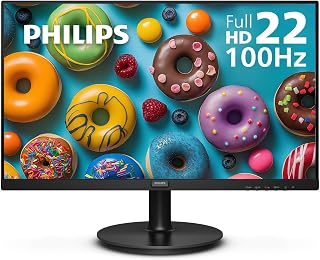
The 100Hz refresh rate provides noticeably smoother scrolling and window movement compared to standard 60Hz office displays while remaining capable for casual gaming. VA technology delivers a 3000:1 contrast ratio that makes text pop against dark backgrounds and improves depth perception in games. Flicker-free backlighting reduces eye fatigue during all-day document editing or evening gaming marathons.
Pros
- 100Hz refresh rate smooths scrolling and casual gaming
- VA panel delivers 3000:1 contrast for richer blacks
- Flicker-free and blue light filter reduce eye strain
- VESA mount support and 4-year warranty included
Cons
- Glossy finish reflects light in bright rooms
- Limited ports restrict multi-display flexibility
The Philips 221V8LB fits neatly into work and gaming setups where space and budget matter. Its 21.5-inch Full HD VA panel offers 3000:1 contrast, producing deeper blacks and more vivid colors than typical TN displays at this size. The 100Hz refresh rate pushes beyond standard 60Hz office monitors, delivering smoother motion whether you're scrolling spreadsheets or tracking enemies in casual shooters. Adaptive-Sync keeps frames aligned to prevent tearing during gameplay. For office tasks, the flicker-free backlight and blue light filter work together to cut down eye strain during marathon sessions. The 178-degree viewing angles mean color stays consistent even when you lean back or share your screen with a colleague. SmartImage game mode adjusts visuals on the fly for different content types. The glossy finish amplifies contrast but can catch reflections under overhead lighting. VESA compatibility lets you mount it on an arm to reclaim desk space. Build quality feels stable despite the compact footprint, and the included HDMI cable gets you running immediately. The 4-year warranty backs reliability for long-term use.
This monitor suits remote workers and casual gamers who want smooth visuals and good contrast in a compact footprint. It works well for students managing documents and streaming between study sessions, or office workers juggling emails and video calls in tight cubicles. Skip it if you need a large canvas for multitasking across many windows, require professional color accuracy for design work, or plan to game competitively at high refresh rates above 100Hz. The glossy screen also makes it a poor match for brightly lit rooms with windows.
Display: 21.5 inch viewable (22 inch class) Full HD 1920x1080 IPS/VA, 16.7 million colors, 3000:1 contrast ratio
Performance: 100Hz refresh rate, 4ms response time, Adaptive-Sync technology
Panel Technology: VA with 178-degree wide viewing angles, SmartImage game enhancement
Eye Care: Flicker-free technology, blue light filter, reduced eye strain features
Connectivity: 1x HDMI, 1x VGA component output
Design: 19.4 inch width, 14.5 inch height, 8.7 inch depth, 4.21kg weight, VESA mount compatible
Power: 22 watts consumption, 12 volt operation
Warranty: 4-year manufacturer warranty on parts and labor
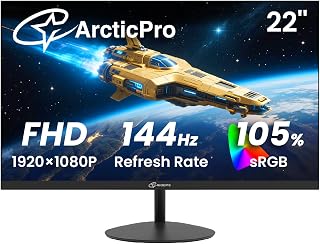
With 105% sRGB coverage, this display reproduces accurate colors for design work and content review while the 144Hz panel handles competitive gaming without motion blur. The 3000:1 contrast ratio produces deep blacks that improve readability in dark-themed code editors and enhance shadow detail in games. A matte screen finish keeps reflections minimal whether you're working under office lighting or gaming at night.
Pros
- 144Hz refresh rate smooths both gaming and desktop productivity
- 3000:1 contrast ratio delivers richer colors than typical office monitors
- Anti-blue light filtering reduces eye strain during extended sessions
- Compact 22-inch size fits tight desks and multi-monitor arrangements
Cons
- Single HDMI port limits multi-device connectivity
- No built-in speakers for video calls or casual audio
For work and gaming in a compact footprint, the ArcticPro AD22ZFA delivers exactly what a 22-inch display should: speed, clarity, and comfort. The 144Hz refresh rate transforms both gameplay and everyday desktop navigation, making scrolling through documents and switching windows feel noticeably more fluid than standard office monitors. The 1ms response time keeps motion sharp whether you're tracking targets in a shooter or dragging files across the screen. The VA panel's 3000:1 contrast ratio produces deeper blacks and more vibrant colors than typical office displays, helping content pop during video calls or media playback. Anti-blue light filtering reduces eye fatigue during long work sessions, a feature that matters more than most realize after eight hours at a desk. The matte finish handles office lighting well, cutting down on distracting reflections. At 22 inches, it fits neatly into tight workspaces or dual-monitor setups without overwhelming the desk. The 178-degree viewing angles maintain image consistency when colleagues lean in to review a spreadsheet or presentation. VESA mounting and tilt adjustment provide setup flexibility for both gaming stations and professional workstations.
Display: 22-inch Full HD (1920x1080) VA Panel, 16:9 Aspect Ratio
Performance: 144Hz Refresh Rate, 1ms Response Time
Color: 105% sRGB, 3000:1 Contrast Ratio, Matte Finish
Viewing Angle: 178 degrees (horizontal and vertical)
Adjustment: Tilt adjustment (-5 to +15 degrees), VESA 75x75mm wall mount
Connectivity: 1x HDMI, VGA input
Features: Anti-blue light technology, eye care design
Dimensions: 19.4W x 14.25H x 7.4D inches, Weight 2.05kg
Warranty: 3-year manufacturer coverage
Included: Monitor, HDMI cable, power adapter, base stand
Pros
- Smooth 120Hz performance makes document scrolling and casual gaming feel more fluid than standard 60Hz displays.
- VA panel delivers strong contrast and deep blacks for work, entertainment, and general desktop use.
- Compact frameless design works well for small desks and multi-monitor arrangements.
- Includes both HDMI and VGA connectivity, plus VESA compatibility for flexible installation.
- Flicker-Free viewing and low-power eco mode add practical benefits for extended daily use.
Cons
- The included stand offers tilt adjustment but does not provide height, swivel, or pivot adjustments.
- There are no built-in speakers, although an earphone output is available for headphones or external audio.
- The glossy screen surface may reflect overhead lighting, and the power button placement can be difficult to locate.
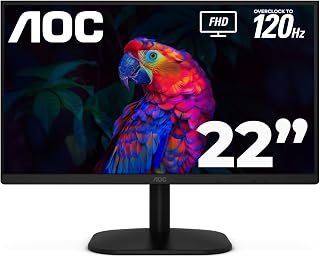
The AOC 22B35HM23 is a compact 21.5-inch viewable monitor designed for home offices, everyday desktop tasks, media consumption, and light gaming. Its Full HD resolution keeps text and images crisp while fitting comfortably on smaller desks.
Its standout feature is the 120Hz refresh rate through HDMI, which makes scrolling, video playback, and compatible games feel smoother than a conventional 60Hz display. The VA panel provides strong contrast, while HDR Ready support and 100.1% sRGB coverage help produce lively, detailed images.
The frameless design gives the monitor a clean, modern appearance and makes it practical for dual-screen setups. Tilt adjustment, VESA compatibility, HDMI and VGA inputs, Flicker-Free technology, and an earphone output add useful flexibility for work and entertainment.
There are a few limitations to consider: the stand only tilts, the monitor has no built-in speakers, and the glossy surface can reflect bright room lighting. Some users may also find the power button awkward to locate.
Overall, the AOC 22B35HM23 is a well-rounded budget monitor for productivity and casual gaming. Its sharp Full HD image, smooth 120Hz performance, compact design, and practical connectivity make it especially appealing for home offices and multi-monitor workstations.

The 144Hz refresh rate delivers smooth motion for fast-paced gaming sessions while the FHD 1080p resolution keeps text crisp for spreadsheets and documents. Built-in speakers eliminate the need for separate audio equipment on a compact desk, and the matte finish reduces glare during long work hours. DisplayPort and HDMI connectivity make it simple to switch between a gaming PC and a work laptop.
Pros
- 144Hz and 1ms response time improve both gaming and work fluidity
- Built-in speakers simplify setup for video calls and casual audio
- Minimal bezels create clean multi-monitor configurations
- Blue Light Shift reduces eye strain during extended work sessions
Cons
- 1920x1080 resolution limits detail for design-heavy workflows
- No USB-C or advanced connectivity for premium laptop setups
The Sceptre E225W-FW144 tackles both work and gaming demands with a practical feature set that avoids unnecessary extras. The 144Hz refresh rate makes a visible difference not just in games but in everyday tasks like scrolling through long documents, navigating spreadsheets, and switching between browser tabs. The 1ms response time keeps motion clean whether you're editing video timelines or playing fast-paced titles after work. FreeSync support eliminates screen tearing during gameplay, while the built-in speakers handle video conferences and casual listening without requiring separate audio hardware. Blue Light Shift technology proves genuinely useful during long workdays, reducing the harsh glare that leads to afternoon eye fatigue. The matte screen finish handles typical office lighting without throwing distracting reflections. Minimal bezels make this a smart choice for side-by-side dual-monitor setups, creating a more seamless visual workspace. At 22 inches and 1920x1080, the pixel density stays sharp for text and UI elements. The compact form factor suits smaller desks and leaves room for keyboards, notepads, and other work essentials without crowding the surface.
Display: 22-inch FHD LED with 1920x1080 native resolution, 16:9 aspect ratio, matte screen finish
Performance: 144Hz refresh rate, 1ms response time, 2000:1 contrast ratio, 170-degree viewing angles, 100 color gamut
Connectivity: 1x HDMI, DisplayPort, FreeSync adaptive sync
Features: Built-in speakers, Blue Light Shift eye care technology, minimal bezel design, wall mount compatible
Physical: 19.9in W x 15.5in H x 7in D, 7 pounds, machine black color
Warranty: 1-year limited manufacturer warranty
Best for hybrid workers who game in their downtime, students balancing coursework and entertainment, and anyone upgrading from a basic 60Hz office display. The built-in speakers simplify desk setup for video calls and eliminate cable clutter. The 144Hz performance suits competitive gaming and makes general productivity feel snappier. Skip this if you need 4K resolution for detailed design work, require USB-C connectivity for single-cable laptop docking, or want premium color accuracy for professional photo editing. The 22-inch size works well for standard desks but may feel cramped for extensive multitasking across multiple windows.

Pros
- Outstanding color accuracy and wide viewing angles from premium IPS panel technology
- Smooth gaming experience with 75Hz refresh rate and FreeSync for reduced screen tearing
- Dual-input connectivity ensures compatibility with older and newer devices without hassle
- Lightweight design and VESA mount support make repositioning and wall mounting simple
- Long-term reliability backed by 36-month support and proven durability
Cons
- Stand does not tilt or swivel, limiting ergonomic adjustability without mounting hardware
- Some users report washed-out blacks and gray tint when viewing from angles despite IPS specs
- Budget pricing may reflect occasional inconsistencies in build quality or accessories
The ETiansu 22-inch FHD monitor is an affordable entry-level display designed for everyday work, study, and light gaming. It targets budget-conscious buyers seeking reliable performance without breaking the bank, including office workers, students, content creators on a budget, and casual gamers looking for a secondary screen.
The standout feature is its IPS panel with exceptional color accuracy, covering 99% sRGB and 90% DCI-P3 color space, delivering vibrant and true-to-life visuals. The 75Hz refresh rate with 2ms response time and AMD FreeSync technology ensures smooth gameplay and reduced tearing during multimedia consumption. Flicker-free technology and blue light filtering make extended work sessions comfortable on the eyes, a genuine advantage over cheaper displays.
Build quality reflects the budget price point. The monitor is lightweight and ships with a pre-attached stand, ensuring quick setup without tools. VESA mounting support provides flexibility for desk optimization. However, the stand lacks tilt and swivel adjustments, which may frustrate users seeking ergonomic flexibility without additional mounting hardware. Some users have reported display inconsistencies, including washed-out blacks and color tint at certain viewing angles, suggesting quality control variations.
For the price, this monitor delivers genuine value. The IPS panel, color accuracy, and gaming features compete favorably with displays costing twice as much. The 36-month warranty and US-based support provide confidence in long-term reliability. However, buyers should manage expectations around build refinement and monitor the stand limitations before purchasing.
Best suited for: students setting up a first workstation, office professionals needing a second monitor, budget gamers, and anyone prioritizing color accuracy over premium features. Not ideal for: professional designers requiring flawless color consistency, competitive gamers needing high refresh rates, or users requiring fully adjustable stands.
Display: 22 inches, 1920x1080 (FHD 1080p), 16:9 aspect ratio, IPS panel, matte finish
Performance: 75Hz refresh rate, 2ms response time, 250 cd brightness, 1000:1 contrast ratio, 178-degree viewing angle
Color: 99% sRGB, 90% DCI-P3, HDR support, blue light filter, flicker-free technology
Connectivity: 1x HDMI 2.0, 1x VGA, VESA 75x75mm mount compatible
Physical: 12.01"W x 14.76"H x 7.87"D, pre-attached stand with tilt adjustment, lightweight design
Support: 36-month warranty, US-based customer service
Ideal for: Students and first-time desktop buyers, office workers seeking a second monitor, budget-conscious gamers, content creators working on tight budgets, anyone upgrading from older displays
Strong match if: You prioritize color accuracy and eye comfort over premium features, need reliable connectivity with multiple devices, want wall-mount flexibility, appreciate long-term warranty support
Consider alternatives if: You need a fully adjustable stand with tilt and swivel, require 144Hz+ refresh rates for competitive gaming, demand perfect color consistency across viewing angles, use professional color-critical applications like photo or video editing
How to Choose a 22-Inch Monitor
Confirm the viewable size and panel that suits your work
Many monitors sold as 22-inch class displays have a 21.5-inch viewable screen, which is a comfortable fit for documents, web browsing, and a compact console station. The Dell 24 Monitor – SE2426H is the outlier here at 23.8 inches, so it offers noticeably more workspace but needs a little more room on your desk.
Panel technology changes what you see every day. IPS screens, including the 22 Inch Computer Monitor FHD 1080p IPS 75Hz, are a strong match when consistent color and wide angles matter, while VA panels can offer deeper-looking blacks for movies and games. For design-oriented workflows, our monitor for CAD work recommendations explain when screen space and color coverage deserve greater priority.
Match refresh rate to your games and daily pace
A 75Hz panel is plenty for general productivity, video, and casual play, but higher refresh rates make scrolling and motion appear more fluid. A 100Hz or 120Hz display offers a meaningful step up for mixed use, while 144Hz is especially appealing if you play action games or want smoother desktop movement.
The ArcticPro 22 Inch Gaming Monitor 144Hz, Sceptre New 22-Inch Gaming Monitor, FHD 1080p, and Dell 24 Monitor – SE2426H target fast motion with 144Hz capability. The AOC 22 Inch Computer Monitor FHD 120Hz Overclocked reaches 120Hz via HDMI, and the Philips 22 Inch Computer Monitor FHD 100Hz VA VESA offers a balanced 100Hz option with Adaptive-Sync. If competitive speed is your whole priority, compare these with our 240Hz 1080p monitor roundup.
Plan your mount, tilt range, and desk connections
A compact footprint is only useful if the screen can sit at a comfortable height and angle. Check for a VESA pattern before buying an arm or wall mount, because several choices here support 75 x 75 mm mounting, including the ArcticPro model and the 22 Inch Computer Monitor FHD 1080p IPS 75Hz. Tilt adjustment is also valuable when your monitor sits below eye level.
Look closely at the ports on both your computer and display. The Sceptre includes HDMI and DisplayPort, the ArcticPro supports HDMI and VGA, and the Dell provides two HDMI inputs for convenient device switching. The AOC also includes an earphone output, while the Sceptre specifically lists integrated speakers. Browse the Cables & Adapters collection before arranging a multi-device desk.
Prioritize color coverage and eye-comfort features
For long reading sessions, schoolwork, or a shared family computer, flicker reduction and low-blue-light modes can be as useful as a higher refresh rate. The Dell carries TÜV Rheinland 3-star eye-comfort certification, the Sceptre has Blue-Light Shift technology, and the Philips lists flicker-free operation. These features can help make extended screen time more comfortable when combined with sensible brightness settings and regular breaks.
Color specifications also separate these displays. The AOC lists 100.1% sRGB coverage and HDR readiness, the ArcticPro title cites 105% sRGB, and the IPS 75Hz model lists 99% sRGB plus 90% DCI-P3 coverage. Those figures are useful starting points, but panel type, viewing angle, and your intended tasks still matter. To compare more display formats and resolutions, browse our monitor category.
Final Thoughts
For a compact screen that puts fluid motion and IPS viewing angles first, the Dell 24 Monitor – SE2426H is a versatile choice with extra screen area. If you need a straightforward gaming-friendly display with integrated audio and DisplayPort, the Sceptre New 22-Inch Gaming Monitor, FHD 1080p is an appealing space-saving alternative.
Frequently Asked Questions
Is a 22-inch monitor large enough for office work?
Yes, a 22-inch class Full HD monitor can work very well for email, documents, browsing, video calls, and point-of-sale tasks. Its compact size helps keep your desk clear, and 1080p keeps text at a comfortably readable scale for many users. It is also a sensible second monitor beside a laptop or larger primary screen. If you regularly keep many full-size windows open at once, a larger panel may be more efficient.
Is 144Hz useful on a small 1080p monitor?
It can be, especially for fast-paced games, sports, racing, and everyday scrolling. A 144Hz screen can present more frames per second than a 75Hz display when your computer or console and connection support the mode. The benefit is most noticeable in movement, rather than in static documents. Be sure to use the correct cable and select the intended refresh rate in your device display settings.
Can I put a 22-inch monitor on a monitor arm?
Many compact displays are arm-friendly, but you should confirm that the monitor has a VESA mounting pattern and that the arm supports its weight. The ArcticPro and 22 Inch Computer Monitor FHD 1080p IPS 75Hz both list 75 x 75 mm VESA compatibility. Remove the included stand only according to the manufacturer instructions. Also leave enough cable slack for height, tilt, and swivel adjustments.
Should I buy a 22-inch FHD monitor or move to a larger 4K display in 2026?
Choose a 22-inch Full HD screen when desk space, simple connectivity, and a compact layout are your main goals. A larger 4K model makes more sense for detailed creative work, large spreadsheets, or viewing more windows at once. Your graphics hardware and preferred text scaling should factor into that decision. If extra resolution is more important than a small footprint, consider our larger 32-inch 4K monitor choices.






Write Your Review
No reviews yet. Be the first to share your experience!