

You’re staring at a flat screen while the game world stretches endlessly in every direction. A curved gaming monitor wraps that action around your peripheral vision, turning your desk into a command center that feels less like a workspace and more like a cockpit.
This guide breaks down ten curved displays spanning budget-friendly 1080p panels to premium ultrawide QD-OLED screens. Whether you’re chasing competitive frame rates or cinematic immersion, you’ll find a monitor that matches your GPU and your ambitions. If you’re also upgrading your entire setup, check out our roundup of the best monitors for the RTX 5070 to see how these curves stack up against flat alternatives.
Quick Comparison
Ratings reflect the most recent data pull. Check each listing for current price and availability.
Quick answer
This guide compares 10 picks, with Alienware 34" Curved Ultrawide Gaming Monitor 180Hz 1ms ranked first. SANSUI 34" Curved 240Hz UltraWide Gaming Monitor has the most customer reviews.

This 34-inch ultrawide offers a 1500R curve and 21:9 aspect ratio that expand peripheral vision for racing and flight sims. The 180Hz refresh rate paired with 1ms response time delivers smooth, blur-free motion in competitive shooters. A 3000:1 contrast ratio brings depth to shadowy environments, while AMD FreeSync Premium eliminates screen tearing across a wide variable refresh range for consistent performance.
Pros
- 21:9 ultrawide expands peripheral awareness substantially
- 180Hz refresh rate handles fast motion smoothly
- Matte finish reduces glare in varied lighting
- 1ms response time minimizes motion blur
Cons
- 3440x1440 resolution demands strong GPU performance
- 1500R curve less aggressive than tighter alternatives
The Alienware AW3425DWM stretches gameplay across 34 inches of curved ultrawide territory. Its 21:9 aspect ratio expands horizontal field of view significantly compared to standard 16:9 panels, letting you spot peripheral movement in competitive matches or absorb more environmental detail in open-world games. The 1500R curve feels less aggressive than tighter alternatives, creating natural viewing without forcing extreme desk positioning. WQHD resolution at this width translates to 3440x1440 pixels, delivering sharp detail across the extended canvas. The 180Hz refresh rate keeps motion smooth during rapid camera pans, while the 1ms response time minimizes trailing artifacts. AMD FreeSync Premium and VESA AdaptiveSync eliminate tearing across variable frame rates. The matte screen finish diffuses ambient light effectively, reducing glare during extended sessions. Contrast sits at 3000:1, helping shadows retain definition in darker scenes. Brightness reaches 400 nits, adequate for typical indoor environments. The 178-degree viewing angles maintain consistent color when viewing from off-center positions. Build quality reflects Dell's typical attention to fit and finish.
Display: 34-inch ultrawide curved LCD, 3440 x 1440 WQHD native resolution, 21:9 aspect ratio, 1500R curvature, matte finish
Performance: 180Hz refresh rate, 1ms gray-to-gray response time, 3,000:1 contrast ratio, 400 nits brightness, 178-degree viewing angle
Color: DCI-P3 95% color gamut, VESA DisplayHDR 400 certification, hardware blue light filter
Connectivity: DisplayPort, HDMI, 3x USB ports, Bluetooth
Adaptive Sync: AMD FreeSync Premium and VESA Adaptive Sync Technology
Dimensions: 31.71" depth x 9.13" width x 21.84" height, 21 lbs weight
Power: 85W consumption, 240V AC
Warranty: 3-year manufacturer warranty
Included: Monitor, stand with riser, power cable, HDMI cable, DisplayPort cable, quick setup guide, VESA cover
Ideal for gamers seeking ultrawide immersion who value horizontal screen real estate for both competitive awareness and cinematic exploration. The 21:9 format particularly benefits simulation titles and strategy games that reward expanded field of view. The 1500R curve balances immersion with practical viewing comfort. Skip this if your GPU struggles with 3440x1440 rendering demands or if you primarily play games that don't support ultrawide aspect ratios properly. Also pass if desk depth limits prevent comfortable viewing distance for a 34-inch curved panel.
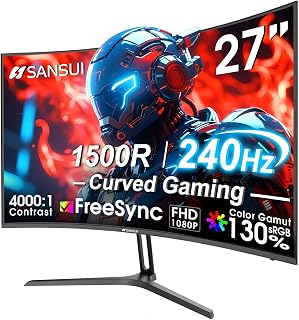
Pros
- Exceptional value for money with 240Hz performance at this price
- Curved design and 1500R radius significantly reduce head tilting and eye fatigue
- Superior color accuracy with 130% sRGB gamut and HDR support
- Blazing fast 1ms response time ideal for competitive gaming
- Sturdy metal stand with flexible tilt adjustment and VESA mounting compatibility
Cons
- Limited viewing angles typical of budget displays, best viewed straight-on
- Non-standard power connector differs from common USB-C standards
- FHD 1080p resolution may feel less sharp than higher-resolution alternatives on large screens
The SANSUI ES-G27C1 PRO is a 27-inch curved gaming monitor designed for players seeking high performance at an accessible price. It combines competitive gaming specs with everyday usability, making it equally suitable for esports enthusiasts, casual gamers, and professionals who spend hours in front of their screen.
The standout feature is undoubtedly the 240Hz refresh rate paired with 1ms response time and FreeSync support, delivering exceptionally smooth gameplay with virtually no ghosting or screen tearing. The 1500R curve pulls you into the action while reducing eye strain during marathon sessions. Color accuracy shines with 130% sRGB coverage, DCI-P3 95% gamut, and HDR support, making it surprisingly capable for photo editing and video work beyond just gaming.
Build quality feels solid thanks to the durable metal stand with adjustable tilt and VESA mounting compatibility. The matte finish eliminates glare, and features like low blue light filtering and flicker-free technology provide genuine relief during extended use. Connectivity includes both DisplayPort 1.4 and HDMI with a 3.5mm audio jack, covering most setup scenarios.
The primary trade-off is FHD 1080p resolution, which is standard for 240Hz gaming but may appear less sharp than higher-resolution displays. Viewing angles are limited, requiring head-on positioning for optimal color and brightness. The proprietary power connector is also non-standard compared to modern USB-C alternatives.
Verdict: The SANSUI ES-G27C1 PRO delivers serious gaming performance without the serious price tag. If you prioritize smooth, responsive gameplay and can accept 1080p resolution with limited side viewing angles, this monitor represents exceptional value and has earned its strong customer ratings.
Display: 27-inch curved LED, 1920x1080 FHD resolution, 16:9 aspect ratio, 1500R curvature
Performance: 240Hz refresh rate, 1ms MPRT response time, 4000:1 contrast ratio, 300 nits brightness
Color: 130% sRGB, 95% DCI-P3 color gamut, HDR support
Features: FreeSync adaptive sync, anti-flicker, low blue light, anti-glare matte finish, black level adjustment, game modes, crosshair overlay
Connectivity: DisplayPort 1.4, HDMI, 3.5mm audio jack
Design: Metal stand with tilt adjustment -5 to +15 degrees, VESA 100x100mm compatible
Dimensions: 24.13"W x 17.84"H x 7.66"D, weighs 7.3 lbs
Warranty: 1-year manufacturer warranty with 30-day money-back guarantee and lifetime technical support

This display offers 180Hz refresh and 1ms response for lag-free competitive gaming, wrapped in a curve that enhances focus. The 3000:1 contrast ratio brings out shadow detail and vibrant color in atmospheric titles. QHD resolution at 32 inches strikes a balance between sharpness and frame rate demands, while the adjustable stand with tilt, height, and swivel ensures ergonomic comfort during marathon sessions.
Pros
- Tight 1000R curve wraps vision for immersive gameplay
- 180Hz refresh and 1ms response eliminate motion blur
- VA panel contrast and deep blacks enhance shadow detail
- Fully adjustable stand with height, tilt, and swivel
Cons
- VA panel viewing angles narrower than IPS alternatives
- QHD resolution spreads pixels across 32 inches
The LG 32G600A-B wraps a 32-inch QHD panel around a tight 1000R curve that pulls your peripheral vision directly into the action. That aggressive curvature makes the most of the 2560x1440 resolution across the wide 16:9 canvas, giving you both the pixel density for crisp visuals and the immersive wraparound effect that flat screens can't match. The VA panel technology behind the curve delivers 3000:1 contrast and deep blacks that add natural depth to shadowy game environments, while the 99% sRGB color gamut ensures vibrant, accurate tones across the spectrum. Speed is handled by a 180Hz refresh rate and 1ms response time working in tandem with AMD FreeSync, smoothing out fast camera pans and eliminating tearing during rapid movement. HDR10 support lifts highlight detail without washing out the image, and practical features like Dynamic Action Sync, Black Stabilizer, and Crosshair overlay give you tactical advantages in competitive shooters. The three-side borderless design keeps distractions minimal, and the fully adjustable stand with height, tilt, and swivel adjustments lets you position the curve exactly where you need it for hours of comfortable play.
Display: 32-inch curved QHD (2560x1440), 16:9 aspect ratio, 1000R curvature, VA panel, matte finish, 3000:1 contrast ratio
Performance: 180Hz refresh rate, 1ms response time (GtG), 300 nits brightness
Color: HDR10 support, up to 99% sRGB color gamut coverage
Adaptive Sync: AMD FreeSync
Connectivity: 1x DisplayPort, 2x HDMI
Features: Dynamic Action Sync, Black Stabilizer, Crosshair overlay, adjustable height/tilt/swivel stand
Dimensions: 27.7 inches wide, 10.2 inches deep, 22 inches high, 14.8 lbs
Warranty: 1-year manufacturer warranty
Included: DisplayPort cable, power cable
This monitor suits gamers who want a large, curved screen for single-player adventures and competitive shooters without stepping up to ultrawide aspect ratios or 4K pricing. Esports players, console gamers connecting via HDMI, and streamers who need immersive visuals and smooth motion will appreciate the combination of size, speed, and curvature. Skip it if you need wider viewing angles for group viewing, prefer higher pixel density on a smaller screen, or require professional color accuracy beyond the sRGB gamut.

The AW3425DW features QD-OLED technology with a staggering 1,500,000:1 contrast ratio, producing perfect blacks and vivid colors that transform HDR gaming. Its 240Hz refresh rate and 0.03ms response time ensure ultra-responsive inputs for esports titles. The 1800R curve at 34 inches creates an enveloping view, while DisplayHDR TrueBlack 400 certification guarantees exceptional luminance range for cinematic storytelling and competitive play alike.
Pros
- 240Hz refresh rate and 0.03ms response time deliver class-leading motion clarity
- QD-OLED panel produces 1,500,000:1 contrast with true blacks and HDR TrueBlack 400 certification
- DCI-P3 99.3% color coverage satisfies both gaming and creative work
- 1800R curve across a 34-inch ultrawide creates a natural, immersive viewing arc
Cons
- OLED panels carry a burn-in risk with prolonged static UI elements during extended sessions
- Ultrawide format can require per-game settings adjustments for proper aspect ratio support
Curved gaming monitors live or die by how well they balance immersion with performance, and the Alienware AW3425DW makes a compelling argument that you no longer have to choose between the two. The 1800R curve across a 34.2-inch QD-OLED panel naturally draws your eyes across the 3440x1440 ultrawide canvas without forcing you to turn your head, while the underlying technology behind that panel is what separates this display from most of the field. A 240Hz refresh rate paired with a 0.03ms response time means motion is exceptionally clean, which matters in fast-paced competitive titles where screen blur can cost you. The QD-OLED panel contributes a 1,500,000:1 contrast ratio and VESA DisplayHDR TrueBlack 400 certification with 1000 nits peak brightness, so HDR game sequences carry real visual weight rather than looking washed out. DCI-P3 99.3% coverage and Delta E under 2 mean colors are accurate enough to satisfy content creators working alongside their gaming sessions. AMD FreeSync Premium Pro and VESA AdaptiveSync keep frame delivery tear-free. The matte finish handles ambient light without sacrificing clarity, a practical advantage in typical gaming setups.
Display: 34.2-inch QD-OLED curved ultrawide, 3440x1440 native resolution, 240Hz refresh rate, 0.03ms response time, 1800R curve, 178-degree viewing angles.
Color: DCI-P3 99.3% color gamut, Delta E less than 2 color accuracy, DisplayHDR TrueBlack 400, 1000 nits peak HDR brightness, 1,500,000:1 contrast ratio.
Connectivity: 2x HDMI, DisplayPort, 3x USB ports, USB Type-B for connectivity hub functionality.
Physical: 31.71 inches deep, 9.13 inches wide, 21.84 inches tall, 20 pounds. Height, tilt, and swivel adjustable stand. VESA mounting compatible.
Additional: Blue light filter, matte screen finish, 36.7W power consumption, 3-year warranty, includes DisplayPort cable, HDMI cable, USB cable, microfiber cloth, and Alienware sticker.
The right pick for serious gamers who want top-tier competitive performance from a curved ultrawide and will not compromise on image quality. Also works well for creators who game. Skip it if you play mostly static or turn-based games where the 240Hz advantage is wasted, or if OLED burn-in from long sessions with static HUD elements is a concern you are not prepared to manage.

The 32GS60QC-B pairs a 1000R curve with 180Hz refresh rate for responsive, immersive gameplay at 32 inches. Its 1ms response time eliminates ghosting in fast motion, while the 3000:1 contrast ratio enhances depth in darker scenes. QHD resolution balances clarity and performance, and features like Black Stabilizer brighten shadows without overexposing highlights, giving competitive players a tactical edge in dimly lit maps.
Pros
- 1000R curve on a 32-inch panel creates strong peripheral wrap in the 16:9 format
- 3000:1 VA contrast ratio produces noticeably deeper blacks than IPS alternatives
- 180Hz refresh rate with 1ms response keeps fast-paced games smooth and sharp
- Built-in Black Stabilizer, crosshair, and FPS counter add genuine competitive utility
Cons
- 300 nits peak brightness limits HDR impact compared to brighter panels
- 16:9 aspect ratio does not provide the expanded horizontal field of view that ultrawide curved monitors offer
Not every curved gaming monitor needs to be ultrawide to deliver a strong sense of immersion, and the LG 32GS60QC-B makes the case for the 16:9 curved format done well. The 1000R curve on a 32-inch panel creates a noticeable wrap effect that pulls the screen closer to your peripheral vision, and the QHD 2560x1440 resolution keeps the image sharp at that size without demanding a high-end GPU to push acceptable frame rates. The VA panel contributes a 3000:1 contrast ratio, which is a meaningful step up from typical IPS panels and translates to darker shadows and better scene depth in moody game environments. At 180Hz the refresh rate covers competitive gaming comfortably, and the 1ms response time keeps motion clean. HDR10 support is present, and 300 nits peak brightness is modest but functional. The 99% color gamut figure gives colors reasonable punch for a VA display. Practical gaming features round out the package: a Black Stabilizer for visibility in dark areas, a built-in crosshair overlay, FPS counter, and a Dynamic Action Sync mode that reduces input lag. Two HDMI ports and a DisplayPort give connectivity flexibility, and the borderless design keeps the aesthetic tidy on a desk.
Display: 32-inch curved VA panel, 1440p QHD (2560 x 1440), 1000R curve radius, 16:9 aspect ratio, 300 nits brightness, 3000:1 contrast ratio, 99% sRGB color gamut, HDR10 support
Performance: 180Hz refresh rate, 1ms GtG response time, AMD FreeSync adaptive sync, Dynamic Action Sync, Black Stabilizer, FPS Counter, multiple game modes (Gamer, FPS, RTS)
Connectivity: 2x HDMI 2.0, 1x DisplayPort 1.4, DisplayPort audio support
Design: Tilt adjustment, three-side borderless frame, matte screen finish, weighs 13 pounds, dimensions 27.6W x 20H x 8.9D inches
Power & Warranty: 24W power consumption, 1-year manufacturer warranty (parts and labor)
Well suited to gamers who want a 1000R curved screen in the familiar 16:9 format, particularly those upgrading from a flat 1080p monitor who want sharper resolution and genuine curvature without committing to ultrawide. Competitive players who value the built-in FPS tools will appreciate the practical extras. Less ideal for anyone who needs ultrawide immersion or high peak brightness for impactful HDR.

The G55C delivers a tight 1000R curve that wraps vision for full immersion in fast-paced titles. Its 165Hz refresh rate keeps motion fluid during competitive play, while the 2500:1 contrast ratio ensures deep blacks and vibrant highlights in darker game scenes. QHD resolution at 32 inches provides sharp detail without demanding excessive GPU power, making it accessible for mid-range builds seeking responsive curved gameplay.
Pros
- 1000R curve creates strong peripheral wrap at 32 inches
- QHD resolution maintains sharpness across larger screen
- 165Hz and 1ms response handle fast motion cleanly
- HDR10 adds visual depth with 2500:1 contrast ratio
Cons
- Plastic stand lacks tilt adjustment
- Glossy finish reflects ambient light sources
The Samsung Odyssey G55C delivers curved immersion at a practical scale for most gaming setups. Its 32-inch panel wraps around your peripheral vision with a tight 1000R curve that pulls you deeper into gameplay without demanding excessive desk space. The QHD resolution ensures textures remain crisp across the larger screen, while the 165Hz refresh rate keeps motion fluid during fast turns and sudden camera swings. Response time sits at 1ms, reducing ghosting when tracking moving targets. HDR10 compatibility adds visual depth to compatible games, enriching contrast and color vibrancy. The 2500:1 contrast ratio helps dark scenes retain shadow detail. Adaptive sync technology eliminates screen tearing across variable frame rates. The glossy finish enhances color saturation but works best in controlled lighting to avoid distracting reflections. Build quality feels sturdy where it matters most, with a stable panel that maintains its position during intense sessions. The stand uses plastic construction and omits tilt adjustment, which may feel limiting if you frequently reposition your workspace. Initial configuration requires manual refresh rate adjustment through the onboard menu system rather than automatic detection.
Display: 32-inch QHD (2560 x 1440), 16:9 aspect ratio, 1000R curvature, glossy finish, 178-degree viewing angle
Performance: 165Hz refresh rate, 1ms MPRT response time, 2500:1 contrast ratio, 300 cd/m2 brightness
Features: HDR10, AMD FreeSync adaptive sync, Eye Saver Mode (blue light reduction), flicker-free technology
Connectivity: 1x DisplayPort, 1x HDMI, 2x component outputs
Physical: 28" wide, 21.01" tall, 10.7" deep, 11.5 lbs. Includes DP cable, power cable, and stand. Wall mount compatible. 1-year manufacturer warranty.
Best suited for gamers upgrading from smaller flat panels who want noticeable immersion without stepping into ultrawide territory. The 32-inch curved format fits standard desks while delivering substantial visual real estate for open-world exploration and competitive shooters. Skip this if you demand premium stand flexibility or need built-in speakers for casual media consumption. The glossy screen finish also makes this a poor match for bright rooms with uncontrolled window glare. Competitive players prioritizing raw speed over immersion may prefer faster refresh options.

This ultrawide reaches 240Hz refresh for buttery-smooth motion in competitive titles, paired with UWQHD resolution that expands screen real estate. The 21:9 aspect ratio and curved design enhance peripheral awareness in multiplayer matches. A 3000:1 contrast ratio delivers solid visual depth, while the VA LED panel balances color accuracy and response speed for gamers prioritizing high frame rates and immersive field of view.
Pros
- 240Hz refresh rate delivers exceptional motion fluidity
- 3440x1440 ultrawide expands competitive awareness
- 450 nits brightness handles bright room conditions
- Matte finish eliminates distracting reflections
Cons
- HDR400 provides only entry-level dynamic range
- Demanding resolution requires strong GPU performance
The SANSUI 34-inch curved monitor pushes refresh performance to 240Hz in ultrawide format. That speed matters most in competitive scenarios where millisecond advantages translate to tangible wins. The 21:9 aspect ratio at 3440x1440 resolution spreads pixels wide, giving you peripheral information that 16:9 panels simply crop away. Fast motion stays sharp thanks to the combination of high refresh and VA LED panel technology. The 3000:1 contrast ratio helps distinguish targets against varied backgrounds, while 450 nits of brightness ensures visibility remains strong even in well-lit rooms. HDR400 certification adds dynamic range for compatible content, though this represents entry-level HDR implementation. The matte screen finish scatters reflections effectively, maintaining image clarity during daylight sessions. Adaptive sync eliminates tearing without forcing you into a specific GPU ecosystem. The 178-degree viewing angles preserve color accuracy when viewing from off-axis positions. AI PQ visual enhancement technology processes incoming signals to optimize image output. The curved panel wraps around your field of view, reducing the need for excessive head movement during extended gameplay.
Display: 34 inches, curved, 21:9 ultrawide aspect ratio, VA LED panel, matte finish, 3440x1440 native resolution
Performance: 240Hz refresh rate, 1ms MRPT response time, 3000:1 contrast ratio, 450 cd/m2 brightness, HDR400 support
Sync Technology: FreeSync adaptive sync, VRR support for Xbox, PS5, Switch via HDMI 2.1
Connectivity: 2x HDMI 2.1 (up to 240Hz at 2K), 2x DisplayPort 1.4 (up to 240Hz at 2K), 3.5mm audio jack
Ergonomics: Tilt adjustment from -5 degrees to +15 degrees, 178-degree wide viewing angle, 100x100mm VESA mount compatible, durable metal stand, Picture-by-Picture and Picture-in-Picture modes
Physical Dimensions: 31.77 inches wide, 7.48 inches deep, 17.91 inches tall
Warranty: 1-year manufacturer warranty, 30-day money-back guarantee, lifetime technical support
Perfect for competitive gamers who demand maximum refresh speed in ultrawide format and have hardware capable of driving high frame rates at 3440x1440. The 240Hz ceiling benefits fast-paced shooters and MOBAs where motion clarity directly impacts performance. Also suits players who stream or record gameplay, as the matte finish minimizes lighting complications. Skip this if your current GPU can't consistently push frames above 144Hz at this resolution, wasting the monitor's speed advantage. Also avoid if you prioritize premium HDR experience, as HDR400 represents baseline certification.

Pros
- Outstanding price-to-performance ratio for an ultrawide gaming monitor
- Exceptional image quality with minimal ghosting and blur thanks to ELMB SYNC and fast response time
- Curved 1500R panel enhances immersion and reduces eye strain during extended gaming sessions
- Versatile for gaming, professional design, content creation, and productivity workflows
- Solid build quality with comprehensive warranty coverage and included accessories
Cons
- Built-in speakers are low quality and tinny, external audio solution recommended
- Stock monitor mount is basic and non-adjustable, may require VESA arm for optimal positioning
- Requires capable GPU (6950XT or higher recommended) to maintain high refresh rates at native resolution
The ASUS TUF Gaming VG34VQ3B is a 34-inch ultrawide curved gaming monitor designed for players and professionals seeking immersive 3440x1440 visuals without the premium 4K price tag. It caters to competitive gamers who value refresh rate and response time, content creators needing wide workspace, and anyone wanting the ultrawide advantage in strategy games, simulation titles, and productivity applications.
Performance is the standout strength here. The 180Hz refresh rate combined with 1ms MPRT response time and ELMB SYNC technology delivers exceptionally smooth, blur-free gameplay. AMD FreeSync Premium eliminates screen tearing, while the 90% DCI-P3 color gamut ensures colors pop with professional-grade accuracy. User feedback consistently praises the crystal-clear image quality and smooth motion, with owners noting the visual upgrade justifies the ultrawide format over traditional 27-inch 1440p alternatives.
The 1500R curve and matte finish create a premium feel, though the basic included mount and tinny integrated speakers highlight where ASUS cut costs. At 16.8 pounds with a 34-inch footprint, the monitor demands proper desk space and a capable GPU to shine, ideally a 6950XT or newer to sustain high frame rates at native resolution.
The minor downsides are typical for the price tier: add external speakers and consider a VESA arm for the best experience. The 3-year warranty and included Adobe Creative Cloud subscription add real value beyond the monitor itself.
Verdict: This is a genuinely compelling option for gamers and creatives seeking ultrawide performance. It delivers on speed, image quality, and value in a way that makes the ultrawide investment accessible. Recommended for anyone wanting immersive gaming or expanded workspace without flagship pricing.
Display: 34-inch curved (1500R) ultrawide LCD, 3440x1440 QHD native resolution, 21:9 aspect ratio, 1370.4 lm brightness, 4000:1 static contrast ratio, 178-degree viewing angles, matte finish.
Performance: 180Hz refresh rate, 1ms MPRT response time, AMD FreeSync Premium, ELMB SYNC motion blur reduction, HDR with VESA DisplayHDR 400, TUV Flicker-Free and Low Blue Light certified.
Color: 90% DCI-P3 color gamut, LED backlit technology for accurate color reproduction across content creation and gaming.
Connectivity: 2x HDMI 2.0, 1x DisplayPort 1.4, 4x USB ports, DisplayWidget Center software for easy settings control.
Physical: 16.8 lbs, 34 x 15 x 10 inches, wall-mount compatible, includes DisplayPort cable, power cord, L-shaped screwdriver, and quick-start guide.
Ideal For: Competitive gamers prioritizing high refresh rates, content creators needing expansive workspace, professionals in design and video editing, esports players, strategy game enthusiasts, and anyone seeking ultrawide versatility.
GPU Requirements: For consistent 180Hz performance at 3440x1440, NVIDIA RTX 4070 or AMD RX 6800 XT and above recommended. Lower-end GPUs will sustain 100-144Hz depending on game settings.
Gaming Experience: Ultrawide format excels in competitive shooters, strategy games, racing simulators, and open-world titles. Some games require black-letter-boxing or ultrawide support. FreeSync Premium ensures smooth gameplay across supported AMD graphics.
Production Use: The 90% DCI-P3 gamut, HDR support, and 3440x1440 resolution provide professional-grade tools for photo and video editing, motion graphics, and general design work. Pixel density is excellent at typical viewing distances.
Setup Considerations: Requires a sturdy desk with at least 34 inches of width. Plan for external speakers to overcome built-in audio limitations. Consider a VESA arm mount for height, tilt, and swivel adjustment beyond the stock stand.

Pros
- Exceptional value for a 240Hz ultrawide with premium features at under $350
- Curved design and 21:9 format create genuinely immersive gaming experiences with natural peripheral vision
- Crisp WQHD resolution maintains sharpness across the large screen without requiring high-end GPU power
- Versatile for gaming, content creation, and productivity thanks to ample screen real estate
- Robust build quality with stable stand and minimal wobble according to user feedback
Cons
- Requires DisplayPort 1.4 or HDMI 2.1 graphics card to achieve full 240Hz performance, which may limit compatibility
- Heavy at 16.1 pounds and requires a sturdy desk or mounting solution for stability
- Out-of-box settings require manual calibration to deliver optimal picture quality, as noted by experienced users
The LG 34G630A-B is a high-performance ultrawide curved gaming monitor designed for competitive gamers and power users who demand more than a standard display can offer. The massive 34-inch 21:9 curved panel delivers an immersive visual experience that goes beyond typical flat monitors, making it ideal for FPS games, racing sims, and productivity workflows that benefit from expanded screen real estate.
Performance is where this monitor truly shines. The 240Hz refresh rate combined with a 1ms response time ensures silky-smooth motion and minimal input lag, while AMD FreeSync Premium technology eliminates screen tearing and stuttering for fluid gameplay. The WQHD resolution at 3440x1440 pixels maintains excellent sharpness across the expansive display, and the 95% DCI-P3 color gamut with DisplayHDR 400 delivers vibrant, lifelike visuals that make games look stunning. Customer feedback confirms that these specs deliver on their promises with a noticeably smoother, more responsive gaming experience.
The build quality and design are solid throughout. The curved VA panel is sharp and immersive, while the adjustable stand offers excellent flexibility for height, tilt, and swivel positioning. The slim bezels keep the focus on the action, and the matte screen finish minimizes glare. Connectivity is comprehensive with DisplayPort, dual HDMI, USB-C with power delivery, and built-in speakers. Setup is straightforward, though the monitor's 16.1-pound weight requires a sturdy desk or mount.
One notable consideration is that achieving the full 240Hz performance requires a graphics card with DisplayPort 1.4 or HDMI 2.1 support. Additionally, users recommend adjusting the out-of-the-box settings before gaming to optimize picture quality, which takes minimal effort but is worth noting. The monitor excels for both gaming and professional work like video editing and music production, making it genuinely versatile.
Overall, the LG 34G630A-B delivers excellent performance and immersion for a premium ultrawide gaming monitor at a competitive price point. It's a strong choice for gamers and professionals willing to invest in a display that genuinely transforms how you interact with content on screen.
Display: 34-inch curved VA panel, 3440x1440 pixels (WQHD), 21:9 aspect ratio, 300 nits brightness, 178-degree viewing angles
Performance: 240Hz refresh rate, 1ms response time (Gray to Gray), 0.23mm pixel pitch, 3:1 contrast ratio
Color and HDR: 95% DCI-P3 color gamut, DisplayHDR 400, HDR10 support, matte screen finish
Connectivity: DisplayPort, 2x HDMI, USB Type-C with 15W power delivery, 2x USB-A ports, 3.5mm audio jack
Adaptive Sync: AMD FreeSync Premium, NVIDIA G-SYNC Compatible (DisplayPort on GTX 10 Series+, HDMI 2.1 on RTX 30 Series+)
Dimensions and Weight: 31.8 inches wide, 20.2 inches tall, 9.2 inches deep, 16.1 pounds
Stand: Adjustable height, tilt, and swivel, space-saving compact base
Additional Features: Built-in speakers, Dynamic Action Sync, Black Stabilizer, FPS Counter, Crosshair overlay, Picture-by-Picture mode, USB-C single-cable connectivity
Warranty: 1-year manufacturer limited warranty
Competitive Gamers: The 240Hz refresh rate and 1ms response time make this ideal for fast-paced competitive titles like shooters and racing games. The ultrawide format provides a genuine competitive advantage by extending your field of view.
Professional Creatives: Content creators, video editors, and music producers benefit from the extra horizontal real estate for timeline work, sample arrangement, and simultaneous window management. The HDR capabilities deliver excellent color accuracy.
Ultrawide Enthusiasts: If you've already committed to the ultrawide experience, this monitor delivers the performance specs you need at a reasonable price point. The curved design enhances immersion compared to flat ultrawides.
Productivity-Focused Users: Anyone spending 40+ hours per week at a desk will appreciate the ergonomic stand, crisp text rendering, and glare-free matte finish. The extra screen space dramatically reduces the need for alt-tabbing.
Not Ideal For: Users with older graphics cards lacking DisplayPort 1.4 or HDMI 2.1 support will be limited to lower refresh rates. Those seeking a compact setup may find the 34-inch width challenging on smaller desks.

This ultrawide combines a dramatic 1000R curve with 21:9 aspect ratio to maximize immersion in open-world adventures and strategy games. The 165Hz refresh rate keeps action smooth, while VA panel technology delivers strong contrast for richer visuals. Its curved screen design minimizes distortion at the edges, ensuring uniform image quality across the entire 34-inch viewing area for extended gaming sessions.
Pros
- 1000R curve is among the tightest available, maximizing immersion
- 21:9 ultrawide aspect ratio expands the in-game field of view
- VA panel delivers 1900:1 contrast for deep blacks in dark scenes
- 165Hz refresh rate handles most gaming genres smoothly
Cons
- 72% color gamut means noticeably less vibrant colors than QD-OLED or quantum dot panels
- 250 nits peak brightness limits HDR effectiveness
The Samsung 34-inch Odyssey G5 brings the immersive 21:9 ultrawide format together with a deep 1000R curve, one of the tightest curves you'll find on a gaming monitor. That curvature is the headline here: it wraps the screen around your field of view more aggressively than flatter alternatives, reducing the sense that you're looking at a flat rectangle and instead placing you inside the scene. The VA panel supports that immersion with a 1900:1 contrast ratio, producing blacks that hold up well in dark game environments. At 165Hz the refresh rate keeps motion smooth for most gaming genres, and HDR10 support adds some dynamic range punch to compatible titles. The 72% color gamut is modest compared to OLED or quantum dot rivals, so color vibrancy is not the strong suit. Brightness at 250 nits is also on the lower side, which limits HDR impact. Where this monitor earns its place in a curved gaming lineup is the combination of the pronounced 1000R curve, ultrawide field of view, and VA contrast working together to create a genuinely enveloping gaming experience at an accessible tier.
Display: 34-inch curved VA LCD panel with 1000R curvature, 21:9 aspect ratio, 3440x1440 native resolution, 250 cd/m2 brightness, 1900:1 contrast ratio, 178-degree viewing angle, 72% color gamut with HDR10 support.
Performance: 165Hz refresh rate, 1ms MPRT response time, AMD FreeSync Premium adaptive sync technology, low frame rate compensation.
Connectivity: 1x HDMI, 1x DisplayPort, 1x 3.5mm audio jack. Wired connectivity, compatible with VESA mounting standards.
Physical: 31.76" width, 18.71" height, 10.73" depth, 12.3 pounds total weight. Black curved design with desk mount and wall-mount capability.
Power & Warranty: 50-watt maximum power consumption at 110 volts. Includes 1-year manufacturer warranty.
A good fit for gamers who prioritize the wraparound feeling of a tight 1000R curve in single-player or open-world titles and want the ultrawide 21:9 perspective without stepping into premium display territory. Less suited to competitive players who need higher refresh rates or to anyone who cares deeply about color accuracy and peak brightness, since both are limited here.
Buying Guide
Curve Radius: 1000R vs. 1500R vs. 1800R
The R number tells you the radius of a circle measured in millimeters. A 1000R curve matches a circle with a one-meter radius, wrapping tighter around your face than a 1500R or 1800R arc. Tighter curves feel more immersive at typical desk distances, especially on ultrawide panels where the edges would otherwise sit far from your line of sight.
For competitive shooters and fast-paced games, a 1000R curve keeps corner information closer to your center of focus, reducing the need to dart your eyes across the screen. Cinematic single-player experiences benefit even more, as the wraparound effect mimics the field of view you’d get in a theater. If you sit farther back or share your screen with others, a gentler 1500R or 1800R curve reduces distortion from off-angle viewing.
Resolution and Aspect Ratio
Standard 16:9 curved monitors come in 1920×1080 FHD, 2560×1440 QHD, and occasional 4K variants. QHD hits the sweet spot for most gamers, delivering sharper text and richer detail without the GPU demands of 4K. Ultrawide 21:9 panels stretch to 3440×1440 or 2560×1080, giving you horizontal real estate that’s perfect for strategy games, flight sims, and productivity tasks.
FHD remains viable if you prioritize refresh rate and frame rate over pixel density, especially on smaller 27-inch screens. Ultrawide resolutions demand more from your graphics card, so pair them with a mid-range or high-end GPU. If you’re running a capable card, explore our guide to the best 1440p monitors for the RTX 5070 to see how these curved options compare to their flat counterparts.
Refresh Rate and Response Time
Refresh rate determines how many frames per second your monitor can display. Competitive players should target 180Hz or higher to keep motion fluid in fast shooters and racing games. Response time, measured in milliseconds, governs how quickly pixels shift from one color to another. A 1ms gray-to-gray spec minimizes ghosting and motion blur, critical when tracking enemies through smoke or darting around tight corners.
Adaptive sync technologies like AMD FreeSync and NVIDIA G-SYNC eliminate screen tearing by synchronizing your monitor’s refresh rate with your GPU’s output. Premium tiers add low-framerate compensation and HDR support. If your card supports variable refresh rate, make sure the monitor does too. For a deeper dive into pairing displays with powerful GPUs, check out the best monitors for the RTX 5070 Ti.
Panel Technology and HDR
VA panels dominate the curved monitor market thanks to their high contrast ratios and deep blacks, making them ideal for immersive single-player campaigns and dark horror titles. IPS alternatives offer wider viewing angles and more accurate colors but often sacrifice contrast. QD-OLED panels deliver infinite contrast, vibrant color, and near-instant pixel response, though they command a premium and require care to avoid burn-in.
HDR certification ranges from entry-level DisplayHDR 400 to flagship TrueBlack 400 on OLED screens. True HDR performance requires local dimming zones or per-pixel control, so budget HDR badges rarely deliver the full dynamic range you see in marketing materials. Prioritize color gamut coverage (look for 95% DCI-P3 or higher) to ensure vibrant, film-accurate hues. If you’re mounting your new screen on an articulating arm, browse our list of the best monitor arms to maximize desk space and adjust viewing angles on the fly.
Final Thoughts
Curved gaming monitors transform your desk into an immersive command center, wrapping action around your field of view and pulling you deeper into every match. The Alienware 34 240Hz QD-OLED Curved Gaming Monitor delivers stunning infinite contrast and lightning-fast pixel response for players who demand flagship performance, while the SANSUI 27 Inch Curved 240Hz Gaming Monitor FHD offers high refresh rates and solid VA contrast at a budget-friendly entry point. Match your resolution and curve radius to your GPU and desk setup, verify adaptive sync compatibility, and you’ll have a display that keeps you locked in for hours. For more guidance on building a complete battlestation, explore our monitors category page to compare additional screens and mounting solutions.
Frequently Asked Questions
Is a curved monitor better for gaming than a flat screen?
Curved monitors enhance immersion by wrapping the display around your peripheral vision, reducing the need to shift your gaze across wide panels. This design works especially well for ultrawide 21:9 screens and single-player campaigns. Competitive players may prefer flat screens for uniform pixel density and simpler multi-monitor setups, but many high-refresh curved displays deliver the same low response times and adaptive sync features you’d find on flat alternatives.
What curve radius should I choose for a gaming monitor in 2026?
A 1000R curve offers the tightest wrap, ideal for typical desk distances of 60–80 centimeters and ultrawide panels where edge content would otherwise sit far from your center of focus. A 1500R curve balances immersion with off-angle viewing comfort, making it suitable for shared spaces or slightly farther seating positions. An 1800R curve provides a gentler arc that reduces distortion when you sit back or collaborate with others at your desk.
Do I need a high-end GPU to run an ultrawide curved monitor?
Ultrawide resolutions like 3440×1440 demand roughly 30% more GPU power than standard 2560×1440 QHD. Mid-range cards handle lighter esports titles and older games comfortably, but AAA releases with maxed settings require a higher-tier GPU to maintain smooth frame rates. Budget 2560×1080 ultrawide panels reduce the load, while 1920×1080 FHD curved monitors run easily on entry-level hardware.
Can I use a curved gaming monitor for productivity and content creation?
Curved ultrawides excel at productivity workflows, offering horizontal space for side-by-side documents, timelines, and browser tabs without the bezels of a dual-monitor setup. Color-critical work benefits from IPS or QD-OLED panels with 95% DCI-P3 coverage and factory calibration. VA panels work well for general office tasks and media consumption but may show slight color shifting at extreme viewing angles.






Write Your Review
No reviews yet. Be the first to share your experience!