

You’re ready to upgrade your gaming setup, but you don’t want to drop half a grand on a monitor. The good news? Today’s sub-$300 gaming displays pack features that would have cost twice as much just a few years ago.
This guide breaks down 7 gaming monitors that deliver high refresh rates, low response times, and the visual clarity you need to stay competitive. Whether you prioritize ultrawide immersion, razor-sharp 4K detail, or blistering 300Hz performance, you’ll find a display that fits your budget and gaming style. For help setting up your complete battlestation, check out our guide to the best monitor arms for ergonomic positioning.
Quick Comparison
| Model | Link | Rating | Screen Size | Resolution | Refresh Rate |
|---|---|---|---|---|---|
| 1 LG 32G600A-B 32" QHD Curved Gaming Monitor 180Hz 1ms... | Check price | 4.5 of 5152 ratings | 31.5 inches | QHD Wide 1440p | 180 hertz |
| 2 ASUS ROG XG27ACS 27" 1440p 180Hz USB-C Gaming Monitor... | Check price | 4.4 of 51,089 ratings | 27 inches | QHD Ultra Wide 1440p | 180 hertz |
| 3 Samsung 32" Odyssey G55C QHD 165Hz Curved Gaming Monitor,... | Check price | 4.4 of 52,087 ratings | 32 inches | QHD Wide 1440p | 165 hertz |
| 4 SANSUI 34" Curved 240Hz UltraWide Gaming Monitor...Highest ratedMost reviewed | Check price | 4.5 of 53,688 ratings | 34 inches | QHD Ultra Wide 1440p | 240 hertz |
| 5 Dell S2725QS 27 inch 4K UHD 120Hz IPS Monitor with... | Check price | 4.4 of 51,031 ratings | 27 inches | 4K | 120 hertz |
| 6 ASUS TUF Gaming VG27AQM5A 27" 1440p 300Hz IPS Gaming...Fastest refresh | Check price | 4.4 of 5285 ratings | 27 inches | QHD Wide 1440p | 300 hertz |
| 7 LG 27GR83Q-B 27" QHD 240Hz Gaming Monitor, 1ms IPS,... | Check price | 4.4 of 5786 ratings | 27 inches | QHD Ultra Wide 1440p | 240 |
Ratings reflect the most recent data pull. Check each listing for current price and availability.
Quick answer
This guide compares 7 picks, with LG 32G600A-B 32" QHD Curved Gaming Monitor 180Hz 1ms ranked first. SANSUI 34" Curved 240Hz UltraWide Gaming Monitor holds the highest customer rating among them. ASUS TUF Gaming VG27AQM5A 27" 1440p 300Hz IPS Gaming leads this list on refresh rate.

Pros
- Exceptional value at this price point for a 32-inch QHD 180Hz monitor with full feature set
- Curved VA panel delivers deep blacks and high contrast ratio for dramatic visual impact
- Fast 1ms response time keeps up with demanding esports titles like valorant and counter-strike
- Excellent ergonomic flexibility with adjustable height, tilt, and swivel for long gaming sessions
- Multiple connectivity options with DisplayPort and dual HDMI for console and PC flexibility
Cons
- QHD resolution on a 32-inch screen results in lower pixel density compared to 4K alternatives, though imperceptible at normal viewing distances
- VA panel technology offers narrower viewing angles than IPS, which may affect picture quality when viewed from the side
- No USB hub or audio speakers built-in, requiring separate peripherals for a complete setup
The LG 32G600A-B is a 32-inch curved QHD gaming monitor designed for competitive gamers and content creators who want a large, immersive display without breaking the bank. With a native 1000R curve that pulls you into the action and a QHD resolution of 2560x1440, this monitor delivers the screen real estate and visual detail needed for both high-performance gaming and creative work. The target audience includes esports enthusiasts, console gamers, and streamers who prioritize smooth motion and responsive performance.
The standout features center on speed and immersion. The 180Hz refresh rate combined with a lightning-fast 1ms response time eliminates motion blur and ghosting in fast-paced games, while AMD FreeSync technology removes screen tearing and stuttering even during intense HDR scenes. The 1000R curvature expands your peripheral vision, and the HDR10 support with 99% sRGB coverage produces bold, punchy colors that bring games and creative content to life. Practical gaming tools like Dynamic Action Sync reduce input lag, Black Stabilizer brightens dark scenes to spot enemies, and the Crosshair overlay aids precision aiming in shooters.
Build quality is solid and professional. The monitor features a sleek three-side borderless design that maximizes screen space, and the fully adjustable stand offers height, tilt, and swivel control to dial in your perfect ergonomic position. VA panel technology delivers exceptional contrast and deep blacks, though viewing angles are narrower than IPS alternatives. At 31.5 inches diagonal with a matte screen finish, the display resists glare and maintains clarity during marathon gaming sessions.
The main consideration is that QHD resolution on a 32-inch screen yields lower pixel density than smaller high-res monitors, though the difference is negligible at typical viewing distances. Additionally, the monitor lacks built-in speakers and USB connectivity, so you'll need separate peripherals to complete your battlestation. These are minor compromises given the performance and value proposition.
The LG 32G600A-B delivers exceptional value for competitive gamers and creators seeking a large, fast, and immersive curved display. The combination of 180Hz, 1ms response, AMD FreeSync, and impressive color accuracy makes it a compelling choice for esports play and content production alike. If you want a big curved screen that performs without the flagship price tag, this is a strong recommendation.
Display: 32-inch curved QHD (2560x1440), 16:9 aspect ratio, 1000R curvature, VA panel, matte finish, 3000:1 contrast ratio
Performance: 180Hz refresh rate, 1ms response time (GtG), 300 nits brightness
Color: HDR10 support, up to 99% sRGB color gamut coverage
Adaptive Sync: AMD FreeSync
Connectivity: 1x DisplayPort, 2x HDMI
Features: Dynamic Action Sync, Black Stabilizer, Crosshair overlay, adjustable height/tilt/swivel stand
Dimensions: 27.7 inches wide, 10.2 inches deep, 22 inches high, 14.8 lbs
Warranty: 1-year manufacturer warranty
Included: DisplayPort cable, power cable
Best For: Competitive esports gamers, console players, content creators, and anyone seeking a large curved gaming display with responsive performance.
Not Ideal For: Users prioritizing maximum pixel density, wide viewing angles, or built-in audio and USB features.
Key Considerations: Confirm your graphics card supports 180Hz output via DisplayPort or HDMI for optimal performance. The 32-inch size works best at viewing distances of 24 inches or more. Pair with a fast GPU (RTX 4070 or higher, or RX 6700 XT equivalent) to consistently hit high frame rates at QHD resolution. If you primarily play slower-paced games or productivity work, a higher resolution 4K display may be better; if you play competitive shooters or fast-action games, this 180Hz option is ideal.

Pros
- Exceptional value at this price point for a 1440p 180Hz monitor with premium features
- Stunning color accuracy and brightness (400 nits) suitable for both gaming and professional photo/video work
- Robust stand with full adjustability ensures comfortable positioning for extended gaming sessions
- ELMB SYNC technology syncs motion blur reduction with variable refresh rate for competitive gaming advantage
- Blue light filter and flicker-free technology reduce eye strain during long usage periods
Cons
- Anti-glare coating creates slight fuzziness on white text and bright content, a common trade-off with matte finishes
- USB-C connectivity lacks sufficient power delivery for most devices, limiting its hub functionality
- Quality control concerns reported in some reviews, including stuck pixels and backlight bleed on affected units
The ASUS ROG XG27ACS is a 27-inch gaming monitor built for players and creators who refuse to compromise on performance. Its 1440p resolution paired with a 180Hz refresh rate and 1ms response time creates a sweet spot for competitive gaming without demanding top-tier GPU power. Whether you're gaming, editing photos and videos, or doing general work, this monitor adapts to your needs.
Performance is where this monitor truly shines. The 180Hz refresh rate makes every motion feel buttery smooth, from fast-paced shooters to RPGs with detailed environments. ASUS Fast IPS technology delivers exceptional color accuracy while maintaining responsiveness, and the ELMB SYNC feature eliminates ghosting and tearing without sacrificing visual quality. The 400-nit brightness ensures visibility even in well-lit rooms.
Build quality is solid throughout. The stand is sturdy and fully adjustable with tilt, swivel, pivot, and height adjustment, accommodating various desk setups and users of different heights. The included DisplayPort cable and ROG pouch show attention to detail. However, the matte anti-glare coating can create slight fuzziness on bright content, which some users find distracting.
The USB-C hub is a practical addition that consolidates connectivity, though it lacks sufficient power delivery for charging most laptops or devices. Quality control appears inconsistent in some units, with occasional reports of stuck pixels and backlight bleed, though most reviews report flawless performance after months of use.
For gamers and creators seeking excellent 1440p performance without flagship pricing, the ROG XG27ACS delivers genuine value. Its combination of high refresh rate, fast response time, color accuracy, and connectivity options makes it a versatile choice that justifies its investment.
Competitive Gamers: The 180Hz refresh rate and 1ms response time provide the responsiveness needed for fast-paced multiplayer titles like Valorant, CS2, and Call of Duty.
Console Gamers: HDMI 2.1 and HDMI 2.0 ports support both PlayStation 5 and Xbox Series X/S at high refresh rates, delivering smooth performance on current-generation consoles.
Content Creators: The 1440p resolution, accurate IPS colors, and 133% color gamut make this monitor suitable for photo editing, video work, and graphic design alongside gaming.
Casual to Mid-Range PC Gamers: 1440p at 180Hz strikes a balance between visual quality and performance, requiring a mid-range GPU rather than high-end hardware.
Display: 27-inch IPS LCD, 2560 x 1440 (1440p), 16:9 aspect ratio, 178-degree viewing angles
Refresh Rate & Response: 180Hz, 1ms response time (GTG), variable refresh rate support
Color & Brightness: 133% color gamut, 400 nits brightness, 400:1 contrast ratio, HDR support
Connectivity: 2x HDMI 2.0, 1x DisplayPort 1.4, 1x USB Type-C (with DisplayPort alt mode), 3x USB downstream ports, 3.5mm audio out
Physical: Dimensions 25.3"W x 15.5"H x 8.6"D, 14.6 lbs, fully adjustable stand (tilt, swivel, pivot, height), VESA 100x100 wall mount compatible
Features: ASUS Fast IPS, ELMB SYNC, G-SYNC compatible, blue light filter, flicker-free, eye care mode, DisplayWidget Center OSD control
Warranty: 3-year limited warranty with Advanced Replacement Service

The 1000R curved design wraps around your field of view for better immersion in fast-paced titles, while the 165Hz refresh rate ensures smooth motion during intense gaming sessions. The 2500:1 contrast ratio delivers deeper blacks and more vivid colors compared to standard panels, making dark scenes in atmospheric games easier to read without sacrificing visual punch.
Pros
- 32-inch QHD curved panel maximizes screen real estate and sharpness
- 165Hz refresh rate with 1ms response time handles fast action smoothly
- HDR10 and 1000R curve create immersive visual experience
- Solid panel construction with reliable FreeSync support
Cons
- Plastic stand lacks tilt adjustment and premium aesthetics
- Glossy finish prone to reflections in bright rooms
The 1440p panel delivers 1.7 times the pixel density of 1080p, keeping game visuals sharp across the generous 32-inch canvas. The 165Hz refresh rate handles fast shooters and racing games smoothly, while the 1ms response time cuts down motion blur when you're tracking targets or drifting corners. The aggressive 1000R curve wraps the display around your field of view, pulling you into the action without requiring multiple panels. HDR10 support adds depth to color and contrast, making environments feel more vibrant. FreeSync handles screen tearing across a wide range of hardware. The glossy finish produces punchy colors but works best in controlled lighting. Build quality is reliable with a sturdy panel, though the plastic stand lacks tilt adjustment and premium feel. Setup requires manually enabling 165Hz through the on-screen menu rather than Windows detection. No built-in speakers means external audio is required.
Display: 32-inch QHD (2560 x 1440), 16:9 aspect ratio, 1000R curvature, glossy finish, 178-degree viewing angle
Performance: 165Hz refresh rate, 1ms MPRT response time, 2500:1 contrast ratio, 300 cd/m2 brightness
Features: HDR10, AMD FreeSync adaptive sync, Eye Saver Mode (blue light reduction), flicker-free technology
Connectivity: 1x DisplayPort, 1x HDMI, 2x component outputs
Physical: 28" wide, 21.01" tall, 10.7" deep, 11.5 lbs. Includes DP cable, power cable, and stand. Wall mount compatible. 1-year manufacturer warranty.
This monitor suits gamers prioritizing immersive single-player experiences and screen size over competitive edge, especially those upgrading from smaller 1080p displays. It works well for players with mid-range GPUs capable of driving 1440p at high frame rates. Skip it if you need premium stand ergonomics, plan to use it in bright rooms with lots of reflections, require built-in audio, or prefer flat panels over aggressive curves.

SANSUI 34" Curved 240Hz UltraWide Gaming Monitor
The 240Hz refresh rate delivers the ultra-smooth motion competitive gamers demand, eliminating blur during fast-paced action in shooters and racing games. The 3440×1440 UWQHD resolution on a 34-inch curved VA panel provides expansive field of view for immersive gameplay while maintaining sharp image quality. The 3000:1 contrast ratio produces deeper blacks and more vibrant colors than standard monitors, enhancing visual detail in dark scenes without sacrificing responsiveness.
Pros
- 240Hz at 3440x1440 ultrawide delivers exceptional smoothness
- 3000:1 VA contrast ratio produces deep blacks and dramatic lighting
- 21:9 aspect ratio expands field of view for competitive advantage
- 450 nits brightness with HDR400 handles various lighting conditions
Cons
- Requires powerful GPU to fully utilize resolution and refresh rate
- 34-inch ultrawide footprint demands significant desk space
The SANSUI 34-inch curved monitor pushes budget gaming into ultrawide territory with a 3440x1440 VA panel running at 240Hz. The 21:9 aspect ratio expands horizontal field of view significantly compared to standard 16:9 displays, giving you peripheral vision advantages in competitive games and broader immersion in racing or flight sims. The 240Hz refresh rate is exceptional at this resolution and screen size, delivering buttery smooth motion that most budget ultrawides can't match. The VA panel offers 3000:1 contrast ratio for deeper blacks and more dramatic lighting compared to IPS alternatives. HDR400 support and 131% color gamut coverage produce vibrant, punchy visuals. The 1500R curve wraps the wide panel around your view naturally. At 450 nits, brightness output handles well-lit rooms effectively. Adaptive sync prevents tearing across GPU brands. The matte finish minimizes glare. AI PQ visual enhancement processing attempts to optimize image quality on the fly. The combination of ultrawide real estate, high refresh rate, and strong contrast makes this a standout value for gamers wanting premium specs without premium pricing.
Display: 34 inches, curved, 21:9 ultrawide aspect ratio, VA LED panel, matte finish, 3440x1440 native resolution
Performance: 240Hz refresh rate, 1ms MRPT response time, 3000:1 contrast ratio, 450 cd/m2 brightness, HDR400 support
Sync Technology: FreeSync adaptive sync, VRR support for Xbox, PS5, Switch via HDMI 2.1
Connectivity: 2x HDMI 2.1 (up to 240Hz at 2K), 2x DisplayPort 1.4 (up to 240Hz at 2K), 3.5mm audio jack
Ergonomics: Tilt adjustment from -5 degrees to +15 degrees, 178-degree wide viewing angle, 100x100mm VESA mount compatible, durable metal stand, Picture-by-Picture and Picture-in-Picture modes
Physical Dimensions: 31.77 inches wide, 7.48 inches deep, 17.91 inches tall
Warranty: 1-year manufacturer warranty, 30-day money-back guarantee, lifetime technical support
This monitor suits competitive and immersive gamers who want both ultrawide advantages and high refresh rates, especially those with powerful GPUs capable of driving 1440p ultrawide at high frame rates. It works well for racing, flight sims, and shooters where peripheral vision matters. Skip it if your GPU struggles with ultrawide resolutions, you prefer color accuracy over contrast punch, or need a smaller footprint for limited desk space.
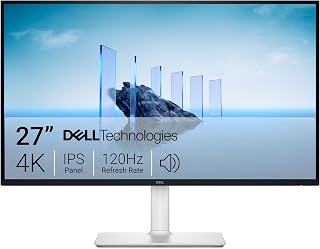
The 4K UHD resolution at 27 inches delivers sharp text and detailed textures without requiring excessive GPU power compared to larger 4K panels. FreeSync Premium eliminates screen tearing during variable frame rates, and the 120Hz refresh rate provides noticeable fluidity over standard 60Hz displays. The matte finish reduces glare in bright environments while the IPS panel maintains accurate colors from wide viewing angles.
Pros
- 4K resolution delivers exceptional sharpness at 27 inches
- 99% sRGB color accuracy benefits both gaming and work
- Fully adjustable stand with premium build quality
- ComfortView Plus and built-in speakers add practical value
Cons
- 4-8ms response time lags behind competitive gaming monitors
- Default brightness setting requires manual adjustment
The Dell S2725QS offers a different approach to budget gaming with its 4K IPS panel, trading ultrawide immersion for razor-sharp detail at 27 inches. The 3840x2160 resolution provides four times the pixels of 1080p, making it ideal for games where visual clarity matters as much as frame rates. The 120Hz refresh rate strikes a practical balance, delivering noticeably smoother motion than standard 60Hz displays while remaining achievable for mid-range hardware at 4K. FreeSync Premium eliminates tearing across variable frame rates. The IPS panel covers 99% of the sRGB color space, ensuring accurate and vibrant visuals that benefit both gaming and productivity. ComfortView Plus reduces blue light without distorting colors during long sessions. The matte finish handles reflections well in various lighting conditions. Build quality feels premium with ultra-thin bezels and a fully adjustable stand offering height, tilt, pivot, and swivel. Re-engineered built-in speakers provide usable audio with improved bass. The 4-8ms response time handles most gaming well but trails dedicated esports monitors. Default brightness runs high and requires manual adjustment.
Display: 27-inch IPS LED panel, 4K UHD (3840x2160), 16:9 aspect ratio, matte anti-glare finish
Color: 99% sRGB color gamut, 1500:1 contrast ratio, 350 nits brightness
Refresh Rate: 120Hz with AMD FreeSync Premium adaptive sync technology
Response Time: 0.03ms, 4-8ms gray-to-gray
Viewing Angle: 178 degrees horizontal and vertical
Connectivity: DisplayPort, 2x HDMI 1.4, 3.5mm audio jack
Adjustments: Height, tilt, pivot, and swivel adjustments, VESA 100x100 compatible
Audio: Built-in 2W stereo speakers with enhanced audio quality
Features: ComfortView Plus blue light reduction, Energy Star certified, USB hub connectivity
Dimensions: 24.08 inches wide, 7.89 inches deep, 15.3 inches high (with stand)
Weight: 14.3 pounds
Power Consumption: 24.6 watts
Warranty: 1-year advanced exchange service and premium panel exchange
This monitor fits gamers who value image quality and versatility over maximum refresh rates, particularly those playing slower-paced or story-driven games where 4K clarity enhances the experience. It works well if you also need a productivity display or want built-in audio. Skip it if you play competitive shooters requiring sub-1ms response times, need refresh rates above 120Hz, or prefer larger screen sizes.

Pros
- Exceptional color quality for an IPS gaming monitor with wide 95% DCI-P3 gamut
- Outstanding build quality with rock-solid stand that eliminates monitor shake and wobble
- Perfect balance of resolution, refresh rate, and response time for both gaming and creative work
- No dead pixels reported in customer experiences with excellent long-term reliability
- Significant performance upgrade from standard 60Hz displays with noticeable smoothness improvement
Cons
- Occasional flickering or artifacting reported in some games at extreme refresh rate settings
- Initial power button operation can be unintuitive for first-time users
- Premium pricing compared to basic 144Hz alternatives, though justified by specifications
The ASUS TUF Gaming VG27AQM5A is a 27-inch gaming monitor designed for serious competitive gamers and content creators who demand both speed and visual quality. With its 1440p QHD resolution, 300Hz refresh rate, and lightning-fast 0.3ms response time, this monitor sits in the sweet spot between high refresh rate competitiveness and pixel-dense image clarity that won't feel like a step backward from 1440p content creation displays.
The standout feature is the combination of Fast IPS technology with ELMB Sync, which enables motion blur reduction and variable refresh rate support to operate simultaneously. This means you get smooth, crisp visuals without ghosting or tearing, whether you're pushing 300fps in competitive shooters or exploring story-driven games at 100fps. The 95% DCI-P3 color gamut delivers vibrant, accurate colors that rival many professional monitors, making this equally capable for photo and video editing alongside gaming.
Build quality is where the TUF branding really shows. The stand is notably rigid and durable, eliminating the desk vibration issues that plague cheaper monitor stands. The matte finish reduces glare, and the Shadow Boost feature intelligently brightens dark scenes without crushing blacks or blowing out highlights. DisplayWidget Center software provides convenient menu control via mouse instead of physical buttons, streamlining workflow adjustments.
The main drawbacks are minor but worth noting. Some users report occasional flickering or artifacting in specific games at maximum refresh rates, likely requiring driver or game-specific tuning. The power button takes trial-and-error to master initially. Additionally, this is a premium-priced monitor that justifies its cost through specifications and build quality rather than raw performance alone.
Verdict: This is the best value 1440p 300Hz gaming monitor for users who value both competitive performance and visual quality. Highly recommended for upgrading from 1080p displays and for gamers who want zero regrets about their monitor investment.
Display: 27-inch Fast IPS panel, 2560x1440 (1440p QHD), 16:9 aspect ratio, 300Hz refresh rate, 0.3ms GTG response time (minimum)
Color: 95% DCI-P3 gamut, 1027.8 lm brightness, 1300:1 contrast ratio, 178-degree viewing angle, Blue Light Filter and Flicker-Free technology
Connectivity: DisplayPort, HDMI, USB, USB Type-C. Adaptive Sync compatible with FreeSync Premium and G-SYNC
Design: Flat matte finish, 100x100mm VESA mounting, adjustable stand with 8.4 inches depth, 24.2 inches width, 17.9 inches height, 10.1 pounds weight
Warranty: 3-year manufacturer warranty with Advanced Replacement Service. Includes DisplayPort cable, power adapter, quick start guide, and 3-month Adobe Creative Cloud subscription
Best For: Competitive gamers in fast-paced titles (shooters, MOBAs, fighting games), esports enthusiasts upgrading from 60Hz or 144Hz displays, content creators needing both gaming performance and color-accurate editing capabilities, users willing to invest in quality hardware that performs reliably long-term
Good For: Single-player gamers wanting visual clarity with high frame rates, streamers and video editors balancing competitive play with content creation, office workers seeking a premium monitor for business use with color accuracy
Not Ideal For: Budget-conscious buyers preferring basic 1440p 144Hz monitors, users prioritizing ultra-high refresh rates above 300Hz, those requiring USB-C hub functionality beyond display connection

This display's 240Hz refresh rate provides ultra-smooth gameplay that competitive players need for tracking fast movement and landing precise shots. The 1ms response time minimizes ghosting and motion blur during rapid camera pans, while DisplayHDR 400 certification adds brightness headroom for highlights. The height-adjustable stand with pivot capability lets you dial in optimal ergonomics for long sessions.
Pros
- 240Hz refresh rate with 1ms response time for competitive edge
- QHD resolution provides sharp visuals without performance compromise
- Fully adjustable stand with height, tilt, and pivot options
- HDMI 2.1 and DisplayPort 1.4 for broad compatibility
Cons
- Quality control issues with dead or stuck pixels reported
- Slow warranty support and replacement process
The 240Hz refresh rate paired with 1ms response time gives you the speed advantage critical in fast-paced shooters and MOBAs, while the QHD resolution ensures you're not squinting at blurry targets. The IPS panel technology means you get accurate colors and wide 178-degree viewing angles without the washed-out look of cheaper VA or TN alternatives. HDMI 2.1 and DisplayPort 1.4 connectivity future-proof your setup for next-gen consoles and GPUs. The ergonomic stand with height, tilt, and pivot adjustments lets you dial in the perfect viewing position for marathon sessions. DisplayHDR 400 certification and 95% DCI-P3 coverage add visual depth that elevates your gaming experience beyond basic esports displays. The 4-pole headphone jack with DTS Headphone:X support is a thoughtful touch for competitive players. This 27-inch display strikes an effective balance between tournament-grade responsiveness and everyday visual quality, making it a strong contender for gamers who take their performance seriously but can't stretch into premium territory.
Display: 27-inch IPS LCD, 2560x1440 (QHD), 16:9 aspect ratio, 178-degree viewing angles, 0.23mm pixel pitch
Refresh Rate & Response: 240Hz via DisplayPort or HDMI 2.1, 1ms (GtG) response time, matte screen finish
Color & HDR: 1000:1 contrast ratio, 95% DCI-P3 color gamut, VESA DisplayHDR 400, 400 cd/m2 brightness
Connectivity: 2x HDMI 2.1, 1x DisplayPort 1.4, USB Type-C, 4-pole headphone jack, supports G-SYNC Compatible and FreeSync Premium
Design: Adjustable stand with height, tilt, and pivot, compatible with VESA wall mounts, 24.2W x 22.7H x 10D inches, 13.7 lbs
Power & Warranty: 29.2W power consumption, 1-year manufacturer warranty (parts and labor)
This monitor is ideal for competitive gamers and esports enthusiasts who prioritize high refresh rates and fast response times at 1440p resolution. It suits players who spend hours in shooters, fighting games, or MOBAs where every millisecond matters. The adjustable stand and good color accuracy also appeal to users who want one display for both gaming and productivity. Skip this if you need guaranteed flawless panels out of the box, as quality control issues have been reported. Also avoid if you require reliable, fast customer support for potential warranty claims.
Buying Guide: What to Look for in a Gaming Monitor
Refresh Rate and Response Time
Refresh rate determines how many frames per second your monitor can display. A 144Hz panel refreshes 144 times per second, creating smoother motion than standard 60Hz displays. Most gamers notice a substantial difference between 60Hz and 144Hz, with diminishing returns above 240Hz unless you’re competing at the highest levels.
Response time measures how quickly pixels change color, typically expressed in milliseconds. A 1ms response time minimizes ghosting and motion blur during fast-paced gameplay. Look for specifications labeled GTG (gray-to-gray) or MPRT (moving picture response time) to compare accurately across different panels.
Resolution and Screen Size Balance
1080p works well for 24-inch displays and competitive gaming where maximum frame rates matter more than visual detail. QHD (2560×1440) hits the sweet spot for 27-inch and 32-inch monitors, delivering sharper images without demanding as much GPU power as 4K. The Dell 27 Monitor S2725QS, 4K UHD IPS, 120Hz, 5ms proves that 4K gaming at 120Hz is achievable in this price range if you prioritize resolution over extreme refresh rates.
Ultrawide monitors like the SANSUI 34 Inch Curved Monitor 240Hz UWQHD provide a 21:9 aspect ratio that expands your peripheral vision in supported games. This format excels in racing sims, flight games, and open-world titles where immersion matters. If you’re pairing your new display with NVIDIA’s latest hardware, our comparison of the best 4K monitors for RTX 5080 covers high-end options that push beyond this price bracket.
Panel Technology Trade-Offs
IPS panels deliver accurate colors and wide viewing angles, making them ideal for content creation alongside gaming. The ASUS ROG XG27ACS 27 Inch 1440p 180Hz USB-C G-SYNC uses Fast IPS technology to achieve 1ms response times that rival VA panels. Traditional IPS displays typically show less contrast than VA alternatives but maintain color accuracy from off-center viewing positions.
VA panels offer deeper blacks and higher contrast ratios, creating more dramatic HDR experiences. Curved VA displays like the Samsung 32″ Odyssey (G55C) wrap around your field of view while delivering the 3000:1 contrast ratios that make dark game scenes pop. The trade-off comes in slightly slower pixel response compared to modern Fast IPS technology.
Adaptive Sync and HDR Features
AMD FreeSync and NVIDIA G-SYNC eliminate screen tearing by synchronizing your monitor’s refresh rate with your graphics card’s output. Most displays in this price range support FreeSync, and many work seamlessly with NVIDIA cards through G-SYNC compatibility. The LG 27GR83Q-B 27-inch Ultragear QHD (2560×1440) carries official G-SYNC Compatible certification for guaranteed performance with GeForce GPUs.
HDR support adds dynamic range to compatible games, though entry-level HDR400 certification provides modest improvements over SDR. True HDR impact requires local dimming zones and higher peak brightness, features typically reserved for premium displays. Still, HDR400 monitors handle HDR content without looking washed out, making them worthwhile for mixed gaming and media consumption. For mid-range AMD builds, our guide to the best 1440p monitors for RTX 5070 explores displays that pair perfectly with modern GPUs.
Final Thoughts
The gaming monitor market under $300 offers impressive variety, from ultrawide curved displays to high-refresh flat panels. If you want the most screen real estate and cutting-edge 240Hz performance, the SANSUI 34 Inch Curved Monitor 240Hz UWQHD delivers exceptional value for competitive and immersive gaming alike. For those who prioritize 4K clarity with solid 120Hz refresh rates and premium build quality, the Dell 27 Monitor S2725QS represents the sweet spot between resolution and performance without sacrificing eye comfort during marathon sessions.
Frequently Asked Questions
Is 144Hz enough for competitive gaming in 2026?
Yes, 144Hz provides plenty of headroom for most competitive titles. While professional esports players often use 240Hz or higher, the jump from 60Hz to 144Hz creates a far more noticeable improvement than moving from 144Hz to 240Hz. Most gamers find 144Hz delivers smooth, responsive gameplay without requiring a top-tier GPU to maintain consistent frame rates.
Should I choose 1440p or 4K for gaming?
1440p makes more sense for high-refresh gaming on mid-range graphics cards, striking an excellent balance between visual clarity and performance. 4K displays demand significantly more GPU power to maintain high frame rates, though they excel for single-player games and productivity work. If your graphics card struggles to hit 60fps at 4K in demanding titles, 1440p at 144Hz provides a smoother overall experience. For more options in this resolution sweet spot, explore our roundup of monitors optimized for RTX 5070.
Do curved monitors actually improve gaming immersion?
Curved displays work best at 27 inches and larger, where the curve wraps around your peripheral vision and reduces the need to move your eyes across a flat plane. The effect becomes more pronounced on ultrawide 34-inch panels that extend further into your field of view. Smaller 24-inch curved monitors provide minimal benefit, while 1000R curvature (matching the curve of a 1-meter radius circle) creates the most dramatic immersive effect.
What’s the difference between FreeSync and G-SYNC?
Both technologies eliminate screen tearing by synchronizing your monitor’s refresh with your GPU’s frame output. FreeSync works with AMD graphics cards and requires no proprietary hardware, keeping monitor costs lower. G-SYNC was originally NVIDIA-exclusive and required a specialized module, but NVIDIA now certifies many FreeSync monitors as G-SYNC Compatible, allowing them to work with GeForce cards. In practice, both deliver virtually identical results for most gamers.






Write Your Review
No reviews yet. Be the first to share your experience!