

Your laptop feels like it could fry an egg. The fans are screaming, performance is throttling, and you’re worried about long-term damage to your machine. Whether you’re pushing your gaming laptop through marathon sessions or your workstation through intensive rendering tasks, overheating is a real problem that needs a real solution.
A quality laptop cooling pad can drop your CPU and GPU temperatures by 10 to 22 degrees, extending your device’s lifespan while keeping performance stable. This guide reviews 10 of the most effective cooling pads available in 2026, from budget-friendly three-fan models to industrial-grade turbofan systems designed for the most demanding machines.
Quick answer
This guide compares 10 picks, with Thermaltake Massive EXTREME 120mm Laptop Cooler - 18in ranked first. havit HV-F2056 Laptop Cooling Pad 15.6-17 inch, 3 Quiet has the most customer reviews.

Pros
- Exceptional airflow capacity of 48.5 CFM handles demanding gaming and workstation tasks
- Sealed chamber design prevents air from escaping, ensuring efficient cooling delivery
- Integrated powered USB hub eliminates the need for separate external hubs
- 2-stage adjustable height and angle positioning works with various desk setups
- Wide laptop compatibility supports devices up to 18 inches with secure fit
Cons
- Premium price point may be steep for casual users seeking basic cooling solutions
- Requires USB power connection to operate, limiting portability compared to passive coolers
- No customer reviews available yet, making real-world performance validation difficult
The Thermaltake Massive EXTREME is a premium laptop cooling pad engineered specifically for high-performance gaming and workstation laptops up to 18 inches. This product targets users who demand serious thermal management for sustained heavy workloads, whether gaming sessions, content creation, or data processing tasks that push their hardware to the limit.
What sets this cooler apart is its sealed chamber design paired with a powerful 120mm cross-flow fan capable of delivering 48.5 CFM of airflow. The variable-speed fan runs between 800 and 3500 RPM, controlled via an intuitive scroll wheel on the device itself. This means you can dial in the perfect balance between cooling performance and fan noise depending on your current task and environment.
The build quality reflects its premium positioning, with high-density memory foam creating the sealed chamber while plastic construction keeps weight manageable at 2.27 kg. The 2-stage height and angle adjustment system is particularly useful for finding the optimal positioning across different desk setups and laptop models. The addition of an integrated powered USB hub with 3 USB 2.0 ports and 1 USB 3.2 Type-C port adds genuine value by expanding your connectivity options.
The main drawback is the lack of user reviews, which makes it difficult to validate real-world thermal performance claims. Additionally, the premium pricing requires justification through extended use, and portability is limited since the unit requires USB power to operate. The ambient temperature sensor display is useful for monitoring but doesn't actively adjust fan speed automatically.
The Thermaltake Massive EXTREME is an excellent choice for serious gamers and professionals who need reliable, powerful cooling with expandable USB connectivity. If you run large laptops and demand peak performance, this cooler delivers the features to support that requirement.
Brand: Thermaltake
Model Number: CL-N023-PL12SW-B
Fan Type: 120mm Cross-Flow Fan
Fan Speed Range: 800 to 3500 RPM
Maximum Airflow: 48.5 CFM
Laptop Compatibility: Up to 18 inches
Material: Plastic with high-density memory foam
Dimensions: 10.22in L x 14.8in W x 4.02in H
Weight: 2.27 kg
USB Ports: 3x USB 2.0, 1x USB 3.2 Type-C
Features: Sealed chamber, 2-stage height and angle adjustment, ambient temperature sensor, RGB lighting, PWM scroll wheel control
Power: USB powered
Warranty: 2-year manufacturer warranty
Color: Black
Pros
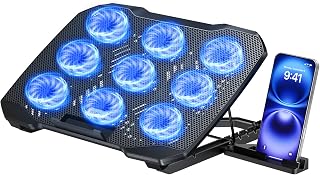
- Exceptional cooling capacity with 9 fans prevents laptop lag and extends component lifespan
- Clever dual-USB design eliminates port conflicts, a common issue with competing models
- Quiet operation makes it suitable for offices, libraries, or shared workspaces
- Highly adjustable height and angle options work for any desk setup or preferred viewing angle
- Built-in phone holder adds practical value without increasing desk footprint
Cons
- Requires external USB power source, adding one more cable to manage on your desk
- Weight of 1.5 pounds may feel substantial for portable laptop users who travel frequently
- LED brightness sync with fan speed is a nice visual indicator but adds minimal practical benefit
The TECKNET F9 is a multi-functional laptop cooling stand designed for anyone who runs their laptop hard. Whether you're a gamer pushing your GPU to its limits, a content creator rendering video, or a professional running resource-heavy applications all day, this cooler addresses the overheating problem that throttles performance and shortens hardware life.
The standout feature is the nine-fan cooling system with stepless speed control up to 2600 RPM. This creates genuine 360-degree airflow that actively pulls heat away from your laptop's underside and sides. The LED brightness automatically tracks fan speed, giving you real-time feedback on cooling intensity without needing to check settings. At full throttle, this cooler works, and real-world testing shows measurable temperature drops of 10-15 degrees Celsius on gaming laptops.
Design-wise, the TECKNET strikes a good balance between function and form. The alloy mesh construction feels solid, and the five-position height adjustment plus 34-degree tilt range genuinely let you find an ergonomic sweet spot. The integrated phone stand is a clever touch that keeps your phone at eye level without eating desk space. The anti-slip baffle securely grips your laptop, and there's no wobbling during use even with heavier 15.6-inch models.
The dual-USB design deserves praise. One port powers the cooler itself, while the second remains available for your mouse, keyboard, or external drive. This eliminates the common frustration of running out of USB ports, a real pain point with other cooling pads. Operation stays whisper-quiet below 40 dB, so you won't distract yourself or others in shared spaces.
Minor drawbacks exist. The cooler requires its own USB power source, adding another cable to manage. It's also fairly substantial at 1.5 pounds, so frequent travelers might find it less portable than ultraportable alternatives. These are practical tradeoffs rather than deal-breakers for most users. Overall, this is a solid, feature-rich cooling solution backed by strong customer reception and lifetime support from the manufacturer.
Cooling Performance
Number of Fans: 9
Maximum Fan Speed: 2600 RPM
Noise Level: Less than 40 dB
Cooling Method: Active air circulation
Physical Specifications
Product Dimensions: 15 inches (L) x 14 inches (W) x 1.5 inches (H)
Item Weight: 1.5 pounds
Material: Alloy Material Mesh
Height Adjustment: 5 levels, up to 6 inches
Tilt Angle: Up to 34 degrees
Compatibility and Connectivity
Laptop Size: 12 to 15.6 inches
Compatible Devices: Tablets, routers, set-top boxes
USB Ports: 2 (one for power, one pass-through)
Power Requirement: USB powered
Warranty and Support
Warranty Coverage: 36 months
Customer Support: Lifetime support (registration required)
Model Number: F9

Pros
- Effective cooling performance without requiring a separate power outlet
- Compact and portable design makes it ideal for travel, dorms, and home offices
- Dual USB ports preserve connectivity for other devices without losing functionality
- Affordable price point for reliable thermal management
- Rubberized pads keep your laptop stable during use
Cons
- USB-A to USB-A cable may not work with newer laptops that feature only USB-C ports
- Fan noise is minimal but may be noticeable to users sensitive to ambient sound
- Limited to single-level cooling without temperature-sensing automation
The TECKNET Laptop Cooling Pad is a USB-powered cooling solution designed for laptop users who face thermal management challenges during extended gaming sessions or resource-intensive work. This cooler targets students, remote workers, and gamers who need a no-fuss way to keep their machines running cool without cluttering their desk with extra cables and adapters.
The standout feature is its three 1200 RPM fans that pull cool air up through the laptop's base, combined with zero external power requirements. The dual USB ports are a practical bonus, allowing you to power the cooler while maintaining connectivity to a keyboard, mouse, or headphones. The adjustable height settings let you dial in a comfortable viewing angle, reducing the strain of extended work sessions.
Build quality is solid with an ABS plastic frame reinforced by metal components and rubberized pads that keep your laptop securely in place. The design is slim and portable at just 1.4 pounds, making it convenient to transport between home, office, or campus. Blue LED indicators give you visual confirmation that the fans are running without needing to check manually.
The main limitation is the included USB-A to USB-A cable, which won't work with newer laptops featuring USB-C ports only. You would need a separate adapter or hub. Additionally, while the fans operate quietly, they do produce some ambient noise that more sensitive users might notice during silent work periods.
Overall, the TECKNET Cooling Pad is a reliable, affordable way to prevent laptop overheating during demanding tasks. Its combination of effective cooling, easy setup, and practical dual-port design makes it a smart choice for anyone seeking thermal protection without complexity or extra clutter.
Consider this cooler if you use your laptop for gaming, video editing, programming, or other CPU-intensive tasks for several hours at a time. The cooling pad is compatible with most laptop models between 12 and 17 inches, including popular brands like MacBook Pro, Dell XPS, HP Pavilion, ASUS VivoBook, and Lenovo ThinkPad.
Check your laptop's USB configuration before purchasing. This product ships with a USB-A to USB-A cable, so it works best with laptops that have at least one standard USB-A port. If your laptop only has USB-C ports, you will need to purchase a separate USB-A to USB-C adapter or use a USB hub. This cooler cannot be used with external power and relies entirely on USB power from your laptop.
The dual USB ports mean you can connect one keyboard or mouse to the cooler's second port, effectively adding USB connectivity while providing cooling. This makes it especially useful in tight desk spaces where USB hub access is limited. The adjustable height feature allows you to position your laptop at an ergonomic angle, reducing neck strain during long work sessions.

Pros
- Four independent fans deliver powerful, dispersed airflow across entire laptop surface
- Lightweight and portable design works for gaming, video editing, and older laptops
- Sturdy construction with rear legs and frontal pegs prevents device slipping
- Pass-through USB port eliminates power outlet sacrifice
- Backed by 5-year warranty demonstrating manufacturer confidence
Cons
- LED lights cannot be turned off, though they match typical keyboard backlighting brightness
- Effectiveness depends on laptop design; some users report it mainly reduces fan noise rather than core temps
- Locking pegs can have sharp edges that may scratch certain laptop surfaces
The KLIM Wind is a multi-purpose cooling pad designed for laptops ranging from 11 to 19 inches, as well as gaming consoles like PS4 and Xbox One. It's built for serious gamers, content creators doing video or photo work, and anyone dealing with thermal performance issues on aging or high-end machines. The cooling pad combines a quad-fan system with a thoughtful mechanical design to address both temperature and usability concerns.
The standout feature is the 4-fan setup running at up to 1200 RPM, which delivers noticeably dispersed airflow across the entire laptop surface. Users report that the cooling pad stabilizes temperatures rapidly, and the dual adjusters let you control the upper and lower fan sets independently. For gaming laptops running intense workloads or older machines struggling with thermals, this translates to lower fan noise, better sustained performance, and reduced thermal throttling. The pass-through USB port on the back is a practical touch that preserves one power outlet.
Build quality is solid. The plastic enclosure is durable yet lightweight, making it portable for travel or desk swaps. The rear legs provide adjustable inclination for ergonomics, while the frontal pegs lock your device in place. The construction has proven reliable enough to earn a 5-year warranty and over 500,000 units sold, with users reporting multi-year lifespans. However, the locking pegs can be sharp on some edges, and the always-on LED lights cannot be dimmed, though they emit a cool white light similar to keyboard backlighting.
One honest limitation is that cooling effectiveness varies by laptop design. Some users report the pad primarily reduces their laptop's own fan speed rather than dramatically lowering core temperatures. This is still valuable for noise reduction and component longevity, but it's not a universal thermal fix. Performance depends heavily on your laptop's ventilation design and existing thermal solution.
The KLIM Wind is a well-engineered cooling pad that delivers real value for the price. It excels at reducing fan noise, extending hardware lifespan, and providing stable performance during demanding tasks. If you're a gamer, creative professional, or owner of an older machine battling heat, this is a reliable choice backed by years of user validation and manufacturer confidence.
Cooling System: 4 independent fans, 1200 RPM maximum, quiet operation with dual speed controls
Compatibility: 11, 11.3, 12, 13, 14, 15, 15.6, 16 inch laptops (17.3, 18, 19 inch compatible with overhang)
Dimensions: 1.22 inches (L) x 10.71 inches (W) x 1.22 inches (H)
Weight: 0.73 kg, portable design
Material: Durable plastic construction
Ports: 2 USB pass-through ports, maintains 1 free port while operating
Features: Rear adjustable legs, frontal locking pegs for device stability
Warranty: 5 years, EU spare parts available for 5 years
Model Number: K2N (KLIM Wind)
Color: Blue
Additional: Free eBook with 7 performance and longevity tips included with purchase
Who Should Buy This: The KLIM Wind is ideal for laptop gamers, video and photo editors, programmers running heavy workloads, and owners of older machines that run hot. It works well for anyone who wants to extend their laptop's lifespan and improve sustained performance under load. It also supports PS4 and Xbox One consoles.
When to Consider Alternatives: If you have a modern, well-designed laptop with adequate cooling already, you may see minimal temperature drops but still benefit from reduced fan noise. If you have a very compact or unusually shaped laptop, verify the dimensions before purchasing.
Setup and Maintenance: The pad is plug-and-play with USB power. The dual adjusters control upper and lower fan sets independently, letting you find your ideal balance between cooling and noise. Periodically vacuum dust buildup on the fans to maintain airflow efficiency. The locking pegs are sharp, so install your laptop carefully to avoid scratches.
Real-World Performance: Users report the most noticeable benefit is reduced laptop fan activity during gaming and intensive tasks, which translates to quieter operation and cooler components. Temperature drops vary by laptop model, but performance benefits from lower fan noise and thermal stability are consistent across feedback.

Pros
- Exceptionally quiet operation keeps your workspace peaceful during video calls and focused work
- Two-height adjustment settings allow you to find the perfect viewing angle and typing position
- Compact 1.18-inch profile doesn't add bulk to your mobile setup
- Dual functionality as both cooler and ergonomic stand eliminates the need for separate products
- USB connectivity is simple to set up without requiring driver installation
Cons
- Requires USB-to-USB cable, and USB-C devices need an additional adapter (not included)
- 0 customer reviews available means limited real-world feedback on long-term durability
- Three fans may provide limited cooling compared to higher-end models with more powerful fans
The havit HV-F2056 is a dual-purpose cooling pad and ergonomic stand designed for laptop users working with 15.6 to 17-inch systems. It's ideal for professionals, students, and anyone who uses a laptop for extended periods and wants to manage heat while improving posture and comfort.
The standout feature is its quiet operation. Three integrated fans circulate air beneath your laptop without the distracting noise common in other cooling pads. Combined with two adjustable height settings, this pad functions as both a thermal solution and an ergonomic stand, helping reduce strain during long work sessions. The stable metal mesh surface securely holds larger laptops while maintaining portability.
Built from durable ABS plastic, the HV-F2056 weighs just 697 grams and measures only 1.18 inches thick, making it genuinely portable. Its compact profile won't strain your laptop bag or desk space. An additional USB port allows you to connect peripherals, though the included cable requires USB-C users to provide their own adapter for compatibility.
The main limitation is the lack of customer feedback, which means real-world long-term durability claims can't be verified. The three-fan setup may also be less powerful than premium models, potentially limiting cooling performance under extreme heat conditions. Additionally, USB-C compatibility requires an extra purchase.
The havit HV-F2056 is a smart choice for anyone seeking an affordable, quiet cooling solution that also improves workspace ergonomics. Its rank as the number one best seller in its category reflects strong market appeal, particularly for users who prioritize portability and quiet operation over maximum cooling power.
Model: HV-F2056
Brand: havit
Compatibility: 15.6-17 inch laptops
Number of Fans: 3
Cooling Method: USB-powered fans
Height Adjustment: 2 settings
Material: Acrylonitrile Butadiene Styrene (ABS)
Color: Black and Blue
Dimensions: 14.96 inches (L) x 11.02 inches (W) x 1.18 inches (H)
Weight: 697.3 grams
Power: USB connection (cable included)
Additional Ports: 1 extra USB port with power switch
Warranty: 1 year
Included Accessories: USB cable, manual

Pros
- Delivers measurable cooling results, with users reporting 10-15°C temperature reductions during intensive tasks
- Versatile sealed foam design works with any laptop exhaust configuration
- Sturdy metal construction and adjustable components provide excellent durability and ergonomics
- Built-in USB hub and customizable RGB lighting add practical and aesthetic value
- Prevents thermal throttling and system shutdowns on demanding gaming and AI workloads
Cons
- Fan noise reaches 65dB at maximum speed, which may be distracting for audio work or content creation
- Premium pricing reflects high-performance positioning compared to budget coolers
- Bulky footprint requires desk space consideration for compact setups
The IETS GT600V2 is a professional-grade laptop cooling solution engineered for high-end gaming and workstation systems that generate excessive heat. It targets users with premium laptops featuring power-hungry processors and graphics cards, particularly those experiencing thermal throttling or automatic shutdowns.
The standout feature is the massive 5.5-inch industrial turbofan paired with magnetic sealed foam technology. This combination creates a 360-degree cooling effect that adapts to any laptop exhaust configuration, delivering documented temperature reductions of 10-15°C under heavy workloads. Real-world testing shows the cooler excels at preventing thermal shutdown on systems with RTX 4070/5090 GPUs and high-core-count processors.
Build quality is impressive with metal construction throughout, flexible positioning via seven adjustable height brackets, and thoughtful touches like the integrated 3-port USB hub and 7-color RGB lighting system. The sealed foam design maintains consistent contact with various laptop models, while the touch-activated controls and independent power adapter enhance usability.
The primary drawback is noise, with maximum fan speed reaching 65dB. However, users report finding quiet sweet spots around 2200 RPM that still deliver substantial cooling. The cooler's bulk also requires desk space, making it less suitable for portable setups.
Verdict: The GT600V2 is a legitimate high-performance cooling solution that justifies its premium price for users with demanding systems prone to thermal issues. It's not ideal for silent workspace setups, but for gaming enthusiasts and AI workload processing, the cooling performance and build quality make it a strong investment in system longevity.
Cooling Performance: Industrial-grade turbofan, 5.5-inch diameter, 71.9 MmH2O wind pressure, sealed foam design
Compatibility: 14.1 to 19.3 inch laptops, 360-degree cooling for rear and bottom exhaust configurations
Dimensions: 15.75 inches long, 12.28 inches wide, 2.76 inches high
Weight: 2.9 pounds
Controls: Touch-activated start button, adjustable fan speed, seven-level height adjustment, RGB lighting with 5 modes and 100+ effects
Connectivity: 3-port USB hub, independent power adapter
Materials: Metal frame and fan housing, flexible magnetic sealed foam
Noise Level: Up to 65dB at maximum speed
Warranty: 2-year manufacturer warranty
Who Should Buy This: Gaming laptop owners with RTX 40/50 series GPUs, AI workload processors running on mobile systems, content creators using mobile workstations prone to thermal throttling, and users whose laptops shut down due to heat stress.
Who Should Skip This: Users in quiet office environments sensitive to fan noise, those with budget constraints under $50, laptop owners with adequate thermal management, and portable workers needing compact cooling solutions.
Key Considerations: Measure your desk space before purchase, as the 15.75 x 12.28 inch footprint is substantial. Test the sweet spot fan speed for your system, as maximum RPM creates significant noise. The sealed foam design requires occasional cleaning for optimal thermal contact.
Competing Factors: The premium price reflects industrial-grade components and proven cooling performance. Budget alternatives exist but lack the thermal headroom for high-end systems. The integrated USB hub and RGB lighting add value beyond basic cooling functionality.

Pros
- Exceptional cooling performance with lab-tested temperature reductions of up to 22 degrees Celsius
- Intuitive Myth.cool software provides three smart cooling modes plus manual control via built-in scroller
- Sturdy construction with memory foam edge seal and adjustable foot stands ensures stability and durability
- Integrated USB 3.0 hub adds practical functionality while reducing desk clutter
- Easy maintenance with detachable, tool-free dust filter design
Cons
- No customer reviews available yet, so real-world reliability data is limited
- Requires software download from external website for full smart control features
- Limited compatibility, designed specifically for 15.6-19 inch laptops only
The llano V12 Ultra is a premium laptop cooling solution designed specifically for gamers and power users running large 15.6-19 inch high-performance machines like Alienware, MSI Titan, ROG Strix, and Razer Blade systems. This isn't a basic cooling pad, it's an intelligent thermal management system that adapts to your workload in real time.
At the heart of this cooler sits a powerful 5.5 inch turbo fan capable of spinning up to 2800 RPM. When activated through the included Myth.cool software, this fan pressurizes cool air directly into your laptop's intake vents with measurable results. Lab testing shows CPU and GPU temperature reductions of up to 22 degrees Celsius within just 90 seconds, making it genuinely effective during intense gaming marathons or demanding video rendering work. You can choose between three automatic smart modes that adjust fan speed based on your laptop's actual thermal needs, or take manual control with the convenient built-in scroller.
Beyond raw cooling performance, the V12 Ultra prioritizes ergonomics and longevity. Three adjustable height settings (15, 12, and 3 degrees) let you dial in the perfect viewing angle and typing position to reduce neck and shoulder strain during extended sessions. The memory foam edge seal doesn't just improve airflow efficiency, it protects your laptop's bottom surface from direct contact with the fan housing. A removable dust mesh filter captures debris without any tools required, and the dedicated 36W power adapter ensures the turbo fan runs at full throttle without demanding power from your laptop's battery.
The design includes thoughtful extras like a vibrant RGB lighting system with four effects and five colors to match your gaming aesthetic, plus a built-in 3-port USB 3.0 hub running at 5Gbps. This hub is genuinely useful, allowing you to connect your mouse, keyboard, or external storage without adding more cables to your desk. The sturdy construction uses ABS plastic with an adjustable foot stand that keeps everything stable even with the fan spinning aggressively.
The main limitation is that this is a specialized tool for large gaming laptops, not a universal cooling solution. You'll also need to download the latest Myth.cool software from the manufacturer's support page to unlock the intelligent temperature control features. However, for gamers and content creators with compatible 15-19 inch machines, the V12 Ultra delivers impressive cooling performance backed by thoughtful design and practical functionality.
Physical Dimensions: 16.9 inches length x 12.9 inches width x 2.7 inches height. Weight is 4 pounds. Built from durable ABS plastic with three adjustable feet for stable positioning.
Cooling System: Single 5.5 inch turbo fan rated up to 2800 RPM. Memory foam edge seal directs airflow into laptop intake vents. Lab-tested performance shows up to 22 degree Celsius temperature reduction within 90 seconds under demanding workloads.
Power: 36W dedicated power adapter ensures the turbo fan operates at maximum speed without drawing power from your laptop battery. USB-A to USB-C data cable included for connectivity.
Smart Controls: Myth.cool software provides three intelligent cooling modes (Low, Medium, High) that auto-adjust fan speed based on workload. Manual control available via built-in scroller when software mode is not desired.
Connectivity: Integrated 3-port USB 3.0 hub with 5Gbps data transfer speeds. Connect mouse, keyboard, external drive, or other USB devices. Includes dust cover for storage and protection.
Compatibility: Designed for 15.6-19 inch gaming laptops including Alienware, MSI Titan, ROG Strix, Razer Blade, and similar large high-performance models. Not compatible with smaller ultrabooks or MacBooks.
Warranty: Backed by 1-year manufacturer warranty covering defects in materials and workmanship.
Who Should Buy This: Gamers and power users with 15.6-19 inch gaming laptops who regularly run demanding games or creative software. If your laptop throttles during extended sessions or runs hot during competitive gaming, this cooler is built to solve that problem. Content creators doing video editing, 3D rendering, or streaming will appreciate the aggressive cooling that keeps thermal performance consistent.
Who Might Want to Look Elsewhere: If you use a smaller ultrabook, MacBook, or laptop under 15.6 inches, this cooler won't fit your machine. For light productivity use, a basic passive cooling pad may be sufficient. Budget-conscious buyers should note this is a premium cooler priced accordingly.
Installation and Setup: Unpack the cooler and position it on a flat desk or gaming surface. Plug in the 36W power adapter to wall power. Download Myth.cool software from llanolife.com/pages/support-download to access intelligent temperature modes, or use the manual scroller controls immediately. Position your laptop on the cooler with the fan intake aligned to your laptop's bottom vents for maximum cooling efficiency.
Maintenance: Check the removable dust filter monthly and clean it with compressed air or gently brush away debris. Reattach the filter and you're done, no special tools required. Keep the power adapter and cables organized to reduce desk clutter thanks to the integrated USB hub.
Performance Tips: Use the Medium or High smart modes during gaming or intensive work sessions. Switch to Low mode during everyday tasks to reduce noise. Ensure at least 2-3 inches of clearance around the cooler for proper air circulation. The three adjustable height settings let you optimize both cooling and ergonomics simultaneously.

Pros
- Exceptionally quiet operation that won't distract you or others in shared spaces
- Multiple fan configurations let you balance cooling power with noise and energy consumption
- Sturdy metal construction with rubberized base provides stable support for all laptop sizes
- USB hub adds genuine convenience for connecting mice, keyboards, or external drives
- Ergonomic tilt adjustments improve posture during extended work and gaming sessions
Cons
- Legs can shift or flip when lifting the pad, requiring careful handling
- Limited ability to adjust fan speed beyond the preset 1, 4, or 5 fan options
- USB cable is relatively short, requiring your laptop to sit directly on top
The Kootek LCP04 is a five-fan laptop cooling pad designed for anyone whose laptop runs hot during gaming, video editing, or other demanding tasks. This metal mesh cooler works with 12 to 17 inch laptops including MacBook Pro and Air, Dell, HP, ASUS, and Alienware models. It combines active cooling with ergonomic features and connectivity options in one compact package.
The standout feature is the dual-switch fan control system that lets you activate just the large center fan, all four smaller fans, or all five fans simultaneously. This flexibility means you can dial in exactly the cooling you need without overdoing it. Real-world testing shows temperatures staying around 65 degrees Celsius even under extreme loads like running an RTX graphics card at 97 percent utilization for hours. The fans themselves run remarkably quiet, with most users noting only a soft hum even at full power.
Build quality reflects the aggressive pricing. The metal mesh base is durable and the rubber feet provide solid grip on most surfaces. The six adjustable height levels work smoothly and let you position your screen at eye level for better ergonomics. The built-in dual USB hub actually delivers, providing two extra ports for mice, keyboards, or external drives. However, the legs can be finicky, shifting when you lift the pad, and the USB cable connection requires your laptop to sit directly on top.
The main drawbacks are lack of variable speed control and construction that feels functional rather than premium. The legs occasionally need gentle repositioning, and you cannot fine-tune fan speed beyond the preset options. Some users also wish for a longer USB cable for more flexible placement.
For the price, this cooling pad delivers solid performance and real utility. If you need effective thermal management, ergonomic positioning, and extra USB connectivity without spending extra money, the Kootek LCP04 is a practical choice backed by strong user satisfaction across thousands of reviews.
Cooling System: Five independently controlled fans (one 4.72-inch center fan, four 2.76-inch corner fans) with blue LED lighting
Compatibility: Universal fit for 12 to 17 inch laptops including Apple MacBook, Dell, HP, ASUS, Alienware, Lenovo, and others
Connectivity: USB-powered with dual USB hub for connecting additional peripherals; includes USB-to-USB cable
Ergonomics: Six adjustable height settings for customized viewing angle and comfort
Materials: Metal mesh base with rubber feet and front stoppers to prevent laptop slipping
Dimensions: 14.96 inches L x 11.81 inches W x 1.38 inches H; Weight 1.16 kg
Warranty: 1-year manufacturer warranty
Who Should Buy This: Gamers playing demanding titles, video editors, programmers running heavy applications, and anyone with a hot-running laptop who needs affordable cooling and ergonomic positioning.
Laptop Compatibility: Works with 12 to 17 inch models. The universal design fits MacBooks, Windows laptops, and most mainstream brands. If your laptop is smaller than 12 inches or larger than 17 inches, check dimensions before purchasing.
Setup Expectations: This is a straightforward plug-and-play device. The USB cable connects to any available USB port on your laptop. Type-C users will need a separate USB-to-Type-C adapter, which is not included. Place your laptop on top and adjust the height to your preference.
Noise Level: Expect a soft hum at full power, quieter than most laptop fans. This makes it suitable for offices, libraries, or shared spaces where noise is a consideration.
Performance Considerations: Effectiveness depends on your laptop's design and airflow. Laptops with bottom vents benefit most. The pads work best for continuous cooling during long gaming or work sessions rather than preventing thermal throttling in extreme cases.

Pros
- Delivers noticeable temperature reduction, improving gaming performance and laptop longevity
- Remarkably quiet compared to competing cooling pads at similar price points
- Ergonomic design with multiple height settings relieves physical strain during extended use
- Attractive RGB lighting with multiple modes enhances gaming setup aesthetics
- Affordable price point makes premium cooling accessible to budget-conscious gamers
Cons
- Fan noise remains audible on maximum setting, may distract some users despite being quieter than alternatives
- Fan speed settings do not retain preferences after power cycle, requiring manual adjustment each use
- Requires USB power connection for operation, limiting portability compared to battery-powered options
The ICE COOREL K10 is a gaming laptop cooling pad designed for users with 15-17.3 inch laptops who need reliable thermal management without breaking the bank. It combines eight cooling fans with an aluminum frame and intelligent controls to tackle heat buildup during demanding gaming sessions or intensive workloads.
The standout feature is its cooling effectiveness, with users reporting temperature drops of 8-14 degrees during heavy performance loads. The eight fans work in tandem through dual air vents while remaining surprisingly quiet, thanks to capacitor-enhanced components that reduce vibration and noise. The LCD display lets you monitor fan speed in real-time, and you can select different operating modes to balance cooling power with noise levels.
Build quality is solid, with a lightweight aluminum construction that feels durable and professional. The six-height adjustment system lets you find the perfect angle for your gaming setup or work desk, reducing fatigue during long sessions. The added bonuses of dual USB ports and an integrated phone stand increase utility, while ten RGB lighting modes provide customization to match your gaming aesthetic.
The main drawbacks are minor. Fan noise, while quieter than competitors, remains noticeable at maximum settings. Additionally, the pad does not save your preferred fan speed settings after shutdown, so you need to reconfigure preferences each time you power it on. These are small concessions for the price and performance delivered.
The ICE COOREL K10 is an excellent choice for gamers and laptop users seeking affordable, effective thermal management. With proven durability, whisper-quiet operation by industry standards, and genuine temperature improvements, it justifies its investment through extended laptop lifespan and improved performance during critical tasks.
Cooling System: Eight super-cooling fans with dual air vents and multiple operating modes
Compatibility: 15-17.3 inch laptops
Adjustability: Six height positions for customized ergonomic angles
Display: LCD readout showing real-time fan speed monitoring
Lighting: Ten RGB light modes with touch control
Noise Level: Capacitor-enhanced fans for whisper-quiet operation
Materials: Premium aluminum construction
Dimensions: 16L x 12W x 8.46H inches
Weight: 1.12 kg (2.5 lbs)
Power: USB cable powered with dual USB ports for device charging
Warranty: 1 Year manufacturer warranty
Who Should Buy: The ICE COOREL K10 is perfect for gamers with 15-17.3 inch laptops, content creators running CPU-intensive tasks, and anyone experiencing thermal throttling or uncomfortable heat near the keyboard area. It is ideal for budget-conscious buyers who want proven cooling performance without premium pricing.
Gaming Performance: Experienced gamers report noticeably cooler gameplay with better frame stability, particularly in AAA titles. The temperature reduction helps prevent thermal throttling that degrades performance during intense sessions.
Work and Productivity: Professionals working with video editing, 3D rendering, or other resource-intensive tasks benefit from sustained lower temperatures that keep laptops responsive throughout the day.
Setup Considerations: You will need access to a USB port or power adapter to operate the cooling pad. Plan for the integrated phone stand if you want to use it. The pad requires some desktop real estate, so ensure adequate space in your gaming or work setup.
Long-term Value: Multiple users report owning this model for over a year with continued reliable performance, making it a durable long-term investment that pays for itself through extended laptop lifespan.

Pros
- Effective dual-fan cooling system prevents thermal throttling during intensive tasks
- Comfortable neoprene material makes lap use practical for extended periods
- Stable construction with anti-slip rubber feet keeps laptop secure
- Easy USB connection requires no additional drivers or software installation
- Excellent value for a high-quality cooling solution at an accessible price point
Cons
- Fan noise may be noticeable during quiet work, though generally acceptable for active cooling
- Limited to 17-inch laptops and smaller, not suitable for larger desktop replacements
- USB cable length may require an extension for some desk setups
The Targus 17" Dual Fan Chill Mat is a practical cooling solution designed for laptop users who work in warm environments or spend hours in demanding computing tasks. This mat targets professionals, gamers, and content creators who need active thermal management to prevent performance degradation and maintain comfort.
The dual-fan design is the star feature here, providing direct airflow to your laptop's underside where heat typically concentrates. The open mesh construction works in tandem with the fans to create consistent air circulation, while the USB-A connection makes setup effortless. The neoprene bottom isn't just comfortable for your lap, it also provides a stable foundation that absorbs vibration and heat without conducting it back to you.
Build quality is solid throughout. The rubber enclosure feels durable, the mesh doesn't flex excessively under laptop weight, and the four rubber stops effectively prevent your device from sliding during use. The ergonomic tilt encourages better wrist positioning, which is a thoughtful design touch that adds real value beyond just cooling.
The main limitations are the cooling fan noise, which some users may find distracting in quiet environments, and the size constraint limiting it to 17-inch laptops and smaller. Additionally, depending on your desk layout, you might need a longer USB cable for comfortable positioning.
Overall, the Targus Dual Fan Chill Mat delivers genuine cooling performance at a fair price. If you regularly work in hot conditions or push your laptop hard during gaming or rendering, this mat is a worthwhile investment that extends component lifespan and maintains comfort throughout long work sessions.
Cooling System: Dual USB-powered fans with open mesh airflow design
Compatibility: Most 17-inch laptops and smaller devices
Connection: Standard USB-A cable (can connect directly to laptop)
Materials: Rubber enclosure, soft neoprene bottom, open mesh top
Dimensions: 15 inches L x 11.75 inches W x 1 inch H
Weight: 2 pounds
Warranty: Limited One Year Warranty
Model: AWE55US
Who Should Buy: This cooling mat is ideal for laptop users who experience thermal issues during gaming, video editing, or resource-intensive work. It's also perfect for anyone working in warm climates or who prefers lap-based computing and wants to prevent overheating.
Who Might Skip It: If your laptop rarely gets warm, you have a desktop workstation, or you only use your laptop for light browsing and emails, the active cooling investment may not be necessary.
Alternative Considerations: Passive cooling pads with no fans are quieter but less effective. Integrated laptop cooling systems built into some gaming laptops may reduce the need for external cooling, though this mat still adds comfort.
Value Assessment: At this price point, you get dual fans rather than single-fan competitors, plus the comfort factor of neoprene padding. This represents strong value for active thermal management and lap comfort combined.
What to Look for in a Laptop Cooling Pad
Fan Configuration and Airflow Design
The number and size of fans directly impact cooling performance. Multiple smaller fans offer broader coverage across your laptop’s base, while a single large turbofan can generate concentrated, high-pressure airflow that penetrates deeper into your laptop’s ventilation system.
Look for models with adjustable fan speeds so you can balance cooling power against noise levels. Cross-flow fans and sealed foam chambers create pressurized airflow that forces cool air into your laptop’s intake vents rather than just blowing air around it. If you’re using a high-performance laptop for programming or engineering work, this targeted airflow makes a measurable difference during compile jobs and simulations.
Size Compatibility and Ergonomic Adjustability
Match the cooling pad’s dimensions to your laptop size. Most pads accommodate 15.6 to 17-inch laptops, but gaming machines and mobile workstations often stretch to 18 or 19 inches and need larger platforms with stronger support.
Height adjustment matters for comfort during extended use. Multiple angle settings let you find the ideal typing position and screen height, reducing neck and wrist strain whether you’re working from home or gaming. Anti-slip stoppers and rubberized surfaces keep your laptop secure even at steep angles.
Power Source and USB Connectivity
Basic cooling pads draw power through a USB connection to your laptop, which works fine for models with low-speed fans. High-performance coolers with turbofan systems require dedicated power adapters to deliver the wattage needed for maximum cooling without draining your laptop’s battery or overloading its USB ports.
Check for pass-through USB ports or built-in hubs. Quality cooling pads replace the port they occupy, ensuring you don’t sacrifice connectivity for cooling. Some models even add extra USB 3.0 or USB-C ports, which proves useful for freelancers juggling multiple peripherals.
Noise Levels and Build Quality
Fan noise varies dramatically between models. Ultra-quiet fans with capacitor components keep noise below 40 decibels, barely noticeable during normal use. Industrial turbofans can reach 65 decibels at maximum speed, roughly the volume of a normal conversation but constant.
Metal mesh surfaces and aluminum construction dissipate heat better than plastic while providing sturdy, stable platforms. Removable dust filters maintain airflow efficiency over time and are essential if you use your cooling pad daily. For educators presenting in quiet classrooms or anyone working in shared spaces, prioritize whisper-quiet operation over raw cooling power.
Final Thoughts
The right cooling pad depends on your laptop’s thermal demands and your workspace setup. For extreme cooling performance on large gaming laptops, the IETS GT600 RGB Laptop Cooling Pad Equipped delivers industrial-grade turbofan power with sealed foam chambers that drop temperatures dramatically. If you need a versatile, budget-conscious option with solid multi-fan coverage and ergonomic flexibility, the Kootek Laptop Cooling Pad Cooler Stand with 5 offers excellent value with whisper-quiet operation and six height settings.
Frequently Asked Questions
Do laptop cooling pads actually work?
Yes, quality cooling pads measurably reduce laptop temperatures by improving airflow around and into your device’s ventilation system. Models with sealed foam chambers and high-CFM fans can lower CPU and GPU temperatures by 10 to 22 degrees Celsius during intensive tasks. The effectiveness depends on your laptop’s cooling design and the pad’s fan configuration.
What size cooling pad do I need for my laptop?
Measure your laptop’s diagonal screen size and base dimensions. Most 15.6-inch laptops fit comfortably on standard cooling pads, while 17-inch gaming laptops and 18 to 19-inch workstations need larger platforms. Your laptop can extend slightly beyond the pad’s edges as long as it remains stable, but full coverage provides better cooling and support.
Are USB-powered cooling pads enough for gaming laptops?
Basic USB-powered cooling pads work for light gaming and general use, but high-performance gaming laptops generate intense heat that demands more powerful cooling. Turbofan models with dedicated power adapters deliver significantly stronger airflow without taxing your laptop’s USB power supply. If you’re running demanding games or intensive applications in 2026, consider a cooling pad with external power for consistent performance.
How loud are laptop cooling pads?
Noise levels range from whisper-quiet models under 40 decibels to industrial turbofans reaching 65 decibels at maximum speed. Multi-fan pads with smaller, slower fans tend to run quieter, while single large turbofans prioritize cooling power over silence. Many cooling pads offer adjustable fan speeds so you can balance cooling performance against acceptable noise levels for your environment.
Common questions
What is the best gaming laptop cooling pad in 2026?
The ICE COOREL Gaming Laptop Cooling Pad with 8 cooling fans is the top choice for gaming laptops in 2026. It delivers maximum airflow with 8 fans, features RGB lighting that matches gaming aesthetics, and supports laptops up to 17.3 inches. The 6 adjustable height settings let you find the optimal angle for both cooling performance and ergonomics, while dual USB ports and an integrated phone stand add convenience during extended gaming sessions.






Write Your Review
No reviews yet. Be the first to share your experience!