

Your neck shouldn’t ache after a full day of work. Yet most of us hunch over laptops placed flat on desks, forcing our heads down at uncomfortable angles for hours. A quality laptop stand solves this by raising your screen to eye level, letting you work in a neutral posture that reduces strain on your neck, shoulders, and spine.
This guide covers 10 standout laptop stands across different styles and budgets. Whether you need a fixed aluminum riser for your home office, a collapsible stand for travel, or an adjustable model that transitions from sitting to standing, you’ll find options that fit your workflow. We’ve also included stands with unique features like 360-degree rotation and built-in wrist support.
Quick answer
This guide compares 10 picks, with BESIGN LS03 Aluminum Laptop Stand, Ergonomic Detachable ranked first.

Pros
- Exceptional build quality with premium aluminum alloy that feels solid and looks professional
- Dramatically reduces neck and shoulder pain through proper ergonomic elevation
- Excellent heat dissipation keeps your laptop cool during intensive work or video calls
- Works with virtually all laptop brands including MacBook, Dell, HP, Lenovo, and Chromebooks
- Simple assembly and tool-free setup makes it ready to use right out of the box
Cons
- Limited height adjustment range may not suit extremely tall users seeking maximum elevation
- Relatively lightweight at 700g means it could shift if your desk surface is uneven
- Requires adequate desk space to accommodate the base footprint effectively
The BESIGN LS03 is a premium aluminum laptop stand designed for professionals, remote workers, and students who spend extended hours at their desk. If you struggle with neck pain, poor posture, or desk organization, this stand delivers practical relief through elegant, minimalist design.
The standout feature is its ergonomic elevation system. By raising your laptop screen 5.7 inches, it positions the top of your display at eye level, naturally correcting forward head posture. Combined with a separate keyboard and mouse setup, this creates a proper workstation that reduces strain on your neck, shoulders, and back. Users consistently report noticeable pain relief within days of use.
Build quality is genuinely impressive for the price point. The premium aluminum alloy construction feels substantial and stable, supporting laptops up to 8.8 pounds without wobble. Rubber padding on the contact points prevents scratches while keeping your device firmly in place. The open lattice design is more than aesthetic, it actively promotes airflow around your laptop, preventing thermal throttling during video calls or intensive tasks.
Assembly takes minutes with the detachable design requiring no tools. The stand folds flat for travel or storage, making it ideal for people who move between home and office. The universal mounting system accommodates laptops from 10 to 15.6 inches across all major brands, so you'll use this for your next device too.
The only real limitations are that extreme height adjustments aren't possible and the stand needs a stable, level surface to prevent shifting. For its price and performance, the BESIGN LS03 is an exceptional value that transforms your workspace ergonomics while keeping your desk clean and organized.
Dimensions: 10.24 x 9.45 x 5.71 inches, Weight: 700g
Elevation: Raises laptop 14.5cm (5.7 inches) for optimal viewing angle
Compatibility: Fits all laptops 10 to 15.6 inches including MacBook Air, MacBook Pro, Lenovo ThinkPad, Dell, HP, ASUS, Chromebook, and other notebooks
Load Capacity: Supports up to 8.8 lbs (4kg)
Material: Premium aluminum alloy with rubber protective padding
Assembly: Detachable design, 3-step assembly with no tools required
Storage: Folds flat for portability and space-saving storage
Warranty: 12-month manufacturer warranty

Pros
- Exceptional build quality in premium aluminum with sand-blasted finish that feels substantial and durable
- Dramatically improves posture and reduces neck, shoulder, and back strain during all-day laptop work
- Thoughtful cable management design keeps wires hidden and desk appearance clean
- Compatible with both Apple and Windows laptops, offering broad applicability
- Backed by 1-year manufacturer warranty providing peace of mind
Cons
- Depth compatibility limit of 10.4 inches may exclude some larger gaming or professional laptops
- Requires pairing with separate keyboard and mouse to achieve full ergonomic benefit
The Rain Design mStand is a premium laptop stand designed for professionals and remote workers who spend extended hours at their computers. It transforms a laptop into a proper desktop workstation, making it ideal for anyone seeking better ergonomics and workspace organization without adding bulk.
The standout feature is its ability to raise your screen to eye level at 5.9 inches, eliminating the downward gaze that causes neck strain and poor posture. The single-piece aluminum construction provides impressive stability while simultaneously acting as a heat sink to keep your laptop cool. The clever 2-inch cable management hole in the back routes wires neatly, maintaining a clean desk appearance.
Build quality is exceptional throughout. The sand-blasted and silver-anodized finish feels premium and matches Apple products beautifully, though it works equally well with Windows machines. The minimalist design integrates a keyboard storage area, helping maximize limited desk space. Compatibility spans MacBook Pro, MacBook Air, and most standard 14-15 inch PC laptops up to 10.4 inches in depth.
The main limitation is that you'll need an external keyboard and mouse to fully leverage the ergonomic benefits, representing an additional investment. Some very large professional laptops may exceed the 10.4-inch depth limit. At $39.99, it's positioned at the premium end of laptop stand options.
The mStand delivers measurable ergonomic improvements and exceptional build quality that justify its price for anyone serious about workspace health and aesthetics. Backed by a 1-year warranty, it's a smart investment in long-term comfort and productivity.
Dimensions: 8.82 x 5.98 x 9.92 inches, Weight: 1 kg (2.2 lbs)
Material: Single-piece aluminum with sand-blasted and silver-anodized finish
Screen Height: Raises laptop screen 5.9 inches to eye level
Cable Management: 2-inch diameter back cable hole with integrated organizer
Compatibility: Apple MacBook Pro, MacBook Air, and most 14-15 inch PC laptops with maximum depth of 10.4 inches
Model Number: 10032, Warranty: 1-year manufacturer's defect coverage
Best For: Remote workers, freelancers, and office professionals who use laptops as primary computing devices and want to improve posture and workspace ergonomics.
Perfect If You: Work 8+ hours daily at a computer, experience neck or back strain, want a clean desk aesthetic, or are setting up a home office that combines style with functionality.
Consider Alternatives If: Your laptop exceeds 10.4 inches in depth, you need a budget option under $25, or you prefer portability over desktop ergonomics.

Pros
- Exceptionally lightweight and packable design makes it truly portable for travel and remote work
- Rigid construction with no wobble provides a stable, professional workstation anywhere
- Universal PivotGrips fit most laptops securely without additional adapters or adjustments
- Quick setup and height memorization feature saves time for frequent repositioning
- High customer satisfaction with strong ratings and positive feedback
Cons
- Requires a separate external keyboard and mouse to achieve full ergonomic benefits (not included)
- Works best for laptops between 12 to 18 inches, which may exclude very large or very small devices
The Roost V3 is a premium portable laptop stand engineered for professionals who work across multiple locations. Whether you're a digital nomad, freelancer, or hybrid worker, this stand transforms any surface into an ergonomic workspace without the bulk of traditional office equipment. It's built for anyone tired of hunching over a laptop screen and ready to invest in their posture and comfort.
The standout feature is its rigid, zero-flex design achieved through an interlocking truss frame and high-stiffness composite materials. Unlike wobbly competitor stands, the Roost V3 provides a rock-solid platform that eliminates screen shake even when typing on an external keyboard. The self-adjusting PivotGrips automatically adapt to fit laptops from 12 to 18 inches, securing them without slipping or requiring manual adjustments every time you change devices.
At just 6 ounces and approximately 1.2 by 13 by 1.3 inches when folded, the Roost V3 slips effortlessly into backpacks, briefcases, or laptop bags. Setup takes seconds thanks to the two-handed locking mechanism, which memorizes your preferred height and pops open to that exact setting each time. The adjustable range of 6 to 14 inches accommodates various eye levels and ergonomic preferences, with 6.5 to 12.5 inches typically recommended for screen lift.
Build quality is evident in every detail, from the engineered composite materials to the rubber insets that keep your laptop in place. The included carrying sleeve protects the stand during transport, and Roost backs the product with a lifetime manufacturer warranty, demonstrating confidence in durability. Real-world performance is validated by thousands of customer reviews citing improved posture, reduced neck pain, and reliable performance across countless business trips and remote work setups.
The main consideration is that this stand requires a separate external keyboard and mouse to fully realize ergonomic benefits, which adds to total investment. However, for anyone serious about portable ergonomics and willing to pair it with a lightweight keyboard, the Roost V3 delivers exceptional value. It's a thoughtfully engineered product that solves a real problem for mobile workers who refuse to compromise on posture or workspace quality.
Dimensions: 1.2 x 13 x 1.3 inches (folded)
Weight: 5.8 ounces
Material: Engineered composite
Compatible Devices: Laptops 12 to 18 inches
Height Adjustment: 6 to 14 inches (screen lift 6.5 to 12.5 inches)
Mounting Type: Tabletop
Color: Black
Design: Foldable with carrying sleeve
Warranty: Lifetime from manufacturer
Included Components: Laptop stand and carrying sleeve
Who Should Buy: Remote workers, digital nomads, frequent travelers, freelancers, and anyone working from multiple locations who values ergonomics and portability. Ideal for professionals spending hours at their laptop and those managing neck or back strain from poor posture.
Who Should Not Buy: Users seeking an ultrabudget option will find cheaper basic stands elsewhere. Those with very large laptops over 18 inches or very small devices under 12 inches may need different solutions. Casual laptop users without posture concerns may find less expensive alternatives adequate.
Setup Tips: Pair with a lightweight portable keyboard and mouse for optimal ergonomics. Memorize your ideal height and use the two-handed lock consistently to maintain the same elevation daily. Store in the included carrying sleeve to protect from scratches during travel. Use on stable, level surfaces for best performance.

Pros
- Exceptional stability and zero wobble compared to cheaper single-hinge alternatives
- Lightweight aluminum construction that's surprisingly durable without feeling flimsy
- Genuinely adjustable with independent height and angle controls for personalized ergonomics
- Folds flat and portable enough for commuting or moving between rooms
- Superior thermal cooling design helps maintain laptop performance during heavy use
Cons
- Initial adjustment can be stiff and requires some effort, though this same stiffness prevents unwanted movement
- Maximum height may not satisfy users who want to elevate their laptop significantly while eating or drinking
- Requires a separate keyboard to achieve optimal ergonomic positioning, adding to overall desk footprint
The Nulaxy C1 is a compact, lightweight laptop stand engineered for professionals and students who spend extended hours at their desk. It's built for anyone experiencing neck strain, upper back pain, or posture fatigue from looking down at their laptop screen all day. The stand is compatible with laptops ranging from 10 to 16 inches, making it versatile across MacBooks, Dell XPS, HP, Lenovo, and gaming machines.
What sets this stand apart is its dual-hinge mechanism that allows independent control of height and angle. Unlike single-hinge competitors, you can customize your setup to match your seating position and monitor height, delivering genuine ergonomic benefits rather than a one-size-fits-all compromise. The advanced heat-vent design on the upper panel actively dissipates heat through geometric airflow channels, preventing thermal throttling during intensive work like video editing, coding, or gaming. Users consistently report no wobble or flex even during active typing, a rarity in this price category.
The build quality punches above its weight class. The aluminum composite frame with silicone pads feels premium and durable without excess bulk. At just 2.65 ounces, it's light enough to move between rooms or pack for travel, yet rigid enough to handle heavy laptops without creaking or sagging. The anti-slip silicone grips protect your device from scratches while keeping it locked in place during your workday.
The main limitation is that initial adjustments require deliberate effort to set your preferred angle and height. Once dialed in, the stiffness becomes an asset by preventing accidental shifts during typing. Some users also note that the stand's height range, while adjustable, may not reach as high as desired for eating or drinking while working, since the design prioritizes viewing angles over extreme elevation.
The Nulaxy C1 delivers genuine ergonomic relief and exceptional stability at a competitive price point. It's an honest upgrade for anyone tired of cheap wobbling stands or the neck pain from screen-focused work. Pair it with an external keyboard for maximum benefits and you have a legitimate posture solution.
Remote workers and hybrid professionals who spend 6+ hours daily at their desk and want to reduce neck and shoulder strain without a full desk overhaul.
Students and programmers who work on laptops for extended periods and need a portable solution that moves between study areas, dorms, and coffee shops.
MacBook users and those with 13-16 inch laptops looking for a lightweight, portable stand that doesn't compromise on stability or thermal performance.
Anyone with existing neck pain, posture issues, or arthritis in the spine who needs genuine ergonomic relief without investing in a standing desk setup.
The Nulaxy C1 arrives fully assembled, requiring no tool-free setup or installation. Simply unbox, adjust to your desired angle and height, and place your laptop on the stand. The dual-foldable design collapses completely flat in seconds, measuring just 11.81 x 11.02 x 2.76 inches when stored. It easily slides into a backpack, briefcase, or laptop bag, making it ideal for business travel or moving between work locations.
The stiffness in the adjustment mechanism means your settings stay locked in place without accidental movement, eliminating the frustration of a stand that slips during typing. Once you find your ergonomic sweet spot, adjustments become infrequent.
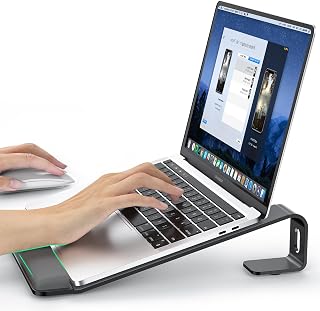
Pros
- Exceptional heat dissipation with 90% airflow keeps your laptop running cooler and prolongs hardware lifespan
- Thoughtful ergonomic design with integrated wrist support actively reduces neck, shoulder, and wrist pain during work
- Remarkably affordable at under $22 yet built with premium aluminum and engineering that rivals stands costing twice as much
- Truly universal compatibility supports laptops from 10 to 17.6 inches, covering virtually every modern laptop brand and model
- Quick tool-free assembly and lightweight portability make it ideal for remote workers who shift between locations
Cons
- Fixed 2.6-inch height may not suit all desk setups or personal preferences, as some users prefer adjustable height options
- Wrist support is modest and works best as a preventative measure rather than a solution for existing wrist or hand injuries
- Open frame design means smaller debris or dust can settle on your laptop screen from above
The LOXP Laptop Stand is an ergonomic riser designed for remote workers, students, and anyone spending extended hours at their laptop. It combines practical health benefits with smart engineering to address two major pain points: poor posture from screen positioning and thermal stress on your device.
The standout feature is the combination of eye-level screen height and integrated wrist support. By elevating your laptop 2.6 inches, it naturally aligns your screen with your eye line, encouraging proper spinal alignment and reducing the hunch that develops from looking down all day. The wrist support acts as a palm rest during typing, distributing pressure across a wider area and significantly reducing strain on your wrists and forearms.
Build quality is impressive for the price. The anodized aluminum construction feels premium and solid, while the triangle-stability design provides excellent support without wobbling. The open frame maximizes airflow to nearly 90%, allowing your laptop to breathe and stay cooler. This cooling benefit is real, especially for performance-intensive work like video editing or programming, and can meaningfully extend your device's lifespan.
The main limitation is the fixed 2.6-inch height, which works well for standard desk heights but may not suit everyone. The wrist support is also passive and works best as a preventative measure rather than a therapeutic solution if you already have wrist pain. Assembly is genuinely tool-free and takes under two minutes.
Overall, this is a smart, well-engineered stand that delivers genuine health and performance benefits at an exceptional price. It earns its high ratings from real users who appreciate how it transforms their daily comfort and laptop longevity.
Compatibility: Laptops 10-17.6 inches, including MacBook Air 11.6/13/13.3/13.6, MacBook Pro 13/13.3/14.2/15.4/16, Lenovo, Dell, Asus, HP, Chromebook, Samsung, and others.
Material: Anodized aluminum alloy with reinforced rubber pads on top and bottom surfaces.
Dimensions: Raises laptop 2.6 inches from desk surface with triangle-point stability design.
Weight: 0.49 kg (lightweight and portable).
Assembly: Tool-free bracket design, detachable and easy to assemble or disassemble.
Warranty: 3-year manufacturer warranty included.
Color: Black anodized aluminum finish.
Who Should Buy This: Remote workers and students spending 6+ hours daily at a laptop, anyone experiencing neck or shoulder discomfort from screen positioning, MacBook or Windows laptop owners seeking affordable cooling and ergonomic solutions, and frequent travelers needing a portable stand.
Who Should Consider Alternatives: Users who need adjustable height settings may want an articulating stand, and individuals with existing severe wrist pain should consult an occupational therapist before relying on passive support products.
Setup Tips: Place the stand on a sturdy desk, adjust your chair height so your elbows form a 90-degree angle when typing, and position your keyboard and mouse at desk level below the stand for optimal ergonomics. The stand works best with an external keyboard and mouse setup.
Value Proposition: For under $22, you get premium aluminum construction, proven ergonomic design, real thermal performance benefits, and genuine 3-year warranty support. This represents exceptional value compared to similarly-featured stands priced at $40 to $60.

Pros
- Exceptional stability with enlarged base prevents any shifting or wobbling during regular use
- 360-degree rotation simplifies screen sharing for presentations, video calls, and team collaboration
- Adjustable height and angles support ergonomic positioning to minimize neck and shoulder strain
- Aluminum construction provides excellent heat dissipation to keep laptops cool and running efficiently
- Compact foldable design makes it ideal for remote workers, students, and frequent travelers
Cons
- Base feels relatively stiff when adjusting angles, so avoid forcing adjustments with a laptop already mounted
- Larger base footprint takes up more desk space compared to compact stands, may not suit smaller workstations
- Premium aluminum construction comes at a higher price point than basic plastic alternatives
The Lamicall Aluminum Laptop Stand is a premium desk accessory designed for professionals, remote workers, and students who spend hours in front of their laptops. Built from high-quality aluminum alloy, this stand combines durability with thoughtful ergonomic features to create a workspace that's both comfortable and productive. It accommodates laptops ranging from 10 to 17.3 inches, making it compatible with virtually every major brand including MacBook, Dell XPS, HP, Surface, and more.
The standout feature is the smooth 360-degree rotating base, which transforms how you collaborate and present. Instead of awkwardly twisting your laptop or repositioning it repeatedly, simply rotate the stand to share your screen during video calls, team meetings, or client presentations. Multiple height and angle adjustments let you position your screen at eye level, significantly reducing the neck and shoulder fatigue that comes from prolonged computer work. The foldable design means you can collapse it flat for storage in a laptop bag or desk drawer, making it an excellent choice for remote workers who move between locations.
Build quality is exceptional throughout. The enlarged aluminum base provides substantial weight and stability that prevents any wobbling or sliding, even when you're typing vigorously or resting your hands on the laptop. The all-aluminum construction also serves a practical purpose beyond aesthetics: it dissipates heat efficiently through multiple ventilation holes, keeping your laptop cooler and extending its operational lifespan. Real-world reviews consistently praise the sturdy construction and sleek modern design that fits professional office environments.
One consideration is that the stand feels relatively stiff when making angle adjustments, so it's best to position it before placing your laptop on top. The enlarged base, while providing excellent stability, does consume a fair amount of desk real estate, which might be a constraint if you're working with limited space. For the features and build quality offered, the price point is reasonable compared to competitors.
The Lamicall Aluminum Laptop Stand is a solid investment for anyone serious about creating an ergonomic, organized workspace. Whether you're outfitting a home office, dorm room, or corporate workstation, this stand delivers on durability, adjustability, and practical features that genuinely improve your daily computing experience. Backed by a 2-year warranty, it's a reliable choice you can count on.
Remote Workers and Home Office Setup: If you work from home, this stand transforms your desk into a professional ergonomic workspace. The adjustable height reduces fatigue during 8-hour workdays, and the 360-degree rotation makes video calls and screen sharing effortless.
Students and College Life: The foldable design is perfect for dorm rooms where space is precious. It lifts your laptop screen to eye level while creating desk space for textbooks and notes, and it's easy to pack when moving between semesters or locations.
Business Professionals and Conference Presenters: The rotating base is ideal for presentations where you need to display your screen from multiple angles. The stable construction keeps your laptop secure even on conference tables or during demonstrations.
Multi-Monitor Setups: Use this stand to keep multiple screens at the same height and angle for a balanced, comfortable viewing position when working with dual displays.
Compatibility: 10 to 17.3-inch laptops including MacBook Air, MacBook Pro, Dell XPS, HP, Surface, Chromebook, ASUS, Acer, and most other popular brands. Also works as a projector mount.
Material: Premium aluminum alloy construction with enlarged base for enhanced stability.
Adjustability: Multiple height and angle positions with smooth 360-degree rotation capability.
Design: Foldable and portable with modern minimalistic black aesthetic.
Additional Features: Advanced heat dissipation, ventilation holes for airflow, no assembly required, 2-year manufacturer warranty.

Pros
- Exceptional stability with zero wobble during active typing, confirmed by multiple reviewers
- True height and angle adjustability that actually reduces neck and shoulder strain
- Surprisingly durable premium build quality for the price point
- Genuinely portable with quick folding mechanism, fitting easily into backpacks
- 360-degree rotation genuinely enhances collaboration and workspace flexibility
Cons
- Front base design limits mouse space for users with limited desk real estate
- May appear slightly wobbly on video demonstrations despite solid real-world stability
- Limited to laptops under 11 pounds, excluding heavier gaming systems
The JOYEKY laptop stand is a premium-feeling aluminum riser designed for remote workers, students, and professionals seeking ergonomic relief without breaking the bank. It accommodates 10-16 inch laptops and MacBooks while maintaining genuine portability for home office, corporate, and travel scenarios.
The standout feature is the combination of absolute stability with legitimate ergonomic adjustment. The heavy aluminum base eliminates the wobbling that plagues cheaper stands, while the height and angle adjustability actually brings screens to proper eye level. Real users report noticeable reductions in neck and shoulder pain. The 360-degree swivel base transforms how teams share screens and present, rotating smoothly without repositioning the entire stand.
Build quality punches above its price point. The aluminum construction feels premium, anti-skid silicone pads protect your laptop from damage, and the open suspended design promotes airflow to prevent thermal throttling during extended use. The folding mechanism is intuitive, reducing the stand to a compact 9.45 x 9.45 x 1.25 inches that actually fits in standard backpacks.
The primary limitation is the front base design, which some users find restrictive for mouse usage if desk space is limited. Additionally, the 11-pound weight capacity excludes heavier gaming laptops. Despite appearing slightly wobbly in video demonstrations, real-world performance shows minimal movement during active typing.
The JOYEKY stand delivers legitimate ergonomic benefits, genuine portability, and exceptional stability at a price point that makes it an easy recommendation. It's the practical choice for anyone prioritizing comfort, build quality, and workspace flexibility over boutique positioning.
This stand is ideal for remote workers and hybrid employees transitioning between home and office. The compact folding design makes it perfect for coworking spaces, coffee shops, or frequent travelers.
Students benefit significantly from the ergonomic adjustability, which reduces strain during extended study sessions. Professionals presenting frequently will appreciate the 360-degree rotation for seamless screen sharing. Anyone recovering from neck or shoulder pain will notice immediate relief from proper screen elevation.
Compatibility: MacBook Air/Pro (12, 13, 14, 16 inch), Dell XPS, HP, Lenovo, Acer, Chromebook, and all 10-16 inch laptops up to 11 pounds.
Dimensions: 10 x 2 x 2.7 inches (assembled), folds to 9.45 x 9.45 x 1.25 inches
Height Range: Adjustable up to 11.81 inches
Material: High-quality aluminum alloy with anti-skid silicone pads
Features: 360-degree swivel base, multi-angle adjustment, foldable design
Warranty: 6 months
Mounting: Tabletop bracket

Pros
- Exceptionally solid construction feels premium despite competitive pricing
- Stable elevation positions screen at eye level, improving posture and reducing fatigue
- Works seamlessly with any laptop brand and size within the 10-17.3 inch range
- Compact and lightweight when folded for portability across multiple workspaces
- Heat dissipation design keeps laptops cool during extended work sessions
Cons
- Adjustment mechanism is stiff, making frequent angle changes inconvenient for shared workspaces
- Some users report minor wobbling during typing with heavier laptops, though the stand remains stable
- Price point may feel slightly high for those seeking budget aluminum stands
The Lamicall Aluminum Laptop Stand is a premium desk accessory designed for professionals, remote workers, students, and anyone spending extended hours on a laptop. It accommodates nearly any laptop from 10 to 17.3 inches, making it a universal solution across MacBook, Dell, HP, Lenovo, and other major brands.
The standout feature is its exceptional build quality. The aluminum alloy construction combined with a substantial base eliminates the flex and wobbling common in budget stands. Users consistently report feeling impressed by the solid feel and durability, with some purchasing multiple units for different workspaces. The adjustable height and angle settings allow you to position your screen at eye level, which meaningfully reduces neck strain and improves posture during long work days.
Design and portability set this stand apart further. The foldable mechanism makes it genuinely portable, fitting easily into laptop bags without bulk. The minimalist aluminum aesthetic looks professional on any desk, and the large base doubles as a convenient space for keyboards or mouse pads. Multiple ventilation holes provide legitimate airflow to keep laptops cool under load.
The primary drawback is the stiff adjustment mechanism. Once locked at your preferred angle, it stays put reliably, but changing angles between users or locations requires noticeable effort. Some users with heavier 17-inch laptops report minor wobbling during typing, though the stand remains fundamentally stable and secure.
The Lamicall stand earns its reputation as a best-seller by balancing durability, functionality, and design in one cohesive package. It delivers real ergonomic benefits and outlasts cheaper alternatives, making it a worthwhile investment for your setup.
This stand is ideal for MacBook Pro and Air users seeking an upgrade beyond their laptop's built-in stand, as well as professionals with Dell XPS, HP, or Surface devices. Remote workers and students benefit significantly from the ergonomic positioning and heat management, especially during full workdays at home or in coffee shops.
It's also excellent for corporate environments outfitting multiple workstations, since the universal compatibility eliminates the need for device-specific stands. The portability appeals to consultants, freelancers, and anyone splitting time between locations. If you value build quality and plan to keep your stand for years, the initial investment pays dividends quickly.
Material: High-quality aluminum alloy
Compatibility: Laptops and tablets 10 to 17.3 inches
Form Factor: Adjustable tabletop stand with bracket mounting
Dimensions: 12 x 10 x 2 inches (folded)
Weight: 0.06 kg
Color: Silver
Special Features: Adjustable height and angle, foldable, portable, ergonomic design
Base Features: Anti-skid silicone pads, smooth edges for scratch protection
Heat Management: Multiple ventilation holes for airflow
Warranty: 2-year manufacturer warranty
Package Contents: 1 adjustable laptop stand, user manual
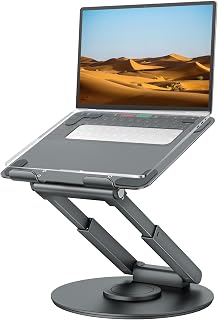
Pros
- Pre-assembled and ready to use right out of the box
- Exceptionally stable with zero wobble even during typing or video calls
- Smooth, responsive adjustment mechanism with satisfying tactile feedback
- Compact footprint saves desk space while providing maximum adjustability
- Heavy-duty construction feels premium and durable for long-term use
Cons
- Requires significant hand strength to collapse or separate the stand
- Initial adjustment points may feel stiff until properly loosened
- Best suited for desk use rather than lap-based work
The tounee Telescopic Laptop Stand LS07 EXPRO is a premium sit-to-stand riser designed for professionals spending extended hours at their desk. Whether you work from home, maintain a corporate office, or switch between multiple locations, this stand addresses the growing health concerns of sedentary work by enabling seamless transitions between sitting and standing postures throughout your day.
The standout feature is its exceptional stability combined with intuitive adjustability. The dual pivot joint construction feels noticeably more robust than competitor models, with smooth height adjustments ranging from 2.1 to 21 inches. The 360-degree rotating base adds practical value for video calls, collaborative work, and screen sharing, while the pre-assembled design means you can start working immediately. Users consistently praise the lack of wobble even with larger 17-inch laptops, a critical factor for productivity and ergonomic comfort.
Build quality is impressive throughout. The aluminum alloy frame delivers a sleek, professional appearance while supporting up to 22 pounds without compromise. The foldable design makes this stand genuinely portable, fitting easily into bags for travel between home and office. The compact base footprint maximizes desk real estate, an essential consideration for space-constrained work environments.
The primary trade-off involves the adjustment mechanism's stiffness. Early users note that separating or collapsing the stand requires full hand strength, though this tension is intentional, ensuring your laptop remains securely positioned during work. Once adjusted to your preferred height, the stand maintains its position reliably.
This stand represents a smart investment for anyone serious about improving workspace ergonomics and workplace health. The combination of durability, adjustability, and thoughtful design makes it ideal for remote professionals, office workers, and hybrid setups seeking a genuine solution to the health impacts of desk work.
Dimensions and Compatibility: Height range 2.1 to 21 inches, compatible with laptops 10 to 17 inches, supports up to 22 lbs. Materials: High-quality aluminum alloy construction. Design: Pre-assembled, foldable form factor with tabletop mounting.
Key Features: 360-degree rotating base, dual pivot joints, telescopic adjustment mechanism with button-activated height control, space-saving folding capability. Color: Gray. Model: tounee LS07 EXPRO. Warranty: 1 year coverage included.
Performance: Ranked number 17 in Amazon Laptop Stands category. Exceptional stability with minimal wobble during typing and work tasks. Smooth rotation and adjustment mechanisms with precision engineering throughout.
Is This Right for You: This stand suits remote workers, office professionals, students, content creators, and anyone spending six or more hours daily at a desk. If you experience neck pain, shoulder tension, or back discomfort from prolonged sitting, the active sit-stand capability offers meaningful relief. The universal 10-17 inch compatibility means it works with MacBooks, Windows laptops, and virtually any notebook computer.
Setup and Use: The stand arrives fully assembled and operational. Simply place your laptop in the cradle, use the button-activated telescopic mechanism to adjust height while sitting or standing, and leverage the 360-degree rotation for comfortable screen positioning. The dual pivot joints stay locked in position once set, requiring no ongoing adjustment during work sessions.
Alternative Considerations: For exclusively standing desk setups, a fixed-height stand may suffice. However, if you alternate between sitting and standing or move your laptop between locations frequently, the telescopic adjustability and portability of this model provide superior flexibility and long-term health benefits.
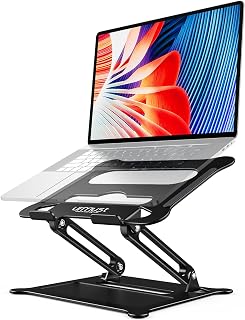
Pros
- Durable aluminum build maintains stability and appearance over years of daily use
- Tool-free adjustment makes finding your ideal viewing angle quick and effortless
- Reduces neck and shoulder strain by raising screen to eye level
- Folds flat for convenient storage and travel
- Reliably holds various laptop models without wobbling
Cons
- Requires some initial force to open from fully closed position
- May develop minor wobbling when typing heavily without external keyboard
- Premium aluminum construction comes at higher price point than plastic alternatives
The Urmust Aluminum Laptop Stand is a premium desk accessory designed for remote workers, students, and professionals who spend extended hours on their laptops. Built from solid aluminum alloy rather than plastic, this stand combines durability with portability, making it suitable for home offices, corporate settings, travel, and outdoor work environments.
The standout feature is its tool-free adjustability, allowing you to modify both height and angle with simple hand movements to match your ergonomic needs. Real-world performance from long-term users confirms the stand maintains its rigidity after years of daily use, while the foldable design compresses to a slim profile for easy transport. Heat dissipation ventilation holes keep laptops cool during extended sessions, and the anti-slip silicone grips prevent your device from sliding regardless of viewing angle.
Design and build quality exceed expectations at this price point. The brushed aluminum finish looks professional on any desk, the construction feels substantial without unnecessary weight, and compatibility spans virtually all laptop brands from 10 to 15.6 inches. Users consistently praise the ergonomic improvements, reporting reduced neck pain and better posture when viewing at eye level.
The primary drawback is that opening from a fully collapsed state requires moderate force, though users report this may ease over time. Some users noted minor wobbling when typing without an external keyboard, though this appears resolution-dependent and often addressable with keyboard placement adjustment.
Overall, this stand delivers professional-grade build quality, practical ergonomic benefits, and genuine portability at a reasonable price point. It's an excellent investment for anyone seeking to improve their workspace setup with a tool that genuinely performs day after day.
Compatibility: Laptops 10 to 15.6 inches including MacBook, MacBook Air, MacBook Pro, Surface Laptop, Dell XPS, Google Pixelbook, HP, ASUS, Acer, Chromebook, Alienware. Also compatible with iPad.
Material: Solid aluminum alloy with rubber and silicone components. Finish is brushed or polished. Rustproof and scratch-resistant.
Capacity: Supports up to 8.8 lbs (4 kg) with no wobbling.
Dimensions: 11.42 x 9.45 x 1.97 inches. Weight: 735 g (1.6 lbs).
Features: Adjustable height and angle, foldable design, tool-free adjustment, heat dissipation ventilation holes, anti-slip silicone grips, smooth edges for scratch protection.
Buying Guide: How to Choose the Right Laptop Stand
Height Adjustment Range
Fixed-height stands work well if you have a consistent desk setup and know your ideal viewing angle. Models like the Rain Design mStand raise your laptop about 6 inches, which suits most seated users when paired with an external keyboard.
Adjustable stands offer flexibility for different tasks and users. Look for models with multiple locking positions or continuous height adjustment. If you alternate between sitting and standing throughout the day, prioritize stands with extended height ranges that reach at least 15 inches at maximum elevation.
Portability vs Stability
Portable stands fold flat for travel but often sacrifice some stability compared to heavier fixed designs. The Roost V3 Laptop Stand – Adjustable and Extremely weighs just 6 ounces and fits in a backpack, making it ideal for remote workers who move between locations. It uses an interlocking truss frame to maintain rigidity despite its light weight.
If your laptop stays on your desk, choose a stand with a larger, heavier base. Aluminum construction with rubber grip pads prevents wobbling during typing. Models with dual support rods or triangular designs distribute weight more effectively than single-hinge stands, especially when supporting heavier laptops for engineering students or gaming machines.
Cooling and Ventilation
Laptop stands improve airflow by elevating your device and creating space underneath for heat dissipation. Open-frame designs with large cutouts or mesh surfaces provide the most ventilation. The Nulaxy Ergonomic Adjustable Laptop Stand for Desk features geometric heat vents across its upper panel, which helps prevent thermal throttling during intensive work sessions.
Solid aluminum stands conduct heat away from your laptop’s base more effectively than plastic alternatives. This passive cooling becomes particularly valuable if you run demanding applications or work in warm environments. Combined with proper ventilation, metal construction extends your laptop’s lifespan by keeping components cooler.
Additional Features Worth Considering
Rotating bases let you pivot your screen to share content during meetings without moving the entire stand. The Lamicall Aluminum Laptop Stand for Desk offers 360-degree rotation, which proves useful for presentations or collaborating with colleagues seated nearby.
Some stands include wrist support or extended front platforms that double as keyboard rests. Cable management features keep charging cables and peripherals organized. If you frequently connect and disconnect your laptop, look for stands with quick-release mechanisms or wide openings that accommodate laptops with cases or skins attached.
Final Thoughts
The right laptop stand depends on how and where you work. For a permanent desk setup with excellent build quality, the Rain Design mStand offers timeless design and solid stability. If you need flexibility to work anywhere or transition between sitting and standing, the tounee Telescopic Laptop Stand delivers impressive height adjustment and portability in one package. Either choice will help you maintain better posture and reduce the physical strain of long work sessions.
Frequently Asked Questions
Do I need an external keyboard and mouse with a laptop stand?
Yes, for most stands that raise your screen significantly. When your laptop sits at eye level, its built-in keyboard becomes uncomfortable to reach. Using separate peripherals lets you position your keyboard at the proper height while keeping your screen elevated. This setup maximizes the ergonomic benefits of the stand.
Will a laptop stand work with my laptop case or skin?
Most stands accommodate laptops with standard cases or skins, but bulky protective cases may cause fit issues. Check the stand’s grip width and adjustability before purchasing. The Roost V3 Laptop Stand – Adjustable and Extremely uses self-adjusting pivot grips that automatically adapt to different laptop thicknesses, making it more forgiving with cases attached.
Can laptop stands support gaming laptops or larger workstations?
Many stands support heavier laptops up to 11 or 22 pounds, which covers most gaming and mobile workstation models. Verify the weight capacity and width compatibility before purchasing. Stands with reinforced dual-support rods or larger bases handle heavier machines more securely. Laptops for computer science students with powerful GPUs benefit from stands with excellent ventilation to manage heat during compilation or rendering tasks.
How much height adjustment do I actually need in 2026?
For seated work, 4 to 8 inches of elevation typically brings your screen to eye level when using an external keyboard. If you want to work standing, look for stands that extend to at least 15 inches. Adjustable models let you fine-tune the height as you discover your preferred working position over time.
Common questions
What is the best laptop stand for desk use in 2026?
The Nulaxy Ergonomic Adjustable Laptop Stand is an excellent choice for desk use, offering dual adjustability and advanced heat-vent design that keeps your device cool during extended work sessions. It supports laptops from 10 to 16 inches and features a sturdy bracket mount that stays stable on any desk surface. The foldable design also makes it easy to store or transport between workspaces when needed.






Write Your Review
No reviews yet. Be the first to share your experience!