

You sit down to work or game and realize your monitor is holding you back. Multitasking feels cramped, colors look flat, or response times just can’t keep up with your reflexes. LG has built a reputation for solving exactly these problems across a wide range of monitor categories, from ultrawide productivity screens to razor-sharp 4K panels and fast-refresh gaming displays. Whether you’re a designer, a remote worker, or a competitive gamer, there’s likely an LG monitor built for the way you use your screen. If you’re also comparing monitors for precision CAD work, LG’s UltraFine lineup is worth a close look.
Quick Comparison
Ratings reflect the most recent data pull. Check each listing for current price and availability.
Quick answer
This guide compares 9 picks, with LG 34WR55QK-B 34-inch UltraWide Curved Monitor ranked first. LG 32GS60QC-B 32in Curved Gaming Monitor 1440p 180Hz has the most customer reviews.

Multitaskers who want screen real estate without multiple monitors will benefit from the 21:9 ultrawide aspect ratio at WQHD resolution, giving ample horizontal space for split-screen work. USB Type-C simplifies cabling for laptop users, and the adjustable stand lets you dial in ergonomic height for long work sessions.
Pros
- 3440x1440 ultrawide eliminates dual monitor clutter for multitasking workflows
- USB Type-C with 65W power delivery simplifies laptop connectivity
- 99% sRGB and HDR10 ensure accurate, vibrant color reproduction
- Curved VA panel with borderless design creates immersive workspace
Cons
- No built-in speakers require external audio setup
- OnScreen Control software installation needed for advanced features
If your workflow demands maximum horizontal space, the LG 34WR55QK-B transforms how you work by replacing dual monitors with a single, seamless ultrawide canvas. Its 3440x1440 resolution across a 21:9 curved panel gives multitaskers room to view spreadsheets, timelines, and documents side by side without constant window switching. The curved VA panel with HDR10 and 99% sRGB coverage delivers vibrant contrast and accurate colors, essential for content work that demands precision. USB Type-C with 65W power delivery cleans up desk clutter by combining video and power into one cable, a significant advantage for laptop-driven setups. The three-sided borderless design creates visual immersion that makes extended work sessions feel less confined. Reader Mode and the matte finish reduce eye strain during marathon editing or coding sessions, while the 100Hz refresh rate keeps everyday interactions smooth. The height and tilt adjustable stand accommodates various desk heights and ergonomic preferences. Without built-in speakers, you'll need external audio, and accessing Picture-by-Picture requires installing LG's OnScreen Control software. Still, for professionals managing complex workflows or video editors needing timeline real estate, this ultrawide offers productivity gains that justify the investment.
Display Specs: 34-inch curved VA panel, 3440x1440 (WQHD) resolution, 21:9 aspect ratio, 100Hz refresh rate, 5ms response time, 3000:1 contrast ratio, 99% sRGB color gamut, HDR10 support, 300 cd/m2 brightness, 178-degree viewing angles
Connectivity: USB Type-C with 65W power delivery, 2x HDMI 2.0, DisplayPort 1.4, 2x USB 3.0 ports, 3.5mm audio jack
Physical: 31.9 inches wide, 22.4 inches tall, 10.2 inches deep, 15.2 pounds, curved black design with height and tilt adjustment
Additional Features: Reader Mode for blue light reduction, Picture-by-Picture mode, OnScreen Control software, FreeSync adaptive sync, matte screen finish, 1-year manufacturer warranty
Perfect for content creators, video editors, financial analysts, and developers who benefit from expansive horizontal workspace and need accurate color for their projects. Laptop users will appreciate the USB-C power delivery that simplifies connections. Skip this if you need built-in audio or prefer plug-and-play simplicity without software installation. Competitive gamers seeking ultra-high refresh rates should look elsewhere, though the 100Hz handles light gaming comfortably.
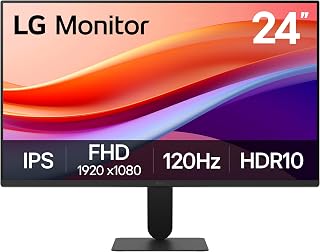
Budget-conscious buyers who still want smooth motion will appreciate the 120Hz refresh rate on a compact 24-inch IPS panel, making everyday scrolling and casual gaming feel noticeably snappier than standard 60Hz options. HDR10 support adds contrast depth to media playback, and the slim stand keeps the footprint tidy on smaller desks.
Pros
- 120Hz and 1ms Motion Blur Reduction smooth motion in work and play
- 99% sRGB and HDR10 provide accurate, vibrant color
- Slim bezels and 7.1-pound weight fit tight spaces and dual setups
- Reader Mode and flicker-free tech reduce eye strain
Cons
- Single HDMI port requires cable swapping for multiple devices
- Full HD resolution offers less detail than 1440p at 24 inches
At 24 inches, the LG 24U411A-B fits office desks, dorm rooms, and dual-monitor setups where space and budget matter. Its 120Hz refresh rate and 1ms Motion Blur Reduction smooth out scrolling, video playback, and casual gaming beyond what standard 60Hz panels deliver, while Dynamic Action Sync cuts input lag for more responsive interactions. The IPS panel covers 99% sRGB and supports HDR10, giving you accurate color for presentations, photo editing, and streaming without oversaturation. Full HD resolution at this size keeps text sharp and performance light, ideal for productivity apps, web browsing, and light creative work. Reader Mode and flicker-free tech ease strain during document-heavy days. The ultra-slim bezels on three sides maximize screen space and look clean in multi-monitor arrays, and the floating stand design tilts from minus 5 to plus 20 degrees while weighing just 7.1 pounds. The matte finish cuts reflections, and the 1500:1 contrast adds depth to dark scenes. The single HDMI port limits multi-device convenience, and Full HD resolution won't satisfy users who need 1440p detail or professional calibration tools.
Display Specifications
Screen Size: 23.8 inches (24-inch class)
Resolution: Full HD 1920 x 1080 (16:9 aspect ratio)
Display Type: IPS LED
Brightness: 250 cd/m2
Contrast Ratio: 1500:1
Viewing Angle: 178 degrees
Pixel Pitch: 0.27mm
Screen Finish: Matte
Performance
Refresh Rate: 120Hz
Response Time: 1ms (Motion Blur Reduction)
Color Gamut: 99% sRGB
HDR Support: HDR10
Adaptive Sync: FreeSync
Features: Dynamic Action Sync, Black Stabilizer, Reader Mode
Connectivity & Power
Ports: 1x HDMI
Included Cables: HDMI and power cable
Power Consumption: 13 watts
Warranty: 1 year manufacturer
Physical Dimensions
Dimensions (D x W x H): 8.7 x 21.2 x 16.4 inches
Weight: 7.1 pounds
Tilt Adjustment: minus 5 to plus 20 degrees
Perfect for home office workers, students, and casual gamers who need smooth motion, accurate color, and compact size without premium pricing. The 120Hz and 99% sRGB suit light creative tasks and productivity equally well. Skip it if you need multiple simultaneous HDMI connections, 1440p pixel density, or factory-calibrated color for pro workflows.

For office work that demands color accuracy, the IPS panel with DisplayHDR 400 certification gives you consistent, wide-angle viewing whether you're reviewing spreadsheets or editing photos. The 4K UHD resolution on a 27-inch screen delivers crisp text for long document sessions, and the matte finish cuts glare in bright workspaces without sacrificing image fidelity.
Pros
- 95% DCI-P3 color gamut with DisplayHDR 400 for accurate, vibrant colors
- USB-C with 90W power delivery simplifies Mac and laptop setups
- Excellent ergonomic stand with height, tilt, and pivot adjustments
- Razor-sharp 4K text rendering ideal for detailed professional work
Cons
- 60Hz refresh rate limits gaming and fast-action performance
- Built-in speakers sound tinny and lack depth for media playback
For professionals who rely on accurate color and sharp text, the LG 27UP850K-W delivers everything a modern workstation demands. Its 4K IPS panel paired with 95% DCI-P3 color gamut and DisplayHDR 400 ensures images and design work appear with exceptional fidelity, while the matte finish keeps reflections at bay during long office hours. The real advantage lies in its connectivity: USB-C with 90W power delivery turns cable chaos into a single-cable solution, particularly valuable for Mac users. Beyond the display itself, the ergonomic stand offers height, tilt, and pivot adjustments that genuinely improve desk ergonomics. Built-in Waves MaxxAudio speakers and webOS streaming add multimedia versatility without extra peripherals. Text rendering is razor-sharp, making spreadsheets, code, and documents effortless to read. The white plastic backing may feel less premium than the performance suggests, and the 60Hz refresh rate firmly plants this in the productivity category rather than gaming. Sound quality works for video calls but lacks depth for serious media consumption. For work-focused setups prioritizing color accuracy and connectivity over high refresh rates, this monitor hits the right balance.
Ideal for Mac users, content creators, designers, and remote professionals who need accurate color reproduction and seamless USB-C connectivity for their workflow. The 4K resolution suits anyone working with detailed images, spreadsheets, or code. Skip this if you're a competitive gamer seeking high refresh rates or if you need built-in speakers for quality audio playback. The 60Hz panel won't satisfy fast-paced gaming, and tinny speakers mean external audio becomes essential for media work.
Display: 27-inch 4K UHD IPS, 3840 x 2160 resolution, 178-degree viewing angle, 1200:1 contrast ratio, 5ms response time.
Color and HDR: 95% DCI-P3 color gamut, DisplayHDR 400, HDR10 support, 400 cd/m2 brightness.
Connectivity: USB Type-C with 90W power delivery, DisplayPort, 2x HDMI 2.0, 2x USB 3.0, headphone jack.
Ergonomics: Height, tilt, and pivot adjustable stand, 9.4 inches deep, 24.2 inches wide, 22.4 inches tall, 5.9kg weight.
Additional: Built-in stereo speakers with Waves MaxxAudio, FreeSync support, 60Hz refresh rate, 44W power consumption, 1-year parts and labor warranty.

LG 32GS60QC-B 32in Curved Gaming Monitor 1440p
Gamers chasing responsiveness will appreciate the 180Hz refresh rate paired with 1ms response time, which keeps fast-paced FPS action smooth and blur-free. The 1000R curve wraps the QHD image around your field of view, while Black Stabilizer and a built-in crosshair give competitive players an edge in dark or chaotic scenes.
Pros
- 180Hz and 1ms response time deliver competitive gaming performance
- 1000R curve and 32-inch QHD screen create immersive, spacious viewing
- 99% sRGB, HDR10, and 3000:1 contrast enhance color and depth
- Black Stabilizer, FPS counter, and crosshair support gaming precision
Cons
- HDMI may cause black screens or resolution problems
- Lightweight build can feel unstable on monitor arms
The LG UltraGear 32GS60QC-B brings 32 inches of 1000R curved VA panel to gamers and multitaskers who want immersion and speed. Its 180Hz refresh rate and 1ms response time keep competitive titles fluid, while AMD FreeSync prevents tearing. The curve wraps your peripheral vision into the action, and QHD resolution at this size balances sharpness with performance across esports and AAA games. Black Stabilizer brightens dark scenes to reveal hidden details, the on-screen FPS counter tracks performance, and the built-in crosshair aids precision in shooters. Beyond gaming, 99% sRGB and HDR10 deliver punchy, accurate color for creative tasks, and the 32-inch canvas gives you room for split-screen workflows or console gaming from the couch. The borderless design and tilt stand keep the setup minimal, while dual HDMI and DisplayPort handle multiple sources. The 3000:1 contrast ratio enhances depth in dark content. However, HDMI can trigger black screens or resolution issues for some users, so DisplayPort is the safer connection. The lightweight build may wobble on weaker arms.
Display: 32-inch curved VA panel, 1440p QHD (2560 x 1440), 1000R curve radius, 16:9 aspect ratio, 300 nits brightness, 3000:1 contrast ratio, 99% sRGB color gamut, HDR10 support
Performance: 180Hz refresh rate, 1ms GtG response time, AMD FreeSync adaptive sync, Dynamic Action Sync, Black Stabilizer, FPS Counter, multiple game modes (Gamer, FPS, RTS)
Connectivity: 2x HDMI 2.0, 1x DisplayPort 1.4, DisplayPort audio support
Design: Tilt adjustment, three-side borderless frame, matte screen finish, weighs 13 pounds, dimensions 27.6W x 20H x 8.9D inches
Power & Warranty: 24W power consumption, 1-year manufacturer warranty (parts and labor)
Ideal for competitive gamers who need high refresh rates and low response times, plus content creators or multitaskers who benefit from 32 inches of curved QHD screen space. The 1000R curve and gaming features suit immersive single-player and esports equally. Skip it if you rely solely on HDMI connections, need a rock-solid build for articulating arms, or prefer flat panels.

Readers and writers spending hours at a screen will find the Reader Mode and Flicker Safe features genuinely useful for reducing eye fatigue during extended sessions. The IPS panel keeps text sharp and colors stable at wide viewing angles, while the 27-inch 4K resolution gives enough clarity for detailed proofreading or research work.
Pros
- 4K resolution with 90% DCI-P3 and HDR10 for accurate, vibrant color
- IPS panel maintains consistency across 170-degree viewing angles
- Matte finish and flicker-free tech reduce glare and eye fatigue
- Clean white design with borderless front fits modern workspaces
Cons
- 60Hz refresh rate and 5ms response time limit motion performance
- No USB-C, USB hub, or built-in speakers
For content creators and office professionals who need accurate color in a clean, modern workspace, the LG 27US500-W delivers 4K UHD resolution at 27 inches with 90% DCI-P3 coverage and HDR10 support. The IPS panel holds 1000:1 contrast and reproduces color consistently across its 170-degree viewing angles, making it reliable for design reviews and client presentations. The white finish and borderless design fit minimalist setups, while the matte screen cuts glare in bright rooms. Flicker-free technology and Reader Mode reduce eye strain during long editing sessions or document-heavy workdays. DisplayPort and dual HDMI give you flexibility for multi-device workflows. The tilt-adjustable stand and 12.1-pound weight make positioning straightforward. At 60Hz with 5ms response time, this monitor prioritizes pixel density and color fidelity over speed, so it suits photography, illustration, spreadsheet work, and video editing better than motion-intensive tasks. The absence of USB-C means you'll route power and data separately, and there are no built-in speakers or USB hubs.
Display Technology: 27-inch 4K UHD IPS panel, 3840x2160 native resolution, 16:9 aspect ratio
Color Performance: 1000:1 contrast ratio, 90% DCI-P3 color gamut, HDR10 support, 300 cd/m2 brightness, 170-degree viewing angles
Technical Specs: 60Hz refresh rate, 5ms response time, flicker-free technology, matte screen finish
Connectivity: 2x HDMI ports, 1x DisplayPort, 3 component outputs
Power and Physical: 25 watts power consumption, 12.1 pounds, 24.15 inches wide, 17.87 inches tall, 8.46 inches deep, ergonomic tilt-adjustable stand with wall mount compatibility
Package Contents: Monitor, power adapter, HDMI cable, stand components, quick start guide, 1-year limited manufacturer warranty covering parts and labor

Anyone needing a straightforward 4K workstation setup will like the built-in dual speakers, which cut down on desk clutter from external audio gear. The 32-inch UHD panel offers plenty of pixel density for detailed spreadsheet or document work, and dual HDMI ports make it easy to switch between a laptop and desktop.
Pros
- 32-inch 4K panel with 90% DCI-P3 delivers vivid colors and sharp detail
- HDR10 and VA technology provide excellent contrast for creative work
- Borderless design and adjustable ergonomic stand maximize workspace comfort
- Gaming features like Dynamic Action Sync and 4ms response time add versatility
Cons
- 60Hz refresh rate limits competitive gaming performance
- Built-in speakers lack depth and power for serious audio needs
When screen size matters as much as image quality, the LG 32UR500K-B brings 4K clarity to a 32-inch canvas that makes everything more visible and less cramped. Its VA panel with HDR10 and 90% DCI-P3 color gamut renders vivid, lifelike colors that elevate both creative projects and multimedia entertainment. The 3840x2160 resolution ensures text stays sharp even at larger sizes, reducing eye strain during extended work sessions. For those who occasionally game, Dynamic Action Sync and Black Stabilizer add practical advantages, while the 4ms response time keeps motion smooth without blur. The borderless design maximizes usable screen area, and the adjustable ergonomic stand lets you dial in the perfect viewing angle for your desk setup. Flicker-free technology and the matte finish work together to reduce fatigue during long workdays. Dual HDMI and DisplayPort connections handle multiple devices without constant cable swapping, and the compact 8.8-inch depth fits smaller desks comfortably. Built-in stereo speakers powered by Waves MaxxAudio handle video calls and casual listening but won't replace dedicated speakers for serious audio work. The 60Hz refresh rate keeps this firmly in the productivity and casual gaming category rather than competitive esports territory.
Display: 32-inch 4K UHD LED VA panel, 3840x2160 native resolution, 16:9 aspect ratio, 178-degree viewing angle
Color and Brightness: 90% DCI-P3 color gamut, 250 nits brightness, 1000:1 contrast ratio, HDR10 support
Performance: 4ms response time, 60Hz refresh rate, FreeSync adaptive sync, 0.18mm pixel pitch
Connectivity: 2x HDMI, 1x DisplayPort, 1x headphone jack
Audio: Dual stereo speakers with Waves MaxxAudio technology
Build: Matte screen finish, borderless design, adjustable ergonomic tilt stand, VESA wall mount compatible
Power and Warranty: 31.5W consumption, 1-year manufacturer warranty, includes monitor and power adapter

Professionals who work from a laptop will value the USB Type-C port with 60W power delivery, letting a single cable charge the laptop while driving the 4K display. The pivot-adjustable stand supports vertical orientation for coding or document review, and the IPS panel ensures consistent color across the wider 32-inch canvas.
Pros
- 99% DCI-P3 color gamut for accurate creative work
- USB-C with 60W power delivery for single-cable laptop setup
- Height, tilt, and pivot adjustments for ergonomic positioning
- Matte screen and flicker-free tech reduce eye fatigue
Cons
- 60Hz refresh rate not suited for gaming
- Semicircular stand legs limit under-desk space
LG built the 32UP83AK-W for professionals who need color accuracy and workspace more than frame rates. The 32-inch 4K IPS panel covers 99% of the DCI-P3 color gamut, making it suitable for photo editing, video color grading, and design work where accurate reproduction matters. The USB-C connection handles display, data, and 60W charging through a single cable, reducing desk clutter for laptop users. The panel maintains consistent color at 178-degree viewing angles, and the matte finish cuts glare during long sessions. Height adjustment, tilt, and pivot rotation let you position the screen for comfort. Built-in speakers handle video calls without requiring external audio. Flicker-free technology and Reader Mode help reduce eye strain during extended work. The 60Hz refresh rate is standard for professional displays and fine for productivity tasks. Real-world reports confirm the color accuracy holds up out of the box, and the 4K resolution on 32 inches gives enough pixel density to run multiple windows side by side without excessive UI scaling.
Display: 32-inch IPS LCD, 4K UHD (3840x2160), 60Hz, 5ms response time, 350 cd/m2 brightness, 1000:1 contrast ratio, 178-degree viewing angles
Color: 99% DCI-P3 color gamut, HDR10 support, matte finish
Connectivity: 2x HDMI, 3x USB 3.0, 1x USB Type-C (4K display output, 60W power delivery)
Audio: Built-in stereo speakers
Stand: Adjustable height (0-5.1 inches), tilt, pivot rotation, VESA 100x100mm mounting compatible
Physical: 28.1 inches wide, 23.5 inches tall, 9.4 inches deep, 18.3 pounds
Power: 55W typical consumption, 240V input
Warranty: 1-year parts and labor
Buy this monitor if you edit photos or video, work in design, or code across multiple windows and need accurate color with USB-C charging for your laptop. The single-cable connection and ergonomic adjustments suit home offices or creative studios. Skip it if you game frequently, since 60Hz will feel limiting compared to high-refresh displays. The semicircular stand legs may not fit tight desk setups with gear underneath.

Pros
- Seamless Mac integration with USB-C charging and DisplayPort support
- IPS technology maintains color accuracy and clarity across wide viewing angles for team collaboration
- Adjustable stand with tilt, swivel, and height customization adapts to your workspace
- Slim stand design saves valuable desk space without sacrificing stability
- Includes all necessary cables, DisplayPort, HDMI, and USB 3.0 for flexible connectivity
Cons
- 100Hz refresh rate is lower than gaming-focused monitors, making it less ideal for fast-paced games
- 5ms response time may show slight ghosting in competitive gaming scenarios
- Requires software installation for full Switch app multitasking functionality
The LG 34U650A-B is a premium ultrawide curved monitor built for professionals, Mac users, and productivity enthusiasts who demand expansive screen real estate. Its 21:9 aspect ratio and 3440x1440 resolution provide the equivalent workspace of two traditional 27-inch monitors side by side, dramatically reducing window switching and mental fatigue during long workdays.
The standout feature is its all-in-one USB-C connectivity with 96W charging, making it exceptional for MacBook Pro and other USB-C laptops. The 100Hz refresh rate keeps visuals smooth for video calls and streaming, while the IPS panel delivers 99% sRGB color accuracy and HDR10 support that makes creative work and media consumption genuinely enjoyable. The 3800R curve wraps your field of view naturally, reducing neck strain during extended sessions.
Design quality impresses with its slim adjustable stand that saves desk space while offering full tilt, swivel, and height customization. The matte finish prevents glare, and the narrow bezels keep the focus on your content. Built-in DepthSound speakers deliver surprisingly full audio for calls and presentations, reducing desk clutter from external speakers.
Drawbacks are minor: the 100Hz refresh rate and 5ms response time make this less suitable for competitive gaming, and the Switch app requires software installation to unlock full multitasking potential. Some users may also find 34 inches requires a larger desk setup.
Verdict: The LG 34U650A-B offers exceptional value for professionals seeking productivity, Mac compatibility, and a genuinely immersive viewing experience. It's a smart investment for anyone ready to upgrade from traditional dual-monitor setups.
Financial analysis and data management: The expansive 3440x1440 canvas lets you view spreadsheets, charts, and multiple data streams simultaneously without compromise.
Software development: Code editors, terminals, and documentation side by side with debugging tools create a seamless workflow that boosts productivity significantly.
Video editing and content creation: Color-accurate IPS display with HDR10 support ensures your edits look perfect, while the ultrawide format gives you instant access to timeline, preview, and effects panels.
Mac ecosystem users: USB-C charging and native DisplayPort support make this the go-to choice for MacBook Pro and Mac mini setups, eliminating cable clutter.

Pros
- Exceptional 4K clarity on a large 32-inch canvas ideal for multitasking and creative work
- Wide color gamut and HDR support bring professional color accuracy to creative projects
- Gaming features like Dynamic Action Sync and Black Stabilizer provide real competitive advantages
- Ergonomic stand offers extensive adjustability for long work sessions
- Excellent value for a 4K monitor at this price point with strong build quality
Cons
- 60Hz refresh rate limits fast-paced gaming compared to 144Hz+ alternatives
- 5ms response time may feel slightly slower for esports players requiring sub-1ms performance
- VA panel limits viewing angles compared to IPS displays if sharing screen space with others
The LG 32UR550K-B is a premium 32-inch 4K monitor designed for professionals, content creators, and casual gamers who demand sharp visuals and reliable performance. Its 3840x2160 resolution combined with a matte screen finish and 90% DCI-P3 color coverage makes it suitable for photo and video editing, design work, streaming, and general multitasking.
The standout feature is the balance of color accuracy and gaming capability. HDR10 support delivers impressive brightness and contrast, while Dynamic Action Sync and Black Stabilizer give gamers a real edge by reducing input lag and improving visibility in dark scenes. The LG Switch app adds practical multitasking power by splitting the display into up to 6 customizable sections, ideal for workflows that demand multiple windows open simultaneously.
Design and build quality are solid throughout. The adjustable stand offers height, tilt, and pivot adjustments, allowing you to position the screen ergonomically for extended work sessions. The matte finish reduces glare, and built-in stereo speakers with Waves MaxxAudio provide adequate sound for streaming and casual use without needing external speakers. Connectivity is straightforward with 2 HDMI ports, DisplayPort, and support for both FreeSync and G-Sync compatible displays.
The main limitations are the 60Hz refresh rate and 5ms response time, which put it in the productivity and casual gaming category rather than competitive esports. The VA panel also has narrower viewing angles than IPS alternatives, though this rarely matters for solo desktop use. At $292.74, these tradeoffs are reasonable for a monitor this size and color-accurate.
Verdict: The LG 32UR550K-B delivers impressive 4K performance for professionals and gamers seeking a do-it-all monitor. Its color accuracy, gaming features, and large screen make it an excellent value for creative work, content consumption, and casual gaming.
Display: 32 inches, 4K UHD (3840 x 2160), 16:9 aspect ratio, matte finish
Technology: VA LED display, 60Hz refresh rate, 5ms response time
Color: 90% DCI-P3 color gamut, HDR10 support, 3000:1 contrast ratio, 250 nits brightness
Connectivity: 2x HDMI, DisplayPort, FreeSync, G-Sync compatible
Stand: Height adjustable, tilt, pivot. Dimensions: 28.1" W x 23.5" H x 9.4" D, Weight: 15.4 lbs
Audio: Built-in stereo speakers with Waves MaxxAudio
Additional: Dynamic Action Sync, Black Stabilizer, LG Switch app for screen splitting
Warranty: 1 year manufacturer
Best for: Content creators needing color accuracy, remote workers and multitaskers, casual to mid-level gamers, home entertainment enthusiasts, and professionals working with 4K content.
Not ideal for: Competitive esports players needing 144Hz+ refresh rates, users requiring ultra-fast sub-1ms response times, or setups where multiple people view the screen simultaneously and need wide viewing angles.
Alternative reasons to consider: If you need a smaller 4K monitor or 1440p with higher refresh rates, explore 27-inch alternatives. If you prioritize speed over color, gaming-focused 1440p 144Hz+ monitors offer better performance.
What to Look for When Buying an LG Monitor
Resolution and Screen Real Estate
Resolution shapes every interaction you have with your display. A Full HD panel like the LG 24U411A-B 24-inch Full HD (1920 x 1080) works well for everyday tasks and light gaming on a budget. Step up to 4K UHD and you gain over eight million pixels, making text sharper and color gradients noticeably smoother.
If you work across multiple apps simultaneously, an ultrawide WQHD panel at 3440×1440 gives you the horizontal canvas to keep windows open side by side without switching. It’s a genuinely different way to work compared to stacking two standard monitors.
Refresh Rate and Response Time
For gaming, refresh rate matters as much as resolution. The LG 32GS60QC-B Ultragear 32-inch Curved delivers a 180Hz refresh rate with 1ms GtG response time, which translates to noticeably smoother motion and tighter input response during fast-paced play. AMD FreeSync support helps eliminate screen tearing without introducing stutter.
Productivity users don’t need 180Hz, but a 100Hz panel still offers perceptibly smoother scrolling and video playback compared to a standard 60Hz display. It’s a small upgrade that makes day-to-day use feel more fluid. For a broader look at high-refresh displays, our roundup of the top 1440p 240Hz monitors covers the fastest options in that resolution class.
Connectivity and USB-C Power Delivery
Modern workflows often revolve around a single cable connecting your laptop to your monitor. USB-C with power delivery changes the game here. The LG 34U650A-B 34-inch UltraWide IPS WQHD 100Hz supports up to 96W of laptop charging through a single USB-C connection, which keeps your desk clean and your laptop topped up without a separate power brick.
The LG 27UP850K-W 27-inch Ultrafine 4K UHD IPS goes even further with USB-C up to 90W plus two HDMI ports, two USB 3.0 ports, and a DisplayPort. That kind of connectivity lets you ditch most dongles entirely. Always confirm the wattage matches your laptop’s charging needs before buying.
Color Accuracy and HDR Support
Color coverage matters most to photographers, video editors, and graphic designers. LG’s UltraFine 4K panels, including the LG 32UP83AK-W 32-inch Ultrafine 4K UHD, reach up to 95% DCI-P3 color gamut coverage alongside HDR10 support. That combination delivers richer reds, deeper blues, and more nuanced shadow detail than a standard sRGB panel.
For most users, 90% DCI-P3 coverage found on monitors like the LG 27US500-W Ultrafine Monitor 27-Inch 4K UHD and LG 32UR500K-B Ultrafine 32-inch 4K UHD (3840×2160) is more than sufficient. You’ll notice the difference compared to a monitor with only sRGB coverage, especially when streaming HDR content. If you need a monitor stand to optimize your viewing angle alongside your new display, check out our guide to the best vertical monitor stands for flexible desktop setups.
Final Thoughts
LG’s monitor lineup covers a lot of ground, and picking the right one comes down to how you actually use your screen. For gamers who want speed and immersion in one curved package, the LG 32GS60QC-B Ultragear 32-inch Curved delivers impressive refresh rates and AMD FreeSync in a bold 1000R curved form. If you’re a creative professional or a remote worker who needs 4K clarity, a wide color gamut, and seamless laptop connectivity, the LG 27UP850K-W 27-inch Ultrafine 4K UHD IPS is the more versatile long-term investment.
Frequently Asked Questions
Are LG monitors good for professional creative work?
Yes. LG’s UltraFine series is built with color-sensitive work in mind, offering high DCI-P3 coverage and HDR10 support that meet the demands of photo editing, video production, and graphic design. The IPS panels maintain consistent color accuracy across wide viewing angles, which matters when you’re reviewing work with colleagues or clients. In 2026, these panels remain a solid choice for professionals who need reliable, calibrated color.
What is the difference between LG UltraGear and UltraFine monitors?
UltraGear monitors are LG’s gaming-focused line, prioritizing high refresh rates, fast response times, and features like AMD FreeSync and Dynamic Action Sync. UltraFine monitors target productivity and creative professionals, emphasizing resolution, color gamut accuracy, and connectivity. Both lines can overlap in everyday use, but the core design priorities differ based on whether performance speed or visual fidelity matters more to you.
Is an ultrawide monitor worth it for productivity in 2026?
For people who regularly work across multiple apps, spreadsheets, or reference documents, an ultrawide monitor genuinely reduces friction. The 21:9 aspect ratio on monitors like the LG 34WR55QK-B 34-inch UltraWide WQHD (3440 x 1440) lets you tile windows side by side without losing screen space to bezels. If your workflow involves constant window switching, an ultrawide often delivers a noticeable productivity gain. You can also explore our full monitors category for more side-by-side comparisons across brands and screen types.
Do LG monitors work well with gaming consoles?
Most LG monitors connect to gaming consoles through HDMI, and 4K UHD models pair especially well with current-generation consoles that output at 4K. Features like Black Stabilizer and Dynamic Action Sync, found across several LG UltraFine and UltraGear models, are designed to enhance both PC and console gaming experiences. Just verify that the monitor’s refresh rate and HDMI version match what your console supports before purchasing.






Write Your Review
No reviews yet. Be the first to share your experience!