

Whether you’re building a clean home office setup, upgrading your gaming rig, or working with color-critical creative projects, choosing the right monitor makes a real difference. Samsung has one of the broadest lineups in the industry, spanning affordable flat panels, immersive curved gaming displays, and stunning QD-OLED screens that redefine picture quality.
This guide covers the top Samsung monitors available right now, matched to different budgets and use cases. If you’re also exploring how resolution and refresh rate intersect, our guide on the best 1440p 240Hz monitors is a helpful companion read before you decide.
Quick Comparison
Ratings reflect the most recent data pull. Check each listing for current price and availability.
Quick answer
This guide compares 10 picks, with Samsung 32 ViewFinity S7 4K UHD IPS Monitor 3840x2160 ranked first. Samsung 27in S3 Curved FHD Monitor 100Hz - Gaming & Work has the most customer reviews.

Creative and productivity-focused setups call for pixel density over speed, and this 4K UHD IPS panel delivers that with HDR10 support for richer highlights and shadow detail. The matte finish reduces reflections during long editing sessions, and the IPS technology keeps colors consistent across a wide viewing angle, ideal for design work or detailed spreadsheet review.
Pros
- 32-inch 4K UHD IPS display
- Crisp text and room for multiple windows
- HDR10 with 178-degree viewing angles
- Eye Saver Mode reduces blue light and flicker
Cons
- 60Hz refresh rate and 5ms response time
- Requires a 4K-compatible GPU or docking station
For text-heavy work, the ViewFinity S7 brings the strongest resolution focus of these Samsung options. The 32-inch 4K UHD IPS display is designed to make fine details and text crisp, while the large screen leaves room to keep multiple windows visible. This makes it a natural fit for documents, spreadsheets, coding, and design tools rather than an action-first gaming desk. HDR10 supports more than 1 billion colors, and the IPS panel offers 178-degree viewing angles. A matte screen helps minimize reflections. It also accounts for long sessions with TUV-certified Eye Saver Mode, which reduces blue light and screen flicker. Connectivity is simple: one HDMI port and one DisplayPort, plus the standard power cable. The stand is described as sturdy. The limitation is motion performance: its 60Hz refresh rate and 5ms response time make it less suitable for gaming. A compatible GPU or docking station is necessary for full 4K output. Within a broad Samsung monitor guide, this is the work-oriented pick for image clarity and screen space.
Display Specs: 32-inch 4K UHD IPS panel, 3840 x 2160 native resolution, 16:9 aspect ratio, 178-degree viewing angle, 300 cd/m2 brightness, 1000:1 contrast ratio, 5ms response time, 60Hz refresh rate.
Color and Enhancement: 0.99 color gamut, HDR10, Eye Saver Mode with blue light reduction, Game Mode, matte screen finish to reduce glare.
Connectivity: 1x HDMI port, 1x DisplayPort, power cable included. Dimensions 28.2 inches wide, 9.59 inches deep, 20.61 inches tall.
Warranty and Support: 1-year manufacturer warranty included. Model number LS32H710EANXZA, UPC 198957295034.

Straightforward home office setups that just need a reliable second screen will do well with this flat 32-inch panel, where a 4000:1 contrast ratio delivers punchier blacks than typical LED monitors in its class. The flat design keeps text and spreadsheets distortion-free edge to edge, a practical fit for document-heavy, non-gaming workdays.
Pros
- 32-inch diagonal provides expansive workspace
- Borderless on three sides for clean multi-monitor arrays
- Eye Saver Mode and Flicker-Free reduce extended-use fatigue
- AMD FreeSync smooths video and casual gaming
Cons
- 1920x1080 resolution stretched thin at 32 inches
- 75Hz and 8ms response time lag gaming-focused models
Samsung's 32-inch flat monitor offers maximum screen real estate for users who prioritize workspace over gaming specs. The borderless design on three sides creates a clean aesthetic that integrates seamlessly into Samsung monitor arrays or mixed-brand setups, while the anti-glare coating reduces reflections in bright offices. At 32 inches, you gain substantial desktop space for spreadsheets, timelines, or reference documents without needing dual monitors. AMD FreeSync eliminates tearing during video playback and casual gaming, while the 75Hz refresh rate handles everyday motion smoothly. Eye Saver Mode and Flicker-Free technology address long-session fatigue directly, making this a practical choice for remote workers logging extended hours. The 4000:1 contrast ratio produces deeper blacks than many budget panels, and 178-degree viewing angles maintain color accuracy from off-center positions. Wall-mounting capability adds flexibility for space-constrained Samsung setups. The limitation is resolution: 1920x1080 stretched across 32 inches yields lower pixel density than smaller displays, softening text and fine details when viewed up close. The 8ms response time and 75Hz refresh lag behind gaming-focused Samsung models, positioning this squarely as a productivity-first monitor.
Display: 32-inch flat LED LCD panel with 16:9 aspect ratio and 1920x1080 FHD resolution.
Performance: 75Hz refresh rate, 8ms response time, 250 cd/m² brightness, 4000:1 contrast ratio, 178-degree viewing angle.
Eye Care: Flicker-Free technology, Eye Saver Mode with blue light reduction.
Gaming: AMD FreeSync for smooth gameplay, Game Mode for enhanced color and contrast.
Connectivity: 1x HDMI port, DisplayPort, 2x component outputs.
Design: Three-sided borderless design, anti-glare screen, wall-mountable. Dimensions: 28.09 x 20.97 x 8.71 inches, 11 pounds.
Warranty: 3-year manufacturer warranty with dedicated B2B call center and extended warranty options available.
Choose this if you need maximum screen space for Samsung-compatible productivity setups and spend most of your day in documents, browsers, or creative tools rather than fast-paced games. The eye care features and borderless design suit office environments and multi-monitor configurations. Avoid it if you sit close enough to notice individual pixels, require high refresh rates for competitive gaming, or work with detailed photo or video editing where resolution density matters.

Budget-conscious setups that still want some visual flair benefit from the 1800R curve, which adds a mild wraparound effect without the size or cost of larger curved displays. A 3,000:1 contrast ratio and 100 hertz refresh rate give everyday browsing and casual gaming a noticeably crisper, more responsive feel than a basic flat panel.
Pros
- 1800R curve creates wraparound immersion for games and content
- TÜV-certified eye comfort with flicker-free and blue light filter
- Game Mode reveals shadow details for competitive advantage
- Lightweight at 8.4 pounds with cables included
Cons
- FHD resolution feels soft at 27 inches up close
- No variable refresh rate support for competitive gaming
For Samsung users building a cohesive setup around the brand, the 27-inch Essential S3 delivers immersive curved viewing at an accessible price point. The 1800R curve wraps around your field of vision, reducing eye movement and drawing you into games, spreadsheets, or video content with tangible depth. Its 100Hz refresh rate keeps motion smooth without demanding high-end graphics hardware, while the 4ms response time handles everyday gaming and productivity work without noticeable lag. Game Mode adjusts contrast to reveal hidden details in shadows, useful for both competitive play and movie watching. TÜV-certified eye comfort technology combines flicker-free backlighting with a blue light filter to reduce fatigue during long work sessions. The ultra-slim profile fits modern Samsung ecosystems visually, and dual HDMI plus D-Sub connectivity lets you link multiple Samsung devices simultaneously. At 8.4 pounds with included cables, setup is straightforward. The FHD resolution at 27 inches means pixel density trails higher-resolution Samsung displays, but the curve compensates by enhancing perceived immersion, making this a smart entry point for Samsung loyalists prioritizing comfort and engagement over raw sharpness.
Buy this if you're assembling a Samsung-centered workspace and want an affordable curved monitor for gaming, streaming, or office work where immersion matters more than pixel-perfect clarity. The eye comfort features and Game Mode make it ideal for users splitting time between productivity and casual gaming. Skip it if you sit close to your screen and need sharp text rendering, or if you're a competitive gamer requiring variable refresh rate technology and faster response times than 4ms.

Compact desk setups that still want serious gaming performance suit this 27-inch option, which pairs an IPS panel with a 180 hertz refresh rate for sharp color and quick response in a smaller footprint. The matte coating helps in glare-prone rooms, making it a fit for players who prioritize speed but don't need a large curved screen.
Pros
- QHD resolution sharpens visuals beyond Full HD
- 180Hz and 1ms response time eliminate motion blur
- IPS panel maintains color accuracy from all angles
- Full ergonomic stand adjusts height, tilt, pivot, swivel
Cons
- QHD at 27 inches nears pixel visibility threshold
- 1-year warranty shorter than premium competitors
The 27-inch Odyssey G5 sits at the performance sweet spot for Samsung setups demanding both gaming speed and professional-grade color accuracy. QHD resolution (2560 x 1440) delivers 77% more pixels than standard Full HD, sharpening text and game details without the GPU strain of 4K. The 180Hz refresh rate and 1ms response time eliminate motion blur during fast gameplay, while G-Sync compatibility syncs frames to your GPU for tear-free visuals across Samsung and non-Samsung graphics cards. IPS panel technology maintains vibrant, accurate colors from any viewing angle, crucial for creative work alongside gaming. HDR10 support expands dynamic range, and the Black Equalizer brightens dark areas to spot hidden enemies without washing out highlights. The ergonomic stand offers height, tilt, pivot, and swivel adjustments to match Samsung multi-monitor configurations precisely. Auto Source Switch+ detects active inputs automatically, streamlining transitions between gaming PC, MacBook, or console without manual cycling. DisplayPort and HDMI connectivity provide flexibility for Samsung and third-party devices. The slim bezel keeps desk aesthetics clean. QHD at 27 inches approaches the threshold where individual pixels become theoretically visible, though real-world feedback confirms crisp, detailed output in practice.
Display: 27-inch QHD IPS LCD with 16:9 aspect ratio, 2560 x 1440 native resolution, 300 cd/m brightness, 1000:1 contrast ratio, 0.99 color gamut, 178-degree viewing angle, Matte finish
Performance: 180Hz refresh rate, 1ms response time (GtG), G-Sync and FreeSync compatible
Features: HDR10, Black Equalizer, Virtual Aim Point, Auto Source Switch+, height-adjustable ergonomic stand with tilt and swivel
Connectivity: DisplayPort, HDMI (1x), power: 48W at 240V
Physical: 24.2 inches wide, 9.9 inches deep, 20.4 inches high, 9 pounds, desk mount
Warranty: 1 year manufacturer coverage
Ideal for Samsung users who game seriously but also need color-accurate displays for creative work, streaming, or professional tasks. The 180Hz refresh and 1ms response satisfy competitive gamers, while IPS color accuracy serves designers and content creators. Skip it if you're gaming casually and prefer to save budget on a lower-spec Samsung panel, or if you demand 4K resolution despite the GPU horsepower required.
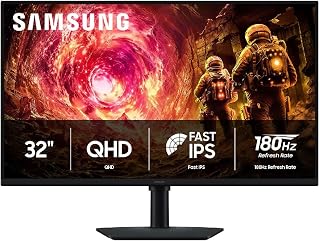
For anyone building a well-rounded gaming setup without stepping into curved or OLED territory, this 32-inch pick offers a 180 hertz refresh rate on an IPS panel, which keeps fast motion smooth while preserving accurate color and wide viewing angles. The matte finish cuts glare in bright rooms, making it a solid all-around choice for competitive and casual titles alike.
Pros
- 180Hz refresh rate with 1ms response time
- QHD IPS panel with 178-degree viewing
- G-Sync compatibility and Black Equalizer
- Adjustable stand with HDMI and DisplayPort cables
Cons
- 32-inch QHD is less dense than 27-inch QHD
- Flat panel may not suit curved-screen fans
The Odyssey G5 G50F earns its place in a Samsung monitor guide as the gaming-first option that can also cover ordinary desktop tasks. Its 32-inch flat IPS screen uses QHD resolution, while the 180Hz refresh rate and 1ms response time put speed at the center of the design. G-Sync compatibility is intended to keep the GPU and panel synchronized, limiting tearing and stuttering during play. HDR10 supplies brighter highlights and more nuanced shadow detail, and Black Equalizer is available for seeing details in dark game areas. It is not limited to a fixed, head-on gaming position. The 178-degree viewing angle helps colors stay true when viewed from the side, and the stand supports height adjustment, tilt, and 90-degree swivel. DisplayPort and HDMI cables are supplied. The decision to use QHD on a 32-inch screen brings more physical workspace but roughly 109 pixels per inch, so it is less dense than a 27-inch QHD display. This is the Samsung choice for a setup centered on fast gaming with useful everyday flexibility.
Display: 32 inches, QHD (2560 x 1440), IPS panel, 16:9 aspect ratio, matte finish
Performance: 180Hz refresh rate, 1ms response time (GtG), 300 cd/m² brightness, 1000:1 contrast ratio
Color: 99% color gamut, HDR10 support, 178-degree viewing angle
Adaptive Sync: G-Sync compatible, FreeSync support
Connections: 1x DisplayPort, 1x HDMI
Adjustments: Height, tilt, and swivel ergonomic stand
Dimensions: 28.1" W x 24.6" H x 9.9" D
Weight: 10.8 lbs
Warranty: 1-year manufacturer coverage
Buy the Odyssey G5 G50F if your Samsung monitor needs to prioritize responsive gaming but still serve as a general desktop display. It suits players who want a 32-inch QHD IPS panel, 180Hz operation, G-Sync compatibility, and an adjustable stand. Skip it if pixel density is your primary concern, since 32-inch QHD is less dense than 27-inch QHD, or if you want a refresh rate beyond its 180Hz limit. It is a flat-panel choice rather than a curved-screen one.

Ultrawide enthusiasts building an immersive command center will appreciate the 21:9 curved VA panel, which wraps a 40-inch canvas around your field of view. A 3000:1 contrast ratio gives VA's signature deep blacks, and 180 hertz keeps racing or shooter titles fluid, making this suited to setups where screen real estate matters as much as speed.
Pros
- 40-inch 21:9 WUHD workspace
- 180Hz refresh with FreeSync Premium Pro
- Deep 3000:1 contrast and HDR support
- Adjustable stand and integrated USB hub
Cons
- Large 1000R curve needs desk space and adjustment
- Full-resolution gaming requires powerful graphics hardware
Samsung’s 40-inch Odyssey G7 G75F is the Samsung monitor to choose when one display needs to serve as both a high-speed gaming screen and a broad workspace. Its 21:9, 5120x2160 canvas puts the emphasis on horizontal room, while the 1000R curve wraps that expanse around the viewer. A VA panel, 3000:1 contrast ratio, VESA DisplayHDR 600 support, and 99% color gamut give dark scenes depth and colors a vivid presentation. For play, the 180Hz refresh rate, 1ms response time, and AMD FreeSync Premium Pro target fluid, tear-free motion. The large format also suits single-player games, competitive FPS titles, and creative tasks that benefit from extra width. Height, tilt, and swivel adjustment help position the screen, and the included cables plus USB hub improve everyday practicality. It is a demanding monitor in more than one sense: its size needs substantial desk space, its curve takes adjustment, and driving games at its full resolution calls for a powerful graphics card. Professional photo or video work may also require calibration.
Display: 40-inch 1000R curved VA panel, 5120x2160 native resolution, 21:9 aspect ratio, 178-degree viewing angles
Performance: 180Hz refresh rate, 1ms response time (GtG), 3000:1 contrast ratio, 350 cd/m2 brightness, VESA DisplayHDR 600
Connectivity: 2x HDMI 2.1, 1x DisplayPort 1.4, USB 3.0 hub upstream, audio jack, stand mount and VESA wall mount compatible
Design: Adjustable stand with height, tilt, and swivel, dimensions 36.56"W x 23.58"H x 11.96"D, 24.9 lbs, includes CoreSync RGB with 16.7 million color options
Warranty: 1-year manufacturer warranty, AMD FreeSync Premium Pro included
Buy it if your ideal Samsung monitor is a very large ultrawide for immersive games and wide creative or multitasking layouts, and you have the desk space and graphics power to support it. The adjustable stand and high refresh rate make it especially compelling for a gaming-centered setup. Skip it if you prefer a conventional flat screen, have limited room, need the easiest setup for professional color work, or do not want to adapt to a pronounced curve. Users who often view from extreme angles may notice slight parallax.

Multitaskers who want an ultrawide workspace without a gaming price tag will find the 21:9 aspect ratio useful for side-by-side windows, backed by PIP and PBP so multiple inputs can share the screen. A 100 hertz refresh rate and AMD FreeSync keep things smooth for light gaming, while the matte coating helps during long office sessions.
Pros
- 3440x1440 21:9 workspace
- 100Hz refresh rate with AMD FreeSync
- HDR10, billion-plus colors, and 3000:1 contrast
- Matte finish, eye care, and dual HDMI inputs
Cons
- Requires considerable desk width
- Matte coating prioritizes glare reduction over vibrancy
Among Samsung’s monitor range, the 34-inch ViewFinity S50GC makes its case through workday versatility rather than extreme gaming specifications. Its 3440x1440 Ultra-WQHD panel uses a 21:9 layout to create a broad, continuous desktop for side-by-side windows, video editing timelines, or financial work. The borderless design keeps the focus on that workspace, and the matte finish is intended to reduce glare. A 100Hz refresh rate and AMD FreeSync support smooth content rendering, while a 5ms response time broadens its appeal to gaming. HDR10 support, more than one billion colors, and a 3000:1 contrast ratio add visual depth for media and content. Samsung also includes TUV-certified Intelligent Eye Care for extended screen time. DisplayPort 1.2, two HDMI 2.2 inputs, and headphone audio allow several useful connection options. It is still a large monitor at 32.1 inches wide, and the matte surface favors glare control over maximum color vibrancy. For a best Samsung monitor list, this is the sensible ultrawide choice for users whose priority is fitting more work into one screen.
Display Specifications: 34-inch ultrawide LCD, 3440x1440 native resolution, 21:9 aspect ratio, 100Hz refresh rate, 5ms response time, 3000:1 contrast ratio, 300cd/m2 brightness, 178-degree viewing angle, matte finish.
Color and Image Technology: 72% color gamut, HDR10 support, AMD FreeSync adaptive sync, TUV-certified Intelligent Eye Care with ambient light sensor, Eye Saver Mode, Flicker Free technology.
Connectivity: 1x DisplayPort 1.2, 2x HDMI 2.2, 1x 3.5mm headphone jack. Includes DisplayPort and HDMI cables.
Physical Dimensions: 32.1 inches wide, 18 inches tall, 8.7 inches deep. Weight: 10.8 pounds. Wall mount compatible.
Power and Warranty: 50 watts power consumption at 110 volts. 1-year manufacturer warranty. Model: LS34C502GANXZA.
Buy it if you want a Samsung ultrawide primarily for multitasking, timelines, spreadsheets, or placing two applications side by side, with enough gaming support for occasional play. Its eye-care feature, matte finish, and multiple video inputs also suit long desktop sessions and mixed-device desks. Skip it if your setup cannot accommodate a 32.1-inch-wide display, if you need the strongest possible color vibrancy from a glossy surface, or if your priority is top-tier competitive gaming speed.

Setups built around immersive, cinematic gaming benefit from the 1000R curve here, which wraps the screen into your peripheral vision for a more enveloping feel. A 2500:1 contrast ratio adds noticeably deeper blacks than standard LED panels, while 165 hertz keeps fast-paced action fluid, making this a strong fit for players who want depth alongside speed.
Pros
- 1000R curve for an immersive field of view
- 165Hz refresh rate and 1ms response time
- QHD delivers 1.7 times the pixels of 1080p
- HDR10 and 2500:1 contrast ratio
Cons
- Plastic stand lacks tilt adjustment
- Glossy finish can show reflections
The G55C's defining feature is its 1000R curve. The 32-inch QHD panel draws the field of view into the game, making this the Samsung choice for an immersive, large-screen gaming setup. QHD renders 1.7 times as many pixels as standard 1080p, while a 165Hz refresh rate and 1ms response time are geared to fast action. Adaptive sync technology and HDR10 are also part of the feature set. Its specifications list a 2500:1 contrast ratio, 300 candela-per-square-meter brightness, and a 0.99 color gamut. The physical design carries more compromises than the screen. The included stand is sturdy, but primarily plastic and without tilt adjustment. Its glossy finish produces vivid colors, although room lighting matters because reflections may be visible. There is no onboard audio. Reaching the full stated refresh rate requires selecting it in the monitor's OSD menu. In a guide spanning Samsung monitor setups, choose this model when a pronounced curve, QHD detail, and fast motion matter more than a fully adjustable stand.
Display: 32-inch QHD (2560 x 1440), 16:9 aspect ratio, 1000R curvature, glossy finish, 178-degree viewing angle
Performance: 165Hz refresh rate, 1ms MPRT response time, 2500:1 contrast ratio, 300 cd/m2 brightness
Features: HDR10, AMD FreeSync adaptive sync, Eye Saver Mode (blue light reduction), flicker-free technology
Connectivity: 1x DisplayPort, 1x HDMI, 2x component outputs
Physical: 28" wide, 21.01" tall, 10.7" deep, 11.5 lbs. Includes DP cable, power cable, and stand. Wall mount compatible. 1-year manufacturer warranty.
Buy the G55C if a 32-inch curved QHD screen is the centerpiece of your gaming setup and you want 165Hz, 1ms performance, HDR10, and adaptive sync technology. It is best suited to players who value a 1000R curve and can control room reflections. Skip it if you require tilt adjustment, prefer a non-glossy finish, or need onboard audio. It is also a poor fit if you do not want to change the refresh-rate setting through the OSD menu.

High-end gaming setups chasing the deepest possible contrast should look here, since the QD-OLED panel hits a 1000000:1 contrast ratio, letting individual pixels go fully dark for true blacks. Paired with a 180 hertz refresh rate, it handles both fast competitive play and atmospheric, story-driven games where lighting detail actually shows up on screen.
Pros
- QD-OLED panel with QHD resolution
- 180Hz refresh and 0.03ms response time
- 1,000,000:1 contrast with HDR10
- Matte anti-glare surface and OLED Safeguard
Cons
- Only one DisplayPort and one HDMI input
- 280 cd/m² brightness trails some mini-LED displays
A 27-inch, 16:9 screen remains a straightforward fit for many desks, and the Odyssey OLED G5 brings Samsung’s OLED option to that familiar format. Its QD-OLED panel combines QHD 1440p resolution with a 1,000,000:1 contrast ratio, delivering the deep black levels, color fidelity, and visual quality highlighted by OLED technology. The matte anti-glare treatment is designed to limit reflections without the haze associated with many gaming screens. This model earns a place in a best Samsung monitor roundup because it pairs that picture focus with fast gaming credentials: 180Hz refresh, 0.03ms response time, FreeSync, and G-Sync compatibility. HDR10 and Pantone-validated reproduction of more than 2,100 colors extend its usefulness to creative work and video. OLED Safeguard uses thermal modulation, logo detection, and automatic screen savers to help prevent burn-in, with a three-year warranty noted in the product information. The tradeoff is versatility of connections: there is one DisplayPort and one HDMI port, plus limited USB options. Its 280 cd/m² peak brightness also falls behind some mini-LED monitors for maximum brightness.
Display: 27-inch QD-OLED flat panel, matte finish
Resolution: QHD 1440p (2560 x 1440 pixels)
Refresh Rate: 180Hz
Response Time: 0.03ms (GtG)
Brightness: 280 cd/m2
Contrast Ratio: 1000000:1
Color Accuracy: Pantone Validated, 2,100+ color reproduction
HDR: HDR10 supported
Connectivity: 1x DisplayPort, 1x HDMI, 1x USB
Adaptive Sync: G-Sync Compatible, AMD FreeSync
Dimensions: 24.01"W x 18.26"H x 9.23"D
Weight: 7.3 lbs
Power Consumption: 78 watts
Warranty: 3-year manufacturer warranty
Buy it if you want a compact Samsung gaming monitor with OLED black levels, strong color performance, QHD resolution, and 180Hz motion in a standard 16:9 shape. It also suits creative users who value HDR10 and Pantone-validated color reproduction. Skip it if you need numerous connections for several devices, broad USB connectivity, a larger ultrawide workspace, or exceptionally high brightness. Those priorities are better matched by another type of Samsung monitor.

Pros
- QD-OLED panel with 1,000,000:1 contrast ratio
- 32:9 ultrawide curved format for immersive setups
- 144Hz refresh rate for smooth motion
- Matte finish reduces glare, 178-degree viewing angle
Cons
- Ultrawide format is overkill for standard desk setups
- Reported brightness inconsistency between dual panels
If your setup is built around having the best screen Samsung makes, the 49-inch Odyssey OLED G9 earns that spot. This is a 32:9 ultrawide QD-OLED panel at 5120x1440, and for a best-of roundup it represents the top tier of what Samsung's monitor lineup can do visually. The million-to-one contrast ratio and OLED panel technology mean deep blacks and accurate color rather than the washed-out contrast you get on standard LCD panels, and the 144Hz refresh rate keeps motion smooth for fast-moving content. A 178-degree viewing angle holds color and contrast steady even off-center, useful on a screen this wide where edges sit far from your eyeline. The matte finish cuts glare in bright rooms, a practical touch on a panel this large. For a 'best for every setup' list, this is the pick for the setup that has space and wants maximum immersion, whether that's a dedicated gaming desk or a multi-monitor replacement. It is a specialized choice rather than a universal one, but within its category it represents Samsung's flagship display technology.
Buy this if you have the desk space for a 49-inch curve and want one screen to replace a multi-monitor array, or if color accuracy and deep contrast matter for your work or games. Skip it if you need a monitor for a compact desk, want something that works well for everyday productivity apps without the ultrawide adjustment period, or are drawn in mainly by the brand name rather than the format.
Display: 49-inch curved QD-OLED with 5120x1440 Dual QHD resolution and 32:9 aspect ratio. 110 pixels per inch provides exceptional clarity. Matte screen finish minimizes glare.
Performance: 144Hz refresh rate, 0.03ms gray-to-gray response time, infinite contrast ratio (1,000,000:1). G-Sync compatible and AMD FreeSync Premium Pro certified. VESA DisplayHDR True Black 400.
Design: 1800R curvature. Dimensions: 47.04 inches wide by 20.84 inches tall by 11.19 inches deep. Weight: 28.4 pounds. Metal stand with height, tilt adjustment. Premium aluminum silver finish.
Connectivity: DisplayPort, HDMI 2.1, Micro-HDMI, USB-C with upstream and downstream ports. Includes DisplayPort and HDMI cables. 3-year manufacturer warranty.
How to Choose the Right Samsung Monitor
Resolution and Panel Type
Resolution shapes everything from text sharpness to how immersive games feel. The 4K tier suits professionals who need fine detail, and the Samsung 32″ ViewFinity S7 (S71H) delivers exactly that with a 3840×2160 IPS panel and HDR10 support. For gaming, QHD hits a sweet spot between clarity and frame rate demands.
Panel type matters too. IPS panels like those in the Odyssey G5 series offer wide 178-degree viewing angles and consistent color. QD-OLED, found in the Samsung 27″ Odyssey OLED G5 (G50SF) and the Samsung 49″ Odyssey OLED G9 (G91SD), takes color accuracy and contrast to another level entirely with true blacks and Pantone-validated color reproduction.
Refresh Rate and Response Time
Casual users and productivity workers can work comfortably with 75Hz to 100Hz, which is what you get on the Samsung 32″ Flat Computer Monitor and the Samsung 27″ Essential S3 (S36GD). These panels keep motion smooth without requiring a high-end GPU.
Competitive gamers should look toward 165Hz or higher. The Samsung 32″ Odyssey (G55C) runs at 165Hz with a 1ms MPRT response time, while both the Samsung 27″ Odyssey G5 (G50F) and Samsung 32″ Odyssey G5 (G50F) push 180Hz with G-Sync compatibility for tear-free gameplay.
Screen Size and Aspect Ratio
Screen size is personal, but a few patterns hold up. The 27-inch format is the most versatile: roomy enough for multitasking, compact enough for a standard desk. At 32 inches, you gain more real estate for creative work or gaming without crossing into ultrawide territory.
If you want to replace a dual-monitor setup or create a fully cinematic gaming experience, ultrawide is the answer. The SAMSUNG 34″ ViewFinity S50GC Series Ultra-WQHD offers a 21:9 ratio with Ultra-WQHD resolution, and the Samsung 40″ Odyssey G7 (G75F) steps that up to a 1000R curved ultrawide with VESA DisplayHDR 600. For the most ambitious setup, the 49-inch 32:9 Samsung 49″ Odyssey OLED G9 (G91SD) delivers dual QHD resolution across a single curved panel.
Eye Care and Ergonomics
Long sessions demand a display that works with your eyes, not against them. Across the lineup, Samsung consistently includes TUV-certified Eye Saver Mode and Flicker Free technology to reduce blue light and eliminate the screen flicker that causes fatigue over time.
Stand flexibility also matters more than people expect. The Samsung 27″ Odyssey G5 (G50F) ships with a height-adjustable ergonomic stand that tilts, pivots, and swivels, which is a genuine advantage if you share a desk or work long hours. Pair a well-positioned monitor with a solid vertical monitor stand for even better posture and workspace organization.
Final Thoughts
Samsung’s monitor lineup covers nearly every need, and two picks stand out as especially strong all-rounders. For professionals and creators who prioritize pixel-perfect detail, the Samsung 32″ ViewFinity S7 (S71H) delivers 4K IPS clarity with HDR10 in a clean, focused package. For serious gamers ready to invest in a next-level experience, the Samsung 27″ Odyssey OLED G5 (G50SF) combines QD-OLED color science, Glare Free technology, and a 180Hz refresh rate into one of the most capable gaming panels Samsung has ever produced.
Frequently Asked Questions
What is the best Samsung monitor for gaming in 2026?
It depends on what kind of gaming you do. For competitive play where frame rate is everything, the Samsung 32″ Odyssey G5 (G50F) offers 180Hz, 1ms response, and G-Sync compatibility at a reasonable entry point. If you want the most visually impressive experience possible, the Samsung 27″ Odyssey OLED G5 (G50SF) raises the bar with QD-OLED technology and a 0.03ms response time. Both are strong choices depending on your priorities.
Is a curved Samsung monitor worth it?
For gaming and immersive media consumption, curved displays genuinely add to the experience. Samsung’s 1000R curvature, used in monitors like the Samsung 32″ Odyssey (G55C) and the Samsung 40″ Odyssey G7 (G75F), wraps more closely around your field of vision to reduce eye movement and increase immersion. For pure productivity or color-accurate work, a flat IPS panel often remains the more practical choice.
What resolution should I choose for a Samsung monitor?
Full HD (1080p) is fine for basic productivity, but QHD (1440p) is the current sweet spot for both gaming and creative work, offering noticeably sharper images without demanding as much GPU power as 4K. If you work with high-resolution assets, photo editing, or CAD, a 4K panel like the Samsung 32″ ViewFinity S7 (S71H) is worth the investment. For even more screen real estate, check our breakdown of monitors built for CAD work to see how resolution and panel size interact for precision tasks.
Does Samsung make ultrawide monitors?
Yes, and they’re among the best in the category. The SAMSUNG 34″ ViewFinity S50GC Series Ultra-WQHD is a great productivity-focused ultrawide with a 21:9 aspect ratio, PIP and PBP support, and AMD FreeSync. For a larger gaming-grade ultrawide, the Samsung 40″ Odyssey G7 (G75F) delivers a 1000R curved 21:9 display with DisplayHDR 600. The Samsung 49″ Odyssey OLED G9 (G91SD) goes even further with a 32:9 super-ultrawide format across a QD-OLED panel.






Write Your Review
No reviews yet. Be the first to share your experience!