

You just ordered a Ryzen processor and now you’re staring at a blank checkout cart wondering if you need to add a CPU cooler to the order. It’s one of the most common questions new PC builders ask, and the answer depends on which Ryzen chip you picked up and what you plan to do with it. This guide breaks down exactly when the included cooler is enough and when an aftermarket upgrade is worth it. If you’re also sorting out your processor choice, our best CPU for gaming guide covers the full picture.
AMD has long been generous with bundled coolers on many of its Ryzen SKUs, but not every chip ships with one, and not every stock cooler handles demanding workloads well. Whether you’re running a budget Ryzen 5 or pushing a Ryzen 9 to its limits, the right cooling solution keeps temperatures stable and performance consistent.
Quick Comparison
| Model | Link | Rating |
|---|---|---|
| 1 Thermalright Phantom Spirit 120SE CPU Cooler, 7 Heat...Highest rated | Check price | 4.8 of 5975 ratings |
| 2 Thermalright Assassin X120 Refined SE CPU Cooler, 4 Heat... | Check price | 4.7 of 51,823 ratings |
| 3 ARCTIC Freezer 36 CPU Cooler: High-Performance... | Check price | 4.7 of 5 |
| 4 Ryzen Wraith Prism RGB LED CPU Cooler AM4 AM5 Socket with... | Check price | 4.7 of 541 ratings |
| 5 Thermalright Peerless Assassin 120 SE CPU Cooler, 6 Heat...Most reviewed | Check price | 4.7 of 53,308 ratings |
| 6 be quiet! Pure Rock Pro 3 Black CPU Air Cooler - 6 Heat... | Check price | 4.7 of 5484 ratings |
| 7 WSHAITE Wraith Prism RGB CPU Cooler for AMD Ryzen AM4 AM5... | Check price | 4.6 of 5116 ratings |
| 8 Minorsonic 360mm AIO CPU Cooler, Ceramic Pump, PWM ARGB... | Check price | 4.4 of 5281 ratings |
| 9 AMD Wraith Stealth AM4 CPU Cooler with Aluminum Heatsink...Unavailable | Check price | 4.6 of 52,078 ratings |
| 10 Thermalright Assassin X 120R SE V2 CPU Cooler: Quiet...Unavailable | Check price | 4.6 of 5 |
Ratings reflect the most recent data pull. Check each listing for current price and availability.
Quick answer
This guide compares 10 picks, with Thermalright Phantom Spirit 120SE CPU Cooler, 7 Heat ranked first. Thermalright Peerless Assassin 120 SE CPU Cooler, 6 has the most customer reviews.

If you're running a higher-TDP Ryzen chip and skipping the stock cooler, the 7 heat pipes with AGHP 4.0 technology give this unit serious thermal headroom for sustained boost clocks. Dual 120mm fans keep noise at just 25.6 db even under load, so you get air cooling that handles demanding Ryzen workloads without the fan noise typically associated with high-performance heatsinks.
Pros
- Excellent thermal performance from advanced AGHP 4.0 heat pipe technology
- Whisper-quiet operation at 25.6dB makes it ideal for silent builds
- Broad socket support eliminates compatibility concerns across Intel and AMD platforms
- Robust build quality with anodized aluminum and pure copper base construction
- Proven reliability with industrial-grade bearings and extended service life rating
Cons
- Single 120mm radiator may require more case airflow compared to larger tower coolers for extreme overclocking
- Installation requires matching correct mounting brackets for your specific socket platform
The Thermalright Phantom Spirit 120SE is a compact yet capable CPU cooler engineered for builders seeking reliable thermal management without premium pricing. This cooler targets budget-conscious gamers, content creators, and system builders who demand solid performance on AM4, AM5, and modern Intel platforms.
The standout feature is the AGHP 4.0 heat pipe technology with seven 6mm diameter pipes that efficiently transport heat away from your CPU regardless of cooler orientation. Paired with dual TL-C12B V2 PWM fans pushing 66.17 CFM at an impressive 25.6dB noise level, this cooler balances cooling capacity with quiet operation ideal for office-friendly builds.
Build quality impresses at this price point. The aluminum fin stack combined with a precision-machined pure copper base ensures optimal heat dissipation, while the industrial-grade S-FDB bearings promise 20,000 hours of reliable operation. The 154mm height accommodates most standard cases and high-profile RAM modules without issues.
The primary limitation is the single 120mm form factor, which may bottleneck extreme overclocking scenarios where you need aggressive cooling. Additionally, installation requires careful attention to bracket selection for your specific socket, though Thermalright provides comprehensive mounting hardware.
The Phantom Spirit 120SE delivers genuine value by combining proven cooling technology, quiet operation, universal compatibility, and durable construction in a price-accessible package. Highly recommended for mainstream gaming, productivity workstations, and standard office builds.
Cooler Specifications: Model PS120SE, dimensions 125L x 135W x 154H mm, weight 100g. Heat sink features anodized black aluminum with pure copper base plate. Seven 6mm AGHP 4.0 heat pipes with industrial-grade construction.
Fan Specifications: Model TL-C12B V2, 120x120x25mm standard industrial-grade PWM fan. Speed 1500 RPM nominal, airflow 66.17 CFM maximum, noise level 25.6dB(A) or quieter. 4-pin 12V DC connector with variable speed control.
Socket Compatibility: Intel LGA1851, LGA1700, LGA1150, LGA1151, LGA1155, LGA1156, LGA1200. AMD AM4 and AM5. Includes appropriate mounting plates and fasteners for each platform.

For budget-conscious Ryzen builds that still need more than the bundled cooler, 4 heat pipes paired with AGHP technology provide a compact but capable thermal solution. Running at 25.6 db with speeds up to 1550 rpm, it answers the cooling question for lower TDP Ryzen chips without demanding much case clearance or airflow planning.
Pros
- Dramatic temperature drops reported over stock Ryzen cooling
- Compact size fits tighter cases than larger towers
- Noise stays at or below 25.6dB at 1550RPM
- Fan frame rated for 20,000 hours of operation
Cons
- Installation requires correctly matching mounting spacers to socket
- Four heat pipes offer less headroom than six-pipe designs
For Ryzen owners asking whether the included stock cooler is enough, the Assassin X120 Refined SE is a direct answer for mainstream builds. Its compact tower design targets exactly the question this guide raises: do you need to upgrade, and if so, what fits without overhauling your case. Four 6mm copper heat pipes with AGHP technology move heat efficiently regardless of orientation, paired with a TL-C12C PWM fan that holds around 1550RPM while keeping noise at or below 25.6dB. On a Ryzen 5600X, that combination has taken gaming temperatures from the 90-94C range typical of stock cooling down to a much safer 40-45C. That kind of drop matters for anyone concerned about sustained Ryzen performance under load. The aluminum heatsink body keeps weight low while still conducting heat well, and the fan frame is rated for 20,000 hours of operation. Its smaller 4.72 x 2.8 x 5.83 inch footprint makes it easier to fit into compact builds than larger dual-tower options. Installation needs attention to the mounting spacers for your specific socket, but getting that right is the main hurdle.
Cooler Model: Thermalright AX120 Refined SE
Dimensions: 125mm L x 71mm W x 148mm H (4.92 x 2.8 x 5.83 inches)
Weight: 645 grams (1.42 lbs)
Material: Aluminum heatsink with copper heat pipes and metal fasteners
Heat Pipe Configuration: 4 pipes at 6mm diameter with AGHP technology
Fan Model: TL-C12C PWM
Fan Size: 120 x 120 x 25mm standard square format
Fan Speed: 1550 RPM (plus or minus 10 percent)
Fan Airflow: 66.17 CFM maximum
Noise Level: 25.6 dB(A) or lower
Power Connector: 4-pin PWM for CPU fan header
Voltage: 12V DC
Intel Socket Compatibility: LGA1150, LGA1151, LGA1155, LGA1156, LGA1200, LGA1700, LGA1851
AMD Socket Compatibility: AM4, AM5
Service Life: 20,000 hours (industrial rated)
Bearing Type: S-FDB (sealed fluid dynamic bearing)
Included Components: CPU cooler, mounting hardware for all compatible sockets, thermal paste, installation guide
Before Installation: Lay the motherboard flat on a work surface rather than installing vertically. Gather the three different sized mounting spacers and review the platform-specific instructions included in the package. Apply a pea-sized amount of thermal paste to the CPU die before mounting (excessive paste reduces cooling performance).
Socket Selection: Identify your CPU socket type and select the correct mounting brackets and spacers from the included hardware. The cooler ships with fasteners for Intel and AMD platforms. Match the bracket size to your specific socket using the size markings and installation guide.
Mounting Process: Install the appropriate mounting plate beneath your motherboard, then secure the cooler base to the CPU using the correctly sized spacers and fasteners. Tighten fasteners gradually in a cross pattern to ensure even pressure. The cooler should not visibly flex or rock when fully secured.
Fan Installation: Mount the TL-C12C fan to the heatsink with rubber dampening pads facing the aluminum fins. Secure the fan using the provided mounting clips, ensuring it clips firmly on both sides. The fan should not rattle or shift during handling. Orient the fan exhaust toward your chassis airflow exit for optimal thermal dissipation.
Cable Management: Connect the fan's 4-pin PWM connector directly to your motherboard's CPU fan header for automatic temperature-based speed control. Configure your BIOS fan curve if needed for additional noise or thermal optimization.

Pros
- Exceptional value for budget-conscious PC builders seeking quality cooling
- Easy installation with innovative click-mounting system for fans
- Dual-fan push-pull configuration maximizes air circulation and cooling capacity
- Compact single-tower design avoids RAM clearance issues common with larger coolers
- Low power consumption (1.2W) minimizes system strain
Cons
- Zero user reviews available, so real-world performance feedback is limited
- Single-tower design may struggle with extreme overclocking compared to dual-tower alternatives
- Stock fan noise levels not detailed, requiring research before purchase
The ARCTIC Freezer 36 is a single-tower CPU cooler engineered for Intel's 12th and 13th-gen processors (LGA1700) and the upcoming LGA1851 platform. This cooler targets budget-conscious builders and system integrators who need reliable thermal management without premium pricing. It's ideal for non-overclocked to moderately overclocked setups in mid-tower and full-tower cases.
The cooler's standout feature is its four offset heat pipes paired with pressure-optimized 120mm fans in a push-pull configuration. The side-flow heat sink design draws cool air through the fins horizontally, improving ventilation efficiency compared to traditional top-down designs. The innovative click-based fan mounting system eliminates screws, making it genuinely easier to service or swap fans later.
Build quality appears solid, with copper heat pipes and an aluminum fin stack combining durability with effective heat dissipation. The improved contact pressure distribution through the Intel mounting frame ensures even thermal contact across the CPU surface. The inclusion of MX-6 thermal compound saves a purchase while meeting modern thermal interface standards.
The main limitation is the single-tower design, which has inherent height restrictions compared to dual-tower coolers. Buyers with aggressive overclocking plans may want to consider larger alternatives. Additionally, with no user reviews yet, field data on noise levels and long-term reliability remains unavailable, though the six-year warranty suggests confidence from ARCTIC.
The ARCTIC Freezer 36 delivers strong value for mainstream gaming and workstation builds, combining easy installation, competent cooling performance, and long-term reliability at an accessible price point. It's a practical choice for anyone upgrading to Intel's latest mainstream platforms without overspending on cooling.
Cooling Performance: 56.3 CFM air flow, 4-pin connector, 200-1800 RPM fan speed range, 1.2W power consumption.
Compatibility: Intel LGA1700, LGA1851, AMD AM4, AMD AM5. Improved contact frame for Intel mounting.
Materials: Copper heat pipes for superior thermal conductivity, aluminum fin stack for lightweight durability.
Dimensions: 4.09 inches L x 4.96 inches W x 6.25 inches H. Weight: 879 grams.
Warranty: 6 years from ARCTIC. Includes MX-6 thermal compound.
Who Should Buy: Budget-conscious PC builders, system integrators handling mainstream platforms, users upgrading Intel 12th/13th-gen systems, and anyone seeking reliable cooling without premium pricing.
Who Should Skip: Extreme overclockers needing maximum cooling headroom, users in compact ITX builds with limited vertical clearance, and those who prioritize cutting-edge noise performance.
Installation Tip: The click-based fan mounting system works with standard 120mm fans, making this cooler future-proof for fan replacements. Ensure your case has adequate top clearance for the 6.25-inch height.
Value Consideration: At this price point, the ARCTIC Freezer 36 competes primarily on ease of installation and dual-fan efficiency rather than extreme performance. It's a sensible middle ground between basic single-fan coolers and expensive high-end solutions.

Pros
- Excellent socket compatibility spans multiple AMD generations, making it ideal for upgrades and system rebuilds
- Flexible dual-speed operation balances silent everyday computing with robust cooling under load
- RGB customization and software control add visual appeal to gaming and content creation builds
- Pre-applied thermal paste eliminates a setup step and reduces installation time
- Highly affordable option compared to premium coolers while maintaining solid thermal performance
Cons
- Maximum airflow of 45 CFM may be limited for extreme overclocking compared to high-end tower coolers
- Noise reaches 40dB in high-speed mode, which is audible during sustained high-performance tasks
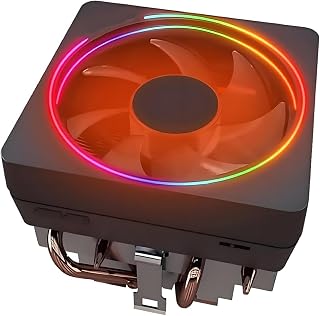
The Wraith Prism is a mid-range CPU cooler designed for AMD Ryzen builders seeking a balance of performance, aesthetics, and affordability. It targets users building or upgrading budget to mid-range systems who want reliable cooling with RGB customization without spending premium prices.
The standout feature is its dual-speed PWM fan with an L/H switch. In low-speed mode, it operates at just 22dBA for near-silent office or light gaming use. High-speed mode pushes up to 2800 RPM and 45 CFM of airflow, sufficient for standard gaming and productivity workloads. The aluminum heatsink paired with a pure copper base and four 6mm direct-contact heat pipes efficiently dissipates heat away from the CPU, supported by pre-applied thermal paste that simplifies installation.
Build quality is solid with durable aluminum and copper construction. The transparent fan blades showcase the RGB lighting effectively, and the cooler supports major RGB sync software for easy integration into existing lighting ecosystems. The Wraith Prism software provides granular control over LED color, brightness, speed, and direction, plus separate control for logo and ring lighting to match your build aesthetic.
The main limitation is that 45 CFM airflow is modest for extreme overclocking scenarios. In high-speed mode, expect around 40dB of noise, which is noticeable during sustained performance tasks. Socket compatibility is genuinely impressive, spanning AM5, AM4, AM3, and legacy sockets, though this comes at the cost of it being a universal bracket design rather than optimized for a single platform.
The Wraith Prism delivers solid value for budget-conscious builders. It cools effectively for standard workloads, runs whisper-quiet in silent mode, and adds visual flair with customizable RGB. For system builders prioritizing quietness and style over maximum thermal headroom, this cooler is a smart choice.
Cooling Performance: Air cooling with 4-pin PWM fan, dual-speed operation (1000-2000 RPM low, up to 2800 RPM high), 45 CFM maximum airflow, 40dB max noise level
Heat Transfer: Aluminum heatsink, pure copper base plate, four 6mm direct-contact copper heat pipes, pre-applied silicone thermal paste
Compatibility: AM5, AM4, AM3, AM2, FM2, FM1, Socket 754, 939, 940 (no adapters required). Supports Ryzen 5, 7, and 9 series processors
Cooling Specifications: RGB lighting with software control, 3.94 x 3.94 x 3.54 inches, 16 ounces, 105W rated power
Who Should Buy: Budget-conscious builders, system upgraders with older AMD platforms, users prioritizing quiet operation, builders seeking RGB customization in entry to mid-range systems
Who Should Consider Alternatives: Extreme overclockers requiring maximum airflow, users with high-end CPUs generating sustained heat loads over 200W, builders indifferent to RGB lighting who prefer simpler cooling solutions
Installation: Installation is straightforward thanks to the universal bracket design and pre-applied thermal paste. No additional thermal paste application needed for standard use. Estimated installation time: 10-15 minutes. RGB control requires downloading Wraith Prism software or connecting to existing RGB headers compatible with major motherboard brands.
Value Assessment: At under $25, this cooler offers competitive performance per dollar, especially when factoring in RGB customization, broad socket compatibility, and dual-speed operation. Best value for builders upgrading older systems or assembling modest gaming PCs.

For Ryzen builders wondering if the included cooler is enough, this upgrade path offers 6 heat pipes and dual PWM fans rated at 265 watts of cooling capacity, comfortably covering mid to upper range Ryzen chips. At 25.6 db noise level, it answers the cooling question without turning your build into a wind tunnel during gaming or rendering sessions.
Pros
- Six AGHP heat pipes handle entry to mid-range Ryzen loads well
- Dual 120mm PWM fans keep noise at or below 25.6dB
- Broad AM4/AM5 and Intel socket compatibility
- Generous RAM clearance avoids common fan-fit issues
Cons
- Large footprint needs real case clearance
- Can run warmer under full load on higher-end chips
Stock coolers struggle with modern Ryzen chips, and that's exactly the gap the Peerless Assassin 120 SE fills. If you're wondering whether your new or current AM4/AM5 build needs an upgrade, this is the baseline answer: yes, and here is an affordable way to do it. Six AGHP heat pipes and dual 120mm PWM fans pull heat away fast enough to keep entry-level and mid-range Ryzen chips in a safe 40-60C range during normal use, climbing to 70-80C under sustained full load. At 1550RPM, noise stays at or below 25.6dB, so you get real thermal headroom without a louder PC. Build quality reflects Thermalright's long track record in air cooling, with an electroplated aluminum fin stack and a copper base that makes solid contact with the CPU. Socket coverage spans AM4, AM5, and most Intel platforms, so it fits a wide range of Ryzen setups. The main thing to plan around is size, since its width and height need genuine case clearance.
Cooler Dimensions: 4.92 inches L x 5.31 inches W x 6.1 inches H (125mm x 135mm x 155mm)
Material: Aluminum fins with pure copper heat pipes and base
Heat Pipes: 6 pure copper pipes with AGHP technology
Socket Compatibility: Intel LGA 1700, 1200, 115X platforms and AMD AM4, AM5 sockets
Fan Specifications: Dual 120mm PWM fans
Fan Speed: 1550 RPM (plus or minus 10%)
Air Flow: 66.17 CFM maximum
Noise Level: 25.6dB or lower
Power Connection: 4-pin connector, 12V
Weight: 907 grams
Right for Ryzen builders replacing a stock cooler or stepping up from a basic one, especially on AM4 or AM5 with entry-level to mid-range CPUs. Good for anyone who wants a quiet, dependable upgrade without spending on premium gear. Skip it if your case is tight on clearance, since the width and height can crowd tall RAM or small cases. Also skip it if you're running a high-end Ryzen chip under heavy sustained loads, where more cooling capacity may be needed.
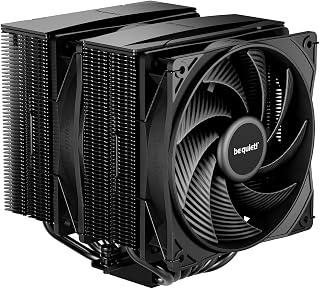
Readers deciding whether their Ryzen setup needs better cooling will find the 6mm heat pipes with HDT technology deliver efficient contact and heat transfer for everyday Ryzen use. The single 120mm PWM fan keeps things simple, though its 34.8 db rating means it runs a bit louder under load, a tradeoff worth noting for quiet-focused builds.
Pros
- Six HDT heat pipes with nickel-plated base for strong heat transfer
- Offset dual-tower design clears RAM and VRM areas
- Adjustable front fan height for flexible builds
- Broad AM4/AM5 and Intel socket support
Cons
- Higher noise level and faster max fan speed than smaller alternatives
- Dual-tower design needs good case airflow to perform well
If the question behind this guide is whether Ryzen needs more than a basic cooler, the Pure Rock Pro 3 answers it for anyone who also cares about noise. This dual-tower air cooler is built for AM4 and AM5 Ryzen systems where thermal performance and quiet operation both matter, not just one or the other. Six copper heat pipes with HDT technology and a nickel-plated base move heat efficiently, while the Pure Wings 3 120mm PWM fan operates at 34.8dB even as rotational speed reaches up to 2000RPM, delivering stronger airflow than smaller single-tower setups when it's needed. The funnel-shaped air outlet and angled fin stack are built to push that airflow effectively through the heatsink. Despite the dual-tower design, an offset architecture helps clear RAM slots and VRM areas, and an adjustable front fan height adds some flexibility for tricky builds. At 5.47 x 4.88 x 6.1 inches, it is sized for builders upgrading from stock Ryzen cooling who want more capacity in reserve, provided the case has decent airflow to support it.
Cooling Performance Dimensions: 5.47 inches L x 4.88 inches W x 6.1 inches H. Weight: 1400g. Material: Aluminum with 6 copper heat pipes featuring HDT technology and nickel-plated base.
Fan Specifications Pure Wings 3 120mm PWM fan. Power: 3.6 watts at 12 volts. Maximum RPM: 2000. Noise level: 34.8 dB. 4-pin connector compatible with standard motherboards.
Compatibility Intel sockets: LGA1851, LGA1700, LGA1200, LGA1151, LGA1150, LGA1155. AMD sockets: AM5, AM4. Includes mounting kits for all compatible platforms with offset mount option for AM5 CPUs.
Package Contents Pure Rock Pro 3 cooler, Pure Wings 3 120mm fan, thermal paste, mounting kit for all compatible sockets, and user manual.
Good for Ryzen builders who want stronger cooling headroom than compact single-tower coolers offer and are willing to trade a bit more size for it. Well suited to builds with decent case airflow. Skip it if your case has limited airflow or tight clearance around the RAM slots, since dual-tower coolers depend on that airflow to perform well, and skip it if you're after the smallest or lowest-noise-floor option on this list.
Pros
- Exceptional value for dual-function RGB cooling at under $25
- Quiet operation in low-speed mode suitable for office and living room builds
- Broad socket compatibility reduces need for upgrades across multiple Ryzen generations
- Pre-applied thermal paste saves time and ensures proper application
- Responsive customer service with satisfaction guarantee
Cons
- 3-month warranty is shorter than many competitor models offering 1-2 year coverage
- RGB control requires compatible motherboard with USB header or separate controller
- High-speed mode reaches 45dBA, which may be noticeable during intensive gaming sessions
The WSHAITE Wraith Prism is a budget-friendly CPU cooler designed for AMD Ryzen builders who want reliable thermal performance without breaking the bank. It targets enthusiasts and everyday gamers running AM4 or AM5 systems, offering solid cooling capability with a modern RGB aesthetic that works with most gaming rigs.
Performance-wise, this cooler combines a pure copper base plate with four 6mm direct-contact copper heat pipes, allowing efficient heat transfer from your CPU to the aluminum fins. The dual-speed PWM fan is a smart feature: switch to low mode for office work and content creation (ultra-quiet at 22dBA), or kick it to high speed (45CFM) when gaming or streaming demands maximum cooling. Pre-applied thermal paste means zero hassle mounting straight onto your CPU.
Build quality is solid for the price. The aluminum heatsink and copper core feel durable, and the 95mm footprint accommodates most tower cases without interference. The transparent fan blades give it a modern look, and the RGB implementation lets you sync colors and effects with popular motherboard software or use the included Wraith Prism software for independent control of the logo and fan ring.
The main trade-offs are the shorter 3-month warranty compared to competitors, and RGB customization requires a compatible motherboard header. High-speed mode at 45dBA isn't whisper-quiet, though it's typical for performance cooling. None of these are dealbreakers for the price point.
Verdict: A reliable, affordable cooler that punches above its weight for mainstream Ryzen builds. Excellent for budget builders and a solid backup cooler for enthusiasts. If RGB lighting matters and you want quiet operation without premium pricing, this Wraith Prism is worth the investment.
This cooler works with an impressive range of AMD sockets, making it a versatile choice across generations. Full compatibility includes AM2, AM3, AM4, AM5, FM1, FM2, 754, 939, and 940 sockets. That means it fits everything from older Ryzen 1000 series up through current Ryzen 7000 processors like the 5700X, 5600X, and 5950X.
The cooler uses standard AMD mounting brackets pre-installed on most modern motherboards, so you likely won't need additional hardware. Just verify your motherboard includes an AM4 or AM5 bracket before ordering. For legacy socket builds, check that your motherboard has the corresponding retention mechanism.
RGB functionality requires either a USB header on your motherboard or a separate RGB controller. Most gaming boards from the last 5 years include USB headers for peripheral RGB, so compatibility is generally excellent.
Installation is straightforward thanks to pre-applied thermal paste. First, ensure your CPU socket matches one of the supported AM sockets. Mount the retention bracket if not already attached to your motherboard. Place the cooler directly onto your CPU, insert the pins or fasteners depending on your socket type, and secure with the included hardware.
Thermal paste is already applied, so avoid adding more unless you're reusing the cooler on a different CPU. The 9-inch cable length is adequate for most cases; route it behind the motherboard tray before connecting to your CPU fan header.
For RGB control, connect the included USB header cable to your motherboard's USB internal header (usually near the bottom-left of the board). Download the Wraith Prism software or use your motherboard manufacturer's RGB control suite to customize lighting effects.

When a Ryzen build runs hot enough that air cooling feels insufficient, this 360mm AIO brings a ceramic bearing pump and 3-phase motor to handle sustained thermal loads more aggressively than a tower cooler. Three PWM ARGB fans spread the workload across a larger radiator, keeping noise to 30 db even while cooling demanding Ryzen configurations.
Pros
- Ceramic bearing pump with 3-phase motor for efficient heat transfer
- Covers both AMD AM5/AM4 and Intel sockets with included brackets
- Daisy-chained fans simplify PWM wiring to one connection per set
- Low 30db noise level even with three fans running
Cons
- 3-pin RGB fans may not match 4-pin headers on some motherboards
- Radiator size requires checking case clearance before buying
Ryzen chips, especially the higher-core X and non-X parts, can run warm under sustained load, and this is where a 360mm AIO earns its place over stock cooling. The Minorsonic pairs a ceramic bearing pump with a 3-phase motor, a combination built to move heat efficiently while keeping vibration and noise down around 30db. For AM5 and AM4 builds specifically, the included mounting hardware covers both platforms, so there's no guesswork about compatibility when matching a cooler to your Ryzen socket. The 12-channel radiator design gives the fans more surface area to dump heat into, which matters if you're running a Ryzen chip that boosts aggressively and needs sustained cooling rather than brief bursts. The daisy-chained PWM fans also mean you're not fighting a tangle of headers during install, just one connection per fan set. If the question is whether a Ryzen build needs more than stock cooling, a 360mm radiator with this pump and motor setup is a reasonable answer for anyone pushing their chip under real workloads.
Cooling System: 360mm AIO liquid cooler with ceramic bearing pump
Pump Specifications: High-speed ceramic bearing pump, 3000 RPM, 3-phase 4-pole motor
Radiator: 12-channel design with optimized fin density
Fans: Three 120mm PWM ARGB fans, daisy-chain configuration, maximum 1600 RPM
Noise Level: 30 dB at full speed
Power Consumption: 5 watts, 12 volts, 4-pin connector
Socket Compatibility: Intel LGA1700, LGA1851, AMD AM5, AMD AM4
Materials: Ceramic, metal, plastic, rubber, copper, aluminum, glass
Included: Pump block, 360mm radiator, three 120mm fans, all mounting brackets, installation manual
Pre-Installation: Verify your CPU socket compatibility and available case space for a 360mm radiator. The cooler supports Intel LGA1700/1851 and AMD AM5/AM4 platforms. All necessary mounting brackets are included in the box.
Key Steps: Mount the radiator and fans to your case first, ensuring proper airflow direction. Connect the pump power to a 4-pin PWM header on your motherboard, then connect the daisy-chained fans to a single PWM header. Finally, install the pump block onto your CPU using the provided brackets. The daisy-chain design means all three fans connect through one cable, significantly reducing the cable clutter compared to traditional setups.
RGB Setup: Connect the 5V ARGB header to your motherboard's RGB/ARGB header. Note that compatibility depends on your motherboard manufacturer. ASUS ROG Strix boards use 4-pin RGB headers, while these fans employ 3-pin connectors, which may cause lighting issues. Consult your motherboard manual for adapter options if needed.

Pros
- Extremely affordable upgrade or replacement cooler for AM4 systems
- Quiet operation with effective cooling performance for stock CPU speeds
- Compact footprint accommodates most PC cases without compatibility concerns
- Official AMD product ensures proper fit and compatibility with AM4 sockets
- Pre-applied thermal paste saves setup time for new builds
Cons
- Pre-applied thermal paste is very sticky and adheres strongly to CPUs, making removal difficult during upgrades or maintenance
- Not suitable for overclocked systems or high-performance workloads requiring advanced cooling
- Limited mounting flexibility compared to aftermarket cooler options
The AMD Wraith Stealth is an official OEM cooler engineered specifically for Socket AM4 processors. It targets budget-conscious builders and users upgrading existing AM4 systems who need dependable thermal management without premium pricing or complex installation steps.
This cooler excels at its core job: keeping AM4 CPUs running cool and quiet. The aluminum heatsink with copper core base efficiently dissipates heat, while the 90mm PWM fan automatically adjusts speed based on CPU temperature. At its price point, performance is genuinely impressive, and users consistently report silent, effective cooling for standard workloads.
Design and build quality reflect its OEM heritage. The heatsink is compact and lightweight, the direct socket mounting is straightforward, and the 9-inch cable length provides convenient routing. The aluminum construction is durable, and the overall package feels solid despite the minimal cost.
One notable drawback: the pre-applied thermal paste is exceptionally sticky. While this provides excellent initial contact and eliminates setup hassles, it creates a serious adhesion problem during future CPU removal or cooler upgrades. Multiple reviewers report the paste holding the cooler so firmly that removing the CPU or heatsink requires heat application or significant force. Plan to replace this paste with quality aftermarket thermal compound before any CPU swap.
Verdict: The Wraith Stealth is an outstanding value for AM4 builds staying within stock operating parameters. Buy it for new builds, upgrades, or as a reliable backup cooler. Skip it if you anticipate frequent CPU upgrades or need cooling for overclocked systems.
Socket Compatibility: AM4
Heatsink Material: Aluminum with copper core base
Fan Size: 90mm (3.5-inch)
Fan Connector: 4-pin PWM
Cable Length: 9 inches (approximate)
Mounting: Direct screw mount to AM4 socket
Thermal Interface: Pre-applied thermal paste
Dimensions: 1.97 inches length
Manufacturer: AMD (Model 712-000052)

Pros
- Exceptional value for money with performance rivaling coolers twice the price
- Very quiet at 25.6dB maximum noise, ideal for office or streaming setups
- Reliable S-FDB bearings reduce vibration and extend fan lifespan
- Compact design leaves room for tall RAM modules in most cases
- Broad platform compatibility supports both current Intel and AMD sockets
Cons
- Single 120mm fan limits cooling capacity compared to dual-fan solutions for high-end CPUs
- RGB lighting requires RGB header on motherboard, limiting customization if unavailable
- Budget build quality may not match premium coolers in long-term durability
The Thermalright Assassin X 120R SE V2 is an entry-level CPU cooler designed for budget-conscious PC builders and office workstations where thermal performance meets affordability. At just $16.59, this cooler targets users building compact PCs or upgrading older systems without committing significant funds to cooling solutions.
The cooler impresses with its straightforward engineering: a pure copper base connects to 4 aluminum heat pipes that funnel heat away from your CPU. The 1550 RPM PWM fan delivers 66.17 CFM of airflow while maintaining an exceptionally quiet 25.6dB noise profile, making it suitable for noise-sensitive environments. S-FDB bearing technology keeps vibration minimal, which translates to longer fan life and consistent performance.
Build quality reflects the price point. The aluminum heatsink and plastic fan shroud are sturdy enough for daily use, though they lack the premium feel of higher-end offerings. The 148mm height is a practical advantage, fitting most mid-tower cases while leaving room for tall RAM modules that often conflict with larger coolers. Installation is straightforward with included mounting hardware for Intel and AMD platforms.
The main limitation is thermal headroom: this single-fan 120mm cooler works well for mainstream CPUs and light productivity workloads but will struggle with enthusiast-grade processors or sustained heavy loads. The RGB lighting is a nice addition but requires a compatible RGB header on your motherboard.
Verdict: The Thermalright Assassin X 120R SE V2 delivers solid thermal performance and whisper-quiet operation at an unbeatable price. It is ideal for budget builds, office systems, or secondary machines where you want dependable cooling without spending big.
Cooler Model: AX120R SE V2
Fan Model: TL-C12C-L V2
Dimensions: 120L x 71W x 148H mm (4.92 x 2.8 x 5.83 inches)
Weight: 100 grams
Heatsink Material: Aluminum with pure copper base
Heat Pipes: 4 x 6mm pure copper
Fan Speed: 1550 RPM (plus or minus 10%)
Airflow: 66.17 CFM maximum
Noise Level: 22-25.6 dB(A)
Power Connector: 4-pin PWM
Voltage: 12V
Power Draw: 15 watts
Bearing Type: S-FDB (Self-Lubricated Fluid Dynamic Bearing)
Socket Compatibility: Intel LGA1150, 1151, 1155, 1156, 1200, 1700, 1851; AMD AM4, AM5
Who Should Buy? Budget builders, office PC users, and anyone seeking reliable cooling without premium pricing. Ideal for mainstream CPUs up to mid-range models from Intel and AMD.
Who Should Look Elsewhere? High-performance gamers and overclockers with enthusiast CPUs will benefit more from dual-fan coolers or liquid cooling solutions that handle sustained thermal loads better.
Installation Tips: Mounting hardware for both Intel and AMD is included. Follow the provided installation guide or video carefully to ensure the mounting plate is properly secured before attaching the cooler to your CPU. The compact size makes installation easier in most case layouts compared to larger tower coolers.
RGB Setup: This cooler includes a self-luminous RGB fan. The RGB and power supply connectors share a common interface, so one connection powers both cooling and lighting. Verify your motherboard has an available RGB header (usually 5V addressable) for customization, or it will run in default mode if connected to a standard 12V RGB header.
How to Choose the Right CPU Cooler for Your Ryzen Build
Does Your Ryzen CPU Come with a Cooler?
Many Ryzen processors include a Wraith-series stock cooler right in the box. Budget and mid-range chips like the Ryzen 5 5600 and Ryzen 7 5700X typically ship with a capable enough cooler for everyday use. Higher-end X-suffix chips and many Ryzen 9 models do not include one, so you’ll need to budget for aftermarket cooling separately.
If your chip does come with a stock cooler and you’re not overclocking, that cooler can absolutely handle the job. The AMD Wraith Stealth Socket AM4 4-Pin Connector CPU is a solid baseline option for lower-TDP Ryzen processors running at stock speeds.
TDP and Thermal Load
Thermal Design Power, or TDP, tells you how much heat your CPU generates under sustained load. A 65W Ryzen chip is far more forgiving than a 105W or 170W model. Stock coolers are sized to match the rated TDP, which means they leave little headroom when you push the processor hard for extended periods.
If you run long rendering sessions, stream while gaming, or frequently max out CPU utilization, an aftermarket cooler gives you that thermal buffer. Options like the Thermalright Phantom Spirit 120SE CPU Air Cooler use seven heat pipes and dual fans to handle substantially more heat than any stock solution at a comparable size. For those building a high-end Ryzen system, pairing it with one of the best Threadripper CPUs available is where robust cooling becomes non-negotiable.
AM4 vs AM5 Socket Compatibility
Ryzen processors span two main socket platforms: the older AM4 and the current AM5. Most modern aftermarket coolers support both, but it’s worth confirming before you buy. AM5 in particular benefits from coolers that apply even contact pressure across the IHS, since the chip’s heat distribution differs slightly from AM4.
The ARCTIC Freezer 36 – Single-Tower CPU Cooler includes a dedicated contact frame for Intel LGA1851 and LGA1700, with full AM5 support as well. The be quiet! Pure Rock Pro 3 Black CPU Air Cooler goes a step further, offering an offset AM5 mounting option that centers the base plate directly over the hottest spots on the die. If you’re also pairing your Ryzen chip with a new GPU, our best CPU for RX 9070 XT has compatibility recommendations worth reading.
Air Cooling vs Liquid Cooling for Ryzen
For most Ryzen builds, a well-designed air cooler handles the job quietly and reliably. Dual-tower designs like the Thermalright Peerless Assassin 120 SE CPU Cooler deliver excellent thermal performance in a compact footprint, with six heat pipes and dual 120mm PWM fans keeping even mid-range Ryzen chips cool under sustained loads.
All-in-one liquid coolers make sense when you want maximum headroom or a cleaner aesthetic in a windowed case. The Minorsonic AIO CPU Cooler offers a 360mm radiator with a high-speed ceramic bearing pump running at 3000 RPM, covering even demanding Ryzen workloads with room to spare. Just make sure your case has the space for a 360mm radiator before committing to one.
Final Thoughts
Whether your Ryzen chip ships with a cooler or not, knowing your workload is the key to making the right call. For everyday use and modest gaming on chips with a bundled solution, you may not need to spend anything extra. But if you’re pushing your processor hard or running an X-suffix chip without an included cooler, a dedicated aftermarket option is worth every cent. For a balanced upgrade that handles most Ryzen workloads without breaking the bank, the Thermalright Peerless Assassin 120 SE CPU Cooler is a crowd-favorite with a strong track record, while builders who want maximum thermal headroom and liquid cooling aesthetics will find the Minorsonic AIO CPU Cooler a compelling 360mm option for high-TDP Ryzen systems.
Frequently Asked Questions
Do all Ryzen CPUs come with a cooler included?
No, not all of them do. Most non-X Ryzen 5 and Ryzen 7 processors include a Wraith-series cooler in the box, but higher-performance X-suffix models and many Ryzen 9 chips do not. Always check the product listing before assuming one is included. AMD clearly lists whether a cooler ships with each SKU.
Is the stock Ryzen cooler good enough for gaming in 2026?
For most casual to mid-range gaming scenarios, the included stock cooler is adequate. It keeps temperatures within spec during normal gaming sessions and everyday multitasking. If you’re running CPU-intensive titles for hours at a time or gaming while streaming, an aftermarket air cooler like the Thermalright Phantom Spirit 120SE CPU Air Cooler gives you noticeably better sustained performance and lower noise. Check our best CPU for gaming roundup if you’re also still finalizing your processor choice.
Can I use an Intel CPU cooler on a Ryzen AM4 or AM5 motherboard?
Generally, no. Intel and AMD use different mounting systems, so a cooler designed exclusively for Intel sockets won’t physically attach to an AM4 or AM5 board without an adapter. Most modern aftermarket coolers ship with hardware for both platforms in the box, so verify the compatibility list before purchasing. The Thermalright Assassin X120 Refined SE CPU Air is one example that includes mounting hardware for both Intel and AMD out of the box.
How do I know if my Ryzen CPU is running too hot?
Ryzen processors are designed to run warm by nature, often hitting 80 to 95 degrees Celsius under load as part of AMD’s precision boost behavior. That’s normal. What’s not normal is sustained temperatures above 95 degrees, unexpected throttling, or system shutdowns during moderate workloads. Free tools like HWiNFO64 or Ryzen Master let you monitor CPU temperatures in real time so you can catch issues early and decide if a better cooler is warranted.


Write Your Review
No reviews yet. Be the first to share your experience!