

Your match starts smoothly, then a household video call, 4K stream, or large download makes movement stutter. When that happens, it is natural to ask: do you need a gaming router, or would better placement, a wired connection, or a modern regular router solve the issue?
This guide separates meaningful gaming features from marketing labels and helps you match a router to your connection, devices, and home layout. It is especially useful for players who share bandwidth with streamers, remote workers, and creators, who should also consider what makes a GPU for video encoding a smart companion for broadcasts.
Quick answer
This guide compares 10 picks, with TP-Link AX4400 Wi-Fi 6 Mesh Dual Band Router, 4400 ranked first. TP-Link AXE5400 WiFi 6E Router, Tri-Band, 5400 Mbps has the most customer reviews.

Pros
- Exceptional Wi-Fi coverage with 6 antennas and beamforming technology reaches every corner of your home
- True Wi-Fi 6 performance with 4400 Mbps speed handles multiple 4K streams and gaming without buffering
- Handles 200+ devices simultaneously thanks to advanced MU-MIMO and OFDMA technology
- Budget-friendly renewed pricing makes enterprise-grade mesh technology accessible
- Simple app-based setup requires no technical knowledge or manual configuration
Cons
- Refurbished units show mixed longevity in reviews, with some customers reporting device resets after a few months
- 90-day warranty is relatively short for a networking appliance that will run 24/7
- Not the absolute latest Wi-Fi generation, though Wi-Fi 6 still delivers excellent real-world performance for most users
The TP-Link AX4400 is a Wi-Fi 6 mesh router designed for homes and small offices that demand robust coverage, fast speeds, and the ability to connect many devices without performance degradation. This refurbished model targets budget-conscious buyers who want modern networking technology without the flagship price tag. The router is well-suited for households with multiple streaming devices, gaming consoles, smart home systems, and heavy internet users.
Performance is the AX4400's strongest suit. The router delivers 4400 Mbps combined throughput across dual bands (2.4 GHz and 5 GHz), with the 5 GHz band reaching 3.8 Gbps through its 4T4R antenna configuration. Real-world testing from verified buyers confirms smooth 4K and 8K streaming, fast downloads, and stable gaming connections. The six high-power antennas with beamforming technology ensure signal reaches throughout larger homes, and MU-MIMO plus OFDMA support means the router handles 200+ connected devices without the congestion issues common in older routers.
Build quality and design are professional without being flashy. The matte black exterior with fixed antennas fits standard home decor. Physical dimensions are compact enough for most entertainment centers, and the five Gigabit Ethernet ports plus one USB 3.0 port provide adequate connectivity for wired and wireless devices. The Tether app interface is intuitive, allowing most users to complete setup within 10 minutes without reading manuals.
The primary concern with this refurbished model is durability. While most reviews are positive, some customers report the device resetting to factory settings intermittently after a few weeks or months of use. The 90-day warranty provides limited protection if hardware defects emerge after that period. Wi-Fi 6 technology is now two generations old with Wi-Fi 7 available, though real-world speed differences are minimal unless your internet connection exceeds 1 Gbps.
Verdict: The AX4400 offers exceptional performance and coverage for the price, making it a smart choice for budget-aware buyers upgrading from older routers. However, the refurbished status and mixed durability reports mean you're accepting moderate risk for significant savings. Best suited for those comfortable with potential replacement needs or confident in applying technical troubleshooting.
Wireless Performance: Wi-Fi 6 standard, 4400 Mbps total throughput, dual band (2.4 GHz and 5 GHz), 4T4R configuration with HE160 support on 5 GHz band.
Connectivity and Ports: 5 Gigabit Ethernet ports (10/100/1000 Mbps), 1 USB 3.0 port for media sharing and cloud storage, supports 200+ simultaneous device connections via MU-MIMO and OFDMA.
Coverage and Antennas: 6 high-power fixed antennas with beamforming technology for extended range, designed for wide-area coverage in multi-story homes and large spaces.
Security: WPA2 encryption, advanced firewall protection, HomeShield premium security services for network and IoT device protection, WPS support.
Physical Specifications: Dimensions 2 inches high by 10.3 inches wide by 5.7 inches deep, black color, 1 unit included, 12V power input, Linux operating system.
Warranty and Support: 90-day limited warranty, app-based remote management and control via Tether application.
Best For: Homeowners upgrading from older Wi-Fi standards who need improved coverage and performance for multiple connected devices, families with heavy streaming and gaming usage, smart home enthusiasts with 50+ IoT devices, budget buyers who want Wi-Fi 6 capability without paying for the latest generation.
Consider Alternatives If: You need premium warranty coverage beyond 90 days, you require the absolute latest Wi-Fi 7 technology, you cannot tolerate any risk of device failure or replacement hassles, or your internet connection is under 100 Mbps where this router's capabilities would be underutilized.
Pro Tip: This refurbished model is ideal as a secondary access point or AP mode device behind another router or firewall system, as confirmed by professional network users in customer reviews. The value proposition is strongest when used in this application versus as a primary router for critical network functions.

Pros
- Excellent value as a renewed product, delivering modern WiFi 6 performance at a fraction of new router costs
- Fast setup process using the intuitive NETGEAR mobile app, typically completed in 30 minutes or less
- Noticeably faster speeds compared to older routers, helping users get full value from their internet service
- Reliable performance with minimal disconnections, eliminating the need for frequent router restarts
- Impressive build quality on renewed units, with customers reporting like-new condition despite refurbished status
Cons
- Limited to 3 Ethernet ports according to specifications, which may constrain users needing multiple wired connections
- 90-day limited warranty is shorter than standard new router warranties, though Amazon Renewed Guarantee provides additional protection
- WiFi coverage of 2,000 sq ft may require additional access points for very large homes or complex layouts
The NETGEAR Nighthawk RAX30 is a WiFi 6 dual-band router designed for households that want modern wireless performance without premium pricing. Best suited for families and small businesses with moderate connectivity needs, this renewed unit combines current technology with reliable performance at a budget-friendly price point.
Performance is the standout feature here. The AX2400 WiFi 6 standard delivers up to 2.4 Gbps of wireless speed, with real-world users reporting noticeable improvements over older routers. Coverage extends to 2,000 sq ft and handles 20+ devices without significant slowdown, making it plenty capable for modern households with multiple smartphones, tablets, streaming devices, and smart home products.
Setup and usability shine in customer feedback. The NETGEAR Nighthawk app guides users through installation in about 30 minutes, and switching from an older NETGEAR router is particularly seamless. The four Gigabit Ethernet ports provide solid wired connectivity for gaming consoles, streaming boxes, and computers that benefit from stable connections.
Build quality on renewed units meets expectations. Multiple customers reported receiving refurbished units in like-new condition, clean and fully functional despite the lack of original packaging. The 90-day limited warranty combined with Amazon Renewed Guarantee protections offers reasonable peace of mind for a budget purchase.
The main limitations are modest: only three Ethernet ports in the actual unit despite the specification listing, and the 2,000 sq ft range may necessitate an access point in very large homes. However, for budget-conscious buyers seeking WiFi 6 performance and reliable operation, this renewed Nighthawk delivers genuine value and a significant upgrade over aging router hardware.
This router is ideal for budget-conscious users upgrading from older wireless technology. If you're paying for internet speeds above 500 Mbps and your current router can't deliver them, the RAX30 will likely unlock that performance. Home offices and households with multiple simultaneous video streams, gaming, and smart devices benefit most from WiFi 6 efficiency.
The renewed condition makes this attractive for buyers comfortable with refurbished electronics and seeking maximum value. If you have a small to medium home (under 2,500 sq ft with straightforward layout) and don't need enterprise-grade features, this delivers excellent everyday performance at a compelling price.
Wireless Performance: WiFi 6 (802.11ax), dual-band, AX2400 total speed, 5-stream configuration, WPA3 security standard.
Connectivity: Four Gigabit Ethernet ports, compatible with cable, fiber, satellite, and DSL ISPs up to 1 Gbps, works with any internet service provider.
Coverage and Capacity: Up to 2,000 square feet, supports 20+ connected devices, suitable for typical home and small office environments.
Warranty and Support: 90-day limited warranty included with automatic firmware updates. Amazon Renewed Guarantee provides replacement or refund protection.
Included Items: RAX30 router, Ethernet cable, Quick Start Guide, power adapter. No original retail packaging on renewed units.

If you're trying to figure out whether a dedicated gaming router actually matters, this tri-band WiFi 6E model earning PCMag's Editors' Choice is a strong reference point. Its QoS and beamforming features let you prioritize gaming traffic over other household devices, which is exactly the kind of lag reduction a competitive player would notice during peak household usage hours.
Pros
- Dedicated 6 GHz band reduces interference and latency
- OFDMA quadruples capacity for simultaneous device use
- EasyMesh support extends coverage to eliminate dead zones
- WPA3 encryption and HomeShield protection included
Cons
- Requires a separate modem for most ISPs
- 6 GHz benefits depend on having compatible devices
If your current router is causing rubber-banding or dropped matches during online play, the signs usually point to bandwidth congestion and high latency rather than a dead router. The Archer AXE75 addresses exactly that with its 6 GHz band, a dedicated lane largely free of interference from neighboring networks and older devices. That matters most when gaming shares the connection with 4K streaming or a house full of smart devices, since OFDMA quadruples network capacity so your match doesn't slow down because someone else started a stream. With 5400 Mbps spread across three bands and a 1.0 GHz dual-core CPU to manage it, this router is built for the exact scenario that signals an upgrade: multiple demanding activities running at once. Eight fixed antennas and EasyMesh support also help if lag is tied to a weak signal reaching your gaming rig. The catch is that you need WiFi 6E capable devices to see the 6 GHz gains, and a separate modem since this is router only.
Wireless Performance: WiFi 6E, 5400 Mbps total (6 GHz: 2402 Mbps, 5 GHz: 2402 Mbps, 2.4 GHz: 574 Mbps)
Connectivity: Tri-band 802.11ax, 8 fixed antennas, 5 Gigabit ports, WAN/LAN connectivity
Processing Power: 1.0 GHz dual-core CPU, 512 MB RAM
Security: WPA2, WPA2-Enterprise, WPA3, VPN Server/Client support (OpenVPN, PPTP, L2TP), HomeShield protection, High-level firewall
Features: EasyMesh compatibility, Beamforming, QoS, Parental Controls, Alexa Compatible, App control
Warranty: 2-year manufacturer warranty, 24/7 technical support
Best for gamers and multi-device households whose connection problems are competition for bandwidth rather than a complete outage, especially if streaming or smart home traffic is slowing down matches. Skip it if you don't have WiFi 6E compatible devices yet, since the headline 6 GHz benefit won't apply, or if you're hoping for a plug and play modem replacement, since this requires its own modem.
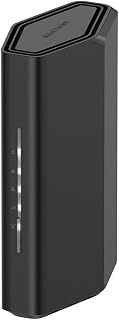
For readers weighing an upgrade based on home size and device load, this WiFi 7 router covers up to 2,000 square feet while supporting gaming consoles, cameras, and smartphones simultaneously. The 3.6 Gbps throughput and dual Ethernet plus Wi-Fi connectivity options give gamers a wired fallback when consistency matters more than convenience.
Pros
- WiFi 7 with 3.6 Gbps across dual bands
- Handles up to 50 connected devices without congestion
- 2.5 Gigabit WAN port suits modern high speed internet plans
- Nighthawk app allows remote management and device pausing
Cons
- 2,000 sq ft range may fall short in larger or multi-story homes
- Requires a separate modem or gateway with an RJ45 port
A common sign you need a gaming router is lag that only shows up when other people in the house are online too, and that's the exact problem the Nighthawk RS90 is built to solve. Its WiFi 7 dual-band setup pushes up to 3.6 Gbps, with MU-MIMO and OFDMA letting devices send and receive data at the same time instead of waiting their turn, so a 4K stream in another room doesn't translate into rubber-banding in your match. Supporting up to 50 connected devices means it can handle a house full of consoles, cameras, and smart gear without choking. A quad-core 2.0 GHz processor and a 2.5 Gigabit WAN port give it the headroom modern internet plans need, while four Gigabit LAN ports let you hardwire a gaming PC or console for the most stable connection possible. If your current setup is struggling under multiple simultaneous users rather than being outright broken, this is the kind of upgrade that targets that specific symptom, provided your home is roughly single-story sized.
Wireless Technology: WiFi 7 (802.11be) Dual-Band
Maximum Speed: 3.6 Gbps (BE3600)
Frequency Bands: 2.4 GHz and 5 GHz
Coverage Area: 2,000 square feet
Connected Devices: Up to 50 devices
Processor: Quad-core 2.0 GHz
Connectivity: 1x 2.5 Gigabit WAN port, 4x 1 Gigabit LAN ports
Antennas: 4 fixed antennas
Security: WPA2, WPA3 protocols, Advanced Router Protection, automatic firmware updates
Power: 12V/1.5A adapter
Control: Nighthawk mobile app (iOS and Android)
Warranty: 1 Year Limited
In the Box: RS90 router, 2.5A power adapter, 2-meter ethernet cable, quick start guide
Model: RS90-100NAS
Good for households where gaming competes with streaming, work calls, and smart devices on the same network, and where coverage needs top out around 2,000 sq ft. Skip it if you live in a larger multi-story home where a mesh system would serve you better, or if you already have a modem with bridge mode requirements you'd rather avoid, since this needs its own modem or gateway.
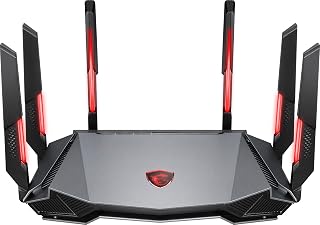
Anyone chasing lower latency will appreciate this tri-band router's AI QoS engine, which actively manages bandwidth allocation during gameplay. Its 1.8GHz quad-core processor and 8-stream MU-MIMO setup handle multiple simultaneous connections without choking frame-critical traffic, making it a logical pick for households debating whether their current router is the real bottleneck.
Pros
- 6GHz band with 4-stream support for dedicated gaming traffic
- AI QoS automatically prioritizes gaming and streaming
- 6-antenna design improves coverage in larger or difficult layouts
- Accessible entry point into WiFi 6E technology
Cons
- 5GHz band limited to 2 streams with more modest speeds
- Configuration interface and companion software feel basic
When lag spikes trace back to your 5GHz band getting overloaded, that's a clear signal a dedicated gaming router would help, and the MSI Radix AXE6600 tackles it by shifting the heavy lifting to its 6GHz band with 4-stream support. Its AI QoS system prioritizes gaming and streaming traffic automatically, which matters if your household runs multiple devices and matches keep getting interrupted by everything else online. A 1.8GHz quad-core processor keeps that prioritization running smoothly, and the 6-antenna layout is built to reach further than typical routers, which helps if lag is actually a coverage problem in a larger home or an older building with thick walls. This is one of the more accessible entry points into WiFi 6E, making it a reasonable upgrade path if you're moving off an aging dual-band router rather than jumping straight to premium gear. The tradeoff is a 5GHz band limited to 2 streams, so if most of your devices still rely on that band, the gains will be more modest there.
6GHz Performance: The standout feature. With 4-stream support at 6GHz, this router delivers excellent speeds for compatible devices like the Meta Quest 3 with Virtual Desktop streaming. Early adopters of 6GHz-capable devices will experience notably better performance than competitors in this price range.
5GHz Performance: Adequate but not impressive. The 2-stream limitation means speeds are moderate, suitable for basic streaming and web browsing but not ideal as a primary band. Most devices currently default to 5GHz, so this is a practical consideration for typical daily use.
Coverage and Stability: Real-world testing shows reliable coverage throughout large homes and buildings with challenging layouts. The wide-coverage antenna positioning effectively penetrates obstacles like plaster walls and hardwood floors. Firmware updates have resolved initial connection dropping issues, resulting in stable, consistent performance.
Gaming and Streaming: AI QoS successfully prioritizes gaming and streaming traffic, preventing bandwidth hogging from other devices. Multiplayer gaming remains smooth with multiple connected devices, and 4K streaming is handled without buffering on capable internet connections.
Fits gamers and remote workers dealing with coverage gaps or congestion in larger or oddly laid out homes, especially those ready to move into WiFi 6E without a big investment. Skip it if you want a polished app experience, since the configuration interface and MSI Center software are limited, or if most of your devices depend on 5GHz, where this router offers only modest improvement.

Serious competitive gamers evaluating a true upgrade will notice this tri-band WiFi 7 router's dedicated WiFi 7 Gaming feature set and 12Gbps capacity, built specifically to minimize latency under heavy load. AiMesh support also solves coverage gaps in larger homes, answering the common complaint that an old router simply can't reach the gaming setup reliably.
Pros
- Exceptional wired connectivity with eight 2.5G ports outmatches competing routers for bandwidth-hungry setups
- Enterprise-class security features and AiMesh support appeal to advanced users managing complex networks
- Reliable performance across multiple bands with strong 2.4GHz, 5GHz, and 6GHz coverage throughout large homes
- Intuitive setup process and web interface make configuration straightforward despite advanced feature depth
- Proven stability handling 30+ devices simultaneously without performance degradation
Cons
- 2.4GHz band can experience instability in AiMesh multi-unit configurations with multiple routers
- Some early WiFi 7 offerings from competitors have had mixed stability reports, requiring firmware updates
The ASUS ROG Strix GS-BE12000 is a next-generation WiFi 7 gaming router designed for competitive gamers, tech enthusiasts, and power users operating complex smart home ecosystems. With tri-band WiFi 7 delivering 12Gbps speeds, this router targets those who demand both wireless performance and enterprise-level wired connectivity.
The standout feature is its extraordinary wired infrastructure: one 2.5G WAN port paired with seven 2.5G LAN ports create a 20G total capacity that devastates the competition. Combined with WiFi 7's 320 MHz channels and Multi-Link Operation, real-world testing confirms stable performance across 30+ connected devices including gaming PCs, streaming devices, smart home hubs, and IoT equipment. The ROG Gaming Network acceleration feature delivers measurable latency reduction through streamlined configuration.
Build quality reflects ASUS's premium positioning: compact 8.9" cube design, quad-core 2.0GHz CPU with active cooling, and eight internal antennas extending coverage to 3,000+ sq. ft. The ASUSWRT interface balances accessibility for beginners with advanced options for power users, and firmware updates deploy smoothly without disruption.
Notable drawback: users running multiple GS-BE12000 units in AiMesh configurations report 2.4GHz instability requiring restarts or SSID recreation, though 5GHz and 6GHz performance remains solid. This limitation primarily affects those scaling across multiple units; single-router deployments perform reliably.
Verdict: The GS-BE12000 justifies its premium price for serious gamers, smart home integrators, and anyone maxing out WiFi 6 routers. Its wired-first architecture and proven multi-device stability make it genuinely enterprise-class hardware for home networks, though AiMesh users should verify 2.4GHz stability before committing to multi-unit setups.
Wireless Performance: WiFi 7 (802.11be) tri-band, 12,000 Mbps total throughput, 320 MHz channels on 6 GHz band, Multi-Link Operation (MLO), 4K-QAM, 4x4 MIMO antenna array with up to 3,000 sq. ft. coverage.
Wired Connectivity: One 2.5G WAN port, seven 2.5G LAN ports, 20G total wired capacity, eight total ports supporting hybrid wired/wireless networks.
Processing Power: Quad-core 2.0GHz CPU, 2GB RAM, active thermal cooling for sustained performance.
Security: Triple-Level Network Security, AiProtection Pro, WPA/WPA2/WPA3 encryption, DNS-over-TLS, Let's Encrypt, SSH, VPN support, firewall, parental controls.
Smart Home Features: Smart Home Master for IoT subnetworks, up to three custom SSIDs, AiMesh support, Guest Mode, ASUS app control.
Physical: 8.9" L x 3.5" W x 8.9" H, black finish, 2 lbs, includes power adapter, Ethernet cable, quick start guide. Warranty: 3 years.
Best for: Competitive online gamers requiring low-latency acceleration, smart home integrators managing 20+ IoT devices, content creators with high-bandwidth wired workstations, users upgrading from aging WiFi 6 routers struggling with device count.
Consider alternatives if: You only need basic WiFi coverage for small homes under 1,500 sq. ft., your ISP doesn't support speeds above 1Gbps making 20G wired ports unnecessary, you're building a multi-router mesh system that may experience 2.4GHz issues, or you prioritize budget over cutting-edge performance.
Not recommended for: Casual users with light browsing needs, renters seeking portable solutions, budget-conscious buyers, or those unfamiliar with advanced networking terminology seeking simplicity.

Not every gamer needs top-tier specs, and this dual-band router illustrates the entry point for an upgrade decision. With Beamforming and QoS included alongside gaming console compatibility, it directs signal strength toward active devices, a reasonable first step for someone whose current setup is dropping connections rather than failing outright.
Pros
- 867Mbps 5GHz band supports lag-sensitive gaming
- Four Gigabit Ethernet ports for a wired, WiFi-free connection
- QoS helps prioritize gaming traffic over other devices
- WPA3 security included at a budget price point
Cons
- 2.4GHz band's 300Mbps ceiling can bottleneck with many legacy devices
- Fixed antennas can't be aimed toward dead zones
If your current router is the reason multiplayer matches feel laggy or voice chat stutters when someone else streams video, the Archer A6 fixes the basics without overspending. Its 5GHz band hits 867Mbps, enough headroom for online gaming while other devices sit on the 2.4GHz band for browsing and smart home traffic. QoS lets you prioritize gaming traffic so a console match doesn't get crowded out by a background download. For the clearest fix, the four Gigabit Ethernet ports let you wire your console or PC directly, removing WiFi variability from the equation entirely. MU-MIMO keeps speeds steady even with several devices connected at once, and beamforming from the four external antennas helps signal reach gaming setups in another room. This is the router for someone whose gaming problems come from a weak, outdated router rather than from needing elite-tier networking features. It solves the real signs of needing an upgrade without the cost of specialized gaming hardware.
Wireless Performance: AC1200 (300Mbps on 2.4GHz + 867Mbps on 5GHz), dual-band, 802.11a/b/g/n/ac compatible, MU-MIMO on 5GHz band.
Connectivity: 4 x Gigabit Ethernet LAN ports, 1 x Gigabit WAN port, total 5 ports, 10/100/1000 Mbps bandwidth per port.
Antennas: 4 fixed external antennas with Beamforming technology for extended coverage.
Security: WPA3 protocol, advanced firewall, parental controls, guest mode, internet security features.
Additional Features: Access Point mode, QoS, WPS, OneMesh support, app-based management via Tether (iOS/Android). Power: 12V adapter. Dimensions: 8.46in L x 4.92in W x 1.81in H. Warranty: 2-year manufacturer coverage. Compatible with all major ISPs (AT&T, Verizon, Xfinity, Spectrum, etc.).
Buy this if you're gaming on an old or budget router and just need stable speeds, wired options, and basic traffic prioritization. It suits casual to regular gamers in typical homes or apartments. Skip it if you're competitive online, have a large multi-story house, or run many legacy 2.4GHz devices alongside gaming, since that band's 300Mbps ceiling can bottleneck under heavy mixed use.

ASUS RT-AX1800S WiFi 6 Dual Band Router, 1800Mbps
Readers debating whether built-in security features justify a new router will find this dual-band WiFi 6 model relevant, since it bundles subscription-free network security with parental controls and AiMesh expansion. For gaming households also juggling smart TVs and tablets, that combination addresses both performance and whole-home coverage concerns in one upgrade.
Pros
- Handles 9-16 devices smoothly via MU-MIMO and OFDMA
- WiFi 6 lowers latency compared to WiFi 5
- Five Gigabit ports for wired gaming connections
- Built-in VPN and AiProtection with no subscription
Cons
- 5GHz band struggles with walls in larger or multi-story homes
- Retractable antennas offer only modest coverage improvements
When the question is whether a gaming router upgrade will actually help, the signs usually point to device congestion and inconsistent latency rather than raw speed alone, and that's exactly what the RT-AX1800S addresses. WiFi 6 brings OFDMA and MU-MIMO, which handle 9-16 connected devices smoothly instead of letting a crowded network choke your game's connection. That matters if your gaming lag shows up specifically when others in the house are streaming or on their phones. The lower latency WiFi 6 provides over WiFi 5 is a direct answer to the kind of stutter that makes people think they need a gaming-specific router. Five Gigabit ports let you hardwire a console or PC for the most reliable connection, bypassing wireless congestion altogether. Built-in AiProtection and a free VPN add security without extra cost. The tradeoff is 5GHz wall penetration, which weakens in larger or multi-story homes, so this fits best in apartments or moderate-sized houses rather than sprawling layouts.
Core Specs: WiFi 6 (802.11ax), 1800 Mbps total speed (1201 Mbps upstream), dual-band (2.4GHz and 5GHz), 2x2 MIMO configuration.
Hardware: Dual-core processor with 4 VPE, 256MB RAM, four external antennas, five Gigabit Ethernet ports. Power supply: AC 110V-240V (50-60Hz), DC output 12V at 1.5A max.
Features: MU-MIMO and OFDMA support, AiMesh compatibility, AiProtection Classic security, ASUS Instant Guard VPN, WPS, parental controls, app and web GUI control. Compatible with Windows, Mac, Linux, iOS, and works with gaming consoles, smart TVs, and smartphones.
Physical: Dimensions 9.06 x 5.28 x 2.2 inches, weight 13.12 ounces, black color. Includes power adapter, Ethernet cable, quick-start guide, and warranty card.

For households wondering if range is their actual problem, this dual-band router covers 2,000 square feet and supports 25 devices, which directly addresses dead zones affecting console gaming in far rooms. Built-in VPN and USB 3.0 support also appeal to gamers who stream or back up footage alongside their matches.
Pros
- Exceptional value for WiFi 6 technology at under $100
- Easy setup with noticeable improvement in coverage and connection stability
- Strong WiFi 6 performance that maximizes speeds on newer devices
- Reliable performance for gaming, streaming, and home office use
- Built-in VPN support adds privacy protection for connected devices
Cons
- Some users report occasional stability issues within the first month that require firmware updates
- Customer support process can be time-consuming if troubleshooting is needed
- Requires a separate cable modem, not a modem-router combo unit
The NETGEAR Nighthawk RAX36 is a WiFi 6 router designed for homeowners and small office users seeking faster wireless speeds without premium pricing. It replaces aging WiFi 5 routers and connects to any standard cable modem, making it accessible to most internet service providers. The router targets users streaming 4K content, online gamers, and families with multiple connected devices.
The standout feature is its AX3000 performance delivering speeds up to 3 Gbps with WiFi 6 technology, which is 2.7 times faster than previous standards. The 1.7 GHz quad-core processor handles concurrent streaming, gaming, and video calls without lag. Coverage extends to 2,000 sq ft, and 160 MHz channel support allows 25 devices to connect simultaneously without noticeable slowdowns. Real-world performance matches advertised speeds on newer devices that support WiFi 6.
Build quality is solid with two internal antennas, four Gigabit Ethernet ports, and a compact black design suitable for living rooms or office spaces. The app-based control interface makes setup straightforward, even for non-technical users. WPA3 security protocol provides modern protection, and the built-in VPN adds an extra layer of privacy for sensitive browsing.
Notable drawbacks include occasional stability issues during the first month of use that typically resolve after firmware updates. Customer support can be cumbersome if problems arise. Additionally, this is a router-only device requiring a separate cable modem, which adds to initial setup complexity.
The NETGEAR Nighthawk RAX36 delivers genuine WiFi 6 performance at an accessible price point. It excels as an upgrade for users with outdated routers, those living in 2,000 sq ft homes, and anyone wanting faster gaming and streaming without premium pricing. Recommended for practical buyers prioritizing value and reliability over cutting-edge features.
Connectivity: WiFi 6 (802.11ax), Dual-Band (2.4 GHz and 5 GHz), 4 Gigabit Ethernet ports, USB 3.0
Performance: Maximum speeds of 3,000 Mbps (AX3000), 1.7 GHz quad-core processor, 160 MHz channel support
Coverage: Up to 2,000 square feet, supports up to 25 connected devices
Security: WPA3 protocol, built-in VPN support, app-based management
Physical: 2 internal antennas, weighs 2.4 pounds, black color, includes Ethernet cable and power adapter
Warranty: 1-year limited warranty from NETGEAR
Is this router right for you? The RAX36 is ideal if you're upgrading from WiFi 5, need reliable coverage in a home up to 2,000 sq ft, or want WiFi 6 speeds without premium pricing. It works with any internet service provider offering up to 1 Gbps speeds (cable, fiber, DSL, satellite).
Setup requirements: You must have a separate cable modem with coax connections. This router does not include a modem. If you don't have one, factor that cost into your purchase decision.
Compatibility: The router works with gaming consoles, PCs, smart TVs, smartphones, and security cameras. Newer devices fully utilize WiFi 6 speeds, while older devices connect at their native WiFi standard speeds.
Performance expectations: Real-world speeds typically range from 1,500-2,500 Mbps depending on device capability, distance from router, and environmental interference. Coverage remains strong throughout a 2,000 sq ft space with minimal dead zones.
Firmware tip: If you experience any instability, manually update firmware immediately after setup. This resolves known issues reported by some early users.
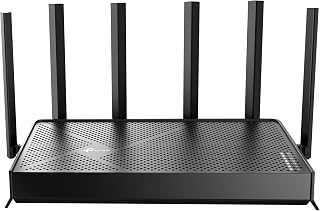
This dual-band WiFi 7 router targets the gamer who wants newer wireless standards without overcomplicating their setup. Its QoS and Access Point Mode give flexibility for prioritizing console traffic or extending an existing network, which matters most to someone whose current router simply can't keep pace with newer device demands.
Pros
- Handles 90+ simultaneous devices without degrading performance
- Dual 2.5Gbps ports for multi-gig wired connections
- Six antennas with beamforming cover up to 2,400 sq. ft
- QoS and HomeShield help isolate IoT traffic from gaming
Cons
- Not compatible with TP-Link's Deco mesh ecosystem
- Needs a separate modem and a robust internet plan to justify its capabilities
If you've already ruled out the easy fixes and your network genuinely struggles under load, the signs point toward a router built for exactly that scenario, and the Archer BE400 is built for it. Multi-Link Operation and a 6.5Gbps combined bandwidth mean the router can keep gaming traffic smooth even with 90+ devices connected simultaneously, a scale where budget routers start to choke. The dual 2.5Gbps ports matter if you're pushing multi-gig internet or running a NAS alongside gaming traffic. QoS and the HomeShield security suite let you isolate IoT devices from your gaming traffic entirely, which is often the real source of inconsistent latency. Six antennas with beamforming cover up to 2,400 sq. ft, addressing range as a root cause of lag in larger homes. This is a router for people who've confirmed their current setup can't keep up, not a first upgrade for casual lag complaints. It solves capacity and congestion problems rather than offering gaming-specific tuning.
Real-world performance metrics consistently exceed specifications. Users report sustained 500+ Mbps downloads on 1 Gbps fiber connections and 780+ Mbps on superior plans. The 2.5Gbps ports enable wired transfers at near-theoretical maximums, making this ideal for content creators and network enthusiasts.
Coverage extends reliably throughout 2,400 sq. ft. with minimal dead zones. The beamforming and six-antenna array intelligently direct signals, maintaining strong connections even in challenging environments like dense apartment buildings or multi-story homes with interference from neighboring networks.
Multi-Link Operation (MLO) dramatically improves stability compared to Wi-Fi 6 routers. By simultaneously using multiple frequency bands for single data streams, the BE400 reduces latency and packet loss, resulting in lag-free gaming and buffer-free streaming regardless of connection density.
HomeShield transforms network security from optional to essential. The real-time scanner identifies threats instantly, parental controls block inappropriate content by category and time window, and Quality of Service (QoS) ensures gaming or work devices get priority bandwidth when needed.
The ability to create separate SSIDs for IoT devices prevents smart home gadgets from accessing sensitive personal data. Combined with WPA3 encryption, VPN server capabilities, and access control features, your network gains protection rivaling enterprise solutions at consumer pricing.
Automatic firmware updates through the cloud keep security patches current without manual intervention, eliminating the common vulnerability window where routers run outdated security code.
Choose this if you've confirmed your network struggles under heavy device load, need multi-gig wired speeds, or game across a larger home needing real coverage. It fits power users and households with dozens of connected devices. Skip it if you have a modest internet plan, a small home, or need TP-Link Deco mesh compatibility, since this only works with EasyMesh-certified devices.
Buying Guide: What Matters for Gaming
Identify the problem before choosing hardware
Start by noticing whether the delay appears only when other people are online, only in a far room, or even on a wired device when the home is quiet. A router upgrade makes sense when congestion, weak coverage, dated Wi-Fi capacity, or missing Ethernet ports are the real limits, but it cannot repair an unreliable ISP connection or a distant game server.
The TP-Link AC1200 Gigabit Dual Band WiFi Router is a practical replacement for light homes that need four Gigabit LAN ports, while the NETGEAR Nighthawk WiFi 6 Router (RAX30) adds Wi-Fi 6 capacity for a wider device mix. For a desktop that also runs development builds between matches, use our CPU guide for compiling code to rule out a local performance bottleneck.
Choose a Wi-Fi generation and band your devices can use
Wi-Fi 6 is still a strong fit for many homes because OFDMA and MU-MIMO help many devices share airtime more efficiently. The ASUS RT-AX1800S Dual Band WiFi 6 Extendable and NETGEAR Nighthawk WiFi 6 Router (RAX36) suit players who need dependable dual-band networking, Gigabit Ethernet, and room for consoles, phones, and smart-home gear.
Wi-Fi 6E adds a 6 GHz band, which can give compatible nearby PCs and mobile devices a clearer wireless path, although its range through walls is shorter. The TP-Link AXE5400 Tri-Band WiFi 6E Router and MSI Radix AXE6600 WiFi 6E Tri-Band Gaming Router offer that tri-band option, while Wi-Fi 7 models add Multi-Link Operation for compatible clients. If your household also edits and uploads video, pair network planning with our PC guide for Premiere Pro, since local editing power and network capacity solve different problems.
Prioritize Ethernet ports and useful traffic controls
Ethernet remains the most consistent way to connect a gaming PC or console because it avoids radio interference, crowded channels, and distance-related signal loss. Look for enough LAN ports for your primary systems, and consider multi-gig ports only if your modem, internet plan, and connected hardware can benefit from them.
The TP-Link BE6500 Dual-Band WiFi 7 Router (BE400) has two 2.5 Gbps ports alongside Gigabit ports, while the ASUS ROG Strix GS-BE12000 WiFi 7 Gaming Router is designed for extensive multi-gig wired setups. Quality of Service can also help when uploads or streams compete with a match: MSI Radix AXE6600 WiFi 6E Tri-Band Gaming Router uses AI QoS, and the ROG model includes gaming-focused acceleration tools. For graphics-heavy work alongside play, the hardware in our GPU guide for Blender rendering will affect local performance far more than router features.
Plan for coverage, security, and future growth
A gaming router must serve more than the room where you play. Put it in a central, elevated, open area when possible, because walls, floors, appliances, and neighboring networks can reduce real-world coverage. A larger or multi-story home may need a compatible mesh expansion rather than a single powerful router.
The TP-Link AX4400 Mesh Dual Band 6-Stream Router combines six antennas and beamforming for broad coverage, while the NETGEAR Nighthawk WiFi 7 Router RS90 is built for busy homes with many connected devices. Keep firmware current, use a separate guest or IoT network where available, and take advantage of parental controls or built-in security features. A work-and-play desk also benefits from a comfortable display, so our monitor guide for accountants can help when long sessions include both spreadsheets and games.
Final Thoughts
For most busy homes with compatible 6 GHz devices, the TP-Link AXE5400 Tri-Band WiFi 6E Router offers a well-rounded path to lower wireless congestion and flexible whole-home expansion. If you are building a multi-gig setup with several wired systems and want advanced game-focused controls, the ASUS ROG Strix GS-BE12000 WiFi 7 Gaming Router is the more ambitious choice.
Frequently Asked Questions
Will a gaming router lower my ping?
It can lower delay caused inside your home when the current router is overloaded, has poor Wi-Fi coverage, or cannot manage competing traffic well. It cannot shorten the route to a game server or fix latency created by your internet provider. A wired connection and sensible traffic priorities usually have the greatest effect on local consistency.
Is Wi-Fi 6 good enough for gaming in 2026?
Yes, Wi-Fi 6 is more than capable for gaming when signal strength is good and the router has enough capacity for your household. Wi-Fi 6E and Wi-Fi 7 are more compelling when you own compatible devices, share a crowded network, or want multi-gig wired connectivity. Do not upgrade solely for a wireless standard if your console or PC is already stable on Ethernet.
Should I connect my gaming PC or console with Ethernet?
Yes, Ethernet is generally the preferred connection for competitive play because it is less affected by interference and household movement. A Gigabit connection is ample for most gaming traffic, while extra wired bandwidth can help with large downloads, local file transfers, and multiple high-demand devices. Use Wi-Fi when running a cable is impractical, then favor the 5 GHz or 6 GHz band when available.
Can one router handle gaming, streaming, and work calls?
Yes, a current Wi-Fi 6, 6E, or 7 router with MU-MIMO, OFDMA, sufficient wired ports, and appropriate coverage can handle a mixed household well. Place it carefully and use traffic controls when large uploads regularly interrupt games or calls. For your call setup, a clear microphone is equally important, and our headset guide for online meetings covers focused options.



Write Your Review
No reviews yet. Be the first to share your experience!