

Your browser, message app, document, and video call all need room, but the right display layout is not simply a question of screen size. An ultrawide gives you one continuous canvas, while a dual-screen desk creates distinct places for focused work, communication, and reference material.
This ultrawide vs dual monitor guide breaks down the practical differences for office work, content creation, gaming, and hybrid desks. If charts are central to your day, our monitor choices for stock-trading charts offer another useful perspective on arranging dense information clearly.
Quick Comparison
Ratings reflect the most recent data pull. Check each listing for current price and availability.
Quick answer
This guide compares 8 picks, with HUANUO Dual Monitor Stand HNDS7: Height Adjustable ranked first. SANSUI 34-inch Curved Ultrawide Gaming Monitor leads this list on refresh rate.
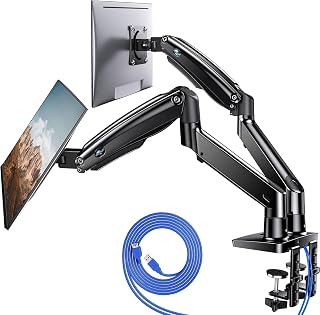
Readers leaning toward the dual monitor side of this debate need hardware that actually supports two displays without sagging, and this mount holds 26.4lbs per arm across a 13 to 40 inch range. With VESA compatibility and both clamp and grommet base options, it fits most desks while keeping two screens stable, height adjusted, and properly aligned for side by side productivity work.
Pros
- Independent 180-degree swivel and 115-degree tilt per arm
- Supports monitors up to 26.4 lbs each
- Height adjustable up to 21.1 inches with extension
- Built-in USB charging and cable management
Cons
- Setup and balancing takes patience with heavier monitors
- Grommet mounting has specific hole requirements to verify first
Deciding between ultrawide and dual monitors often comes down to how you want your screens positioned, and the HUANUO HNDS7 makes the dual route viable by solving the biggest complaint about two-monitor desks: clutter and awkward angles. Instead of two monitors fighting for base space, this stand mounts both on aluminum arms with 180-degree swivel, 115-degree tilt, and 360-degree rotation, so you can angle each screen independently the way a single curved ultrawide can't. Height adjusts up to 21.1 inches with extension to 25.59 inches, and each arm holds up to 26.4 lbs, enough for most standard monitors. Mounting works via C-clamp or grommet bolt-through for desks up to 3.54 inches thick, and cable channels plus USB charging ports keep the setup tidy. If your decision in this comparison leans toward dual monitors for multitasking flexibility rather than one continuous ultrawide canvas, this stand is what makes that choice actually comfortable and space-efficient at a desk.
Mounting and Compatibility
Screen Size Support: 13 to 40 inches per monitor
Weight Capacity: 26.4 lbs per arm
VESA Compatibility: 75x75mm or 100x100mm
Mounting Types: C-clamp and bolt-through grommet
Desk Thickness: Up to 3.54 inches
Grommet Hole Diameter: 0.39 to 1.97 inches
Adjustment Range
Height Adjustment: Up to 21.1 inches
Extension: Up to 25.59 inches
Swivel: -90 to +90 degrees
Tilt: -30 to +85 degrees
Rotation: 360 degrees
Construction
Material: Premium aluminum alloy
Color: Black
Movement Type: Articulating
Additional Features: Dual USB ports with 5.25 ft cable, integrated cable management
Warranty
Manufacturer Warranty: 5 years
Buy this if you've decided two separate monitors suit your workflow better than one ultrawide, especially for multitasking, coding, or reference-plus-work setups where independent screen angles matter. Remote workers and gamers running dual displays benefit most. Skip it if you've already decided on an ultrawide instead, if your monitors exceed 26.4 lbs each, or if your desk can't accommodate clamp or grommet mounting.

Readers comparing resolution real estate between setups will notice this panel's 3440 x 1440 UWQHD resolution across a 21:9 frame, giving the kind of screen space dual monitor users get from stacking two displays, minus the bezel gap. A 200 hertz refresh rate and 3000:1 contrast ratio make it a strong single screen alternative for fast paced or detail heavy work.
Pros
- 200Hz refresh rate for smooth motion
- 1500R curve suited to replacing a two-screen field of view
- HDR and 3000:1 contrast for vibrant visuals
- VESA mount compatible for flexible positioning
Cons
- No built-in speakers
- Needs a high-end GPU to hit full refresh rate at native resolution
If you're torn between two monitors on your desk and one wide screen, this is the strongest case for going ultrawide. At 34 inches with a 3440x1440 resolution and 21:9 ratio, the SANSUI covers roughly the same horizontal span as a two-monitor array, but without the center bezel breaking up your view. That matters most for anyone running spreadsheets next to a browser, or a game window next to chat and stats, since nothing gets cut off at a seam. The 1500R curve keeps the far edges within natural eye movement, which a flat dual setup can't replicate. For gaming specifically, 200Hz refresh and FreeSync give it an edge over a mismatched two-monitor rig where only one screen is fast. The tradeoff for consolidating into one panel is losing the ability to angle two displays independently, so if you need one screen portrait and one landscape, this won't replace that flexibility.
This monitor excels in competitive and immersive gaming scenarios. The 200Hz refresh rate ensures smooth motion in esports titles, while the 1ms response time eliminates ghosting during fast camera pans or quick reflexes. FreeSync adaptive sync removes screen tearing for seamless visuals across compatible AMD graphics cards.
The ultrawide 21:9 format provides significant competitive advantage in tactical shooters like Valorant or Rainbow Six Siege, offering extended peripheral vision without requiring head movement. The AI-powered sniper scope and crosshair features enhance visibility in challenging lighting conditions. VA technology's superior contrast makes spotting enemies at distance more practical than on standard IPS panels.
Content creators benefit enormously from the 3440x1440 ultrawide workspace. Video editors gain expanded timeline visibility, color graders appreciate the 130% sRGB and 96% DCI-P3 color gamut coverage for professional work, and photographers enjoy side-by-side reference while editing. The 178-degree wide viewing angle ensures consistent color representation across the massive canvas.
Picture-in-Picture and Picture-by-Picture modes allow simultaneous display of different sources, ideal for monitoring multiple applications. The curved design reduces the need for extreme head movement across the extended display area, reducing neck fatigue during long creative sessions.

For readers who want ultrawide convenience without sacrificing multitasking tools dual monitor setups are known for, PIP and PBP support let this 21:9 panel split sources like two displays would. Add HDR10 and AMD FreeSync at 100 hertz, and it covers the productivity and visual flexibility arguments both camps raise in the ultrawide versus dual debate.
Pros
- PIP and PBP support multiple sources like a dual-monitor setup
- 3000:1 contrast ratio for strong visual depth
- TUV-certified eye care for long sessions
- Dual HDMI and DisplayPort connectivity
Cons
- 100Hz refresh rate limits competitive gaming use
- 72% color gamut is modest for color-critical work
For readers weighing ultrawide against dual monitors for work rather than gaming, the ViewFinity S50GC leans into productivity. Its 3440x1440 resolution across a 21:9 panel gives you the combined width of two monitors without a dividing bezel interrupting spreadsheets, timelines, or side-by-side documents. PIP and PBP features specifically address what dual-monitor users value most, the ability to view multiple sources at once, so switching to this single screen doesn't mean giving up that multitasking layout. The matte finish and TUV-certified eye care technology suit long work sessions better than a glossy curved gaming panel would. HDR10 and a 3000:1 contrast ratio add some visual depth for media, though the 100Hz refresh rate and 72% color gamut mark this as built for office and creative work over competitive gaming. If your reason for comparing ultrawide to dual monitors is a two-screen gaming rig, this isn't the direct match, but for consolidating a work-from-home dual-monitor desk, it fits cleanly.
Display Specifications: 34-inch ultrawide LCD, 3440x1440 native resolution, 21:9 aspect ratio, 100Hz refresh rate, 5ms response time, 3000:1 contrast ratio, 300cd/m2 brightness, 178-degree viewing angle, matte finish.
Color and Image Technology: 72% color gamut, HDR10 support, AMD FreeSync adaptive sync, TUV-certified Intelligent Eye Care with ambient light sensor, Eye Saver Mode, Flicker Free technology.
Connectivity: 1x DisplayPort 1.2, 2x HDMI 2.2, 1x 3.5mm headphone jack. Includes DisplayPort and HDMI cables.
Physical Dimensions: 32.1 inches wide, 18 inches tall, 8.7 inches deep. Weight: 10.8 pounds. Wall mount compatible.
Power and Warranty: 50 watts power consumption at 110 volts. 1-year manufacturer warranty. Model: LS34C502GANXZA.
Best for professionals and multitaskers moving away from two monitors toward one wide screen with built-in PIP and PBP to keep multiple sources visible. Not the right pick for gamers wanting high refresh rates, since 100Hz trails behind dedicated gaming ultrawides. Skip it too if accurate color work is a priority, as the 72% color gamut is modest compared to wider-gamut alternatives.

Since this listing includes two 34 inch ultrawide panels, it directly addresses readers torn between formats by offering a dual ultrawide setup instead of choosing one. Each 1500R curved screen runs 165 hertz with AMD FreeSync Premium, giving the combined screen space of dual monitors while keeping the curved, immersive feel ultrawide fans want.
Pros
- 1500R curve on both panels for immersive side by side viewing
- 165Hz refresh rate with 1ms response time
- AMD FreeSync Premium for smooth frame pacing
- Matte screens reduce glare, built in speakers included
Cons
- AMD FreeSync only, less ideal for NVIDIA GPU owners
- Needs a capable GPU to hit 165Hz at 3440x1440
If this comparison has you leaning toward ultrawide for the immersive, bezel-free view but you still want the multitasking space of two screens, this Kado 2-pack lets you have both. Each 34-inch panel delivers 3440x1440 resolution with aggressive 1500R curvature, so running two side by side gives you a sweeping panoramic field that a single dual-monitor setup can't replicate, while still letting you dedicate one screen to a task and the other to reference or chat. The 165Hz refresh rate and 1ms response time keep motion sharp, and AMD FreeSync Premium smooths out frame pacing for compatible GPUs. Matte finishes cut glare over long sessions, and dual HDMI plus DisplayPort inputs mean each monitor can take its own source if needed. For this article's decision point, it's a middle path: the curve and resolution of ultrawide, doubled, rather than choosing one or the other outright. Just know it leans toward gaming rigs with modern GPUs rather than general productivity use.
Display Specs: 34-inch curved LED screens with 3440x1440 QHD resolution, 21:9 aspect ratio, 1500R curvature radius, and matte finish for glare reduction.
Performance: 165Hz refresh rate with 1ms response time. AMD FreeSync Premium eliminates screen tearing. Blue light filter and flicker-free technology reduce eye strain during extended use.
Connectivity: 2 HDMI ports and 2 DisplayPort connections per monitor for seamless multi-source connectivity. Built-in stereo speakers provide basic audio output.
Physical: Each monitor measures 31.8" wide by 17.96" high by 8.6" deep. VESA mount compatible for flexible mounting solutions. Includes 1-year manufacturer warranty.
Good for gamers or streamers who want the curved ultrawide look but still want two distinct screens for multitasking or multi-source input. Best suited to AMD GPU owners who can use FreeSync Premium. Skip it if you're on NVIDIA hardware, need a single continuous ultrawide canvas rather than two separate panels, or lack a GPU strong enough to push 3440x1440 at 165Hz.

Pros
- Exceptional screen real estate eliminates need for multiple monitors, saving desk space and setup complexity
- USB-C docking functionality with 90W charging simplifies cable management for laptop users
- High refresh rate and response time make it versatile for both professional work and casual gaming
- Curved design and wide viewing angles reduce eye strain during extended work sessions
- Robust warranty and B2B support demonstrate Samsung's commitment to business customers
Cons
- Extreme ultrawide format may not suit all desk setups or workspaces without significant rearrangement
- Limited availability of native apps and games optimized for 32:9 aspect ratio content
The Samsung 49-inch ultrawide is a high-end productivity monitor designed for professionals who spend extended hours working with multiple applications or working on content creation tasks. This is the tool for video editors, graphic designers, financial traders, and anyone who values screen real estate over traditional multi-monitor setups.
What truly sets this monitor apart is its 1000R curve combined with the 32:9 aspect ratio, which naturally matches human field of view and reduces the need to constantly move your head. The 5120x1440 native resolution provides crisp detail across the entire panel, while the 120Hz refresh rate keeps scrolling and interactions feeling responsive. VESA DisplayHDR 400 support adds meaningful color depth for creative professionals, and the built-in speakers provide adequate audio for video conferencing without requiring separate equipment.
Build quality is solid with an adjustable stand that allows height customization for ergonomic positioning. The connectivity suite is comprehensive, including USB-C with 90W power delivery that effectively transforms the monitor into a docking station for laptops. The KVM switch functionality lets you seamlessly control two computers without reaching for additional peripherals, streamlining workflow for power users managing multiple systems.
The main limitation is the extreme ultrawide format, which works brilliantly for specific workflows but may feel awkward if your workspace or primary software doesn't take full advantage of the width. Additionally, the high price tag positions this as an investment for professionals rather than casual users. At 32.2 pounds and 45 inches wide, the monitor demands dedicated desk real estate.
For professionals seeking to consolidate multiple monitors or those whose work genuinely benefits from expanded horizontal screen space, this Samsung monitor delivers exceptional value through its dual QHD resolution, smooth performance, and thoughtful docking capabilities. It's a solid choice for anyone willing to invest in a premium ultrawide experience.
Display: 49-inch curved LCD with 1000R curvature and 32:9 aspect ratio. Native resolution 5120x1440 pixels (Dual QHD). 120Hz refresh rate, 5ms response time, 400 cd/m2 brightness, 3000:1 contrast ratio. VESA DisplayHDR 400 support. Matte finish with 179-degree viewing angles.
Connectivity: 1x DisplayPort, 2x HDMI, USB-C with 90W power delivery, 3x USB ports total, Ethernet. Includes DisplayPort and USB-C cables plus power cord. FreeSync adaptive sync technology.
Design: Dimensions 45.18"W x 16.56"H x 22.38"D. Weight 32.2 lbs. Height-adjustable stand with wall mount compatibility. Wall mount type specified.
Performance: 55W typical power consumption. Supports Picture-by-Picture mode (note: 120Hz unavailable in PbP mode). KVM switch enables two-source control. Eye Care technology reduces flicker and strain.
Warranty: 3-year manufacturer warranty with ship-in service, dedicated B2B call center, and extended warranty options available.
Who Should Buy: Video editors, graphic designers, financial traders, programming professionals, and content creators who benefit from expansive horizontal screen space. Ideal for anyone replacing a dual-monitor setup with a single ultrawide solution. Best suited for professionals with dedicated desk space and budgets that accommodate premium displays.
Key Considerations: Ensure your desk can accommodate a 45-inch wide monitor. Verify that your GPU supports 5120x1440 resolution at your desired refresh rate. Check that your primary applications scale well to ultrawide aspect ratios. Consider the height-adjustable stand as essential for ergonomic positioning during long work sessions.
Alternatives to Consider: Smaller 34-inch ultrawides offer similar benefits with reduced desk footprint. Standard curved 32-inch gaming monitors provide 144Hz+ refresh rates at lower cost. Dual 27-inch QHD monitors with separate stands offer flexibility for mixed workflows.
Warranty and Support: The 3-year manufacturer warranty with dedicated B2B call center provides peace of mind. Extended warranty options are available for additional protection. Samsung's business support infrastructure suggests confidence in product reliability and long-term satisfaction.

For anyone weighing the immersive case for ultrawide, the 1000R curved screen and 21:9 ratio replicate the eye curvature better than flatter panels, pulling peripheral vision into the frame. Paired with a 165 hertz refresh rate on VA tech, it suits readers prioritizing smooth motion and wraparound visuals over running two separate monitors.
Pros
- 1000R curve for an immersive wraparound view
- 165Hz refresh rate with FreeSync Premium
- 3440x1440 resolution replaces dual-screen width
- VESA mounting for flexible desk setups
Cons
- Only a single HDMI port
- Minor bezel gaps noticeable to some users
Choosing between ultrawide and dual monitors often comes down to whether you want seamless width or independent screens, and the Odyssey G5 makes the ultrawide case well for anyone easing into it. Its 1000R curve is tighter than most ultrawide panels, which pulls the edges of that wide 3440x1440 canvas closer to your peripheral vision, something a flat dual-monitor setup can't offer. For users switching from two monitors because of the center bezel splitting their view, this consolidates that into one unbroken 21:9 display. The 165Hz refresh and FreeSync Premium keep gaming responsive, a point where a mismatched dual-monitor pair sometimes falls short if the second display is older or slower. It still demands real desk depth given its curved profile and width, so measure your space before assuming it's a drop-in replacement. The single HDMI port is worth noting if your old dual setup relied on multiple inputs feeding separate screens, since you'll need adapters to consolidate those sources into one monitor.
Display: 34-inch curved VA LCD panel with 1000R curvature, 21:9 aspect ratio, 3440x1440 native resolution, 250 cd/m2 brightness, 1900:1 contrast ratio, 178-degree viewing angle, 72% color gamut with HDR10 support.
Performance: 165Hz refresh rate, 1ms MPRT response time, AMD FreeSync Premium adaptive sync technology, low frame rate compensation.
Connectivity: 1x HDMI, 1x DisplayPort, 1x 3.5mm audio jack. Wired connectivity, compatible with VESA mounting standards.
Physical: 31.76" width, 18.71" height, 10.73" depth, 12.3 pounds total weight. Black curved design with desk mount and wall-mount capability.
Power & Warranty: 50-watt maximum power consumption at 110 volts. Includes 1-year manufacturer warranty.
Good fit for anyone replacing two separate monitors with one wide display for gaming or general multitasking, particularly if budget matters more than top-tier specs. Less suited to users who need multiple simultaneous HDMI sources without adapters, or who relied on having two independently adjustable screens. Also worth skipping for buyers chasing the highest refresh rate at native resolution without a strong GPU to back it.

Readers debating whether one wide screen can replace two monitors will find this 32:9 panel's extreme width most relevant, since it approximates a dual monitor span in a single curved OLED display. A 144 hertz refresh rate and 1,000,000:1 contrast ratio add the motion clarity and depth that make giving up a second monitor feel like less of a tradeoff.
Pros
- Exceptional picture quality with perfect blacks and vibrant colors from QD-OLED technology
- Ultra-responsive 0.03ms gray-to-gray response time provides competitive edge in fast-paced games
- Immersive curved design with 32:9 aspect ratio creates unmatched sense of presence for sim racing
- Versatile connectivity and Picture-in-Picture enable seamless multitasking for productivity
- Built-in safeguards automatically prevent burn-in while optimizing thermal performance
Cons
- 32:9 ultrawide aspect ratio may be impractical for standard gaming or general productivity tasks
- Potential brightness calibration variance between dual panels can create visible gradients on gray tones
- Samsung warranty support has been criticized as limited beyond the initial Amazon return window
The Samsung 49-inch Odyssey OLED G9 is a premium ultrawide curved gaming monitor designed for enthusiasts who demand the best in visual immersion and performance. Its 32:9 aspect ratio and aggressive 1800R curve make it an exceptional choice for sim racing, flight simulation, and competitive gaming where peripheral vision and environmental awareness matter.
The standout feature is undoubtedly the QD-OLED display technology, which delivers perfect blacks, infinite contrast, and exceptional color accuracy across the 5120x1440 resolution. Paired with a 0.03ms response time and 144Hz refresh rate, this monitor excels at minimizing input lag and motion blur, giving competitive gamers a genuine performance advantage. The VESA DisplayHDR True Black 400 certification ensures stunning HDR visuals with exceptional depth and detail.
Build quality feels premium with a metal stand that offers extensive adjustability. The monitor's curved design wraps around your field of view, and the ergonomic stand allows precise positioning for comfort during extended sessions. Connectivity options are comprehensive, including DisplayPort, HDMI 2.1, USB-C, and Micro-HDMI, with included cables reducing setup hassle.
Real-world usage considerations matter here. The ultrawide aspect ratio is transformative for sim racing but can be cumbersome for standard gaming and productivity workflows. Some users have reported brightness inconsistencies between the dual panels, creating a subtle gradient effect on neutral tones. Additionally, Samsung's out-of-warranty support has drawn criticism from owners experiencing issues after the initial purchase period.
For sim racing enthusiasts and creative professionals prioritizing immersive visuals and color accuracy, the investment justifies the premium price. However, general gamers and productivity users may find the ultrawide format limiting and should consider more conventional monitor proportions.
Sim racing and flight simulation enthusiasts who need maximum peripheral visibility and immersion. The curved ultrawide format creates an unmatched sense of presence that transforms the driving or flying experience.
Video editors and color graders requiring accurate color reproduction and extensive screen real estate. The QD-OLED panel's exceptional color accuracy and brightness uniformity make it excellent for professional creative work.
Competitive gamers in titles that benefit from wider field of view, such as strategy games, flight sims, and racing sims. Standard esports titles may not utilize the ultrawide format as effectively.
Display: 49-inch curved QD-OLED with 5120x1440 Dual QHD resolution and 32:9 aspect ratio. 110 pixels per inch provides exceptional clarity. Matte screen finish minimizes glare.
Performance: 144Hz refresh rate, 0.03ms gray-to-gray response time, infinite contrast ratio (1,000,000:1). G-Sync compatible and AMD FreeSync Premium Pro certified. VESA DisplayHDR True Black 400.
Design: 1800R curvature. Dimensions: 47.04 inches wide by 20.84 inches tall by 11.19 inches deep. Weight: 28.4 pounds. Metal stand with height, tilt adjustment. Premium aluminum silver finish.
Connectivity: DisplayPort, HDMI 2.1, Micro-HDMI, USB-C with upstream and downstream ports. Includes DisplayPort and HDMI cables. 3-year manufacturer warranty.

Pros
- Exceptional ultrawide 32:9 format provides genuinely immersive gaming and productivity workspace
- 5K2K resolution at 120Hz eliminates the need to compromise between image clarity and refresh rate
- Universal USB-C connectivity simplifies cable management and enables charging across multiple devices
- HDR400 support with 99% sRGB accuracy delivers professional-grade color performance for content creators
- Adjustable stand with tilt, swivel, and height options accommodates various desk setups and viewing preferences
Cons
- Ultrawide 32:9 aspect ratio may require game optimization or letterboxing in older titles not designed for such widescreens
- Premium pricing reflects the niche appeal, making it less accessible for casual users compared to standard monitors
- Glossy screen finish can attract fingerprints and reflections in bright environments, requiring regular cleaning
The INNOCN 49C1R is a premium ultrawide curved gaming and productivity monitor designed for enthusiasts who demand maximum screen real estate and visual performance. This 49-inch display with its distinctive 32:9 aspect ratio and 1800R curvature represents the cutting edge of monitor technology, delivering an immersive experience that standard 16:9 displays simply cannot match.
The standout feature is undoubtedly the 5120x1440 resolution paired with a 120Hz refresh rate over DisplayPort 1.4. This combination ensures you get both stunning visual clarity and smooth, responsive gameplay without compromise. The VA panel technology delivers impressive color accuracy with 99% sRGB coverage and HDR400 support, making this monitor equally capable for competitive gaming and professional color-critical work like video editing and graphic design.
The connectivity is genuinely thoughtful for a gaming monitor. USB-C with 65W power delivery means you can connect your laptop, charge your phone, and connect a gaming console all from single high-speed cables. The addition of DisplayPort 1.4, HDMI 2.1, and RJ45 Ethernet provides exceptional flexibility. The curved design reduces eye strain compared to flat monitors, and the adjustable stand offers tilt, swivel, and height options for ergonomic positioning.
The main considerations are the ultrawide format, which requires game support and may show letterboxing in older titles, and the premium price point. The glossy screen finish also demands regular cleaning to maintain clarity. Despite these considerations, the feature set and performance justify the investment for serious gamers and creative professionals seeking maximum productivity and immersion.
The INNOCN 49C1R is an exceptional ultrawide monitor that delivers on its promises. If you value screen real estate, visual quality, and modern connectivity, this is a top-tier choice that stands apart from conventional gaming monitors. The 1-year manufacturer warranty provides reasonable peace of mind for this premium investment.
Display: 49-inch curved VA panel, 5120x1440 native resolution, 32:9 aspect ratio, 120Hz refresh rate, 1ms response time
Image Quality: 400 nits brightness, 3000:1 contrast ratio, 99% sRGB color gamut, HDR400 support, 1800R curvature, 178-degree viewing angles
Connectivity: 1x DisplayPort 1.4, 1x USB-C 65W, 1x HDMI 2.1, 2x USB 3.0, 1x USB-B, 1x RJ45 Ethernet, 1x 3.5mm audio jack, built-in speakers
Features: FreeSync adaptive sync, Picture-by-Picture and Picture-in-Picture modes, height/tilt/swivel adjustable stand, wall mount compatible, glossy screen finish
Warranty: 1 year manufacturer warranty
Best For: This monitor is ideal for competitive gamers seeking maximum field of view, professional content creators needing expansive workspace, traders and analysts requiring multiple data streams, and anyone combining work and gaming on a single display.
Consider This If: You spend extended hours gaming or working at your desk and value immersive visuals. You use a modern USB-C laptop and want to eliminate cable clutter. You edit video, work with color-critical content, or manage multiple application windows simultaneously.
Skip If: You primarily play older games not optimized for ultrawide displays. You have budget constraints, as this is a premium product. You prefer matte screen finishes or work in very bright environments where glossy screens become problematic.
How to Choose Between an Ultrawide and Dual Monitors
Match the panel layout to the way you arrange windows
An ultrawide puts every application on one uninterrupted canvas, which feels natural when you drag timelines, large spreadsheets, or a wide browser across the display. Dual monitors create two clear zones, letting you keep a meeting, inbox, or research page visible while your active project stays separate.
Resolution determines how much usable room you gain. The SAMSUNG 34″ ViewFinity S50GC Series Ultra-WQHD uses a 21:9 Ultra-WQHD panel, while the Samsung 49” Business Curved Ultrawide Dual QHD expands that idea to a 32:9 Dual QHD workspace that resembles two QHD work areas without a center bezel. For notebook pairing and display scaling, see our monitor recommendations for MacBook Pro users.
Measure your desk, viewing distance, and mounting options
Measure available width and depth before committing to either route. Two monitors need room for separate stands or arms, but they can be angled independently and positioned at different heights, which is useful if one screen is mainly for vertical documents, chat, or dashboards.
The HUANUO Dual Monitor Stand for 13″–40″ supports two VESA-compatible displays and is rated for screens up to 26.4 pounds per arm, giving a dual arrangement greater placement flexibility while freeing desk space. A curved ultrawide generally needs less width than two comparable panels, but its depth and curve still deserve careful planning. Pair either setup with comfortable input gear from our keyboards and mice category to keep your posture sustainable.
Prioritize ports and multi-device workflow
Dual monitors are straightforward when one computer has enough display outputs, and they make switching attention between two systems visually simple. A single ultrawide can be more elegant for mixed-device desks when it offers picture-by-picture or picture-in-picture, allowing two sources to share one panel.
The INNOCN 49″ Curved Monitor Ultrawide Gaming 5K2K includes PIP/PBP plus USB-C, DisplayPort, HDMI, USB ports, and RJ45 connectivity, making it a strong fit for a laptop-and-desktop workflow. The Samsung 49” Business Curved Ultrawide Dual QHD also combines USB-C charging with DisplayPort, HDMI, USB, and built-in speakers, so fewer accessories may be needed on your desk.
Choose gaming features based on your preferred genres
For immersive single-player games, an ultrawide removes the center seam and gives you a wider view of compatible worlds. The SANSUI 34-Inch Curved Gaming Monitor UWQHD 3440 x reaches a 200Hz refresh rate with VRR support, while the Samsung Odyssey G5 in this selection combines a 1000R curve, 165Hz refresh rate, and AMD FreeSync Premium.
Dual monitors remain practical for players who want a game on one display and Discord, guides, streams, or hardware controls on the other. The Kado 2-Pack 34″ Curved 1500R 165Hz 1ms Ultrawide offers that dedicated-screen approach, while a 5120 x 1440 panel such as the Samsung 49″ Odyssey OLED G9 (G91SD) demands considerably more graphics power for native-resolution play. Confirm that your favorite games support your intended aspect ratio before deciding.
Final Thoughts
Choose the SAMSUNG 34″ ViewFinity S50GC Series Ultra-WQHD if you want a practical single-screen workspace with PBP and smooth everyday motion. Choose the Samsung 49″ Odyssey OLED G9 (G91SD) if premium QD-OLED contrast, a 32:9 field of view, and fast-paced play matter more to you.
Frequently Asked Questions
Is an ultrawide monitor better than two monitors for office work?
An ultrawide is often better if you prefer an uncluttered desk and frequently move windows across a broad workspace. Two monitors can be better when you need permanent separation between tasks or want different screen orientations. Browse our monitor category for more screen formats built around different work styles.
Can a 49-inch ultrawide replace a dual-monitor setup?
Yes, a 49-inch 5120 x 1440 display can closely resemble two 27-inch QHD panels placed side by side, with no bezel between them. It is an appealing option for spreadsheets, editing timelines, and wide dashboards. However, two separate monitors still offer more freedom to change the angle, height, and orientation of each screen.
Does an ultrawide work well for gaming in 2026?
An ultrawide works very well for games that support 21:9 or 32:9, particularly racing, simulation, role-playing, and cinematic action titles. Look for a refresh rate, response specification, adaptive-sync support, and resolution your graphics hardware can handle comfortably. Our GPU picks for Helldivers 2 can help frame the kind of graphics performance demanding games may require.
Which layout is better for photo, video, or color-focused work?
An ultrawide is excellent for a long editing timeline with media bins and tools visible beside it, while dual monitors make it easy to keep a preview or reference image on a dedicated screen. Color-critical buyers should focus on panel quality, gamut coverage, calibration options, and uniformity rather than layout alone. Our EIZO monitor alternatives for color work cover more display considerations for creative workflows.






Write Your Review
No reviews yet. Be the first to share your experience!