

An EIZO display can be the right benchmark when your files move from camera to print, but not every desk needs the same level of color management. You may instead need a sharp 4K screen for a laptop, a KVM-equipped hub for two systems, or a lightweight panel that travels without taking over your bag.
This guide to the best EIZO monitor alternative options separates those needs clearly. We compare color-first ColorEdge models, productivity-minded FlexScan displays, and a portable ARZOPA screen, so you can match the panel to your workflow instead of buying around a brand label. If a one-cable desk is your goal, our guide to Thunderbolt 5 docks for high-bandwidth desks can help you map the rest of the setup.
Quick Comparison
Ratings reflect the most recent data pull. Check each listing for current price and availability.
Quick answer
This guide compares 10 picks, with EIZO ColorEdge CG2700S 27-Inch WQHD HDR Color ranked first. EIZO FlexScan EV2480-BK 23.8-Inch Full HD IPS Monitor holds the highest customer rating among them. ARZOPA Z1RC 16-Inch Portable Monitor, 2.5K QHD has the most customer reviews.

Pros
- Built-in calibration sensor simplifies ongoing color management.
- USB-C connectivity combines display output, data transfer, and 92W power delivery.
- 400 cd/m² brightness and HDR gamma support benefit photo and video workflows.
- Integrated LAN and USB-A ports reduce the need for extra desktop accessories.
- Large 27-inch WQHD workspace is well suited to editing, photography, and 3D creation.
Cons
- The 60Hz refresh rate and 19ms response time are less suited to fast competitive gaming.
- Glossy screen finish can produce reflections in bright rooms.
- WQHD resolution is less detailed than a 4K monitor for ultra-high-resolution production work.
The EIZO ColorEdge CG2700S is a professional 27-inch WQHD monitor built for color-sensitive work. Its 2560 x 1440 resolution gives photographers, video editors, game developers, and 3D artists useful room for content and editing tools.
Its built-in calibration sensor supports fully automatic self-calibration, while HDR gamma support includes targets for HDR-HLG and HDR-PQ workflows. The 400 cd/m² brightness, digital uniformity equalizer, and True Black enhancement are designed to support consistent, detailed image evaluation.
USB-C is a practical highlight, carrying video and USB data while delivering up to 92W of power to a compatible laptop. DisplayPort, HDMI, four USB-A ports, and an integrated RJ-45 LAN connection make it easier to build a clean, connected workstation.
The flat black cabinet is suited to professional desk setups and supports wall mounting. However, the glossy finish may show reflections, while the 60Hz refresh rate and 19ms response time make this a better creative monitor than a competitive gaming display.
Overall, the CG2700S is a strong choice for creators who value automated calibration, HDR workflow support, and simplified USB-C connectivity. Buyers focused on native 4K production or high-refresh gaming should consider a different display format.

EIZO FlexScan EV2480-BK 23.8-Inch Full HD IPS
Pros
- USB-C connectivity with up to 70-watt power delivery simplifies laptop docking and reduces cable clutter.
- IPS technology provides broad viewing angles and dependable image consistency for office collaboration.
- Pivot adjustment and ergonomic positioning support more comfortable, adaptable desk setups.
- Four downstream USB ports provide convenient access to keyboards, mice and other peripherals.
- Two-year manufacturer warranty adds reassurance for business and home office buyers.
Cons
- The 23.8-inch Full HD format provides less workspace and detail than larger QHD or 4K monitors.
- Its business-focused design may be less suitable for color-critical creative work or specialized gaming use.
- The supplied product data does not specify a brightness value, making very bright-room performance harder to assess.
The EIZO FlexScan EV2480-BK is a 23.8-inch Full HD IPS monitor designed for business users, office workers and home office setups. It suits buyers who want dependable image quality, practical connectivity and ergonomic flexibility in a compact display.
Its USB-C input supports DisplayPort signal transmission and up to 70 watts of power delivery, allowing compatible laptops to connect with fewer cables. DisplayPort, HDMI and a four-port USB hub also make it easy to attach computers and everyday accessories.
The slim, virtually frameless design uses a 1 mm bezel for a clean appearance and efficient desk use. Pivot adjustment, flexible positioning, anti-reflection properties and flicker-free brightness control help support comfortable use throughout the workday.
The main limitation is the Full HD resolution and 23.8-inch size, which offer less workspace than larger QHD or 4K alternatives. Buyers seeking color-critical production or a gaming-focused display may also prefer a more specialized monitor.
Overall, the EV2480-BK is a strong office monitor for users who value USB-C laptop connectivity, ergonomic adjustment and a polished, compact design. It delivers a practical balance of image quality and workstation convenience for everyday business and home office tasks.

Pros
- Built-in self-calibration makes routine color management easier and more convenient.
- Wide-gamut coverage and strong contrast are well suited to color-critical creative work.
- Reviewers praise its accurate screen-to-print results and dependable image quality.
- Solid professional build with VESA mounting support and a five-year warranty.
- Multiple video inputs support older and newer display connections.
Cons
- The 1920 x 1200 resolution and 60 Hz refresh rate are less suitable for users seeking 4K detail, HDR, or high-refresh gaming.
- Its professional features come at a premium compared with consumer-grade monitors.
- Modern MacBook users may need a separate USB-C or Thunderbolt adapter, since the included cables do not provide a direct USB-C connection.
The EIZO ColorEdge CG2420-BK is a professional 24.1-inch color graphics monitor built for photographers, designers, print specialists, and post-production editors. Its 16:10 format and 1920 x 1200 resolution provide practical workspace for image editing panels and document previews.
Its standout feature is the integrated calibration sensor, which works with EIZO ColorNavigator software to simplify color management. With 99% Adobe RGB coverage, 400 cd/m² brightness, and a 1500:1 contrast ratio, it is designed to deliver consistent color and clear tonal separation for demanding creative workflows.
The monitor has a durable professional design with VESA compatibility, a supplied monitor hood, and a selection of DVI-D, DisplayPort, and HDMI connections. Customer feedback particularly highlights its accurate screen-to-print results, easy calibration, strong black levels, and reliable image quality.
There are a few limitations to consider. The 1920 x 1200 resolution and 60 Hz refresh rate do not target 4K, HDR, or high-refresh gaming, and the glossy finish may be less comfortable in brightly lit environments. Users with newer MacBooks may also need an additional USB-C or Thunderbolt adapter.
For color-critical HD workflows, the CG2420-BK is a compelling professional monitor with convenient calibration and long-term support. It is best suited to buyers who value dependable color accuracy and print consistency more than ultra-high resolution or gaming performance.

Pros
- Excellent 4K clarity with a high-density 163 ppi IPS display
- Versatile USB-C docking with strong 94W Power Delivery
- Integrated LAN, USB hub, KVM switch and Picture-by-Picture support
- Wide 178-degree viewing angles and solid 2000:1 contrast
- Five-year manufacturer warranty listed in the specifications
Cons
- The 60Hz refresh rate is suited to productivity rather than high-refresh gaming
- Glossy screen finish may produce reflections in brightly lit rooms
- Its extensive docking features may be more than needed for a basic single-computer setup
The EIZO FlexScan EV2740X-BK is a 27-inch 4K UHD IPS monitor built for business professionals, home offices and organized desktop workstations. Its high pixel density makes documents, spreadsheets and detailed applications appear crisp without requiring an oversized display.
Its strongest advantage is the USB-C docking function, which carries DisplayPort video, data, wired LAN and up to 94W of laptop power through one connection. Four USB downstream ports, Picture-by-Picture viewing and a KVM switch also make it practical for users who regularly work across two computers or multiple signal sources.
The 3840 x 2160 resolution, 178-degree viewing angles, 350 cd/m² brightness and 2000:1 contrast ratio support clear, comfortable everyday viewing. A flat black design, EcoView power-saving features and ergonomic capabilities suit professional environments where long work sessions and tidy cable management matter.
There are a few limitations to consider. The 60Hz refresh rate is appropriate for office productivity but less compelling for competitive gaming, while the glossy finish can reflect windows and overhead lighting. The monitor's docking features may also be unnecessary for users who need only a straightforward display.
Overall, the EV2740X-BK is a strong choice for buyers prioritizing sharp 4K imagery, one-cable USB-C connectivity and multi-computer control. It is particularly well suited to business and desktop users who will take advantage of its integrated LAN, USB hub, KVM and Picture-by-Picture features.

Pros
- Sharp 4K UHD resolution with a dense 163 ppi presentation for clear text and detailed graphics
- Convenient USB-C docking with substantial 94W Power Delivery
- Useful KVM-style switching through dual USB upstream connections
- Professional connectivity with HDMI, DisplayPort, USB, and Ethernet
- IPS panel with wide viewing angles and comfort-focused display features
Cons
- The 60Hz refresh rate is better suited to productivity and CAD than high-refresh gaming
- The professional feature set may be more than casual users need
- The monitor's large 4K resolution can require scaling on some operating systems for comfortable text size
The EIZO EV2740X-WT is a 27-inch 4K UHD monitor designed for professional office work, CAD applications, and hybrid workstations. Its high pixel density makes text and graphics look exceptionally defined, making it a strong fit for users who value precision and workspace efficiency.
Its standout feature is USB-C docking with up to 94W Power Delivery, allowing a compatible notebook to receive power while carrying video, audio, USB data, and network connectivity through one cable. The 4K IPS panel, 350 cd/m² brightness, 2000:1 contrast ratio, and 178-degree viewing angles support clear, comfortable everyday productivity.
Connectivity is particularly flexible, with two HDMI ports, DisplayPort, USB-C, USB 3.0, and Ethernet. Dual USB upstream ports enable keyboard and mouse sharing between two computers, while Picture-by-Picture mode can display two sources simultaneously for comparison and multitasking.
The 60Hz refresh rate is appropriate for office and design workflows but does not target competitive gaming or users seeking exceptionally smooth motion. Buyers should also confirm that their laptop supports the required USB-C video and charging functions to take full advantage of the docking features.
Overall, the EV2740X-WT is a capable professional monitor for users who need sharp 4K detail, dependable connectivity, and a cleaner single-cable setup. It is most compelling for notebook-based offices, CAD work, and home workstations that benefit from switching between multiple computers.

Pros
- WUXGA 1920 x 1200 resolution provides useful 16:10 vertical workspace.
- IPS technology and a 178-degree viewing angle support consistent image quality.
- Flicker-free and auto-brightness features are useful for extended desk work.
- Broad video connectivity includes HDMI, DisplayPort, DVI, and D-Sub.
- Five-year manufacturer warranty adds confidence for professional use.
Cons
- The glossy screen finish can produce reflections under strong ambient lighting.
- The 60 Hz refresh rate and 5 ms response time are better suited to productivity than competitive gaming.
- One listed USB port and the 24.1-inch size may feel limiting for users who need extensive peripheral connectivity or a larger multitasking canvas.
The EIZO FlexScan EV2456FX-BK is a 24.1-inch professional IPS LCD monitor designed for business users, photo and video editing, and general desktop productivity. Its 16:10 format provides useful vertical space for documents, timelines, and multitasking.
The native 1920 x 1200 WUXGA resolution, 350 cd/m² brightness, and 1000:1 contrast ratio produce a clear workspace for everyday applications. A 178-degree viewing angle helps preserve image consistency, while flicker-free technology and auto brightness support comfortable long sessions.
Connectivity is a strong practical feature, with HDMI, DisplayPort, DVI, and D-Sub inputs for a mix of current and older devices. The black rectangular design includes built-in speakers and wall-mount compatibility, and the five-year manufacturer warranty is well suited to professional environments.
There are some limitations for specialized buyers: the glossy finish may reflect room lighting, and the 60 Hz refresh rate with a 5 ms response time is not aimed at competitive gaming. The single listed USB port and 24.1-inch panel may also feel restrictive for users seeking extensive expansion or a larger canvas.
Overall, the EV2456FX-BK is a practical professional monitor for office work and content-focused workflows that benefit from a 16:10 WUXGA display. It is a stronger fit for productivity and editing than for fast-action gaming or users prioritizing a large screen and high refresh rate.

Pros
- High 2560x1600 resolution offers more usable detail and vertical workspace than standard 1080p portable monitors
- 16:10 display is especially useful for coding, office documents, and spreadsheet work
- Portable, slim form factor is convenient for mobile work setups
- Broad compatibility with USB-C and mini HDMI devices
- Built-in speakers add convenience for meetings and casual media use
Cons
- The 60Hz refresh rate and 26ms response time are less suitable for competitive gaming
- 350-nit brightness is better suited to indoor use than bright outdoor environments
- Device compatibility may require the appropriate cable or power arrangement, particularly with smartphones and consoles
The ARZOPA Z1RC is a 16-inch portable monitor designed for users who need more workspace without carrying a full-size display. Its 2.5K resolution, 16:10 layout, and lightweight design make it well suited to remote workers, programmers, students, travelers, and console users.
Its 2560x1600 IPS panel produces sharp text and detailed images, while 123% sRGB coverage and a 1200:1 contrast ratio support vivid, well-defined visuals. The taller 16:10 format is particularly useful for viewing more lines of code, spreadsheet rows, and document content at once.
At approximately 1.46 pounds and 0.36 inches thick, the monitor is easy to pack into a laptop bag or move between work areas. USB-C and mini HDMI inputs support a wide selection of laptops, PCs, gaming consoles, smartphones, and tablets, while built-in speakers add practical convenience.
The 60Hz refresh rate and 26ms response time are adequate for productivity, streaming, presentations, and casual gaming, but they do not target fast competitive play. Its 350-nit brightness is also more appropriate for indoor work than direct sunlight, and some devices may require specific cables or power setups.
Overall, the ARZOPA Z1RC is a capable portable monitor for expanding a mobile workstation or adding a second screen on the go. Its high resolution, useful 16:10 aspect ratio, broad connectivity, and compact build make it a strong productivity choice, provided gaming speed and outdoor brightness are not top priorities.

Pros
- Excellent 4K detail for photography, video editing, and color grading
- Wide-gamut coverage supports demanding color-managed workflows
- Hardware calibration support helps maintain consistent, repeatable color
- USB Type-C single-cable connectivity simplifies notebook-based setups
- Long 5-year manufacturer warranty adds confidence for professional use
Cons
- The 10 ms response time is less suited to fast competitive gaming
- The glossy screen finish may produce reflections in bright rooms
- Professional calibration requires additional setup and color-management knowledge
The EIZO ColorEdge CS2740 is a 27-inch 4K UHD monitor designed for photographers, video editors, colorists, and other professionals who depend on accurate on-screen color. Its 3840 x 2160 resolution provides a detailed workspace for examining images, timelines, and fine creative work.
Its standout strength is wide-gamut performance, with 99% AdobeRGB and 100% sRGB coverage. Free calibration software and hardware calibration support help users create a more consistent, color-managed workflow, while the 350 cd/m² brightness and 178-degree viewing angle support comfortable viewing from different positions.
Connectivity is practical for modern creative setups. DisplayPort, HDMI, and USB Type-C inputs support flexible device connections, while USB Type-C can carry video, USB data, and up to 60 W of power through one cable to a compatible notebook or other device.
The monitor includes a built-in USB hub and flicker-free technology, but its 10 ms response time makes it better suited to creative production than fast competitive gaming. The glossy finish can also reflect ambient light, so careful desk placement may be helpful in bright rooms.
Overall, the CS2740 is a strong choice for professionals who prioritize detailed 4K output, broad color coverage, and calibration control. It is most compelling for serious photo and video work, while casual users and gaming-focused buyers may find its specialized features more than they need.
Pros
- Versatile USB-C docking with LAN connectivity and charging support
- Sharp QHD resolution with support for more than 1.06 billion hues
- Excellent ergonomic adjustability, including height, swivel, pivot, and tilt
- Frameless design, built-in speakers, and extensive connectivity options
- Energy-saving features and TCO Certified Generation 9 and ENERGY STAR credentials
Cons
- The single HDMI port may limit connection flexibility for some setups
- QHD resolution is detailed, but it is not as sharp as a 4K monitor at the same screen size
- The 5 ms response time and business-focused feature set may not suit competitive gaming
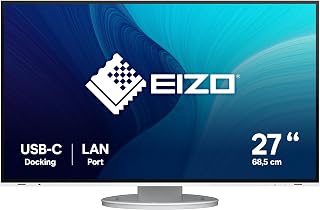
The EIZO FlexScan EV2795-WT is a 27-inch QHD monitor built for professionals, remote workers, laptop users, and creatives. Its USB-C docking features are especially useful for replacing several desk cables with one streamlined connection.
In everyday use, the 2560 x 1440 resolution provides clear space for documents, spreadsheets, and multitasking. Support for more than 1.06 billion hues, adjustable image controls, and a 5 ms response time make it well suited to office work and general creative tasks.
The virtually frameless design gives the display a modern appearance, while the adjustable stand supports height, swivel, pivot, and tilt changes. Built-in speakers, a USB hub, DisplayPort, HDMI, USB-C, and a 3.5 mm audio connection add practical flexibility.
Its main limitations are the single HDMI port, QHD resolution rather than 4K, and a business-oriented 5 ms response time that may not appeal to competitive gamers. The data also does not specify a high refresh rate, so gaming should not be its primary use.
Overall, the EV2795-WT is a strong choice for a clean, ergonomic workstation with integrated connectivity. It offers the greatest value to users who need USB-C docking, daisy chaining, LAN access, and dependable QHD clarity in one professional display.

EIZO ColorEdge CG223W 22-Inch Hardware Calibration
Pros
- Hardware calibration supports predictable, repeatable color management.
- Wide-gamut coverage is well suited to photography and graphic design.
- ColorNavigator makes calibration more accessible and precise.
- 3D LUT technology helps improve additive color mixing and tonal accuracy.
- DVI and DisplayPort connectivity, three USB ports, and wall-mount compatibility add flexibility.
Cons
- The 1680 x 1050 resolution is modest by current monitor standards.
- The glossy screen surface may produce distracting reflections in bright rooms.
- Its 6 ms response time and color-focused design make it less suited to fast-paced gaming.
The EIZO ColorEdge CG223W is a 22-inch LCD monitor aimed at photographers, graphic designers, and other users who need dependable color reproduction. Its hardware calibration makes it a better fit for color-managed work than a standard office display.
Hardware calibration stores display adjustments inside the monitor, helping maintain tonal detail and consistent output. With 95% Adobe RGB coverage, an sRGB preset, ColorNavigator software, and a 3D LUT, it offers useful tools for precise color workflows.
The 1680 x 1050 resolution provides a wide workspace, while the 2000:1 contrast ratio and 178-degree viewing angle support clear images from different positions. DVI and DisplayPort connectivity, three USB ports, and wall-mount compatibility add practical flexibility.
The black design is functional and professional, but the glossy screen can reflect surrounding light. Its older resolution also provides less detail than modern monitors, and the 6 ms response time is not optimized for fast-action gaming.
Overall, the EIZO ColorEdge CG223W remains a specialized choice for users who value calibrated, wide-gamut color over modern resolution or gaming performance. It is most compelling for photography, design, and other color-critical tasks where predictable display output matters.
Buying Guide: How to Choose an EIZO Monitor Alternative
Prioritize Color Management for Creative Output
Color-critical photography, prepress, and video grading call for more than a panel that simply looks vivid. The ColorEdge CG2700S combines a digital uniformity equalizer, built-in automatic self-calibration, 400 cd/m² brightness, and HDR targets for HLG and PQ, helping keep luminance and color behavior consistent across its 27-inch WQHD canvas.
The CG2420 is a compact 24.1-inch 16:10 choice with 99% Adobe RGB coverage and a built-in sensor, while the CS2740 moves to 4K with 99% Adobe RGB, 100% sRGB, USB-C, and hardware-calibration support. The older CG223W retains hardware calibration, a 3D LUT, and 95% Adobe RGB coverage, but its 1680 x 1050 resolution fits legacy-oriented desks better than a modern primary screen.
Choose Resolution and Aspect Ratio for Your Daily Tasks
A 27-inch 4K EV2740X delivers 163 ppi, which is especially useful when you spend hours reading fine type, inspecting high-resolution photos, or working with dense interface panels. It also gives you room for side-by-side windows without making a larger monitor feel visually coarse at typical desk distance.
The QHD EV2795 is a practical middle ground for documents, timelines, and general office work, while the 24.1-inch EV2456 provides extra vertical space through its 1920 x 1200 WUXGA format. The smaller EV2480 uses Full HD and suits straightforward everyday productivity, especially where a compact physical footprint matters more than pixel density.
Look Beyond USB-C to the Full Docking Feature Set
USB-C is most valuable when it carries video, data, and laptop power through one cable, but wattage and expansion ports still matter. The black EV2740X acts as a capable desk hub with up to 94W power delivery, LAN, four downstream USB ports, Picture-by-Picture capability, and a KVM switch for moving between compatible computers.
The EV2480 supplies up to 70W through USB-C, while the EV2795 adds daisy-chain convenience, LAN, and flexible audio connections for a cleaner workspace. If you plan to use a wired network, pair your display planning with reliable Ethernet cables for latency-sensitive connections, and consider these PoE switches for managed wired offices when your workspace network is expanding.
Balance Ergonomics and Portability With Your Work Location
A monitor that matches your posture can improve day-long comfort as much as extra resolution. The EV2795 offers height, swivel, pivot, and tilt adjustment, while its Auto EcoView and EcoView Optimizer features respond to ambient conditions and help manage power use. The EV2480 also uses flicker-reducing brightness control and has a highly compact, near-frameless design.
The ARZOPA 16-inch 2.5K Portable Monitor fills a different role: it weighs 1.46 pounds, uses a 16:10 2560 x 1600 IPS panel, and accepts USB-C or HDMI sources. It is a flexible second screen for travel, meetings, and console sessions rather than a replacement for a calibrated studio panel. For a more complete portable play setup, see our picks for mobile gaming controllers for handheld sessions.
Final Thoughts
Your choice comes down to whether color control or desk flexibility is the priority: the EIZO ColorEdge CG2700S computer monitor 68.6 cm suits a color-managed creative workflow, while the ARZOPA 16" 2.5K Portable Monitor is a sensible companion screen for travel and simple USB-C setups. Pick the model whose calibration, resolution, and connectivity support the work you do every day.
Frequently Asked Questions
Which option is strongest for a color-managed photo workflow in 2026?
Prioritize a ColorEdge display when Adobe RGB coverage, calibration support, and screen uniformity directly influence what your client or print partner receives. The CG2700S is the more complete choice for creators who value integrated calibration and HDR targets, while the CS2740 is compelling when 4K detail and USB-C connectivity are central to your editing desk.
A portable wide-gamut claim alone does not create a like-for-like substitute for a hardware-calibrated professional monitor. If your output is color sensitive, choose the display based on its calibration workflow and gamut requirements before considering convenience features.
Can a portable monitor replace an EIZO display for creative work?
A portable display can be excellent as a second workspace for email, notes, reference images, video calls, or travel, but it serves a different purpose from a dedicated color-managed monitor. The ARZOPA offers a detailed 2.5K 16:10 screen, useful contrast, and easy USB-C or HDMI connection in a notably lightweight format.
For portable gaming systems, it can also give you more screen space than the handheld display itself. If you are assembling that kind of kit, our guide to the best SSD options for ROG Ally storage can help you plan the rest of your portable setup.
Should I choose 4K or QHD for an office monitor?
Choose 4K if fine text, large spreadsheets, high-resolution imagery, and generous multitasking space are your main priorities. The EV2740X delivers a very sharp 27-inch presentation and is particularly useful if you prefer to keep several applications visible at once without relying heavily on a second display.
QHD is often easier to view at comfortable scaling and remains a strong fit for productivity, browser-based work, and documents. The EV2795 combines that resolution with USB-C docking features, making it a balanced option for laptop-based workspaces that need fewer cables.
Can a FlexScan monitor simplify a two-computer desk?
Yes, the right FlexScan model can reduce clutter by combining USB-C power delivery, USB expansion, and network access in the monitor. The EV2740X goes further with Picture-by-Picture and KVM functionality, allowing compatible connected systems to share the display and attached peripherals more easily.
Confirm that your laptop supports USB-C DisplayPort Alt Mode and that its power needs fall within the monitor’s delivery capacity. Also consider how many USB devices, video inputs, and network connections you need before deciding between a display-based dock and a separate docking station.






Write Your Review
No reviews yet. Be the first to share your experience!