

Your microphone sounds great, but if it is sitting on a cheap desktop stand or awkwardly propped up near your keyboard, you are leaving audio quality on the table. A proper boom arm lets you position the mic right in front of your mouth, pull it away when you are not recording, and keep your desk clean in the process. Whether you stream on Twitch, record a weekly podcast, or produce voiceover content, the right arm makes a noticeable difference in both comfort and sound.
This guide walks through five of the most reliable options available right now, covering everything from budget-friendly picks to professional-grade studio arms. If you are also building out your broadcast corner, check out our roundup of the best Stream Deck controllers to complete your setup.
Quick answer
This guide compares 5 picks, with RØDE PSA1+ Professional Studio Boom Arm with Spring ranked first.

Internal spring damping is the standout feature here, letting you reposition the arm silently mid-recording without thumps leaking into your track. For anyone recording vocals, podcasts, or voiceover where clean audio matters most, that mechanism justifies choosing this over simpler friction-hinge arms that transmit handling noise straight to the capsule.
Pros
- Fully damped internal springs
- Silent, fluid repositioning
- 360-degree rotation and extended reach
- Integrated XLR cable management
Cons
- Tension setup depends on microphone weight
- Cable routing is specifically described for XLR
A great boom arm does more than suspend a microphone: it should let a creator move the mic into place without adding unwanted sound or visual clutter. The RØDE PSA1+ earns its place among the best options for that job through a fully damped internal spring system and parallelogram design. Those elements are described as providing fluid, quiet adjustment, which matters for podcasters, streamers, voice actors, and broadcasters recording on a regular schedule. The arm’s movement is not its only strength. It offers 360-degree rotation and extended reach, giving users room to adapt placement to varied desk and recording layouts. Precision threading lets users set tension for their microphone’s weight, while the powder-coated neoprene arm gives the setup a polished studio-oriented appearance. An integrated cable-management system holds an XLR cable along the arm rather than letting it hang across the workspace. For a microphone setup intended to stay neat, stable, and ready for repeat recordings, the PSA1+ focuses on the fundamentals that make a boom arm worthwhile: controlled positioning, silent movement, and an organized desk.
Dimensions: 21.25 x 8.25 x 3.25 inches, Maximum Height: 0.9 meters
Weight Capacity: Maximum microphone weight 1.2kg, minimum 0.25kg
Mounting: Desk clamp for surfaces up to 70mm thick, thread adaptors for both 3/8 inch and 5/8 inch mic mounts
Construction: Powder-coated finish with neoprene arm cover, fully damped internal springs
Included Components: PSA1+ arm, desk clamp, thread adaptors
Warranty: 2-year manufacturer coverage

At 3.46 x 2.36 x 5.51 inches folded, this arm stays out of camera frame and off crowded desks, which matters for streamers who need a mic present but not visually dominating their setup. The low profile design paired with metal construction gives sturdy support without the bulky footprint typical of full-size boom arms.
Pros
- Low profile keeps the camera view unobstructed
- 740 mm reach with full articulation
- All-metal anti-torsion design
- Magnetic cable channels
Cons
- Needs a solid desk mount
- Other microphone types may need cable-channel adaptation
When a microphone arm sits between a creator and the camera, its shape can matter as much as its reach. Elgato’s Wave Mic Arm Low Profile is built around keeping the microphone support out of the camera view while still offering a 740 mm reach and full articulation. That focus makes it a strong contender for video calls, streams, and recorded video where a conventional raised boom could visually interrupt the shot. Its all-metal construction, anti-torsion design, and locking mechanisms are intended to keep the arm firm rather than bent or wobbly. The 1,692 g metal arm is also a substantial desk-mounted piece, so a solid mount surface is important. Magnetic cable channels give cable routing a deliberate place along the arm, helping preserve a more orderly desktop appearance. This option makes the most sense in a polished, camera-facing setup. It emphasizes low-profile sightlines, broad placement range, and stable support. Creators who want the microphone close during a broadcast or call without putting a prominent arm through the frame will find that combination particularly relevant. Its black metal finish also suits modern streaming workspaces.
Material: All-metal construction with anti-torsion design
Dimensions: 3.46 x 2.36 x 5.51 inches, 740mm (29.1 in) horizontal reach
Weight: 1692g (3.73 lbs)
Articulation: 360-degree horizontal rotation, 90-degree upper vertical rotation
Color: Black
Cable Management: Magnetic covers for integrated cable channels
Profile: Low-profile design sits below shoulder line
Buy the Wave Mic Arm Low Profile if you stream, make videos, record calls, or use a camera and want the arm to stay outside the visual field. It is also suited to a larger desk thanks to its 740 mm reach, with magnetic cable channels for a cleaner arrangement. Skip it if your desk cannot provide a solid mount point, or if you need cable channels that fit another microphone type without slight adaptation.

Full rotation and adjustable reach make this arm easy to swing between typing position and mic position, a real convenience for anyone juggling gameplay and commentary. Since it folds away compactly, it suits desks already packed with Blue Yeti or Fifine mics where every inch of surface space counts during long streaming sessions.
Pros
- Full 360-degree base rotation
- 135-degree extension and 180-degree vertical adjustment
- Folds away compactly
- 1.5 kg capacity
Cons
- Clamp works best on flat desks
- Not for microphones over 1.5 kg
Flexibility is the key reason to put the InnoGear MU01 on a best boom arm shortlist. Its desk-mounted design combines full base rotation with 135-degree forward extension and 180-degree vertical adjustment, giving gaming, streaming, and recording setups multiple ways to bring a microphone into position. Once the session ends, the arm folds away compactly. The MU01 is built from alloy steel and uses robust springs. Its upgraded spring mechanism is described as addressing arm droop, while the 1.5 kg capacity is intended for popular gaming and streaming microphones rather than every heavy studio microphone. A clamp secures the stand to flat desks up to 2 inches thick, making the desk surface part of the buying decision. For creators seeking an adjustable microphone arm with a compact stowed position, this model covers the core boom-arm tasks. It is especially relevant where one desk serves gaming, live streaming, and recording, since the arm can rotate, extend, adjust vertically, and then be folded away after use.
Choose the MU01 if you use a popular gaming or streaming microphone and need a desk-mounted arm that can rotate fully, extend forward, adjust vertically, and fold away after a session. It is a sensible match for flat desks no thicker than 2 inches. Skip it for heavier studio microphones beyond its 1.5 kg capacity, or for desks with curved or slanted edges, where the clamp may not work as well.

Built from alloy steel and weighing 1.6 kg, this arm is engineered for stability under a heavier condenser mic like the Blue Yeti without drifting out of position. Its built-in cable management also keeps XLR or USB cords tidy along the arm, a detail that matters for anyone streaming on camera where loose cables look messy.
Pros
- Up to 37.4 inches of vertical reach
- Supports microphones up to 3.5 pounds
- Integrated cable channels with rubber covers
- Silent adjustments and no-drill clamp
Cons
- Shock mount is not included
- Clamp fits desks only up to 2 inches thick
For a microphone setup that needs broad placement options rather than a fixed desktop stand, the InnoGear Mic Arm brings unusually long reach to the desk. Its 14-inch main arm can pair with the 6.3-inch extension riser, producing up to 37.4 inches of vertical reach and 32.3 inches of horizontal extension. That range can place a microphone above a monitor or reach across a desk, while a 360-degree rotating base, 135-degree front-to-back movement, and 180-degree up-and-down articulation provide multiple positioning choices. The arm uses thickened steel and an internal spring system rated for microphones up to 3.5 pounds, covering microphones such as the Blue Yeti and Shure SM7B mentioned for this model. It also addresses the visual side of a recording or streaming desk: integrated cable channels and removable rubber covers keep the cable routed along the arm. Smooth, silent adjustment is particularly useful where microphone movement occurs near a recording. Installation uses a desk clamp instead of drilling, provided the desktop is no more than 2 inches thick. A separate shock mount is needed for vibration isolation.
Physical Dimensions: Main arm length 14 inches, extension riser 6.3 inches, total package dimensions 15.75 x 1.57 x 13.78 inches, weight 1.6 kg (3.5 lbs).
Material and Build: High-grade thickened alloy steel construction with internal spring mechanism for stability and load support.
Reach and Positioning: Maximum horizontal reach 32.3 inches, maximum vertical reach 37.4 inches, 135-degree front-to-back adjustment, 180-degree up-and-down adjustment, 360-degree rotatable base.
Weight Capacity: Maximum load-bearing capacity 3.5 pounds, suitable for premium microphones including Blue Yeti, Shure SM7B, HyperX QuadCast, and similar models.
Connector: Universal 5/8-inch metal connector compatible with 20+ microphone brands and models.
Mounting: Desk clamp compatible with surfaces up to 2 inches thick, no drilling or permanent installation required.
Cable Management: Built-in channels with removable rubber cable covers for organizing cables and maintaining clean desk appearance.
Choose this arm if you need a boom arm with substantial vertical and horizontal coverage for a Blue Yeti, Shure SM7B, or another microphone weighing up to 3.5 pounds. It suits creators who want to route a cable out of view and position the microphone over a monitor or across a larger desk. Skip it if your desk edge exceeds 2 inches, if vibration isolation must be included, or if you prefer not to assemble the optional extension riser.

Weighing in at 1300 g with a compact 13 x 11.6 x 4.1 inch footprint, this arm is light enough to mount easily yet substantial enough to hold a mic steady through active gaming sessions. Its low profile metal build keeps the setup discreet, appealing to streamers who want function without a bulky arm crowding their camera view.
Pros
- Low-profile design preserves monitor visibility
- Up to 29 inches of reach
- Three screw adapters are included
- Cable channels reduce desktop clutter
Cons
- Clamp-side section lacks vertical adjustment
- Clamp requires a 0.8 to 2.4-inch desk edge
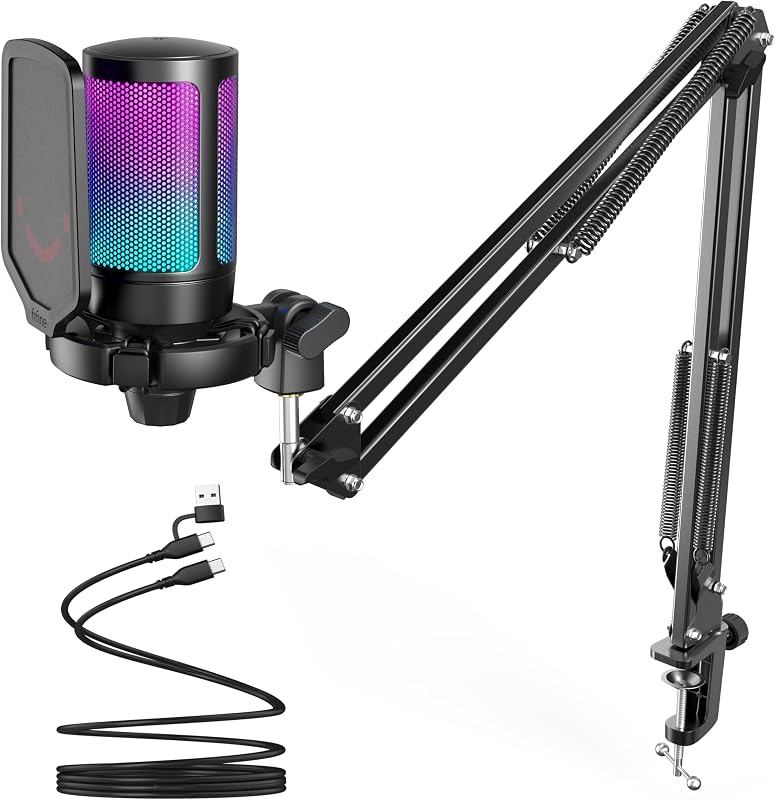
Keeping a clear view of the screen is a central requirement for a microphone boom arm in gaming and streaming setups, and the FIFINE BM88 approaches that problem with a low-profile layout. Rather than rising into the monitor area, it extends below the screen. The design still provides up to 29 inches of reach, 220 degrees of vertical adjustment, and 360-degree horizontal rotation, giving users room to bring a microphone into position while keeping the display unobstructed. Its all-metal build and non-slip C-clamp focus on stability at the desk. The clamp holds the arm without scratching the surface, and included 1/4-inch, 3/8-inch, and 5/8-inch screw adapters expand compatibility with standard microphones or shock mounts. Cable-management channels guide the microphone cable along the boom, making the setup less cluttered and helping avoid accidental disconnection. For an article selecting the best microphone boom arms, this is a compelling choice for users who prioritize an unobstructed monitor and broad adjustment range over a conventional elevated arm. Check desk compatibility first: the C-clamp accepts desk thicknesses from 0.8 to 2.4 inches. The segment nearest the clamp does not move vertically, which can limit placement choices on a very compact desk.
Buy the BM88 if your microphone arm must stay low enough to preserve a clear monitor view, particularly for gaming or streaming. It makes sense for desks with an edge between 0.8 and 2.4 inches thick and for users who value included adapters for standard microphones or shock mounts. Skip it if you need vertical adjustment at the section closest to the clamp, have a very compact desk where that restriction matters, or need a clamp outside its stated thickness range.
Boom Arm Buying Guide
Build Quality and Stability
The arm needs to hold its position once you set it. Lightweight plastic arms with weak springs tend to droop over time, especially with heavier microphones like the Shure SM7B or Blue Yeti. Look for all-metal construction and internal springs rated for at least 1.5 kg of load.
The RØDE PSA1+ Professional Studio Boom Arm uses a parallelogram spring design that stays remarkably steady, while both the FIFINE BM88 Low Profile Microphone Boom Arm Stand and the Elgato Wave Mic Arm Low Profile Microphone Boom feature all-metal anti-torsion frames that resist wobble even when the arm is fully extended.
Reach and Range of Motion
Desk size matters more than most people realize. A shallow desk might only need 20 inches of horizontal reach, but a wide broadcast desk or a dual-monitor setup benefits from the full 29-inch reach offered by both the Elgato Wave Mic Arm and the FIFINE BM88. Vertical range is equally important if you record standing or switch between sitting and standing positions.
The InnoGear Mic Arm Microphone Boom Arm Cable stands out here with a maximum vertical reach of over 37 inches thanks to its included extension riser, making it one of the most versatile picks for taller setups or over-monitor positioning.
Cable Management
Running an XLR cable along the outside of a boom arm looks messy and creates snag points. Integrated cable channels solve this cleanly. The Elgato Wave Mic Arm uses magnetic covers that snap shut over routed cables, while the InnoGear Mic Arm Microphone Boom Arm Cable runs cables through built-in rubber-covered channels along the arm.
If your desk is already a tangle of cables, a boom arm with solid management built in is worth prioritizing. Pair it with some good peripherals and you can follow our tips in the best webcam for low light guide to keep your entire streaming corner organized and camera-ready.
Low-Profile vs. Standard Design
Standard boom arms swing up and over your workspace, which is fine for dedicated recording desks. Low-profile arms are designed to extend below your monitor line, keeping the mic close to your mouth without blocking your screen view during a live session or an intense gaming match.
The FIFINE BM88 and the Elgato Wave Mic Arm are both purpose-built for this use case. If screen real estate matters to you, such as when you are streaming and need to read chat, a low-profile arm is the smarter choice. For a dedicated podcast or recording environment, the RØDE PSA1+ Professional Studio Boom Arm gives you full overhead extension with a completely silent spring system that will not pick up handling noise mid-recording. Broadcast-quality setups can also benefit from a solid visual setup, so take a look at our picks for the best ring light for streaming while you are at it.
Desk Clamp Compatibility
Not every clamp fits every desk. Thick desks, rounded edges, and glass surfaces can all cause problems with standard c-clamps. Before buying, measure your desk thickness and confirm it falls within the arm’s supported range. Most options here handle desks up to two inches thick, while the RØDE PSA1+ Professional Studio Boom Arm goes up to 70mm.
The InnoGear Boom Arm Microphone Mic Stand for Blue is specifically designed for flat, squared desk edges, so slanted or curved edges are a known limitation worth confirming before purchase. Always double-check the spec before ordering if your desk has an unusual profile.
Final Thoughts
For most streamers and podcasters, the right boom arm comes down to how seriously you take your audio setup. If you want a professional, silent, broadcast-ready arm that will last for years, the RØDE PSA1+ Professional Studio Boom Arm is the clear top choice. If you prefer a screen-friendly, low-profile option that still delivers premium all-metal build quality at a more accessible point, the Elgato Wave Mic Arm Low Profile Microphone Boom is the one to reach for.
Frequently Asked Questions
What is the best boom arm for a Blue Yeti microphone?
The Blue Yeti is a heavier condenser mic, so you need an arm rated for at least 1.5 kg. Both the InnoGear Mic Arm Microphone Boom Arm Cable and the RØDE PSA1+ Professional Studio Boom Arm are confirmed compatible and strong enough to hold it securely. The InnoGear option even lists the Blue Yeti by name in its compatibility specs.
Do boom arms work with all microphones?
Most boom arms use standard 5/8-inch threading with a 3/8-inch adapter included, which covers the vast majority of dynamic and condenser microphones. The FIFINE BM88 Low Profile Microphone Boom Arm Stand goes a step further by including 1/4-inch, 3/8-inch, and 5/8-inch adapters in the box. Always verify the weight rating matches your mic before ordering.
Are low-profile boom arms better for gaming and streaming setups?
For gaming and live streaming in 2026, low-profile arms are generally preferred because they position the mic below your monitor line, keeping your screen visible and your face unobstructed on camera. Standard arms work well for dedicated podcast desks where screen visibility is less of a concern. If you are building a full streaming corner, our guide to the best green screen for streaming covers another visual upgrade worth considering.
How do I stop my boom arm from drooping over time?
Drooping is usually caused by springs that are too weak for the microphone’s weight or tension knobs that are not tight enough. Choose an arm rated for slightly more than your mic’s actual weight, and tighten the friction joints at the pivot points. Arms with internal spring damping, like the RØDE PSA1+ Professional Studio Boom Arm, are specifically engineered to resist this problem over years of daily use.







Write Your Review
No reviews yet. Be the first to share your experience!