

In CS2, a split-second peek, a fast flick, or an enemy holding a dark corner can decide the round. The right monitor helps you follow movement more clearly, react with confidence, and avoid distractions such as tearing or awkward screen positioning. For a broader look at high-speed displays, see our competitive FPS monitor guide.
This guide to the best monitor for CS2 compares ten practical choices for different play styles. You will find compact 240Hz Full HD options for pure competitive focus, plus 27-inch QHD models that add sharper detail without giving up smooth motion. If crisp 1440p visuals are your priority, our budget 1440p monitor guide offers more useful context.
Quick Comparison
Ratings reflect the most recent data pull. Check each listing for current price and availability.
Quick answer
This guide compares 10 picks, with Dell SE2426HG 24 inch 240Hz Gaming Monitor - FHD IPS ranked first. Samsung 27 Odyssey G5 QHD 1440P 180Hz Gaming Monitor holds the highest customer rating among them. SANSUI 24 Inch 240Hz Curved Gaming Monitor FHD 1080P has the most customer reviews.

The 240Hz refresh rate provides exceptionally smooth motion, reducing motion blur and helping you track enemies more precisely during spray transfers. IPS technology ensures consistent colors and viewing angles, so player models remain visible from any seating position. FHD resolution is less demanding on your GPU, allowing you to maximize frame rates for the smoothest possible experience.
Pros
- 240Hz refresh rate delivers exceptional smoothness for fast tracking
- 0.5ms response time minimizes input lag and motion blur
- Fast IPS combines speed with accurate colors and wide viewing angles
- TÜV 3-star certification reduces eye strain during extended play
Cons
- 1920x1080 resolution may feel soft for non-gaming use
- Typical IPS contrast ratio does not excel in dark scenes
CS2 rewards high refresh rates above almost everything else, and the Dell SE2426HG prioritizes exactly that. The 240Hz panel with 0.5ms response time gives you a tangible competitive advantage in fast-paced firefights where milliseconds decide rounds. Movements feel noticeably smoother than 144Hz displays, and your crosshair tracks enemies with minimal motion blur. AMD FreeSync Premium keeps frame delivery synchronized, eliminating screen tearing when your FPS fluctuates during smoke-heavy executes or multi-player firefights. The fast IPS technology preserves color accuracy and 178-degree viewing angles while hitting that 0.5ms response time, a combination rare in this segment. At 24 inches with 1920x1080 resolution, you get the pixel density competitive players prefer, making targets crisp and easy to track without requiring excessive GPU power to maintain high frame rates. The 99% sRGB coverage ensures consistent color representation, useful for spotting player models against varied map backgrounds. TÜV Rheinland 3-star eye comfort certification reduces blue light without color distortion, addressing fatigue during long practice sessions or tournament grinds. The matte finish cuts glare, and the lightweight 7.4-pound build makes repositioning simple. Dual HDMI 2.0 and DisplayPort 1.4 inputs let you connect both PC and console simultaneously.
Display: 24-inch FHD IPS, 1920x1080 native resolution, 16:9 aspect ratio, 93 pixel pitch, 1000:1 contrast ratio, 178-degree viewing angles, 300 nits brightness, 99% sRGB color gamut
Performance: 240Hz refresh rate, 0.5ms response time, AMD FreeSync Premium, HDMI VRR support, TÜV Rheinland 3-star blue light reduction
Connectivity: 2x HDMI 2.0, 1x DisplayPort 1.4, Power input
Physical: 21.21 inches wide, 16.23 inches tall, 7.04 inches deep, 7.4 pounds, black matte finish, desk mount with tilt adjustment
Power and Warranty: 14 watts typical consumption, 240V AC input, 1-year advanced exchange service, includes HDMI cable, stand, power cable, and documentation
Buy this if competitive CS2 performance is your priority and you want every refresh rate advantage within reach. The 240Hz and 0.5ms response time suit players who maintain high frame rates and value fluidity over higher resolution. It works for esports-focused setups where reaction speed matters most. Skip it if you play casually or prefer the sharper visuals of 1440p for single-player games and content work. The 1080p resolution feels softer for non-gaming tasks on a 24-inch screen.
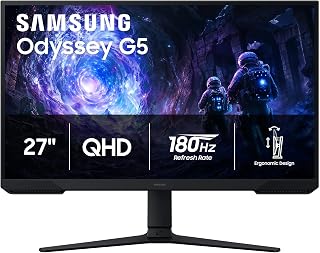
The 180Hz refresh rate delivers smooth motion tracking during fast firefights, while the VA panel's 3000:1 contrast ratio helps spot enemies in CS2's darker corners and shadowed angles. QHD resolution at 27 inches provides sharp visuals without the performance hit of 4K, letting you maintain high frame rates. The matte finish reduces glare during extended competitive sessions.
Pros
- 180Hz and 1ms response time deliver smooth, responsive gameplay for tracking and flicks
- Black Equalizer brightens shadows to spot hiding opponents without overexposing the image
- QHD resolution sharpens player models and UI elements across long sightlines
- 3000:1 VA contrast ratio improves visibility in dark corners and shadowy map areas
Cons
- Requires capable GPU to maintain high frame rates at 1440p
- On-screen menu navigation less intuitive than competing models
Counter-Strike 2 rewards players who can track heads through smokes and hold tight angles at high frame rates, and the Samsung Odyssey G5 delivers exactly that foundation. The 180Hz refresh rate gives you smooth target tracking and fast updates that matter in clutch rounds, while the 1ms response time keeps ghosting from blurring enemy models during quick peeks. QHD resolution at 27 inches sharpens player outlines and UI elements compared to 1080p, letting you spot movement across long sightlines on maps like Dust2 and Anubis. AMD FreeSync eliminates the screen tearing that disrupts crosshair placement during spray transfers. The VA panel's 3000:1 contrast ratio produces deep blacks that help distinguish enemies in shadowy corners, and the Black Equalizer feature brightens dark areas without washing out the rest of the image. The matte finish cuts down glare during long practice sessions, and the adjustable stand lets you dial in the perfect height and angle for consistent crosshair placement. For CS2 players upgrading from older 60Hz or basic 144Hz displays, this monitor offers a meaningful competitive edge without requiring a top-tier GPU to drive it.
Display: 27-inch QHD VA panel, 2560 x 1440 resolution, 16:9 aspect ratio, 178-degree viewing angles
Performance: 180Hz refresh rate, 1ms response time (MPRT), 300 cd/m brightness, 3000:1 contrast ratio
Features: HDR10, AMD FreeSync, Black Equalizer, matte screen finish
Connectivity: 2x HDMI, 1x DisplayPort, 1x power connector
Design: Adjustable stand with tilt, pivot, and height settings, desk mount, flat panel shape
Dimensions: 24.34 inches wide, 9.22 inches deep, 20.5 inches tall, 10.1 pounds
Power: 35 watts consumption, 240 volts
Warranty: 1-year manufacturer coverage

The 144Hz refresh rate provides smooth gameplay at a frame rate most systems can consistently deliver in competitive settings. IPS technology ensures accurate color reproduction, helping you distinguish player models from map textures. At 24 inches with FHD resolution, pixel density remains sharp while keeping hardware requirements reasonable for sustained high frame rates.
Pros
- 144Hz and 1ms response time handle CS2's fast-paced gunfights
- IPS panel shows consistent colors for better enemy visibility
- TUV flicker-free and low blue light reduce fatigue in long sessions
- Lightweight build and VESA support simplify desk optimization
Cons
- Single HDMI port requires cable swapping for multiple devices
- Limited stand adjustment beyond tilt angle
CS2 demands fast reactions and smooth visuals, and the MSI PRO MP243L E14 delivers both at 24 inches. The 144Hz refresh rate keeps crosshair tracking fluid during spray transfers, while the 1ms response time ensures your inputs register without perceptible lag. FreeSync eliminates tearing when holding angles or tracking enemies through smoke. The IPS panel provides consistent color reproduction across the screen, making enemy silhouettes easier to spot against varied map backgrounds. At 1920x1080, frame rates stay high even on mid-range hardware, letting you maximize competitive advantage. The matte finish prevents reflections from disrupting your focus during clutch rounds. TUV-certified flicker-free technology and low blue light reduction become meaningful during extended practice sessions or tournament play. The four-side slim bezel design minimizes visual distraction, keeping attention where it belongs. VESA mounting enables optimal monitor positioning for ergonomic crosshair placement. While the single HDMI port limits multi-device convenience, the lightweight build and tilt adjustment make desk setup straightforward for players prioritizing performance over premium features.
Best for CS2 players on strict budgets who need reliable high-refresh performance without compromising eye comfort during long practice sessions. The 24-inch size suits competitive players who prefer smaller displays for reduced eye travel. Skip this if you want higher resolution for content creation between matches, need multiple video inputs for console switching, or demand adjustment beyond basic tilt for complex ergonomic setups.

The 120Hz refresh rate offers smoother motion than standard 60Hz displays while remaining accessible for mid-range hardware. IPS technology provides consistent color accuracy and wide viewing angles, ensuring enemy models stand out against map backgrounds. At 27 inches with FHD resolution, you get a larger viewing area without sacrificing the frame rates competitive play demands.
Pros
- 120Hz delivers smoother CS2 gameplay than standard 60Hz monitors
- IPS panel provides better viewing angles than budget TN alternatives
- 1ms response time reduces input lag during competitive play
- Frameless bezel minimizes visual distraction
Cons
- 1080p at 27 inches reduces text sharpness for desktop work
- 250 nits brightness struggles in bright rooms
For CS2 players seeking smoother gameplay than standard 60Hz panels, the Acer KB272 G0bi provides a meaningful upgrade path without breaking budgets. The 120Hz refresh rate doubles the motion fluidity of basic displays, making spray control and tracking noticeably easier during gunfights. Paired with 1ms response time, the monitor minimizes input lag that separates successful peeks from failed attempts. FreeSync compatibility eliminates screen tearing when paired with AMD GPUs, keeping visuals clean during rapid camera movement. The IPS panel technology maintains color accuracy and viewing angles superior to cheaper TN alternatives, helping spot enemies against complex map textures. At 27 inches with 1920x1080 resolution, the pixel density trades ultimate sharpness for easier frame rate targets on mid-tier hardware. The frameless bezel design reduces visual distraction around the active play area. Matte finish prevents glare during daylight sessions. While 250 nits brightness suffices for indoor gaming, brighter environments may wash out darker corners where opponents hide. Connectivity covers essentials with HDMI and legacy VGA, though DisplayPort absence limits future GPU upgrade paths. The functional plastic build keeps costs down while delivering the core performance CS2 demands.
Display: 27-inch IPS LCD, 1920x1080 Full HD, 16:9 aspect ratio, 250 nits brightness, 100,000,000:1 contrast ratio, 99% color gamut
Performance: 120Hz refresh rate, 1ms VRB response time, FreeSync adaptive sync support, matte screen finish
Connectivity: 1x HDMI, 1x VGA, 1x audio jack
Physical: 24.07 inches wide, 17.44 inches tall, 8.27 inches deep, 4.99 kg weight, tilt adjustment, wall mount compatible
Power & Warranty: 18 watts power consumption, 3-year full parts and labor warranty included
Ideal for casual CS2 players upgrading from 60Hz displays who want noticeable smoothness improvement without investing in 144Hz+ premium panels. Works well for mixed-use setups balancing office work and evening gaming sessions. Skip this if you compete seriously and need 144Hz minimum, want sharper text at 27 inches for productivity tasks, or require bright outdoor-facing desk placement.
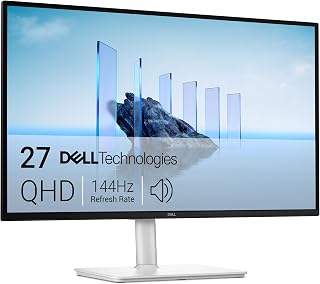
The 144Hz panel with 1ms response time gives you fluid motion and minimal input lag for quick reactions in competitive play. IPS technology ensures accurate color representation and wide viewing angles, crucial for spotting player models against varied map backgrounds. QHD resolution at 2560x1440 strikes a balance between visual clarity and frame rate performance.
Pros
- TUV 4-star eye comfort with flicker-free tech reduces strain during long practice sessions
- 144Hz and 1ms response time handle fast peeks and tracking smoothly
- Fully adjustable stand supports repeatable ergonomic positioning for muscle memory
- Built-in 3W speakers deliver clear footstep and utility audio without external setup
Cons
- Limited connectivity with single HDMI 2.1 and one DisplayPort may require adapters
- 144Hz ceiling lower than 180Hz or 240Hz alternatives for absolute competitive edge
CS2 players spend hours grinding aim maps, reviewing demos, and queueing matches, and the Dell S2725DSM addresses that marathon reality with comfort features that don't sacrifice performance. The 144Hz refresh rate and 1ms MPRT response time provide the smooth, responsive experience needed for tracking moving targets and holding pixel angles, while the QHD resolution at 27 inches gives you crisp player outlines and legible UI text. AMD FreeSync keeps frames consistent during intense firefights. What separates this monitor for CS2 use is the TUV 4-star eye comfort certification, achieved through flicker-free technology and blue light reduction that ease strain during long sessions without dulling image quality. The IPS panel with 178-degree viewing angles and 1500:1 contrast delivers accurate colors and decent shadow detail. The built-in dual 3W speakers are surprisingly capable for hearing footsteps and utility cues without requiring a separate audio setup. The fully adjustable stand with height, tilt, pivot, and swivel lets you lock in a repeatable head position for muscle memory, and the matte finish reduces reflections under overhead lighting.
Best for CS2 players who grind long hours and want eye comfort without sacrificing competitive refresh rates and response times. The adjustable ergonomics and built-in audio suit players with limited desk space or minimal peripherals. Skip it if you need 180Hz or higher for maximum competitive advantage, or if you run multiple legacy devices that require more than one HDMI and one DisplayPort. Also not the choice for players chasing absolute fastest response times at 240Hz and above.
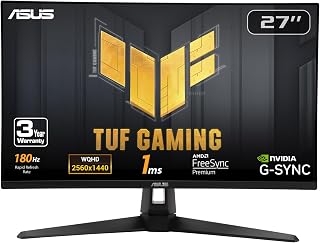
Fast IPS technology combines the color accuracy of IPS with improved response times, reducing ghosting during rapid crosshair movement. The 180Hz refresh rate provides smoother frame delivery than standard 144Hz displays, giving you a competitive edge in fast-paced engagements. QHD resolution at 1440p offers clear enemy visibility without demanding excessive GPU power.
Pros
- 180Hz Fast IPS with 1ms response delivers smooth, ghost-free tracking and peeks
- ELMB Sync with G-SYNC and FreeSync Premium covers both NVIDIA and AMD GPUs
- 130% sRGB and HDR produce vibrant colors that distinguish players against backgrounds
- 3-year warranty includes accidental damage protection
Cons
- Integrated 2W speakers are weak and unsuitable for hearing footsteps or utility
- Ships with high brightness requiring manual adjustment in settings
CS2 demands monitors that can keep up with rapid crosshair adjustments, spray transfers, and holding off-angles at high frame rates, and the ASUS TUF VG27AQ3A answers with a Fast IPS panel running at 180Hz. The 1ms response time is legitimately fast for IPS technology, eliminating ghosting that blurs enemy models during quick peeks and site retakes. ELMB Sync works alongside G-SYNC compatibility and FreeSync Premium to remove motion blur and screen tearing across both NVIDIA and AMD GPUs, giving you clean frames whether you're holding a tight angle or tracking a strafing opponent. The 130% sRGB color gamut and HDR support produce vibrant, accurate visuals that help distinguish player models against map backgrounds. QHD resolution at 27 inches sharpens UI elements, crosshair placement, and distant targets across long sightlines on maps like Mirage and Overpass. The GamePlus overlay adds practical tools like frame rate counters and customizable crosshairs for warmup and practice. The frameless design minimizes bezel distraction in multi-monitor setups, and the matte anti-glare finish holds up during long practice blocks. ASUS includes full cables and a 3-year warranty with accidental damage protection.
Display: 27-inch Fast IPS, 2560 x 1440 (QHD), 16:9 aspect ratio, 178-degree viewing angles
Refresh Rate: 180Hz native. Supports G-SYNC compatible, FreeSync Premium, and AdaptiveSync with variable refresh rate
Response Time: 1ms (moving picture response time)
Color: 130% sRGB gamut, HDR-10 support, 856.5 lm brightness, 1000:1 contrast ratio
Connectivity: 2x HDMI 2.0, 1x DisplayPort 1.4, 3.5mm audio jack
Physical: 24.2" depth, 8.4" width, 17.9" height, 4.6 kg weight. VESA 100x100 mount compatible. Flat panel with matte screen finish
Features: Blue light filter, flicker-free technology, integrated 2W stereo speakers, frameless design, built-in GamePlus menu with FPS counter and crosshair overlay
Warranty: 3-year warranty with accidental damage replacement
Best for CS2 players who want 180Hz Fast IPS performance with broad GPU compatibility across NVIDIA and AMD systems. The ELMB Sync and multiple adaptive sync options suit players who prioritize motion clarity and tear-free gameplay. Skip it if audio quality matters, as the 2W speakers are weak and tinny. Also requires manual brightness adjustment out of the box, and players needing 240Hz for absolute competitive response should look higher in the refresh range.

The WQHD Fast IPS panel delivers sharp image quality with minimal response time blur, essential for tracking moving targets accurately. At 180Hz, it provides smooth motion reproduction that helps reduce perceived input lag. G-SYNC eliminates screen tearing without introducing the stuttering that can throw off your aim during critical moments.
Pros
- QHD resolution sharpens distant targets and map details
- 1ms response time with fast IPS combines speed and color accuracy
- G-SYNC support eliminates tearing during frame rate drops
- 95% DCI-P3 color coverage improves visual clarity and depth
Cons
- Requires mid to high-end GPU for consistent 180Hz at 1440p
- 180Hz ceiling may feel limiting for ultra-competitive setups
The Alienware AW2725DM hits the ideal balance for CS2 players who want competitive responsiveness without sacrificing visual fidelity. Its 27-inch QHD panel at 180Hz delivers smooth, tear-free gameplay through G-SYNC support, while the 1ms gray-to-gray response time ensures your shots register exactly when you click. The 1440p resolution provides noticeably sharper character models and map details compared to 1080p, making long-range headshots easier to line up on maps like Dust2 or Mirage. The fast IPS technology combines TN-level speed with superior color accuracy and 16:9 viewing angles, so the image stays consistent whether you're centered or leaning back between rounds. With 95% DCI-P3 coverage and DisplayHDR 400 certification, in-game lighting and materials render with convincing depth, helping you read visual cues faster. The matte finish eliminates distracting reflections during intense matches. The 27-inch form factor is large enough for immersive play without forcing excessive head movement, a key consideration for maintaining crosshair focus. Alienware's build quality shows in the solid chassis and clean cable management. For mid-range rigs running RTX 4070 or equivalent cards, this monitor lets you maintain high frame rates at 1440p in CS2 while staying ready for other demanding titles.
Display: 27-inch QHD (2560 x 1440) IPS panel, 16:9 aspect ratio, matte finish
Refresh Rate: 180Hz
Response Time: 1ms gray-to-gray
Color Gamut: 95% DCI-P3
HDR: DisplayHDR 400 certified
Sync Technology: NVIDIA G-SYNC
Additional Features: Console mode, hardware blue light filter, VESA mountable
Brand: Alienware (Dell)
This monitor suits CS2 players with mid to high-end rigs who want sharper visuals than 1080p without the performance penalty of 4K. The 180Hz refresh rate and 1ms response time cover competitive needs while the QHD resolution improves target identification at distance. It's ideal if you play a mix of competitive shooters and AAA games. Skip it if you're running a budget GPU that struggles to hit 180 FPS at 1440p, or if you prioritize frame rates above 180Hz over resolution upgrades.
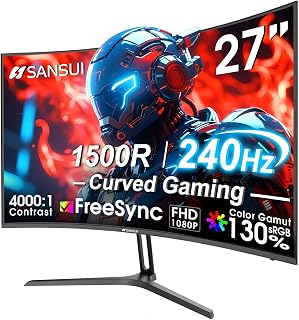
The 240Hz refresh rate delivers exceptionally fluid motion, giving you more visual information per second during fast reactions. The 1500R curve wraps peripheral vision naturally, helping you spot movement at screen edges. The 4000:1 contrast ratio enhances visibility in dark areas, while MPRT 1ms response time minimizes ghosting during quick flicks and tracking.
Pros
- 240Hz refresh rate provides ultra-smooth competitive advantage in CS2
- 1500R curve enhances peripheral awareness for better map scanning
- 4000:1 contrast and HDR improve enemy visibility in shadows
- Metal stand and VESA support enable stable ergonomic positioning
Cons
- Narrow viewing angles require centered head positioning
- 1080p resolution may feel dated for non-gaming desktop tasks
CS2 rewards fast reflexes and precise aim, and the SANSUI ES-G27C1 PRO targets serious players with 240Hz performance. This refresh rate nearly quadruples standard 60Hz motion fluidity, making micro-adjustments during spray transfers and one-taps feel instantaneous. The 1ms MPRT response time eliminates ghosting that obscures moving targets, while FreeSync synchronization keeps frames tear-free during intense firefights. The 1500R curve wraps peripheral vision naturally, reducing head movement needed to scan corners and common angles. At 27 inches with 1920x1080 resolution, CS2 runs at high frame rates even on mid-tier GPUs, letting hardware fully utilize the 240Hz ceiling. The 4000:1 contrast ratio and HDR support enhance dark map visibility, making opponents in shadowed positions easier to identify. Low blue light filtering and flicker-free technology matter during marathon practice sessions or tournament days. The metal stand provides stable positioning with tilt adjustment and VESA compatibility for arm mounting. Matte finish prevents glare from disrupting crosshair placement. While viewing angles narrow compared to premium IPS panels, head-on competitive play positions rarely expose this limitation. The 300 nit brightness handles typical indoor lighting without washing out.
Display: 27-inch curved LED, 1920x1080 FHD resolution, 16:9 aspect ratio, 1500R curvature
Performance: 240Hz refresh rate, 1ms MPRT response time, 4000:1 contrast ratio, 300 nits brightness
Color: 130% sRGB, 95% DCI-P3 color gamut, HDR support
Features: FreeSync adaptive sync, anti-flicker, low blue light, anti-glare matte finish, black level adjustment, game modes, crosshair overlay
Connectivity: DisplayPort 1.4, HDMI, 3.5mm audio jack
Design: Metal stand with tilt adjustment -5 to +15 degrees, VESA 100x100mm compatible
Dimensions: 24.13"W x 17.84"H x 7.66"D, weighs 7.3 lbs
Warranty: 1-year manufacturer warranty with 30-day money-back guarantee and lifetime technical support
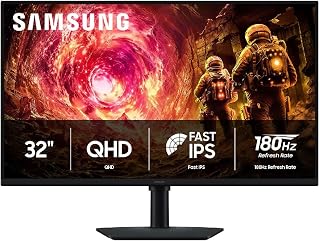
The 180Hz refresh rate delivers the frame pacing competitive CS2 players rely on for tracking heads through smokes and holding tight angles. QHD resolution at 32 inches gives you enough pixel density to spot distant models without sacrificing the high refresh performance that matters in ranked matches. The IPS panel keeps colors and contrast consistent across the screen, so enemy outlines stay visible whether they peek left or right.
Pros
- 180Hz and 1ms response time keep gameplay smooth and responsive
- 32-inch QHD resolution offers strong clarity and map awareness
- Black Equalizer brightens shadows without compromising overall contrast
- IPS panel with wide viewing angles maintains color accuracy
Cons
- 180Hz cap limits ultra-high frame rate competitive setups
- 32-inch 1440p pixel density slightly lower than 27-inch equivalent
CS2 demands precision and clarity, and the Samsung Odyssey G5 delivers both through its 32-inch QHD panel. The 180Hz refresh rate paired with 1ms response time ensures your crosshair movements stay fluid and responsive during firefights, while G-Sync compatibility removes tearing when frame rates fluctuate. The 1440p resolution gives you enough pixel density to spot distant enemies clearly without demanding the GPU horsepower that 4K requires, letting you maintain high frame rates in competitive matches. IPS technology with 178-degree viewing angles keeps colors accurate across the entire screen, crucial when scanning for opponents in shadowed corners. The Black Equalizer feature brightens dark areas without washing out the entire image, giving you a visibility edge in low-light sections of maps like Ancient or Overpass. At 32 inches, you get expansive screen real estate that improves peripheral awareness during clutch situations. The matte finish resists glare from room lighting, and the ergonomic stand provides full height, tilt, and swivel adjustments so you can dial in the perfect sightline. HDR10 support adds visual depth to the game's lighting effects, making outdoor sections and smoke grenades more immersive.
Display: 32 inches, QHD (2560 x 1440), IPS panel, 16:9 aspect ratio, matte finish
Performance: 180Hz refresh rate, 1ms response time (GtG), 300 cd/m² brightness, 1000:1 contrast ratio
Color: 99% color gamut, HDR10 support, 178-degree viewing angle
Adaptive Sync: G-Sync compatible, FreeSync support
Connections: 1x DisplayPort, 1x HDMI
Adjustments: Height, tilt, and swivel ergonomic stand
Dimensions: 28.1" W x 24.6" H x 9.9" D
Weight: 10.8 lbs
Warranty: 1-year manufacturer coverage
Buy this if you want a large, immersive display for CS2 that balances competitive performance with visual quality. The 32-inch QHD panel suits players who value screen space and clarity without needing extreme refresh rates beyond 180Hz. It works well for those who mix competitive play with casual gaming or content creation. Skip it if you're chasing every possible frame above 180Hz or prefer the sharper pixel density of a 27-inch 1440p monitor. Pure esports grinders targeting 300+ FPS may want a smaller, faster panel instead.

Pros
- 240Hz refresh rate at 1080p
- FreeSync and quoted 1ms response time
- 3000:1 VA contrast and 124% sRGB
- Matte curved screen with crosshair overlay
Cons
- No height adjustment
- Reports of occasional dark-scene bleed or clouding
For Counter-Strike 2, speed matters more than chasing extra resolution. The SANSUI ES-G24C1 PRO makes its CS2 case with a 24-inch, 1080p VA panel running at 240Hz, plus FreeSync and a quoted 1ms response time. Those specifications target smooth fast-shooter motion, reduced tearing, and minimal ghosting during quick peeks, strafes, and crosshair corrections. Rather than treating image quality as an afterthought, it pairs that refresh rate with a 3000:1 contrast ratio, 124% sRGB color gamut, HDR support, and adjustable black-level controls. The 1500R curve is an unusual element on a 24-inch competitive display, but it is part of this model’s more immersive presentation. Its matte anti-glare finish, anti-flicker technology, and low-blue-light support add useful consideration for extended sessions. Both DisplayPort and HDMI support 240Hz operation, and the built-in crosshair overlay gives players another gaming-focused option. The compromise is straightforward: FHD helps support the high-refresh focus, but delivers less detail than 1440p alternatives.
Display: 24-inch VA panel, 1920x1080 (FHD), 16:9 aspect ratio, 1500R curve
Performance: 240Hz refresh rate, 1ms response time (MPRT), 3000:1 contrast ratio
Color: 124% sRGB, 93% DCI-P3, 300 nits brightness, HDR support
Connectivity: DisplayPort 1.4 (supports 240Hz), HDMI 2.0 (supports 240Hz), 3.5mm audio jack
Sync Technology: AMD FreeSync adaptive sync
Adjustments: 5 to 15 degrees tilt adjustment, VESA 75x75mm compatible
Features: Game modes, crosshair overlay, shadow booster (black level adjustment), anti-flicker, anti-glare, low blue light
Dimensions: 23.78 inches deep, 4.45 inches wide, 15.55 inches high
Warranty: 30-day money-back guarantee, free replacement coverage, lifetime technical support
Buy this SANSUI if your CS2 setup is centered on 1080p competitive play and you value a 240Hz refresh rate, FreeSync, a compact 24-inch format, and the extra contrast a VA panel can provide. It also suits players who want a curved panel, matte finish, crosshair overlay, and both DisplayPort and HDMI connectivity. Skip it if you need 1440p detail, stand height adjustment, or a flat display for competitive play, and if reports of occasional backlight bleed or clouding in dark scenes are a concern.
How to Choose a Monitor for CS2
Match the refresh rate to your frame output
CS2 benefits from a high refresh rate because more frequent screen updates make rapid tracking feel cleaner and more connected to your mouse movement. A 240Hz panel is most valuable when your PC can sustain similarly high frame rates, making the Dell 24 240Hz Gaming Monitor – SE2426HG and SANSUI 24 Inch Curved 240Hz Gaming Monitor FHD compelling choices for players focused on competitive Full HD play.
A 144Hz or 180Hz monitor remains a strong fit if your system varies below 240 frames per second or you play other genres alongside CS2. The msi PRO MP243L E14 24-inch IPS 1920 x 1080 (FHD) supplies a useful middle ground, while 180Hz QHD screens prioritize detail and fluidity together. If you also want a high-resolution setup for demanding single-player games, compare the requirements in our guide to 4K 240Hz monitors.
Choose resolution and screen size for your desk distance
For a dedicated CS2 setup, a 23.8-inch or 24-inch 1080p display is still an excellent format. It keeps the whole image within your natural field of view and is easier for a modest graphics card to drive at high frame rates. Along with the Dell and SANSUI options, the Acer 27in FHD 1920×1080 IPS 120Hz Gaming Monitor works for players who want a larger Full HD canvas, though its pixel density is lower than a smaller FHD screen.
A 27-inch QHD monitor is the more versatile choice when you want sharper maps, clearer text, and room for work or streaming between matches. The Samsung 27" Odyssey G5 (G51F) Series QHD (1440P), ASUS TUF Gaming VG27AQ3A 27 Inch 1440p 180Hz, Alienware 27 Gaming Monitor AW2725DM, and Dell 27 Plus QHD Monitor – S2725DSM all pair 2560 x 1440 resolution with gaming-oriented refresh rates.
Prioritize motion clarity, VRR, and shadow controls
Response-time claims are useful, but they are only one part of clear motion. Variable refresh rate support helps the display follow changes in frame output, reducing visible tearing and uneven movement when your performance fluctuates. The Samsung 32” Odyssey G5 (G50F) adds G-Sync compatibility, while both Samsung Odyssey models include Black Equalizer controls that can improve visibility in very dark areas of a map.
The ASUS model brings ELMB Sync alongside FreeSync Premium and G-Sync compatibility, a valuable combination for players who want crisp action without giving up adaptive sync. Both SANSUI curved 240Hz models include MPRT, FreeSync, and shadow-enhancing controls. Remember that a monitor cannot solve unstable online latency, so wireless players may also benefit from our guide to gaming WiFi extender options.
Do not overlook stand adjustment and connectivity
Comfort matters during long practice sessions. Height, tilt, pivot, and swivel adjustments make it easier to place the center of the panel at a natural viewing level, particularly if you sit close to the screen. The Samsung 27" Odyssey G5 (G51F) Series QHD (1440P), Samsung 32” Odyssey G5 (G50F), and Dell 27 Plus QHD Monitor – S2725DSM offer broader ergonomic adjustment than a basic tilt-only stand.
Check the ports on both your graphics card and monitor before ordering, especially if you expect to run the full refresh rate. DisplayPort is usually the straightforward PC connection for high-refresh gaming, while HDMI can be convenient for consoles. The Dell 27 Plus QHD Monitor – S2725DSM also includes speakers, and VESA support on several options gives you the flexibility to use a monitor arm later.
Final Thoughts
For players chasing maximum Full HD responsiveness, the Dell 24 240Hz Gaming Monitor – SE2426HG is a focused, sensible match for CS2. If you want a sharper all-around screen for gaming and everyday use, the Alienware 27 Gaming Monitor AW2725DM combines QHD detail, 180Hz motion, and strong color coverage in a more versatile format.
Frequently Asked Questions
Is 240Hz worth it for CS2 in 2026?
Yes, 240Hz can be worthwhile for CS2 if your PC consistently delivers high frame rates and you value the clearest possible motion during quick aim adjustments. It provides more visual updates than 144Hz or 180Hz, which can make tracking feel smoother. However, a good 144Hz or 180Hz display is still highly capable when your frame rate is lower or when image detail matters more to you.
Should I choose 1080p or 1440p for CS2?
Choose 1080p if your priority is reaching very high frame rates with less GPU demand, especially on a 24-inch monitor. Choose 1440p if you want a sharper image for CS2, other games, browsing, and productivity. A 27-inch QHD monitor is often the more balanced choice when your graphics card can keep pace.
Is a 27-inch monitor too large for competitive Counter-Strike?
No, but your desk depth and viewing distance matter. A 27-inch QHD screen can work very well when you sit far enough back to see the HUD and peripheral action comfortably, while 24-inch FHD remains the compact competitive standard. If you are considering a much larger display for mixed gaming, review these 32-inch 4K monitor picks before deciding.
Do FreeSync and G-Sync matter for CS2?
Adaptive sync can be helpful when your frame rate moves above and below your monitor’s refresh ceiling, since it reduces tearing and uneven motion. It is especially useful on QHD panels where frame output can vary more than at 1080p. Enable it when supported by your GPU, then adjust in-game settings to suit your preferred balance of image quality and responsiveness.






Write Your Review
No reviews yet. Be the first to share your experience!