

Your printer may sit quiet for days, then suddenly need to handle a school packet, tax form, color flyer, and a stack of scanned pages before dinner. A dependable wireless printer should connect smoothly, produce legible text, and fit your routine without creating another chore.
This guide covers the best wireless printer options for occasional home use, high-volume color jobs, travel, and busy document workflows. Keeping digital copies matters too, so it helps to pair your printer with a reliable external hard drive for document backups when important paperwork starts piling up.
Quick answer
This guide compares 10 picks, with Canon PIXMA TS6520 Wireless All-in-One Inkjet Printer ranked first. Epson EcoTank ET-2803 Wireless All-in-One Printer holds the highest customer rating among them. Epson EcoTank ET-2800 Wireless All-in-One Printer has the most customer reviews.

The PIXMA TS6520 measures just 6.7 inches tall, making it one of the most compact options for tight desk spaces or home offices with limited shelf room. The 1.42-inch OLED display provides clear, backlit readability for adjusting settings in dim lighting. Automatic duplex printing and borderless photo output handle both professional documents and creative projects without requiring manual paper flipping or trimming.
Pros
- Compact 14.8 by 14 by 6.7 inch design
- Automatic two-sided printing
- Color and borderless printing
- Works with computers, smartphones, and tablets
Cons
- No automatic document feeder
- 11 ppm maximum black-and-white copy speed
An all-in-one printer for a home office has to cover routine admin work without becoming a large permanent fixture. The Canon PIXMA TS6520 approaches that role as a compact color inkjet with printing, flatbed scanning, copying, and automatic duplex output. Measuring 14.8 by 14 by 6.7 inches and weighing 15.4 pounds, it is well suited to a small desk or shared workspace where a full-size office printer would be inconvenient. Wireless support matters when documents arrive on different devices throughout the day. This model works with laptops, PCs, smartphones, and tablets, with printing supported through the Canon PRINT App, Apple AirPrint, and Mopria Print Service. Its 1.42-inch monochrome OLED display gives access to printer status and ink-level information, which can simplify day-to-day checks. The hybrid two-cartridge ink system is intended for sharp black text and vibrant color output, and borderless printing broadens its usefulness beyond work documents. Automatic two-sided printing can reduce paper use for reports and handouts. Its 11-page-per-minute maximum black-and-white copy speed places it in the occasional-to-moderate home-office category, rather than a choice for heavy daily document batches.
Printer Type: Inkjet all-in-one (print, scan, copy)
Print Speed: 11 pages per minute (black and white)
Resolution: 600 x 600 dpi
Color Output: Cyan, Magenta, Yellow, Black (CMYK)
Media Support: Plain paper, letter size (8.5 x 11 inches), with and without borders
Features: Automatic duplex (2-sided) printing, flatbed scanner, borderless printing, OLED display
Connectivity: Wi-Fi dual-band (2.4GHz and 5GHz), USB, mobile printing (Canon PRINT App, Apple AirPrint, Mopria)
Display: 1.42-inch monochrome OLED screen
Dimensions: 14.8 inches deep, 14 inches wide, 6.7 inches high
Weight: 15.4 pounds
Warranty: 3-year manufacturer limited warranty
Compatible Cartridges: PG-295 pigment-based black ink and CL-286 dye-based color ink tanks
Compatible Devices: Laptops, PCs, smartphones, tablets
Voice Control: Amazon Alexa compatible
Choose the TS6520 for a home office, student desk, or shared workspace that needs occasional color documents, scanning, copying, and wireless printing from a mix of computers and mobile devices. It is also a fit when a compact unit and automatic two-sided printing matter. Pass if you routinely scan or copy long document stacks, because it has no automatic document feeder, or if higher-volume work makes an 11-page-per-minute maximum copy speed too limiting.

The Envy 6155 handles home office essentials with automatic duplex printing, cutting paper use in half for two-sided documents. At 11.2 pounds and just over 5 inches tall, it fits easily on crowded desks or shelves. Wireless connectivity lets you print from any room, and support for envelopes and labels makes it practical for sending invoices or client correspondence without switching devices.
Pros
- Prints, scans, and copies in color
- 100-sheet input tray
- Automatic duplex printing
- Handles envelopes, labels, paper, and transparencies
Cons
- 10 ppm black and 7 ppm color maximum speeds
- Cartridge locking prevents third-party or refilled cartridges
Home-office needs can shift from a color handout to a scanned form or a label addressed for a shipment. The HP Envy 6155 covers printing, flatbed scanning, and copying in a 17.05 by 5.35 by 14.21-inch all-in-one that weighs 11.2 pounds. It handles plain paper, envelopes, labels, and transparencies, so it offers more flexibility than a documents-only setup. Wireless capability keeps it aligned with households where work files may come from more than one device. This model puts convenience ahead of high-volume pace. A 2.4-inch color touchscreen provides direct controls, its 100-sheet input tray reduces how often paper needs replenishing, and automatic duplex printing supports two-sided reports and other routine documents. HP describes AI-powered printing that can remove unwanted content from web pages and emails, while P3 true-to-screen technology is intended to reproduce colors accurately. Maximum print speeds of 10 pages per minute in black and 7 in color suit personal office tasks and family printing rather than sustained bulk jobs. It is also made with at least 60% recycled plastic. For wireless home-office users who value color output, media options, and everyday operation, the Envy 6155 is a practical all-in-one, provided its slower color speed fits the workload.
Print Performance: Black printing up to 10 ppm, color up to 7 ppm. Maximum resolution 4800 x 1200 dpi. Automatic duplex printing included.
Connectivity: Dual-band Wi-Fi with automatic connection detection. USB and mobile app printing via HP's smartphone application. Works with any device on your network.
Paper Handling: 100-sheet input tray. Supports letter size (8.5 x 11 inches) and specialty media including envelopes, labels, transparencies, and photo paper up to 8 x 10 inches.
Design: Compact dimensions 17.05 inches deep, 5.35 inches wide, 14.21 inches tall. Weighs 11.2 pounds. Available in white with 60% recycled plastic construction. Includes one-year limited hardware warranty.
Buy the Envy 6155 if a home workspace needs color printing plus scan and copy functions, particularly for mixed jobs involving plain paper, envelopes, labels, or transparencies. It makes sense for individuals and families who appreciate a touchscreen, a 100-sheet tray, automatic two-sided printing, and AI-powered cleanup of web pages or emails. Skip it for a busy office with sustained high-volume output, especially if 10 ppm black and 7 ppm color speeds would slow your work. It may also not suit buyers who want third-party or refilled cartridges.

The PIXMA TR7120 includes an auto document feeder that handles multi-page scanning and copying without manual sheet swapping, saving time when digitizing contracts or reports. Automatic duplex printing produces two-sided documents for professional presentations. Amazon Alexa voice control lets you start print jobs hands-free, useful when you're moving between tasks or away from your computer.
Pros
- Exceptional value for an all-in-one printer with ADF at this price
- Auto Document Feeder saves significant time on batch scanning and copying
- Automatic 2-sided printing reduces paper consumption and long-term costs
- Reliable dual-band Wi-Fi connectivity ensures stable performance throughout your home
- Simple setup and intuitive OLED display make it accessible for all skill levels
Cons
- Print speed is moderate at 9-14 pages per minute, suitable for home use but not high-volume environments
- Single paper tray limits unattended printing capacity to 100 sheets
- Limited to 8.5 x 14 inch maximum paper size, restricting specialty printing options
The Canon PIXMA TR7120 is a versatile all-in-one inkjet printer designed for home users and hybrid workers who need more than basic printing capabilities. It combines printing, scanning, and copying in a compact package that won't dominate your desk or workspace.
The standout feature is the Auto Document Feeder, which transforms multi-page document handling from a tedious manual task into a seamless automated process. Paired with automatic duplex printing, these features make the TR7120 genuinely useful for everyday productivity tasks like scanning receipts, copying contracts, or printing school assignments. The 2-cartridge hybrid ink system delivers crisp text and vibrant color output that punches above its weight for the price.
Build quality and design are solid for this price tier. The compact 14.8 x 14 x 8.2 inch footprint fits comfortably on most home office desks, while the 1.42 inch monochrome OLED display provides clear status updates and simple menu navigation. Dual-band Wi-Fi connectivity is reliable, and support for Canon PRINT App, Apple AirPrint, and Mopria Print Service gives you flexible mobile printing options from any device.
The main limitations are print speed (9-14 pages per minute depending on color) and a single 100-sheet paper tray, which means this printer excels at occasional to moderate printing rather than high-volume jobs. The maximum paper size is limited to 8.5 x 14 inches, ruling out oversized documents or specialty projects.
The PIXMA TR7120 is a smart choice if you prioritize affordability, multi-page document handling, and reliable all-in-one functionality. It's genuinely useful for home offices and small-scale document work, delivering real value without unnecessary complexity.
Home users and hybrid workers who frequently scan or copy multi-page documents and want an affordable, space-efficient solution. Ideal for households that print school assignments, contracts, or photos occasionally but need scanning and copying capabilities beyond basic printing.
Not recommended for high-volume printing environments, small businesses with heavy daily printing demands, or users who need specialized paper sizes or advanced photo printing capabilities.
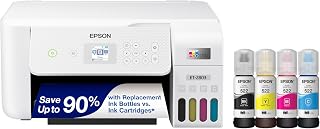
The EcoTank ET-2803 eliminates cartridge replacements with high-capacity refillable tanks that handle thousands of pages per fill, reducing downtime and supply costs. Built-in scanning capability digitizes receipts, contracts, and documents for electronic filing or email sharing. Wi-Fi and USB connectivity options ensure compatibility with older computers and modern mobile devices, supporting mixed-technology home office setups.
Pros
- Refillable tanks with up to two years of included ink
- Wi-Fi, app, and voice-activated printing
- Built-in scanner and copier
- High stated black and color page yields
Cons
- Slow 5 ppm color output
- Larger footprint than compact models
Home-office printing often means moving between work reports, school handouts, and occasional color materials, and the ET-2803 addresses that mix with Wi-Fi, scanning, copying, and refillable ink tanks. Its strongest case in a wireless home-and-office roundup is not speed but staying supplied: it includes enough ink for up to two years, while a replacement bottle set is rated for as many as 4,500 black pages or 7,500 color pages. That reduces the interruption of frequent cartridge changes for households or small teams with steady output. Wireless access, voice-activated printing, and mobile app support also give several users flexible ways to send jobs. A color display supports routine navigation, and EcoFit bottles are designed to make refilling cleaner. Text is sharp and color is vivid enough for typical home and small-business documents. The compromise is throughput. Rated at 10 monochrome and 5 color pages per minute, it suits recurring everyday jobs more than long, time-sensitive batches. It also occupies more desk room than compact printers and needs genuine Epson ink to preserve warranty coverage.
Model: Epson EcoTank ET-2803
Printer Type: Wireless All-in-One Inkjet (Print, Scan, Copy)
Print Speed: 10 pages per minute (black), 5 pages per minute (color)
Connectivity: Wi-Fi, USB
Special Features: Refillable ink tank, high-resolution scanner, color display, voice-activated printing, AirPrint, Epson Smart Panel app
Ink System: EcoFit refillable bottles (equivalent to 80 cartridges per set)
Page Yield: Up to 4,500 pages black, 7,500 pages color per ink set
Included Ink: 2 years of ink supply in the box
Color: White
Weight: 8.8 pounds
Warranty: Limited warranty (genuine Epson ink required for coverage)
Pros
- Exceptionally lightweight and portable, perfect for travel and remote work
- High-quality color output with 5-color ink system for professional-looking documents and photos
- Seamless wireless connectivity with multiple printing options and cloud support
- Easy-to-use interface with intuitive OLED display and mobile app control
- Strong 4.2 out of 5 star rating reflects consistent user satisfaction
Cons
- Print speed of 5.5 pages per minute in color is slower than traditional office printers, better suited for occasional use
- Limited to 8.5x11 inch maximum print size, not ideal for larger format printing needs
- Smaller OLED display may require frequent navigation through menus for advanced settings
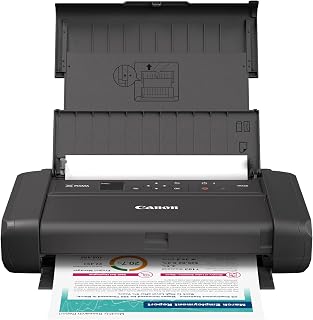
The Canon PIXMA TR160 is a portable inkjet printer designed for professionals, students, and remote workers who need reliable printing without sacrificing mobility. Its 4.5-pound weight and compact design make it an excellent choice for anyone frequently working from different locations, whether that's coffee shops, libraries, or home offices.
The standout feature is the 5-color hybrid ink system, which delivers sharp, crisp black text for documents and vibrant color output for photos. Print speeds of 5.5 pages per minute in color and 9 pages per minute in monochrome are respectable for a portable printer, though slower than traditional office equipment. The ability to print borderless and square formats adds creative flexibility beyond standard rectangular documents.
Connectivity is where the TR160 truly shines. Support for Canon PRINT app, Apple AirPrint, and Mopria Print Service means seamless printing from smartphones, tablets, and computers. The wireless direct mode is particularly useful, allowing printing without a Wi-Fi network. The 1.44-inch monochrome OLED display provides quick access to ink levels and printer status, keeping you informed without cluttering the compact chassis.
Build quality reflects Canon's reputation for durability in a lightweight package. The printer feels solid despite its portability, and Energy Star certification shows thoughtful power management. The user base of nearly 800 reviews with a 4.2 star average suggests real-world reliability and consistent performance across diverse use cases.
The main drawback is print speed, which suits occasional and regular-use printing better than high-volume office scenarios. The 8.5x11 inch maximum print size also limits options for larger formats. For mobile professionals and remote workers prioritizing portability without sacrificing quality, the PIXMA TR160 delivers excellent value and dependable performance.
Model: Canon PIXMA TR160
Printing Technology: Inkjet
Color Capability: Full color with 5-color hybrid ink system
Maximum Print Size: 8.5 x 11 inches
Print Speed (Color): 5.5 pages per minute
Print Speed (Monochrome): 9 pages per minute
Connectivity: USB, Wireless (Wi-Fi), Canon PRINT app, Apple AirPrint, Mopria Print Service
Weight: 4.5 pounds
Display: 1.44-inch monochrome OLED
Special Features: Energy Star certified, borderless printing, square format printing, wireless direct mode
Best For: This printer is ideal for remote workers, digital nomads, students, freelancers, and professionals who need portable printing without compromising quality. If you print occasionally but need professional results when you do, or if you travel frequently and want printing capability on the road, the PIXMA TR160 is an excellent fit.
Consider Alternatives If: You need high-volume printing capabilities, require larger format printing beyond 8.5x11 inches, or work primarily from a fixed office location where a traditional printer would be more suitable. Businesses with consistent daily printing demands may also benefit from faster standard printers.
Perfect Use Cases: Printing travel documents, student assignments, client proposals while at meetings, event signage at conferences, family photos while away from home, or maintaining printing capability at a co-working space.

The MegaTank G3270 uses refillable ink tanks instead of cartridges, reducing the cost and frequency of replacements during high-volume printing months. Borderless printing produces edge-to-edge photos and marketing materials without white margins. Wi-Fi connectivity and a display screen simplify setup and network management, keeping the printer accessible to multiple users in a home or small office.
Pros
- Up to 6,000 black and 7,700 color pages per ink set
- Wi-Fi and USB connectivity
- Scanning and copying in one device
- LCD screen and borderless printing
Cons
- No automatic duplex printing
- Modest color print speed
Wireless capability is most useful in a home office when it is paired with a printer that can serve everyday work without constant consumable changes. The Canon MegaTank G3270 centers its appeal on that second part: an ink set can produce up to 6,000 black-and-white pages or 7,700 color pages, and two years of ink are included. For a household office, this makes it a sensible match for steady streams of forms, reports, schoolwork, and color documents. Wi-Fi and USB provide connection options, while its all-in-one design brings scanning and copying into the same unit. The built-in LCD supplies direct access to core functions, and the printer can also create borderless prints. Energy Star and EPEAT qualifications add useful context for buyers considering efficiency. Its output rating of 11 pages per minute in monochrome and 6 in color means it is better suited to routine printing than deadline-driven stacks. Also factor in the lack of automatic double-sided printing: duplex documents require manual handling. This is a practical home-and-office wireless choice when substantial page yield matters more than top speed or automated paper-saving workflows.
Choose the G3270 for a home office, household, or small operation with frequent document and color-print needs that wants a wireless all-in-one and exceptional stated ink yield. It makes sense for buyers comfortable manually turning pages for two-sided jobs and working at modest print speeds. Skip it if automatic duplex printing is important, if large color batches must finish quickly, or if your workflow depends on higher-speed output. It is also less compelling for people who print only occasionally.
Connectivity: USB and Wi-Fi for flexible printing and network sharing
Print Technology: Inkjet with borderless printing capability
Print Speed: 11 pages per minute monochrome, 6 pages per minute color
Display: 1.35-inch square LCD screen
Functions: Print, copy, and scan in one device
Special Features: Energy Star certified, EPEAT qualified, network-ready, borderless printing support
Physical: 13.2 pounds, compact footprint suitable for desks and small workspaces
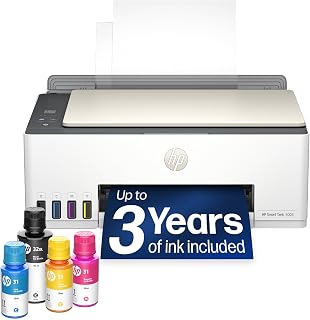
The Smart Tank 5003 includes up to three years of ink in the box, eliminating frequent cartridge purchases for budget-conscious home offices. Refillable tanks handle thousands of pages between refills, ideal for printing reports, homework, or client documents. HP ePrint and Mopria support let you send files directly from phones and tablets, streamlining workflows when you're away from your desk.
Pros
- Up to three years of included ink
- Supports AirPrint, Mopria, HP ePrint, Wi-Fi, and USB
- Scanner, copier, and scan-to-PDF capability
- Cartridge-free, mess-free refill design
Cons
- 5 ppm color print speed
- Not intended for frequent large print runs
For a home office that needs one printer to cover documents, copies, scans, and mobile printing, the HP Smart Tank 5003 concentrates on straightforward wireless access and long-running ink capacity. Its cartridge-free, refillable system includes up to three years of ink, estimated at roughly 6,000 pages, which can simplify ownership for homes with regular paperwork. It supports Wi-Fi alongside Apple AirPrint, Mopria, HP ePrint, USB, and Print Anywhere, giving phone, tablet, and computer users several routes to the printer. Scan-to-PDF capability is especially relevant to home-office administration, helping keep basic digital document tasks within the same machine. The all-in-one format avoids the need for separate scanning and copying hardware, and the refill design is described as mess-free. At 11.1 pounds, it is manageable for a home setting. Its 10-page-per-minute monochrome and 5-page-per-minute color ratings define its limits: it handles everyday documents and photos, but it is not aimed at frequent large print runs. Color output is acceptable and black text is crisp for ordinary needs. This is a better fit for a wireless workspace seeking low-maintenance everyday coverage than for a demanding office where speed determines productivity.
Connectivity: Wireless (Wi-Fi), USB, Apple AirPrint, HP ePrint, Mopria Print Anywhere
Printing Technology: HP Thermal Inkjet
Print Speed: 10 pages per minute (black and white), 5 pages per minute (color)
Special Features: Wireless printing, high-volume refillable ink tank, print from phone or tablet, scan to PDF, borderless printing
Output: Color
Color: Oatmeal White with Portobello accents
Weight: 11.1 pounds
Model: HP Smart Tank 5003 All-in-One Printer (9B2D3A)
Buy the Smart Tank 5003 if your home workspace needs wireless printing from phones, tablets, or computers, plus occasional scanning, copying, and PDF creation. It is well aligned with households that print regularly and want a cartridge-free system with a large included ink supply. Skip it if your office routinely produces large batches or needs quick color output, since its stated 5 ppm color speed is modest. It is also less suitable for users whose printing is limited to occasional small tasks.

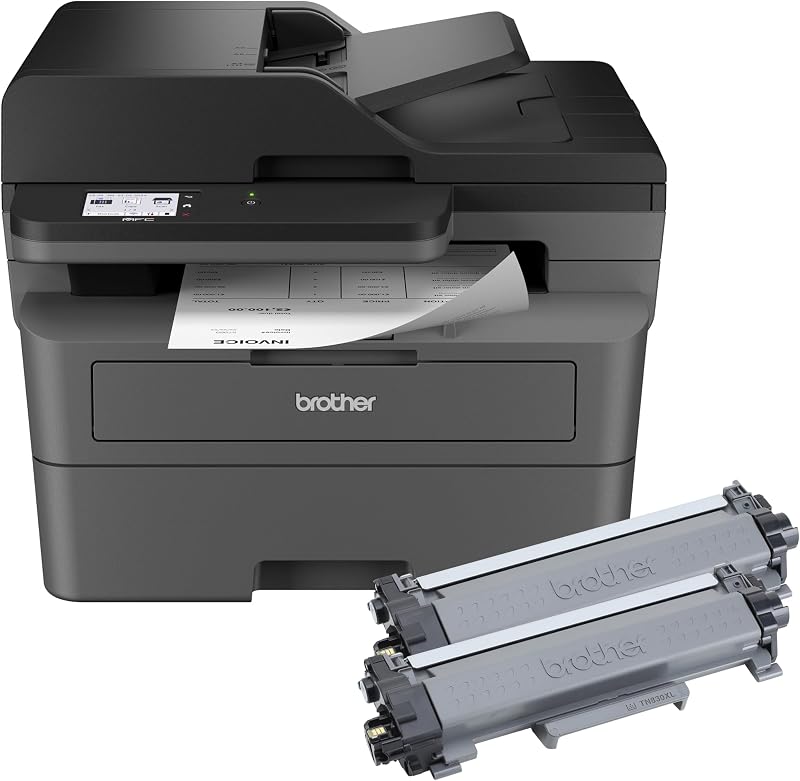
The DCP-L2640DW uses laser technology for fast monochrome printing, ideal for text-heavy reports and contracts that don't require color. An auto document feeder scans and copies multi-page documents in one pass, streamlining administrative tasks. Ethernet, USB, and Wi-Fi connectivity options support wired office networks and wireless home setups, adapting to different workspace configurations without requiring additional hardware.
Pros
- 36 ppm maximum monochrome speed
- 50-page automatic document feeder
- Automatic duplex printing
- Wi-Fi, Ethernet, and USB connectivity
Cons
- Monochrome output only
- No built-in fax
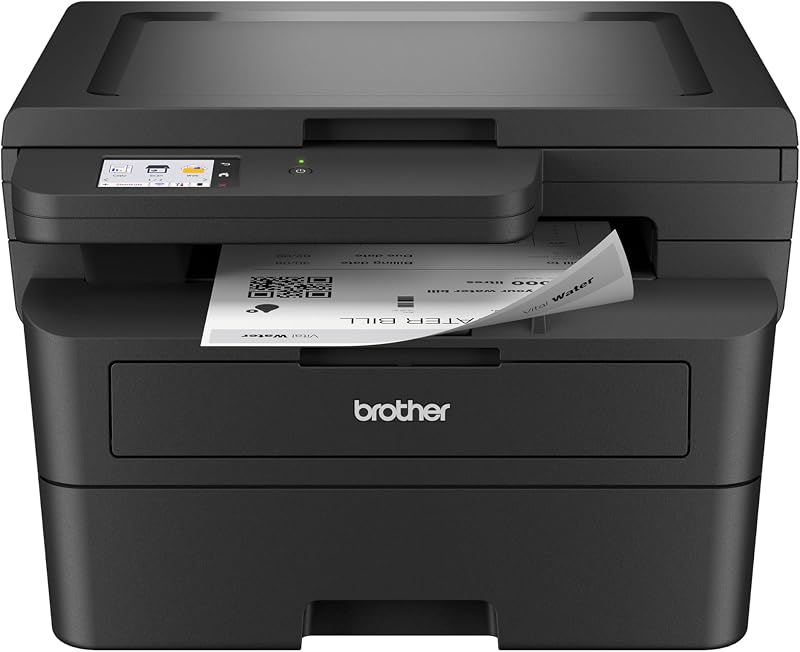
Home-office printing often means sending a document from a laptop, scanning a signed packet, and making a quick copy without dedicating much desk space. The Brother DCP-L2640DW brings those three jobs into a compact monochrome laser unit with Wi-Fi, Ethernet, and USB connectivity. Its 36-page-per-minute maximum monochrome speed is a meaningful advantage for recurring reports, forms, and other text-led work, while automatic duplex printing helps limit paper use on longer jobs. For shared household and small-workgroup use, the 50-page automatic document feeder is particularly useful for multi-page copying and scanning. The printer can scan to email, and Brother Mobile Connect supports printing and scanning from mobile devices, adding flexibility when work moves between phones, laptops, and a home desk. Its 15.7 by 16.1 by 12.5 inch footprint remains compact while retaining network-ready options for a more permanent setup. This is an especially focused wireless choice for document workflows: it prints only in black and white, but it pairs speed, automatic two-sided output, and multi-page handling in a single print, copy, and scan device.
Connectivity: Dual-band Wi-Fi (2.4GHz / 5GHz), Ethernet, USB
Print Technology: Laser, Monochrome
Print Speed: 36 pages per minute (monochrome)
Scan Speed: 23.6 ipm (black), 7.9 ipm (color)
Auto Document Feeder: 50 pages
Key Features: Auto-duplex printing, Energy Star certified, EPEAT qualified, envelope printing, scan to email, network-ready
Dimensions: 15.7 inches D x 16.1 inches W x 12.5 inches H
Weight: 25 pounds
Model: DCP-L2640DW
Color: Black
Buy it if your home or small office mainly produces black-and-white documents and you want wireless printing alongside copying and scanning. It suits remote workers or small teams that will use the 50-page feeder, automatic duplex printing, mobile-device support, or Ethernet as well as Wi-Fi. Skip it if presentations, photos, or client materials require color, if fax is essential to your workflow, or if you need the higher toner capacity associated with larger enterprise-oriented printers.

The Megatank G3290 features auto power-on that activates the printer when a job arrives, eliminating the need to manually wake it before each use. The 7-inch touchscreen simplifies navigation through scan, copy, and print settings without connecting to a computer. Refillable supertanks reduce ink replacement frequency, keeping a busy home office running without interruption during peak work periods.
Pros
- Exceptional ink efficiency with page yields of 6,000-7,700 pages per bottle, dramatically reducing long-term printing costs
- Easy setup and intuitive touchscreen interface get you printing within minutes, even for non-technical users
- Compact footprint and lightweight design make it ideal for small spaces without sacrificing functionality
- Strong wireless connectivity works reliably even through thick walls, as confirmed by user experiences
- High-quality output with 4800 x 1200 resolution produces crisp text and vibrant color photos
Cons
- Initial WiFi setup can be frustrating for some users, particularly with QR code scanning on mobile devices
- Mobile app functionality is basic and may require using a computer for optimal printer configuration
- Included documentation is minimal, requiring reliance on on-screen guides and online resources
The Canon PIXMA G3290 MegaTank is an all-in-one inkjet printer built specifically for home offices and small businesses that prioritize cost-efficiency. This compact workhorse combines printing, scanning, and copying in a footprint small enough to fit almost anywhere, making it perfect for kitchens, home offices, or dorm rooms where space is at a premium.
The standout feature is undoubtedly the MegaTank system, which delivers page yields of 6,000 black and 7,700 color pages per ink set. This translates to genuine savings that add up quickly for frequent users, potentially reducing annual ink expenses by up to $1,000. Setup is straightforward for most users, with the 2.7-inch color touchscreen guiding you through each step. Wireless connectivity works reliably, though some users report initial WiFi pairing can be clunky on mobile devices.
Print quality is solid across documents and photos, thanks to the hybrid pigment-black and dye-color ink system that produces sharp text and vibrant borderless photos up to 8.5 x 11 inches. The printer handles diverse media types well, from envelopes to cardstock, and automatic 2-sided printing conserves paper. Copy speeds of 11 pages per minute are respectable for a home printer.
Real-world drawbacks include minimal documentation in the box, requiring reliance on on-screen guides and Canon's website for troubleshooting. The mobile app, while functional, is basic and lacks advanced features some power users might expect. Initial setup frustrations around WiFi connection, particularly with QR code scanning on certain Android devices, have frustrated some users despite later success.
The Canon PIXMA G3290 MegaTank is an excellent choice for cost-conscious home office users and families who print regularly. If low ink costs and reliable wireless connectivity matter more than premium features, this printer delivers outstanding value and will quickly pay for itself through ink savings alone.
Printer Type: Inkjet SuperTank multifunction (print, copy, scan)
Print Speed: Up to 11 pages per minute black and white
Print Resolution: 4800 x 1200 dpi
Paper Capacity: 100 sheets (plain), 20 sheets (photo)
Ink System: 4-color (black, cyan, magenta, yellow) with page yields of 6,000 black and 7,700 color pages per set
Connectivity: USB 2.0, WiFi wireless
Display: 2.7-inch LCD color touchscreen
Dimensions: 16.4 inches wide x 14.3 inches deep x 7 inches high
Weight: 14.2 pounds
Warranty: 1-year limited warranty with Canon support
Ideal For: Home office workers, families with frequent printing needs, small creative businesses, students, and anyone seeking to minimize printing costs without sacrificing quality.
Best Use Cases: High-volume document printing, photo printing, creative projects, home business operations, and environments where printer footprint is limited.
May Not Be Ideal If: You need fast professional-grade output, advanced mobile app features, maximum print speeds, or rarely print fewer than a few pages monthly, making cartridge-based systems more practical.

The EcoTank ET-2800 ships with refillable ink bottles that print thousands of pages before needing replacement, cutting down on supply runs and waste. Mobile printing capability through Android devices lets you send documents directly from your phone, useful for printing emails or attachments on the go. At 11.4 pounds, it's light enough to reposition on a desk or move between rooms as needs change.
Pros
- Dramatically lower ink costs with refillable tanks that last significantly longer than cartridges
- Reliable performance confirmed by users reporting consistent quality after months of regular use
- Easy wireless setup and mobile printing capability supports multi-device households
- Environmentally responsible printing reduces cartridge waste and plastic consumption
- Compact footprint with full multifunction capabilities (print, scan, copy) ideal for space-conscious homes
Cons
- Manual double-sided printing requires user intervention to flip pages and reload, not fully automatic
- 10 pages per minute print speed is slower than some competing models for time-sensitive projects
- Limited to single-tray paper feeding with 100-sheet capacity requiring more frequent refills for high-volume printing
The Epson EcoTank ET-2800 is a practical all-in-one printer built specifically for home users and small home offices that prioritize low operating costs over speed. It combines printing, scanning, and copying functions in a compact design that won't dominate your desk, making it an attractive option for households that print regularly but have limited space.
The standout feature is undoubtedly the refillable ink tank system. Each set of ink bottles is equivalent to approximately 90 individual cartridges, and the included bottles provide up to 2 years of ink for typical home use. Users report that this translates to genuine savings on replacement costs, and the environmental benefit of eliminating cartridge waste appeals to eco-conscious households. Print quality is solid with 5760 x 1440 dpi color resolution and Micro Piezo Heat-Free Technology producing vivid, detailed documents and photos.
Performance is reliable based on owner feedback, with multiple users confirming consistent operation after months of regular use. Wireless connectivity and voice-activated printing add modern convenience, and the built-in flatbed scanner with LCD display makes the unit genuinely useful for scanning documents and photos at home. At 11.4 pounds, the printer is lightweight and portable compared to many competing models.
There are genuine limitations to consider. Double-sided printing requires manual intervention, which feels outdated compared to automatic duplex models. Print speed at 10 pages per minute is moderate, making it less suitable if you regularly print large batches. The single paper tray with 100-sheet capacity means frequent reloading for substantial printing sessions.
The EcoTank ET-2800 succeeds as an economical, low-maintenance solution for home printing. It delivers reliable quality and exceptional value over time if you print frequently enough to benefit from the tank system. Skip this model only if you need fast automatic duplex printing or handle very high monthly volumes.
Printer Type: Inkjet with refillable EcoTank system
Print Speed: 10 ISO pages per minute (black and color)
Resolution: 5760 x 1440 dpi (color), 5760 dpi (black and white)
Ink Capacity: Up to 4,500 black pages and 7,500 color pages per set
Functions: Print, scan, copy in one device
Scanner: Flatbed with 720 x 720 dpi color resolution
Connectivity: Wireless, mobile app support, voice-activated printing
Media Support: Plain paper, glossy photo paper, envelopes up to 8.5 x 14 inches
Paper Capacity: 100-sheet single tray
Display: LCD color display for easy navigation
Dimensions: 22.8 x 14.8 x 10 inches
Weight: 11.4 pounds
Power Consumption: 12 watts
Warranty: 1-year limited warranty
Best For: Home users and small home offices with regular but not high-volume printing needs. Ideal if you print color documents frequently and want to minimize ongoing costs.
Consider Alternatives If: You need automatic duplex printing, print more than 200 pages monthly consistently, or require print speeds faster than 10 ppm for time-sensitive work.
Key Considerations: This printer rewards consistent use. The refillable tank system provides the greatest value if you print at least 50-100 pages monthly. Epson strongly recommends genuine ink to maintain warranty coverage and print quality. Initial setup is straightforward with wireless connectivity, and the mobile app support makes it convenient for households with multiple devices.
Long-Term Value: Owners consistently report durability and reliability after extended ownership, suggesting this printer holds up well with regular home use. The included 2 years of ink and reasonable price make it an accessible entry point for families upgrading from older printers or adding printing capability to a home office.
How to Choose the Right Wireless Printer
Match the ink system to how often you print
Refillable ink tanks make the most sense when your household moves through a steady stream of assignments, forms, photos, and creative projects. The Epson EcoTank ET-2803 Wireless Color All-in-One and Canon MegaTank G3270 All-in-One Wireless Color both use high-capacity refillable systems designed to keep ink changes infrequent.
The HP Smart Tank 5003 Wireless All-in-One Ink Tank also targets frequent home printing with a cartridge-free refill design. If you print only now and then, a conventional cartridge model such as the Canon PIXMA TS6520 Wireless Color Inkjet Printer or HP Envy 6155 Wireless All-in-One Color Inkjet may be the more straightforward fit.
Decide how much scanning and copying you need
An automatic document feeder is valuable when you regularly scan multi-page agreements, class notes, or client records. The Canon PIXMA TR7120 Wireless Color Inkjet Printer includes an ADF and automatic two-sided printing, while the Brother DCP-L2640DW Wireless Compact Monochrome adds a 50-page ADF for efficient black-and-white document work.
For occasional copies, a flatbed scanner is usually enough and leaves fewer moving parts to manage. If your scans become a long-term archive, consider organizing them on one of the best NAS hard drives for shared file storage so household or office documents are accessible from more than one device.
Look beyond Wi-Fi to connection flexibility
Wireless printing is easier when the printer supports the way your devices already work. The Canon PIXMA TS6520 and HP Envy 6155 offer dual-band Wi-Fi, while the Brother DCP-L2640DW also provides Ethernet for a more fixed small-office setup. The Canon PIXMA TR160 Color Wireless Portable Printer has Wireless Direct mode for printing without a router.
Mobile support is equally useful when files arrive through email, cloud storage, or messaging apps. AirPrint, Mopria, and brand-specific apps can simplify phone and tablet printing, while a portable SSD for Mac workflows gives you a convenient place to carry large PDFs, photos, and project files.
Consider size, paper handling, and daily convenience
Desk space matters, especially in apartments, dorm rooms, and shared home offices. The Canon PIXMA TR160 is designed to fit into a bag or backpack, making it the clear choice for people who need full-page prints away from a permanent desk. For a smaller fixed workspace, a compact tenkeyless keyboard can also help leave room for a printer and paper tray.
Small details can make everyday ownership easier. The HP Envy 6155 has a 100-sheet input tray and color touchscreen, while the Canon MegaTank G3290 All-in-One Wireless Printer combines auto two-sided printing with a color touchscreen. By comparison, the Canon MegaTank G3270 uses single-sided printing, which may be perfectly adequate if you rarely print longer documents.
Final Thoughts
For a busy household that prints color materials often, the Epson EcoTank ET-2803 Wireless Color All-in-One offers a practical refillable-ink approach with scanning and copying included. If your priority is quick, high-volume black-and-white paperwork for a small office, the Brother DCP-L2640DW Wireless Compact Monochrome is the more purpose-built choice.
Frequently Asked Questions
Which wireless printer is best for home use in 2026?
The right home printer depends on whether your priority is frequent color printing, quick documents, photos, or simple occasional use. The Epson EcoTank ET-2803 is a strong match for families that want refillable ink tanks, while the Canon PIXMA TS6520 is a compact all-in-one with auto two-sided printing for everyday paperwork.
Choose a model with scanning and copying if you handle permission slips, recipes, receipts, or work forms at home. A display, mobile app support, and a paper tray that suits your routine are often more useful than chasing a long feature list.
Are ink-tank wireless printers worth it?
Ink-tank printers are especially appealing when you print often enough to benefit from their high page yields. The Epson EcoTank ET-2800 Wireless Color All-in-One, Canon MegaTank G3290 All-in-One Wireless Printer, and HP Smart Tank 5003 Wireless All-in-One Ink Tank are built around refillable reservoirs rather than small replacement cartridges.
They are less compelling for someone who prints a few pages only a handful of times each year. Think about your likely output over several months, plus whether you are comfortable refilling bottles when the tanks run low.
What wireless printer is good for scanning multiple pages?
Look for an automatic document feeder rather than relying only on a flatbed scanner. The Brother DCP-L2640DW Wireless Compact Monochrome is particularly capable for high-volume black-and-white paperwork, with an ADF and fast document printing.
If you also need color output for presentations, forms, or photos, the Canon PIXMA TR7120 Wireless Color Inkjet Printer offers an ADF alongside color printing, copying, scanning, and automatic two-sided printing. That balance makes it a sensible choice for hybrid work or school administration tasks.
Can I print from my phone without a computer?
Yes, most options here support mobile printing through AirPrint, Mopria, or a dedicated manufacturer app. The Canon PIXMA TR160 works with the Canon PRINT app and also supports direct wireless connections, which is useful when you are away from your usual network.
For mobile scanning and printing, save important originals before editing or sharing them. If your file collection is growing quickly, our guide to the best 8TB hard drives for large archives can help you plan a more durable storage setup.





Write Your Review
No reviews yet. Be the first to share your experience!