

You sit down to game, edit a spreadsheet, or open several browser windows, then wonder whether a curved screen would actually improve your setup or simply take up more desk space. The curved vs flat monitor choice is not about one format winning for everyone, it is about matching the screen to your viewing distance, tasks, and peripherals.
This guide compares practical differences between curved and flat displays, from immersive ultrawides to straightforward productivity panels. If your setup includes an Apple laptop, our monitor guide for MacBook Pro users can also help you narrow down connection and resolution priorities.
Quick Comparison
Ratings reflect the most recent data pull. Check each listing for current price and availability.
Quick answer
This guide compares 10 picks, with Sceptre 27" Curved Gaming Monitor 1080p 75Hz, HDMI/VGA ranked first. SANSUI 34-inch Curved Ultrawide Gaming Monitor leads this list on refresh rate.

Sceptre 27" Curved Gaming Monitor 1080p 75Hz
Pros
- Curved 1500R design creates an immersive visual experience that enhances gaming and cinematic content
- Excellent color reproduction with 99% sRGB makes it suitable for both gaming and content creation
- Multiple connectivity options with 2 HDMI and 1 VGA port allow easy device switching
- Built-in speakers and headphone jack save desk space and provide convenience
- Affordable price point makes it accessible for budget-conscious buyers
Cons
- 75Hz refresh rate is lower than modern gaming standards, limiting smooth performance in competitive titles
- 1080p resolution on a 27-inch screen results in lower pixel density and potentially visible pixelation at close viewing distances
- No USB hub or USB-C connectivity limits integration with modern peripherals and charging needs
The Sceptre C275W-1920RN is a 27-inch curved monitor built for casual gamers, content consumers, and office workers seeking an affordable entry into curved display technology. Its 1500R curvature and immersive design appeal to those who want more engaging visuals without premium pricing. The monitor combines practical features like dual HDMI ports, built-in speakers, and color-accurate 99% sRGB reproduction into a compact, budget-conscious package.
The standout feature is undoubtedly the 1500R curved display, which genuinely enhances peripheral vision awareness during gaming and makes movies feel more cinematic. The 99% sRGB color gamut delivers vibrant, accurate colors that surpass many competitors at this price point, making it suitable for casual photo editing, design work, and media consumption. With an 8ms response time, the monitor handles everyday gaming smoothly, though competitive esports titles will show the limitations of its 75Hz refresh rate. The anti-glare matte finish and blue light filter provide practical comfort for extended use.
Build quality feels solid with a metal pattern brush finish that is pleasant to touch and resistant to fingerprints. The monitor's compact footprint, especially without the stand, makes it suitable for smaller desk setups. At just 5.5 pounds, it is easy to reposition or wall mount. The included VGA and dual HDMI ports offer flexible connectivity for desktops, laptops, and gaming consoles without requiring additional adapters.
The primary drawback is the 75Hz refresh rate, which feels sluggish compared to modern 144Hz or 165Hz gaming monitors. Additionally, the 1920 x 1080 resolution on a 27-inch screen results in lower pixel density than smaller 1080p displays, which may cause visible pixelation for users sitting close to the screen. The lack of USB connectivity or USB-C is a missed opportunity for modern workflows.
The Sceptre C275W-1920RN delivers excellent value for budget-conscious buyers who prioritize curved immersion and color accuracy over cutting-edge refresh rates. It excels as a secondary gaming monitor, general productivity display, or entry point into curved technology, but should not be considered a competitive gaming solution.
Display Specifications
Screen Size: 27 inches
Resolution: 1920 x 1080 (Full HD)
Aspect Ratio: 16:9
Curvature: 1500R
Panel Type: LED
Refresh Rate: 75 Hz
Response Time: 8ms
Color Gamut: 99% sRGB
Brightness: 250 cd/m2
Contrast Ratio: 1,000,000:1
Viewing Angles: 178 degrees (H) x 178 degrees (V)
Connectivity and Features
HDMI Ports: 2
VGA Port: 1
Audio: Built-in speakers, headphone jack
Additional Features: Anti-glare, blue light filter, flicker-free, curved design, tilt adjustment, wall mount compatible
Physical Dimensions
With Stand: 24.27"W x 17.69"H x 9.01"D
Without Stand: 24.27"W x 14.43"H x 2.56"D
Weight: 5.5 lbs
Power Consumption: 36 watts
Warranty and Support
Warranty: 1-year limited manufacturer warranty
Ideal For
Budget gamers seeking an affordable curved monitor upgrade, office workers and programmers needing color-accurate displays for productivity, content consumers watching movies and streaming content, designers and photographers requiring reliable 99% sRGB color reproduction without high cost
Not Recommended For
Competitive esports players requiring 144Hz or higher refresh rates, users needing 1440p or 4K resolution for detailed work, professionals requiring extensive connectivity options like USB-C or Thunderbolt, those prioritizing cutting-edge gaming performance over value

Someone deciding between curved and flat for mixed work and media should consider this 34-inch curved option's matte finish, which tames reflections during long reading or document sessions, while HDR10 support still gives movies and games the contrast punch that makes a curved panel feel worthwhile beyond spreadsheets.
Pros
- 21:9 curve matches ultrawide field of view
- 178-degree viewing angle keeps edges clear
- Matte finish reduces glare on the curved surface
- USB-C with power delivery simplifies cabling
Cons
- No built-in speakers
- Advanced features need OnScreen Control software
When the curved-vs-flat question comes down to which curve actually earns its place on your desk, the 34WR55QK-B makes a practical case. Its VA panel wraps gently around your field of view at 3440x1440, and because it's a true 21:9 ultrawide rather than a stretched flat panel, the curve follows the natural arc of your eyes across that width instead of just adding a gimmick. The matte finish keeps glare from fighting the curve's reflections, and the 178-degree viewing angle means the edges don't wash out the way some curved panels can. If your main hesitation about curved monitors is distortion on straight lines or awkward edge visibility, the combination of this gentle curve, HDR10 contrast, and 99% color gamut shows the format at its most functional rather than its most flashy. It's a solid pick for anyone deciding that curved makes sense specifically because of the extra width, not despite it.
Display Specs: 34-inch curved VA panel, 3440x1440 (WQHD) resolution, 21:9 aspect ratio, 100Hz refresh rate, 5ms response time, 3000:1 contrast ratio, 99% sRGB color gamut, HDR10 support, 300 cd/m2 brightness, 178-degree viewing angles
Connectivity: USB Type-C with 65W power delivery, 2x HDMI 2.0, DisplayPort 1.4, 2x USB 3.0 ports, 3.5mm audio jack
Physical: 31.9 inches wide, 22.4 inches tall, 10.2 inches deep, 15.2 pounds, curved black design with height and tilt adjustment
Additional Features: Reader Mode for blue light reduction, Picture-by-Picture mode, OnScreen Control software, FreeSync adaptive sync, matte screen finish, 1-year manufacturer warranty
Best for buyers choosing curved specifically to match an ultrawide, multitasking-heavy setup, like editors or finance professionals who want the screen to wrap around their peripheral vision. Skip it if you've decided flat is the safer bet for design work involving straight lines, or if you want built-in speakers without extra setup.
Pros
- Exceptional value combining a premium ultrawide monitor with a full smart TV platform at under $350
- Immersive curved 1800R design wraps around your field of view for cinematic and gaming experiences
- Versatile connectivity supports work, gaming, and streaming without additional boxes or subscriptions to the monitor itself
- Highly responsive and stable performance based on customer feedback about crystal-clear display and smooth operation
- Compact footprint for a 34-inch display, fitting nicely on home office desks without dominating the space
Cons
- Requires separate subscriptions for most streaming services, internet connection mandatory for smart features
- Limited to 100Hz refresh rate, which is lower than gaming-focused monitors at higher price points
- Magic Remote sold separately, though standard remote navigation works for all smart features
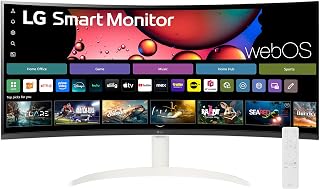
The LG 34SR60QC-W is a hybrid device that bridges the gap between a professional monitor and a smart TV. It's purpose-built for remote workers who want expansive screen real estate without sacrificing entertainment, as well as creative professionals and gamers seeking an immersive ultrawide canvas. The 21:9 aspect ratio transforms how you work, allowing 3-5 applications to run side by side without overlapping windows.
The standout feature is the integrated webOS23 platform, which eliminates the need for a streaming device or smart TV box. Netflix, Prime Video, Disney+, and HBO Max launch directly from the monitor, alongside over 300 free LG channels covering sports, movies, and comedy. Apple AirPlay 2 integration makes content casting from Apple devices seamless. For productivity, cloud PC support lets you run Microsoft 365 and Google Workspace natively without a connected computer, blurring the line between monitor and standalone device.
Build quality impresses. The curved 1800R display wraps around your vision with minimal bezels on three sides, creating a premium aesthetic that works in professional and gaming environments alike. The matte finish resists glare, and the 99% sRGB color gamut with HDR10 produces vivid, accurate colors suitable for photo editing and video work. At 13.5 pounds, it's lightweight enough to reposition easily yet stable on standard monitor arms.
The 100Hz refresh rate is serviceable for casual gaming and daily work but falls short of competitive 144Hz+ displays at higher price points. Streaming services and cloud apps require active internet and paid subscriptions. The Magic Remote enhances control but sells separately. These are minor trade-offs given the feature density and price.
Verdict: This monitor excels as an all-in-one solution for home offices, creative studios, and gaming setups where ultrawide real estate and smart entertainment converge. Customer satisfaction is high, with users consistently praising the immersive display, color quality, and exceptional value proposition. It's recommended for anyone tired of juggling separate monitors, streaming devices, and cables.
Remote workers and home office professionals benefit most from this monitor. The ultrawide 3440x1440 resolution lets you run email, messaging, and video calls on one side while keeping documents or spreadsheets fully visible on the other, dramatically improving efficiency compared to single 27-inch displays.
Creative professionals in photo editing, video work, and graphic design gain from the 99% sRGB color accuracy and ultrawide canvas. Seeing your full timeline or multiple layers at once speeds up workflow and reduces eye strain from constant panning and zooming.
Gaming enthusiasts appreciate the immersive curved design and 100Hz refresh rate. While not competitive at esports framerates, it's excellent for story-driven games, strategy titles, and casual competitive play where immersion matters more than extreme refresh rates.
Entertainment seekers who want a secondary streaming device will love the built-in webOS platform. You get a smart TV without a second HDMI input or power cable cluttering your setup, plus full access to major streaming services and free LG channels.
Budget-conscious buyers seeking premium specs at mid-range pricing should prioritize this monitor. The combination of ultrawide resolution, smart TV platform, gaming-ready features, and build quality typically costs significantly more split across separate devices.
Display: 34-inch curved ultrawide with 21:9 aspect ratio, 3440x1440 QHD resolution, 1800R curve radius, 99% sRGB color gamut, HDR10, 300 cd brightness, 3000:1 contrast ratio, 178-degree viewing angles, matte finish
Performance: 100Hz refresh rate, G-Sync compatible, 0.35mm pixel pitch, VA panel technology
Smart Features: webOS23 platform, Netflix, Prime Video, Apple TV, Disney+, HBO Max, 300+ free LG channels, AirPlay 2, HomeKit compatible, Microsoft 365 and Google Workspace cloud support
Connectivity: 2x HDMI ports, 3x USB 3.0 Type-A ports, Bluetooth, Wi-Fi for streaming and AirPlay
Physical: 31.85in width, 19.03in height, 8.79in depth, 13.5 lbs, desk and wall mount compatible, tilt adjustment, 3-side frameless design
Warranty: 1 year parts and labor, power consumption 0.5 watts

If you want the curved look without committing to an ultrawide desk footprint, this 27-inch panel uses a gentler 1800R curve suited to standard 16:9 content like documents and browsers, and its 100 hertz refresh keeps everyday scrolling and casual gaming responsive without needing a wraparound ultrawide.
Pros
- 1800R curve adds real depth and immersion at 27 inches
- 100Hz refresh rate and Game Mode support smooth, detail-rich visuals
- Blue light filter and flicker-free design ease long sessions
- Slim design with HDMI and D-Sub connectivity
Cons
- FHD resolution limits sharpness compared to flat QHD or 4K options
- No variable refresh rate support for competitive gaming
If you are weighing curved against flat, the Samsung Essential S3 is a clean entry point into what a curve actually changes. Its 1800R curvature wraps the 27-inch screen around your field of view, so edges feel closer and depth reads more naturally than on a flat panel of the same size. That matters most for immersive tasks like gaming and video, where the curve reduces the sense of looking at a flat rectangle and instead pulls you into the scene. The 100Hz refresh rate keeps motion reasonably smooth, and Game Mode adjusts contrast to pull detail out of shadows, both useful for the kind of fast or dark content where curved displays tend to shine. Eye comfort features like the blue light filter and flicker-free panel also support the long viewing sessions that immersive setups encourage. The tradeoff is resolution: FHD on a 27-inch curve means less sharpness than you would get from a flat QHD or 4K panel at the same size, so the curve adds immersion but not pixel density.
Good for anyone deciding curved is worth trying without committing to a premium panel, especially casual gamers, streamers, and remote workers who want a wraparound feel for movies and browsing. Skip it if sharpness matters more to you than curvature, or if you want competitive gaming features like variable refresh rate, since this leans toward comfort and immersion over precision.

If you're set on a tight 1000R curve for immersive gaming, this 32-inch panel wraps the screen aggressively around your field of view, matching your eye's natural curvature. A 165 hertz refresh rate keeps fast motion smooth, which matters more on curved displays where edge distortion can exaggerate choppy frames during quick camera pans.
Pros
- Aggressive 1000R curve shows what curved gaming panels offer
- 165Hz refresh rate with 1ms response for smooth motion
- QHD resolution at a space-friendly 32-inch size
- HDR10 support adds visual depth
Cons
- Plastic stand with no tilt adjustment
- Glossy finish prone to reflections in bright rooms
If the curved-vs-flat question comes down to how dramatic a curve you actually want, the Odyssey G55C sits firmly on the aggressive end. Its 1000R radius is tighter than most ultrawide curves, which matters because tighter curvature is what makes a flat panel feel genuinely different rather than just bigger. At 32 inches and QHD resolution, it stays compact enough that the curve wraps your view without needing desk space an ultrawide demands. For readers trying to decide whether curved is worth it for gaming specifically, this is a useful middle case: 165Hz and 1ms response show what curved gaming panels can do at a mainstream size, while the 2500:1 contrast ratio and HDR10 support demonstrate the visual depth curved fans point to. The glossy finish adds vibrancy but leans into reflections, a real consideration when comparing against matte flat alternatives. It's a solid reference point for the curve-intensity half of the decision.
Display: 32-inch QHD (2560 x 1440), 16:9 aspect ratio, 1000R curvature, glossy finish, 178-degree viewing angle
Performance: 165Hz refresh rate, 1ms MPRT response time, 2500:1 contrast ratio, 300 cd/m2 brightness
Features: HDR10, AMD FreeSync adaptive sync, Eye Saver Mode (blue light reduction), flicker-free technology
Connectivity: 1x DisplayPort, 1x HDMI, 2x component outputs
Physical: 28" wide, 21.01" tall, 10.7" deep, 11.5 lbs. Includes DP cable, power cable, and stand. Wall mount compatible. 1-year manufacturer warranty.
Buy this if you want to experience a pronounced curve without committing to an ultrawide footprint, especially for gaming at a standard 16:9 ratio. Skip it if your room has bright, uncontrolled lighting, since the glossy finish will reflect more than a flat matte screen would, or if you want tilt adjustment and a premium stand feel.

If your use case leans toward fast-paced gaming on a curved screen without sacrificing screen real estate, this 34-inch UWQHD panel pairs a 3440x1440 resolution with a 200 hertz refresh rate, letting the curve's immersive wraparound keep up with quick, competitive motion rather than just looking good at rest.
Pros
- 21:9 ultrawide curve replaces multi-monitor setups
- 200Hz refresh rate with 1ms response time
- Matte finish controls glare better than glossy alternatives
- Tilt adjustment and VESA mounting for flexible positioning
Cons
- Needs a high-end GPU to hit 200Hz at native resolution
- Newer brand with limited user review history
For anyone weighing curved against flat because they want curvature to actually replace a multi-monitor setup, the SANSUI 34-inch ultrawide is the stronger argument than a standard curved display. Its 21:9 aspect ratio and 1500R curve are built specifically to wrap a wider field of view, which is the core case curved advocates make over flat screens. The 200Hz refresh rate and 3000:1 contrast push performance higher than typical curved competitors, and the matte finish directly addresses one of flat-panel glossy screens' advantages, glare control, removing that point in flat's favor. Tilt adjustment and VESA compatibility mean the curve doesn't come at the cost of flexible positioning, something buyers often assume they're sacrificing. The AI picture and blue light features add polish beyond raw specs. The tradeoffs are the ones curved ultrawide shoppers should expect: higher-end graphics cards are needed to hit full refresh rate at this resolution, and as a newer brand there's less user feedback to lean on than established curved lines.
This monitor excels in competitive and immersive gaming scenarios. The 200Hz refresh rate ensures smooth motion in esports titles, while the 1ms response time eliminates ghosting during fast camera pans or quick reflexes. FreeSync adaptive sync removes screen tearing for seamless visuals across compatible AMD graphics cards.
The ultrawide 21:9 format provides significant competitive advantage in tactical shooters like Valorant or Rainbow Six Siege, offering extended peripheral vision without requiring head movement. The AI-powered sniper scope and crosshair features enhance visibility in challenging lighting conditions. VA technology's superior contrast makes spotting enemies at distance more practical than on standard IPS panels.
Content creators benefit enormously from the 3440x1440 ultrawide workspace. Video editors gain expanded timeline visibility, color graders appreciate the 130% sRGB and 96% DCI-P3 color gamut coverage for professional work, and photographers enjoy side-by-side reference while editing. The 178-degree wide viewing angle ensures consistent color representation across the massive canvas.
Picture-in-Picture and Picture-by-Picture modes allow simultaneous display of different sources, ideal for monitoring multiple applications. The curved design reduces the need for extreme head movement across the extended display area, reducing neck fatigue during long creative sessions.

For a curved monitor that still feels suited to spreadsheets and multitasking, this 34-inch ultra-WQHD panel's matte finish keeps text sharp and glare-free, while PIP and PBP support let you split the curved canvas into separate inputs, useful if you're choosing curved for a hybrid work and entertainment setup.
Pros
- TUV-certified Intelligent Eye Care for long sessions
- AMD FreeSync keeps curved gameplay smooth
- 100Hz refresh rate with 5ms response time
- Borderless design minimizes distraction
Cons
- 72% color gamut is modest for color work
- Matte finish trades some vibrancy for reduced glare
Deciding between curved and flat often comes down to how much you trust a curve not to distort your work, and the ViewFinity S50GC leans on eye care credentials to make that case. Its TUV-certified Intelligent Eye Care and matte finish are built around comfort during the long sessions where curved screens either win you over or start to feel gimmicky. At 3440x1440 across 21:9, the curve is wide enough to justify itself, and AMD FreeSync plus a 100Hz refresh rate mean the curved format doesn't cost you smoothness if you also game. The 72% color gamut is more modest than some ultrawide rivals, so if color accuracy is your deciding factor between curved and flat, weigh that against the eye comfort features. For anyone whose main worry about going curved is eye strain over flat alternatives, this model's eye care certification is the direct answer to that concern, backed by a 3000:1 contrast ratio for depth without needing extreme brightness.
Display Specifications: 34-inch ultrawide LCD, 3440x1440 native resolution, 21:9 aspect ratio, 100Hz refresh rate, 5ms response time, 3000:1 contrast ratio, 300cd/m2 brightness, 178-degree viewing angle, matte finish.
Color and Image Technology: 72% color gamut, HDR10 support, AMD FreeSync adaptive sync, TUV-certified Intelligent Eye Care with ambient light sensor, Eye Saver Mode, Flicker Free technology.
Connectivity: 1x DisplayPort 1.2, 2x HDMI 2.2, 1x 3.5mm headphone jack. Includes DisplayPort and HDMI cables.
Physical Dimensions: 32.1 inches wide, 18 inches tall, 8.7 inches deep. Weight: 10.8 pounds. Wall mount compatible.
Power and Warranty: 50 watts power consumption at 110 volts. 1-year manufacturer warranty. Model: LS34C502GANXZA.
Good for buyers who want a curved screen mainly for comfort during long work or gaming sessions and value certified eye care over top-tier color accuracy. Skip it if accurate color reproduction is your priority, since the 72% gamut trails other ultrawide curved options in this comparison.
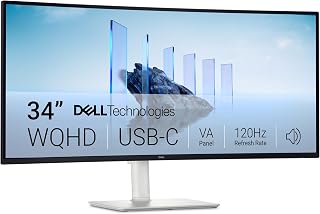
Readers torn between curved and flat for productivity should note this one goes flat, at 34 inches with a 21:9 ultrawide ratio that gives you side by side windows without the depth distortion a curve adds to spreadsheets and text columns. The matte finish also cuts glare in bright offices where flat screens are typically preferred.
Pros
- 120Hz refresh rate keeps curved motion smooth
- 99% sRGB and strong color gamut for creative work
- Eye Comfort technology reduces blue light
- Height and tilt adjustment for ergonomic setup
Cons
- Limited port selection for peripheral-heavy setups
- Single USB-C port may constrain multi-device users
If your decision between curved and flat hinges on whether the curve will actually feel smooth and responsive rather than just immersive, the S3425DW's 120Hz refresh rate is the strongest argument for curved in this lineup. Many curved monitors trade motion clarity for wraparound field of view, but here the VA panel pairs its curve with FreeSync Premium and a fast response time, so quick scrolling and multi-window dragging stay fluid instead of smeared. The 99% color gamut and 3000:1 contrast ratio also mean you're not sacrificing accuracy for the curve, which matters if you've been hesitant that curved panels compromise color work compared to flat alternatives. Eye Comfort features address the other common curved-monitor concern, extended viewing fatigue. For buyers weighing a curved ultrawide against a flat one specifically because they're worried about ghosting or softness in motion, this model's refresh rate and response time make the curved option the easier sell.
Display: 34-inch curved VA panel, 3440x1440 WQHD resolution, 21:9 aspect ratio, 109 pixel pitch, 300 nits brightness, 3000:1 contrast ratio, 178-degree viewing angles
Color: 99% sRGB, 95% DCI-P3 coverage, 8-bit color depth, HDR ready
Performance: 120Hz refresh rate, 0.03ms response time, AMD FreeSync Premium
Connectivity: 1x USB-C with 65W power delivery and 10Gbps data, 2x HDMI 2.0, 4x USB-A 3.0, built-in speakers
Physical: Ash white color, matte screen finish, anti-glare coating, height and tilt adjustable, VESA mountable, desk mount included, 31.78" width x 16.2" height x 8.73" depth, 20.7 lbs
Features: ComfortView Plus (blue light reduction to 35%), energy efficient, 1-year advanced exchange warranty
Suited to professionals and developers who want curved specifically because of its immersive width but refuse to give up smooth motion for it. Less suited to buyers prioritizing extensive port variety, since connectivity is limited to two HDMI, four USB-A, and one USB-C.

For someone weighing immersion against desk space, the 1000R curve on this 34-inch ultrawide pulls the edges closer so a 21:9 canvas doesn't feel like you're scanning side to side. VA display technology adds the deep blacks that make curved gaming setups feel more enveloping during dark, cinematic scenes.
Pros
- 21:9 ultrawide curve replaces a dual flat-monitor setup
- 165Hz refresh rate with 1ms response time
- AMD FreeSync Premium prevents screen tearing
- VA panel with HDR10 for added contrast depth
Cons
- Requires significant desk space for its wide curved footprint
- Only one HDMI port limits multi-source connectivity
When the curved-vs-flat decision hinges on screen real estate, the Odyssey G5's 21:9 ultrawide shape is the clearest case for curved over flat: it delivers the equivalent of a dual-monitor flat setup in one seamless panel. The 1000R curvature keeps the wide field of view wrapped around your eyes rather than flattening out at the edges the way a flat ultrawide would, which is the central tradeoff this article's readers are weighing. A 165Hz refresh rate and 1ms response time keep it competitive for gaming, and AMD FreeSync Premium prevents tearing as the curve stays smooth during fast motion. The VA panel's contrast and HDR10 support give the curve added depth in shadows and highlights, reinforcing why curved panels are often chosen for cinematic or story-driven content over flat screens. Build quality is solid, though small bezel gaps and a single HDMI port are minor points against it. The dimensions require real desk space, a fair tradeoff reminder for anyone assuming curved ultrawides take up the same footprint as flat monitors of similar diagonal size.
Display: 34-inch curved VA LCD panel with 1000R curvature, 21:9 aspect ratio, 3440x1440 native resolution, 250 cd/m2 brightness, 1900:1 contrast ratio, 178-degree viewing angle, 72% color gamut with HDR10 support.
Performance: 165Hz refresh rate, 1ms MPRT response time, AMD FreeSync Premium adaptive sync technology, low frame rate compensation.
Connectivity: 1x HDMI, 1x DisplayPort, 1x 3.5mm audio jack. Wired connectivity, compatible with VESA mounting standards.
Physical: 31.76" width, 18.71" height, 10.73" depth, 12.3 pounds total weight. Black curved design with desk mount and wall-mount capability.
Power & Warranty: 50-watt maximum power consumption at 110 volts. Includes 1-year manufacturer warranty.
Buy this if screen real estate and an immersive wraparound view are your main reasons for choosing curved over flat, particularly for gaming or multitasking across a wide canvas. Skip it if your desk space is limited, since the wide, curved footprint demands more room than an equivalent flat monitor, or if you need multiple HDMI inputs.

For readers deciding whether a modest curve is worth it at a smaller size, this 32-inch panel keeps the familiar 16:9 ratio so existing content doesn't stretch oddly, while VA display technology delivers the richer contrast that makes a curved screen's immersion noticeable even outside ultrawide gaming setups.
Pros
- Large 32-inch curved display provides an expansive workspace and immersive viewing experience.
- 100Hz refresh rate and 4ms response time support smoother everyday use and casual gaming.
- Built-in speakers help save desk space and simplify cable management.
- Matte screen finish and Eye Saver Mode are useful for long work or entertainment sessions.
Cons
- Full HD resolution can look less sharp on a 32-inch screen than a QHD display, especially for text and detailed images.
- Connectivity is limited to one HDMI port and one D-Sub connection, with no USB ports listed.
- The monitor defaults to 60Hz, so users must enable 100Hz in the settings.
The Samsung S39GD is a 32-inch FHD curved monitor designed for business work, home entertainment, and casual gaming. Its large 1800R curve creates an immersive field of view, while the built-in speakers make it practical for users who want a simpler desk setup.
Real-world performance benefits from the 100Hz refresh rate and 4ms response time, which help scrolling, video, and everyday gameplay feel smoother. The VA panel and 3000:1 contrast ratio also support deeper blacks, while Game Mode lets users adjust color and contrast for better visibility in darker scenes.
The matte screen finish helps limit distracting reflections, and the 178-degree viewing angle makes the display easier to share. TÜV-certified Eye Saver technology reduces flicker and excessive blue light, adding comfort during longer work or entertainment sessions.
There are some trade-offs to consider. Full HD resolution is relatively modest for a 32-inch screen, and the listed connections are limited to one HDMI port and one D-Sub port. The default refresh rate is also 60Hz, so 100Hz must be enabled manually in the monitor settings.
Overall, the Samsung S39GD is a practical large-screen monitor for office productivity, media, and casual gaming. It is best for buyers who value a curved display, built-in audio, smooth 100Hz performance, and eye comfort more than high-resolution detail or extensive connectivity.
Buying Guide
Match the curve to screen size and viewing distance
Curvature matters most on larger screens. A 34-inch 21:9 display such as the LG 34SR60QC-W 34-inch QHD (3440×1440) can bring the far edges closer to your natural field of view, which helps the screen feel cohesive when you sit centered at a desk.
Tighter curves create a stronger wraparound effect. The 1000R Samsung 32" Odyssey (G55C) is geared toward close, centered gaming, while an 1800R option such as the Samsung 27" Essential S3 (S36GD) gives everyday work and entertainment a gentler sense of depth. A flat monitor is often easier to share with someone beside you because its image geometry looks more consistent from off-center angles.
Choose resolution and aspect ratio for the work you do
A 27-inch Full HD curved display like the Sceptre Curved 27-inch Prime Monitor up to 100Hz is a simple choice for casual use, streaming, and lighter gaming. If you spend long hours reading fine text or placing multiple windows side by side, QHD or Ultra-WQHD provides more working room and sharper detail at typical desk distances.
For multitasking, a 34-inch 3440 x 1440 ultrawide can replace a two-screen arrangement without a center bezel. The LG 34WR55QK-B 34-inch UltraWide WQHD (3440 x 1440) and SAMSUNG 34" ViewFinity S50GC Series Ultra-WQHD offer the wide canvas that timelines, documents, and chat windows need. If games are part of your decision, pair that extra pixel load with one of the smart GPU builds for Baldur’s Gate 3 so your system can drive the resolution smoothly.
Prioritize refresh rate for fast games and video
Screen shape does not determine motion clarity, refresh rate and adaptive-sync support do. A 100Hz panel is a noticeable step up from basic office displays for scrolling, video, and casual play, while the 165Hz Samsung 34′ Odyssey G5 Ultra-Wide Gaming Monitor and the 200Hz SANSUI 34-Inch Curved Gaming Monitor UWQHD 3440 x deliver more frequent updates for competitive action.
Look for FreeSync or VRR support if you play on a compatible PC, as it can reduce tearing when frame rates fluctuate. The SANSUI model combines HDMI 2.1, DisplayPort 1.4, a Fast VA panel, and picture-by-picture capability, while the Dell 34 Monitor S3425DW, WQHD VA, 120Hz balances a 120Hz refresh rate with FreeSync Premium for mixed work and play.
Check ports, charging, and stand adjustments
A monitor should simplify your desk rather than add cable clutter. USB-C with power delivery is especially useful for laptop users because one cable can carry video and charge the computer. The LG 34WR55QK-B provides USB-C charging up to 65W and adds height and tilt adjustment, while the Dell 34 Monitor S3425DW, WQHD VA, 120Hz also supports single-cable USB-C power delivery.
Consider your accessories before committing. Multiple HDMI inputs suit consoles and streaming devices, while picture-in-picture or picture-by-picture helps you monitor two sources during file management with a hard drive dock for backups and drive access. For portable storage workflows, a display with convenient USB ports pairs well with a fast M.2 to USB adapter.
Final Thoughts
Choose a curve when you want an enveloping, centered experience on a larger screen, and choose flat when viewing flexibility or a conventional layout matters more. The LG 34WR55QK-B 34-inch UltraWide WQHD (3440 x 1440) is a versatile ultrawide workspace choice, while the Sceptre Curved 27-inch Prime Monitor up to 100Hz fits buyers who want a straightforward curved display for everyday use.
Frequently Asked Questions
Is a curved monitor better than a flat monitor for work?
A curved monitor can feel more natural for a wide, single-screen workspace because its edges remain within a more comfortable viewing arc. Flat monitors remain excellent for documents, design work shared with others, and dual-display arrangements. For a laptop-first office, compare your needs with our recommended monitors for MacBook Pro setups before deciding.
Are curved monitors good for gaming in 2026?
Curved monitors are especially compelling for racing, role-playing, simulation, and open-world games because they expand peripheral immersion. For fast competitive games, focus equally on refresh rate, response behavior, and adaptive sync. A capable graphics card remains essential, particularly with an ultrawide resolution, so review these GPU options for demanding PC games alongside the monitor.
Does a curved monitor help reduce eye strain?
A curve may make the outer portions of a large screen feel less distant when you are positioned directly in front of it, but it is not a cure for eye discomfort. Proper brightness, reasonable viewing distance, breaks, and flicker-reduction features matter more. Models such as the Samsung 32" S3 (S39GD) Series FHD 100Hz include eye-comfort features and built-in speakers for a cleaner everyday desk.
Can one ultrawide curved monitor replace two flat monitors?
For many people, yes. A 34-inch Ultra-WQHD monitor gives you room for two or three applications without the bezel gap between separate displays. Choose a model with picture-by-picture support, such as the SAMSUNG 34" ViewFinity S50GC Series Ultra-WQHD, if you want to view two physical input sources at once.






Write Your Review
No reviews yet. Be the first to share your experience!