

A monitor can look attractive on a spec sheet yet feel wrong once it is handling spreadsheets at noon, a video call from an angle, and a dark game after work. That is why the VA vs IPS panel decision matters: it shapes black depth, off-center color, perceived motion, and how comfortable the screen feels across a long day.
This guide compares five practical displays for students, home offices, casual players, and anyone building a mixed-use desk. We focus on panel trade-offs before screen size and refresh rate, while our guide to monitors for MacBook Pro can help if your display will spend most of its time beside an Apple laptop.
Quick Comparison
| Model | Link | Rating | Screen Size | Resolution | Refresh Rate |
|---|---|---|---|---|---|
| 1 Philips 22 inch FHD 100Hz VA Monitor for Work and Gaming,...Highest ratedMost reviewed | Check price | 4.6 of 53,871 ratings | 21.5 inches | FHD 1080p | 100 hertz |
| 2 MSI PRO MP243L E14 24-inch 144Hz IPS Gaming Monitor,... | Check price | 4.6 of 5289 ratings | 24 inches | FHD 1080p | 144 hertz |
| 3 Philips 22E2N1100 22 Inch Full HD IPS Monitor,... | Check price | 4.5 of 5121 ratings | 22 inches | FHD 1080p | 120 hertz |
| 4 LG 24U411A-B 24-inch Full HD IPS Monitor 120Hz HDR10 for... | Check price | 4.6 of 5 | 23.8 inches | FHD 1080p | 120 hertz |
| 5 SANSUI 32 Inch Curved Gaming Monitor 1440p 180Hz Fast VA...Fastest refresh | Check price | 4.5 of 52,925 ratings | 32 inches | QHD Wide 1440p | 180 |
Ratings reflect the most recent data pull. Check each listing for current price and availability.
Quick answer
This guide compares 5 picks, with Philips 22 inch FHD 100Hz VA Monitor for Work ranked first. SANSUI 32 Inch Curved Gaming Monitor 1440p 180Hz Fast leads this list on refresh rate.
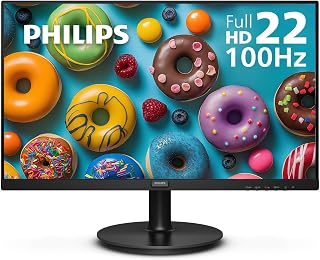
Philips 22 inch FHD 100Hz VA Monitor for Work
For readers specifically weighing VA panels, this model's 3000:1 contrast ratio is the standout spec, delivering deeper blacks than typical IPS alternatives in this roundup. That makes it a strong pick for dim rooms or movie watching where shadow detail matters more than wide viewing angles. Flicker-free backlighting adds comfort during long sessions at this screen size.
Pros
- 3000:1 contrast ratio, notably higher than the IPS options here
- 100Hz refresh rate with Adaptive-Sync for smoother visuals
- Blue light filter and flicker-free technology for eye comfort
- 4-year warranty included
Cons
- Glossy screen finish can show noticeable glare
- 22-inch size is smaller than the other options in this comparison
If the VA vs IPS debate comes down to contrast, the Philips 221V8LB is the clearest VA example in this lineup. Its 3000:1 contrast ratio dwarfs the 1500:1 figures typical of the IPS options here, which translates into deeper blacks and brighter whites for streaming and everyday viewing. Paired with a 100Hz refresh rate and Adaptive-Sync, it also avoids the common VA criticism of feeling sluggish, delivering smoother scrolling and tear-free video and casual gaming for a panel type usually associated with slower response. The 22-inch size and glossy finish are the clearest tradeoffs against the IPS competitors in this list, since the smaller screen and glossy coating can introduce glare that a matte IPS panel avoids. Blue light filtering and flicker-free technology help with eye comfort during longer sessions. For anyone shopping this article specifically to understand what a VA panel brings to the table versus IPS, this model demonstrates the contrast advantage clearly while still keeping refresh rate and smoothness in the conversation.
Buy this if you want to see VA's contrast advantage in action, especially for streaming or watching content where deep blacks matter. It fits budget-conscious buyers who don't need wide viewing angles. Skip it if you need the color consistency IPS provides at off-angle viewing, if glare from the glossy finish is a dealbreaker, or if you want a larger screen than 22 inches.
Display: 21.5 inch viewable (22 inch class) Full HD 1920x1080 IPS/VA, 16.7 million colors, 3000:1 contrast ratio
Performance: 100Hz refresh rate, 4ms response time, Adaptive-Sync technology
Panel Technology: VA with 178-degree wide viewing angles, SmartImage game enhancement
Eye Care: Flicker-free technology, blue light filter, reduced eye strain features
Connectivity: 1x HDMI, 1x VGA component output
Design: 19.4 inch width, 14.5 inch height, 8.7 inch depth, 4.21kg weight, VESA mount compatible
Power: 22 watts consumption, 12 volt operation
Warranty: 4-year manufacturer warranty on parts and labor

If you're weighing panel types for a hybrid gaming and work setup, this one leans IPS for color accuracy while still hitting 144Hz for smooth motion. The matte finish cuts glare in bright offices, and 1ms response time keeps fast-paced games crisp. For anyone comparing VA's contrast against IPS's viewing angles, this strikes a middle ground without sacrificing refresh rate.
Pros
- 178 degree viewing angles typical of IPS panels
- 144Hz refresh rate with FreeSync for smooth motion
- Matte finish reduces glare in bright rooms
- Flicker-free and low blue light features for longer sessions
Cons
- 1500:1 contrast ratio is modest next to VA alternatives
- Single HDMI port limits simultaneous connections
When you're weighing VA against IPS for a 2026 monitor upgrade, the MSI PRO MP243L E14 makes the IPS case well. It's an IPS panel that doesn't ask you to sacrifice speed for color accuracy, pairing 178 degree viewing angles with a 144Hz refresh rate and FreeSync, so the wide, consistent color you expect from IPS comes alongside genuinely smooth motion. That combination matters most if you split your screen time between spreadsheets and competitive games and don't want a panel that compromises on either. The 1500:1 contrast ratio won't match a VA panel's deep blacks, but the tradeoff buys you color consistency from any seating position, useful if you share a desk or watch content with others. A matte finish keeps glare down in bright rooms, and TUV flicker-free certification plus low blue light support longer sessions in front of the screen. For anyone comparing panel types with gaming and office duty both on the list, this is the IPS entry worth considering.
Buy this if you want IPS color consistency and wide viewing angles without giving up a high refresh rate for gaming or fast scrolling. It suits anyone torn between VA's contrast and IPS's color accuracy who leans toward accuracy. Skip it if deep blacks and high contrast for movies or dark-room use matter more to you than viewing angles, or if you need higher than 1080p resolution.

Pros
- Sharp Full HD IPS picture with wide viewing angles
- Smooth overclocked 120Hz performance with Adaptive-Sync
- Useful eye-care modes for extended screen time
- Slim bezel and VESA compatibility suit flexible setups
- Includes both HDMI and VGA connectivity
Cons
- The 22-inch screen offers less workspace than larger 24-inch or 27-inch monitors
- The 120Hz refresh rate is overclockable rather than the native refresh specification
- The 1ms figure is based on MPRT, so real-world pixel response can vary by scene and settings
The Philips 22E2N1100 is a compact Full HD IPS monitor designed for professionals, students, home office users, and everyday computing. Its 22-inch display provides a practical balance of desk space and screen room for documents, browsing, video, and general productivity.
Its 1920 x 1080 resolution, 178-degree viewing angles, and IPS panel produce clear images with consistent colors from different seating positions. The overclockable 120Hz refresh rate makes scrolling and motion feel smoother, while Adaptive-Sync helps minimize tearing and stuttering for casual gaming and fast-moving content.
Comfort is a notable strength for long work sessions. LowBlue Mode, Flicker-Free technology, and EasyRead mode are designed to reduce visual fatigue, and the ultra-slim bezel gives the monitor a clean look that works especially well in a multi-display setup.
There are a few limitations to consider. The 22-inch size provides less workspace than larger monitors, and the 120Hz specification is overclockable. Its 1ms rating uses MPRT measurement, so actual pixel response may vary depending on the content and selected settings.
Overall, the Philips 22E2N1100 is a capable, space-conscious monitor for office work, schoolwork, entertainment, and casual gaming. Its IPS image quality, smooth refresh rate, eye-care tools, HDMI and VGA ports, and VESA support make it a versatile choice for a straightforward desktop setup.
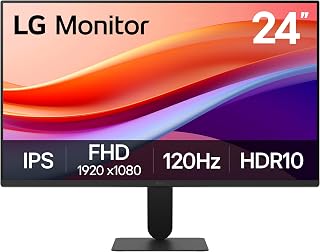
Choosing between VA and IPS often comes down to color consistency, and this display's IPS panel paired with HDR10 support makes it suited for photo editing or mixed media viewing where accurate tones matter. The 120Hz refresh rate adds responsiveness for everyday multitasking, while Reader Mode and flicker-safe tech ease eye strain during extended screen time.
Pros
- 120Hz refresh rate, highest among the IPS options here
- 178 degree viewing angles with 99% sRGB color gamut
- HDR10 support and Dynamic Action Sync for reduced input lag
- Ultra-slim bezels and lightweight 7.1 pound build
Cons
- 1500:1 contrast ratio trails VA panel alternatives
- Single HDMI port limits multiple simultaneous connections
The LG 24U411A-B rounds out the IPS side of this comparison with the highest refresh rate of the group at 120Hz, plus HDR10 and a 99% sRGB color gamut. For readers deciding between VA and IPS, this model shows what IPS brings when color accuracy and consistent viewing angles are the priority, 178 degrees here, while still keeping pace with VA panels on smoothness thanks to 1ms Motion Blur Reduction and Dynamic Action Sync for reduced input lag. Its ultra-slim three-side bezel design and light 7.1 pound build make it an easy fit for dual-monitor setups where you want matching color behavior across both screens, something VA panels handle less consistently off-axis. The 1500:1 contrast ratio is the expected IPS tradeoff against VA's deeper blacks, and a single HDMI port means no simultaneous multi-device hookup. For anyone who has decided color accuracy and viewing angle consistency outweigh raw contrast, this is the strongest IPS pick in the lineup.
Display Specifications
Screen Size: 23.8 inches (24-inch class)
Resolution: Full HD 1920 x 1080 (16:9 aspect ratio)
Display Type: IPS LED
Brightness: 250 cd/m2
Contrast Ratio: 1500:1
Viewing Angle: 178 degrees
Pixel Pitch: 0.27mm
Screen Finish: Matte
Performance
Refresh Rate: 120Hz
Response Time: 1ms (Motion Blur Reduction)
Color Gamut: 99% sRGB
HDR Support: HDR10
Adaptive Sync: FreeSync
Features: Dynamic Action Sync, Black Stabilizer, Reader Mode
Connectivity & Power
Ports: 1x HDMI
Included Cables: HDMI and power cable
Power Consumption: 13 watts
Warranty: 1 year manufacturer
Physical Dimensions
Dimensions (D x W x H): 8.7 x 21.2 x 16.4 inches
Weight: 7.1 pounds
Tilt Adjustment: minus 5 to plus 20 degrees
Buy this if color accuracy, wide viewing angles, and a slim design for multi-monitor setups matter more than deep contrast. It suits content creators and home office users leaning IPS. Skip it if you've decided VA's higher contrast ratio is the priority for your use case, or if you need more than one HDMI input for your setup.

Pros
- Outstanding price-to-performance ratio for 1440p 180Hz gaming at this screen size
- Smooth, responsive gameplay with 1ms OD response time and FreeSync support
- Curved 1500R design immerses you in games, movies, and work with reduced eye fatigue
- Rich color reproduction with 125% sRGB and 95% DCI-P3 gamut for vibrant imagery
- Easy setup with included DisplayPort cable and multiple connectivity options
Cons
- Height adjustment not available on ergonomic stand, limiting vertical positioning flexibility
- Some units report minor backlight bleed and warm color temperature out of the box requiring calibration
- No integrated speakers, requiring separate audio solution for complete immersion
The SANSUI 32-inch curved gaming monitor is a budget-friendly powerhouse designed for gamers who demand high refresh rates and immersive visuals without breaking the bank. Its 1440p resolution paired with a 180Hz refresh rate strikes an ideal balance between visual fidelity and performance for modern gaming rigs, while the curved 1500R display creates an engaging viewing experience whether you're gaming, streaming, or working.
Performance is where this monitor truly shines. The 1ms OD response time eliminates ghosting and motion blur during fast-paced gameplay, while AMD FreeSync technology syncs your GPU's output with the display to eliminate screen tearing. The 125% sRGB color gamut with 95% DCI-P3 coverage and HDR support deliver vibrant, punchy colors that make games pop off the screen. Brightness peaks at 300 nits, providing excellent visibility even in well-lit rooms.
The curved design is both functional and stylish, wrapping around your field of vision to reduce eye strain during extended gaming sessions. The 178-degree viewing angle ensures consistent color and contrast even when viewing from the side. Dual DisplayPort 1.4 connections support the full 180Hz refresh rate, while dual HDMI ports provide backward compatibility. Setup is straightforward, taking just minutes to connect and configure.
A few considerations worth noting: the ergonomic stand lacks height adjustment, so positioning flexibility is limited to tilt and swivel. Some users report minor backlight bleed in dark corners, and the display ships with slightly warm color temperatures that benefit from basic calibration. Additionally, there are no built-in speakers, so you'll need separate audio if you want immersive sound.
The SANSUI ES-G32C delivers exceptional value for competitive gamers, content creators, and professionals seeking a high-refresh ultrawide display at an unbeatable price. With strong performance metrics, vibrant colors, and a premium curved design, it punches well above its weight class and comes backed by a 30-day satisfaction guarantee and lifetime technical support.
Display: 32-inch curved VA panel with 1500R radius, matte finish, 178-degree viewing angles
Resolution: 2560 x 1440 (WQHD) at 16:9 aspect ratio
Refresh Rate: 180Hz via DisplayPort 1.4, up to 144Hz via HDMI
Response Time: 1ms (overdrive), 1000:1 to 3000:1 contrast ratio
Color Performance: 125% sRGB, 95% DCI-P3, 8-bit color depth, 300 nits brightness, HDR support, blue light reduction, flicker-free technology
Connectivity: 2x DisplayPort 1.4, 2x HDMI, 1x 3.5mm audio jack
Adaptive Sync: AMD FreeSync
Stand Adjustments: Tilt (minus 5 to plus 15 degrees), swivel, VESA mount compatible (100x100mm)
Physical: 24.19in wide x 17.75in tall x 8.06in deep, 6kg weight
Warranty: 30-day money-back guarantee, free replacement warranty, lifetime technical support
Included: DisplayPort cable (1.5m), power adapter, 1m power cord, user manual
Buying Guide
Contrast, Black Depth, and Room Lighting
VA panels are commonly a better starting point when you watch or play in a dim room and want darker-looking blacks. That trait can give games, films, and high-contrast scenes more depth, although ambient light, display settings, and the content itself still have a major effect on what you see.
The Philips 22 Inch Computer Monitor FHD 100Hz VA VESA is a compact Full HD VA choice with 100Hz, Adaptive-Sync, a wide viewing claim, and VESA support. If you prefer a larger, more enveloping game view, the SANSUI 32-Inch Curved Gaming Monitor WQHD 2560 x brings a 1500R curved WQHD panel, 180Hz operation, FreeSync, and DisplayPort connectivity.
Viewing Angles and Color Consistency
IPS is usually the more comfortable direction when you often lean, stand, collaborate, or run a dual-screen layout. Its core benefit is stable color and brightness from broader angles, so a shared document or side monitor generally changes less as your seat position moves.
The Philips 22 Inch Computer Monitor FHD 120Hz combines IPS, an overclockable 120Hz rate, 1ms MPRT, and low-blue-light tools in a compact format. The LG 24U411A-B 24-inch Full HD (1920 x 1080) adds HDR10 and up to 99% sRGB coverage, while our EIZO alternatives for color work explain when color-critical needs require more than broad gamut claims.
Refresh Rate, Sync, and Motion Clarity
Do not let the VA-versus-IPS label obscure a monitor’s refresh rate, adaptive-sync support, and effective motion handling. A higher refresh rate can make cursor movement, scrolling, and fast games appear more continuous, but your computer must produce enough frames and your connection must support the selected mode.
The msi PRO MP243L E14 24-inch IPS 1920 x 1080 (FHD) targets this balance with a 144Hz IPS panel, FreeSync, HDR readiness, and tilt adjustment. For action-oriented setups, compare it with the options in our guide to GIGABYTE monitors, then confirm that your system has a capable graphics card for Baldur’s Gate 3 or similar demanding games.
Resolution, Screen Size, and Desk Fit
Resolution and physical dimensions can matter as much as panel technology, especially if this display is used for work before games. A 22- or 24-inch Full HD monitor is straightforward to place and keeps interface elements larger, whereas a 32-inch WQHD panel gives spreadsheets, timelines, and game worlds considerably more breathing room.
Check your viewing distance, desk depth, VESA needs, stand tilt, and ports before deciding. For data-heavy layouts, our monitor recommendations for stock trading show why screen organization can improve readability, while HDMI is often convenient for consoles and DisplayPort may unlock higher refresh modes on a gaming PC.
Final Thoughts
When deeper blacks and a compact screen matter most, the Philips 22 Inch Computer Monitor FHD 100Hz VA VESA delivers a straightforward VA setup; for high-resolution, large-screen play, the SANSUI 32-Inch Curved Gaming Monitor WQHD 2560 x is the more immersive direction. Match the panel to your room, games, and daily work, and you will make a choice that remains satisfying.
Frequently Asked Questions
Is IPS or VA better for office work in 2026?
IPS is a natural choice for office work when color consistency across the screen and flexible viewing angles are top priorities. It suits shared desks, frequent video calls, browser-heavy work, and dual-monitor arrangements where you may not sit perfectly centered.
VA can still work very well for documents and email, particularly if you also value deeper blacks for evening entertainment. Before deciding, compare screen size, ergonomics, and ports alongside panel type, and consult our BenQ monitor guide for more work-oriented display considerations.
Does VA always have better contrast than IPS?
VA commonly has an advantage in native contrast, which helps blacks look richer in dark scenes. That does not mean every VA display delivers identical results, since backlight behavior, coating, room lighting, and image settings also influence perceived depth.
IPS panels can remain compelling because their viewing angles are usually more forgiving, particularly for a monitor used by more than one person. If your room has strong daylight or you sit directly in front of the screen, weigh those conditions before treating contrast alone as the deciding factor.
Is IPS better than VA for gaming?
Neither panel type automatically wins for gaming. For quick competitive play, prioritize refresh rate, adaptive-sync compatibility, input feel, resolution, and motion clarity, because these factors affect responsiveness more directly than the panel label.
IPS is attractive for vivid color and broad viewing angles, while VA can be appealing for cinematic single-player games in a darker space. A 120Hz, 144Hz, or 180Hz model only reaches its potential when your console or PC and cable can carry the required signal.
Should I choose 1080p or WQHD in a VA vs IPS panel monitor?
Choose Full HD when you want a compact display, modest graphics demands, and large, easy-to-read interface elements. It is a sensible match for 22- and 24-inch desks, office work, and casual play without asking as much of your system.
WQHD provides noticeably more workspace and a more detailed image on a larger screen, but it also asks more from your graphics hardware. Whichever resolution you choose, set the display’s refresh rate correctly in your operating system and use the input that supports its full capability.






Write Your Review
No reviews yet. Be the first to share your experience!