

You don’t need to drain your wallet to enjoy smooth, immersive gaming. Whether you’re building your first gaming setup or upgrading from an outdated display, budget gaming monitors in 2026 deliver impressive refresh rates, crisp visuals, and fast response times without the premium price tag. This guide reviews 10 standout options that balance performance and affordability, helping you find the perfect display for competitive shooters, fast-paced racing games, or casual play.
We’ve evaluated monitors across key features like refresh rate, panel technology, color accuracy, and connectivity to ensure you get the most value. If you’re also upgrading your entire workspace, check out our recommendations for working from home setups to build a complete productive environment.
Quick Comparison
Ratings reflect the most recent data pull. Check each listing for current price and availability.
Quick answer
This guide compares 10 picks, with Dell SE2426HG 24 inch 240Hz Gaming Monitor - FHD IPS ranked first. Samsung 27 Odyssey G5 QHD 1440P 180Hz Gaming Monitor holds the highest customer rating among them. Sceptre 24-inch Curved Gaming Monitor 1080p 75Hz has the most customer reviews.

Pros
- Blazing 240Hz refresh rate and fast response time create competitive gaming advantages
- IPS panel provides accurate colors and 178-degree viewing angles, rare for this price tier
- TÜV eye comfort certification with blue light reduction reduces strain during long sessions
- Dual HDMI ports allow simultaneous connections to multiple gaming devices
- Lightweight and tilt-adjustable design accommodates various desk configurations
Cons
- 1920x1080 resolution feels dated compared to newer 1440p 240Hz alternatives at similar prices
- No USB hub or advanced ergonomic adjustments like height or pivot, limiting desk integration
- 1000:1 contrast ratio is standard for IPS but lower than TN panels, reducing perceived depth in dark scenes
The Dell SE2426HG is a 24-inch gaming monitor built for players who prioritize refresh rate and fluidity over resolution. This is the sweet spot for competitive gamers in titles like Valorant, CS2, and Fortnite where 240Hz matters most. The monitor combines performance-focused specs with practical daily-use features like eye comfort certification.
The standout feature is the combination of 240Hz refresh rate and 0.5ms response time with a fast IPS panel, a rare trio at this price. AMD FreeSync Premium eliminates tearing on compatible systems, while the 99% sRGB coverage ensures your games and creative work look vibrant and accurate. The IPS technology provides 178-degree viewing angles, so colors remain consistent from wide perspectives.
Build quality is solid for the price. The 24-inch matte-finish panel resists glare, and the sturdy stand accommodates tilt adjustment. At 7.4 pounds, it is lightweight enough to reposition easily. The dual HDMI 2.0 and DisplayPort 1.4 connectivity provide flexibility for gaming PCs, PlayStation, Xbox, and other devices simultaneously.
The TÜV Rheinland 3-star eye comfort certification is genuine value for extended gaming or work sessions. It reduces blue light without degrading color accuracy, addressing real concerns about monitor-related eye strain. Power consumption of just 14 watts keeps your system efficient.
The main limitation is 1920x1080 resolution, which may feel soft on a 24-inch screen for non-gaming use. The contrast ratio is typical for IPS, not exceptional. If you game competitively and value smoothness, this monitor delivers. For creative professionals or single-player gaming at higher fidelity, a 1440p display may be a better fit despite costing more.
Display: 24-inch FHD IPS, 1920x1080 native resolution, 16:9 aspect ratio, 93 pixel pitch, 1000:1 contrast ratio, 178-degree viewing angles, 300 nits brightness, 99% sRGB color gamut
Performance: 240Hz refresh rate, 0.5ms response time, AMD FreeSync Premium, HDMI VRR support, TÜV Rheinland 3-star blue light reduction
Connectivity: 2x HDMI 2.0, 1x DisplayPort 1.4, Power input
Physical: 21.21 inches wide, 16.23 inches tall, 7.04 inches deep, 7.4 pounds, black matte finish, desk mount with tilt adjustment
Power and Warranty: 14 watts typical consumption, 240V AC input, 1-year advanced exchange service, includes HDMI cable, stand, power cable, and documentation
Competitive Gamers: 240Hz and 0.5ms response time give you a measurable edge in fast-paced titles. FreeSync Premium eliminates tearing for ultra-smooth gameplay on compatible systems.
Multi-Device Setups: Dual HDMI ports let you connect your gaming PC, PlayStation, and Xbox without unplugging cables. Switch inputs instantly.
Budget-Conscious Performance Seekers: This monitor delivers 240Hz gaming performance at a fraction of premium pricing, with the bonus of eye comfort certification.
Extended Gaming Sessions: TÜV certification and blue light reduction make this comfortable for long play sessions or work, reducing eye fatigue and strain.
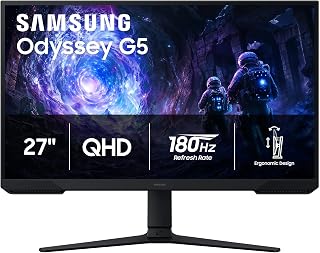
The 27-inch Odyssey G5 delivers 1440p resolution at 180Hz, giving budget gamers sharp visuals and smooth motion without compromise. VA panel technology provides a 3000:1 contrast ratio for deep blacks in dark scenes, whether you're exploring shadowy dungeons or competitive shooters. The matte finish reduces glare during long sessions, and the 16:9 aspect ratio ensures full compatibility with every game in your library.
Pros
- 180Hz refresh rate with 1ms response time for competitive gaming
- QHD resolution delivers 1.7x more detail than Full HD
- Adjustable stand with tilt, pivot, and height options
- Black Equalizer brightens shadows for tactical advantage
Cons
- Requires capable GPU to fully utilize 180Hz at 1440p
- On-screen menu system less intuitive than premium models
For budget-conscious gamers chasing smooth performance without settling for basic 1080p panels, the Samsung Odyssey G5 delivers a rare combination of QHD clarity and 180Hz speed at an accessible price point. The 27-inch VA panel pushes 1440p resolution with a 1ms response time, giving you the pixel density to spot distant targets and the speed to react when it matters. AMD FreeSync handles synchronization between GPU and display, eliminating the tearing and stuttering that plague cheaper monitors during intense firefights. The 3000:1 contrast ratio produces deeper blacks than typical IPS alternatives, adding visual depth to shadowy game environments. HDR10 support enhances dynamic range, though it functions best as a complement to the core gaming specs rather than a marquee feature. Samsung includes a Black Equalizer tool that brightens dark scenes for competitive visibility, and the adjustable stand offers tilt, pivot, and height flexibility that budget monitors often skip. Build quality feels solid with a matte finish that reduces reflections during extended play sessions. Dual HDMI and DisplayPort inputs provide versatile connectivity for multi-device setups.
Display: 27-inch QHD VA panel, 2560 x 1440 resolution, 16:9 aspect ratio, 178-degree viewing angles
Performance: 180Hz refresh rate, 1ms response time (MPRT), 300 cd/m brightness, 3000:1 contrast ratio
Features: HDR10, AMD FreeSync, Black Equalizer, matte screen finish
Connectivity: 2x HDMI, 1x DisplayPort, 1x power connector
Design: Adjustable stand with tilt, pivot, and height settings, desk mount, flat panel shape
Dimensions: 24.34 inches wide, 9.22 inches deep, 20.5 inches tall, 10.1 pounds
Power: 35 watts consumption, 240 volts
Warranty: 1-year manufacturer coverage

Pros
- Exceptional value: curved gaming monitor quality at under $80
- Immersive curved display with 1800R curvature enhances gaming and movie watching
- High-quality VA panel with 98% sRGB gamut and 3000:1 contrast for sharp, vibrant images
- Multiple connectivity options including dual HDMI and VGA ports for versatile device support
- 1ms response time and Adaptive Sync technology minimize ghosting and tearing during gameplay
Cons
- 75Hz refresh rate is adequate for casual gaming but lags behind higher-end 144Hz+ monitors
- 1080p resolution on a 24-inch screen may feel less sharp compared to 1440p alternatives
- No USB ports or advanced ergonomic adjustments like height or tilt customization
The Sceptre C248W-1920RN is a budget-friendly curved gaming monitor designed for gamers and productivity users who want immersive visuals without breaking the bank. The 24-inch size strikes a practical balance between screen real estate and desk space, making it suitable for both gaming setups and general computer work.
The standout feature is the 1800R curved VA panel, which delivers an engaging, wrap-around visual experience. With 1ms response time, 75Hz refresh rate, and Adaptive Sync technology, gameplay feels smooth and responsive. The 98% sRGB color accuracy and 3000:1 contrast ratio ensure vibrant colors and deep blacks, making this monitor capable across gaming, streaming, and creative tasks.
Build quality is solid for the price. The brushed metal finish is smooth and pleasant to handle, and the compact dimensions (21.61 inches wide, 9.06 inches tall) won't overwhelm typical gaming desks. The monitor includes dual HDMI and VGA ports, built-in speakers, and is VESA wall-mount ready, offering flexible installation options for various setups.
The main limitations are the 1080p resolution and 75Hz refresh rate, which are entry-level by modern standards. Competitive gamers or those with higher-end GPU setups may want monitors with 144Hz+ refresh rates and higher resolution. However, for casual gaming, console connections, and everyday computing, these specs are perfectly adequate.
Overall, the Sceptre C248W-1920RN delivers excellent value as an affordable curved gaming monitor. Its combination of curved immersion, solid color accuracy, and practical connectivity makes it a smart choice for budget-conscious buyers upgrading from flat displays or building an affordable gaming setup.
Display: 24-inch curved VA panel, 1920 x 1080 (1080p FHD), 16:9 aspect ratio, 1800R curvature
Performance: 75Hz refresh rate, 1ms response time, 250 cd/m2 brightness, 3000:1 contrast ratio, 178-degree viewing angle
Color: 98% sRGB color gamut, matte finish display
Connectivity: 2x HDMI ports, VGA, 3.5mm audio input, built-in speakers
Features: Adaptive Sync, VESA wall mount ready (100x100mm), tilt adjustment, metal black finish
Dimensions: 21.61 inches wide x 9.06 inches tall x 16.04 inches deep, weighs 6 pounds
Power: 29 watts consumption, 120V compatible, 30,000+ hour lamp life
Warranty: 1-year limited manufacturer warranty
Who Should Buy: This monitor is ideal for casual gamers, console players, budget-conscious professionals, and anyone upgrading from a flat display who wants curved-screen immersion without premium pricing. It works well for gaming, streaming, productivity, and general computing.
Who Might Want to Look Elsewhere: Competitive esports gamers, content creators requiring high color accuracy beyond 98% sRGB, or users with high-end GPUs capable of driving 1440p or 144Hz+ displays should consider higher-spec monitors.
Key Considerations: Verify that your GPU supports 1920x1080 at 75Hz (nearly all modern GPUs do). Check available desk space for the 21.61-inch width. If you need USB connectivity or extensive adjustment options, note that this model focuses on curved immersion over advanced ergonomics.
Tips for Best Experience: Use HDMI connections for superior video quality over VGA. Enable Adaptive Sync in your GPU settings to reduce tearing. Position the monitor about 20-24 inches from your eyes to fully appreciate the curved display benefits. Mount on an arm bracket if your desk space is limited.

Pros
- Exceptional value at the price point with professional-grade features like 144Hz and FreeSync
- Bright, crisp IPS display with vibrant colors makes it excellent for work and gaming alike
- Eye-comfort certifications and low blue light reduction minimize fatigue during long sessions
- Lightweight and easy to position with flexible tilt and VESA mounting options
- Reliable performance backed by 3-year manufacturer warranty and firmware update support
Cons
- Limited to 1920x1080 resolution, so pixel density is lower than 27-inch alternatives
- Single HDMI port limits simultaneous connectivity compared to higher-end models
- Built-in speakers mentioned in reviews but not formally listed in specifications
The MSI PRO MP243L E14 is a 24-inch Full HD gaming monitor designed for budget-conscious gamers and productivity users who refuse to sacrifice performance. With its 144Hz refresh rate, FreeSync support, and rapid 1ms response time, this monitor bridges the gap between casual office work and competitive gaming without the premium price tag.
The standout feature is the combination of smooth high-refresh gaming performance with an IPS panel that delivers accurate colors and exceptional viewing angles. The TUV-certified flicker-free technology and low blue light reduction are meaningful additions that reduce eye strain during marathon work sessions or gaming marathons, backed by MSI's Eye-Q Check vision assessment tool for optimal display tuning.
Build quality is solid and lightweight, with a tilt-adjustable stand that ranges from minus 5 to plus 20 degrees, making it easy to find your ideal viewing angle. VESA 100x100mm mounting compatibility opens doors to arm solutions and multi-monitor setups, while the matte finish screen reduces distracting glare in brightly lit environments.
The main limitation is the 1920x1080 resolution on a 24-inch panel, which results in lower pixel density than 27-inch alternatives. Additionally, the single HDMI port means you'll need to swap cables if you want to use multiple simultaneous inputs, though the legacy VGA port ensures compatibility with older systems.
The MSI PRO MP243L E14 delivers genuine value for gaming enthusiasts and professionals working on tighter budgets. It's a reliable, well-built monitor that won't disappoint users who prioritize smooth performance and eye comfort over cutting-edge specs.
This monitor is best suited for gamers playing esports titles like League of Legends, CS:GO, or Valorant where high refresh rates matter more than ultra-high resolution. It's equally valuable for office professionals who set up dual-monitor workstations, as the crisp IPS panel and ergonomic features support productivity without the eye fatigue of budget TN panels.
Consider this monitor if you have an AMD graphics card supporting FreeSync, or if you're upgrading from a 60Hz or 75Hz display. The 144Hz jump will feel immediately noticeable in both gameplay responsiveness and cursor tracking. If you need 1440p or 4K resolution, higher refresh rates above 144Hz, or curved panels, look elsewhere. This is a straightforward, honest performer for practical gaming and work use.
The lightweight design and compact 24-inch footprint make it perfect for small desks or as a secondary monitor. The three-year warranty and firmware update support indicate MSI's confidence in long-term reliability, so this is a purchase you can feel comfortable making.

Pros
- Exceptional value at entry-level gaming monitor price point
- FreeSync compatibility eliminates screen tearing for smooth AMD graphics card performance
- 1ms response time and 120Hz refresh rate ideal for competitive gaming
- IPS technology ensures consistent color accuracy across wide viewing angles
- Sleek frameless design and tilt adjustment offer versatile placement options
Cons
- 1920x1080 resolution at 27 inches results in lower pixel density compared to 1440p alternatives
- Limited to HDMI and VGA connectivity, lacking modern DisplayPort option
- 250 nits brightness may struggle in very bright rooms or direct sunlight
The Acer KB272 G0bi is a budget-friendly 27-inch gaming monitor designed for casual gamers, esports enthusiasts on a tight budget, and office workers seeking responsive performance without premium pricing. It bridges the gap between basic office monitors and high-end gaming displays, making it versatile for mixed use scenarios.
The standout feature is the combination of 120Hz refresh rate and 1ms response time, which delivers genuinely smooth gameplay and reduces motion blur in fast-paced titles. FreeSync support eliminates screen tearing when paired with AMD graphics cards, creating a tear-free experience that feels noticeably more polished than 60Hz standard monitors. The IPS panel technology ensures vibrant colors and wide viewing angles, a serious advantage over cheaper TN panels that often look washed out from the sides.
Build quality reflects the budget positioning, with a functional yet basic plastic construction. The frameless bezel design is a nice touch that maximizes usable screen space and gives it a more modern appearance than traditional bezeled monitors. Connectivity options include HDMI and VGA, which cover most setups but lack the future-proofing of DisplayPort found on pricier competitors.
The main limitation is 1920x1080 resolution on a 27-inch screen, resulting in a pixel density of roughly 82 pixels per inch. Text and fine details won't be as sharp as 1440p monitors, though this remains acceptable for gaming and general office work. The 250 nits brightness is adequate for indoor use but may struggle in brightly lit spaces.
The Acer KB272 G0bi is an excellent entry point into gaming monitors or a smart secondary display upgrade for budget-conscious buyers. It delivers genuine performance improvements over 60Hz displays at a price that doesn't require compromise elsewhere in your setup.
Display: 27-inch IPS LCD, 1920x1080 Full HD, 16:9 aspect ratio, 250 nits brightness, 100,000,000:1 contrast ratio, 99% color gamut
Performance: 120Hz refresh rate, 1ms VRB response time, FreeSync adaptive sync support, matte screen finish
Connectivity: 1x HDMI, 1x VGA, 1x audio jack
Physical: 24.07 inches wide, 17.44 inches tall, 8.27 inches deep, 4.99 kg weight, tilt adjustment, wall mount compatible
Power & Warranty: 18 watts power consumption, 3-year full parts and labor warranty included
Who Should Buy: This monitor excels for budget-conscious gamers upgrading from 60Hz displays, esports players on a budget, content creators needing color-accurate IPS panels, and office workers seeking responsive displays. It's also ideal as a second or third monitor in multi-display setups.
Who Should Skip: If you demand sharp pixel-level clarity, high brightness for outdoor or very bright rooms, advanced connectivity options, or high refresh rates above 120Hz, consider stepping up to 1440p or higher refresh rate alternatives.
Best Use Cases: Competitive online gaming, video editing workflows, office productivity, video playback, web design, general productivity tasks. The FreeSync support makes it particularly valuable for AMD Ryzen and Radeon GPU owners.
Value Proposition: At under $100, this monitor offers gaming-grade specifications that normally cost significantly more, making it one of the best dollar-per-performance options available. The included 3-year warranty adds significant peace of mind.

Pros
- Exceptional value at under $120 with professional gaming-grade refresh rate and response time
- Smooth, tear-free gaming performance thanks to AMD FreeSync technology
- Highly adjustable stand lets you find your perfect gaming position
- Eye-friendly features make it comfortable for marathon gaming sessions
- Borderless design supports dual-monitor setups without visible bezels
Cons
- 1080p FHD resolution is lower than newer 1440p or 4K monitors, limiting sharpness at close viewing
- Glossy screen finish can produce glare in brightly lit rooms
- Limited to 24-inch size, which may feel small for some gaming setups
The Samsung Odyssey G3 (G30D) is a 24-inch FHD gaming monitor built for competitive gamers and console players who prioritize smooth, responsive performance over cutting-edge resolution. At this price point, it punches well above its weight with a 180Hz refresh rate and 1ms response time, delivering the fluid, lag-free experience that serious gamers demand.
The monitor's standout features combine to create a genuinely competitive gaming experience. The 180Hz refresh rate paired with AMD Radeon FreeSync eliminates screen tearing and input lag, making fast-paced games feel remarkably smooth. The Black Equalizer feature is particularly useful in tactical shooters and dark games, helping you spot enemies in shadows without cranking brightness. The Virtual Aim Point crosshair overlay adds a subtle but meaningful precision boost for accuracy-dependent titles.
Build quality is solid with a robust 8.6-pound chassis and exceptionally flexible ergonomic stand. The swivel, tilt, pivot, and height adjustment functions let you dial in the perfect viewing angle, which matters for comfort during extended gaming sessions. The 3-sided borderless bezel design is more than aesthetic luxury: it genuinely enables seamless dual-monitor setups for immersive racing simulations or expanded gaming workspaces.
The main trade-off is 1080p resolution. In an era of 1440p and 4K gaming, the 1920x1080 pixel density is noticeably softer when sitting close to a 24-inch screen, particularly in detailed or text-heavy games. The glossy screen finish, while good for color vibrancy, reflects light and can cause glare in bright rooms. Eye Saver Mode effectively reduces blue light and flicker, though it's somewhat basic compared to newer monitors.
Verdict: The Samsung Odyssey G3 is a smart buy for competitive gamers, console players, and anyone prioritizing smooth, responsive gameplay over resolution. Excellent value, minimal input lag, and thoughtful gaming features make it one of the best sub-$150 gaming monitors available. Highly recommended for gaming rooms, esports setups, and content creators who benefit from high refresh rates.
The 180Hz refresh rate combined with 1ms response time (MPRT) creates a responsive, smooth gaming environment that noticeably improves performance in competitive titles. AMD FreeSync eliminates the screen tearing that plagues budget displays, delivering consistently smooth visuals without frame drops or stuttering. Real-world user feedback confirms the monitor excels for fast-paced gaming on PS5, PC, and other platforms running games at 120+ FPS.
Features like Black Equalizer and Virtual Aim Point are gaming-specific tools that enhance competitiveness without being gimmicks. Black Equalizer's ability to reveal hidden details in dark scenes provides a genuine tactical advantage in tactical shooters and stealth games. The Virtual Aim Point crosshair overlay helps with precision aiming in FPS games. These features work together to make the Odyssey G3 genuinely competition-ready without requiring extensive tweaking.
This monitor is ideal for competitive gamers on a budget, console players, content streamers requiring high refresh rates, and anyone upgrading from older 60Hz displays. It's particularly well-suited for FPS and fighting game enthusiasts, esports competitors, and racing sim enthusiasts who benefit from the high refresh rate and low response time. The ergonomic adjustments and eye-comfort features also make it suitable for non-gamers doing extended work on a computer, particularly those experiencing eye strain from older displays.
It is less suited for creative professionals requiring precise color accuracy and high resolution, or users with limited desk space who need ultra-compact monitors. If you prioritize 4K visuals or 1440p sharpness over refresh rate, consider higher-end alternatives. However, for gaming and everyday computing at this price, the Odyssey G3 is a no-brainer.
Pros
- Excellent refresh rate and response time for competitive gaming at this price
- VA panel technology with high contrast ratio (3000:1) produces rich blacks and vibrant colors
- Eye-care features and matte screen reduce fatigue during long sessions
- Versatile 22-inch size works for both gaming and productivity tasks
- Sturdy build with tilt adjustment and multiple mounting options
Cons
- Compact 22-inch screen may feel small for some gaming or design work
- No built-in speakers requires external audio solution
- Limited to single HDMI port, which may inconvenience users with multiple devices
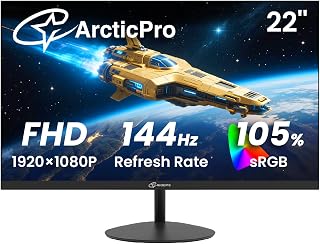
The ArcticPro AD22ZFA is a compact 22-inch gaming monitor designed for budget-conscious gamers and office workers seeking smooth performance without premium pricing. This Full HD display combines essential gaming specs with eye-care technology, making it suitable for both competitive gameplay and daily productivity tasks.
The monitor's standout strength lies in its 144Hz refresh rate paired with a lightning-fast 1ms response time, delivering noticeably smoother motion and reduced ghosting compared to standard 60Hz displays. The 1920x1080 Full HD resolution provides crisp detail, while the VA panel's 3000:1 contrast ratio produces rich blacks and vibrant colors. Anti-blue light filtering helps minimize eye strain, a crucial feature for extended gaming or work sessions.
Build quality reflects the price point, but ArcticPro doesn't cut corners where it matters. The 178-degree viewing angles ensure consistent image quality from various positions, while tilt adjustment and VESA wall-mounting compatibility offer flexibility in setup. The matte screen finish effectively reduces glare and reflections.
The main limitations are the compact 22-inch size, which may feel tight for high-resolution gaming or design work, and the single HDMI port that limits device connectivity. The absence of built-in speakers also means you'll need external audio. However, these trade-offs are acceptable at this price level.
The ArcticPro 22-inch monitor represents solid value for entry-level gamers, esports enthusiasts on a budget, and professionals who prioritize smooth performance over screen real estate. With a strong customer rating and reliable warranty coverage, it's a practical choice for anyone seeking 144Hz gaming performance without overpaying.
Display: 22-inch Full HD (1920x1080) VA Panel, 16:9 Aspect Ratio
Performance: 144Hz Refresh Rate, 1ms Response Time
Color: 105% sRGB, 3000:1 Contrast Ratio, Matte Finish
Viewing Angle: 178 degrees (horizontal and vertical)
Adjustment: Tilt adjustment (-5 to +15 degrees), VESA 75x75mm wall mount
Connectivity: 1x HDMI, VGA input
Features: Anti-blue light technology, eye care design
Dimensions: 19.4W x 14.25H x 7.4D inches, Weight 2.05kg
Warranty: 3-year manufacturer coverage
Included: Monitor, HDMI cable, power adapter, base stand
Pros
- Exceptional value for 200Hz performance at under $100 price point
- 1ms response time and FreeSync create tear-free, responsive gaming experience
- Comprehensive eye-care features reduce fatigue during extended gaming sessions
- Wide 178-degree viewing angles accommodate multiple viewers or desk setups
- Flexible mounting options with VESA compatibility and tilt adjustment
Cons
- 1080p resolution at 24 inches results in 92 PPI pixel density, lower than modern standards
- No built-in speakers require external audio solution or headphones
- FreeSync compatibility limited to AMD graphics cards and some newer NVIDIA cards
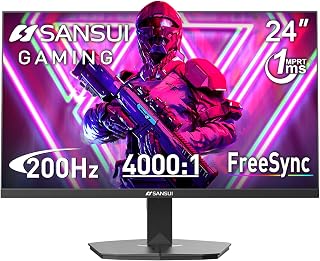
The SANSUI ES-G24F4L is a 24-inch gaming monitor designed for budget-conscious gamers who prioritize refresh rate and response time over resolution. This monitor targets competitive players in fast-paced titles like esports games, first-person shooters, and battle royales where smooth performance matters more than pixel density.
The standout features here are its 200Hz refresh rate and 1ms MPRT response time, which work together to deliver fluid, responsive gameplay. Paired with FreeSync technology, the monitor automatically synchronizes with your graphics card to eliminate screen tearing and stuttering. The 110% sRGB color gamut ensures vibrant visuals, while HDR support and a 4000:1 contrast ratio add depth and dimension to both gaming and creative content.
Build quality is solid for the price tier. The matte screen finish with anti-glare coating, anti-flicker technology, and low blue light filter create a comfortable viewing experience during long gaming marathons. The monitor offers flexible positioning with tilt adjustment and VESA wall-mount compatibility, plus practical features like crosshair, timer, and black level adjustments for competitive advantage.
The primary trade-off is the 1920x1080 resolution, which may appear less sharp than higher-resolution alternatives on a 24-inch screen. Additionally, the lack of built-in speakers requires a separate audio solution, and FreeSync support limits you to AMD graphics cards or compatible NVIDIA hardware.
Verdict: The SANSUI ES-G24F4L represents excellent value for competitive gamers seeking high refresh rates and minimal input lag on a tight budget. It excels in gaming performance but is less ideal for resolution-focused tasks or professional color-critical work.
Display: 24-inch LCD, 1920x1080 FHD, 16:9 aspect ratio, 178-degree viewing angle, matte finish
Performance: 200Hz refresh rate, 1ms MPRT response time, FreeSync adaptive sync, 4000:1 contrast ratio, 300 nits brightness
Color & Image: 110% sRGB color gamut, HDR support, anti-flicker, low blue light filter, anti-glare coating, overdrive, black level adjustment
Connectivity: DisplayPort 1.4, HDMI, 3.5mm audio jack, includes HDMI cable and power adapter
Physical: 21.2W x 12.55H x 1.79D inches, 4.08 kg, VESA 75x75mm mount, tilt adjustment -5 to 15 degrees
Power: 36 watts typical consumption
Warranty: 1-year manufacturer warranty, 30-day money-back guarantee, lifetime technical support
Best For: Competitive gamers, esports players, budget-conscious streamers, and anyone prioritizing smooth 200Hz performance over 4K resolution.
Consider If: You have an AMD graphics card or compatible NVIDIA GPU, prefer fast-paced gaming over visual fidelity, and want professional-grade refresh rates without premium pricing.
Skip If: You need high resolution for detailed visuals, require built-in audio, depend on NVIDIA G-Sync, or primarily use NVIDIA graphics cards with adaptive sync needs.
Compatibility: Works with desktops, gaming laptops, PlayStation 5, Xbox Series X/S, and gaming consoles with HDMI or DisplayPort connectivity. FreeSync requires AMD Radeon or compatible NVIDIA RTX cards with G-Sync compatible mode.

Pros
- Exceptional color accuracy with 100% sRGB coverage, ideal for creative professionals
- Outstanding value at this price point with high refresh rate and gaming features
- Eye-care technology including blue light shift for comfortable extended use
- FreeSync support eliminates stuttering during fast-paced gaming
- VESA wall mountable design for flexible workspace organization
Cons
- 1080p resolution on a 27-inch screen results in lower pixel density compared to higher resolution alternatives
- 100Hz refresh rate is moderate compared to 144Hz+ gaming monitors at similar price points
- Built-in speakers are functional but may not match quality of dedicated external audio
The Sceptre 27-inch Prime Gaming Monitor is engineered for budget-conscious gamers, streamers, and graphic designers seeking reliable performance without breaking the bank. This 27-inch 1080p display combines practical gaming features with color-accurate output, making it versatile enough for both competitive play and creative work.
The standout feature here is undoubtedly the 100% sRGB color gamut paired with 100Hz refresh rate and 1ms response time. AMD FreeSync eliminates screen tearing during gameplay, while the FPS and RTS game modes automatically optimize display settings for different gaming genres. The 100Hz refresh rate keeps motion smooth and responsive, though enthusiasts may notice the difference compared to 144Hz+ alternatives.
Design-wise, the frameless panel feels modern and premium, while the matte screen surface reduces glare for comfortable viewing. Multiple connectivity options, 2 HDMI and 1 DisplayPort, provide flexibility in setup. Built-in speakers and a headphone jack eliminate the need for additional audio equipment, streamlining your desk space. The VESA wall mount pattern offers mounting flexibility for optimized viewing angles.
The primary limitation is that 1080p resolution on 27 inches produces relatively low pixel density compared to higher-resolution options. While still acceptable for gaming and general use, those working on detailed design tasks may find the pixel density limiting. Additionally, the 100Hz refresh rate is respectable but moderate compared to higher-end gaming displays in the same price range.
Final verdict: This is a solid all-arounder that delivers genuine value. If you prioritize color accuracy, gaming responsiveness, and practical features over bleeding-edge specs, this Sceptre monitor deserves serious consideration. The blue light shift feature and eye-care technology make it particularly suitable for those with extended screen time demands.
Display: 27-inch FHD 1080p (1920x1080) 16:9 aspect ratio with matte screen surface
Performance: 100Hz refresh rate, 1ms response time, 100% sRGB color gamut, AMD FreeSync technology
Connectivity: 2 HDMI ports, 1 DisplayPort, audio in jack, headphone jack
Audio: Built-in speakers for audio output without external equipment
Special Features: Blue Light Shift eye care technology, FPS and RTS game modes, frameless design, VESA wall mountable (100x100mm)
Design: Machine black finish, frameless bezel, matte surface finish to reduce glare

Pros
- Outstanding value with legitimate 165Hz performance at sub-$150 price point
- Smooth, responsive gameplay with 1ms response time and AMD FreeSync support
- Eye-friendly features including flicker-free technology and low blue light filter
- Solid build quality feels durable and professional, not cheap or flimsy
- Versatile 23.8-inch size fits most desk setups with compact, elegant design
Cons
- VA panel coating creates slight blurriness and glare at extreme viewing angles
- Limited to 1080p resolution, so competitive esports titles benefit more than visual-heavy games
- Refresh rate may occasionally advertise as 120Hz in some units, so verify specifications
The Acer Nitro KG241Y is a full HD gaming monitor purpose-built for competitive players and budget-conscious gamers seeking high refresh rate performance without premium pricing. With its 165Hz refresh rate, 1ms response time, and AMD FreeSync support, this monitor delivers the responsiveness needed for esports titles and fast-paced multiplayer gaming.
The standout feature is undoubtedly the 165Hz refresh rate paired with AMD FreeSync Premium technology. This combination eliminates screen tearing and stuttering, creating a seamless experience where every frame feels immediate and responsive. Users consistently praise the monitor for its smoothness and the competitive edge it provides in games where reaction time matters. The 1ms response time keeps up with rapid mouse movements and in-game action.
Beyond gaming, the KG241Y prioritizes eye comfort through flicker-free technology, ComfyView display modes, and blue light filtering options. The VA panel delivers solid color saturation at 72% NTSC, making it suitable for photo editing and creative work alongside gaming. Build quality is notably sturdy, with a sleek design and zero-frame bezels that enable multi-monitor setups without interrupting your visual field.
The VA panel does introduce some viewing angle limitations, with slight glare and color shift at extreme angles. The 1080p resolution, while ideal for high framerates, may feel limiting if you prioritize visual fidelity in graphically demanding single-player games. Some units have been reported with refresh rates closer to 120Hz, so specifications should be verified at purchase.
The Acer Nitro KG241Y is a smart choice for esports enthusiasts, casual gamers upgrading from 60Hz displays, and anyone seeking responsive gaming performance on a realistic budget. It proves that high refresh rate gaming doesn't require flagship pricing.
Display Specs: 23.8-inch Full HD VA panel, 1920x1080 native resolution, 16:9 aspect ratio, 250 nits brightness, 100,000,000:1 contrast ratio.
Performance: 165Hz refresh rate, 1ms response time (VRB), AMD FreeSync Premium adaptive sync technology.
Connectivity: 1x DisplayPort 1.2, 2x HDMI 2.0 (cable included), VESA mount compatible (100x100mm).
Design: Zero-frame construction, tilt adjustment -5 to 15 degrees, 3.8 kg weight, dimensions 21.27W x 16.3H x 7.44D inches.
Features: Flicker-free technology, ComfyView display modes, blue light filter, HDR ready, matte screen finish. Model: UM.QX1AA.S01, includes 3-year parts and labor warranty.
Best For: Esports competitors, console gamers on PlayStation 5 or Xbox Series X, streamers needing multi-monitor setups, photo editors seeking color-accurate displays without excessive cost.
Consider Alternatives If: You prioritize 1440p or 4K resolution for visual fidelity, need 240Hz+ for extreme competitive gaming, or require professional color accuracy grading where VA panel limitations matter.
Monitor Setup Tips: Pair with a GPU capable of driving 165fps at 1080p (RTX 3060 Ti or equivalent). Use DisplayPort for maximum compatibility. Enable AMD FreeSync in graphics driver settings. Adjust tilt angle and blue light filter based on your desk lighting to optimize comfort.
Value Assessment: This monitor delivers exceptional performance-per-dollar compared to 240Hz+ models. The 165Hz refresh rate handles modern gaming smoothly without the premium pricing of faster panels. Best return on investment for 1080p gaming.
What to Look for When Buying a Budget Gaming Monitor
Refresh Rate and Response Time
Refresh rate determines how many frames per second your monitor can display, while response time measures how quickly pixels change color. For smooth, competitive gaming, aim for at least 144Hz refresh rate and 1ms response time.
Monitors like the Dell 24 240Hz Gaming Monitor – SE2426HG and SANSUI 24 Inch Gaming Monitor 200Hz 1Ms FreeSync exceed these benchmarks, delivering ultra-smooth motion that keeps you ahead in fast-paced shooters and racing games. Lower refresh rates can cause stuttering and input lag, putting you at a disadvantage during critical moments.
Panel Technology and Color Accuracy
IPS panels offer superior color accuracy and wide viewing angles, making them ideal for both gaming and content creation. VA panels provide deeper blacks and higher contrast ratios, enhancing immersion in dark scenes.
The msi PRO MP243L E14 24-inch IPS 1920 x 1080 (FHD) combines IPS technology with 144Hz performance, delivering accurate colors across 178-degree viewing angles. For students balancing gaming with coursework, explore our guides on computer science laptops and engineering student laptops that complement your monitor choice.
Adaptive Sync Technology
AMD FreeSync and NVIDIA G-Sync synchronize your monitor’s refresh rate with your graphics card’s frame output, eliminating screen tearing and stuttering. This feature is essential for maintaining visual smoothness when frame rates fluctuate.
Most budget monitors support FreeSync, which works with both AMD and compatible NVIDIA cards. The Samsung 24″ Odyssey G3 (G30D) includes AMD Radeon FreeSync to keep your gameplay seamless across varying frame rates, ensuring consistent performance whether you’re running high or moderate graphics settings.
Resolution and Screen Size
Full HD (1920×1080) remains the sweet spot for budget gaming monitors, offering sharp visuals without demanding excessive GPU power. Screen sizes between 24 and 27 inches provide comfortable viewing distances for most desk setups.
The Samsung 27″ Odyssey G5 (G51F) Series QHD (1440P) steps up to QHD resolution with 1.7 times the pixel density of Full HD, delivering exceptional detail for immersive gaming. Curved displays like the Sceptre Curved 24-inch Gaming Monitor 1080p R1500 wrap the image around your field of view, enhancing depth perception in racing and simulation games.
Final Thoughts
Budget gaming monitors in 2026 prove you don’t need to sacrifice performance for affordability. If you prioritize high refresh rates and fast response times for competitive play, the Dell SE2426HG delivers 240Hz smoothness with IPS color accuracy. For immersive single-player experiences with enhanced detail, the Samsung Odyssey G5 offers QHD resolution and HDR support that brings game worlds to life.
Frequently Asked Questions
What refresh rate do I need for competitive gaming?
For competitive shooters and esports titles, aim for at least 144Hz to ensure smooth motion tracking and reduced input lag. Higher refresh rates like 180Hz or 240Hz provide even more responsive gameplay, helping you react faster to enemy movements. Casual gamers can enjoy excellent performance at 100-144Hz without needing the absolute highest refresh rates.
Is IPS or VA better for gaming monitors?
IPS panels offer superior color accuracy and wider viewing angles, making them ideal if you also use your monitor for content creation or media consumption. VA panels provide deeper blacks and higher contrast ratios, enhancing immersion in dark game environments. For fast-paced competitive gaming, IPS panels with 1ms response times deliver the best combination of speed and color quality.
Do budget gaming monitors support HDR?
Several budget monitors in 2026 include HDR support, which expands the range of colors and brightness levels for more realistic visuals. While budget HDR implementations don’t match premium displays, they still enhance gaming experiences with improved contrast and highlight detail. Look for HDR10 certification to ensure meaningful visual improvements over standard dynamic range displays. If you’re also considering mobile gaming options, our guide on laptops for freelancers covers portable powerhouses that complement your desktop setup.
Can I use a budget gaming monitor for console gaming?
Absolutely. Most budget gaming monitors include HDMI ports compatible with PlayStation, Xbox, and Nintendo Switch consoles. Look for monitors with HDMI 2.0 or higher to support higher refresh rates on newer consoles. Features like FreeSync also work with Xbox Series X|S and PlayStation 5, reducing screen tearing for smoother console gameplay across all your favorite titles.
Common questions
What is the best cheap gaming monitor under $150 in 2026?
The Sceptre 27-inch E275W-FW100T offers excellent value with a large 27-inch display, 100Hz refresh rate, 1ms response time, and AMD FreeSync support, all while staying within budget. Its FHD 1080p resolution and 100% sRGB coverage deliver solid image quality for gaming and general use. Built-in speakers and multiple HDMI ports add convenience without inflating the price.






Write Your Review
No reviews yet. Be the first to share your experience!