

Replacing a tiny cartridge halfway through school packets, invoices, or photo projects is frustrating, especially when the printer sits at the center of a shared workspace. An ink tank machine replaces that cycle with visible, high-capacity reservoirs and bottle refills, making it a practical fit when your output is consistent rather than occasional.
This guide narrows the best ink tank printer choices for family rooms, home offices, and small businesses by looking at paper handling, scan tools, color capability, and refill convenience. If printed records are part of your routine, pair the printer with a reliable external hard drive for backups so important files exist in more than one place.
Quick answer
This guide compares 10 picks, with Epson EcoTank ET-3760 Wireless All-in-One Printer ranked first. Epson EcoTank ET-2800 Wireless All-in-One Printer has the most customer reviews.

Pros
- Exceptional long-term savings through affordable replacement ink bottles at just 1 cent per color page
- Reliable performance with fast print speeds, high-resolution scanning, and professional output quality
- Convenient all-in-one functionality combines printing, scanning, and copying in one compact device
- Eco-friendly operation reduces plastic waste and environmental impact compared to cartridge-based printers
- User-friendly features including voice activation, mobile printing, and intuitive color touchscreen display
Cons
- Higher upfront cost than entry-level cartridge printers, though offset by long-term ink savings
- Requires occasional maintenance to prevent ink tank clogs if printer sits unused for extended periods
- Voice activation feature requires compatible smart devices and internet connection for full functionality
The Epson EcoTank ET-3760 reimagines the all-in-one printer for cost-conscious home offices and small businesses. This cartridge-free system uses high-capacity refillable ink tanks that deliver dramatic savings without sacrificing print quality or reliability.
The standout feature is the economics: replacement ink bottles cost as little as 1 cent per color page versus 20 cents with traditional cartridges. A single replacement set yields up to 7,500 black and 6,000 color pages, equivalent to roughly 90 individual cartridges. With up to 2 years of ink included in the box, users can print extensively before purchasing replacements, making this ideal for businesses managing tight budgets.
Performance remains solid across all functions. The PrecisionCore heat-free technology produces sharp text and vibrant color output on various paper types. The auto document feeder, 150-sheet paper tray, and integrated flatbed scanner make it genuinely multifunction. Wireless and ethernet connectivity, plus voice-activated printing support, add modern convenience for tech-savvy users.
The main drawback is the higher initial purchase price compared to basic cartridge printers, though this investment pays dividends within months of regular use. The device also benefits from a 2-year limited warranty and requires product registration for extended coverage, which reflects Epson's confidence in reliability.
The ET-3760 delivers exceptional value for anyone printing regularly. If your office prints more than a few hundred pages monthly, the cost savings and environmental benefits of going cartridge-free make this printer a practical investment that pays for itself.
Understanding the true cost of ownership is essential for this printer. While the upfront price is higher than budget cartridge models, the per-page printing cost is dramatically lower, making it highly economical for volume printing.
A replacement ink bottle set costs significantly less than purchasing individual cartridges and prints 6,000 to 7,500 pages depending on color usage. For a business printing 500 pages monthly, one replacement set covers 12 to 18 months of operation. Over three years, ink costs represent a fraction of what cartridge users spend, easily covering the price difference and continuing to deliver savings.
The included ink in the box provides immediate printing capability without additional purchases, and the generous included volumes mean months of printing before replacement bottles are needed. This makes the ET-3760 particularly attractive for budget planning and reducing surprise expenses.

For a tidy home desk setup, this Epson model's compact 12.5 by 14.2 inch frame and light 9.3 pound build fit tight spaces easily. The 1.44 inch color screen simplifies navigating settings without a computer, and 11 PPM output keeps pace with everyday letters, forms, and school printouts without slowing down a household routine.
Pros
- Dramatically lower cost per page compared to traditional cartridge printers
- Easy setup and wireless connectivity praised by reviewers for immediate usability
- Print quality exceeds competitor models like Canon PIXMA at a lower price point
- Reliable workhorse for high-volume printing needs like homeschooling or small businesses
- Environmentally conscious design reduces plastic waste from disposable cartridges
Cons
- Print speed of 11 ppm is slower than premium laser or inkjet models
- Color printing limited to 6 ppm, which may frustrate users needing fast color output
- Built-in 1.44-inch display is small compared to touchscreen alternatives on higher-end models
The Epson EcoTank ET-2903 is a wireless all-in-one inkjet printer designed for home users, students, and small offices that prioritize affordability and low maintenance over speed. With three years of ink included and refillable tanks that hold significantly more than traditional cartridges, this printer targets budget-conscious buyers tired of expensive replacement costs.
The standout feature is the combination of economical printing and solid quality. Users consistently report that photo and document output meets or exceeds printers costing significantly more, with sharp colors and clean text. The Heat-Free technology and permanent printhead promise reliability without the noise and energy consumption of heated inkjet systems. Setup is straightforward, and wireless connectivity works seamlessly for printing and scanning from phones and computers.
The physical design is compact and modern, measuring just 14.2 inches wide with a 1.44-inch color display for navigation. The 100-sheet paper tray and flatbed scanner cover typical home printing and copying needs. Ink refilling is genuinely simple thanks to keyed bottles that prevent mixing, a common frustration with competing tank systems.
The main drawbacks are speed and display size. At 11 ppm for black and just 6 ppm for color, this printer suits moderate-use households rather than high-volume environments. The small display is functional but cramped compared to modern touchscreen interfaces. Additionally, while the included ink lasts years, replacement ink bottles cost less per page but require budgeting upfront.
The ET-2903 is an excellent choice for anyone seeking a reliable, affordable all-in-one printer for everyday home and school printing. It delivers genuine value through low operating costs and respectable output quality, though speed limitations make it less suitable for demanding commercial use.
Consider the EcoTank ET-2903 if you print at least a few times per week and want to minimize ongoing ink expenses. The three-year ink supply makes sense only if you keep the printer that long; if you upgrade frequently, the value proposition diminishes.
This model is not ideal if you need fast color printing, handle specialty media regularly, or require photo-lab quality output. For photographers or designers, higher-end Epson models offer better performance. For ultra-high-volume environments like busy offices, laser printers remain more cost-effective despite lower per-page ink costs with this system.
The printer's compact size is perfect for desk setups, but verify your desk depth can accommodate the 12.5-inch footprint. Check that your home Wi-Fi network supports the Epson Smart Panel app on your devices before purchase to ensure seamless mobile printing works as expected.
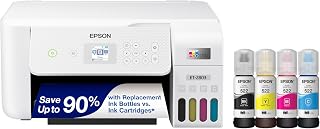
Anyone wanting a no-frills setup for home paperwork will like that this Epson printer combines scanning with refillable ink tanks, cutting down on cartridge swaps during busy stretches. Wireless and USB connectivity give flexibility for shared use between family members or a small home office, whichever way the desk is arranged.
Pros
- Refillable tanks with up to two years of ink
- Up to 4,500 black or 7,500 color pages per refill
- Prints, scans, and copies
- Wi-Fi, USB, voice, and mobile app support
Cons
- Maximum color speed is 5 pages per minute
- Needs more desk space; setup and cleaning can take time
For home and work printing, the Epson EcoTank ET-2803 makes its case through a refillable tank system rather than a quick output pace. It comes loaded with enough ink for up to two years of printing, and a refill can yield up to 4,500 black pages or 7,500 color pages. That gives a household or small work setup a long runway between ink purchases and avoids the routine of replacing individual cartridges. It is an all-in-one color inkjet, so scanning and copying are part of the same 8.8-pound machine. Wi-Fi and USB connectivity support flexible placement, while voice-activated printing and mobile app support suit a shared home or collaborative workspace. Its EcoFit bottles are designed for clean filling, and the color display simplifies navigation. Text is sharp and colors are vibrant enough for most home and small-business printing. The compromise is throughput: maximum speed is 10 pages per minute in monochrome and 5 in color. Initial setup and cleaning cycles can take time, and the tank design requires more desk space than compact alternatives. Users must use genuine Epson ink to maintain warranty coverage.
Model: Epson EcoTank ET-2803
Printer Type: Wireless All-in-One Inkjet (Print, Scan, Copy)
Print Speed: 10 pages per minute (black), 5 pages per minute (color)
Connectivity: Wi-Fi, USB
Special Features: Refillable ink tank, high-resolution scanner, color display, voice-activated printing, AirPrint, Epson Smart Panel app
Ink System: EcoFit refillable bottles (equivalent to 80 cartridges per set)
Page Yield: Up to 4,500 pages black, 7,500 pages color per ink set
Included Ink: 2 years of ink supply in the box
Color: White
Weight: 8.8 pounds
Warranty: Limited warranty (genuine Epson ink required for coverage)

Pros
- Dramatically lower cost per page makes high-volume printing economical for families and home offices
- Generous ink supply included reduces the need for frequent refills and reordering
- Wireless connectivity and Epson Smart Panel app enable printing from multiple devices
- All-in-one functionality covers printing, scanning, and copying without requiring separate devices
- Voice-activated printing adds modern convenience for hands-free operation
Cons
- Print speed of 5 pages per minute in color is slower than some competitors, making it less ideal for high-volume professional environments
- Requires genuine Epson ink to maintain warranty coverage, which limits flexibility with third-party alternatives
- Learning curve for initial setup and ink tank refilling may challenge users unfamiliar with cartridge-free systems
The Epson EcoTank ET-2850 is a cartridge-free, all-in-one wireless printer designed for home users, families, and small offices seeking to reduce printing costs without sacrificing quality. It combines printing, scanning, and copying capabilities in a compact white unit, making it a practical choice for anyone tired of expensive ink cartridge replacements.
The standout feature is its refillable ink tank system, which delivers up to 90% savings on replacement ink compared to traditional cartridges. Each bottle set prints up to 7,500 pages in black and 6,000 in color, and the inclusion of roughly two years of ink in the box means users can start printing immediately without worrying about early refills. Wireless connectivity and voice-activated printing through the Epson Smart Panel app add modern convenience for multi-device households.
Print quality is solid across documents and photos, thanks to Micro Piezo Heat-Free Technology and pigment black ink that produce sharp text and vibrant colors on various paper types. The built-in flatbed scanner supports high-resolution copying, and automatic 2-sided printing helps conserve paper. The 3.5-inch color LCD display makes navigation intuitive even for less tech-savvy users.
Color print speed of 5 pages per minute is noticeably slower than many alternatives, which may frustrate users handling frequent large projects. The printer also requires genuine Epson ink to maintain warranty protection, limiting cost-cutting options for refills. Initial setup and tank filling require careful attention, though the EcoFit bottle design aims to simplify the process.
The EcoTank ET-2850 is an excellent value printer for households and small offices with moderate printing needs and a focus on long-term savings. Its combination of low operating costs, wireless convenience, and all-in-one functionality justifies the upfront investment for the right user, though speed-focused environments may want to consider faster alternatives.
Print Performance: Maximum resolution of 4800 x 1200 dpi for both black and color output. Color print speed of 5 pages per minute; black and white copy speed of 10.5 pages per minute. Auto-duplex printing supports 2-sided documents.
Connectivity and Control: Wireless printing with Android controller support. Voice-activated printing via Epson Smart Panel app. USB and network connectivity for flexible device integration. Compatible with laptops and smart devices.
Scanner and Copier: Flatbed scanner with 1200 x 2400 dpi color resolution and 600 dpi black and white resolution. Maximum copy resolution matches scanner capabilities. Up to 100 copies per run with color LCD display for easy operation.
Physical Specifications: Dimensions of 22.3 inches wide by 14.8 inches deep by 10.2 inches high. Weight of 11.9 pounds. Includes 1 black ink bottle (127 mL) and 3 color ink bottles (70 mL each). 1-year limited warranty covers defects in materials and workmanship.
Best For: This printer suits families, home offices, and small businesses that print regularly but want to minimize ongoing costs. It's ideal for users who value convenience features like wireless printing and all-in-one functionality over speed. Environmental consciousness and multi-year cost savings are additional motivators for purchase.
Print Volume Consideration: The included ink and high page yields support approximately 150 pages monthly, making it well-suited for typical home use. High-volume commercial printing environments should consider faster alternatives, but most household and light office users will find ample capacity between refills.
Genuine Ink Requirement: Understand that warranty coverage requires genuine Epson ink bottles. While this ensures quality and device longevity, it means you cannot substitute cheaper third-party inks without voiding coverage. Budget long-term refill costs accordingly, though savings versus cartridges remain substantial.
Setup and Maintenance: Allocate time for initial ink tank filling and printer setup. The EcoFit bottles are designed for simplicity, but first-time users should follow instructions carefully. Regular use prevents ink from drying in the tanks, making it better suited for consistent printing than occasional users.

Pros
- Dramatically lower cost per page makes high-volume printing economical for businesses and creators
- Wide-format printing opens possibilities for marketing materials, art prints, and professional signage
- Reliable all-in-one design handles printing, scanning, copying, and faxing without extra devices
- Generous ink yields mean less frequent cartridge replacements and minimal downtime
- Smart connectivity through Wi-Fi, USB, and LAN plus voice control adds convenience and flexibility
Cons
- Larger footprint and 26.5-pound weight require dedicated desk or furniture space
- Initial setup requires ink bottle installation and may take longer than cartridge printers
- Voice activation requires Epson Connect registration and compatible devices, adding setup complexity
The Epson EcoTank ET-15000 is a wide-format all-in-one inkjet printer built for professionals and small business owners who print regularly and need to control costs. It combines printing, scanning, copying, and faxing in a single machine, making it a practical solution for creative studios, marketing departments, and high-volume home offices.
What sets this printer apart is its revolutionary refillable ink tank system. Instead of replacing expensive cartridges, you simply refill large bottles that cost just pennies per page. Epson claims up to 90 percent savings versus cartridge alternatives, with each replacement set yielding approximately 6,000 pages. The wide-format capability prints up to 13x19 inches through the rear-feed tray, opening doors for posters, photos, and specialty projects that standard printers cannot handle. Print speeds reach 17 ppm in black and 9 ppm in color with sharp 4800x2400 dpi resolution.
Build quality is solid, with a 2.7-inch color touchscreen, 250-sheet front paper tray, and automatic document feeder for scanning. Wi-Fi connectivity, USB, LAN ports, and voice-activated printing via Epson Connect add modern convenience. The machine weighs 26.5 pounds and measures nearly 30 inches deep, so it demands significant desk or furniture real estate.
The main drawbacks include the large physical footprint, longer initial setup compared to traditional cartridge printers, and the requirement to register with Epson Connect for voice functionality. Additionally, optimal ink yields depend on consistent printing patterns and infrequent printing may result in lower page counts.
For anyone tired of expensive cartridge replacements and needing wide-format output, the ET-15000 delivers exceptional value and capability. It's a smart investment for creative professionals and businesses with regular printing demands.
This printer is ideal for graphic designers, photographers, small marketing agencies, and print-heavy home offices. If you regularly print marketing materials, artwork, or high volumes of documents and want to slash ink expenses, the EcoTank ET-15000 justifies its investment through dramatic cost savings.
It's also perfect for anyone who scans, copies, or faxes documents as part of their workflow and wants a single reliable device. The wide-format capability makes it particularly valuable for creative professionals who need to output beyond standard 8.5x11 sizes.

For a home office juggling both wireless printing and paperwork, this Canon model earns its place with a built-in display screen for easy navigation and network-ready Wi-Fi for setup across multiple devices. Borderless printing rounds it out for anyone occasionally producing photos or flyers alongside everyday documents, without fussing over cables or drivers.
Pros
- Two years of included ink
- Up to 6,000 black or 7,700 color pages per set
- Borderless printing and display screen
- Wi-Fi and USB connectivity
Cons
- Single-sided printing requires manual duplex handling
- Maximum color speed is 6 pages per minute
Low ink intervention is the central appeal of Canon’s PIXMA G3270 for a home-and-work desk. Its MegaTank design trades cartridges for bulk tanks, and the supplied ink covers two years. A set is rated for as many as 6,000 black-and-white pages or 7,700 color pages, giving regular document users a clear reason to favor it for long stretches of printing. Beyond output, this black all-in-one brings scanning and copying into the same network-ready machine. Wi-Fi and USB are available for connection, and its display screen puts core functions close at hand. Borderless printing expands its scope beyond standard documents. Energy Star and EPEAT qualifications further distinguish the G3270. This is not built around speed or hands-off two-sided workflows. Color printing tops out at 6 pages per minute, while monochrome reaches 11 pages per minute. It prints single-sided, so duplex jobs need manual handling. Those limits matter in a busy work setting with frequent multipage color files. For home offices or small operations where ink yield outweighs output pace and automatic duplexing, the G3270 concentrates its strengths in the areas tank-printer buyers often value most.
Choose the G3270 for a home office, household, creative studio, or small operation with recurring print needs and a strong preference for large black and color page yields. It is especially sensible when scanning, copying, borderless printing, Wi-Fi, and a display screen are useful in one machine. Skip it if automatic two-sided printing is essential or if your workday involves sustained, high-volume color runs where a 6-page-per-minute maximum will slow the workflow. It favors long-run ink economy over speed and duplex convenience.
Connectivity: USB and Wi-Fi for flexible printing and network sharing
Print Technology: Inkjet with borderless printing capability
Print Speed: 11 pages per minute monochrome, 6 pages per minute color
Display: 1.35-inch square LCD screen
Functions: Print, copy, and scan in one device
Special Features: Energy Star certified, EPEAT qualified, network-ready, borderless printing support
Physical: 13.2 pounds, compact footprint suitable for desks and small workspaces
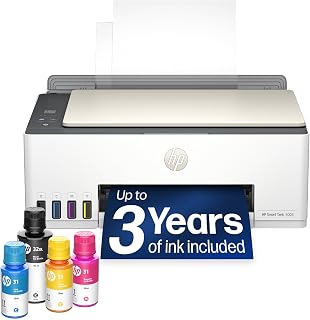
Families splitting duties between school assignments and remote work benefit from this HP pick's Mopria and AirPrint support, letting anyone print straight from a phone or tablet without installing software. Scan to PDF handles paperwork digitizing, while the high-volume tank keeps output steady during busy weeks at home or in a small office.
Pros
- Up to three years of included ink
- About 6,000 pages from the included ink supply
- Print, scan, copy, and scan to PDF
- AirPrint, Mopria, HP ePrint, Wi-Fi, USB, and Print Anywhere
Cons
- Maximum color speed is 5 pages per minute
- Not suited to frequent large print jobs
Three years of included ink gives the HP Smart Tank 5003 a particularly long-term angle for home and work printing. The cartridge-free refillable tank is rated for about 6,000 pages from the included supply, reducing how often a regular home user or small office must think about replenishment. Its ink tank approach is paired with color printing, scanning, and copying, making it useful where separate equipment would crowd a shared workspace. Connection options cover wireless Wi-Fi, USB, Apple AirPrint, HP ePrint, Mopria, and Print Anywhere. That breadth makes it practical for people who switch between phones, tablets, and computers. It also supports scan-to-PDF, and the mess-free refill design is intended to avoid the spilled-ink frustration associated with older tank systems. At 11.1 pounds, it is an all-in-one for home placement. Speed sets the boundary for its use at work. Maximum output is 10 monochrome pages per minute and 5 color pages per minute, so it makes more sense for everyday documents and photos than frequent large jobs. Black text is crisp and color output is acceptable, though this is not positioned as a fast, premium printer. It therefore suits home or small-office users who value included ink and mobile printing.
Connectivity: Wireless (Wi-Fi), USB, Apple AirPrint, HP ePrint, Mopria Print Anywhere
Printing Technology: HP Thermal Inkjet
Print Speed: 10 pages per minute (black and white), 5 pages per minute (color)
Special Features: Wireless printing, high-volume refillable ink tank, print from phone or tablet, scan to PDF, borderless printing
Output: Color
Color: Oatmeal White with Portobello accents
Weight: 11.1 pounds
Model: HP Smart Tank 5003 All-in-One Printer (9B2D3A)
Buy the Smart Tank 5003 for a household or small office that prints often enough to value three years of included ink, but does not need rapid production printing. It is a strong fit for users who scan or copy, print from phones and tablets, or want AirPrint, Mopria, HP ePrint, Wi-Fi, USB, and Print Anywhere support. Skip it if large color or monochrome jobs are frequent and speed is the priority. Users seeking premium color output should also look elsewhere.

Pros
- Exceptional ink economy saves money and reduces environmental waste with replacement bottles equivalent to 90 individual cartridges
- Wireless connectivity with dedicated Epson Smart Panel app provides convenient printing from any connected device
- Compact 11.5-pound design fits easily on home office desks without sacrificing functionality
- Auto-duplex printing and flatbed scanner add versatility for copying and scanning tasks
- Straightforward EcoFit bottle design prevents ink mixing and spilling during refills
Cons
- Color print speed of 8 pages per minute is slower than black and white, affecting job completion time for mixed-media printing
- Genuine Epson ink requirement for warranty coverage may limit cost-saving options for budget-conscious buyers
- Mobile printing features require internet connection, limiting offline printing capabilities
The Epson EcoTank ET-2980 is a wireless all-in-one inkjet printer designed for families and home office users who print frequently and want to minimize ongoing expenses. This model combines printing, scanning, and copying in a compact 14.8-inch-wide footprint that fits most desk setups without dominating the workspace.
The standout feature is the massive refillable ink tank system. With enough included ink to print approximately 6,600 black pages and 5,500 color pages (enough for 3 years based on typical home use), this printer dramatically reduces the frustration and expense of traditional cartridge replacements. Epson claims each replacement bottle set is equivalent to about 90 individual cartridges, making long-term printing costs significantly lower than conventional inkjet models. The PrecisionCore Heat-Free technology also enables a permanent printhead designed to last the printer's lifetime, improving overall reliability.
Performance is solid for the price point. Print speeds reach 15 pages per minute in black and white and 8 pages per minute in color, representing 50% improvements over the previous generation. The 4800 x 1200 resolution delivers photo-quality output suitable for everyday documents, photos, and family projects. Wireless connectivity via Wi-Fi and USB, combined with the Epson Smart Panel mobile app, makes it easy to print and scan from smartphones and tablets. Automatic double-sided printing and borderless photo printing add professional touches for minimal effort.
The main drawback is that color printing speed lags behind black printing, which matters if you regularly print mixed-media documents. Additionally, Epson strongly recommends genuine ink cartridges to maintain warranty coverage, which limits your ability to save further by purchasing third-party alternatives. Finally, most wireless and mobile features require an active internet connection, which may be inconvenient during network outages.
The Epson EcoTank ET-2980 represents excellent value for households and small home offices that prioritize low total cost of ownership and reliable all-in-one functionality over speed and premium features.
Printing Capabilities: Color inkjet with 4800 x 1200 resolution, 15 ppm black and white, 8 ppm color, automatic duplex printing, and borderless printing support.
Tank System: Large refillable EcoTank with included ink bottles for up to 6,600 black and 5,500 color pages. Replacement bottle sets equivalent to approximately 90 individual cartridges.
Scanning and Copying: Flatbed scanner with maximum 8.5 x 14 inch media support and 100-sheet tray capacity for copying.
Connectivity: Wireless Wi-Fi, USB 2.0, compatible with Windows PCs, Macs, smartphones, and tablets via Epson Smart Panel app.
Physical Specs: 14.8 inches wide, 13.7 inches deep, 7.4 inches tall, weighing 11.5 pounds. Includes 1-year limited warranty.
Best For: Home users, families, and small home office operators who print 100+ pages monthly and want to minimize cartridge replacement costs and environmental impact.
Consider This Printer If: You are frustrated with frequent cartridge purchases, value wireless mobile printing, need reliable scanning and copying functions, and can benefit from 3 years of included ink without worrying about running out.
Not Ideal If: You print rarely (under 50 pages per month), need color printing speeds matching professional office equipment, require high-volume capability for business use, or want the flexibility of third-party ink without warranty concerns.
Total Cost of Ownership: The included ink provides substantial value upfront. Long-term savings compared to traditional cartridge printers are significant, especially for users printing hundreds of pages monthly. Budget replacement ink bottles as needed after 3 years.

Anyone setting up a compact workspace will appreciate this Epson unit's manageable 11.4 pound weight and modest footprint, making it easy to tuck onto a shelf or small desk. Mobile printing capability suits students or remote workers sending jobs from a laptop, while the refillable tank keeps color output running without constant attention.
Pros
- Refillable ink tank system
- Prints, copies, and flatbed scans
- Wireless, mobile, and voice-activated printing
- Detailed 5760 x 1440 dpi color output
Cons
- Two-sided printing is manual
- 100-sheet tray and modest copy speed
Managing the recurring ink needs of a household or a modest home workspace is the ET-2800’s clearest strength. Rather than relying on standard cartridges, this color all-in-one uses refillable tanks; a set of ink bottles is equivalent to about 90 cartridges, and the included bottles can supply up to two years of typical home printing. That arrangement makes sense for people who want a printer available for everyday documents, occasional color work, copies, and scans without making replacement cartridges the center of the experience. It also brings essential home-and-work functions into a relatively light 11.4-pound unit: color printing, copying, and flatbed scanning. Wireless and mobile printing add flexibility, while voice-activated printing and an LCD display broaden its convenience. Its 5760 x 1440 dpi color resolution and Micro Piezo Heat-Free Technology support detailed documents and photos. The tradeoff is throughput. Black-and-white copying reaches 10 pages per minute, the tray holds 100 sheets, and two-sided jobs require manual handling. It is better suited to recurring personal or light office output than large, fast print runs.
Printer Type: Inkjet with refillable EcoTank system
Print Speed: 10 ISO pages per minute (black and color)
Resolution: 5760 x 1440 dpi (color), 5760 dpi (black and white)
Ink Capacity: Up to 4,500 black pages and 7,500 color pages per set
Functions: Print, scan, copy in one device
Scanner: Flatbed with 720 x 720 dpi color resolution
Connectivity: Wireless, mobile app support, voice-activated printing
Media Support: Plain paper, glossy photo paper, envelopes up to 8.5 x 14 inches
Paper Capacity: 100-sheet single tray
Display: LCD color display for easy navigation
Dimensions: 22.8 x 14.8 x 10 inches
Weight: 11.4 pounds
Power Consumption: 12 watts
Warranty: 1-year limited warranty
Buy the ET-2800 if your home or small home office needs a color printer that also scans and copies, and your priority is reducing routine cartridge replacements. It suits regular everyday printing, document scanning, and photo printing where fast batch output is not essential. Skip it if work involves frequent high-volume jobs, since its 100-sheet tray and 10-page-per-minute black-and-white copy speed can slow larger sessions. Also look elsewhere if automatic two-sided printing is a requirement.

Pros
- Dramatically lower ink costs make this ideal for high-volume printing environments
- Compact footprint saves desk space while maintaining fast performance and large paper capacity
- Refillable ink bottles are simple to replace and the maintenance box is inexpensive
- Dependable build quality with proven reliability across multiple units in business settings
- Professional print quality using Epson DURABrite ET pigment inks for vibrant color output
Cons
- Paper jams occur occasionally, though users report they are easily resolved by basic troubleshooting
- Does not support borderless printing or maximum paper size capabilities advertised in some channels
- Print quality is good but slightly less saturated than higher-end EcoTank models
The Epson EcoTank ET-5150 is an all-in-one inkjet printer designed for offices, small businesses, and studios that demand high-volume printing without the expense of traditional cartridges. Its refillable ink tank system with high-yield bottles makes it ideal for users who want to cut printing costs while maintaining reliability and professional output quality.
The standout feature is the dramatically reduced per-page cost of just 2 cents in color versus 14 cents with standard cartridges. Performance is solid, with printing speeds of 17 ppm for black and 9.5 ppm for color. The permanent printhead is engineered to last the life of the printer, eliminating one of the hidden costs of long-term printer ownership. Each ink bottle set yields up to 7,500 black pages or 6,000 color pages, meaning fewer interruptions for refills in busy environments.
Design and build quality are practical and straightforward. The compact 25.9-inch width is smaller than expected, making it suitable for space-conscious offices, while the 250-page input capacity handles moderate daily workflows. The LCD display and wireless connectivity provide convenient operation, though some users report occasional paper jams that are readily fixed with minor adjustments. The copy speed of 40 ppm black and white is competitive, and the sheetfed scanner works well for document processing.
Drawbacks include the lack of borderless printing, which may disappoint users needing edge-to-edge output. Some customers noted that print saturation is slightly less vibrant than pricier EcoTank models, though quality remains professional for most business documents. A small percentage of users experience frequent paper jams, typically resolved by checking paper quality or performing basic maintenance.
The Epson EcoTank ET-5150 is a smart investment for cost-conscious offices and high-volume printing environments. Its low running costs, reliable performance, and all-in-one capabilities make it a practical alternative to expensive cartridge-based systems, backed by a two-year warranty and proven durability across multiple installations.
One of the primary advantages of the EcoTank ET-5150 is its dramatically lower cost per page. At approximately 2 cents per color page compared to 14 cents with traditional color laser cartridges, the savings compound quickly in high-volume environments. A business printing 5,000 pages monthly would save roughly $600 per year in ink costs alone.
Initial investment is higher than entry-level cartridge printers, but the payback period for busy offices is typically 6 to 12 months depending on volume. Replacement ink bottles are inexpensive, and the maintenance box that occasionally needs replacement is a fraction of the cost of cartridge sets. Over three to five years of typical use, total cost of ownership strongly favors the EcoTank system.
The zero-cartridge-waste benefit also appeals to environmentally conscious organizations seeking to reduce their landfill contribution while lowering expenses.
How to Choose an Ink Tank Printer
The selection ranges from straightforward print, copy, and scan machines to wide-format and office-focused units. Start with how many pages you create in a typical week, then decide whether automatic two-sided printing, an automatic document feeder, a larger tray, fax capability, or borderless photos will genuinely save you time.
Compact choices such as the Canon MegaTank G3270 and Epson EcoTank ET-2800 suit everyday household duties, while the Epson EcoTank ET-15000 and EcoTank Pro ET-5150 target more demanding workflows. The right choice is the model whose strengths match your documents, media, and available desk space.
Match Print Speed and Paper Capacity to Your Routine
Monthly volume should guide this decision before any other feature. The Epson EcoTank ET-3760 combines a 250-sheet tray, automatic document feeder, and automatic two-sided printing, making it a sensible fit for repeated multipage jobs. The EcoTank Pro ET-5150 is the stronger candidate when fast first pages and its rated 17 black or 9.5 color ISO ppm better suit your workday.
For lighter family printing, the Epson EcoTank ET-2903 offers rated speeds of 11 black and 6 color ISO ppm with a 100-sheet tray. The Epson EcoTank ET-2800 handles up to 10 ISO ppm for basic projects, while the newer EcoTank ET-2980 emphasizes a long included ink supply for less frequent refill planning.
Choose for Your Documents, Photos, and Paper Sizes
Regular letters and forms do not need a wide-format machine, but creative and business projects sometimes do. The Epson EcoTank ET-15000 is the specialized option here, bringing wide-format capability, fax support, and a resolution up to 4800 x 2400 dpi. It makes more sense for layouts, larger visuals, and materials that outgrow standard office paper.
For photo-oriented home use, the HP Smart Tank 5003 supports borderless prints, while the Epson EcoTank ET-2903 lists a 5760 x 1440 dpi resolution for detailed images and text. The Canon MegaTank G3270 uses single-sided printing, so the Epson EcoTank ET-2850 is the more convenient pick when automatic duplex documents are a priority.
Look Closely at Scanning, Copying, and Connectivity
A capable scanner matters when you digitize signed forms, homework, receipts, or family photos. The Epson EcoTank ET-3760 adds an automatic document feeder and a 2.4-inch color display, while the Epson EcoTank ET-2803 and ET-2850 provide flatbed scanning and copying for smaller batches. The Canon MegaTank G3270 keeps controls simple with its compact LCD display.
Wireless printing is useful only when it works with the devices you already use, so confirm mobile support before choosing. Epson Smart Panel, AirPrint, and Mopria support make several EcoTank models flexible for mixed-device homes. If you transfer large files between devices, a portable SSD for a Mac workflow can complement mobile scanning, while a NAS hard drive setup gives shared documents a central home.
Consider Refilling and Long-Term Ownership
Refill design affects how comfortable the printer is to own over time. Epson uses keyed EcoFit bottles across many EcoTank models, helping reduce bottle mix-ups during refills. HP takes a different approach with plug-in bottles that drain into the Smart Tank 5003, while Canon lists substantial black-and-white and color page yields for the MegaTank G3270.
Published page yields are useful comparisons, but your results will change with photo coverage, color-heavy graphics, and document density. Follow the brand’s ink guidance, use the printer regularly, and keep it in a clean, stable location. If you retain many scans and images, an 8TB hard drive for long-term backups can protect the digital side of your printing workflow.
Final Thoughts
For a fast-moving home office, the Epson EcoTank ET-3760 Wireless Color All-in-One brings an automatic document feeder, larger tray, and duplex support that make multipage work less hands-on. If your priority is uncomplicated everyday print, copy, and scan output, the Canon MegaTank G3270 All-in-One Wireless Color is an approachable choice with strong stated ink capacity and a compact feature set.
Frequently Asked Questions
Are ink tank printers worth it for home use in 2026?
Ink tank printers make the most sense when you regularly print school materials, forms, recipes, color pages, and household documents. Compact models such as the Canon MegaTank G3270 and Epson EcoTank ET-2800 combine copying and scanning with refillable tanks, keeping the setup practical for a family workspace.
Visible tanks also let you see when ink is getting low, which can make refills easier to anticipate before an important deadline. If you print only rarely, factor periodic use and routine care into your decision instead of focusing only on headline page-yield figures.
Which ink tank printer is right for a home office?
Choose a model with paper handling that reflects your actual workload. The Epson EcoTank ET-3760 is well suited to recurring forms and multipage scans because it has an automatic document feeder, a 250-sheet tray, and automatic two-sided printing. The EcoTank Pro ET-5150 is better aligned with users who place greater importance on faster rated print speeds.
For occasional wide materials, the Epson EcoTank ET-15000 adds a different advantage through its wide-format design and fax capability. A home office printer should minimize manual steps, so prioritize the features that remove repetitive loading, flipping, and scanning tasks from your day.
Can an ink tank printer produce good photos and borderless prints?
Yes, but photo priorities vary by model. The HP Smart Tank 5003 supports borderless printing, making it especially useful for snapshots and creative projects. The Epson EcoTank ET-2903 lists a high 5760 x 1440 dpi resolution, which is helpful when you want crisp text alongside detailed color output.
Paper choice still has a major effect on the finished image, so select media suited to your intended result. If your projects need larger visuals rather than standard photo sizes, the wide-format Epson EcoTank ET-15000 is the more fitting direction.
What features matter in an ink tank printer for a small desk?
For a limited workspace, focus on footprint, simple wireless access, and a display that makes copying and setup less frustrating. The Epson EcoTank ET-2803, Epson EcoTank ET-2903, and Canon MegaTank G3270 are all geared toward straightforward home printing rather than oversized paper handling.
Your desk can remain productive when the printer works alongside compact peripherals, such as a tenkeyless keyboard for smaller workspaces or a dedicated number pad for spreadsheet work. Leave enough clearance for paper loading and bottle refills, since a cramped location can make even a compact printer harder to use.





Write Your Review
No reviews yet. Be the first to share your experience!