

Photo editing demands precision that most consumer displays cannot deliver. When colors shift between your monitor and final print, when detail vanishes in shadows, or when glare forces you to squint at your screen for hours, you need hardware designed specifically for visual work.
This guide evaluates 10 professional monitors built for photographers, digital artists, and content creators. We focus on factory calibration, color gamut coverage, resolution, and practical features that affect your daily workflow. Whether you edit RAW files from portrait sessions or prepare images for commercial printing, one of these displays will match your requirements and workspace setup.
Quick Comparison
Ratings reflect the most recent data pull. Check each listing for current price and availability.
Quick answer
This guide compares 10 picks, with ViewSonic VP2766-2K 27" QHD USB-C Monitor 120Hz IPS ranked first. ASUS ProArt PA278QV 27 Inch 1440p Professional Monitor holds the highest customer rating among them. Dell 27 Plus QHD Monitor S2725DSM 144Hz 2560x1440 USB-C leads this list on refresh rate.

Pros
- Pantone-validated factory calibration eliminates need for separate calibration tools, saving time and money
- 90W USB-C single-cable solution powers and displays from most modern laptops while supporting a second device via HDMI 2.1
- QHD resolution provides significant detail upgrade over 1080p without requiring high-end GPU demands
- Full ergonomic adjustability plus VESA compatibility adapts to any workspace setup
Cons
- Premium pricing compared to standard 27-inch monitors may not justify investment for casual users or non-color-critical work
- 5ms response time, while adequate for most work, falls short of gaming-focused displays for fast-paced graphics
- Color accuracy benefits require proper room lighting and viewing conditions to fully realize
The ViewSonic VP2766-2K is a professional-grade 27-inch QHD monitor designed specifically for creative professionals including video editors, photographers, graphic designers, and anyone requiring accurate color representation. Its factory-calibrated Pantone validation and 100% sRGB coverage make it a compelling choice for workflows where color accuracy directly impacts output quality.
The standout feature is the comprehensive USB-C integration. A single cable handles video, data, and up to 90W of power delivery, simplifying workspace setup and charging most modern USB-C laptops simultaneously. The additional HDMI 2.1 port enables connecting a second device at 120Hz, creating flexible multi-monitor workflows. The 120Hz refresh rate and 5ms response time on an IPS panel deliver both smooth motion and vibrant colors without compromise.
Build quality reflects its professional positioning. The fully adjustable ergonomic stand supports tilt, swivel, 90-degree portrait pivot, and 130mm height adjustment, accommodating extended work sessions and various workspace configurations. Dual 3W stereo speakers, four USB-C ports, and standard VESA mounting provide comprehensive connectivity and flexibility. Flicker-free technology and low blue light filtering reduce eye strain during long creative sessions.
The main limitation is pricing. This monitor targets professionals who value color accuracy and integrated USB-C connectivity over casual users seeking basic displays. The 5ms response time, while solid for creative work, won't satisfy gamers prioritizing ultra-fast refreshes. Additionally, realizing full color accuracy benefits requires properly controlled lighting environments.
For creative professionals invested in USB-C ecosystems and requiring reliable color-accurate displays, the VP2766-2K delivers exceptional value. The combination of Pantone validation, ergonomic design, and modern connectivity solves real workflow problems. Budget-conscious users or those without color-critical requirements should consider more basic alternatives.
Display Specifications: 27-inch QHD IPS panel, 2560 x 1440 resolution, 16:9 aspect ratio, 120Hz refresh rate, 5ms response time, matte finish, 100% sRGB color space, Pantone validated and factory calibrated.
Connectivity: One USB-C upstream port (90W power delivery), one USB-C downstream port (15W), two USB-C downstream ports (4.5W each), one USB-A port, HDMI 2.1, audio output jack, Kensington security slot. HDMI and USB-C cables included.
Ergonomics and Build: Fully adjustable stand with tilt, swivel, 90-degree pivot to portrait, 130mm height adjustment. 100 x 100mm VESA pattern for standard arms and mounts. Dual 3W stereo speakers. Flicker-free technology and low blue light filter. Energy Star 8.0 and EPEAT Silver certified. 3-year warranty included.
Ideal For: Video editors, photographers, graphic designers, digital artists, and creative professionals requiring color-accurate displays. Particularly suited for USB-C laptop users including MacBook Pro and MacBook Air owners seeking consolidated connectivity and charging solutions.
Consider Alternatives If: You primarily game and prioritize ultra-fast response times, work with strict color management requiring hardware profiling tools beyond factory calibration, or need the lowest-cost 27-inch monitor available without color accuracy requirements.
Best Use Cases: Professional creative workflows, multi-device USB-C setups, workspaces requiring ergonomic flexibility, color-critical content creation, and hybrid work environments where single-cable simplicity matters.
Pros
- Exceptional color accuracy with Calman verification ensures reliable results for photo and video editing
- Wide 178-degree viewing angles and matte IPS panel minimize color shift and reflections
- Comprehensive connectivity options and USB hub streamline workflow and desk organization
- Thoughtful ergonomic design with full adjustment options reduces neck and back strain
Cons
- 75Hz refresh rate is lower than gaming monitors, making it less ideal for fast-paced gaming
- No HDR support limits dynamic range for HDR content creation and consumption
- Limited brightness at 350 cd/m2 may feel dim in very bright environments or for some color-critical work
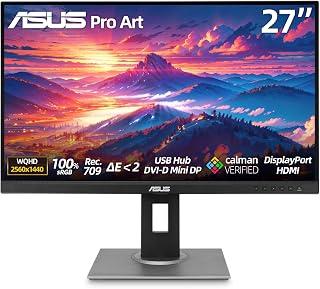
The ASUS ProArt Display PA278QV is a professional-grade 27-inch monitor designed for content creators, photo editors, and video producers who require accurate, reliable color performance. Its factory-calibrated 100% sRGB gamut with Calman verification makes it an excellent choice for anyone serious about color-critical work without the premium pricing of higher-end reference monitors.
The standout feature here is the color accuracy. With a ΔE<2 delta E value and factory calibration, this monitor delivers consistent color representation straight out of the box. The 2560x1440 WQHD resolution provides ample screen real estate for detailed work, while the 178-degree IPS panel ensures colors remain accurate even when viewing from different angles. The 5ms response time is adequate for most creative workflows, though gamers will notice the 75Hz refresh rate feels sluggish.
Build quality is solid throughout. The stand offers exceptional adjustability with tilt, swivel, pivot, and height adjustment, allowing proper ergonomic positioning for extended work sessions. The matte finish on the IPS panel reduces glare and reflections, which is crucial during long editing sessions. ASUS Eye Care Technology, including flicker-free operation and low blue light mode, helps minimize eye strain during those marathon editing sessions.
Connectivity is generous with DisplayPort, HDMI, DVI, and a 4-port USB 3.0 hub, making integration into creative workstations straightforward. The lack of HDR support and modest 350 cd/m2 brightness are reasonable tradeoffs given the price and intended use case, though professionals in HDR workflows may need to consider higher-tier options.
This monitor delivers professional color accuracy at a price that won't require a second mortgage. For freelance designers, photographers, and videographers, it represents strong value. It won't compete on speed with gaming monitors, but that was never the goal. This is a reliable, accurate, and comfortable monitor for serious creative work.
Display: 27-inch IPS LCD, 2560x1440 WQHD resolution, 16:9 aspect ratio, 178-degree viewing angles
Color Performance: 100% sRGB, 100% Rec.709, Calman Verified, Delta E less than 2, factory calibrated
Brightness & Contrast: 350 cd/m2 brightness, 1000:1 contrast ratio
Refresh Rate & Response: 75Hz, 5ms response time
Connectivity: 1x DisplayPort 1.2, 1x Mini DisplayPort, 1x HDMI 1.4, 1x DVI-D Dual Link, 4x USB 3.0 downstream, 3.5mm audio input/output
Design: Height, tilt, swivel, and pivot adjustable stand, frameless design, VESA 100x100mm wall mount compatible
Dimensions: 24.21W x 8.9H x 15.04D inches with stand, 10.93 lbs without stand, 17.02 lbs with stand
Best For: Photo editors, video producers, graphic designers, and content creators who prioritize color accuracy over refresh rate. Also suitable for general professional work where precise color representation matters.
Not Recommended For: Competitive gamers seeking high refresh rates, professionals requiring HDR capability, or those working in exceptionally bright environments where the 350 cd/m2 brightness may feel insufficient.
Comparison Context: This monitor sits in the mid-range professional category. It offers better color accuracy than standard consumer monitors but costs significantly less than ultra-premium reference monitors like those from Eizo or BenQ's higher-end ProArt line. If your work demands HDR or higher brightness levels, budget for a step up. If you mostly work in typical office lighting with sRGB-based content, this monitor delivers everything you need.
Setup Tip: Take advantage of the full ergonomic adjustability to position the monitor at eye level and arm's length distance. Use the low blue light feature during evening sessions to minimize sleep disruption. The USB hub is convenient for peripherals, but don't rely on it for high-bandwidth devices like external drives.
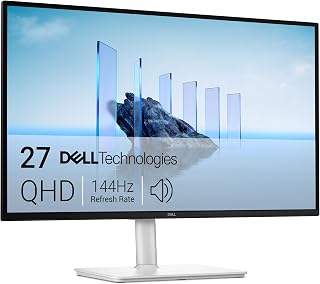
The 27-inch QHD panel with IPS technology delivers accurate color reproduction across wide viewing angles, critical when evaluating subtle tonal shifts in portraits or landscapes. The matte finish eliminates glare during extended editing sessions, while the height, tilt, pivot, and swivel adjustability lets you position the screen at eye level to reduce neck strain and maintain color consistency from your working angle.
Pros
- 99% color gamut with 1500:1 contrast for reliable color work
- TUV-certified eye comfort features reduce editing fatigue
- Fully adjustable stand accommodates precision positioning
- Matte finish eliminates studio glare
Cons
- QHD resolution limits large print evaluation
- Limited connectivity with single HDMI and DisplayPort
Photo editors working within QHD workflows will appreciate how the Dell S2725DSM balances resolution and performance without the GPU demands of 4K. The 2560x1440 IPS panel delivers 99% color gamut coverage and a 1500:1 contrast ratio, providing the color accuracy needed for reliable image evaluation. The 178-degree viewing angles maintain consistency when collaborating or reviewing work from different positions. What sets this monitor apart for extended editing sessions is its TUV 4-star eye comfort certification, combining flicker-free technology with blue light reduction to minimize fatigue during long retouching work. The fully adjustable stand supports height, tilt, pivot, and swivel adjustments, letting you dial in the perfect viewing position for precision work. The matte finish eliminates distracting reflections in bright studios. At 14.1 pounds with efficient 21.4-watt power consumption, it fits neatly into professional setups. The dual 3W speakers handle client presentations without external audio. While the 144Hz refresh rate and 1ms response time target gaming, they also benefit photographers previewing high-speed action sequences smoothly.
Best suited for photographers working in QHD resolution who need accurate color representation without 4K overhead, or those building dual-monitor setups where matching panels matter. The ergonomic design and eye comfort features make it ideal for full-day editing workflows. Skip this if you require native 4K resolution for large print work or need extensive connectivity for multiple legacy devices. The single HDMI 2.1 and lone DisplayPort may frustrate users juggling several input sources simultaneously.
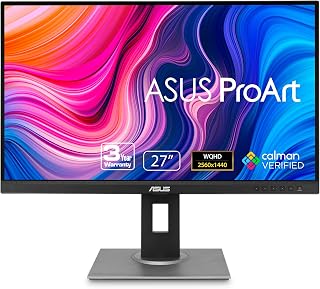
The 1440p QHD resolution gives photo editors enough screen real estate to see fine detail without the file size overhead of 4K workflows. The matte finish eliminates glare that can distort color judgment during long editing sessions. With a 16:9 aspect ratio, the display matches the native dimensions of most digital camera sensors, so images appear without letterboxing. The 27-inch size strikes a balance between workspace comfort and pixel density for critical retouching work.
Pros
- Factory calibrated for immediate color accuracy
- Matte finish eliminates glare in bright workspaces
- QHD resolution balances detail and GPU performance
- 178-degree viewing angles maintain color consistency
Cons
- Limited to sRGB gamut coverage
- Lacks hardware calibration support
The ASUS ProArt PA278QV delivers professional-grade color accuracy in a 27-inch QHD format designed specifically for creative work. Its 2560x1440 resolution provides ample screen real estate for detailed photo editing without the GPU demands of 4K, while the matte finish eliminates distracting reflections during long retouching sessions. The display covers 100% of the sRGB color space, ensuring accurate color representation for web and print workflows. With 178-degree viewing angles and 350 nits of brightness, the panel maintains consistent color reproduction from edge to edge and adapts well to various lighting conditions. The 16:9 aspect ratio matches standard photography formats naturally, and the factory calibration reduces setup time for color-critical work. At 75Hz, the refresh rate exceeds typical photo editing needs while the LCD LED backlight technology provides stable, flicker-free illumination. The 100,000,000:1 dynamic contrast ratio enhances shadow detail discrimination, crucial when adjusting exposure in darker image regions. For photographers seeking color reliability without premium display pricing, this ProArt model balances professional features with practical specifications.
Display Specifications: 27-inch IPS panel with 2560 x 1440 (QHD) resolution, 16:9 aspect ratio, 100,000,000:1 contrast ratio, 350 nits brightness, 178-degree viewing angles, and matte anti-glare finish.
Color Accuracy: Factory-calibrated with Delta E < 2, 100% sRGB gamut, 100% Rec. 709 gamut, Calman verified, includes color pre-calibration report.
Connectivity: DisplayPort, HDMI, Mini-DisplayPort, DVI-D, plus 4x USB 3.2 Gen 1 Type-A ports integrated hub for peripheral connections.
Design: Fully adjustable ergonomic stand supports height, tilt, pivot, and swivel adjustments. Dimensions 24.21 x 15.04 x 8.9 inches, weighs 17 pounds. VESA wall mount compatible.
Additional Features: Flicker-free technology, blue light filter, built-in speakers, FreeSync adaptive sync support. Power consumption 12.5 watts. 3-year standard warranty, extendable to 5 years with online registration.
This monitor suits photographers working primarily in sRGB color spaces, particularly those preparing images for web publication or standard print workflows. Hobbyists stepping up from consumer displays and professionals managing high-volume editing will appreciate the factory calibration and matte screen. Skip this if you require Adobe RGB or DCI-P3 coverage for commercial print work, need 4K resolution for extremely detailed retouching, or regularly edit HDR content requiring wider brightness ranges and advanced tone mapping capabilities.
Pros
- Exceptional color accuracy with Adobe RGB gamut certification for professional-grade output
- Large 32-inch screen real estate reduces eye strain and improves workflow efficiency
- Integrated shading hood minimizes reflections and color cast from ambient lighting
- Multiple connectivity options including USB-C, HDMI, and USB ports cover diverse setup needs
- Solid build quality and professional design suitable for studio environments
Cons
- Premium pricing may exceed budgets for hobbyist or casual photographers
- 32-inch size demands significant desk space and may overwhelm smaller workstations
- Glossy screen finish requires careful positioning to minimize reflections despite the hood
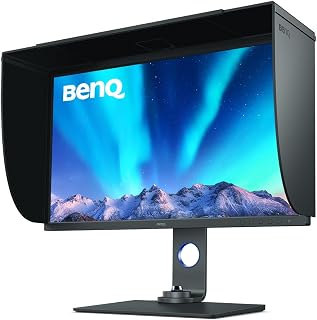
The BenQ SW321C is a professional-grade 32-inch 4K monitor engineered specifically for photographers, videographers, and digital artists who prioritize color accuracy. This monitor delivers exceptional value for serious creatives investing in color-critical work, from portrait retouching to landscape post-processing and video color grading.
The standout feature is its Adobe RGB color gamut certification combined with the integrated shading hood, which significantly reduces color cast from ambient lighting. The 3840x2160 resolution provides ample screen real estate for detailed work, while the 5ms response time ensures smooth performance during panning and zooming. USB-C connectivity adds modern convenience, enabling single-cable connections to compatible laptops and streamlining desk setup.
Build quality reflects its professional positioning. The robust construction feels durable enough for demanding studio use, and the adjustable stand allows comfortable ergonomic positioning. The 160-degree viewing angles mean team members or clients can view work without noticeable color or contrast shifts. Connectivity is comprehensive with dual HDMI ports, USB Type-C, and three USB ports for peripheral support.
The primary drawback is the significant investment required, making it best suited for professionals whose work demands justify the cost. Additionally, the 32-inch size consumes substantial desk space, and the glossy screen finish can still reflect bright overhead lighting despite the hood's protection. Careful room lighting setup remains important for optimal results.
For professional photographers and videographers serious about color accuracy and willing to invest in their workspace, the BenQ SW321C delivers exceptional performance and reliability. It represents a solid long-term investment backed by three years of manufacturer warranty support.
Display Specifications
Resolution: 3840x2160 (4K UHD)
Screen Size: 32 inches
Aspect Ratio: 16:9
Response Time: 5 milliseconds
Viewing Angle: 160 degrees
Display Technology: LCD
Screen Finish: Glossy
Pixel Pitch: 0.23mm
Color and Contrast
Color Gamut: Adobe RGB
Contrast Ratio: High
Picture Quality Enhancement Technology: Adobe RGB, High Contrast Ratio
Connectivity
HDMI Ports: 2
USB Type-C: 1
USB Ports: 3
Component Outputs: 1
Physical Specifications
Dimensions: 26.93" W x 35.98" H x 14.96" D
Weight: 25.6 kg (56.4 lbs)
Mounting Type: Wall Mount
Cable Length: 1 yard
Power and Warranty
Power Consumption: 52 watts
Voltage: 220 volts
Warranty: 3 Years Manufacturer Warranty
Ideal For
Professional photographers working with demanding color-critical projects including studio portraits, commercial photography, and fine art printing. Videographers and colorists requiring accurate color grading. Designers and digital artists who need precise color representation for their output. Photo retouchers and post-production specialists working in commercial or fine art environments.
Consider Alternatives If
Your budget is limited and you're a hobbyist photographer working casually. You have limited desk space and need a more compact monitor solution. You primarily do social media or web-only work where color precision is less critical. You prefer matte screen finishes and want minimal glare without requiring a separate hood.
Why This Monitor Stands Out
The integrated shading hood is a game-changer for studio environments, effectively controlling ambient light without requiring separate purchases. The combination of Adobe RGB certification, professional build quality, and comprehensive connectivity options creates a complete color-accurate workspace solution. The three-year warranty demonstrates manufacturer confidence in durability and reliability for professional use.

With 4K UHD resolution and IPS panel technology, this 27-inch display delivers sharp detail and reliable color accuracy across the entire workspace. The DisplayHDR 400 rating expands contrast range for more lifelike highlight and shadow rendering, while the matte screen finish minimizes distracting reflections when judging exposure, white balance, and tonal transitions in critical editing work.
Pros
- 95% DCI-P3 coverage delivers wide-gamut color accuracy
- True 4K resolution reveals fine detail and sharpness
- USB-C with 90W power delivery simplifies tethered workflows
- DisplayHDR 400 improves dynamic range evaluation
Cons
- 60Hz refresh rate limits video editing workflows
- Built-in speakers inadequate for critical audio work
The LG 27UP850K-W prioritizes what photo editors actually need: exceptional color fidelity and sharp rendering. The 4K IPS panel paired with 95% DCI-P3 coverage delivers the wide color gamut essential for evaluating images destined for print or digital publication. DisplayHDR 400 support with 400 cd/m² brightness adds dynamic range for assessing shadow detail and highlight rolloff. True 4K resolution at 27 inches produces pixel density that reveals fine details invisible on lower-resolution displays, critical when judging sharpness and inspecting for artifacts. The USB-C connection supplying 90W power delivery transforms desk organization, eliminating cable clutter while charging your laptop during tethered shooting sessions. The ergonomic stand provides height, tilt, and pivot adjustments for comfortable positioning during marathon editing sessions. The matte finish reduces reflections in studio environments. Built-in color calibration tools help maintain accuracy over time. While the 60Hz refresh rate won't appeal to gamers, it's perfectly adequate for still image work where color trumps motion performance. The comprehensive port selection including DisplayPort, dual HDMI, and USB 3.0 accommodates cameras, card readers, and multiple computers.
Photographers who prioritize color accuracy and detail rendering over refresh rate will find this monitor ideal, especially Mac users who benefit from seamless USB-C integration. The DCI-P3 coverage suits editorial, commercial, and fine art photographers working in wide-gamut color spaces. Skip this if you need high refresh rates for video editing or if you're seeking the absolute brightest display for HDR mastering work beyond DisplayHDR 400 certification.
Display: 27-inch 4K UHD IPS, 3840 x 2160 resolution, 178-degree viewing angle, 1200:1 contrast ratio, 5ms response time.
Color and HDR: 95% DCI-P3 color gamut, DisplayHDR 400, HDR10 support, 400 cd/m2 brightness.
Connectivity: USB Type-C with 90W power delivery, DisplayPort, 2x HDMI 2.0, 2x USB 3.0, headphone jack.
Ergonomics: Height, tilt, and pivot adjustable stand, 9.4 inches deep, 24.2 inches wide, 22.4 inches tall, 5.9kg weight.
Additional: Built-in stereo speakers with Waves MaxxAudio, FreeSync support, 60Hz refresh rate, 44W power consumption, 1-year parts and labor warranty.

Pros
- Exceptional color accuracy with 90% DCI-P3 gamut expression ideal for photo and video editing
- Energy-efficient design consuming only 25 watts, among the lowest in its class
- IPS panel with 170-degree viewing angles ensures consistent color from any position
- Comprehensive connectivity with DisplayPort and dual HDMI ports
- Flicker-free display reduces eye strain during long creative sessions
Cons
- 60Hz refresh rate limits use for gaming or fast-paced multimedia applications
- No USB-C connectivity, which some professionals prefer for single-cable solutions
- 5ms response time may not satisfy users prioritizing rapid pixel transitions
The LG 27US500-W is a professional-grade 27-inch 4K monitor designed for creative professionals including photographers, video editors, graphic designers, and content creators who prioritize color accuracy over everything else. Its affordable price point makes it accessible to freelancers and small studios entering professional workflows without the premium cost of enterprise displays.
The standout feature is its exceptional color performance, delivering 90% DCI-P3 color gamut with HDR10 support and a 1000:1 contrast ratio that brings digital imagery to life with precision and depth. The 4K UHD resolution provides exceptional detail clarity, and the IPS panel technology ensures consistent color reproduction across 170-degree viewing angles, critical for collaborative work environments where multiple team members review content simultaneously.
Build quality reflects LG's consumer electronics pedigree with a clean white finish, lightweight 12.1-pound frame, and ergonomic stand offering flexible tilt adjustment. The matte screen finish minimizes reflections in bright environments, while the flicker-free technology reduces eye fatigue during intensive creative work. DisplayPort and dual HDMI connectivity provide solid future-proofing, though the absence of USB-C limits single-cable desk integration.
The primary limitation is the 60Hz refresh rate, which means this monitor is not suited for gaming or fast-motion content work. The 5ms response time is acceptable for creative work but not optimized for interactive applications. Additionally, there are no USB downstream ports or built-in speakers, requiring separate peripherals for a complete setup.
The LG 27US500-W delivers exceptional value for budget-conscious creative professionals seeking legitimate 4K color accuracy. Its combination of DCI-P3 color space, HDR10 support, and affordable pricing positions it as a smart entry point into professional color-critical work without unnecessary enterprise markups.
Display Technology: 27-inch 4K UHD IPS panel, 3840x2160 native resolution, 16:9 aspect ratio
Color Performance: 1000:1 contrast ratio, 90% DCI-P3 color gamut, HDR10 support, 300 cd/m2 brightness, 170-degree viewing angles
Technical Specs: 60Hz refresh rate, 5ms response time, flicker-free technology, matte screen finish
Connectivity: 2x HDMI ports, 1x DisplayPort, 3 component outputs
Power and Physical: 25 watts power consumption, 12.1 pounds, 24.15 inches wide, 17.87 inches tall, 8.46 inches deep, ergonomic tilt-adjustable stand with wall mount compatibility
Package Contents: Monitor, power adapter, HDMI cable, stand components, quick start guide, 1-year limited manufacturer warranty covering parts and labor
Pros
- Exceptional color accuracy right out of the box eliminates need for manual calibration
- USB-C connectivity simplifies workspace setup with single cable for power, video, and data
- Highly versatile ergonomic stand accommodates portrait, landscape, and custom viewing angles
- Factory-verified performance meets professional standards for photography and video editing
- Extended 5-year warranty provides long-term protection and peace of mind
Cons
- 75Hz refresh rate is lower than gaming-focused monitors, limiting suitability for fast-paced gaming
- Higher price point compared to standard office monitors, making it a significant investment for casual users
- No integrated speakers may require separate audio solution for some workflows
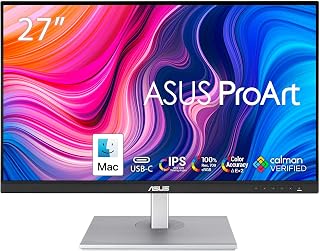
The ASUS ProArt PA278CV is a professional-grade 27-inch monitor designed specifically for creative professionals who cannot compromise on color accuracy. Whether you work in graphic design, photo editing, video production, or content creation, this display delivers the precision your work demands. Its factory-calibrated settings mean you get exceptional color performance immediately out of the box without the need for additional calibration tools or expertise.
The standout feature is undoubtedly the USB-C connectivity with 65W power delivery, which fundamentally changes how you interact with your workspace. A single cable handles video, data transfer, and laptop charging simultaneously, transforming a typical multi-cable desk setup into something clean and organized. The 27-inch QHD IPS panel with 2560x1440 resolution provides ample screen real estate for detailed work, while the 100% sRGB and Rec. 709 color gamut coverage ensures your creative output matches your vision across all professional platforms and devices.
Build quality reflects ASUS's professional positioning. The monitor features a comprehensive ergonomic stand with height adjustment, tilt, swivel, and a full 90-degree pivot mode for portrait orientation. This flexibility means the display adapts to your working style rather than forcing you into a fixed position. The non-glare IPS panel reduces eye strain during extended sessions, and the 350 cd/m2 brightness level provides sufficient luminance for well-lit studios without excessive glare.
The primary limitation is the 75Hz refresh rate, which places this firmly in the productivity category rather than gaming territory. Additionally, this monitor's professional-grade specifications come at a premium price point. There are no integrated speakers, so audio monitoring requires external solutions. However, the inclusion of DisplayPort daisy-chaining capability and free Adobe Creative Cloud access partially offset these considerations.
The ASUS ProArt PA278CV is an excellent investment for serious creative professionals who value color accuracy, connectivity, and ergonomic flexibility. The factory-calibrated performance, USB-C versatility, and 5-year warranty combine to deliver a compelling long-term value proposition for design-focused workflows.
Display Specs: 27-inch QHD IPS panel with 2560x1440 resolution, 16:9 aspect ratio, 75Hz refresh rate, 1900 contrast ratio, 350 cd/m2 brightness, 178-degree viewing angle, non-glare finish, and 0.23mm pixel pitch.
Color Accuracy: Factory-calibrated with Delta E less than 2, 100% sRGB gamut, 100% Rec. 709 gamut, and Calman Verified certification for professional-grade color reproduction.
Connectivity: USB Type-C with 65W power delivery, DisplayPort, HDMI, USB 3.2 Gen 1, and 3.5mm audio output. Supports DisplayPort daisy-chaining for up to four displays.
Physical Specifications: Dimensions 24.21 inches wide by 14.72 inches deep by 8.98 inches high, weighing 18.5 pounds. Stand includes height, tilt, swivel, and 90-degree pivot adjustments. Wall mountable.
Power and Warranty: 65W maximum power consumption at 240V operation. Includes 5-year warranty coverage with 3 years standard protection plus 2 years extension available through online registration.
Ideal Users: Graphic designers, photo editors, video producers, and digital content creators who require professional color accuracy and demand high-quality displays. Also suitable for creative professionals using both Mac and PC in hybrid work environments.
Key Benefits for Your Workflow: If your work involves color-sensitive tasks like photo retouching, video grading, or design work destined for print, this monitor eliminates costly color recalibration issues. The USB-C connectivity is particularly valuable if you work with modern laptops that support USB-C docking, significantly simplifying your desk setup and improving cable management.
Long-term Value: The 5-year warranty and factory-verified performance standards make this a solid long-term investment for professionals who depend on display accuracy daily. The ergonomic stand design means you can maintain this monitor comfortably through years of intensive creative work.

The 4K UHD resolution paired with 99% sRGB coverage ensures images appear with accurate color and exceptional clarity, essential when preparing files for print or web delivery. IPS technology maintains consistent color at any angle, and the 120Hz refresh rate provides smooth panning across large files or timelines, reducing eye fatigue during long retouching sessions.
Pros
- USB-C simplifies laptop-based editing workflows with 65W power
- 99% sRGB coverage ensures accurate color representation
- 120Hz refresh rate benefits hybrid photo and video work
- ComfortView Plus reduces eye fatigue without color impact
Cons
- USB-C reliability concerns reported by some users
- sRGB gamut narrower than DCI-P3 for print workflows
The Dell S2725QC addresses modern photo editing workflows where color accuracy meets practical connectivity. The 4K IPS panel with 99% sRGB coverage provides the color precision photographers need for reliable image evaluation, while the 1500:1 contrast ratio helps assess tonal transitions in shadows and highlights. The USB-C connection becomes transformative for laptop-based editing, consolidating video, 65W power delivery, and data transfer through one cable. This streamlines tethered shooting workflows and keeps desks organized during client sessions. The 120Hz refresh rate adds unexpected fluidity when scrubbing through image sequences or working with video content. ComfortView Plus technology reduces blue light emissions to 35% or below, minimizing eye strain during extended retouching sessions without color-shift penalties. The fully adjustable stand with height, tilt, swivel, and pivot options accommodates various workspace configurations and viewing preferences. The ash white finish and slim bezels suit professional environments. The included built-in speakers handle client presentations adequately. The 4ms response time maintains smooth performance across editing applications. HDR readiness expands dynamic range evaluation capabilities beyond standard displays.
Display: 27-inch 4K IPS LED, 3840 x 2160 native resolution, 16:9 aspect ratio, 163 ppi pixel pitch
Color: 99% sRGB, 1500:1 contrast ratio, 350 nits brightness, HDR ready
Refresh: 120Hz, 4ms response time, AMD FreeSync Premium
Connectivity: USB Type-C (65W power delivery), 2x HDMI, 10Gbps data transfer
Adjustability: Height, tilt, swivel, pivot, VESA mounting compatible
Features: Built-in speakers, anti-glare matte screen, ComfortView Plus blue light reduction, 178-degree viewing angles
Power: 25.2W consumption, 240V AC
Dimensions: 24.08" W x 15.3" H x 7.89" D, 14.8 lbs
Warranty: 1-year Advanced Exchange and Premium Panel Exchange
Photographers using MacBooks or high-end Windows laptops who value single-cable simplicity will benefit most, particularly those balancing still photography with occasional video projects. The sRGB coverage suits web-focused and editorial photographers. Skip this if you require wider DCI-P3 gamut for commercial printing work, or if reports of USB-C reliability issues concern you. The HDMI fallback works but undermines the monitor's primary selling point.

Pros
- Exceptional color accuracy with factory calibration and hardware calibration support
- Paper Color Sync technology delivers reliable screen-to-print matching for photographers
- Nano matte finish reduces reflections and simulates paper texture for natural editing
- USB-C power delivery and connectivity streamline workspace cable management
- Comprehensive warranty and professional-grade build quality
Cons
- 2K QHD resolution is lower than 4K alternatives, which some professionals may find limiting
- 60Hz refresh rate is not suitable for video playback or motion graphics work
- Premium pricing reflects professional target market, not ideal for casual users
The BenQ SW272Q is a 27-inch professional photography and video editing monitor built for creatives who prioritize color accuracy over everything else. With 99% Adobe RGB and 98% DCI-P3 coverage, this display is engineered for photographers, retouchers, and post-production specialists who need their edits to translate reliably to print and broadcast.
The standout feature is the integration of Paper Color Sync technology paired with hardware calibration via Palette Master Ultimate software. This combination lets you see exactly how your images will look on specific paper stocks before printing, eliminating costly mistakes. The nano matte panel with TUV certification adds another layer of professionalism by simulating paper texture on-screen and minimizing reflections that would otherwise compromise color judgment.
Build quality is solid with a fully adjustable stand offering height, pivot, and swivel adjustments. The 90W USB-C connectivity is a practical addition for photographers using newer laptops, consolidating power and display into a single cable. The 5ms response time and 1000:1 contrast ratio are adequate for stills work, though not optimized for motion.
The main limitation is the 2K QHD resolution at 2560x1440. While crisp at 27 inches, some professionals accustomed to 4K may find it restrictive for detailed retouching work. The 60Hz refresh rate confirms this is purely a color-critical display, not intended for video playback or animation.
For photographers and print specialists willing to invest in proven color accuracy and screen-to-print consistency, the SW272Q delivers professional-grade reliability. It is best suited for those who calibrate regularly and rely on hardware-verified color management rather than casual users seeking an affordable large monitor.
Display
Screen Size: 27 inches
Resolution: 2560x1440 (QHD Wide)
Panel Type: Nano Matte LCD
Color Gamut: 99% Adobe RGB, 98% DCI-P3
Colors Supported: 1.07 billion (16-bit 3D LUT)
Brightness: 300 nits
Contrast Ratio: 1000:1
Viewing Angle: 170 degrees
Connectivity
USB Type-C with 90W Power Delivery
DisplayPort
HDMI (2x)
USB Hub
Physical
Dimensions: 24.17in W x 17.78in H x 10.78in D
Weight: 18.3 lbs
Adjustments: Height, Pivot, Swivel
Mounting: VESA Wall Mount Compatible
Performance
Response Time: 5ms
Refresh Rate: 60Hz
Adaptive Sync: FreeSync
Power Consumption: 90 watts
Warranty
3-Year Manufacturer Warranty
Calman Verified
LightSpace Ready
Ideal Users
Professional photographers and retouchers who require color-accurate editing for print and commercial work. Graphic designers specializing in photo-based projects. Video editors working in color grading for commercial projects. Print production specialists and prepress professionals. Anyone using hardware calibration workflows.
Less Suitable For
Budget-conscious creators looking for an affordable 27-inch monitor. Video gamers or motion graphics artists requiring high refresh rates. Casual users prioritizing screen real estate over color accuracy. Professionals requiring 4K resolution for detailed pixel-level work.
Buying Guide
Color Accuracy and Calibration
Delta E values below 2 ensure what you see matches what prints. Factory calibration eliminates the guesswork, delivering accurate color from the moment you unbox the display. The BenQ SW272Q 27-inch 2K 90W USB-C Photographer ships with hardware calibration and 16-bit 3D LUT support, while both ASUS ProArt models achieve Calman Verified Delta E<2 certification straight from the factory.
Wide color gamut matters when preparing files for print or professional delivery. Look for 99% Adobe RGB coverage if you work with CMYK workflows, or prioritize DCI-P3 for digital media and web content. The BenQ SW321C 32″ PHOTOGRAPHY MONITOR 3840 x 2160 covers 99% Adobe RGB, making it ideal for photographers who need screen-to-print consistency across different paper stocks and printer profiles.
Resolution and Screen Real Estate
QHD resolution (2560×1440) provides 1.77 times more pixels than Full HD, giving you sharper detail for retouching work without the system resource demands of 4K. The ViewSonic VP2766-2K 27 Inch ColorPro 2K QHD IPS balances pixel density with smooth performance, especially useful if your editing system runs on integrated graphics.
True 4K displays (3840×2160) shine when you work with high-resolution cameras or need extreme zoom capability during detail work. Both the LG 27UP850K-W 27-inch Ultrafine 4K UHD IPS and Dell 27 Monitor S2725QC, 4K UHD IPS, 120Hz deliver native 4K with IPS panels, though you will need adequate GPU power to drive them smoothly while running Lightroom or Photoshop with multiple adjustment layers.
Connectivity and Workflow Integration
USB-C with power delivery simplifies desk cable management when you work from a laptop. Single-cable connectivity that handles video, data, and charging reduces clutter and speeds up the transition between locations. The ASUS ProArt PA278CV 27 Inch 1440p QHD USB-C provides 65W power delivery, enough for most ultrabooks and mobile workstations, while the ViewSonic VP2766-2K pushes 90W for more demanding laptops.
DisplayPort daisy-chaining matters if you run multi-monitor setups. The ASUS ProArt PA278CV supports connecting up to four displays through a single output from your computer, eliminating the need for multiple cables and GPU ports when you expand your workspace for timeline editing or reference panels.
Panel Technology and Eye Comfort
IPS panels dominate professional photo editing because they maintain color consistency across wide viewing angles. This matters when you step back to evaluate composition or when clients view your screen from the side during review sessions. Every monitor in this comparison uses IPS technology, ensuring you see accurate color regardless of your position.
Anti-glare coatings reduce eye strain during extended editing sessions, especially in spaces with windows or overhead lighting. The BenQ SW272Q 27-inch 2K 90W USB-C Photographer features a Nano Matte panel with TÜV anti-reflection certification, simulating paper texture on screen while eliminating reflections that force you to adjust your position or squint. Combined with flicker-free backlighting and low blue light filters, these displays reduce fatigue when you work through long retouching sessions or batch processing workflows.
Final Thoughts
Choosing the right display depends on your specific workflow and budget. If you need exceptional color accuracy with paper texture simulation for print work, the BenQ SW272Q delivers professional-grade performance with its Nano Matte panel and 16-bit 3D LUT. For photographers working primarily with digital delivery who want 4K clarity and solid color coverage, the LG 27UP850K-W combines DisplayHDR 400, 95% DCI-P3 coverage, and 90W USB-C connectivity at a competitive value. Both represent reliable choices that will serve you through thousands of editing hours.
Frequently Asked Questions
Do I really need hardware calibration for photo editing?
Hardware calibration maintains accurate color over time without relying on software adjustments that can drift or reset. If you deliver work to clients or prepare files for professional printing, factory hardware calibration with Delta E<2 certification ensures your edits match output from day one. Hobbyists editing for social media can work effectively with factory sRGB presets on quality IPS panels.
What resolution works best for a 27-inch photo editing monitor in 2026?
QHD (2560×1440) offers an optimal balance between detail and system performance for most photographers. It provides sharper rendering than Full HD without the GPU demands of 4K, making it ideal if you work on mid-range systems or portable workstations. Choose 4K only if you regularly work with files from high-resolution cameras above 40 megapixels or need extreme zoom capability during retouching.
How much color gamut coverage do I need for photography?
For web and digital delivery, 100% sRGB coverage suffices. If you prepare files for commercial printing or work with professional labs, target 99% Adobe RGB to match CMYK color spaces. DCI-P3 coverage matters more for video work and digital cinema, though it also benefits photographers delivering content for modern displays and mobile devices.
Should I choose a matte or glossy screen for photo editing?
Matte anti-glare coatings reduce reflections in bright environments, making them practical for spaces with windows or overhead lighting. Glossy screens can appear sharper but create distracting reflections that force you to adjust your position. Professional photo monitors typically use matte finishes with advanced coatings that minimize texture grain while controlling glare, giving you both clarity and comfort during extended editing sessions.
Common questions
What is the best monitor for graphic design work in 2026?
The BenQ SW321C is the best monitor for graphic design in 2026. Its 32-inch 4K display with Adobe RGB coverage delivers the wide color gamut needed for print and digital design work, while the included shading hood blocks ambient light for accurate color evaluation. The high contrast ratio ensures deep blacks and bright whites, critical for professional design projects.






Write Your Review
No reviews yet. Be the first to share your experience!