

Whether you’re backing up important work files, carrying a presentation to a client meeting, or simply need extra storage that fits in your pocket, the right USB flash drive makes all the difference. With capacities ranging from 64GB to 512GB and transfer speeds that vary wildly between models, finding a drive that balances speed, durability, and value takes research.
This guide evaluates 10 top-performing USB flash drives available in 2026, covering everything from budget-friendly options to premium high-speed models. We’ve examined real-world performance, build quality, and user feedback to help you choose the drive that matches your workflow. If you’re also looking to upgrade other work equipment, our roundup of laptops for working from home can help complete your setup.
Quick answer
This guide compares 10 picks, with SanDisk 64GB Cruzer Glide USB 3.0 Flash Drive - Fast ranked first. Samsung BAR Plus 128GB USB 3.1 Flash Drive, 400MB/s holds the highest customer rating among them. SanDisk Ultra Flair 128GB USB 3.0 Flash Drive, 150MB/s has the most customer reviews.

Pros
- Consistent USB 3.0 speeds that don't degrade during extended transfers
- Retractable connector design is more practical and durable than removable caps
- Works seamlessly across Windows, Mac, and mobile devices without drivers
- Compact form factor makes it genuinely portable for on-the-go work
- Strong 4.7-star rating reflects real-world reliability and user satisfaction
Cons
- Build quality feels lightweight and less premium compared to higher-end alternatives
- No LED indicator light to show transfer activity or device status
- Gets noticeably warm during large file transfers, though not dangerously so
The SanDisk Cruzer Glide 64GB is a straightforward USB 3.0 flash drive designed for anyone who needs fast, reliable portable storage. Whether you're backing up work files, transferring media between devices, or carrying documents across multiple computers, this drive delivers the capacity and speed to handle everyday tasks without frustration.
Performance is where this drive shines. Users consistently report read speeds around 130 MB/s that remain stable even during large multi-gigabyte transfers. Unlike cheaper alternatives that throttle after a few seconds, the Cruzer Glide maintains its performance throughout, making it genuinely useful for real work rather than just moving a few small files.
The retractable slider design is a practical upgrade over traditional removable caps, which have a habit of getting lost in desk drawers. The mechanism feels solid enough for daily use, and the drive stays compact at just 2.34 inches long and 4 grams. It connects instantly to any USB port without requiring driver installations, a reliability factor that matters in professional environments.
Build quality is the main compromise at this price point. The plastic body feels light and somewhat insubstantial compared to premium drives, and there's no LED indicator light for visual feedback during transfers. The drive also generates noticeable heat during large file operations, though it never reaches dangerous temperatures.
For the price, the SanDisk Cruzer Glide offers legitimate value. It's reliable, fast enough for most users, and backed by a 5-year warranty. Best suited for professionals, students, and anyone who prioritizes performance and compatibility over aesthetic appeal.
Storage Capacity: 64 GB
Interface: USB 3.0 (Type A)
Read Speed: 130 MB/s
Dimensions: 2.34 inches L x 0.33 inches W x 0.86 inches D
Weight: 4 grams
Memory Type: Flash Memory
Design: Retractable slider connector
Warranty: 5-year limited manufacturer warranty
Compatibility: Windows PC, Mac OS, mobile devices with USB port
Model Number: SDCZ600-064G-G35

Pros
- Excellent read/write speeds make file transfers quick and efficient
- Retractable design eliminates connector damage and adds portability
- Universal USB compatibility works with desktops, laptops, and USB-C devices
- Built-in SecureAccess software offers free encryption for sensitive files
- Highly rated by users for reliability and consistent performance
Cons
- Retractable mechanism requires a specific push-and-extend motion that some users find unintuitive
- 256GB capacity may be insufficient for users with very large media libraries or professional video work
- Read/write speeds are adequate but not among the fastest available in the USB 3.0 market
The SanDisk Cruzer Glide 256GB is a USB 3.0 flash drive designed for everyday users who need reliable portable storage. Whether you're a student transferring assignments, a professional sharing project files, or someone backing up important photos and documents, this drive delivers the capacity and security you need in a compact package.
Performance is solid across the board. USB 3.0 connectivity ensures faster data transfers compared to older USB 2.0 drives, while backward compatibility means you can use it on any device with a standard USB port, including phones with USB-C adapters. The retractable connector is a smart design choice that protects the USB tip from damage during transport and storage, addressing a common failure point in flash drives.
Build quality reflects SanDisk's reputation for durability. The compact design is genuinely portable, weighing just 7 grams, and the included SecureAccess software adds a valuable security layer for protecting sensitive files with password encryption. The 5-year limited warranty provides peace of mind for a device you'll rely on regularly.
The main consideration is the retractable mechanism, which requires a deliberate push-down-and-extend motion that feels less intuitive than traditional slide designs. Additionally, if you work with extremely large video files or professional-grade media libraries, you may eventually find 256GB limiting and want to consider external SSDs for those workflows.
For most users seeking a dependable, secure, and reasonably fast flash drive, the SanDisk Cruzer Glide 256GB is an excellent choice backed by proven brand reliability and consistently positive user feedback.
Storage Capacity: 256GB
Interface: USB 3.0
Connector Type: USB Type A
Read Speed: 4 MB/s
Write Speed: 3.2 MB/s
Design: Retractable connector
Dimensions: 2.34 inches (D) x 0.86 inches (W) x 0.33 inches (H)
Weight: 7 grams
Color: Black
Warranty: 5-year limited manufacturer warranty
Model Number: SDCZ600-256G-G35
Best For: Students transferring large files between school and home computers, professionals sharing project files and presentations, photographers and videographers backing up media, content creators using Ventoy or portable bootable drives, anyone needing password-protected portable storage.
Consider Alternatives If: You require the absolute fastest USB speeds available, you need more than 256GB in a single device, or you prefer a traditional slide connector over a retractable design.

Pros
- Exceptional 400MB/s read speed handles large files and 4K video transfers in seconds
- Rugged metal construction withstands drops, water exposure, and extreme temperatures
- Integrated keyring design prevents accidental loss in daily carry
- Samsung's industry-leading flash memory technology delivers reliability and performance
- Compact footprint fits in pockets without adding noticeable weight or bulk
Cons
- Premium pricing compared to budget USB drives limits appeal to cost-conscious buyers
- Write speeds of 200MB/s lag behind the 400MB/s read speed for large file creation
- Metal casing may feel slightly warm during extended high-speed transfers
The Samsung BAR Plus 128GB USB 3.1 flash drive is a premium storage solution designed for professionals, content creators, and anyone who needs reliable, fast data transfers. Its compact metal design makes it perfect for on-the-go professionals who need to carry important files between workstations, cameras, and editing suites.
What sets this drive apart is its exceptional 400MB/s read speed, which enables you to transfer a 3GB 4K video file in just 10 seconds. Combined with Samsung's proven 64-layer V-NAND technology, you get both speed and data integrity in a single package. The USB 3.1 standard ensures compatibility with modern devices while delivering consistent performance across different platforms.
The build quality is where the BAR Plus truly shines. Its solid metal casing provides more than just aesthetics; it offers genuine protection against shock, water, temperature extremes, magnetic fields, and even X-rays. The integrated keyring eliminates the worry of accidental loss, and the compact 0.6-inch dimensions make it disappear in a pocket or bag. At just 1.13 grams, it adds virtually no weight to your carry.
The main drawback is the 200MB/s write speed, which is half the read speed. If you frequently create large files directly on the drive rather than transferring them, you may experience slower performance. Additionally, the premium build quality comes at a higher price point than basic competitors, though the 5-year warranty justifies the investment.
The Samsung BAR Plus 128GB is the ideal choice for anyone who values both performance and durability. Whether you're backing up critical files, transferring media on set, or keeping your digital life organized, this drive delivers Samsung's world-class reliability in a design that's as beautiful as it is tough.
Storage Capacity: 128GB
Interface: USB 3.1 Type A
Read Speed: 400MB/s
Write Speed: 200MB/s
Dimensions: 0.6in D x 0.6in W x 0.5in H
Weight: 1.13 grams
Material: Metal casing
Durability: Waterproof, shock-proof, temperature-proof, magnet-proof, X-ray proof
Operating Temperature: 0-60 degrees Celsius
Warranty: 5-year limited warranty
Compatible Devices: Laptops, tablets, televisions, and most modern computing devices
Pros
- Blazing-fast speeds make transferring large 4K video files and photo libraries incredibly quick
- Rugged aluminum construction withstands daily wear, drops, and pocket carry without damage
- SecureAccess encryption software with 128-bit AES protection safeguards confidential work
- Backward compatible with USB 2.0 and 3.0 ensures compatibility across older and newer devices
- Compact size and lightweight design make it ideal for mobile professionals and creators on the go
Cons
- Requires USB 3.2 Gen 1 or USB 3.0 port to achieve advertised speeds, may be slower on older devices
- Premium pricing reflects the high performance, making it more expensive than budget flash drive alternatives
- No USB-C connector option, limiting direct compatibility with newer smartphones and tablets
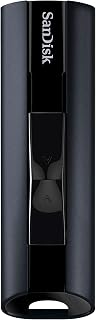
The SanDisk Extreme PRO USB 3.2 is purpose-built for creative professionals, videographers, photographers, and anyone regularly working with large files. This 512GB solid-state flash drive delivers the speed and reliability needed for seamless workflows, whether you're on set, in the studio, or traveling between locations.
Performance is the standout feature here. With read speeds up to 420MB/s and write speeds reaching 380MB/s, transferring a full 4K video shoot or high-resolution photo library happens in seconds rather than minutes. The USB 3.2 Gen 1 interface ensures consistent performance, though you'll need a compatible port to unlock these speeds. In real-world use, this translates to less time waiting and more time creating.
Build quality matches the performance specs. The durable aluminum metal casing feels premium and protects against the bumps and drops that come with field work. At just 18 grams, it's light enough to forget you're carrying it, yet sturdy enough to handle the rigors of professional use. The compact form factor makes it convenient for pocket storage or camera bags.
Security features add practical value for professionals handling sensitive client work. The SanDisk SecureAccess encryption software uses 128-bit AES protection, and the included RescuePRO Deluxe software provides data recovery peace of mind. Backward compatibility with USB 2.0 and 3.0 ensures you can use this drive across multiple devices, even older computers.
The main trade-offs are price and connector type. This is a premium product, so expect to pay more than budget alternatives. Additionally, there's no USB-C option, which might matter if you work primarily with newer devices. Despite these considerations, the combination of speed, capacity, durability, and security makes this an excellent investment for creators and professionals who demand reliability.
Content creators and video editors working with 4K footage and large project files will see the biggest benefit from the speed and capacity on offer.
Photographers managing thousands of RAW image files and needing quick backup solutions will appreciate the fast transfer speeds and secure encryption.
Business professionals handling confidential documents and presentations benefit from the military-grade security features and reliable backup capacity.
Travel and field professionals who need a rugged, portable storage solution will value the durable aluminum construction and lightweight design that withstands constant movement.
Storage Capacity: 512GB solid-state memory ensures ample space for large projects and file libraries.
Speed Performance: Read speeds up to 420MB/s and write speeds up to 380MB/s require USB 3.2 Gen 1 or USB 3.0 port for full performance.
Connectivity: USB Type-A connector with USB 2.0 and USB 3.0 backward compatibility. Requires USB 3.2 Gen 1 or 3.0 port for advertised speeds.
Security: 128-bit AES encryption via SanDisk SecureAccess software. Password protection compatible with Windows 8, Windows 10, and macOS 10.9 and later.
Physical Design: Durable aluminum metal casing, compact form factor, 18.14 grams. Color: Black. Warranty: Lifetime limited manufacturer warranty.

Pros
- Dual connectivity works seamlessly with iPhones, Android phones, PCs, and Macs
- Fast 130MB/s read speeds suitable for transferring large files and video projects
- Durable titanium metal casing with swivel design resists drops and damage
- Includes encryption software for added security of sensitive data
Cons
- Write speeds are noticeably slower than read speeds, which may impact large backup operations
- Actual usable capacity is lower than advertised due to pre-installed security software taking up space
The Lexar JumpDrive Dual Drive D400 is a practical solution for anyone juggling multiple devices. Whether you're backing up iPhone photos, transferring files between a PC and Android phone, or moving large project files across platforms, this dual-connector design eliminates the frustration of carrying multiple cables or adapters.
Performance is solid where it matters most. The 130MB/s read speed makes file transfers snappy for everyday use, and the dual USB 3.2 Gen 1 connectivity works reliably across all major platforms. The metal housing feels premium and the swivel design is thoughtfully engineered to protect the connectors during daily carry and use.
Build quality is impressive. The titanium finish resists fingerprints and scratches, and reviewers consistently praise the robust construction. The lightweight design (17.8g) makes it pocket-friendly without feeling cheap or plasticky.
A fair caveat: write speeds lag behind read speeds, which becomes noticeable when performing large backups or transferring video projects. Additionally, the pre-loaded Lexar DataShield security software consumes storage space, so your effective capacity will be somewhat less than the stated 128GB.
Overall, the D400 delivers excellent value for cross-platform users. If you need reliable, fast storage that works seamlessly between your phone and computer without adapters, this drive justifies its modest price point. The five-year warranty underscores Lexar's confidence in the product's longevity.
Storage Capacity: 128GB
Read Speed: Up to 130MB/s
Connectors: USB Type-C and USB Type-A (dual)
Interface: USB 3.2 Gen 1
Compatibility: iPhone 15, Android, PC, Mac
Security: Lexar DataShield encryption included
Design: Titanium metal housing with swivel
Weight: 17.8g
Warranty: Five-year limited warranty
Model: LJDD400128G-BNQNU
Pros
- Exceptional real-world transfer speeds make moving large files fast and efficient
- Premium metal construction feels solid and survives accidental drops or being tossed in bags
- Universal compatibility with computers, laptops, tablets, and compatible smart devices
- Password protection with encryption adds peace of mind for sensitive files
- Excellent value at the 128GB capacity with proven reliability across thousands of reviews
Cons
- Write speeds of 50-60MB/s are slower than read speeds, which may matter for frequent large uploads
- Can generate moderate heat during sustained high-speed transfers, though this is normal for the hardware
- Password protection on Mac requires additional software download for full functionality
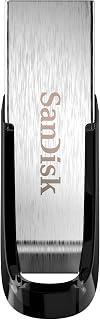
The SanDisk Ultra Flair 128GB is a professional-grade USB 3.0 flash drive designed for anyone who regularly transfers large files between devices. Whether you're a content creator, business professional, photographer, or casual user backing up important data, this drive delivers the speed and reliability needed for modern computing. Its 128GB capacity provides ample space for a complete media library or project files.
Performance is where this drive truly excels. With read speeds up to 150MB/s and write speeds around 50-60MB/s in real-world testing, you'll transfer a full-length movie in under 30 seconds. This 15x speed advantage over USB 2.0 drives means your workflow stays productive, whether you're moving photos from a camera or syncing project files. Customer reviews consistently praise the tangible difference in transfer times, with users reporting gigabytes of data moving in just minutes.
The metal casing sets this drive apart from cheaper plastic competitors. It feels premium, resists damage from daily keychain wear, and survives accidental drops or rough handling. The compact design fits easily in a pocket or bag without adding bulk. Temperature management is adequate, with users noting that mild heat during sustained transfers is normal and expected for USB 3.0 drives at this performance level.
Security features include 128-bit AES encryption and password protection, though Mac users will need to download additional software. For sensitive business files or personal documents, this encryption layer provides solid protection against unauthorized access. The drive works immediately on Windows and Mac without requiring driver installation.
The SanDisk Ultra Flair 128GB is a smart investment for anyone seeking reliable, fast portable storage backed by millions of satisfied users and a 1-year warranty. Minor write-speed limitations are outweighed by excellent read performance, durability, and proven real-world reliability.
Storage Capacity: 128GB
Interface: USB 3.0 (USB 3.2 Gen 1)
Read Speed: Up to 150MB/s
Write Speed: Up to 4MB/s (varies by capacity)
Connection Type: USB 3.0 Micro B
Encryption: 128-bit AES
Dimensions: 0.26in (D) x 1.67in (W) x 0.52in (H)
Weight: 4.5 grams
Color: Black and Silver
Model: SDCZ73-128G-G46
Warranty: 1 year
Compatible With: Computers, laptops, tablets, smartphones with USB ports

Pros
- Exceptional speed for the price, outperforming costlier competitors like Lexar drives
- Robust build quality with metal construction and matte black finish feels premium and durable
- 128GB capacity handles large projects, backups, and media transfers without swapping drives
- Retractable design protects the connector and prevents accidental damage during daily carry
- Works immediately with any USB port, no special drivers or configuration needed
Cons
- Write speed of 30MB/s is notably slower than read speed, affecting some backup scenarios
- Requires reformatting to exFAT or NTFS for files larger than 4GB, adding a setup step
- Less durable for heavy keychain use compared to more rugged enterprise-grade drives
The Amazon Basics 128GB USB 3.1 flash drive is a no-nonsense storage solution for anyone who needs fast, reliable file transfers without paying premium brand prices. Whether you're a content creator, IT professional, student, or casual user managing backups and documents, this drive delivers genuine utility. The 128GB capacity handles everything from system backups to video projects, making it far more practical than smaller drives.
Performance is the standout quality here. The 130MB/s read speed is legitimately fast for a USB 3.1 Gen 1 drive and noticeably quicker than older USB 2.0 standards or even some comparable modern drives. Users consistently report moving large video files and 50GB datasets in minutes rather than hours. The write speed of 30MB/s is more modest but remains acceptable for typical use cases. Real-world speeds vary based on your system, file types, and transfer method, but the advertised figures align with what reviewers actually experience.
Build quality impresses at this price point. The metal construction with matte black finish feels premium and sturdy, avoiding the cheap plastic feel of budget alternatives. The retractable design keeps the USB connector protected during storage and daily carry, and the compact 2.2-inch length slides easily into bags or onto keychains. At just 8.53 grams, it won't weigh you down. Customers who've used this drive for months report no degradation or reliability issues.
A few limitations are worth noting. The 30MB/s write speed means large backups take longer than higher-end drives. Files larger than 4GB require reformatting from the default FAT32 to exFAT or NTFS, adding a one-time setup step. This isn't a drive for extreme abuse or professional-grade data center use, though it's plenty rugged for everyday professional work.
The verdict is straightforward: if you need genuine 128GB capacity with proven speed and reliability, this drive is the smart choice. The performance, build quality, and price combination outpaces competitors that cost significantly more. Recommended for backups, file transfers, video work, and any situation where you need storage that actually performs.
Storage Capacity: 128GB (usable storage approximately 115GB+)
Interface: USB 3.1 Gen 1 (backward compatible with USB 2.0)
Read Speed: Up to 130MB/s (USB 3.1 port required)
Write Speed: Up to 30MB/s (USB 3.1 port required)
Memory Type: High-quality NAND Flash
Connector: USB Type A
Format: FAT32 (default), reformattable to exFAT or NTFS
Dimensions: 2.2 x 0.8 x 0.5 inches
Weight: 8.53 grams
Design: Retractable with keyhole
Color: Matte Black
Warranty: 12 months
Model Number: LS21USB128G1
Ideal For: Professionals managing large files, students backing up coursework, content creators transferring footage, anyone needing reliable 128GB storage without premium pricing.
Use Cases: System backups, video file transfers, photo library transport, portable software, documents and presentations, cross-platform file sharing between Windows and Mac.
Not Ideal For: Users requiring extreme durability for harsh environments or those who need maximum write speeds for professional data center scenarios.

Pros
- Exceptional read speeds make large file transfers quick and efficient
- Innovative capless design prevents the frustration of lost or broken caps
- Great value with two drives included for backup or sharing purposes
- Compact and portable, fitting easily in a pocket or laptop bag
- Strong customer ratings reflect real-world reliability and performance
Cons
- Write speeds are not explicitly listed, which may matter for heavy content creation workflows
- USB 3.0 compatibility required for full speed, older devices will operate at slower USB 2.0 speeds
- Limited to 128GB per drive, which may feel restrictive for video editors or large media libraries
The PNY Turbo Attaché 3 128GB USB 3.0 Flash Drive 2-Pack is a dependable storage solution for anyone who regularly transfers files between computers. This two-pack bundle makes it ideal for professionals, students, and remote workers who need reliable portable storage without breaking the bank.
Performance is where this drive shines. With read speeds up to 100MB/s, you'll experience dramatically faster file transfers compared to older USB 2.0 drives. Whether you're moving project files, backing up photos, or sharing HD videos, the speed improvement is noticeable and practical. The drive maintains backward compatibility with USB 2.0 ports, so it works universally across older and newer systems.
Design and durability stand out as key strengths. The sliding collar mechanism eliminates the common problem of lost caps that plague traditional flash drives. The lightweight, durable construction feels solid in hand and is built to withstand daily use in bags, pockets, and desk drawers. The compact size means you can easily carry both drives without adding bulk to your workspace.
One consideration is that write speeds aren't advertised, which may be relevant if you frequently move large amounts of data or work with video editing. Additionally, while USB 3.0 compatibility is standard on modern devices, achieving full speed requires connecting to USB 3.0 ports. Older computers will connect at USB 2.0 speeds, which is still acceptable but noticeably slower.
Overall, the PNY Turbo Attaché 3 delivers excellent value as a practical, fast, and durable storage solution. The two-pack format adds versatility for backup, sharing, or keeping one at home and one on the road. Backed by strong customer reviews and a one-year warranty, this is a smart choice for everyday file transfer and backup needs.
Storage Capacity: 128GB per drive, 2 drives included
Interface: USB 3.0 Type A
Read Speed: Up to 100MB/s
Write Speed: 10x faster than USB 2.0
Design: Sliding collar, capless
Compatibility: PC and Mac computers with USB 3.0 and USB 2.0 ports
Color: Silver
Weight: 0.02 kg
Warranty: 1 Year
Model: P-FD128X2TBOP-MP
Best For: This drive is ideal for professionals, students, and everyday users who need fast, reliable storage for transferring documents, photos, videos, and large project files between computers.
Consider This Drive If: You want speeds significantly faster than USB 2.0, value a practical design without caps, need two drives for backup or mobile use, and work primarily with modern computers that have USB 3.0 ports.
May Not Be Ideal If: You regularly use older computers limited to USB 2.0 only, need write speed specifications for video work, or require more than 128GB of single-drive capacity for specialized workflows.
Storage Capacity Tip: 128GB is adequate for most users. It holds approximately 26,000 high-resolution photos, 25 hours of HD video, or thousands of documents. Consider your typical file transfer volume when deciding if this capacity suits your needs.

Pros
- Fast 100MB/s transfer speeds handle large file backups efficiently
- Built-in encryption and secure file deletion protect sensitive data
- Three-pack offers value and convenience for multiple devices or as backups
- Slim design with retractor mechanism keeps the drive durable and pocket-ready
- Wide device compatibility eliminates compatibility concerns across ecosystems
Cons
- 100MB/s speeds are decent but not exceptional compared to newer USB 3.2 Gen 2 drives
- No customer reviews available yet to validate real-world performance and durability
- Password protection through DataShield requires user setup and maintenance
The Lexar A30E is a practical USB 3.2 Gen 1 flash drive designed for everyday users who need reliable portable storage without unnecessary complexity. The three-pack format makes it valuable for professionals managing files across multiple locations, students organizing coursework, or anyone building a backup strategy.
Performance is solid with 100MB/s read speeds, delivering 10x faster transfers than older USB 2.0 drives. For typical office work, photos, and video files, this speed handles real-world tasks efficiently. The drive includes Lexar DataShield encryption, allowing you to create password-protected storage vaults and securely erase files so they cannot be recovered, adding a practical security layer for sensitive documents.
Design and build quality reflect Lexar's reputation for portable storage. The push-button retractor keeps the connector protected, while the lanyard loop adds carry convenience. At just 7.41g per drive, these are genuinely pocket-friendly. Universal USB Type-A compatibility means plug-and-play operation on PCs, Macs, tablets, and older devices without driver installation.
The main limitation is that transfer speeds, while respectable, don't match newer USB 3.2 Gen 2 drives that reach 400+MB/s. For routine backups and file transfers, this is rarely a concern, but video professionals or those moving massive datasets should consider faster alternatives. The lack of user reviews currently available means real-world durability reports are not yet available.
The Lexar A30E three-pack is a sensible choice for cross-device backup, school, travel, or office environments where you value simplicity, basic security, and reasonable performance over cutting-edge speed.
Storage Capacity: 64GB (per drive, 3 drives total)
Interface: USB 3.2 Gen 1
Connector Type: USB Type-A
Read Speed: Up to 100MB/s
Dimensions: 2.32 inches D x 0.79 inches W x 0.45 inches H
Weight: 7.41g per drive
Color: Black
Security: Lexar DataShield encryption with password protection
Special Features: Push-button retractor, lanyard loop, lightweight design
Compatibility: Windows, macOS, tablets, and all USB Type-A devices
Model: A30E
Manufacturer: Lexar Co., LTD
Pros
- Fast USB 3.0 speeds significantly reduce file transfer time for large projects
- Generous 256GB capacity handles extensive photo libraries, video projects, and backups
- Secure encryption and password protection for confidential documents and personal files
- Reliable brand with proven track record and strong customer satisfaction ratings
- Compact retractable design eliminates lost caps and protects the USB connector
Cons
- Actual usable storage is less than advertised due to file system formatting
- Retractable mechanism may accumulate dust around the USB port over extended use
- Performance depends on host device capabilities and may vary from stated speeds
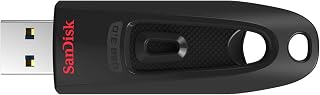
The SanDisk Ultra 256GB is a high-capacity USB 3.0 flash drive designed for professionals, content creators, and anyone who regularly transfers large files. With its generous storage capacity and fast transfer speeds, it bridges the gap between traditional external hard drives and portable thumb drives, offering practical everyday storage without requiring an internet connection.
What makes this drive stand out is its combination of speed and capacity. At 130MB/s read speeds, file transfers happen quickly enough to save meaningful time on large projects. The 256GB capacity means you can store an entire portfolio of photos, video projects, or backup files without juggling multiple drives. Users consistently praise the reliability and performance in real-world use, with many reporting consistent speeds that match the advertised specifications.
The build quality reflects SanDisk's reputation for durability. The retractable design protects the connector without requiring a separate cap, making it genuinely convenient for frequent use. The drive is lightweight and pocket-friendly, designed to withstand the rigors of being carried in bags and pockets. The 5-year limited warranty provides confidence in long-term reliability.
The main drawback is that actual usable storage runs about 10-15 percent less than advertised due to file system overhead, which is standard across all storage devices. Some users note that the retractable mechanism can accumulate dust around the port over time, though this doesn't affect functionality for most people. Additionally, speeds may vary depending on your specific computer and USB port quality.
The SanDisk Ultra 256GB is an excellent choice for anyone needing fast, reliable portable storage. It's particularly valuable for professionals moving large files between offices, students backing up coursework, and content creators managing project files. If you need robust storage with proven performance at a reasonable price point, this drive delivers on its promises.
Storage Capacity: 256GB
Interface: USB 3.2 Gen 1 (USB 3.0)
Read Speed: Up to 130MB/s
Write Speed: Up to 10x faster than USB 2.0
Connector: USB Type-A
Design: Retractable, Lightweight
Compatibility: Windows 7+, macOS 10.9+, USB 3.0 port required
Security: 128-bit AES password protection
Warranty: 5-year limited manufacturer warranty
Model Number: SDCZ48-256G-GAM46
Best For: This drive is ideal if you transfer large files regularly, need portable backup storage, or work with video, photo, or design projects. It's also great for students backing up coursework and professionals moving files between locations.
Consider This Instead If: You need more capacity, consider a portable SSD or external hard drive. If you rarely transfer large files, a smaller capacity drive may be more cost-effective. If security is paramount, look for drives with hardware encryption rather than software-based protection.
Speed Note: Actual transfer speeds depend on your computer's USB 3.0 port quality, the files being transferred, and background system activity. The 130MB/s rating represents optimal conditions. Real-world performance is typically slightly lower but still substantially faster than USB 2.0.
Buying Guide: What to Look for in a USB Flash Drive
Transfer Speed and USB Standard
Transfer speed determines how quickly you can move files on and off your drive, and the difference between USB 2.0 and USB 3.0 (or newer 3.1 and 3.2 standards) is dramatic. A USB 2.0 drive maxes out around 30-40MB/s, while USB 3.0 drives start at 100MB/s and can reach 400MB/s or more in premium models.
If you regularly transfer large video files, photo libraries, or software installers, investing in a USB 3.0 or higher drive saves considerable time. The SANDISK 512GB Extreme PRO USB 3.2 Solid State delivers read speeds up to 420MB/s, meaning a 4K video file that would take minutes on an older drive transfers in seconds. For students juggling assignments and presentations, check out our guide to laptops for business students to ensure your computer can take full advantage of high-speed storage.
Storage Capacity
Capacity needs vary widely depending on how you use your drive. A 64GB drive like the SanDisk 64GB Cruzer Glide USB 3.0 Flash Drive handles everyday documents, presentations, and a modest photo collection without issue. It’s perfect for students who need to shuttle assignments between campus computer labs and home.
For photographers, videographers, or anyone working with high-resolution media, 128GB to 256GB models offer breathing room. The SanDisk Cruzer Glide 256GB USB 3.0 Flash Drive provides ample space for extensive photo shoots or multiple 4K video projects. If you’re a creative professional managing large files, pairing your storage with the right hardware matters; our article on laptops for engineering students covers systems built to handle demanding workflows.
Durability and Build Quality
Flash drives live in pockets, bags, and backpacks where they endure constant jostling, temperature swings, and the occasional drop. Metal casings outlast plastic shells and provide better protection for the internal components. The SAMSUNG BAR Plus 3.1 USB Flash Drive, 128GB features rugged metal construction rated as waterproof, shockproof, and temperature-proof, backed by a five-year warranty.
Design details matter too. Retractable connectors like those on the PNY 128GB Turbo Attaché 3 USB 3.0 Flash Drive eliminate the need for a cap that can get lost, while keyring holes prevent the drive from disappearing into the depths of your bag. For educators who move between classrooms and carry multiple devices, durability is essential; see our recommendations for laptops for teachers that prioritize similar built-to-last design.
Security Features
Portable storage means portable risk. If your drive contains sensitive work documents, client information, or personal data, password protection and encryption become critical. Many drives include proprietary software like SanDisk SecureAccess or Lexar DataShield that creates encrypted, password-protected vaults on the drive.
The SANDISK 128GB Ultra Flair, USB-A Flash Drive offers 128-bit AES encryption through its included software, ensuring your files stay private even if the physical drive is lost. For professionals handling confidential client data, this layer of protection is non-negotiable. Law students and legal professionals managing case files should review our guide to laptops for law students for complementary device security features.
Final Thoughts
The right USB flash drive depends on how you work and what you’re storing. For everyday file transfers and document backup, the Amazon Basics 128 GB Ultra Fast USB 3.1 Flash delivers reliable performance and excellent value. Creative professionals moving large media files will appreciate the blazing speed of the SANDISK 512GB Extreme PRO USB 3.2 Solid State, which cuts transfer times dramatically. Choose based on your capacity needs, how often you’ll move large files, and whether you need encryption for sensitive data.
Frequently Asked Questions
What’s the difference between USB 3.0 and USB 3.1 flash drives?
USB 3.1 offers theoretical maximum speeds up to 10Gbps compared to USB 3.0’s 5Gbps, though real-world performance depends on the specific drive’s internal components. Both standards are dramatically faster than USB 2.0 and work interchangeably with USB 3.0 and 3.1 ports. In 2026, most quality flash drives use USB 3.0 or higher, making them backward compatible with older USB 2.0 ports at reduced speeds.
How long do USB flash drives typically last?
Quality flash drives can last 10 years or more with normal use, though heavy daily read-write cycles will reduce lifespan. Modern drives use wear-leveling technology to distribute writes across memory cells evenly, extending longevity. Store your drive in a cool, dry place when not in use, and avoid leaving it plugged in continuously to maximize its useful life.
Can I use a USB flash drive to run an operating system?
Absolutely. Many IT professionals and computer science students create bootable USB drives to run Linux distributions, Windows installation media, or diagnostic tools. The SANDISK 256GB Ultra, USB-A Flash Drive provides ample space for multiple operating system images. For students learning system administration or software development, pairing a bootable drive with the right hardware is essential; our roundup of laptops for computer science students covers machines that support this kind of work.
Do I need a USB-C flash drive or is USB-A still fine in 2026?
USB-A remains widely compatible with most desktop computers, older laptops, and many peripherals, making it the safer choice for maximum device compatibility. However, newer laptops and tablets increasingly favor USB-C ports. The Lexar 128GB JumpDrive Dual Drive D400 USB 3.2 solves this dilemma with both USB-C and USB-A connectors in a single drive, letting you move files between newer phones, tablets, and traditional computers without adapters.





Write Your Review
No reviews yet. Be the first to share your experience!