

Remote work, online meetings, and content creation have made a quality webcam essential for PC users. Whether you’re joining video conferences, streaming gameplay, or recording tutorials, the right webcam delivers clear video and crisp audio that built-in laptop cameras simply can’t match.
This guide covers 10 webcams that excel across different needs and budgets. You’ll find options with 4K resolution, advanced autofocus, noise-canceling microphones, and plug-and-play convenience. We evaluated each model for image quality, audio performance, ease of setup, and compatibility with popular platforms like Zoom, Teams, and OBS. If you’re setting up a home office workspace, these webcams pair well with modern productivity setups.
Quick answer
This guide compares 10 picks, with TRAUSI 1080P Webcam with Noise-Canceling Mic, Auto ranked first. Logitech C920 HD Pro Webcam - 1080p Video Calling holds the highest customer rating among them.
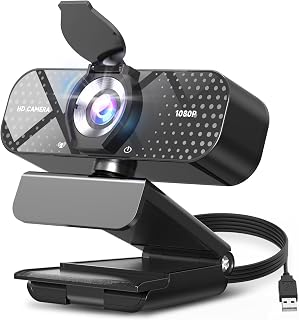
PC users who spend long hours on video calls will appreciate the automatic light correction here, which adjusts exposure in real time so faces stay well-lit even in poorly lit home offices. The built-in noise-canceling microphone means no separate audio gear is needed, and the plug-and-play USB connection gets you up and running without driver headaches. The included privacy shield adds a layer of security when the camera is not in use.
Pros
- 1080P HD with wide-angle lens captures clear, well-framed video
- Automatic light correction adapts to changing room conditions
- Noise-canceling microphone keeps voice clear in noisy spaces
- True plug-and-play setup with included privacy cover
Cons
- Fixed focus limits flexibility at very close or variable distances
- 30fps frame rate less fluid for fast-motion streaming
For PC users seeking a capable webcam without spending heavily, the TRAUSI TW05 delivers 1080P full HD video that handles daily video calls, remote meetings, and basic streaming with confidence. The wide-angle lens captures enough of your workspace for natural framing, while the automatic light correction adapts on the fly whether you're working in a dimly-lit home office or near a bright window. The built-in noise-canceling microphone keeps your voice clear even when household noise or office chatter intrudes. Setup couldn't be simpler: plug the USB cable into your PC and you're live in seconds, no drivers or software required. The privacy cover slides over the lens when you need security between calls. The minimalist black design sits unobtrusively on any monitor, and the 5-foot cable reaches desktop towers without strain. The fixed focus works well at typical desk distances, and the 30fps frame rate handles standard video conferencing smoothly. For PC users who need solid everyday performance rather than premium specs, this webcam covers the essentials reliably.
Video Quality: 1080P Full HD (1920x1080) at 30fps, 16:9 aspect ratio, AVI format capture
Lens: Wide-angle lens with 2.8-4mm focal length range and fixed focus design for consistent sharpness
Audio: Built-in noise-canceling microphone with AAC audio format support
Connectivity: USB 2.0, 3.0, 3.1, and OTG compatible, plug-and-play with no driver installation needed
Compatibility: Windows PC, Mac, laptops, desktops, plus Zoom, Skype, Teams, and streaming platforms
Physical: Compact minimalist design, privacy cover included, 5ft USB power cable, 90-day manufacturer warranty
Ideal for PC users working remotely, attending online classes, or hosting casual streams who want dependable 1080P video without overspending. Perfect if you value automatic light correction and noise-canceling audio in varied home or office environments. Skip this if you need 4K resolution, higher frame rates for action-heavy streaming, or manual focus control for close-up work. Also not the choice if you frequently move during calls and need advanced autofocus tracking.
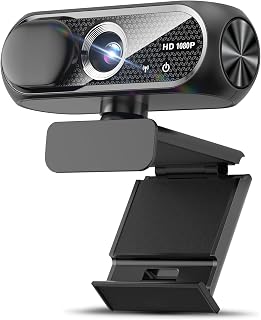
Built around a CMOS sensor with dedicated low-light handling, this compact webcam keeps video clear during evening calls or in rooms without great overhead lighting, which is a common reality for PC users working from home. The wide-angle lens fits more of your space into the frame, and the plug-and-play USB setup means no software installation stands between you and your first call on Zoom or Skype.
Pros
- 1080P CMOS sensor with vibrant, sharp video quality
- Automatic light correction handles varied lighting conditions well
- Noise-canceling microphone keeps voice clear in busy environments
- Compact design with privacy cover and plug-and-play USB setup
Cons
- Fixed focus lacks depth control for varied distances
- Mounting can be difficult on curved laptop screens
The Shcngqio TWC29 brings 1080P full HD video to PC setups with a focus on ease and practicality. The CMOS sensor delivers sharp, vibrant images in a natural 16:9 aspect ratio that feels right during Zoom calls, Skype chats, or streaming sessions. What makes this webcam stand out for PC users is the automatic light correction technology, which genuinely adapts to your environment whether you're in a dim basement office or a sunlit room, keeping video quality consistent without manual tweaking. The wide-angle lens provides solid field of view for solo or small-group framing. Audio quality matters, and the built-in noise-canceling microphone holds up well in typical home and office settings, ensuring your voice cuts through background activity. The compact form sits neatly on any monitor, and the included 5-foot USB cable offers enough reach for most desktop PC configurations. The privacy cover adds a layer of security when you step away. Plug-and-play functionality means no software installs or driver hunts. The fixed focus design prioritizes simplicity and works fine at standard desk distances, while the 30fps frame rate handles everyday video calls smoothly.
Video Capture: 1080p Full HD at 30fps, 1920x1080 resolution, 16:9 aspect ratio, AVI format
Lens and Focus: Wide-angle lens with fixed focus, 1-2 meter focal length range
Sensor: CMOS photo sensor for reliable low-light performance
Audio: Built-in noise-canceling microphone, supports AAC and MP3 formats
Connectivity: USB 2.0, 3.0, and 3.1 compatible, plus OTG support. Includes 5-foot USB power cable. No additional drivers required.
Compatibility: Windows PC, Mac, Linux, tablets, and smartphones. Works with Zoom, Skype, and all major video conferencing platforms
Design: Compact form factor, black color, includes privacy cover slide
Warranty: 90-day manufacturer warranty

Pros
- Exceptional video quality at 4K 30fps with intelligent auto-focus for professional-looking streams and calls
- Dual microphones with 16.4-foot range capture clear audio without additional equipment in conference settings
- Advanced low-light performance with auto-exposure ensures usable video in dim home offices or classrooms
- Includes USB C adapter for modern laptop compatibility alongside traditional USB A devices
- Physical privacy cover eliminates security concerns and awkward moments during video calls
Cons
- 4K 30fps requires both hardware and software support; unsupported systems automatically downgrade to 1080p 60fps
- Limited 70-degree viewing angle may exclude participants sitting outside the camera frame in group settings
The UGREEN 4K webcam is a versatile solution designed for remote professionals, educators, and content creators who demand quality video and audio without premium pricing. Its 8MP CMOS sensor and phase-detection autofocus make it suitable for everything from daily Zoom calls to YouTube streaming and online teaching.
The standout feature is its dual microphone system with 16.4-foot audio pickup range, which captures voices clearly even in larger rooms or when multiple people are speaking. Combined with intelligent auto-exposure technology that adjusts to low-light environments, this webcam performs consistently across various home office setups. The autofocus tracks subjects smoothly from less than a foot away to over 16 feet, keeping the image sharp during movement.
Build quality is solid with a lightweight compact design that mounts easily on monitors, laptops, or tripods. The inclusion of a built-in privacy cover is a practical security feature that many users will appreciate, eliminating the need for tape or separate covers. The newly added USB C adapter broadens compatibility with modern devices while maintaining support for traditional USB A connections.
One consideration is that 4K 30fps requires compatible hardware and software. Systems lacking full 4K support will default to 1080p 60fps, which still delivers excellent quality for most users. The 70-degree viewing angle works well for solo users but may not include everyone in larger group settings.
Overall, this webcam offers strong value for anyone upgrading from basic laptop cameras or investing in their first dedicated streaming setup. The combination of 4K capability, reliable autofocus, dual microphones, and cross-platform compatibility makes it a practical choice for professional video communication and content creation.
Video Specifications: 4K 30fps and 1080p 60fps video modes, 8MP CMOS sensor, 70-degree viewing angle, 1.8 f-stop aperture, phase-detection autofocus with 0.33 to 16.4-foot range, MJPG video capture format, 16:9 aspect ratio, low-light correction with auto-exposure.
Audio Specifications: Dual built-in microphones, high-sensitivity design, 16.4-foot audio pickup range, MJPG audio format support.
Connectivity and Compatibility: USB 2.0 with Type A and USB C connectivity, driver-free plug-and-play installation. Compatible with Windows 7 and above, Mac OS X 10.6 and above, Linux, Android 5.0 and above, and iPad OS 17 and above. Works with Zoom, Skype, YouTube, FaceTime, Twitch, Facebook, Teams, Discord, OBS, and similar platforms.
Physical Specifications: 96.3 grams weight, compact minimalist grey design, built-in privacy cover, operating temperature range 32-113 degrees Fahrenheit.

The Sony 1/2-inch CMOS sensor is one of the largest found in consumer webcams, capturing significantly more light and detail than smaller sensors, which translates directly to cleaner 4K footage on your PC. Phase-detection autofocus keeps your face sharp even when you move around, and the dual noise-reduction microphones handle background sounds well enough that a dedicated USB microphone is not necessary for most home setups.
Pros
- Sony 1/2-inch sensor delivers true 4K with exceptional low-light performance
- PDAF autofocus tracks movement faster and more accurately than standard systems
- Aerospace-grade aluminum unibody with CNC machining for premium durability
- Magnetic privacy cover with 12 strong magnets stays securely attached
Cons
- Premium price point compared to standard 4K webcams
- Limited codec and frame rate options for advanced streaming workflows
The Acer WBC-0E01 brings broadcast-level 4K video to PC setups through its Sony 1/2-inch CMOS sensor, which captures balanced, true-to-life color and exceptional detail that standard webcam sensors can't match. PDAF autofocus technology delivers faster, more accurate focus tracking than typical contrast-based systems, keeping you crisp even when moving or gesturing during calls and streams. The large sensor also excels in low light, producing clean footage without the grainy, washed-out look common in poorly lit rooms. Dual high-sensitivity digital microphones with noise reduction capture audio clearly from up to 2.5 meters away, suppressing keyboard clicks and ambient noise for professional sound quality. The aerospace-grade aluminum unibody construction with CNC machining provides exceptional build quality and durability that plastic competitors can't replicate, while the A-grade sandblasted matte finish resists fingerprints and looks professional on any desk. The all-metal body doubles as a heat sink for reliable performance during extended streaming sessions or all-day video calls. At just 57 grams, it remains portable despite premium materials. Plug-and-play USB-C connectivity requires no driver installation and works across Windows, Mac, and ChromeOS. The magnetic privacy cover uses 12 strong magnets for secure attachment, and the included USB-A to USB-C adapter ensures broad device compatibility.
Sensor: Sony 1/2-inch CMOS, 4 MP effective still resolution
Video: UHD 4K resolution, 16:9 aspect ratio, MP4 capture format, Digital zoom, Auto focus with PDAF
Optics: 10-26mm focal length range, 1.8 f/1.0 aperture range, 83-degree viewing angle
Audio: Dual high-sensitivity digital microphones with noise reduction, captures from up to 2.5 meters
Connectivity: USB-C to USB-A (adapter included), compatible with Windows, Mac, and ChromeOS
Build: Aerospace-grade aluminum unibody, precision CNC machined, A-grade sandblasted matte finish, 57 grams, includes magnetic privacy cover with 12 magnets
Compatibility: Works with Teams, Zoom, Twitch, YouTube, Google Meet, FaceTime, and compatible with Nintendo Switch 2
Package Contents: 4K webcam, USB-C to USB-A cable, USB-A to USB-C adapter, webcam stand, user manual
Warranty: 1 year
Ideal for content creators, streamers, and professionals who prioritize video quality and build durability for daily streaming, YouTube recording, or high-stakes video meetings where presentation matters. The Sony sensor and PDAF autofocus justify the investment for those producing regular video content or conducting client-facing calls. Skip this if you're a casual user who only joins occasional video chats, as the premium construction and sensor technology exceed typical conferencing needs.

Pros
- Excellent video quality with natural colors and sharp detail in both bright and low-light environments
- Dual microphones and stereo audio capture make it exceptional for content creators and podcasters
- Privacy shutter provides peace of mind when the camera is not in use
- Plug-and-play setup requires no drivers or software installation on most systems
- Durable construction with adjustable clip mount that securely attaches to curved or flat monitors
Cons
- USB cable is relatively short at approximately 5 feet, may require an extension cable for some desk setups
- Fixed 78-degree field of view may feel narrow for wide-angle recording or multi-person video calls
- No built-in spotlight or ring light to enhance low-light performance beyond the autofocus correction
The Logitech C920S HD Pro Webcam is a solid mid-range option for professionals who spend significant time on video calls, remote presentations, or content creation. It's purpose-built for remote workers, online students, livestreamers, and anyone who needs reliable 1080p video without breaking the bank.
What sets the C920S apart is its combination of features that work seamlessly together. The full HD 1080p sensor paired with a glass lens ensures your video looks sharp and detailed, while the autofocus and light correction technology automatically adjust to your environment. The dual microphones capture natural stereo sound, eliminating the tinny audio quality common in cheaper webcams. For content creators and professionals, these elements combine to deliver genuine broadcast-quality results.
Build quality is professional without feeling fragile. The adjustable clip mount grips securely to monitors of varying thicknesses and even curved displays, and the padding protects your screen from scratches. The privacy shutter is a thoughtful addition that puts you in control of your camera whenever you step away. At just under 6 ounces, the camera feels substantial but won't strain your monitor arm.
The main limitation is the relatively short USB cable, which may necessitate an extension cable depending on your desk layout. The 78-degree field of view is standard but narrower than ultra-wide options, so it works best for single-user setups rather than group video calls. Additionally, while the low-light correction is impressive, adding external lighting will always yield better results in very dim environments.
Verdict: The C920S is a reliable workhorse for remote workers and content creators who value dependable performance and good audio quality. Its combination of 1080p video, dual mics, and privacy controls makes it one of the best values in professional webcams today.
Video Performance: 1080p Full HD at 30fps, H.264 codec, 78-degree viewing angle, autofocus with low-light correction
Audio: Dual stereo microphones, supports WAV, MP3, and AAC formats
Optics: Glass lens, f/2.8 aperture, 1mm to 50mm focal length range, smooth zoom capability
Connectivity: USB 2.0 compatible, plug-and-play setup
Physical: 5.4in x 3.1in x 5.4in, 5.76 ounces, adjustable clip mount, privacy shutter included
Compatibility: Windows, Mac, Linux, and all major video platforms
Warranty: 1-year limited hardware warranty from Logitech
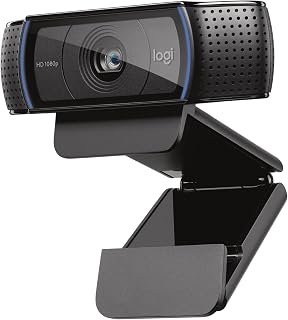
The C920x delivers full 1080p at 30fps through a 1/2.9-inch CMOS sensor, producing smooth, detailed video that holds up well in typical office lighting. Its native XSplit VCam compatibility makes it a practical pick for PC users who stream or record content alongside their regular meetings. The USB connection works across a wide range of desktops and laptops without any additional software setup required.
Pros
- Five-element glass lens with intelligent autofocus delivers crisp, detailed video
- Automatic light correction excels in low-light without graininess
- Dual stereo microphones capture natural, professional audio
- 78-degree wide-angle view and XSplit VCam license included
Cons
- No physical privacy shutter for quick lens coverage
- 30fps frame rate may feel limiting for fast-paced streaming
The Logitech C920x stands as a professional-grade choice for PC users who need reliable 1080P video for business calls, content creation, or streaming. The five-element glass lens delivers crisp, detailed images across the entire frame, while the intelligent autofocus continuously adjusts to keep you sharp. Automatic light correction adapts to your environment in real time, brightening and sharpening footage in low light without introducing the grainy artifacts common in lesser webcams. The wide 78-degree viewing angle accommodates solo shots or multiple people, making it versatile for team calls or demonstration videos. Audio quality elevates this webcam above budget competitors: dual stereo microphones positioned on either side of the lens capture your voice naturally and minimize background noise, making calls feel more professional and engaging. The compact form factor and professional black finish blend into any PC setup without drawing attention. The included 3-month XSplit VCam license adds value, letting you blur or replace backgrounds without a green screen. The 30fps frame rate handles most video conferencing and streaming smoothly, though fast-paced action may benefit from higher rates. The absence of a physical privacy shutter is the main compromise.
Video Performance: Full HD 1080p at 30fps, 720p at 30fps, 78-degree viewing angle, autofocus with light correction
Audio: Dual stereo microphones for natural sound capture
Lens: Five-element glass lens, 1.8 f-stop maximum aperture, auto focus
Sensor: CMOS 1/2.9 inch, FHD maximum display resolution
Connectivity: USB, plug-and-play compatibility with Windows 11 and multiple operating systems
Physical: 3.7 inches wide, 2.7 inches tall, 1.7 inches deep, weighs 5.7 ounces
Included: C920x Webcam, USB cable, user documentation, 3-month XSplit VCam license
Warranty: 1 Year Limited Hardware Warranty
Perfect for PC users in remote work, content creation, or streaming who prioritize proven reliability and professional-grade video and audio quality. Ideal if you value intelligent autofocus, superior low-light performance, and dual microphones that outperform single-mic designs. Skip this if you need a physical privacy shutter for quick security or require frame rates above 30fps for fast-action gaming or sports streaming.
Pros
- Exceptional 1080p video quality that rivals much more expensive alternatives
- Dual mics with noise reduction make your voice sound professional and clear
- Fast autofocus and precise glass optics capture detail-rich video
- Automatic low-light correction adapts to different lighting environments
- Easy setup with standard USB connection and wide OS compatibility
Cons
- Limited to 720p on FaceTime for Mac, despite full 1080p capability on other platforms
- No built-in privacy shutter, requiring separate measures for camera security
- Fixed focal length may require adjustment of positioning to get optimal framing
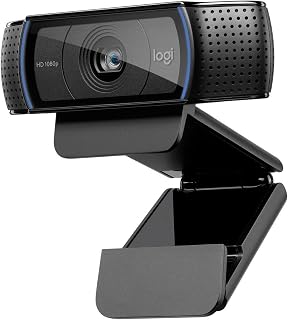
The Logitech HD Pro Webcam C920 is a professional-grade USB webcam designed for remote workers, content creators, and anyone serious about video communication quality. It delivers full HD 1080p video calling and recording, which was industry-leading when released and remains competitive today. The camera suits professionals who spend significant time in video meetings and want reliable, high-quality video without investing in expensive cinema equipment.
The standout features center on optics and audio. The 5-element precision glass lens with autofocus ensures sharp, detail-rich video across various distances and lighting conditions. H.264 compression reduces file sizes without sacrificing quality, speeding up uploads and reducing CPU load. Dual built-in microphones with automatic noise reduction let colleagues hear you clearly, even in moderately noisy environments. Automatic low-light correction adapts to different room lighting, though very dim settings still show visible grain.
Build quality reflects Logitech's reputation for reliability. The camera feels solid and the universal clip mount fits most laptops and monitors securely. The 6-foot USB cable offers reasonable reach for most desk setups. Overall design is minimalist and unobtrusive. The C920 performs consistently across Windows, Mac, Chrome OS, and Android platforms, making it reliable for cross-platform teams and flexible workflows.
Limitations exist. FaceTime for Mac tops out at 720p despite the camera's 1080p capability on other platforms, a frustrating constraint for Mac users. The camera lacks a physical privacy shutter, requiring you to position it carefully or cover it manually. Performance in very low light shows visible noise, and fixed autofocus means repositioning the camera if you move significantly closer or farther away.
The Logitech C920 remains a solid choice for professional video calling and recording. It punches above its price point with dependable optics, clear audio, and broad compatibility. Recommended for remote workers, content creators, and teams prioritizing video quality and reliability over premium features.
Video: Full HD 1080p at 1920x1080 pixels, 30 fps. H.264 compression. Effective still resolution 15MP. Digital image stabilization. 5-element precision glass lens with autofocus. Maximum aperture f/2.0. Minimum focal distance 2mm.
Audio: Dual built-in microphones with automatic noise reduction. Supports AAC, MP3, WAV formats.
Connectivity: USB 2.0 with 6-foot cable. Compatible with Windows 7/8/10 or later, macOS 10.10 or later, Chrome OS, and Android 5.0 or above.
Physical: Dimensions 3.7in D x 1.7in W x 2.8in H. Weight 113g. Universal clip mount fits laptops and LCD monitors. Features automatic low-light correction and tripod-ready design.
Warranty: 2-year limited warranty from Logitech. Package includes webcam, 6-foot USB cable, and user documentation.
Remote Workers: Reliable 1080p performance and dual mics make you look and sound professional in daily video meetings with colleagues and clients.
Content Creators: Quality glass optics and smooth autofocus work well for YouTube introductions, Twitch streaming, or online course videos where presentation matters.
Educators: Clear video and audio let students see and hear you effectively during online classes and virtual office hours.
Freelancers: Professional-grade video quality builds credibility during client calls and portfolio presentations without expensive equipment investment.
Not Recommended For: Users needing extreme low-light performance, Mac-exclusive shops requiring full 1080p on FaceTime, or those seeking premium 4K capability.

Pros
- Excellent video quality in 1080p with natural color reproduction and reliable auto-focus performance
- Integrated dual microphones eliminate echo and capture clear audio without additional USB microphone purchases
- Physical privacy cover is a thoughtful security feature that's more reliable than software solutions
- Wide 78-degree field of view balances showing your face clearly while capturing your workspace
- Sturdy build quality and flexible mounting make it easy to position on any setup
Cons
- Fixed 78-degree field of view may feel limiting if you need wider angle shots for group presentations
- No built-in speaker or audio output means you still need separate headphones or monitor audio
- Autofocus performance can struggle in very low-light environments despite automatic light correction
The Logitech C920e is a purpose-built webcam for professionals and teams working remotely or in hybrid environments. It addresses the common frustration of poor video quality in video calls by delivering crisp 1080p HD video that looks significantly better than most laptop built-in cameras. Whether you're conducting client presentations, team meetings, or daily standups, this webcam elevates your on-camera presence.
The standout features center on audio and video quality. The dual omnidirectional microphones are impressively effective, capturing your voice clearly from up to one meter away without requiring you to speak directly at the lens. Combined with the HD autofocus that keeps you sharp throughout your meeting and automatic light correction that flatters you under various lighting conditions, you get a fully balanced video calling experience. The 78-degree field of view strikes a sweet spot between showing your face clearly and giving enough room to share your workspace visually.
Build quality and usability are thoughtfully executed. The camera features a sturdy adjustable clip that grips securely to any laptop or external monitor, and the 1/4 inch tripod thread provides flexibility for custom mounting if you prefer a dedicated stand. The physical privacy cover is a practical touch that lets you see at a glance whether the lens is protected, addressing privacy concerns better than relying on software alone.
The main limitations are the fixed field of view if you need wider angles for group presentations, and the lack of built-in audio output means you'll still use your monitor or headphones for sound. In very low-light situations, the autofocus can hesitate before locking in, though the automatic light correction helps more than you might expect.
For remote workers, distributed teams, and organizations deploying video conferencing equipment at scale, the C920e delivers reliable professional video and audio quality at a mid-range price point. It's certified for Zoom and works with all major platforms, making it a versatile choice that just works out of the box.
Video: 1080p FHD resolution, 78-degree fixed field of view, 3MP effective still resolution, 16:9 aspect ratio, digital image stabilization, auto-focus with automatic light correction
Audio: Two integrated omnidirectional microphones, captures audio from up to 1 meter away, supports AAC and MP3 audio formats
Connectivity: USB connection, compatible with Windows 8 or later, macOS 10.10 or later, and ChromeOS including Windows 11
Physical: Compact form factor, 2.8 inches deep by 3.7 inches wide by 1.7 inches high, weighs 5.71 ounces, includes adjustable mounting clip and 1/4 inch tripod thread, physical privacy cover included
Certifications: Zoom certified, TAA compliant, works with Microsoft Teams, Google Meet, Cisco Webex, and other popular video calling platforms
Best For: Remote workers and hybrid teams who participate in frequent video calls and need better image quality than their laptop camera. Also ideal for organizations deploying webcams across multiple employees, schools and training environments, and content creators needing reliable video input without professional studio gear.
Consider If: You attend video calls multiple times per week and current audio and video quality feels inadequate. You want a single device that handles both video and audio well. You value privacy and prefer a physical lens cover over software-only solutions. You need to support multiple mounting options from laptop clip to tripod.
Skip If: You need ultra-wide angle video for group presentations (the 78-degree field of view is fixed). You work primarily in very low-light environments where autofocus struggles. You require professional broadcast-grade video features and controls. You need built-in speakers or audio monitoring capabilities.
Compatibility Note: This webcam works with virtually all modern video conferencing platforms and operating systems. Logitech includes device management software for IT teams managing multiple deployments, making it enterprise-friendly.

This 4K webcam stands out for PC users who need more than standard video, as the infrared sensor enables Windows Hello facial recognition for secure, password-free login on compatible desktops and laptops. Digital image stabilization keeps the frame steady during long sessions, and the USB connection ensures broad compatibility across the PC ecosystem without requiring proprietary docking hardware.
Pros
- RightLight 3 HDR automatically handles challenging lighting conditions
- Three field-of-view presets and 5x zoom offer framing flexibility
- Windows Hello facial recognition for secure PC login
- Compact design with universal mounting clip fits various displays
Cons
- Model has been discontinued, affecting availability and support
- USB-only connectivity with no wireless options
For PC users who need reliable 4K video quality without complexity, the Logitech BRIO 4K Ultra HD Webcam delivers professional-grade conferencing with intelligent automatic adjustments. RightLight 3 HDR technology stands out by compensating for difficult lighting scenarios, keeping you visible and well-balanced whether you're backlit by a bright window or working in a poorly lit room. The system automatically adjusts exposure and contrast so you don't need to fiddle with manual settings before every call. Three customizable field-of-view presets (90, 78, and 65 degrees) let you choose the right framing for your space, from tight solo shots to wider angles that include your surroundings. The 5x digital zoom provides additional framing flexibility without requiring physical repositioning. Dual omni-directional microphones with noise cancellation capture your voice clearly while suppressing background sounds like HVAC systems or street noise. The compact form factor fits easily on laptops, monitors, and LCD displays with a universal mounting clip that accommodates various screen thicknesses. Windows Hello integration enables fast, secure facial recognition login on Windows PCs. The included privacy shade provides physical camera coverage when not in use. Compatibility spans Windows, Mac, and ChromeOS for flexible deployment across different PC setups and operating systems.
Video Performance: 4K Ultra HD resolution, 90fps maximum frame rate, 5x digital zoom, three FOV presets (90, 78, 65 degrees), RightLight 3 HDR with auto light adjustment.
Audio: Dual omni-directional microphones, noise-canceling technology, MP3 and PCM audio format support.
Physical Design: 1x1x4 inches, 0.16kg weight, black finish, universal mounting clip, privacy shade, digital image stabilization.
Connectivity: USB connection, Windows Hello integration, compatible with Windows, Mac, and ChromeOS platforms.
Additional Features: Auto focus, 86.6-degree viewing angle, infrared support, 1-year limited hardware warranty, model number 960-001105.
Best for remote workers and professionals who conduct frequent video meetings on PC and need consistent 4K quality with minimal manual adjustment. The RightLight HDR makes it particularly valuable for those working in rooms with inconsistent or challenging lighting. Skip this if you only use video occasionally, as the feature set exceeds casual needs. Note that this model has been discontinued, which may affect future availability and long-term support.
For PC users who want the sharpest possible image, the 4K CMOS sensor here captures detail that standard 1080p cameras simply cannot match, making presentations and streaming look noticeably more professional. Dynamic image stabilization smooths out minor camera movement, and dual USB-A and USB-C connectivity means it fits virtually any modern desktop or laptop setup without needing an adapter.
Pros
- RightLight 3 HDR adapts intelligently to challenging lighting conditions
- Three field-of-view presets and 5x zoom offer flexible framing
- Dual noise-canceling mics capture clear audio without external equipment
- Windows Hello support for fast, secure facial recognition login
Cons
- Privacy shutter clip design feels flimsy and detaches easily
- USB cable is thick and stiff, complicating cable management
When your PC setup demands professional-grade video quality for meetings and streaming, the Logitech Brio delivers genuine 4K resolution backed by intelligent lighting and audio technology. RightLight 3 with HDR automatically compensates for poor room lighting, ensuring you look clear and balanced whether you're backlit by a window or working in a dim home office. The dual noise-canceling microphones capture your voice cleanly from up to 4 feet away, filtering out keyboard typing and household background noise without requiring a separate mic setup. Three adjustable field-of-view options (65, 78, and 90 degrees) let you dial in the perfect framing for solo calls or wider collaborative sessions. The 5x digital zoom holds quality well when you need tighter framing. Autofocus responds quickly as you move, keeping you sharp throughout long meetings. Windows Hello facial recognition adds fast, secure login to Windows PCs. The compact, lightweight body mounts securely to monitors or laptop screens and works seamlessly across Windows, Mac, and ChromeOS. Logi Options+ software unlocks granular control over zoom, focus, and color balance for fine-tuning your image. The included privacy shutter offers peace of mind when the camera isn't in use, though the clip-on design feels less secure than integrated shutters.
Best for remote professionals, content creators, and streamers who spend hours on video calls or producing recorded content and need consistently sharp 4K quality with minimal lighting setup. The HDR and adjustable field-of-view make it especially valuable for those working in variable lighting or shared spaces. Skip this if you only use video occasionally for casual calls, as the feature set and investment exceed basic needs. Budget-conscious users will find capable 1080p alternatives for less demanding use cases.
Buying Guide: What to Look for in a PC Webcam
Resolution and Frame Rate
Resolution determines how sharp and detailed your video appears. Full HD 1080p at 30fps works well for most video calls and casual streaming. Models like the TRAUSI 1080P FHD Webcam with Noise-Canceling Mic and 1080P HD Webcam with Microphone deliver crisp images at this standard resolution.
For professional content creation or detailed presentations, 4K resolution provides four times the clarity of 1080p. The UGREEN 4K@30fps Webcam for PC Ultra HD Web Camera and Acer 4K Webcam for PC/Mac with All-Metal Unibody capture ultra-high-definition video with Sony sensors and advanced autofocus systems. Keep in mind that 4K requires both your hardware and conferencing software to support the higher resolution.
Autofocus and Light Correction
Autofocus keeps you sharp as you move during calls or presentations. Phase Detection Autofocus (PDAF) responds faster than standard autofocus, tracking movement within milliseconds. The UGREEN and Acer 4K models both feature PDAF for blur-free video even when you shift position or lean toward your screen.
Automatic light correction adjusts brightness and color balance in real time, compensating for dim rooms or harsh backlighting. The Logitech C920S HD Pro Webcam Full 1080p/30fps uses this technology to maintain consistent image quality regardless of your lighting setup. For freelancers working from various locations, this feature eliminates the need for dedicated lighting equipment.
Audio Quality and Microphones
Built-in microphones eliminate the need for separate audio equipment. Dual omnidirectional microphones capture sound from multiple directions, useful when presenting to groups or moving around your workspace. Models like the Logitech C920e HD 1080p Mic Enabled Webcam feature two integrated mics that pick up clear audio from up to one meter away.
Noise-canceling technology filters out keyboard clicks, fan noise, and background chatter. Both the TRAUSI and Shcngqio 1080P models include this feature, ensuring your voice comes through clearly during calls. For professionals attending frequent video meetings or educators conducting online classes, clean audio prevents miscommunication and reduces listener fatigue.
Privacy Features and Build Quality
Privacy covers provide physical protection when your webcam isn’t in use. Slide-on covers like those on the TRAUSI and Shcngqio models let you block the lens instantly. The Acer 4K Webcam for PC/Mac with All-Metal Unibody uses a magnetic cover with 12 built-in magnets that snap securely over the lens, offering quick access and reliable security.
Build materials affect durability and heat management. Aluminum construction, like the aerospace-grade body on the Acer webcam, dissipates heat efficiently during extended recording sessions. Plastic housings on budget models work fine for occasional use but may not withstand daily professional demands. Universal mounting clips fit most monitors and laptops, while tripod threads provide flexibility for alternative positioning.
Final Thoughts
The right webcam depends on how you plan to use it. For high-quality streaming and professional video work, the UGREEN 4K webcam delivers exceptional clarity with its Sony sensor and PDAF technology. If you need a reliable option for daily video calls and remote collaboration, the Logitech C920e balances performance and compatibility across platforms. Both models offer plug-and-play setup, built-in microphones, and privacy covers that make them practical choices for any PC workspace.
Frequently Asked Questions
Do I need a 4K webcam for Zoom meetings?
Most video conferencing platforms compress video to 720p or 1080p regardless of your webcam’s resolution. A 4K webcam still benefits you by providing better low-light performance, sharper detail at standard resolutions, and future-proofing for platforms that will support 4K streaming. For typical business meetings, a quality 1080p webcam delivers excellent results at lower cost.
Will a PC webcam work with my Mac or Chromebook?
Nearly all modern webcams support Windows, macOS, and ChromeOS through standard USB protocols. The webcams in this guide work across platforms without requiring special drivers. Check that your device has a compatible USB port (USB-A or USB-C), and verify your operating system meets the minimum version requirements listed by the manufacturer. Many models include adapters for both port types.
How important is autofocus for video calls?
Autofocus prevents blurry video when you move closer to or farther from your screen. If you sit relatively still during calls, standard autofocus performs adequately. Content creators, educators demonstrating objects, or anyone who shifts position frequently benefit significantly from Phase Detection Autofocus, which tracks movement faster and maintains sharp focus continuously. The feature becomes especially valuable during presentations when you reference physical materials or write on whiteboards.
Can I use a webcam for streaming in 2026?
Dedicated webcams handle streaming well, particularly models with 1080p60 or 4K30 capabilities. Most streaming software like OBS, Streamlabs, and XSplit recognize webcams as video sources immediately. For gaming streams, position your webcam to capture your reactions without blocking gameplay footage. Professional streamers often prefer 4K models for the enhanced image quality and wider field-of-view options that help frame both the streamer and their environment effectively.
Common questions
What is the best webcam for gaming on PC in 2026?
The Logitech C920S HD Pro Webcam is an excellent choice for gaming, offering full 1080p/30fps video with low-light performance and clear stereo audio. Its CMOS sensor and compact design make it ideal for streaming or recording gameplay without taking up much space. For higher resolution, the Logitech 4K Webcam or UGREEN 4K@30fps model deliver ultra-sharp video quality, though most streaming platforms compress to 1080p anyway. All three connect via USB and work driver-free with popular streaming software like OBS and Discord.







Write Your Review
No reviews yet. Be the first to share your experience!