

Whether you’re building a Twitch channel, hosting professional webinars, or creating YouTube content, your webcam serves as the bridge between you and your audience. A subpar camera can undermine even the most compelling content, while the right one elevates your entire production value.
This guide examines 10 leading webcams designed specifically for streaming, comparing everything from sensor quality and autofocus systems to audio performance and software features. We’ll help you identify which model aligns with your streaming goals and budget.
Quick answer
This guide compares 10 picks, with TRAUSI 1080P Webcam with Noise-Canceling Mic, Auto ranked first. Logitech C920x HD Pro Webcam 1080p/30fps with Dual Mics holds the highest customer rating among them.
Pros
- Excellent value at under $20 with professional-grade features like auto light correction and noise cancellation
- Works immediately out of the box with USB 2.0, 3.0, 3.1, and OTG compatibility across Mac and PC
- Noise-canceling mic performs well in distracting environments, making it reliable for remote work and online classes
- Privacy cover provides simple, effective security without requiring software or permissions management
- Wide-angle lens captures more of your space, ideal for group calls or showing presentations
Cons
- Fixed focus design means you cannot manually adjust sharpness if objects are very close or far from the camera
- 30fps maximum frame rate may feel slightly less smooth than premium webcams during fast-motion scenarios
- No zoom capability, so you cannot digitally enlarge or frame subjects without repositioning the camera
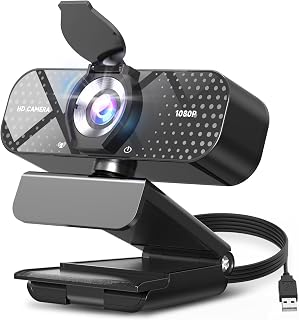
The TRAUSI TW05 is a budget-friendly 1080P webcam designed for remote workers, online educators, content creators, and anyone who needs reliable video conferencing without investing heavily. At this price point, it punches well above its weight by combining essential features that typically cost significantly more.
The standout features deliver real-world value. The 1080P resolution with wide-angle lens captures crisp, detailed video suitable for professional settings. The noise-canceling microphone performs admirably in noisy environments, keeping background clatter at bay while your voice remains clear. The automatic light correction is genuinely useful, adapting your video quality from dimly-lit home offices to naturally-lit spaces without requiring manual adjustments. Setup is refreshingly simple, requiring nothing more than plugging in the USB cable.
Build quality feels solid for the price. The minimalist black design is unobtrusive on any monitor or laptop. The included 5ft USB cable provides reasonable reach, and the privacy cover slides smoothly over the lens for quick security when you step away. The eco-conscious materials and energy-efficient design add environmental value without compromising performance.
The fixed focus and 30fps frame rate represent the main limitations. If you frequently work very close to the camera or move rapidly during streams, you may notice focus soft spots or slightly less fluid motion compared to higher-end alternatives. These trade-offs are reasonable at this price point.
Verdict: The TRAUSI TW05 delivers genuine professional functionality for budget-conscious buyers. It excels for daily video calls, teaching sessions, and casual streaming. If you need premium frame rates, manual focus control, or 4K resolution, look elsewhere. For everyone else seeking reliable performance at an exceptional price, this webcam is a solid choice.
Video Quality: 1080P Full HD (1920x1080) at 30fps, 16:9 aspect ratio, AVI format capture
Lens: Wide-angle lens with 2.8-4mm focal length range and fixed focus design for consistent sharpness
Audio: Built-in noise-canceling microphone with AAC audio format support
Connectivity: USB 2.0, 3.0, 3.1, and OTG compatible, plug-and-play with no driver installation needed
Compatibility: Windows PC, Mac, laptops, desktops, plus Zoom, Skype, Teams, and streaming platforms
Physical: Compact minimalist design, privacy cover included, 5ft USB power cable, 90-day manufacturer warranty
Best For: This webcam suits remote workers, online students, educators, small content creators, and anyone seeking reliable video conferencing on a budget. It covers professional video call needs without requiring technical expertise.
Not Ideal If: You require 4K resolution, manual focus control, 60fps frame rates, or professional-grade zoom capabilities. Serious streamers and video production professionals should consider higher-end alternatives.
Setup Tips: Simply plug the USB cable into your computer, wait a few seconds for automatic driver detection, then open your video conferencing app and select TRAUSI as your camera. The privacy cover slides on and off smoothly, so keep it handy when stepping away from your desk.
Maintenance: Keep the lens clear of dust and fingerprints with a soft, dry cloth. Store the privacy cover in place when not using the camera to protect the lens from debris.
Pros
- Excellent image quality in 1080p with vibrant colors and sharp detail
- Built-in microphone handles noisy environments surprisingly well for the price point
- Truly plug-and-play with zero setup required, works immediately on Windows, Mac, and Linux
- Lightweight and compact design won't obstruct your monitor or take up desk space
- Privacy cover is a thoughtful addition that competitors often omit
Cons
- Mounting can be tricky on some laptop screens due to the compact design
- Fixed focus may not suit users who need variable depth of field adjustments
- Limited to 30fps video capture, so not ideal for high-speed action or professional streaming
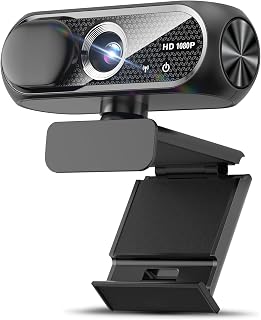
The Shcngqio TWC29 is a budget-friendly 1080p webcam designed for professionals and casual users alike. Whether you're working from home, teaching online, streaming content, or gaming with friends, this webcam delivers reliable performance without breaking the bank. The compact form factor and plug-and-play setup make it accessible to anyone, regardless of technical skill level.
What sets this webcam apart is its thoughtful feature set at this price point. The 1080p sensor captures sharp, vibrant video with a 16:9 aspect ratio that feels natural during video calls. The wide-angle lens provides good field of view, while the automatic light correction technology is genuinely useful, adapting to low-light rooms, bright sunlight, and everything in between. The built-in noise-canceling microphone performs admirably in typical home and office environments, keeping your voice clear even when others are working nearby.
Build quality is solid for the price. The webcam feels sturdy and compact, sitting neatly on top of a monitor without feeling intrusive. The included 5-foot USB cable provides reasonable reach, and the privacy cover is a practical addition that shows the manufacturer thought about user concerns. The CMOS sensor and fixed focus design prioritize simplicity and reliability over advanced features.
The main limitations are the fixed focus system, which works fine for typical distances but won't appeal to users needing variable depth control, and the 30fps maximum frame rate, which is adequate for standard video conferencing but not ideal for fast-action streaming or gaming. A few users noted difficulty mounting the webcam securely on curved laptop screens, though traditional flat monitors have no issues.
For anyone seeking a dependable, affordable webcam for everyday video calls, remote work, or light streaming, the Shcngqio TWC29 delivers excellent value. The combination of 1080p clarity, noise cancellation, automatic light adjustment, and thoughtful design makes it a smart choice for budget-conscious buyers who don't want to sacrifice essential features.
Video Capture: 1080p Full HD at 30fps, 1920x1080 resolution, 16:9 aspect ratio, AVI format
Lens and Focus: Wide-angle lens with fixed focus, 1-2 meter focal length range
Sensor: CMOS photo sensor for reliable low-light performance
Audio: Built-in noise-canceling microphone, supports AAC and MP3 formats
Connectivity: USB 2.0, 3.0, and 3.1 compatible, plus OTG support. Includes 5-foot USB power cable. No additional drivers required.
Compatibility: Windows PC, Mac, Linux, tablets, and smartphones. Works with Zoom, Skype, and all major video conferencing platforms
Design: Compact form factor, black color, includes privacy cover slide
Warranty: 90-day manufacturer warranty
Logitech C920x HD Pro Webcam 1080p/30fps with Dual
Pros
- Consistently sharp video quality even in challenging lighting with automatic adjustment
- Dual microphones deliver balanced audio capture superior to single-mic competitors
- XSplit VCam inclusion adds significant value for content creators and remote professionals
- Plug-and-play USB setup requires no complex installation or software
- Five-element glass lens provides professional-grade optical quality
Cons
- No privacy shutter included, requiring manual covering or software solution for privacy
- Fixed 30fps maximum frame rate may feel limited for fast-action streaming or gaming
- 78-degree field of view slightly narrower than some competing models at similar price point
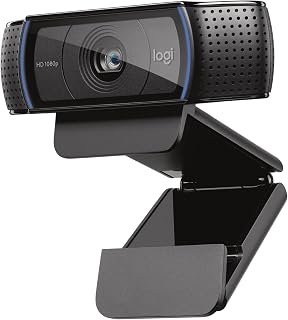
The Logitech C920x is a professional-grade webcam engineered for remote workers, content creators, and streamers who demand reliable 1080p video quality. Whether you are joining critical business calls, building a YouTube channel, or streaming gameplay, this camera delivers the clarity and features needed to make a strong impression.
The standout feature is the combination of intelligent autofocus with automatic light correction, which continuously adapts to your environment. In low-light conditions, the camera brightens and sharpens the image without the graininess common in budget webcams. The five-element glass lens ensures images remain crisp and detailed across the entire frame, while the wide 78-degree viewing angle accommodates multiple people or a full-body shot for demonstration videos.
Audio quality matters as much as video for conferencing and content creation. The C920x includes dual stereo microphones positioned on either side of the lens, capturing your voice naturally and minimizing background noise. This two-mic design significantly outperforms single-mic webcams, making your calls feel more professional and engaging.
The included 3-month XSplit VCam license is a practical bonus that lets you remove, replace, or blur your background without investing in a green screen. Design-wise, the compact form factor and professional black finish blend unobtrusively into any setup. The main trade-off is the absence of a physical privacy shutter, and the 30fps frame rate, while sufficient for most uses, may feel limiting for fast-paced streaming or gaming.
The C920x ranks as a top choice for professionals and creators seeking reliable, proven performance. It delivers broadcast-quality video and audio in a straightforward, dependable package that justifies the investment if you spend significant time on video calls or content production.
Video Performance: Full HD 1080p at 30fps, 720p at 30fps, 78-degree viewing angle, autofocus with light correction
Audio: Dual stereo microphones for natural sound capture
Lens: Five-element glass lens, 1.8 f-stop maximum aperture, auto focus
Sensor: CMOS 1/2.9 inch, FHD maximum display resolution
Connectivity: USB, plug-and-play compatibility with Windows 11 and multiple operating systems
Physical: 3.7 inches wide, 2.7 inches tall, 1.7 inches deep, weighs 5.7 ounces
Included: C920x Webcam, USB cable, user documentation, 3-month XSplit VCam license
Warranty: 1 Year Limited Hardware Warranty
Best For: Remote professionals, online educators, YouTube content creators, Twitch streamers, podcasters, and anyone conducting regular video meetings who values reliable performance and built-in background customization tools.
Consider If: You prioritize automatic light correction, need dual-microphone audio capture, work in varying lighting conditions, want an included background removal tool, and prefer proven, widely-used hardware over experimental alternatives.
Possibly Skip If: You require faster frame rates for competitive gaming, need a privacy shutter built-in, work exclusively in perfectly-lit environments, or prefer USB-C connectivity over standard USB.

Pros
- Exceptional 4K image quality with true HDR and strong low-light capability outperforms standard webcams
- Physical pan and tilt with AI tracking keeps you framed automatically during movement or multitasking
- Professional-grade audio with AI noise cancellation delivers broadcast-quality sound without external mics
- DeskView and Whiteboard modes add versatility for presentations, teaching, and creative workflows
- Privacy mode automatically tilts down after inactivity for built-in security and peace of mind
Cons
- Not compatible with ARM-based Windows systems or Windows Hello Face Recognition, limiting some users
- Requires 9V battery for certain features, adding an extra maintenance consideration
The Insta360 Link 2 is a premium PTZ webcam designed for serious streamers, content creators, and professionals who need broadcast-quality video and audio. With its 1/2 inch sensor and 4K resolution, it delivers the kind of image clarity and detail that standard webcams simply cannot match. Whether you're streaming on Twitch, hosting virtual meetings in Teams, or recording tutorial videos, this webcam brings professional standards to your desk setup.
The standout features that justify the investment are the AI tracking system and exceptional audio quality. The physical pan and tilt mechanism actively follows your movements, keeping you framed perfectly without any manual intervention. The built-in noise-canceling microphone uses advanced algorithms to strip away background distractions, delivering clear audio even in noisy environments. The Phase Detection Auto Focus ensures every frame is razor-sharp, and the natural bokeh effect adds a cinematic quality that rivals DSLR cameras.
Design-wise, the Link 2 is compact and elegantly built with a graphite black finish that fits naturally into modern workspace aesthetics. The magnetic mount system is flexible and quick to set up. The free Link Controller software gives you granular control over all settings and unlocks advanced features like DeskView mode for overhead camera angles and Whiteboard mode for interactive presentations. The included recognition markers enable gesture control, letting you start tracking or zoom with simple hand gestures.
The main limitation is compatibility, as the webcam does not work with ARM-based Windows systems or Windows Hello Face Recognition. Additionally, it requires a 9V battery for full functionality, which some users might find inconvenient compared to purely USB-powered alternatives. The premium pricing reflects the professional-grade capabilities, which may be overkill for casual users who just need basic video call functionality.
The Insta360 Link 2 is the best-in-class choice for anyone serious about streaming quality, professional presentations, or content creation. The combination of 4K video, intelligent tracking, and studio-grade audio makes it worth the investment for creators and professionals who spend significant time on camera.
Video and Image Quality: 4K resolution, 8MP still images, 1/2 inch CMOS sensor with HDR and exceptional low-light performance capture professional-grade video in any lighting condition.
AI Tracking and Framing: Physical PTZ mechanism automatically pans, tilts, and frames your movements. Gesture control and smartphone app enable intuitive remote operation for hands-free adjustments.
Audio Excellence: Advanced AI noise-canceling microphone filters unwanted background sounds, delivering broadcast-quality audio for streaming and conferencing without external equipment.
Focus and Clarity: Phase Detection Auto Focus provides instant sharp focus for every frame. Natural bokeh effect creates DSLR-like depth of field from your desk camera.
Software and Modes: Free Link Controller software unlocks advanced customization, DeskView mode for overhead angles, and Whiteboard mode for interactive presentations and teaching.
Compatibility: Works seamlessly with Zoom, Microsoft Teams, Twitch, and all major video conferencing and streaming platforms on Windows and Mac systems.
Content Creators and Streamers: The 4K resolution, AI tracking, and professional audio make this essential for Twitch, YouTube, and live streaming workflows where image and sound quality directly impact audience engagement and retention.
Remote Professionals: Teams, business leaders, and remote workers benefit from the sharp video quality, AI tracking that keeps them centered during movement, and noise-canceling audio that projects professionalism on calls with clients and executives.
Educators and Presenters: Teachers and trainers gain from DeskView and Whiteboard modes for demonstrations, gesture control for hands-free operation, and the natural bokeh that creates a polished, engaging presentation experience.
Casual Users Should Consider: If you primarily use your computer for basic video calls or the webcam sits unused most of the time, the premium price may not be justified. A standard 1080p webcam would serve your needs adequately at a lower cost.
Pros
- Genuinely impressive video quality at under 40 dollars with professional-grade Sony sensor
- Autofocus tracks movement smoothly, making it excellent for dynamic content and video calls
- AI microphone filtering actually works, delivering clear audio without distracting background noise
- Includes both USB-A and USB-C adapters for seamless connection to any device
- Reliable performance backed by 2-year warranty and proven customer satisfaction
Cons
- No built-in speakers, so you'll need external audio for monitoring during recordings
- Frame rate drops to 30fps at 4K resolution, though 60fps is available at 1080p or 2K
- Requires manual microphone selection in system settings and apps to activate noise cancellation
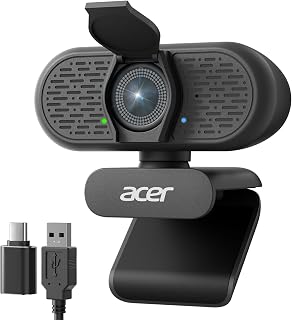
The Acer A640 is a 4K webcam designed for remote workers, content creators, and live streamers who want professional video quality without professional-grade complexity or pricing. It combines genuine Sony sensor technology with practical features like AI noise cancellation and a physical privacy shutter, making it a solid choice for anyone conducting video calls, recording tutorials, or streaming online.
What sets this webcam apart is its combination of instant PDAF autofocus and real-world performance. The autofocus tracks movement smoothly without the hunting behavior common in budget webcams, keeping you sharp even during animated presentations or dynamic content. The Sony 1/2.8-inch sensor delivers genuine 4K clarity at 30fps, with flexibility to shoot at 60fps in 1080p or 2K for smoother motion capture. Low-light correction actively enhances your appearance in dim lighting, a feature that actually matters for morning video calls or home offices without ideal lighting.
Build quality feels solid and purposeful. The sleek grey design includes a physical privacy shutter you can slide closed instantly, providing tangible security beyond software controls. The included USB-A to USB-C adapter ensures compatibility across older and newer devices. Setup is genuinely plug-and-play with no drivers required on Windows, Mac, or Linux platforms.
The main drawback is setup friction around the AI microphone. You'll need to manually select the A640 as your default microphone in both system settings and individual apps like Zoom or Teams to activate noise cancellation. There's also no built-in speaker, so you'll need headphones or external monitors. The 30fps frame rate at 4K is adequate for most uses but noticeable if you're comparing directly to 60fps alternatives.
For the price, this is genuinely impressive. It delivers the sensor quality and autofocus performance you'd expect from cameras costing twice as much, with the reliability customers consistently praise. If you're upgrading from your laptop's built-in camera or a years-old webcam, you'll notice the difference immediately.
Core Performance: 4K video at 30fps, 2K/1080p at 60fps, Sony CMOS 1/2.8-inch sensor, 77.4-degree viewing angle, 2-8mm aperture
Autofocus: Phase Detection Autofocus (PDAF), 10-26cm focal range, instant subject lock-on
Connectivity: USB with included USB-A to USB-C adapter, compatible with Windows, Mac, Linux
Audio: AI-powered noise cancellation microphone (no built-in speaker)
Security: Physical sliding privacy shutter
Physical: 4.64 ounces, compact design, 2-inch screen size
Warranty: 2 years manufacturer coverage
Remote Workers: If you're on video calls regularly and want to look professional without fussing with lighting or focus adjustments, the automatic low-light correction and autofocus handle it for you.
Content Creators: Streamers and YouTubers will appreciate the reliable 4K quality, smooth autofocus during movement, and AI noise cancellation that reduces editing work later.
Casual Upgraders: Moving up from your laptop camera or an older webcam, you'll notice immediate improvements in clarity, color accuracy, and focus reliability.
Price-Conscious Buyers: You get Sony sensor quality and autofocus performance typically reserved for cameras costing 80-120 dollars.
Skip If: You need 60fps video at 4K, built-in audio monitoring, or automatic microphone setup without manual configuration.

Pros
- Excellent 4K video quality at an affordable price point
- Fast and accurate autofocus performance across a practical working range
- Built-in privacy cover and local-only data handling appeal to security-conscious users
- Flexible stand design with tripod mount option suits various desk setups
- Wide compatibility across major video conferencing platforms and operating systems
Cons
- Defaults to 1080p, requires manual switching to 4K via software or third-party apps
- Fixed 73-degree field of view cannot be adjusted, limiting framing options
- No facial tracking or autofocus adjustment features for advanced use cases
The EMEET NOVA 4K is a capable webcam designed for professionals who need reliable 4K video without breaking the bank. It targets remote workers, online educators, content creators, and streamers who demand sharp visuals for business calls, virtual classes, or live broadcasts.
The standout feature is the 4K resolution at 30fps with PDAF autofocus that locks onto subjects quickly across a 7.9 to 118-inch range. In practice, this means your video stays sharp whether you're sitting close to your desk or stepping back during a presentation. The dual omnidirectional mics handle voices clearly up to 8 feet away, and the EMEETLINK software lets you fine-tune brightness, contrast, and saturation on the fly.
Build quality is solid, with a robust swivel connection, internal rubber gripping material, and a 1.5-meter fixed cable. The universal joint offers 360-degree horizontal rotation and 15-degree vertical tilt, plus a standard tripod mount for flexible positioning. The included privacy cover is a practical touch for security-minded users.
The main drawbacks are the 1080p default resolution (you must manually switch to 4K), a fixed 73-degree field of view, and no facial tracking or advanced autofocus controls. These limitations don't hurt everyday use but may frustrate power users wanting more customization.
Overall, the NOVA 4K delivers strong value for professionals prioritizing clarity, privacy, and compatibility without premium pricing. It's reliable, easy to use, and built to last with a 2-year warranty.
Video: 4K UHD at 30fps, 1080p default, YUY2/MJPEG capture format, 73-degree fixed viewing angle, PDAF autofocus (7.9 to 118 inches), CMOS sensor with f/3.3 aperture.
Audio: Dual omnidirectional microphones, 100-10kHz frequency range, effective pickup up to 8 feet with optimal positioning.
Connectivity: USB 2.0, plug-and-play (no drivers required), compatible with Windows 10/11, macOS 10.14+, Android TV 7.0+. Works with Zoom, Teams, Google Meet, and major platforms.
Physical: Compact form factor (2.16 x 3.94 x 2.32 inches), 4.64 ounces, universal joint with 360-degree horizontal rotation, 15-degree vertical tilt, 180-degree adjustable stand, tripod mount support.
Warranty: 2-year manufacturer warranty. Package includes privacy cover, USB cable, and user manual.

Pros
- Sharp, detailed 4K video quality that looks professional on video calls and streams
- Fast and reliable PDAF autofocus prevents blurry moments during meetings
- Built-in dual mics eliminate the need for external microphones in most scenarios
- Easy setup with no drivers or cloud services required, straightforward USB plug-and-play
- Excellent value at the price point compared to other 4K webcams
Cons
- Defaults to 1080P resolution, requires manual switching to 4K in camera software or OBS
- 4K quality depends on adequate lighting, performance noticeably degrades in darker rooms
- Lacks auto-follow or tracking features found on higher-end models
The EMEET C960 is a 4K webcam designed for professionals, remote workers, educators, and content creators who need reliable video quality without breaking the bank. It combines genuine 4K resolution with practical features like autofocus and dual microphones, making it suitable for everything from daily video calls to streaming and online lectures.
The standout feature is the PDAF autofocus system, which keeps you sharp and in focus even as you move around your workspace. Paired with auto light correction, the C960 adapts well to different lighting conditions, though it performs best in well-lit environments. The dual omnidirectional microphones capture natural, clear audio that reviewers consistently praise, often matching or exceeding the quality of dedicated external microphones.
Build quality is solid for the price range. The compact design fits most monitor setups, and the included privacy cover addresses security concerns. The soft mount prevents scratches, and the flexible adjustment options allow you to position the camera exactly how you need it. All of this comes without requiring driver installations or cloud connectivity.
The main drawback is that 4K requires manual activation through software like OBS or PotPlayer rather than being the default setting. Additionally, video quality depends significantly on lighting conditions. The 73-degree field of view is narrower than some competitors, which some users see as a benefit for minimizing background clutter during professional meetings.
The EMEET C960 is a smart choice if you need a reliable 4K webcam with excellent audio for video conferencing or streaming. It won't match premium models with advanced features like auto-tracking, but it delivers professional-grade video and sound at a price that makes it accessible to most users.
Video Performance: True 4K resolution at 30fps (defaults to 1080P), CMOS sensor, 73-degree field of view, maximum 3-meter focal range, 8.3 MP still resolution.
Autofocus and Imaging: PDAF autofocus technology, auto light correction for low-light and bright environments, digital zoom, wide-angle lens with 2mm minimum aperture.
Audio: Dual omnidirectional microphones for clear, natural sound capture with minimal background noise.
Connectivity and Compatibility: USB plug-and-play, works with Windows 7/10/11, macOS 10.14 and above, Android TV 7.0 and above, and Linux. Compatible with Zoom, Teams, Skype, and other major communication platforms. EMEETLINK software for custom video settings.
Physical Design: Compact form factor (3.9" x 2.3" x 2.2"), weighs 4.8 ounces, includes privacy cover and adjustable mount with 360-degree horizontal and 15-degree vertical adjustment. 1/4-inch tripod thread for alternative mounting options.
Pros
- Exceptional autofocus performance that tracks movement smoothly in real-time
- Intuitive gesture controls eliminate need for software adjustments during streams
- Ultra-portable form factor makes it ideal for mobile content creators and remote workers
- Excellent low-light performance thanks to large sensor and f/1.8 aperture
- Magnetic safety cover protects lens and adds premium feel
Cons
- Mounting stand feels unstable and may require alternative mounting solution
- Short USB-C cable limits positioning flexibility without extension cables
- Advanced features require software download, which some corporate networks may not permit
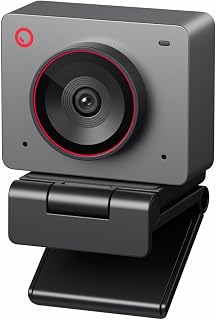
The OBSBOT Meet 2 redefines what a webcam can be for content creators, streamers, and remote professionals. This is not your standard laptop webcam. It's a professional-grade imaging device packed into a form factor so small it fits in your pocket, making it perfect for anyone who needs broadcast quality video without studio equipment.
What sets the Meet 2 apart is its AI intelligence. The auto-framing feature dynamically adjusts composition in real-time, keeping you centered whether you're alone or presenting to a group. The gesture control system is genuinely innovative, letting you zoom and toggle framing with hand signals, eliminating the need to reach for a keyboard or mouse mid-stream. The 1/2 inch CMOS sensor with f/1.8 aperture captures four times more light than standard webcams, delivering crisp video even in dimly lit rooms or during evening broadcasts.
Build quality feels premium. The magnetic lens cover is satisfying to use, and the overall design is sleek without being fragile. The dual omni-directional mics do solid work filtering out mechanical noise, though power users typically pair this with external audio equipment anyway. Video options include 4K at 30fps or 1080p at 60fps, giving you flexibility depending on your streaming platform and internet bandwidth.
The primary trade-off is the mounting solution. The included stand lacks stability and many users resort to alternative mounts or placing the camera on their desk. The USB-C cable is also noticeably short, requiring an extension for optimal desk positioning. Setup is genuinely plug-and-play out of the box, though accessing advanced controls means installing OBSBOT Center software, which may not work in restricted corporate environments.
If you stream, create content, or need reliable video for professional calls, the Meet 2 delivers exceptional value. It outperforms built-in laptop cameras by a significant margin and costs less than most professional alternatives. The AI features genuinely improve the viewing experience, not just as marketing gimmicks but as practical tools that keep your audience engaged. Highly recommended for anyone serious about video quality.
Video Performance: 4K UHD at 30fps or 1080p at 60fps, 48MP still resolution, 4x digital zoom
Imaging Tech: 1/2 inch CMOS sensor, f/1.8 aperture, 10-26mm focal length range, auto-focus with gesture and AI controls
Audio: Dual omni-directional noise-canceling microphones with adaptive noise reduction
Connectivity: USB-C, plug-and-play compatible with PC/Mac, optional OBSBOT Center software
Physical: 40.5g weight, compact design (0.43 x 0.2 x 0.41 inches), includes magnetic lens cover and USB cable, 1-year warranty
Best For: Streamers on Twitch or YouTube, podcast video producers, remote professionals on frequent video calls, content creators prioritizing portability, esports players wanting tournament-grade equipment
Not Ideal For: Corporate users with strict software installation policies, people who need a sturdy all-in-one mounting solution out of the box, users requiring HDMI output instead of USB
Setup Tips: Invest in a small monitor arm or desk mount to replace the included stand. A USB-C extension cable (3-6 feet) gives you better positioning flexibility. Pair with external lighting for optimal low-light performance. Test gesture controls in your streaming software to ensure compatibility.
Comparison Context: The Meet 2 sits above entry-level 1080p webcams but below high-end cinema cameras. It competes favorably with other 4K webcams in terms of AI features, size, and price point while offering better autofocus than most competitors.

Pros
- Outstanding 4K image quality with true-to-life colors and smooth autofocus
- Intelligent auto-framing adapts automatically to single users or groups
- Premium audio quality with AI noise cancellation cuts through ambient noise
- Versatile modes including DeskView and Whiteboard for creative flexibility
- Easy privacy switch and privacy mode protect your camera when not in use
Cons
- Not compatible with ARM-based Windows systems or Windows Hello Face Recognition
- Premium pricing places it above entry-level webcams
- Requires USB-C connection, limiting use on older systems without adapters
The Insta360 Link 2C is a premium webcam designed for professionals, streamers, and content creators who refuse to compromise on video quality. Built around a spacious 1/2-inch sensor, it captures true 4K video with HDR and exceptional low-light performance, making it suitable for everything from corporate video calls in dim conference rooms to high-energy gaming streams under dynamic lighting.
What truly sets the Link 2C apart is its intelligent feature set. The Phase Detection Auto Focus locks onto your face instantly and keeps it sharp, while the auto-framing system dynamically adjusts zoom and positioning to keep you and your audience in frame without any manual intervention. The AI-powered noise-canceling microphone is genuinely effective at filtering out typing, background chatter, and ambient office noise, ensuring your voice comes through clear and professional. Hand gesture control and smartphone app management add remarkable convenience to your streaming or call setup.
Build quality is solid and the compact form factor fits naturally on most monitors. The included magnetic mount and recognition markers make setup straightforward. The free Link Controller software provides granular control over all settings, from color grading to advanced audio tuning, letting you dial in the exact look and feel you want for your specific use case.
The main limitation is compatibility, as the camera does not work with ARM-based Windows systems or Windows Hello Face Recognition. Additionally, this is a premium product with a price tag to match, and you'll need a USB-C port or adapter to use it with older machines. If your setup is compatible and your budget allows, these minor restrictions fade away quickly once you experience the quality and automation this camera delivers.
The Insta360 Link 2C is a worthy investment for anyone who spends significant time on video calls or streams and wants professional results without the complexity of multi-camera rigs or external lighting. It genuinely performs, and the thoughtful feature design shows that Insta360 understands what content creators and remote professionals actually need.
Video Quality: 4K resolution at 16:9 aspect ratio with HDR support and low-light performance. Phase Detection Auto Focus ensures consistently sharp focus. Natural bokeh effect replicates DSLR depth of field.
Audio: AI-powered noise-canceling microphone with support for AAC, MP3, and PCM formats. Advanced algorithms filter unwanted background noise for professional-grade communication.
Control & Compatibility: Compatible with Zoom, Microsoft Teams, Twitch, and major video platforms. Gesture control, smartphone app, and remote adjustment via Link Controller software. USB connectivity with included USB-C cable and A adapter.
Hardware: 1/2-inch CMOS sensor. 108cm maximum focal length with 1.8mm maximum aperture. Includes magnetic mount, recognition markers, and 1-year warranty. Compact form factor designed for desktop and monitor placement.
Remote Professionals: Perfect for executives, consultants, and remote workers who want studio-quality video during important client calls and presentations without investing in separate lighting or backdrop equipment.
Content Creators & Streamers: The 4K sensor, auto-framing, and intuitive controls make this ideal for YouTubers, Twitch streamers, and other creators who need reliable, hands-free video quality during long sessions.
Gamers & Esports: High-quality webcam for stream overlays and audience engagement, with gesture control and AI tracking that keeps your face in frame during intense gaming moments.
Team Collaboration: Multi-person auto-framing works great for small team meetings, huddles, or collaborative work sessions where multiple people need to stay visible and engaged.

Pros
- Exceptional 4K video quality that noticeably outperforms standard 1080p webcams
- Intelligent lighting correction works exceptionally well in challenging conditions from low light to bright sunlight
- Windows Hello integration adds security and convenience to device access
- Flexible field-of-view options accommodate different room sizes and shooting styles
- Dual microphones with noise cancellation eliminate distracting background sounds effectively
Cons
- Privacy shutter clips on loosely and can detach easily, lacking the durability expected at this price point
- USB cable is thick and stiff, limiting flexibility in cable management
- Full 4K functionality requires Logi Options+ app on Windows and Mac, with limited support on Linux
The Logitech Brio Pro X is a premium 4K webcam designed for professionals who spend significant time in video meetings, streaming, or content creation. This is the camera for remote workers, therapists conducting telehealth sessions, and anyone who wants to present themselves with exceptional clarity and professionalism on video calls.
The standout feature is the ultra 4K video quality combined with RightLight 3 and HDR technology that automatically adapts to your lighting conditions. Users report dramatically sharper images and better color reproduction compared to standard webcams. The dual noise-canceling microphones are equally impressive, capturing clean audio from up to 4 feet away while filtering out background noise. The three adjustable field-of-view presets (65, 78, and 90 degrees) let you frame your shot exactly as needed, whether for head-and-shoulders professional meetings or wider room views.
Build quality is solid with a compact, lightweight design that works across Windows, Mac, and ChromeOS. The Windows Hello facial recognition feature works reliably for secure login, and the included privacy shutter adds an extra security layer. However, the privacy shutter design feels flimsy, clipping onto the camera top and detaching too easily for a device at this price. The USB cable is also thicker and stiffer than ideal for cable management.
Performance is excellent for video conferencing platforms and streaming applications. The autofocus is responsive, and the 5x digital zoom allows closer framing without quality loss. The Logi Options+ app on Windows and Mac provides granular control over zoom, focus, and color settings, though Linux users have limited access to these features.
The Logitech Brio Pro X is a worthwhile investment for professionals who spend hours on video calls and want to control how they appear to colleagues, clients, and audiences. The 4K video quality, intelligent lighting adjustment, and strong microphone performance justify the premium price for remote work, telehealth, and content creation use cases.
Remote workers and managers conducting daily video conferences who need consistently professional video quality across different lighting conditions.
Telehealth and therapy professionals where clear video and audio are essential for patient care and emotional connection during virtual sessions.
Content creators and streamers who want broadcast-quality video from a compact, easy-to-setup device without requiring external lighting rigs.
Windows users who value biometric security and want seamless facial recognition login integrated with their webcam.
What to Consider When Choosing a Streaming Webcam
Resolution and Sensor Quality
Resolution determines how crisp your stream appears to viewers. While 1080p remains perfectly adequate for most streaming scenarios, 4K models like the Insta360 Link 2 offer future-proofing and superior clarity when downscaled.
Sensor size matters just as much as pixel count. Larger sensors capture more light, producing cleaner images in challenging lighting conditions. The 1/2″ sensors found in premium models significantly outperform smaller sensors in low-light environments.
Autofocus Technology
Phase Detection Auto Focus (PDAF) represents a major advancement over traditional contrast-based systems. PDAF locks onto subjects instantly and maintains focus even when you move around your setup.
This becomes critical during dynamic streams where you demonstrate products, write on whiteboards, or simply shift positions. Models like the EMEET NOVA and Acer A640 utilize PDAF to eliminate the frustrating focus hunting that plagues budget webcams.
Audio Capabilities
Built-in microphones serve as your backup audio solution and occasional primary source. Dual omnidirectional microphones with AI noise cancellation filter out keyboard clicks, fan noise, and background conversations.
While dedicated microphones still provide superior audio for professional streams, webcam audio has improved dramatically. The noise-canceling systems in the Logitech Brio and OBSBOT Meet 2 capture clean vocal audio even in less-than-ideal recording environments. If you’re setting up your streaming workspace, check out our guide on laptops optimized for home office use.
Smart Features and Software Control
AI-powered features like auto-framing, gesture control, and tracking change how you interact with your camera during streams. Auto-framing keeps you centered without manual adjustments, while gesture controls let you zoom or activate features without touching your keyboard.
Companion software unlocks additional capabilities beyond basic webcam functions. Programs like EMEETLINK and Logitech’s Options+ provide granular control over exposure, white balance, and field of view. These tools prove invaluable when dialing in your exact look across different lighting scenarios.
Privacy shutters offer peace of mind between streaming sessions. Physical covers ensure complete lens blockage, eliminating concerns about unauthorized access or accidental broadcasts. Students managing online coursework alongside streaming might find our recommendations for computer science laptops particularly relevant.
Final Thoughts
Your webcam choice directly impacts how audiences perceive your content and brand. For streamers prioritizing cutting-edge AI features and PTZ capabilities, the Insta360 Link 2 delivers professional-grade performance with intuitive gesture controls and true 4K clarity. Budget-conscious creators seeking reliable 1080p quality will appreciate the TRAUSI 1080P FHD Webcam with Noise-Canceling Mic, which provides essential features without unnecessary complexity. Match your selection to your streaming frequency, production standards, and growth trajectory.
Frequently Asked Questions
Do I really need 4K for streaming on Twitch or YouTube?
Most streaming platforms compress 4K footage during broadcast, making 1080p perfectly sufficient for live content. However, 4K webcams excel in two scenarios: recording local footage for edited content and future-proofing your setup as platform capabilities expand. The superior sensors in 4K models also improve image quality even when streaming at 1080p.
Can webcam microphones replace dedicated streaming mics?
Webcam microphones have improved significantly, with AI noise cancellation rivaling entry-level USB mics in controlled environments. For casual streaming or backup audio, they’re entirely adequate. Professional streamers and podcasters still benefit from dedicated XLR or USB microphones, which offer superior clarity and customization. Consider webcam audio your safety net rather than your primary solution.
What lighting conditions do these webcams handle best?
Models with larger sensors and HDR technology adapt to varied lighting more effectively than budget options. The Insta360 Link 2 and Logitech Brio perform well in challenging conditions thanks to their advanced light correction algorithms. That said, proper lighting remains your most impactful upgrade, even premium webcams struggle with harsh backlighting or extremely dim environments. For professionals juggling multiple work setups, our teacher laptop recommendations address similar portability and performance needs.
Are PTZ webcams worth the extra investment in 2026?
Pan-tilt-zoom webcams justify their premium when you move around during streams, demonstrate physical products, or collaborate with multiple people in frame. The Insta360 Link 2’s physical tracking and OBSBOT Meet 2’s AI framing eliminate the need for manual camera adjustments. Static streamers who remain seated throughout broadcasts gain minimal benefit from PTZ capabilities and should prioritize image quality and audio instead.
Common questions
What is the best streaming webcam to buy in 2026?
The Insta360 Link 2 stands out as the best streaming webcam for most creators in 2026. Its 1/2-inch sensor delivers excellent low-light performance, AI tracking keeps you centered during dynamic streams, and HDR ensures balanced exposure. The PTZ mechanism and gesture control add production value without extra equipment. Alternative strong picks include the OBSBOT Meet 2 for portability and the EMEET NOVA for budget-conscious streamers who still want 4K quality.







Write Your Review
No reviews yet. Be the first to share your experience!