

A 60Hz monitor can feel perfectly adequate during a slow-paced adventure or strategy game, then suddenly feel restrictive when you are tracking an opponent in a shooter or racing through a crowded course. At 60Hz, the screen can show up to 60 distinct frames per second, so faster movement looks less continuous than it does on a higher-refresh display.
This guide answers whether 60Hz is enough for gaming based on the games you play, the frame rates your hardware can produce, and the image quality you value most. It also compares practical monitor paths from 120Hz through 240Hz, especially if you are pairing a display with a capable graphics card from our GPU guide for Helldivers 2.
Quick Comparison
Ratings reflect the most recent data pull. Check each listing for current price and availability.
Quick answer
This guide compares 10 picks, with Sceptre 25" 165Hz Gaming Monitor 1ms FHD 1080p AMD ranked first. KTC 27" 4K 160Hz Gaming Monitor - Fast IPS, HDR400 holds the highest customer rating among them. Z-Edge 27" 180Hz FHD Gaming Monitor, 1ms Response, IPS has the most customer reviews.

Pros
- Exceptional value for competitive gaming at under $100
- 165Hz refresh rate gives a tangible edge in reaction-time sensitive games
- Fast 1ms response time eliminates ghosting and motion blur
- AMD FreeSync support creates stutter-free gameplay with compatible graphics cards
- Lightweight and wall-mountable for flexible setup options
Cons
- 1080p resolution is lower than newer 1440p gaming monitors at this price point
- No USB hub or additional ports beyond audio/video connectivity
- Glossy screen finish may cause glare in bright environments
The Sceptre E255B-1658A is a 25-inch gaming monitor engineered for competitive esports players and enthusiasts seeking high-refresh-rate performance on a budget. At this price point, it delivers impressive specs that punch above its weight class, making it an excellent entry point into high-frame-rate gaming.
The standout feature is undoubtedly the 165Hz refresh rate combined with a blazing-fast 1ms response time. In competitive titles like CS:GO, Valorant, and Overwatch, this means smoother visuals and faster visual feedback that can genuinely impact performance. AMD FreeSync technology eliminates screen tearing, creating a seamless experience when paired with Radeon graphics cards. The anti-flicker technology reduces eye strain during extended gaming sessions.
Build quality is solid for the price range. The 25-inch panel uses a 16:9 aspect ratio with FHD 1920x1080 resolution, delivering crisp visuals on a screen size that avoids excessive pixel scaling. The monitor includes a sturdy stand and is VESA wall-mount ready, offering flexibility in desk setup. Built-in speakers provide basic audio output, and dual HDMI 2.0 ports plus DisplayPort ensure broad device compatibility with PCs, laptops, and gaming consoles.
The main limitation is the 1080p resolution. While this is sufficient for 25-inch gaming at competitive settings, players stepping up from smaller monitors may notice less screen real estate. The glossy finish, while offering vibrant colors, can be prone to glare in brightly lit rooms. Additionally, the monitor lacks USB hub functionality that might be found on higher-end models.
For esports players, content creators on a budget, and anyone prioritizing fast refresh rates over premium resolution, the Sceptre E255B-1658A delivers exceptional value. It's a straightforward, no-frills gaming monitor that excels at its core purpose: delivering smooth, responsive gaming visuals at an unbeatable price.
Display: 25-inch IPS LED panel, 1920x1080 (FHD), 16:9 aspect ratio, 300 cd/m² brightness, 5,000,000:1 dynamic contrast ratio
Performance: 165Hz refresh rate, 1ms gray-to-gray response time, 178-degree viewing angle, AMD FreeSync, flicker-free technology
Connectivity: 2x HDMI 2.0, 1x DisplayPort, 3.5mm audio output, built-in speakers
Physical: 21.96"W x 15.95"H x 7.35"D (with stand), 7.5 lbs, VESA wall-mount compatible, tilt adjustment
Power: 27W typical consumption, 30W maximum, compatible with 100-240VAC 50/60Hz input
Warranty: 1-year limited manufacturer warranty, includes DisplayPort cable and power cord
Ideal For: Competitive esports players, FPS and fighting game enthusiasts, budget-conscious gamers, content creators upgrading from 60Hz displays, anyone pairing with AMD Radeon graphics cards
Best Use Cases: CS:GO, Valorant, Overwatch, Fortnite, League of Legends, fighting games, fast-paced action titles where frame rate responsiveness matters most
Not Ideal For: Productivity professionals requiring high resolution, color-critical work like photo/video editing, players seeking premium 1440p or 4K gaming visuals, users who prioritize aesthetic designs with premium connectivity

Pros
- Exceptional 4K image quality with vibrant colors straight out of the box with minor calibration
- Outstanding value compared to competing 4K gaming monitors from major brands
- Fast 1ms response time combined with 160Hz refresh rate delivers smooth competitive gaming
- Robust connectivity with dual HDMI 2.1 and dual DisplayPort 1.4 for flexibility
- Full ergonomic adjustability ensures comfortable positioning during long gaming or work sessions
Cons
- Some users report minor motion smearing with high contrast text that improves with overdrive adjustments
- Bright out-of-box calibration requires manual tuning to achieve optimal color accuracy for professional work
- Limited USB ports (one USB 3.0, one USB 2.0) for peripheral connectivity
The KTC H27P22S is a 27-inch 4K gaming monitor designed for gamers and creative professionals seeking premium performance at an accessible price point. This monitor combines a fast IPS panel with 160Hz refresh rate capability, making it suitable for both competitive gaming and color-critical work like photo and video editing.
The standout feature is the combination of true 4K resolution (3840x2160) with an impressive 160Hz refresh rate and 1ms response time. Real-world performance delivers sharp, detailed imagery with smooth motion handling. The HDR400 support with 132% sRGB color gamut produces vibrant, lifelike colors, and the 1000:1 contrast ratio provides excellent depth. FreeSync and G-Sync compatibility ensure tear-free gaming across both AMD and NVIDIA graphics cards without requiring proprietary adaptive sync technology.
Build quality is solid with a matte IPS panel that reduces glare and an ergonomic stand offering full adjustment capabilities including tilt, height, pivot, and swivel functions. The dual HDMI 2.1 and DisplayPort 1.4 connections provide excellent connectivity flexibility. Eye care features like flicker-free technology and blue light filtering make extended sessions more comfortable for daily work and gaming.
The main drawback is that optimal color accuracy requires manual calibration out of the box due to aggressive brightness settings. Some users report minor motion smearing in specific scenarios with high contrast text, though this can be mitigated through overdrive settings. These issues are minor and resolvable through adjustment rather than hardware limitations.
Verdict: The KTC H27P22S delivers compelling 4K gaming performance with excellent color quality and smooth responsive gameplay at a price point significantly lower than competing options from established brands. It's an intelligent choice for gamers upgrading from 1080p or 1440p who want genuine 4K fidelity without compromising refresh rate or response time.
Display: 27-inch 4K UHD IPS, 3840x2160 pixels, 16:9 aspect ratio, 178-degree viewing angles
Performance: 160Hz refresh rate (144Hz PC support), 1ms response time, 400 cd/m2 brightness, 1000:1 contrast ratio
Color: HDR400, 132% sRGB color gamut, low blue light filter, flicker-free technology
Connectivity: HDMI 2.1 x2, DisplayPort 1.4 x2, USB 3.0 x1, USB 2.0 x1
Adjustment: Tilt, height, pivot, and swivel adjustable stand, VESA mounting compatible
Dimensions: 30.7"W x 19.09"H x 7.09"D, 8.3kg weight
Included: Monitor, stand, DP cable, power adapter, and setup accessories

Pros
- Genuinely faster response times than IPS alternatives, no input lag or ghosting in fast-paced games
- Outstanding color accuracy and brightness for a TN panel, rivaling more expensive displays
- Excellent build quality and durability, maintains performance integrity over years of use
- G-SYNC compatibility ensures smooth gameplay with NVIDIA graphics cards without screen tearing
- Highly adjustable ergonomic stand prevents neck strain and fits seamlessly into any desk setup
Cons
- Vertical viewing angles are limited due to TN panel technology, not suitable for side-by-side viewing
- Built-in speakers are low quality and volume levels are weak for any serious audio needs
- Matte screen finish may reduce perceived brightness and color pop compared to glossy alternatives
The ASUS TUF Gaming VG27BQ is a 27-inch 1440p gaming monitor purpose-built for competitive gamers and esports enthusiasts who demand lightning-fast response times without compromising visual quality. This display bridges the gap between refresh rate performance and image clarity, making it ideal for titles like CS:GO, Valorant, and Destiny 2 where every millisecond counts.
The standout feature is the 0.4ms response time paired with a 165Hz refresh rate and ELMB Sync technology, which delivers genuinely smooth gameplay without ghosting or motion blur that plagues slower displays. Real-world testing confirms this monitor responds faster than comparable IPS panels, giving competitive players a tangible advantage. The 1440p resolution provides sharp detail and crisp text, striking a balance between visual fidelity and the high framerates modern GPUs can deliver.
Build quality is exceptional for the price point. The fully adjustable ergonomic stand with height, tilt, swivel, and pivot adjustments accommodates virtually any desk configuration. The matte finish reduces glare, and ASUS Eye Care technology with blue light filtering helps reduce fatigue during marathon gaming sessions. Color reproduction is surprisingly good for a TN panel, offering 99% color gamut coverage and accurate brightness control through Shadow Boost technology.
The main limitation is the TN panel's narrow vertical viewing angles, making this a front-and-center monitor rather than a multi-viewer display. The built-in speakers are functional but produce weak audio output. However, given the $289 price point and the inclusion of a 3-year warranty, these tradeoffs are reasonable for gamers prioritizing performance.
The ASUS TUF VG27BQ delivers genuine competitive value for esports and fast-paced gaming, outperforming more expensive alternatives in raw responsiveness while maintaining solid color accuracy and build quality. Highly recommended for anyone building a dedicated gaming rig on a budget.
Display Specs: 27-inch QHD 1440p (2560 x 1440) with 16:9 aspect ratio. Native refresh rate 144Hz overclocked to 165Hz. 0.4ms gray-to-gray response time with IPS-level color performance on TN panel technology.
Visual Features: 350cd/m2 brightness, 1000:1 contrast ratio, 170-degree horizontal and 160-degree vertical viewing angles, 99% color gamut. ELMB Sync reduces screen tearing and ghosting. Shadow Boost enhances dark scene details. ASUS Eye Care includes flicker-free technology and blue light filter.
Connectivity and Audio: 1x DisplayPort 1.2, 2x HDMI 2.0, USB connectivity. Built-in 2W speakers for basic audio output. VESA 100x100 mounting support for wall or arm installation.
Physical and Power: Dimensions 24.41" (W) x 14.84" (H) x 8.31" (D). Weight 5.8 lbs. 65W power consumption. Ergonomic stand with full height, tilt, swivel, and pivot adjustments. 3-year warranty with advanced replacement included.
Competitive Gaming: The 0.4ms response time and 165Hz refresh rate make this ideal for esports titles like Counter-Strike, Valorant, League of Legends, and Overwatch where responsiveness directly impacts performance.
Fast-Paced Games: Action games, shooters, and racing titles benefit tremendously from the combination of high refresh rates and low response times, delivering fluid, artifact-free motion.
Budget-Conscious Enthusiasts: Gamers seeking premium gaming performance without premium pricing will appreciate the value proposition and exceptional build quality.
Single-Monitor Setups: As a primary front-and-center display, the TN panel's viewing angle limitations are not a concern. The 1440p resolution and color accuracy make it suitable for casual productivity and content consumption when not gaming.

Pros
- Excellent value for price, delivering 165Hz performance at a budget-friendly cost
- Fast 1ms response time ensures competitive edge in fast-paced games
- IPS panel provides accurate colors and wide 170-degree viewing angles
- Built-in speakers and integrated audio eliminate need for extra peripherals
- FreeSync support provides smooth, tear-free gaming with AMD graphics cards
Cons
- 1080p resolution on 27-inch panel results in lower pixel density compared to 1440p alternatives
- Built-in speakers are basic quality, suitable for casual use but not professional audio needs
- Limited to 100-240V operation, making international travel use dependent on adapters
The Sceptre E275B-FPT165 is a no-nonsense 27-inch gaming monitor built for competitive players and esports enthusiasts who value responsiveness and smooth frame delivery over cutting-edge resolution. It targets budget-conscious gamers upgrading from 60Hz displays or those seeking a secondary high-refresh monitor without breaking the bank.
The standout features center on gaming performance. The 165Hz refresh rate combined with a snappy 1ms response time delivers noticeably smoother motion in fast-paced titles like CS2, Valorant, and Fortnite. AMD FreeSync Premium synchronizes the display with compatible graphics cards, eliminating screen tearing and stuttering. The IPS panel renders 99% sRGB color accuracy, ensuring competitive visibility while maintaining vibrant visuals that look good even when not gaming.
Build quality reflects its price point. The monitor features a sleek matte-finish bezels, slim profile, and modern gunmetal black aesthetic. VESA wall mounting and a clean cable pass-through help minimize desk clutter. Connectivity includes three HDMI ports and one DisplayPort, plus an audio jack and built-in speakers for convenience. The 170-degree viewing angles and blue light reduction technology add practical comfort for extended sessions.
The main limitation is the 1080p resolution on a 27-inch panel, which yields lower pixel density than 1440p or 4K alternatives. Text and fine details appear slightly softer than on higher-resolution monitors. The built-in speakers are basic and suitable only for casual gaming or video calls, not music or movie enjoyment. Gamers with high-end GPUs capable of higher refresh rates and resolutions may find this monitor limiting.
Verdict: The Sceptre E275B-FPT165 is an excellent choice for budget-conscious esports players and streamers who prioritize high refresh rates and responsive gameplay. It delivers exceptional performance-per-dollar and remains a solid upgrade for anyone moving from 60Hz displays. Recommended for competitive multiplayer gaming, streaming setups, and users with mid-range graphics hardware.
Display: 27-inch IPS LED panel, 1920x1080 (Full HD), 16:9 aspect ratio, matte finish
Performance: 165Hz refresh rate, 1ms response time (blur reduction), 1096.32 lm brightness, 170-degree viewing angles
Color: 99% sRGB color gamut, blue light shift technology, flicker-free
Connectivity: 3x HDMI, 1x DisplayPort, audio jack, built-in 2W speakers
Features: AMD FreeSync Premium, custom FPS/RTS gaming modes, VESA 75x75 wall mount, tilt adjustment (3 height positions), frameless design
Physical: 24.1" W x 17.2" H x 6" D, 7.3 lbs, adjustable stand included
Power: 100-240V AC, includes 1-year limited warranty

Pros
- Exceptional refresh rate and response time at this price point
- Smooth curved design enhances immersion without being overwrought
- Clear picture quality and accurate colors require minimal calibration
- Versatile for gaming, work, and console play on PS5 and Xbox
- Solid build quality and durability backed by customer longevity reports
Cons
- Built-in speakers are adequate for low-mid volume but no match for dedicated audio systems
- Requires manual refresh rate adjustment in display settings to achieve 240Hz potential
- 1500R curvature is subtle, so users seeking extreme immersion may prefer tighter curves
The Sceptre C275B-FWT240 is a 27-inch curved gaming monitor engineered for budget-conscious players and productivity users who refuse to compromise on performance. This 1080p display punches above its weight class, delivering 240Hz refresh rates and 1ms response times that typically cost significantly more. It is perfect for competitive shooters, fast-paced action games, and anyone transitioning from standard 60Hz monitors.
The standout feature is the 240Hz refresh rate paired with AMD FreeSync support, which eliminates screen tearing and delivers buttery-smooth gameplay. The 1ms response time ensures ghosting and blur are virtually eliminated during fast camera movements and combat scenarios. The 1500R curvature is moderate but effective, wrapping your vision without feeling excessive. The edgeless design keeps focus on the action rather than monitor bezels.
Build quality and design are solid throughout. The 27-inch 1080p panel provides sharp text and clear imagery for both gaming and work tasks, with 99% sRGB color accuracy satisfying casual photo and video editing. The monitor supports multiple connectivity options, HDMI 1 and 2 at 144Hz, HDMI 3 at 165Hz, and DisplayPort at full 240Hz, offering flexibility for modern gaming setups and console compatibility with PS5 and Xbox.
The integrated speakers are serviceable for low-mid volume but lack bass and clarity, making external speakers the obvious upgrade path for audio enthusiasts. One minor quirk: achieving the full 240Hz requires manual configuration in Windows display settings, though reviewers confirm the difference is immediately noticeable. The curved design is comfortable but not extreme, so users seeking aggressive immersion curves may find it underwhelming.
Verdict: The Sceptre C275B-FWT240 delivers impressive performance and value for budget-focused gamers and everyday users. With 240Hz refresh rates, 1ms response times, and reliable build quality, it competes well above its price tier. It is best suited for competitive gaming and versatile use rather than ultra-premium immersion, but represents one of the strongest value propositions in affordable high-refresh gaming displays.
Display: 27-inch curved LCD with 1920x1080 FHD resolution, 16:9 aspect ratio, matte screen finish. Performance: 240Hz refresh rate, 1ms response time, 178-degree viewing angles, 1500R curvature, 0.36mm pixel pitch. Color: 99% sRGB gamut with blue light shift technology and flicker-free operation. Connectivity: 3x HDMI ports (144Hz, 144Hz, 165Hz) plus 1x DisplayPort (240Hz), audio output jack, built-in stereo speakers. Adaptive Sync: AMD FreeSync Premium. Power: 42 watts typical consumption. Physical: 24.22 inches wide, 17.78 inches tall, 8.22 inches deep, 8 pounds. Warranty: Limited 1-year coverage. Compatibility: Windows, Android, and iPhone devices.
Best For: Competitive gamers, esports enthusiasts, casual console players, and productivity users seeking high-refresh performance without premium pricing. The 240Hz rate excels in fast-paced shooters, MOBAs, and racing games where frame rates matter.
Consider This Monitor If: You want a smooth gaming experience, plan to use both PC and console, value flexible connectivity options, and appreciate curved screens without overpaying. You are upgrading from 60Hz or 144Hz displays and want a noticeable difference.
Avoid If: You demand ultra-tight curvature (this is moderate), require exceptional audio quality integrated into the display, or need premium color accuracy for professional content creation. You also may want to skip this if your graphics card cannot consistently push 200+ FPS in your favorite titles.
Setup Tips: Manually set display refresh rate to 240Hz in Windows Settings for full performance. Use DisplayPort for maximum 240Hz capability. Connect HDMI 3 if using 165Hz gaming on consoles. Mount externally if integrated speakers underwhelm your audio needs. Enable blue light filter during extended work or evening gaming sessions.

Pros
- High refresh rate and fast response time create competitive gaming advantage with minimal motion blur
- QHD resolution with 99% color gamut makes this excellent for both gaming and creative work
- Extensive ergonomic adjustments including pivot mode accommodate any workspace or preference
- Dual adaptive sync support works with NVIDIA and AMD graphics without compromise
- Quick installation design and generous 3-year warranty reduce setup hassle and ownership risk
Cons
- No USB-C connectivity limits modern device compatibility compared to newer premium monitors
- 350 nits peak brightness may feel modest for very bright rooms or outdoor viewing
- Limited review data available makes it harder to verify long-term durability and real-world performance
The KOORUI 27E3Q is a 27-inch QHD gaming monitor purpose-built for competitive gamers and creative professionals seeking high performance without premium pricing. The 1440p IPS display combines a 170Hz refresh rate with 1ms response time to deliver responsive, fluid gameplay across modern titles.
What sets this monitor apart is its balanced feature set: the 99% color gamut ensures accurate colors for photo and video work, while HDR400 support with 350 nits brightness enhances contrast in dark shadows and bright highlights. FreeSync Premium and G-Sync compatibility mean you get tear-free gaming regardless of your GPU brand, a practical advantage for flexibility.
Design and ergonomics are thoughtfully handled. The full range of adjustments, including a rare 90-degree pivot for vertical mode, adapts to different setups and workstyles. The snap-on bracket design eliminates frustrating screws and allows installation in minutes. Connectivity through DisplayPort 1.4 and dual HDMI 2.0 ports covers most gaming consoles and modern PCs.
Potential drawbacks include the lack of USB-C, which may concern those wanting single-cable docking solutions. The 350 nits brightness, while adequate for most rooms, might feel limited in very bright environments. Additionally, the absence of extensive user reviews creates some uncertainty about long-term reliability and real-world color accuracy.
The KOORUI 27E3Q delivers excellent value for gamers and content creators who prioritize refresh rate, color accuracy, and adjustability. The combination of 170Hz, QHD resolution, and ergonomic flexibility makes this a strong mid-range choice, backed by a solid 3-year warranty.
Display: 27-inch IPS, 2560 x 1440 (QHD), 16:9 aspect ratio, 99% color gamut, 178-degree viewing angle
Performance: 170Hz refresh rate (overclocked), 1ms response time (MPRT), 1000:1 contrast ratio, 350 nits peak brightness, HDR400 support
Connectivity: DisplayPort 1.4, HDMI 2.0 (x2), 3.5mm audio jack
Ergonomics: Height adjustment (110mm range), tilt (-15 to +15 degrees), swivel (-5 to +20 degrees), 90-degree pivot for portrait mode, VESA compatible
Build: Matte finish, flat design, 24.15 inches wide, 14.22 inches tall, 3.29 inches deep, weighs 16.62 lbs
Warranty: 3-year manufacturer warranty (display 1 year, accessories 3 years)
Best For: Competitive gamers, esports players, digital artists, photo editors, and productivity professionals needing a high-refresh QHD monitor with exceptional adjustability.
Consider This If: You want 1440p clarity with smooth 170Hz gaming, need accurate colors for creative work, or require multiple connectivity options and full ergonomic flexibility without spending premium prices.
Skip If: You need USB-C charging, require brightness above 350 nits for bright rooms, or want extensive verified user reviews before purchasing.
Competitive Alternatives: Compare against other 27-inch 1440p 144Hz+ monitors, but note this model's advantages in refresh rate, color gamut, and ergonomic range. The 170Hz capability and pivot functionality justify consideration despite brand recognition differences.
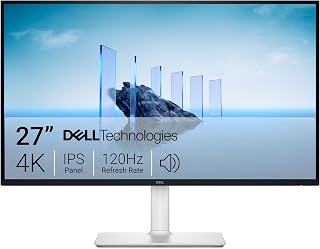
If you're stuck wondering whether 60Hz still cuts it in 2026, this one answers with a clear upgrade path. The 120Hz refresh rate doubles standard output, giving noticeably smoother motion in fast-paced titles, while FreeSync Premium keeps frame pacing steady to avoid tearing. Combined with 4K UHD sharpness and a 5ms response time, it's a practical step up for anyone ready to move past 60Hz without jumping to niche high-refresh gear.
Pros
- 120Hz refresh rate, double the standard 60Hz baseline
- FreeSync Premium prevents tearing as frame rates rise
- 4K resolution and 99% sRGB keep non-gaming use strong
- Adjustable stand with height, tilt, pivot, and swivel
Cons
- 4-8ms response time trails dedicated gaming monitors
- Default brightness runs high and needs manual tuning
If you're stuck at 60Hz and wondering whether the jump matters, the S2725QS is a clear way to find out without committing to a single-purpose gaming display. Doubling to 120Hz is the headline change here, and it's immediately noticeable in cursor movement, scrolling, and fast-paced game motion compared to a standard 60Hz panel. Pair that with FreeSync Premium and tearing stays out of the picture during the frame rate swings that come with 60-to-120 upgrades. Unlike monitors built purely for competitive play, this one doesn't ask you to give up resolution or color quality to get there: you still get 4K sharpness and 99% sRGB accuracy, so the panel earns its keep outside of gaming too. The 178 degree viewing angle and 1500:1 contrast keep images looking consistent whether you're gaming or working. For someone deciding if 60Hz is holding them back, this is a practical, dual-purpose way to test higher refresh rates while keeping a monitor that's genuinely useful for everything else.
Display: 27-inch IPS LED panel, 4K UHD (3840x2160), 16:9 aspect ratio, matte anti-glare finish
Color: 99% sRGB color gamut, 1500:1 contrast ratio, 350 nits brightness
Refresh Rate: 120Hz with AMD FreeSync Premium adaptive sync technology
Response Time: 0.03ms, 4-8ms gray-to-gray
Viewing Angle: 178 degrees horizontal and vertical
Connectivity: DisplayPort, 2x HDMI 1.4, 3.5mm audio jack
Adjustments: Height, tilt, pivot, and swivel adjustments, VESA 100x100 compatible
Audio: Built-in 2W stereo speakers with enhanced audio quality
Features: ComfortView Plus blue light reduction, Energy Star certified, USB hub connectivity
Dimensions: 24.08 inches wide, 7.89 inches deep, 15.3 inches high (with stand)
Weight: 14.3 pounds
Power Consumption: 24.6 watts
Warranty: 1-year advanced exchange service and premium panel exchange
Good for gamers and everyday PC users moving off a 60Hz monitor who want to feel the difference in smoothness without buying a niche gaming display. Suits anyone who also uses their screen for work or content since the 4K resolution and color accuracy carry over. Skip it if you're chasing the lowest possible response times or refresh rates well above 120Hz, since the 4-8ms response time and 120Hz ceiling fall short of dedicated high-refresh gaming monitors.

Pros
- Exceptional value for budget-conscious gamers seeking high refresh rate performance
- Fast 1ms response time delivers crisp action sequences without ghosting artifacts
- IPS technology provides wide viewing angles and vibrant colors for immersive visuals
- FreeSync support minimizes screen tearing across AMD graphics cards
- Versatile mounting options enable ergonomic multi-monitor configurations
Cons
- 1080p FHD resolution limits detail and clarity compared to 1440p or 4K alternatives at this screen size
- Single HDMI port restricts simultaneous multi-device connectivity
- Response time specification uses MPRT measurement rather than standard GTG, which may not directly compare to competitor specs
The Z-Edge UG27F is a 27-inch gaming monitor engineered for players seeking high refresh rate performance without premium pricing. This monitor delivers 180Hz refresh rates and 1ms response times on an IPS panel, making it suitable for competitive esports players, casual gamers, and content creators who value both speed and color accuracy in a single display.
The standout performance feature is the combination of 180Hz refresh capability with FreeSync adaptive sync technology. This pairing creates exceptionally smooth gameplay by synchronizing the monitor's refresh rate with your graphics card output, effectively eliminating screen tearing and stuttering. The 1ms MPRT response time keeps fast-moving scenes sharp during intense action sequences, providing a tangible advantage in FPS and racing games. The IPS panel technology sets this monitor apart from competitors by delivering 178-degree viewing angles and consistent color reproduction, making it practical for productivity work and collaborative gaming sessions.
Design and build quality reflect solid engineering at this price point. The 27-inch display features a slim bezel design with a modern aesthetic, supported by flexible VESA 100x100mm mounting that accommodates both traditional desk stands and wall mounts. The anti-glare screen finish minimizes reflections, while the Flicker-Free technology substantially reduces eye strain during marathon gaming or work sessions. Built-in gaming tools like crosshair overlays and customizable game modes add practical functionality without unnecessary complexity.
The primary limitation is the 1920x1080 FHD resolution on a 27-inch panel, which results in lower pixel density than 1440p displays. This becomes noticeable during text-heavy work or when viewing content from close distances, though most gamers prioritize refresh rate over resolution at this performance tier. Additionally, the single HDMI port limits device connectivity compared to competitors offering multiple inputs.
The Z-Edge UG27F represents excellent value for budget-conscious gamers and productivity users prioritizing high refresh rates and color accuracy over cutting-edge resolution. Customer feedback consistently highlights the balance of performance, build quality, and affordability, making this monitor a smart choice for those stepping up from standard 60Hz displays or seeking a secondary gaming monitor.
Display and Panel: 27-inch IPS LCD with 1920x1080 FHD resolution, 16:9 aspect ratio, 300 cd/m2 brightness, 1000:1 contrast ratio, and 120% color gamut. The anti-glare screen finish provides 178-degree horizontal and vertical viewing angles.
Performance: 180Hz refresh rate with 1ms MPRT response time, FreeSync adaptive sync support, Flicker-Free technology, and multiple game mode presets optimized for different genres. Native resolution is 1920x1080 pixels with 0.16mm pixel pitch.
Connectivity and Mounting: Single HDMI input, VESA 100x100mm mounting compatible with monitor arms and wall mounts. Desk mount stand included. Dimensions: 24.2 inches deep, 6.9 inches wide, 14.2 inches high.
Warranty and Support: 1-year limited warranty from Z-Edge, Model UG27F, UPC 815895027250. Compatible with desktop computers featuring HDMI video output.
Pros
- Exceptional refresh rate at an affordable price point
- Curved panel design genuinely enhances peripheral awareness during gameplay
- Fast 1ms response time minimizes ghosting in competitive titles
- Multiple connectivity options support console, PC, and device switching
- Wall-mountable with VESA 75x75mm standard for flexible positioning
Cons
- 1080p resolution may feel dated compared to 1440p alternatives at similar price points
- Basic color accuracy and HDR implementation suitable for gaming but not content creation
- Limited warranty coverage with only one year of manufacturer protection
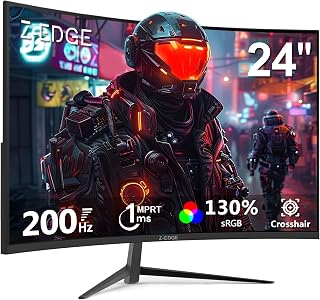
The Z-Edge UG24 is a curved gaming monitor specifically engineered for competitive gamers and esports enthusiasts who prioritize refresh rate and response time over resolution. At 24 inches with 1920x1080 FHD display, this monitor targets budget-conscious players seeking the performance advantages of high refresh rate gaming without breaking the bank.
The standout performance metrics are the 200Hz refresh rate and 1ms response time, which combine to deliver visibly smoother motion and faster pixel transitions. The 1650R curved panel genuinely fills your peripheral vision during gameplay, creating a more immersive experience than flat alternatives. The flicker-free technology and blue light filter help reduce eye strain during extended gaming sessions, a practical benefit for daily use.
Design-wise, the monitor features a sleek three-sided edge-to-edge bezel for modern aesthetics and dual monitor setups. The VESA 75x75mm mount and wall-mount compatibility provide flexible positioning options. Build quality appears solid, though the plastic construction is typical for this price segment. Connectivity includes one HDMI and one DisplayPort, plus a 3.5mm audio jack.
The main limitation is 1080p resolution, which can appear less sharp than 1440p displays at similar viewing distances. Color accuracy and HDR capabilities are functional but basic, making this monitor better suited for gaming than professional content work. Some users may also note that curved ultrawide-style immersion is less pronounced on a 24-inch screen than larger models.
Verdict: The Z-Edge UG24 delivers genuine value for competitive gamers prioritizing fast refresh rates and smooth gameplay. It is an excellent entry point into high-performance gaming without premium pricing, though prospective buyers should accept 1080p resolution and basic color performance as necessary trade-offs.
Display: 24-inch curved LCD, 1920x1080 FHD, 16:9 aspect ratio, 1650R curvature
Performance: 200Hz refresh rate, 1ms response time, 3000:1 contrast ratio, 300 cd/m2 brightness
Technology: LED backlight, FreeSync Adaptive Sync, flicker-free, blue light filter
Connectivity: 1x HDMI, 1x DisplayPort, 3.5mm audio jack
Mounting: VESA 75x75mm compatible, wall-mountable
Dimensions: 21.3 inches wide, 15.6 inches tall, 5.7 inches deep
Weight: 3.6 kg
Power: 23 watts at 12 volts
Warranty: 1 year manufacturer coverage

Pros
- Excellent value for 240Hz performance at this price point
- Easy setup with multiple connectivity options for gaming consoles and PCs
- Vibrant IPS colors and high contrast ratio enhance both gaming and everyday use
- Flexible mounting options including wall mount and monitor arm compatibility
- Customers report exceptional build quality and reliability for the cost
Cons
- 1080p resolution may feel dated compared to 1440p alternatives, limiting fine detail
- Smaller 24-inch screen size can feel cramped for non-competitive gaming or productivity work
- Some buyers note settings adjustment needed out of the box for optimal performance
The Z-Edge UG24PJ is a 24-inch 240Hz gaming monitor built for competitive gamers and console players seeking smooth, responsive gameplay at an accessible price. The 1080p FHD resolution paired with a blazingly fast 240Hz refresh rate and 1ms response time makes this monitor ideal for fast-paced shooters, esports titles, and console gaming where speed matters more than pixel density.
Where this monitor truly shines is performance. The 240Hz refresh rate combined with FreeSync adaptive sync technology delivers incredibly smooth visuals with virtually no screen tearing or ghosting. The 1ms response time keeps up with even the most demanding competitive games. The IPS panel offers excellent color accuracy at 99% sRGB coverage and a comfortable 178-degree viewing angle, making gameplay engaging and colors punchy without the typical TN panel limitations. Additional gaming features like crosshair overlays and dedicated FPS/RTS modes add welcome competitive advantages.
Design-wise, the monitor impresses with a clean, modern aesthetic. The three-sided narrow bezel maximizes screen real estate, making it suitable for dual-monitor setups. Build quality feels solid for the price, with easy connectivity via both HDMI and DisplayPort inputs supporting the full 240Hz experience. The monitor is lightweight, wall-mountable, and accepts standard monitor arms for ergonomic positioning.
The main trade-off here is resolution. At 1080p on a 24-inch screen, pixel density is lower than 1440p competitors, which some users may notice in non-competitive gaming or productivity work. The 24-inch size, while ideal for esports, feels cramped for those seeking an immersive single-player experience or multi-tasking environment.
Verdict: This is an excellent gaming monitor for competitive play and console gaming. The 240Hz performance is genuine, colors are vibrant, and the price-to-performance ratio is hard to beat. Recommended for esports enthusiasts and budget-conscious gamers. Less suitable for those prioritizing visual fidelity or screen real estate.
Display Specs: 24-inch FHD 1080p (1920x1080), 16:9 aspect ratio, IPS panel, 240Hz refresh rate, 1ms response time, 178-degree viewing angle, 1000:1 contrast ratio, 350cd brightness, 99% sRGB color gamut, anti-glare screen finish.
Connectivity: 1x HDMI (supports 240Hz), 1x DisplayPort (supports 240Hz), 3.5mm audio jack. Adaptive sync via FreeSync.
Design: 21.4 inches deep, 5.7 inches wide, 15.6 inches tall. Weighs 3.88kg. Includes desk mount stand with VESA 75x75mm mounting standard for wall mount and monitor arm compatibility. Three-sided narrow bezel design.
Additional Features: Crosshair overlay, FPS game mode, RTS game mode, anti-glare coating, 1-year manufacturer warranty. Model UG24PJ by Z-Edge.
Buying Guide: Is 60Hz Enough for Gaming?
Match Refresh Rate to Your Actual Frame Rate
A 60Hz panel refreshes once every 16.7 milliseconds. That is still a solid baseline for turn-based games, RPGs, cozy games, and cinematic single-player titles, particularly when your system maintains a stable 60 frames per second. A monitor cannot create frames your PC or console does not send, so hardware performance comes first.
The difference becomes clearer in shooters, fighting games, sports titles, and racing games. A 120Hz display cuts the frame interval to 8.3 milliseconds, while 165Hz and 240Hz reduce it further. The Sceptre E255B-1658A 25" FHD 1080p 165Hz 144Hz 1ms and Z-Edge 24 inch 240Hz 144Hz Gaming Monitor make sense when your PC can sustain high frame rates, so consult our GPU picks for Baldur’s Gate 3 if you are balancing display goals with graphics performance.
Choose Resolution Before Chasing the Highest Refresh Rate
Full HD is easier for a graphics card to drive at high frame rates, making it a natural fit for competitive play. A 24-inch or 25-inch 1080p screen keeps pixel density comfortable while letting models such as the Sceptre E255B-1658A and Z-Edge 24 inch 240Hz 144Hz Gaming Monitor emphasize speed. At 27 inches, 1080p is still usable, though individual pixels look more apparent at a close desk distance.
QHD often provides the most balanced upgrade for PC gaming. The ASUS TUF Gaming 27" 2K HDR Gaming Monitor (VG27BQ) and KOORUI Monitor, 27" QHD IPS Gaming Monitor, 170Hz combine 1440p detail with high refresh support, while the KTC 27 Inch 4K 160Hz Gaming Monitor, UHD Fast IPS favors sharp 4K visuals for a more powerful setup. If your display also serves a work laptop, our guide to monitor options for a MacBook Pro can help you consider connectivity and daily productivity needs.
Look for Adaptive Sync and the Right Ports
Higher refresh is more valuable when motion stays clean. Adaptive-sync features such as FreeSync, FreeSync Premium, and G-SYNC Compatible modes align the display’s refresh behavior with changing frame output, reducing visible tearing and uneven motion. The Dell 27 Monitor S2725QS, 4K UHD IPS, 120Hz, 5ms brings FreeSync Premium to a 4K 120Hz option, while the Sceptre 27-inch FHD 1080p IPS Gaming LED Monitor adds FreeSync to a speed-focused Full HD design.
Confirm which port supports the refresh rate you want before buying. DisplayPort is usually the straightforward PC choice, and HDMI capabilities vary by monitor, console, cable, and source device. The KTC model includes HDMI 2.1 and DisplayPort 1.4 connections, whereas the Z-Edge 27 inch 180Hz 165Hz Gaming Monitor offers HDMI and DisplayPort for flexible desktop setups. Laptop users should also verify external-display outputs, especially when choosing among the laptop choices for cybersecurity students that may double as school and gaming machines.
Prioritize Panel Comfort, Size, and Desk Flexibility
Refresh rate is not the only part of a satisfying gaming view. IPS panels generally offer broad viewing angles and rich color, which is useful for mixed gaming and media use. Curved Full HD alternatives such as the Sceptre New 27-inch Curved Gaming Monitor FreeSync and Z-Edge 24 inch Curved Gaming Monitor, 200Hz 165Hz create a more enveloping view, while their 1ms-rated motion features are aimed at fast action.
For long sessions, an adjustable stand and VESA mounting support can matter as much as another few hertz. The ASUS TUF VG27BQ and KOORUI 27-inch QHD model offer extensive positioning adjustments, helping you set a comfortable screen height. If your gaming area also handles large recordings or a growing game library, a portable SSD adapter guide can help you organize fast external storage without crowding your main drive.
Final Thoughts
Choose the Sceptre E255B-1658A 25" FHD 1080p 165Hz 144Hz 1ms when your priority is high-refresh 1080p play and a compact competitive setup. Choose the KTC 27 Inch 4K 160Hz Gaming Monitor, UHD Fast IPS when you want a sharper 4K image alongside fast refresh support, provided your PC can drive it. Either option is a meaningful step beyond 60Hz for the right kind of player.
Frequently Asked Questions
Is 60Hz enough for gaming on PS5 or Xbox Series X?
Yes, a 60Hz monitor is enough for console games that run at 60 frames per second or lower. However, many supported console games offer 120Hz performance modes, and you need a compatible display and connection to use them. If you mainly play competitive multiplayer games, 120Hz can provide noticeably smoother motion and quicker visual updates.
Can I use a 165Hz monitor if my PC only gets 60 FPS?
Yes. A 165Hz monitor will work normally with a PC producing 60 FPS, although you will not see 165 unique frames each second until your frame rate rises. Adaptive sync can still help make fluctuating performance look more consistent, and the monitor gives you room for future hardware upgrades.
Is 120Hz or 165Hz better for everyday gaming in 2026?
For most players, 120Hz is already a substantial improvement over 60Hz and works well for both console and PC gaming. A 165Hz display offers an additional smoothness benefit for players who spend a lot of time in fast PC games and have the hardware to reach higher frame rates. Resolution, panel quality, and adaptive sync should still influence your decision.
Will a higher-refresh monitor make games load faster?
No. Refresh rate improves the way movement appears after the game is running, but it does not improve loading times, download speeds, or storage capacity. Those tasks depend more on your drive and system configuration, so explore our hard drive dock recommendations if you need an easier way to access and back up game storage.






Write Your Review
No reviews yet. Be the first to share your experience!