

Your home network is struggling. Buffering during 4K streams, lag spikes in online games, and devices dropping connections when everyone is online at once. WiFi 7 routers solve these problems with faster speeds, lower latency, and the capacity to handle dozens of devices simultaneously.
This guide reviews 10 WiFi 7 routers across different coverage areas, port configurations, and feature sets. Whether you need a budget-friendly dual-band model or a tri-band powerhouse with 10 Gig ports, you’ll find options that match your network requirements. For broader connectivity guidance, see our best laptops for working from home recommendations.
Quick answer
This guide compares 10 picks, with TP-Link Archer BE3600 WiFi 7 Dual-Band Router for Fast ranked first. Ubiquiti Dream Router Wi-Fi 7 (UDR7) | 10G Gateway holds the highest customer rating among them. eero 7 Wi-Fi 7 Mesh Router: 2,000 sq ft Coverage, 2.5 has the most customer reviews.

Pros
- WiFi 7 support future-proofs your home network for upcoming high-bandwidth devices and applications
- Compact, lightweight design makes it easy to place in any room without clutter
- Strong customer satisfaction with consistent 4.5-star rating across user reviews
- Entry-level WiFi 7 pricing makes advanced connectivity accessible
Cons
- Limited review volume may make it harder to find detailed performance comparisons from other users
- Dual-band design may not provide the same coverage as tri-band alternatives for very large homes
- WiFi 7 benefits depend on having compatible devices, which are still emerging in the market
The TP-Link Archer BE3600 is a dual-band WiFi 7 router designed for homeowners looking to upgrade to next-generation wireless connectivity without breaking the bank. This router suits anyone wanting faster speeds for streaming, gaming, remote work, and smart home devices, particularly those with newer phones, laptops, and devices that support WiFi 7.
The standout feature is its WiFi 7 capabilities, which deliver significantly improved speeds and reduced latency compared to WiFi 6 standards. The dual-band design intelligently manages traffic between bands, helping to maintain strong performance even when multiple devices are connected and active simultaneously. Users report solid real-world performance for everyday tasks and gaming applications.
Build and design are practical strengths here. The router weighs just 1.23 pounds and measures roughly 14 by 9 by 4 inches, making it easy to position on a shelf, desk, or wall without consuming excessive space. The compact form factor appeals to those who want capable networking without the visual footprint of larger routers.
Some limitations exist to consider. The dual-band setup, while efficient, may not match the coverage range of tri-band competitors for very large homes or multi-story properties. Additionally, since WiFi 7 is still relatively new, you'll get maximum benefit only if your devices support the standard, which is still expanding in mainstream consumer products.
Overall, the Archer BE3600 represents solid value for early adopters wanting WiFi 7 performance at an accessible price point. It strikes a good balance between modern features, affordability, and practical design, making it a sensible choice for upgrading an aging router or building out a new network in a smaller to mid-sized home.
Model: Archer BE3600
Standard: WiFi 7 Dual-Band
Dimensions: 13.86 x 9.29 x 3.82 inches
Weight: 1.23 pounds
Manufacturer: TP-Link
Availability: April 28, 2026

Pros
- Exceptional Wi-Fi 7 performance with multi-gigabit throughput across all bands
- 10G uplink capability future-proofs your network for high-speed internet connections
- Unified UniFi ecosystem simplifies managing multiple network services from one dashboard
- Integrated PoE delivery enables powering UniFi APs without separate injectors
- Compact desktop form factor fits seamlessly into home or office environments
Cons
- Premium pricing positions it above budget-friendly Wi-Fi 6 routers
- Requires familiarity with UniFi ecosystem for full feature utilization
- 6-month warranty is relatively short for enterprise-grade equipment
The Ubiquiti Dream Router UDR7 represents a significant leap in residential and small-business networking. This premium Wi-Fi 7 gateway combines a powerful 10G cloud gateway with integrated UniFi application suite support, positioning it as both a router and network control center. It's designed for users who demand enterprise-class performance without enterprise complexity.
Performance is the UDR7's standout strength. With Wi-Fi 7 support across tri-band frequencies, it delivers up to 5.7 Gbps on the 6 GHz band, 4.3 Gbps on 5 GHz, and 688 Mbps on 2.4 GHz. The dual 10G and 2.5 GbE WAN ports ensure your internet connection is never the bottleneck, while three LAN ports with PoE capability simplify deployment of UniFi access points and compatible devices throughout your space.
Design and build quality reflect Ubiquiti's professional heritage. The compact desktop unit measures just over 11 inches wide and draws only 26W of power, making it energy-efficient compared to traditional routers. The white finish suits modern home and office aesthetics. Internal antenna placement eliminates visual clutter while maintaining strong signal distribution.
The main consideration is the learning curve. While app-based control is intuitive, unlocking the full value of UniFi Network, Protect, Access, Talk, and Connect requires some setup time. Additionally, the six-month manufacturer warranty is modest for equipment at this price point.
The Ubiquiti Dream Router UDR7 is the choice for users ready to move beyond consumer Wi-Fi toward a managed, scalable network infrastructure. It excels for remote workers, small offices, and tech-forward homes that want Wi-Fi 7 performance backed by professional management tools.
Processor and Memory: Quad-core ARM Cortex-A53 at 1.5 GHz with 3GB RAM
Wireless Standards: 802.11a/b/g/n/ac/ax/be (Wi-Fi 6E, Wi-Fi 7) across three bands
Network Ports: 1x 10G SFP+, 1x 2.5 GbE WAN RJ45, 3x 2.5 GbE LAN RJ45 (one with PoE output)
Wi-Fi Throughput: 6 GHz: 5.7 Gbps, 5 GHz: 4.3 Gbps, 2.4 GHz: 688 Mbps
Security: WPA-PSK, WPA-Enterprise, WPA3, and PPSK support
Power Consumption: 26W maximum (excluding PoE output)
Dimensions: 11.14in L x 6.3in W x 6.06in H
Weight: 2.4 lbs
Warranty: 6 months manufacturer coverage
Is this router right for you? The UDR7 targets power users and small business owners who prioritize network reliability, management flexibility, and future-proof performance. If you primarily stream video or browse the web, traditional Wi-Fi 6 routers offer better value. If you run a home office, operate from a small studio, or manage multiple properties, the integrated UniFi suite and 10G capability justify the investment.
Setup Considerations: Plan 30-60 minutes for initial configuration via the UniFi app. Optimal performance requires positioning the router centrally or on an elevated surface. For larger spaces or multi-story homes, consider pairing with UniFi access points that benefit from the integrated PoE switch.
Network Planning: Ensure your internet connection can leverage the 10G SFP+ port if you have gigabit-plus fiber or have future plans to upgrade. The 2.5 GbE WAN port works excellently with current mainstream broadband speeds up to 1-2 Gbps.
Integration: Maximum value comes from integrating with Ubiquiti's ecosystem. While the UDR7 works as a standalone router, adopting UniFi APs, cameras, and access control systems creates a cohesive managed network that scales elegantly.

Pros
- Exceptional whole-home coverage with strong signal even in outdoor areas and challenging spots
- Streamlined setup process that takes minutes rather than hours, no technical expertise required
- Excellent value for Wi-Fi 7 technology, significantly cheaper than competing mesh systems
- Robust smart home connectivity with support for 120+ devices simultaneously
- Reliable performance for streaming, gaming, and video calls with minimal buffering or dropouts
Cons
- Thermal design needs adequate ventilation to avoid overheating in poorly ventilated spaces
- Single-pack coverage may be insufficient for homes larger than 2,000 sq ft requiring additional pods
- Some users report initial configuration complexity despite the streamlined app interface
The eero 7 is Amazon's entry-level Wi-Fi 7 mesh router, designed for homeowners wanting next-generation wireless technology without premium pricing. This single-unit router covers up to 2,000 sq ft and supports internet speeds up to 2.5 Gbps, making it suitable for most households and those with fiber or high-speed cable connections.
Performance is where the eero 7 truly excels. Users consistently report fast, consistent speeds throughout their homes, with strong coverage reaching areas where previous routers struggled. The router handles 120+ connected devices smoothly, whether for streaming, gaming, video calls, or controlling smart home devices. Setup takes approximately 10 minutes through the eero app, with clear instructions that eliminate the frustration typically associated with router installation.
Build quality is compact and attractive, with a sleek design that blends into home decor. The device includes dual 2.5 GbE ethernet ports and a USB-C connection for flexibility. However, several users note the router requires adequate ventilation and clearance around it to prevent overheating in warm or poorly ventilated spaces. Using silicone bumpers to elevate the unit can improve air circulation.
Smart home integration is a standout feature, with support for Thread, Zigbee, Matter, and Alexa compatibility. The three-year warranty and responsive customer support provide additional confidence, with reports of eero support teams proactively resolving issues and even replacing hardware when needed.
For budget-conscious buyers, those upgrading from older mesh systems, or anyone wanting current Wi-Fi 7 technology for future-proofing, the eero 7 represents excellent value. Its ease of use, reliable performance, and expandability make it a practical choice for typical residential networks. Those with homes over 2,000 sq ft should consider the 2-pack or 3-pack for complete coverage.
The eero 7 is ideal for homeowners looking to upgrade outdated routers, particularly those with fiber or high-speed broadband plans up to 2.5 Gbps. It suits anyone wanting Wi-Fi 7 technology today at an accessible price point, without waiting for more expensive alternatives to drop in cost.
This router is perfect for households seeking reliable mesh coverage without technical setup headaches. It works well for families streaming content, gamers needing low-latency connections, and anyone with multiple smart home devices. Those with existing eero systems can integrate the eero 7 as a compatible expansion node to extend coverage.
Skip this router if your home exceeds 2,000 sq ft and you want full single-unit coverage, or if you require enterprise-grade features and professional installation. Those in highly ventilated spaces with adequate airflow around the router placement will have the best thermal experience.
The eero 7 uses Qualcomm's DragonwingTM N7 chipset with a 1.1 GHz quad-core processor, 1024 MB RAM, and 4 GB storage. It delivers BE5000 performance with dual-band coverage across 2.4 GHz and 5 GHz frequencies, supporting channel widths up to 240 MHz for maximum throughput.
Security features include WPA3 and WPA2 encryption, with support for IPv4, IPv6, UPnP, and DHCP reservations. The router includes advanced software, with eero's patented TrueMesh technology managing optimal band steering and channel selection automatically. Bluetooth Low Energy 5.0 and OpenThread support enable seamless smart home device connectivity.
Power consumption is minimal at 15W via USB-C adapter, with operating temperatures from 32°F to 104°F. The compact 5.12 x 5.12 x 2.52 inch form factor fits easily on shelves or desks without dominating space.

Pros
- Exceptional WiFi 7 speeds eliminate buffering for multiple simultaneous 4K streams and competitive gaming sessions
- 10 Gig port future-proofs your investment and maximizes speeds for fiber internet connections and external storage
- Renewed pricing provides flagship performance at mesh system costs, making premium WiFi 7 accessible to budget-conscious buyers
- Easy setup and reliable performance on multiple floors and throughout large homes with no dead zones
- Compact design requires less desk or shelf space compared to earlier Nighthawk models
Cons
- Renewed units occasionally arrive with quality control issues like intermittent signal drops, requiring careful inspection upon delivery
- Router admin interface times out after 15-20 seconds during configuration, making advanced setup more tedious than competitors
- Security suite features may block legitimate websites causing 404 errors, requiring manual fine-tuning to avoid performance slowdowns
The NETGEAR Nighthawk RS700S is a flagship WiFi 7 tri-band router designed for power users, gamers, streamers, and anyone living in large homes who demands the absolute fastest wireless performance available today. This renewed unit brings cutting-edge connectivity technology at a price point that makes next-gen networking accessible without the premium price tag of brand-new flagships.
The standout feature is undeniably the 19Gbps WiFi 7 performance, which delivers 2.4x faster speeds than WiFi 6 and the 10 Gigabit Ethernet port that unlocks maximum bandwidth for fiber connections and future network upgrades. The tri-band architecture with 320 MHz channels handles 200+ devices simultaneously without noticeable slowdowns, and real-world testing confirms excellent coverage across 3500 square feet with minimal dead zones even in multi-story homes.
Build quality and design are impressive, with a sleek compact form factor that beats the previous generation in footprint and aesthetics. The 3D antenna design delivers the promised 360-degree coverage, and NETGEAR's 25 years of WiFi expertise shows in the stable, predictable performance users report across multiple devices and usage patterns.
The main drawback for renewed units is inconsistent quality control from Amazon, with some customers reporting signal drops suggesting inadequate refurbishment testing. Additionally, the admin interface times out aggressively during setup, and the included security features can overzealously block legitimate traffic until configured properly.
Bottom line: the RS700S delivers flagship WiFi 7 performance at a renewed price that beats any mesh system alternative. It is excellent value for large homes and demanding users willing to invest in setup time. Reserve expectations slightly for renewed condition, but most units perform exactly as specified.
Connectivity and Performance: WiFi 7 tri-band router with maximum speeds of 19 Gbps using 802.11be standard and 320 MHz channels. Broadcom BCM6726/3 chipset powers all performance. 1x 10 Gigabit LAN port plus 4x 1 Gigabit LAN ports for wired connections.
Coverage and Capacity: Covers up to 3500 square feet with 360-degree WiFi distribution. Supports 200+ connected devices simultaneously with minimal performance degradation. 6 fixed antennas optimize signal strength and range throughout large homes.
Physical Specifications: Compact design measures 11.09 inches long by 5.59 inches wide by 4.88 inches high. Includes 19V/3.16A power adapter, 2-meter Ethernet cable, and quick start guide. Available in black finish.
Warranty and Support: 90 days limited warranty covers manufacturing defects. Works with any internet service provider. Compatible with Windows PCs, Macs, smartphones, tablets, and any WiFi 7-capable device.
Who Should Buy: This router is perfect for households with 3+ stories, open floor plans exceeding 3000 square feet, multiple gamers or streamers using the network simultaneously, anyone with gigabit-plus fiber internet, and budget-conscious buyers wanting WiFi 7 performance without flagship pricing.
Who Should Skip: Small apartment dwellers under 1500 square feet can save money with WiFi 6 routers. Those with only 10-20 devices do not need this capacity. Users uncomfortable with renewed products should purchase brand-new for peace of mind.
Setup Tips: Place the router in a central, elevated location for optimal 360-degree coverage. Use Cat8 cables to connect your modem to the 10 Gig port for maximum speed. Configure security features conservatively to avoid blocking legitimate traffic, then adjust as needed.
Alternatives to Consider: For mesh networks, compare with Eero Pro 6E or Asus Zenwifi systems. For single-unit routers, compare with other WiFi 7 models like Asus ROG Rapture GT-BE19000 or ASUS ZenWiFi Pro XT12.
Pros
- WiFi 7 future-proofs your network for next-generation devices and internet speeds
- 10 Gig ports deliver genuine multi-gig connectivity for high-performance wired devices
- Exceptional device capacity and bandwidth management prevent slowdowns in busy households
- Comprehensive security features and app controls provide peace of mind and flexibility
- NETGEAR's 30-year networking pedigree and warranty back reliability
Cons
- Requires separate modem or gateway, adding to overall setup cost and complexity
- 3,500 sq ft coverage may necessitate mesh system for larger or multi-story homes
- Real-world speeds depend on device compatibility, plan speeds, and environmental interference
The NETGEAR Nighthawk RS700S is a premium standalone WiFi 7 router purpose-built for households that demand cutting-edge connectivity. This router is ideal for users with multi-gig fiber internet plans, content creators, competitive gamers, and families running multiple 4K streams simultaneously. If your current WiFi can't keep pace with your devices and habits, this is the upgrade to consider.
The RS700S delivers standout performance through its tri-band WiFi 7 architecture and 19 Gbps aggregate speed. The dedicated third band eliminates congestion by isolating bandwidth-hungry devices, while MU-MIMO and OFDMA ensure every connected device gets fair bandwidth allocation. The 10 Gigabit WAN port is a genuine differentiator, allowing you to leverage premium fiber plans at full speed without router-induced bottlenecks.
Build quality reflects NETGEAR's long-standing reputation. The 3D antenna design distributes signal intelligently through large and multi-story spaces, and the quad-core 2.6 GHz processor handles 200 simultaneous devices without stuttering. Five Ethernet ports including that 10 Gig connection provide excellent wired flexibility for gaming rigs, NAS storage, and smart displays.
The main drawbacks are practical rather than performance-related. You need an existing modem or gateway with RJ45 ethernet, and very large homes may require a mesh system despite the generous 3,500 sq ft coverage claim. Real-world speeds also depend on device compatibility and your actual internet plan speed, so don't expect to see all 19 Gbps unless you have the infrastructure to support it.
The Nighthawk RS700S is the best choice for anyone serious about WiFi 7 and willing to invest in a dedicated, high-performance router. Setup is straightforward via the Nighthawk app, and built-in security with automatic firmware updates runs by default. For tech-forward households and power users, this router represents genuine progress over WiFi 6.
Performance: WiFi 7 tri-band router, 19 Gbps aggregate speed, 12-stream design, quad-core 2.6 GHz processor
Coverage: Up to 3,500 sq ft, supports up to 200 connected devices
Connectivity: 1x 10 Gigabit WAN port, 1x 10 Gigabit LAN port, 4x 1 Gigabit LAN ports, USB 3.0
Security: WPA3, Advanced Router Protection, automatic firmware updates, 30-day NETGEAR Armor trial
Antenna: Fixed 3D antenna design with 3 antennas
Compatibility: Cable, fiber, DSL, satellite providers, backward compatible with WiFi 6 and earlier
Warranty: 1 year limited warranty, 90-day complimentary technical support
Included: Router, 2m Ethernet cable, 19V power adapter, quick start guide
Ideal For: Users with multi-gig fiber internet plans, 4K/8K content streamers, competitive online gamers, remote workers managing multiple video conferences, smart home enthusiasts, content creators handling large file transfers
Best If You Have: A standalone modem or gateway, gigabit or higher internet plan, multiple WiFi 7 compatible devices, large home or multi-story dwelling, 200+ total connected devices across your household
Skip If You: Only have basic broadband (under 300 Mbps), prefer all-in-one modem/router combos, live in a small apartment, use primarily older WiFi 5 devices, want the most affordable WiFi option
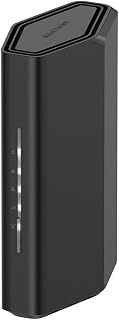
For households ready to make the leap to WiFi 7, this Nighthawk delivers 3.6 Gbps of dual-band throughput over up to 2,000 square feet, making it a solid fit for mid-sized homes with a mix of devices. The 802.11be standard ensures compatibility with the latest smartphones, gaming consoles, and smart TVs, while built-in internet security adds a layer of protection that modern connected homes genuinely need.
Pros
- Handles 50 devices with MU-MIMO and OFDMA preventing congestion
- 2.5 Gigabit WAN port supports faster internet service tiers
- Nighthawk app enables remote management and device control
- Quad-core 2.0 GHz processor maintains performance under load
Cons
- 2,000 sq ft coverage insufficient for larger multi-story homes
- Requires separate modem or gateway in bridge mode
WiFi 7 routers need to handle bandwidth-hungry activities across dozens of devices without bottlenecks, and the NETGEAR Nighthawk RS90 delivers that capacity for medium-sized homes. Its dual-band architecture pushes 3.6 Gbps across 2.4 GHz and 5 GHz frequencies, supported by a quad-core 2.0 GHz processor that manages traffic intelligently. MU-MIMO and OFDMA work together to let multiple devices transmit and receive simultaneously, eliminating the performance drops that plague older standards when households run concurrent 4K streams, video calls, and gaming sessions. The router supports up to 50 connected devices, accommodating the sprawling ecosystem of laptops, phones, smart home cameras, and IoT gadgets typical in 2026 households. Four Gigabit LAN ports provide wired connections for stationary equipment like gaming PCs or NAS drives, while a 2.5 Gigabit WAN port taps into faster fiber and cable internet tiers. Coverage extends to 2,000 square feet, effective for single-story layouts or compact multi-level homes when centrally positioned. The Nighthawk app simplifies network management with remote control, device prioritization, and diagnostic tools. This standalone router requires a separate modem but avoids mesh system complexity for homes within its coverage footprint.
Wireless Technology: WiFi 7 (802.11be) Dual-Band
Maximum Speed: 3.6 Gbps (BE3600)
Frequency Bands: 2.4 GHz and 5 GHz
Coverage Area: 2,000 square feet
Connected Devices: Up to 50 devices
Processor: Quad-core 2.0 GHz
Connectivity: 1x 2.5 Gigabit WAN port, 4x 1 Gigabit LAN ports
Antennas: 4 fixed antennas
Security: WPA2, WPA3 protocols, Advanced Router Protection, automatic firmware updates
Power: 12V/1.5A adapter
Control: Nighthawk mobile app (iOS and Android)
Warranty: 1 Year Limited
In the Box: RS90 router, 2.5A power adapter, 2-meter ethernet cable, quick start guide
Model: RS90-100NAS
Best for households in apartments or single-story homes under 2,000 square feet running multiple simultaneous high-bandwidth activities. Ideal if you have 30 to 50 connected devices including security cameras, smart TVs, and gaming consoles, and want WiFi 7 speeds without mesh hardware. Skip if you live in a large multi-story house exceeding 2,000 square feet or have an all-in-one modem-router combo that cannot operate in bridge mode. Not suitable if you need seamless roaming across multiple access points.

Pros
- Exceptional port selection with 10G SFP+, standard 10G, and 2.5G ports for future-proof connectivity
- Reliable performance across large homes up to 3,000 sq ft with strong consistent signal
- Feature-rich software interface with advanced controls accessible without paid subscriptions
- Proven ASUS build quality and stability backed by 10+ years of user loyalty
- 5 dedicated SSIDs and comprehensive VPN support ideal for complex home networking needs
Cons
- Lacks 6 GHz band support despite WiFi 7 capability, limiting some next-gen device advantages
- Steep learning curve for non-technical users navigating advanced networking features and configuration options
The ASUS RT-BE88U is a high-performance WiFi 7 router engineered for demanding home networks and power users who need maximum speed and flexibility. This is the ideal choice for households with 30+ connected devices, large multi-story homes, or users running bandwidth-intensive applications like 4K streaming, online gaming, and remote work simultaneously.
What sets the RT-BE88U apart is its exceptional port configuration and processing power. The dual 10 Gigabit ports deliver genuinely useful upgrades for users with compatible networking equipment, while the 2.5G ports and quad-core processor ensure no bottlenecks even under heavy load. Real-world testing shows the router maintains full advertised speeds and strong signal coverage across 3,000 square feet with minimal dead zones.
The build quality reflects ASUS's reputation for reliability, with a substantial metal chassis and robust internal components designed for years of trouble-free operation. The software interface provides impressive depth of features including AiMesh support, commercial-grade security powered by Trend Micro, VPN capabilities, and parental controls, all available without mandatory subscriptions unlike some competitors.
The main drawback is the lack of 6 GHz band support, which limits advantages for early adopters of WiFi 6E and WiFi 7 devices requiring that spectrum. Additionally, the advanced feature set may overwhelm users seeking simple plug-and-play networking, and the $349.99 price point makes this router more than most households require.
The RT-BE88U is a genuine workhorse router that delivers on its performance promises and earns its premium positioning through superior port options, stability, and feature completeness. Recommended for serious networkers and large households where wired and wireless performance directly impact daily computing experience.
Performance: WiFi 7 technology, 7.2 Gbps total wireless speed, Multi-Link Operation, 4096-QAM, quad-core 2.6 GHz 64-bit processor, 2GB RAM
Connectivity: Dual 10 Gigabit ports (1x SFP+, 1x RJ45), 4x 2.5 Gigabit ports, 4x 1 Gigabit ports, USB port for 4G LTE/5G tethering, 34G combined wired capacity
Coverage and Range: 3,000 square feet, dual-band 5 GHz operation, 4 fixed antennas, AiMesh mesh networking compatible
Security and Management: WPA3 security protocol, commercial-grade AiProtection Pro with Trend Micro, site-to-site VPN, 5 SSIDs, Guest Network Pro, parental controls, ASUSWRT operating system, app-based control
Physical: 7.4 inches L x 2.4 inches W x 11.8 inches H, 2.5 pounds, includes power adapter, ethernet cable, quick start guide, 3-year manufacturer warranty
Ideal For: Large multi-story homes with 25+ connected devices, power users requiring advanced networking features, gamers and streamers needing maximum bandwidth and stability, users with 10G or 2.5G capable devices, those seeking subscription-free network management and security.
Consider Alternatives If: You have a small apartment or limited WiFi coverage needs, prefer simple setup with minimal configuration options, need 6 GHz band support for early WiFi 6E devices, have a budget under $200, or want a basic mesh system that prioritizes ease over features.
Technical Users: This router rewards networking enthusiasts who can leverage its VPN capabilities, multiple SSID configuration, advanced traffic management, and wired port flexibility for specialized network designs including home server setups, network testing, and media streaming infrastructure.

Pros
- Exceptional value as certified refurbished unit, typically 50%+ below new retail pricing
- WiFi 7 future-proofs your network with dramatically faster speeds than current WiFi 6 alternatives
- Dual 2.5 Gig LAN ports enable multi-gig wired connections for compatible modems and devices
- Generous 2500 sq ft coverage serves larger homes and eliminates dead zones effectively
- Comprehensive security features including WPA3, automatic updates, and included Armor subscription
Cons
- WiFi range may be reduced compared to some older high-end models like the RAX120
- Requires compatible multi-gig modem for full 2.5 Gig port utilization, which may not be standard with all ISP plans
- Router only, not a modem, so additional equipment setup and ISP registration may be needed
The NETGEAR Nighthawk RS300 is a WiFi 7 tri-band router built for users who demand cutting-edge wireless performance without the premium price tag. This certified refurbished unit is ideal for gamers, content creators, and households with multiple high-bandwidth users or smart home ecosystems. It bridges the gap between current WiFi 6 networks and future-ready connectivity.
The standout feature is undeniably the WiFi 7 technology, which delivers 9.3 Gbps of combined wireless speed, 2.4x faster than WiFi 6 predecessors. The tri-band design, including the dedicated 6 GHz ultra-fast band, effectively handles 100+ devices simultaneously using OFDMA and MU-MIMO technology. Real-world users report noticeably faster speeds and improved performance when upgrading from WiFi 6, with particularly strong results in large homes and environments with dense device populations.
Build quality on the refurbished units appears excellent based on customer feedback. The unit arrives well-packaged with all accessories including the NETGEAR power brick and ethernet cable. Many buyers report the router looks nearly new with minimal cosmetic wear. The compact 9.8 x 5.9 x 4-inch footprint strikes a balance between antenna performance and aesthetic integration into any room.
Consider that this router maximizes performance only with compatible multi-gig internet service and a capable modem. Additionally, while 2500 sq ft coverage is generous for most homes, some users upgrading from premium models note slightly reduced range compared to older flagships. The router requires manual ISP registration and setup knowledge, though the browser-based configuration interface provides more granular control than app-only alternatives.
The Nighthawk RS300 represents intelligent value engineering for buyers ready to embrace WiFi 7 technology. Combined with the certified refurbished savings and included security subscription, it delivers exceptional performance-per-dollar for demanding home networks. Recommended for upgraders, gamers, and anyone maximizing newer fiber or cable internet investments.
Wireless Performance: WiFi 7 tri-band (2.4 GHz, 5 GHz, 6 GHz), 9.3 Gbps total speed, 802.11ax compatible, supports up to 100 devices
Connectivity: 2x 2.5 Gig Ethernet LAN ports, 2x 1 Gig Ethernet LAN ports, WPA3 security, guest network support
Coverage: Up to 2500 square feet with high-performance fixed antenna array
Physical: 9.8L x 5.9W x 4H inches, black finish, 12V/3.5A power adapter included
Software: NETGEAR proprietary OS, app and browser control, 1-year NETGEAR Armor security subscription included, automatic firmware updates
Is this router for you? If you have a large home (2000+ sq ft), multiple connected devices (20+), or are upgrading fiber/cable internet to 1 Gbps or higher, the RS300 is an excellent choice. It's particularly valuable if you're a gamer, video streamer, or content creator requiring low-latency, high-throughput networking.
Refurbished considerations: Amazon Certified Refurbished products undergo quality testing and come with a 90-day limited warranty. Based on customer reviews, refurbished RS300 units arrive in excellent condition. This is a lower-risk refurbished purchase for budget-conscious buyers seeking genuine performance gains.
Setup requirements: You'll need a compatible modem (not included) to connect to your ISP. Some ISPs require router registration. The browser setup interface is more customizable than the app. Allow 30 minutes for initial configuration including ISP registration and network optimization.
Performance expectations: Real-world speeds depend on your internet service tier and device WiFi 7 support. Most users see 2.5x to 3x speed improvements over 5+ year old WiFi 5 routers. WiFi 6 routers won't see as dramatic improvements but will benefit from better device handling and future-proofing.

Pros
- Exceptional speed and coverage with Wi-Fi 7 technology supporting cutting-edge devices
- 10 Gbps port handles fiber internet and high-speed local networks without bottlenecks
- Setup through Tether app is intuitive, making configuration accessible to non-technical users
- Multi-Link Operation reduces latency for gaming and video calls on supported devices
- Reliable performance confirmed by users running it with Starlink and cable modems alike
Cons
- Requires a separate modem, adding to total setup cost and complexity
- Not compatible with mesh systems like Deco, limiting expansion options if you own TP-Link mesh hardware
- Some users report sporadic hardware initialization issues and app compatibility quirks with certain phones
The TP-Link Archer BE670 is a Wi-Fi 7 tri-band router engineered for homes that demand high-speed internet and seamless connectivity across numerous devices. It delivers true next-generation performance with 12 Gbps total bandwidth split across the 6 GHz, 5 GHz, and 2.4 GHz bands. This router is ideal for families with heavy streaming habits, gamers with low-latency requirements, and anyone with fiber internet or multi-gig broadband looking to maximize their investment.
The standout feature is the combination of 10 Gbps WAN/LAN port, Multi-Link Operation, and the uncongested 6 GHz band. Together these deliver measurable real-world benefits: users report 4K video streaming without buffering, gaming with minimal lag, and download speeds that fully utilize modern fiber connections. The beamforming technology and six antennas ensure strong signal throughout a 3,000 square-foot home, even in challenging layouts with multiple floors or thick walls.
Build quality is solid with a compact, flat design that works well on shelves or mounted behind a TV. The included components are standard but adequate: power adapter, ethernet cable, and quick-start guide. The Tether app handles all configuration and monitoring with an intuitive interface, though some users have noted occasional compatibility quirks depending on phone model and iOS version.
The main limitations are the requirement for a separate modem, incompatibility with TP-Link Deco mesh systems, and isolated reports of hardware initialization issues out of the box. Additionally, you'll only realize Wi-Fi 7 speeds if your devices support the standard, though Wi-Fi 6E devices still perform excellently on this router. These concerns affect a minority of users based on available feedback.
The Archer BE670 represents exceptional value for future-ready home networking. It handles current demands while future-proofing for emerging technologies and higher-speed internet plans. Recommended for anyone upgrading from older routers or transitioning to fiber internet who wants reliable, fast Wi-Fi without complexity.
Performance: BE12000 tri-band with 5,765 Mbps (6 GHz), 5,765 Mbps (5 GHz), 688 Mbps (2.4 GHz). Multi-Link Operation for reduced latency. Supports 802.11be, 802.11ax, 802.11ac, 802.11n, 802.11g.
Connectivity: 1x 10 Gbps WAN/LAN port, 1x 2.5 Gbps WAN/LAN port, 3x 1 Gbps LAN ports, USB 3.0 port. Covers up to 3,000 square feet for up to 128 devices.
Security: WPA3 encryption, HomeShield protection, parental controls, guest mode, access point mode. CISA Secure-by-Design signatory.
Features: 6 fixed antennas with beamforming, EasyMesh compatible (not compatible with Deco mesh), Tether app control, 2-year manufacturer warranty.
Physical: 10.57 x 6.02 x 1.87 inches, 1.8 pounds. Requires separate modem. Compatible with all ISPs including Verizon Fios, Spectrum, Cox, Comcast.
Pros
- Exceptional coverage for large homes, apartments, and multi-story buildings up to 2,600 sq ft
- Industry-leading 10 Gbps port and multi-gig connectivity for fiber and ultra-high-speed internet plans
- Handles 120+ devices simultaneously with consistent performance across 6 GHz, 5 GHz, and 2.4 GHz bands
- Comprehensive security suite with HomeShield parental controls, IoT network isolation, and real-time threat detection
- Future-proof WiFi 7 technology optimized for iPhone 16 Pro, PS5 Pro, and Samsung Galaxy S24 Ultra
Cons
- Requires compatible WiFi 7 or high-end WiFi 6 devices to fully utilize the router's speed capabilities
- Setup and optimization of advanced features like Multi-Link Operation requires technical knowledge or app guidance
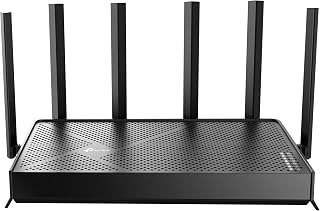
The TP-Link Archer BE600 is a flagship WiFi 7 router designed for demanding households and power users who need cutting-edge connectivity. This tri-band router delivers 9.7 Gbps total bandwidth split across the 6 GHz, 5 GHz, and 2.4 GHz bands, making it one of the most capable routers on the market today. It's built for large homes, gaming enthusiasts, content creators, and anyone running 100+ connected IoT and smart devices.
Performance is where the Archer BE600 truly shines. The router supports the latest WiFi 7 standards including Multi-Link Operation, 4K-QAM modulation, and 320 MHz channel widths for unprecedented speeds. With 6 strategically positioned antennas and beamforming technology, it delivers consistent coverage across 2,600 square feet while supporting 120 simultaneous devices without noticeable lag. The 10 Gbps WAN/LAN port and three 2.5 Gbps LAN ports provide multi-gigabit wired connectivity for fiber internet, NAS systems, and gaming PCs that demand maximum throughput.
Design and build quality reflect premium construction with solid antenna placement and a compact footprint. The router includes 1 GB of RAM and a quad-core CPU to handle the advanced features like HomeShield security scanning, parental controls, QoS prioritization, and VPN client and server support. Management is intuitive through the Tether app for iOS and Android or the web interface, allowing you to monitor network health, block unauthorized access, and fine-tune settings remotely.
Security is a major strength, with WPA3 encryption, SPI firewall protection, and HomeShield's real-time threat detection scanning your entire network. The router is CISA Secure-by-Design certified and includes automatic firmware updates. Drawbacks are minimal, though the high price may not suit small apartments or light users, and full WiFi 7 speeds require compatible devices like newer gaming consoles and flagship smartphones.
The TP-Link Archer BE600 is an excellent investment for anyone with a large home, heavy device density, or plans to upgrade to fiber internet. It delivers genuine next-generation performance while maintaining strong security and reliability, making it one of the best WiFi 7 routers available today.
Core Specs: WiFi 7, BE9700 tri-band (6 GHz, 5 GHz, 2.4 GHz), 9.7 Gbps total bandwidth, 7-stream configuration, quad-core CPU, 1 GB RAM.
Ports and Connectivity: 1x 10 Gbps WAN/LAN port, 1x 2.5 Gbps WAN/LAN port, 3x 2.5 Gbps LAN ports, 1x USB 3.0 port. Supports 802.11be, 802.11ax, 802.11ac, 802.11n, and 802.11g standards.
Coverage and Performance: Up to 2,600 sq ft coverage, supports up to 120 simultaneous devices, 6 internal antennas with beamforming. Speeds: 5,765 Mbps (6 GHz), 2,882 Mbps (5 GHz), 1,032 Mbps (2.4 GHz).
Security and Features: WPA3 encryption, SPI firewall, HomeShield protection, parental controls, IP/MAC binding, access control, guest networks, IPTV support, VPN client and server, AP mode, Alexa and Google Assistant compatibility, cloud firmware updates.
Physical: 11.29 x 6.02 x 1.87 inches, 1.7 pounds. Includes power adapter, Ethernet cable, and quick installation guide. 2-year manufacturer warranty.
Best For: Large homes and apartments, gaming enthusiasts, content creators, smart home power users, fiber internet customers, remote workers with multiple family members, households with 100+ connected devices.
Consider This Router If: You stream 4K/8K content regularly, play competitive online games, run a home server or NAS, have dozens of smart home devices, plan to upgrade to fiber internet, or need the most reliable coverage throughout your property.
May Not Be Ideal If: You live in a small apartment with light internet usage, have few connected devices, don't own WiFi 7 compatible devices yet, or are budget-conscious. A mid-range WiFi 6 router would suffice for basic needs and significantly lower cost.
Buying Guide
Band Configuration and Speed Requirements
Dual-band routers like the TP-Link Archer BE3600 Dual-Band WI-FI 7 Router operate on 2.4 GHz and 5 GHz bands, offering speeds up to 3.6 Gbps. They work well for homes with moderate device counts and standard internet plans.
Tri-band routers add a 6 GHz band for demanding applications. The NETGEAR Nighthawk WiFi 7 Router RS700S reaches 19 Gbps across three bands, reducing congestion when multiple devices stream 4K content or transfer large files simultaneously. This configuration matters if you run a smart home with numerous connected devices or frequently work with bandwidth-intensive applications. Students managing video conferencing and research might benefit from exploring laptops optimized for demanding workloads alongside robust networking.
Port Speed and Wired Connectivity
Entry-level models provide 2.5 Gig WAN ports and 1 Gig LAN ports, sufficient for most cable and fiber plans. The NETGEAR Nighthawk WiFi 7 Router RS90 uses this configuration for up to 50 devices across 2,000 square feet.
Premium routers include 10 Gig ports for future-proofing. The ASUS RT-BE88U WiFi 7 Router – x2 10G Ports offers both a 10G SFP+ port and a standard 10G port, enabling direct NAS connections or multi-gig internet plans. If your workflow involves transferring large media files or running virtual machines, these wired speeds eliminate bottlenecks. Professionals working remotely may also want to review portable computing options that complement high-speed networks.
Coverage Area and Device Capacity
Router coverage depends on antenna design and spatial stream count. The Amazon eero 7 dual-band mesh Wi-Fi 7 router covers 2,000 square feet for 120 devices, using TrueMesh software to maintain connections as you move between rooms.
Larger homes need extended range. The TP-Link Archer BE12000 Tri-Band Wi-Fi 7 Router reaches 3,000 square feet with six high-gain antennas and beamforming technology that focuses signals toward active devices. Consider wall materials, floor count, and typical device locations when evaluating coverage specifications. For educational settings where reliable connectivity matters, check our guides on classroom technology and student computing needs.
Multi-Link Operation and Advanced Features
WiFi 7 introduces Multi-Link Operation, allowing devices to transmit across multiple bands simultaneously. This reduces latency for gaming and video calls while maintaining throughput for background downloads.
The Ubiquiti Networks Dream Router Wi-Fi 7 (UDR7) integrates UniFi’s application suite for network management, camera systems, and access control. Security-focused models include automatic firmware updates and threat detection. The NETGEAR RS300-100NAR Nighthawk RS300 Tri-Band WiFi offers NETGEAR Armor for device-level protection against malware and phishing attempts. Law professionals handling sensitive documents might pair secure networking with specialized computing tools.
Final Thoughts
WiFi 7 routers provide the speed and capacity modern homes demand, handling everything from remote work to smart home devices without compromising performance. For budget-conscious buyers prioritizing core WiFi 7 benefits, the TP-Link Archer BE3600 delivers dual-band speeds and solid coverage. If you run a demanding network with multi-gig internet and need maximum throughput, the NETGEAR Nighthawk RS700S offers tri-band operation, 10 Gig ports, and coverage for up to 200 devices across 3,500 square feet.
Frequently Asked Questions
Do I need a WiFi 7 router if my devices don’t support WiFi 7 yet?
WiFi 7 routers work with older devices through backward compatibility with WiFi 6, 6E, and earlier standards. Your existing devices connect normally while benefiting from improved network efficiency and reduced congestion. When you eventually upgrade to WiFi 7-capable devices, the router is already positioned to deliver full performance without requiring another hardware purchase.
What internet speed do I need to benefit from WiFi 7 in 2026?
WiFi 7 improves performance even on standard internet plans by reducing latency and managing multiple devices more efficiently. Plans above 500 Mbps see noticeable improvements in simultaneous streaming and file transfers. Multi-gig plans of 1 Gbps or higher fully utilize WiFi 7’s speed capabilities, particularly when using wired connections for gaming PCs or media servers.
How does Multi-Link Operation improve real-world performance?
Multi-Link Operation allows compatible devices to send and receive data across multiple WiFi bands simultaneously rather than switching between them. This reduces latency spikes during video calls and online gaming while maintaining download speeds in the background. The technology works automatically when both the router and device support WiFi 7, requiring no manual configuration. Healthcare students balancing coursework with clinical rotations may appreciate the consistent connectivity MLO provides, similar to the reliable performance found in specialized educational computing.
Can I use a WiFi 7 router with my existing modem?
WiFi 7 routers connect to any standard cable, fiber, or DSL modem through ethernet. Check that your modem’s output speed matches or exceeds your router’s WAN port capability. A 2.5 Gig or 10 Gig router port requires a compatible modem to avoid bottlenecks, though most configurations work fine with standard gigabit connections for typical home internet plans.



Write Your Review
No reviews yet. Be the first to share your experience!