

Remote work, online classes, and content creation have made webcams essential, but you shouldn’t need to spend a fortune for quality video calls. Whether you’re joining Zoom meetings from your home office or streaming gameplay on Twitch, a budget webcam can deliver sharp visuals and clear audio without the premium price tag.
This guide reviews 10 webcams that balance affordability with performance. We’ve evaluated resolution quality, autofocus capabilities, microphone clarity, and compatibility across popular platforms to help you find the right camera for your setup.
Quick answer
This guide compares 10 picks, with 1080P HD Webcam with Noise Cancellation, Auto Light ranked first. Logitech C920x HD Pro Webcam 1080p/30fps with Dual Mics holds the highest customer rating among them.
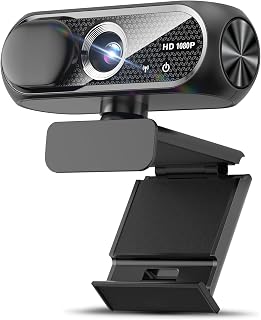
The wide-angle lens captures more of your space without repositioning, while auto light correction ensures clear video even in dimly lit rooms. Noise cancellation on the built-in microphone reduces background distractions during calls, and the privacy cover adds security when the camera isn't in use. Plug and play USB connectivity means no driver installation, making setup effortless for quick video chats or streaming sessions.
Pros
- Automatic light correction adapts to varying room brightness
- Noise-canceling microphone performs well in home and office settings
- Privacy cover included for security-minded users
- Plug-and-play USB setup requires no driver installation
Cons
- Fixed focus system lacks depth control
- Mounting can be tricky on curved laptop screens
When budget is the priority, the Shcngqio TWC29 delivers 1080p video quality without demanding much from your wallet. This compact webcam handles the basics reliably: sharp video at 16:9 aspect ratio, automatic light correction that adapts to dim rooms or bright windows, and a noise-canceling microphone that keeps your voice clear in typical home or office settings. The wide-angle lens captures enough field of view for solo calls, and the plug-and-play USB setup means no driver hunting or software installation. The included privacy cover addresses a practical concern, and the 5-foot cable gives you reasonable flexibility in placement. Build quality feels solid for the price, and the compact form factor sits neatly atop most monitors without feeling intrusive. The fixed focus system works well at typical desk distances, and the CMOS sensor prioritizes consistency over fancy features. The 30fps frame rate handles standard video calls comfortably. A few users noted mounting challenges on curved laptop screens, though flat monitors present no issues. For anyone seeking dependable 1080p video at a low entry point, this webcam covers the essentials without unnecessary extras.
Video Capture: 1080p Full HD at 30fps, 1920x1080 resolution, 16:9 aspect ratio, AVI format
Lens and Focus: Wide-angle lens with fixed focus, 1-2 meter focal length range
Sensor: CMOS photo sensor for reliable low-light performance
Audio: Built-in noise-canceling microphone, supports AAC and MP3 formats
Connectivity: USB 2.0, 3.0, and 3.1 compatible, plus OTG support. Includes 5-foot USB power cable. No additional drivers required.
Compatibility: Windows PC, Mac, Linux, tablets, and smartphones. Works with Zoom, Skype, and all major video conferencing platforms
Design: Compact form factor, black color, includes privacy cover slide
Warranty: 90-day manufacturer warranty

The Sony 1/2-inch sensor is significantly larger than typical budget webcam sensors, capturing more light for clearer video in varied conditions. PDAF autofocus responds quickly to movement, keeping you sharp during animated discussions or presentations. Two noise reduction microphones isolate your voice from ambient sound, and the all-metal unibody construction feels durable compared to plastic alternatives at this price point.
Pros
- Sony 1/2-inch sensor delivers exceptional 4K clarity and low-light performance
- PDAF autofocus responds faster and more accurately than budget competitors
- Aerospace-grade aluminum construction with excellent heat dissipation
- Dual noise-reducing mics capture clear audio up to 2.5 meters
Cons
- Limited codec and frame rate customization options
- Higher price point within the budget webcam category
The Acer WBC-0E01 proves that budget webcams can deliver premium build and image quality when engineering priorities align. Its Sony 1/2-inch CMOS sensor produces balanced, lifelike 4K video with exceptional clarity that makes a genuine difference in professional calls and streaming. The PDAF autofocus reacts faster and more precisely than typical budget implementations, keeping footage sharp through movement. That larger sensor also excels in low light, producing clean footage where cheaper webcams struggle with noise and grain. Dual high-sensitivity mics with noise reduction reach out to 2.5 meters, filtering keyboard sounds and room echo effectively. The aerospace-grade aluminum unibody construction feels closer to professional equipment than typical plastic webcams, with precision CNC machining and a matte finish that resists fingerprints. At just 57 grams, it remains highly portable despite the metal frame. Heat dissipation through the aluminum body supports reliable extended use. The magnetic privacy cover uses 12 magnets for secure attachment. USB-C connectivity is plug-and-play with an included USB-A adapter for older systems. This webcam skips extensive codec options but nails the core streaming and conferencing experience with outstanding image quality and premium materials.
Sensor: Sony 1/2-inch CMOS, 4 MP effective still resolution
Video: UHD 4K resolution, 16:9 aspect ratio, MP4 capture format, Digital zoom, Auto focus with PDAF
Optics: 10-26mm focal length range, 1.8 f/1.0 aperture range, 83-degree viewing angle
Audio: Dual high-sensitivity digital microphones with noise reduction, captures from up to 2.5 meters
Connectivity: USB-C to USB-A (adapter included), compatible with Windows, Mac, and ChromeOS
Build: Aerospace-grade aluminum unibody, precision CNC machined, A-grade sandblasted matte finish, 57 grams, includes magnetic privacy cover with 12 magnets
Compatibility: Works with Teams, Zoom, Twitch, YouTube, Google Meet, FaceTime, and compatible with Nintendo Switch 2
Package Contents: 4K webcam, USB-C to USB-A cable, USB-A to USB-C adapter, webcam stand, user manual
Warranty: 1 year
Buy this if you're a content creator, streamer, or professional who values image quality and build durability within budget limits. The superior low-light performance and fast autofocus make it ideal for varied shooting conditions. The premium aluminum construction appeals to users who travel frequently or simply want gear that lasts. Skip this if you need extensive codec customization or high frame rate options beyond standard 4K@30fps, as those advanced controls aren't the focus here.
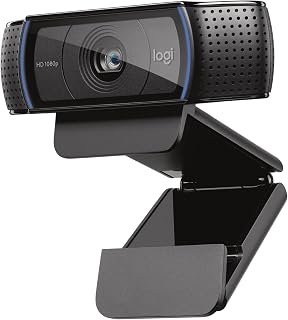
Logitech C920x HD Pro Webcam 1080p/30fps with Dual
Full 1080p resolution at 30fps delivers smooth, detailed video that looks professional on Zoom or Skype without taxing your system. The 1/2.9 inch photo sensor captures accurate color and clarity in typical indoor lighting. XSplit VCam compatibility gives you background replacement and effects if you want to enhance your stream or meeting presence, all while staying within a modest budget.
Pros
- Five-element glass lens delivers sharp, detailed video
- Dual stereo microphones capture natural sound and reduce background noise
- 78-degree wide viewing angle fits multiple people or broader shots
- Automatic light correction brightens low-light scenes without graininess
Cons
- No physical privacy shutter included
- 30fps frame rate may feel limiting for fast-paced streaming
The Logitech C920x brings professional-grade 1080p video to the budget category, making it a smart choice when you need reliability and image quality without stretching your wallet. The five-element glass lens ensures sharp, detailed video across the entire frame, while the intelligent autofocus continuously adapts as you move. Automatic light correction handles low-light environments without the graininess that plagues cheaper models, and the 78-degree wide viewing angle accommodates multiple people or broader framing. Audio quality stands out thanks to dual stereo microphones positioned on either side of the lens, capturing natural sound and minimizing background noise far better than single-mic competitors. The included 3-month XSplit VCam license adds background removal and blur capabilities without requiring a green screen, a practical bonus for remote workers and casual streamers. The compact design and professional black finish blend into any setup, and the 1080p/30fps performance handles video calls and standard streaming comfortably. The absence of a physical privacy shutter is a notable omission, and the 30fps frame rate won't satisfy users needing smoother motion for fast-paced content. Still, this webcam delivers proven performance and broadcast-quality results at a budget-friendly point.
Video Performance: Full HD 1080p at 30fps, 720p at 30fps, 78-degree viewing angle, autofocus with light correction
Audio: Dual stereo microphones for natural sound capture
Lens: Five-element glass lens, 1.8 f-stop maximum aperture, auto focus
Sensor: CMOS 1/2.9 inch, FHD maximum display resolution
Connectivity: USB, plug-and-play compatibility with Windows 11 and multiple operating systems
Physical: 3.7 inches wide, 2.7 inches tall, 1.7 inches deep, weighs 5.7 ounces
Included: C920x Webcam, USB cable, user documentation, 3-month XSplit VCam license
Warranty: 1 Year Limited Hardware Warranty
Remote workers, content creators, and streamers seeking professional video and audio quality at a reasonable cost will appreciate the C920x. The dual stereo microphones and five-element glass lens make it ideal for business calls, YouTube videos, and live broadcasts. Skip it if you require a physical privacy shutter or higher frame rates for gaming and fast-action streaming. It's built for clarity and dependability, not cutting-edge speed.

Pros
- Exceptional value: premium 2K video quality and dual mics at an affordable price point
- Versatile compatibility: works seamlessly across Windows, Mac, Linux, Android, and iPad without driver installation
- Smart features: automatic light adjustment and wide 95-degree FOV eliminate common video call frustrations
- Built-in dual microphones capture clear audio with background noise reduction, eliminating need for external mic
- Thoughtful design: privacy cover, 360-degree rotation, and compact form factor adapt to any workspace
Cons
- Fixed-focus lens cannot adjust focus or use digital zoom, requiring minimum 50cm distance for optimal clarity
- 2K resolution support depends on your computer, monitor, USB port bandwidth, and software capabilities
- Not suitable for applications requiring manual focus control or close-range macro video capture
The UGREEN 2K webcam is a feature-rich solution designed for professionals, remote workers, content creators, and anyone seeking reliable video communication without breaking the bank. It bridges the gap between budget webcams and expensive professional equipment, offering 2K resolution with excellent build quality and practical features.
The standout performance comes from the 4MP CMOS sensor capturing crisp 2K video at 30fps, paired with dual integrated microphones that actively suppress background noise. Automatic light adjustment ensures you look good even in dim lighting, while the expansive 95-degree field of view is perfect for group calls, product shots, or streaming setups. Real-world usage shows consistent performance across Zoom, Skype, YouTube, and other major platforms.
Build quality is solid for the price tier. The compact, lightweight design pairs well with the included privacy cover, addressing legitimate security concerns. The 360-degree rotation and universal mounting system mean it works on monitors, laptops, desks, or tripods. Setup is refreshingly simple: plug in, and it works immediately on Windows, Mac, Linux, Android, and iPad without driver installation.
The main limitation is the fixed-focus lens, which cannot be adjusted and performs best at distances greater than 50cm. This means it works great for typical video call distances but won't function well for close-up macro work. Additionally, achieving actual 2K resolution requires compatible hardware and software on your end, so some users may max out at 1080P depending on their setup.
Overall, this is an excellent webcam for the price. It delivers on image and audio quality, includes thoughtful features like the privacy cover, and works across virtually any platform or device. It's the smart choice for anyone upgrading from integrated laptop cameras or entry-level webcams.
Choose the UGREEN 2K webcam if you need reliable video quality for work-from-home calls, streaming, content creation, or online teaching. Its dual microphones and auto-light adjustment eliminate common frustrations without requiring additional equipment.
This webcam may not be the best fit if you need manual focus control, macro video capabilities, or zoom features. Professional streamers and video producers with highly specific equipment requirements should verify 2K compatibility with their existing setup before purchasing.
Installation is plug-and-play across Windows 7 and above, Mac OS X 10.6 and above, Linux, Android 5.0 and above, and iPad OS 17 and above. The privacy cover and 360-degree rotation make it adaptable to nearly any desk configuration. Minimum 50cm focal distance should be considered when planning your camera placement.
Video Performance: 2K and 1080P resolution, 30fps, 4MP CMOS sensor, 16:9 aspect ratio, MP4 format, 95-degree field of view
Audio: Dual integrated microphones, AAC and MP3 audio format support, background noise suppression
Design: Compact form factor, 3.52 ounces, privacy cover included, 360-degree rotation, universal mount compatibility
Compatibility: Windows 7/8/10/11, Mac OS X 10.6+, Linux, Android 5.0+, iPad OS 17+. Works with Zoom, Skype, YouTube, FaceTime, Twitch, Facebook, and other platforms. Driver-free, plug-and-play installation.
Technical Specs: Fixed-focus lens, 2.2 f-stop aperture, 1x optical zoom, digital zoom not supported, USB connectivity, indoor antenna

Ultra 4K resolution at 30fps provides exceptional sharpness for close-up work or detailed presentations, far exceeding typical budget offerings. PDAF autofocus locks onto your face quickly and tracks movement, keeping you in focus without manual adjustments. Dual omnidirectional microphones capture clear audio from multiple angles, and auto light correction compensates for inconsistent lighting, making this a standout value for home office setups.
Pros
- 4K resolution at 30fps delivers sharp, detailed video
- PDAF autofocus locks onto subjects quickly across a wide range
- Dual omnidirectional mics capture clear audio up to 8 feet away
- Robust build with 360-degree rotation and tripod mount
Cons
- Defaults to 1080p, requires manual switch to 4K
- Fixed 73-degree field of view limits framing flexibility
The EMEET NOVA 4K offers genuine 4K resolution at 30fps in a budget-friendly package, making it a standout option when you want maximum clarity without premium pricing. The PDAF autofocus locks onto subjects quickly and maintains sharpness across a 7.9 to 118-inch range, keeping you in focus whether you're leaning in or stepping back during presentations. Dual omnidirectional microphones capture voices clearly up to 8 feet away, and the EMEETLINK software provides on-the-fly adjustments for brightness, contrast, and saturation. The robust swivel connection and universal joint deliver 360-degree horizontal rotation and 15-degree vertical tilt, plus a standard tripod mount for flexible positioning. Internal rubber gripping material keeps the webcam stable on monitors, and the included privacy cover addresses security concerns. Build quality feels solid, and the 1.5-meter fixed cable provides adequate reach. The main gotcha is the 1080p default resolution, requiring manual switching to access 4K. The fixed 73-degree field of view limits framing options, and the lack of facial tracking or advanced autofocus controls may frustrate power users. Still, for remote workers, educators, and content creators prioritizing sharpness and reliability, this webcam delivers strong value with a 2-year warranty backing it up.
Video: 4K UHD at 30fps, 1080p default, YUY2/MJPEG capture format, 73-degree fixed viewing angle, PDAF autofocus (7.9 to 118 inches), CMOS sensor with f/3.3 aperture.
Audio: Dual omnidirectional microphones, 100-10kHz frequency range, effective pickup up to 8 feet with optimal positioning.
Connectivity: USB 2.0, plug-and-play (no drivers required), compatible with Windows 10/11, macOS 10.14+, Android TV 7.0+. Works with Zoom, Teams, Google Meet, and major platforms.
Physical: Compact form factor (2.16 x 3.94 x 2.32 inches), 4.64 ounces, universal joint with 360-degree horizontal rotation, 15-degree vertical tilt, 180-degree adjustable stand, tripod mount support.
Warranty: 2-year manufacturer warranty. Package includes privacy cover, USB cable, and user manual.

The 4K sensor at 30fps delivers crisp detail for professional-looking video calls, while the 73-degree field of view frames you naturally without excessive background clutter. PDAF autofocus adjusts instantly when you lean forward or shift position, eliminating the soft focus that plagues cheaper models. Dual omnidirectional mics with noise reduction ensure your voice comes through cleanly, even in busier environments.
Pros
- True 4K resolution with PDAF autofocus at budget pricing
- Dual omnidirectional mics rival dedicated microphones
- Auto light correction adapts to varying conditions
- Privacy cover and compact design with soft mount
Cons
- 4K mode requires manual activation in software
- Performance drops noticeably in poor lighting
When your budget is tight but your video calls matter, the EMEET C960 delivers surprisingly strong 4K performance at a fraction of what premium webcams cost. The PDAF autofocus system keeps you sharp whether you lean back or shift forward, a feature usually reserved for pricier models. Auto light correction helps compensate for inconsistent home office lighting, though you'll still want decent ambient light for best results. The dual omnidirectional microphones are a genuine highlight, capturing clear audio that rivals standalone mics and eliminating the need for extra gear. Build quality feels reassuring with a solid compact frame, included privacy cover, and a soft mount that won't scratch your monitor. Setup is genuinely plug-and-play with no driver headaches. The 73-degree field of view keeps backgrounds tighter, which works well for professional calls. One quirk: 4K mode requires manual activation in apps like OBS rather than being automatic. Video quality still leans on good lighting to shine, but for budget-conscious buyers who need dependable 4K with strong audio, this webcam punches well above its weight class.
Video Performance: True 4K resolution at 30fps (defaults to 1080P), CMOS sensor, 73-degree field of view, maximum 3-meter focal range, 8.3 MP still resolution.
Autofocus and Imaging: PDAF autofocus technology, auto light correction for low-light and bright environments, digital zoom, wide-angle lens with 2mm minimum aperture.
Audio: Dual omnidirectional microphones for clear, natural sound capture with minimal background noise.
Connectivity and Compatibility: USB plug-and-play, works with Windows 7/10/11, macOS 10.14 and above, Android TV 7.0 and above, and Linux. Compatible with Zoom, Teams, Skype, and other major communication platforms. EMEETLINK software for custom video settings.
Physical Design: Compact form factor (3.9" x 2.3" x 2.2"), weighs 4.8 ounces, includes privacy cover and adjustable mount with 360-degree horizontal and 15-degree vertical adjustment. 1/4-inch tripod thread for alternative mounting options.

Pros
- Plug-and-play setup eliminates frustrating driver downloads and compatibility issues
- True 1080P resolution delivers sharp, detailed video for professional presentations
- Low-light performance automatically adapts for clear video without extra lighting
- Affordable price point makes it accessible for home offices, schools, and businesses
- Extended 5-foot cable and adjustable mounting provide flexible positioning
Cons
- No reviews available to validate real-world performance claims
- Lower-tier CMOS sensor may not match premium webcams in extreme low-light conditions
- Fixed 3.5mm focal length limits customization for specialized use cases
The Xweiryn K1 is a straightforward 1080P webcam designed for anyone needing reliable video conferencing on a tight budget. It targets remote workers, online students, content creators, and gamers who want quality video without complexity or expensive equipment. The plug-and-play design means you can unbox it and start your first video call within seconds.
Video quality stands out as the core strength. The 1080P resolution delivers crisp, detailed images at 30fps, and the automatic low-light adjustment is genuinely useful for home offices with variable lighting. The stable transmission chip prevents the lag and frame drops that plague cheaper alternatives. Compatibility across Zoom, Teams, Google Meet, and other platforms is seamless.
The build feels practical for the price. The compact design takes up minimal desk space, the adjustable clip fits most monitors and laptop frames, and the 5-foot braided cable provides real flexibility for room layout. USB 3.0 support ensures fast, stable connectivity without requiring powered hubs.
The main limitation is the lack of verified user feedback. With zero reviews, you're relying on manufacturer specifications rather than independent validation. Additionally, the fixed focal length and CMOS sensor may struggle in professional studio settings or extremely dim environments compared to higher-end webcams.
For the asking price, the Xweiryn K1 delivers genuine value. It handles the essentials flawlessly and includes features like low-light adjustment that justify the cost. This is the right choice if you need dependable video conferencing for work, school, or casual streaming without investing in premium gear.
Video Performance: 1080P resolution, 30fps frame rate, 16:9 aspect ratio, CMOS sensor, 3.5mm focal length
Connectivity: USB 2.0/3.0, 5-foot braided cable included
Compatibility: Windows XP through Windows 11, Mac, and all major video platforms (Zoom, Teams, FaceTime, Google Meet, YouTube)
Design: Compact form factor, adjustable clip, portable and lightweight
Features: Automatic low-light adjustment, stable transmission chip, plug-and-play setup with no drivers required
Model: Xweiryn K1, ASIN B0GG3JNQGF
Pros
- Instant setup with USB plug-and-play compatibility across Windows, Mac, and Linux
- RightLight 2 technology automatically adjusts brightness and contrast for flattering video
- Reliable noise-canceling microphone performs well in moderately busy environments
- Wide 55-degree viewing angle includes more of your workspace and background
- Flexible mounting clip accommodates various setups and screen sizes
Cons
- 720p resolution is adequate but not high-definition compared to modern 1080p webcams
- Fixed focus and modest aperture (1.8 f-stop) limit performance in low-light situations
- Microphone range of 1.5 meters may not reach all speakers in larger rooms
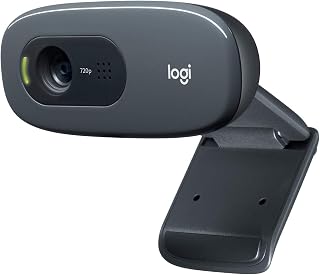
The Logitech C270 is a no-frills 720p webcam designed for remote workers, students, and casual video gamers who need reliable performance without complexity. It's perfect for frequent Zoom calls, Skype conversations, and team meetings where video clarity matters but premium specs aren't essential.
The standout feature is RightLight 2 technology, which automatically brightens and enhances your image based on ambient lighting. In real-world use, this produces noticeably better video than static webcams in offices with variable light or at home where you might sit near a window. The 55-degree field of view is genuinely wide, capturing you and your surroundings naturally. The built-in microphone uses noise reduction to filter background chatter, making your voice clear even in moderately busy spaces up to 1.5 meters away.
Build quality is solid but minimal. The plastic construction feels durable enough for daily use, and the adjustable clip is versatile, allowing secure attachment to monitors or laptops, or simple placement on a shelf. The USB cable is integrated and reasonably long for flexible positioning. Overall design prioritizes function over aesthetics, which is appropriate for its price point.
The main limitation is 720p resolution. While sufficient for most video calls, it's noticeably softer than 1080p competitors. Low-light performance is also modest due to the fixed focus and f-1.8 aperture. If you frequently video call in dim lighting or need premium sharpness, consider stepping up to a higher-end model.
The Logitech C270 remains a solid value for everyday video calling. It delivers dependable performance, automatic lighting correction, and hassle-free setup at an unbeatable price. Recommended for budget-conscious remote workers and anyone seeking a straightforward webcam for regular video meetings.
Video
Resolution: 720p (1280 x 720)
Frame Rate: 30 fps
Field of View: 55 degrees diagonal
Photo Sensor: CCD
Capture Format: MJPEG
Focal Length: 0.01 mm
Aperture: f/1.8
Audio
Microphone: Built-in noise-reducing
Pickup Range: 1.5 meters
Audio Format: PCM
Connectivity & Compatibility
Connection: USB 2.0 Type-A
Compatible With: Skype, Zoom, Windows, Mac, Linux
Setup: Plug-and-play, no driver installation required
Physical
Mounting: Adjustable universal clip
Screen Size Reference: 2.7 inches
Memory: Internal flash memory
Ideal For
Remote workers and employees attending daily video calls via Zoom, Skype, or Microsoft Teams. Students attending online classes and group project meetings. Casual gamers using Nintendo Switch 2's GameChat mode. Home office users with limited budgets who prioritize reliability over premium features.
Not Ideal For
Content creators and streamers requiring high resolution or advanced optics. Professional photographers or videographers needing studio-grade image quality. Users working in consistently dim environments who can't supplement with additional lighting. Anyone requiring 1080p or 4K video capture for critical applications.
Pros
- Excellent brightness adjustment with RightLight technology makes you look professional in any lighting
- Simple privacy slider gives peace of mind when not in use
- Built-in microphone eliminates the need for external audio equipment
- Works flawlessly across all major video conferencing platforms
- Affordable price point offers great value for quality 1080p video
Cons
- Fixed focus may not be ideal for users who want depth-of-field control or manual focus adjustment
- Limited 60-degree viewing angle restricts multi-person framing compared to wider angle alternatives
- No optical zoom capability, only digital zoom available through software
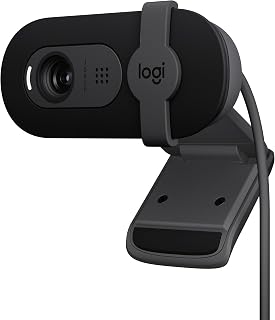
The Logitech Brio 101 is a compact Full HD webcam designed for remote workers, students, and casual content creators who need reliable video quality for meetings and streaming. It's an entry-level option that punches above its weight with practical features like RightLight brightness adjustment and an integrated privacy shutter.
The standout feature is RightLight technology, which automatically boosts brightness up to 50% to reduce shadows and unflattering lighting. In real-world use, this means you'll look polished even in dim home offices or poorly lit rooms. The built-in microphone captures clear audio for calls, and the universal plug-and-play compatibility with Zoom, Teams, and Google Meet means setup takes seconds.
Build quality is straightforward but solid. The 4.96-ounce device is lightweight and portable, making it easy to move between workspaces. The physical privacy shutter is simple yet effective, sliding smoothly to block the lens when you're not on camera. The refined color options add personality to your setup while maintaining a professional appearance.
Limitations are minor but worth noting. The fixed focus and 60-degree viewing angle won't work for everyone, particularly if you need to frame multiple people or want manual focus control. Digital zoom is available through the Logi Options+ app, though it cannot match optical zoom quality.
Overall, the Brio 101 is a reliable, affordable webcam that delivers genuine quality where it matters most: your appearance on video. For remote workers, distance learners, and streamers on a budget, it's a smart choice that won't disappoint.
Video: 1080p Full HD resolution, H.264 video capture, 60-degree viewing angle, fixed focus with 4mm maximum focal length
Audio: Built-in microphone with mono audio support for clear communication during calls
Connectivity: USB-A connection with integrated cable, works with Windows 7+, macOS 10.10+, and Chrome OS
Physical: Compact rectangular design measuring 2.87in W x 2.62in H x 1.26in D, weighs 4.96 ounces, available in black
Features: RightLight auto-brightness, integrated privacy shutter, customizable settings via Logi Options+ app, 1-year limited hardware warranty
Best For: Remote workers attending daily video calls, students in online classes, small content creators starting with streaming, and anyone needing a dependable webcam without premium pricing.
Consider Alternatives If: You need ultra-wide framing for group calls, want manual focus control, require advanced zoom capabilities, or stream at resolutions higher than 1080p.
Not Recommended For: Professional video production, high-end streaming, or applications requiring advanced camera control and flexibility.
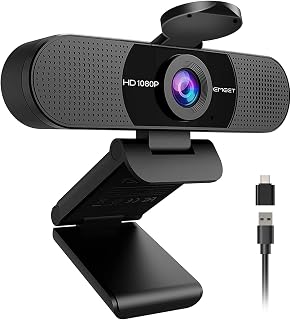
Pros
- Excellent 1080P video quality at an affordable price point
- Built-in dual mics eliminate the need for purchasing a separate microphone
- Wide 90-degree lens reduces the need to reposition for group calls
- Privacy cover adds a layer of security for privacy-conscious users
- Automatic exposure and color adjustment adapts to various lighting environments
Cons
- Fixed focus may require positioning within the 11.8 to 118.1-inch range for optimal clarity
- Performs best in well-lit environments and may struggle in low-light conditions
- No built-in speakers, requiring external audio output for monitoring
The EMEET C960 is a budget-friendly 1080P webcam designed for remote workers, students, and professionals who need reliable video conferencing without premium pricing. It strikes a solid balance between essential features and affordability, making it ideal for anyone upgrading from their laptop's built-in camera.
The standout features include dual omnidirectional microphones that capture clear audio, a wide 90-degree field of view for group calls, and automatic light adjustment to ensure you look professional regardless of your environment. The 5-layer anti-glare lens delivers smooth, realistic 1920x1080 video with minimal distortion, and the fixed focus range accommodates typical desk setups well.
Build quality is solid with an ultra-compact form factor that won't dominate your desk space. The removable privacy cover provides genuine security when you're not on camera, and the dual connectivity options (USB Type-A and USB-C adapter) ensure compatibility across most modern devices. Setup is straightforward plug-and-play with broad software support.
The main limitations are the fixed focus requirement and dependence on good lighting for optimal results. The lack of built-in speakers means you'll need external audio, and Windows Hello compatibility is not supported. Additionally, connection through USB hubs rather than direct ports may impact performance.
Overall, the EMEET C960 represents excellent value for professionals and remote workers seeking dependable video conferencing. Its combination of dual mics, wide field of view, and automatic adjustments delivers professional-quality video calls at a fraction of premium webcam prices.
Video and Image: 1080P (1920x1080) resolution, 16:9 aspect ratio, CMOS sensor, fixed focus (11.8 to 118.1 inches), 90-degree wide-angle lens, 5-layer anti-glare lens
Audio: Dual omnidirectional microphones, supports AAC, MP3, and PCM formats, no built-in speakers
Connectivity: USB Type-A and USB-C adapter, compatible with Windows 10/11, macOS 10.14+, and Android TV 7.0+
Design: Ultra-compact form factor, 2.65 inches wide x 2.04 inches high x 4.88 inches deep, 0.16 kg weight, includes removable privacy cover and clip base
Compatibility: Works with Zoom, Teams, FaceTime, Google Meet, YouTube and more. Not compatible with Windows Hello, game consoles, or tablets. Includes 2-year warranty and USB cable with user manual
Who Should Buy: Remote workers, online educators, content creators on a budget, and anyone seeking a reliable 1080P webcam with built-in microphones for daily video conferencing.
Setup Tips: Connect directly to your computer's main USB port for stable performance rather than through a hub or docking station. Select the C960 as your default camera and microphone in your operating system and applications. Ensure proper lighting by positioning your camera in front of a light source for best results.
Performance Optimization: The fixed focus works best when your face is between 11.8 and 118.1 inches from the camera. For optimal video quality, use the webcam in normal or well-lit environments and adjust your application's video settings to match your lighting conditions. The dual microphones pick up voice clearly in typical office environments.
Alternatives to Consider: If you need autofocus capability, a 4K resolution, or integrated speakers, premium models may be worth the investment. However, for straightforward video conferencing at a value price, the C960 delivers solid performance without unnecessary features.
Buying Guide: What to Consider in a Budget Webcam
Resolution and Frame Rate
Resolution determines how sharp you’ll appear on screen. Most budget webcams offer 1080p, which provides clear detail for video calls and streaming. Some models like the EMEET NOVA 4K Webcam for PC, Ultra 4K HD and Acer 4K Webcam for PC/Mac with All-Metal Unibody step up to 4K resolution, capturing finer details and providing more professional-looking video.
Frame rate matters for smooth motion. A 30fps frame rate works well for most applications, from business meetings to casual streaming. Higher frame rates reduce blur during movement, making your gestures and expressions easier to read. If you’re working from home, a capable laptop paired with the right webcam ensures smooth video performance across different platforms.
Autofocus and Light Correction
Autofocus keeps you sharp as you move during calls. Basic webcams use fixed focus, which works if you stay in one position. Advanced models like the EMEET C960 4K Webcam for PC, PDAF Auto Focus feature PDAF technology for faster, more accurate focusing that adapts to your movements.
Light correction adjusts brightness and contrast automatically. The Logitech C920x HD Pro PC Webcam Full 1080p/30fps excels in low-light conditions, while the 1080P HD Webcam with Microphone dynamically adjusts color temperature to suit your environment. If you’re also searching for laptops for online teaching, remember that proper lighting and webcam features work together for the clearest presentation.
Microphone Quality and Audio Range
Built-in microphones eliminate the need for separate audio equipment. Dual omnidirectional microphones, found in models like the UGREEN 2K Webcam for PC Ultra HD 1080P Computer, capture your voice clearly while reducing background noise. Most budget webcams pick up sound from 1.5 to 2.5 meters away, suitable for typical desk setups.
Noise reduction features filter out keyboard clicks, air conditioning hum, and other distractions. This becomes crucial during long video conferences or recorded lectures. Students looking for laptops for remote classes should prioritize webcams with clear audio to participate effectively in virtual discussions.
Field of View and Mounting Options
Field of view determines how much of your space appears on camera. A 70-degree FOV focuses tightly on you, ideal for solo calls. Wider angles like the 90-degree FOV on the EMEET C960 1080P Webcam with Microphone, 2 Mics capture more of your surroundings, useful for group meetings or showing physical objects during presentations.
Mounting flexibility matters for different setups. Universal clips attach securely to monitors and laptop screens, while tripod threads let you position the camera at eye level. The Logitech Brio 101 Full HD 1080p Webcam offers 360-degree rotation for finding your perfect angle. Whether you’re a freelancer working from cafes or a law student joining study groups, adjustable mounting adapts to any workspace.
Final Thoughts
The right budget webcam depends on how you’ll use it. If you need professional-grade 4K video for content creation or client presentations, the EMEET NOVA 4K delivers exceptional clarity with PDAF autofocus and dual microphones. For everyday video calls and online meetings where reliable HD quality matters more than ultra-high resolution, the Logitech C920x offers proven performance with automatic light adjustment and stereo audio.
Frequently Asked Questions
What resolution do I need for Zoom meetings?
1080p resolution provides clear, professional-looking video for Zoom calls and works well for most business meetings. While 720p webcams like the Logitech C270 720p Webcam Plug-and-Play Wide are adequate for casual use, 1080p cameras deliver sharper detail that helps you make a better impression. 4K webcams offer the highest quality but require more bandwidth and processing power.
Do budget webcams work with Mac computers?
Most budget webcams support both Windows and macOS through USB plug-and-play connectivity. Models like the Acer 4K Webcam for PC/Mac with All-Metal Unibody specifically list Mac compatibility and work with FaceTime, Zoom, and other Mac applications. Check the product specifications to confirm macOS support before purchasing, especially if you’re using a laptop for technical work that requires specific system compatibility.
How important is a privacy cover on a webcam?
A privacy cover blocks the lens when you’re not actively using the camera, preventing unauthorized access or accidental activation. Many budget webcams now include sliding covers or magnetic shields as standard features. The 1080P HD Webcam with Microphone offers a slide-to-cover design for quick privacy control. This simple feature provides peace of mind without affecting video quality when the cover is open.
Can I use a budget webcam for live streaming in 2026?
Budget webcams handle live streaming on platforms like Twitch, YouTube, and Facebook Live effectively. The Webcam for PC, HD 1080P USB Plug-and-Play Computer delivers smooth 30fps video suitable for gaming streams and creative content. For best results, ensure adequate lighting in your space and use streaming software like OBS to optimize video settings. Students creating presentations or professionals recording training videos will find these cameras more than capable for their needs.
Common questions
What is the best webcam under $50 for budget-conscious buyers?
The C270 offers reliable 720p video with proven Logitech build quality and wide compatibility, making it ideal for basic video calls. The UGREEN 2K model steps up to 1080p with a 95-degree field of view and lightweight design, delivering better image quality for just slightly more. Both are plug-and-play with built-in microphones, so no drivers or setup hassle.







Write Your Review
No reviews yet. Be the first to share your experience!